

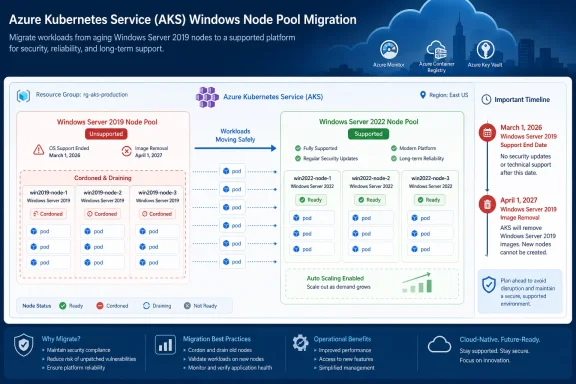
Windows Server 2019 node pools in Azure Kubernetes Service are already unsupported. Microsoft ended AKS support for those pools on March 1, 2026; they cannot be used with Kubernetes 1.33 or later, and Microsoft says scaling operations will fail after the remaining Windows Server 2019 node images are removed on April 1, 2027.
That makes replacement an active migration task, not a date to monitor. An existing Windows Server 2019 node may continue running, but its continued operation does not restore support or prove that AKS can add capacity when needed.
Use Azure Resource Graph Explorer to find affected pools across the Azure subscriptions visible to your account:
In the Azure portal, open Azure Resource Graph Explorer, select the relevant subscriptions, paste the query, and select Run query. Export the results and assign an owner, application dependency, migration status, and removal date to every returned pool.
For one cluster, confirm the control-plane configuration with Azure CLI:
Then obtain credentials and inspect the OS SKU reported by the live nodes:
The verified label for this audit is
Scale-out is enough of a risk by itself. An autoscaled Windows Server 2019 pool can encounter the image-removal boundary precisely when demand is rising. A manually sized pool is not exempt because an administrator may still need to add capacity.
The AKS deadline is also separate from the broader Windows Server lifecycle. A WindowsForum report on Windows Server 2019’s end-of-life path notes that mainstream support ended on January 9, 2024 and that Microsoft moved the product into a security-only extended-support phase. That broader lifecycle does not mean Microsoft must continue supplying Windows Server 2019 as a supported AKS node image.
WindowsForum discussions comparing Windows Server 2019 and 2022 likewise show that administrators have been weighing compatibility against migration pressure for some time. In AKS, however, the supported cluster and node-pool matrix—not a preference for the older server release—governs the decision.
For each node, identify its assigned pods:
Inspect workload scheduling constraints:
Search for
Inventory the requested container images as well:
Image names do not prove host-OS compatibility. Validate manifests, Dockerfiles, registry metadata, and build pipelines under your control. Include init containers, sidecars, jobs, monitoring components, and infrequently used operational workloads.
WindowsForum’s report about a July 2025 Windows Server 2019 security update causing cluster failures and VM restarts is also a reminder to use staged validation and an approved maintenance window. It does not establish that the same issue affects AKS replacement pools, but it illustrates why Windows infrastructure changes should not be deployed fleet-wide without testing.
Before starting, confirm that:
Create the replacement pool:
Add the required
In the portal, the corresponding path is AKS cluster > Node pools > Add node pool. Select Windows as the OS type, choose a Windows OS SKU supported by the cluster version, configure sizing and availability settings, and create the pool. Review Microsoft’s compatibility table before accepting any portal default.
Confirm that the nodes become ready:
When the replacement is ready, prevent new scheduling on the old nodes:
Drain them during the approved maintenance window:
Verify that production pods are running on the replacement pool:
Check critical controllers for unavailable replicas and inspect pending or failed pods:
Test the operation threatened by the retirement by scaling out the new pool:
Wait for the additional node or nodes to report
In the portal, use AKS cluster > Node pools > new pool > Scale node pool, increase the node count, save, and monitor Nodes and Kubernetes workloads until the added capacity is ready.
If validation fails before deletion, stop the migration, correct the replacement pool or workload rules, and uncordon the old nodes:
That is the practical rollback window. After deleting the unsupported pool, administrators should not assume it can be recreated, so preserve it—cordoned if necessary—until the replacement has passed functional, capacity, and monitoring validation.
Only then delete the old pool:
The portal path is AKS cluster > Node pools > old pool > Delete. Re-run the Resource Graph and Azure CLI inventories afterward to confirm that no
WindowsForum’s migration coverage for Windows Server 2012 R2 makes the same broader operational point: applying the final available updates is not a migration strategy. Here, waiting for April 1, 2027 is even less defensible because AKS support has already ended.
That makes replacement an active migration task, not a date to monitor. An existing Windows Server 2019 node may continue running, but its continued operation does not restore support or prove that AKS can add capacity when needed.
 Inventory the Fleet Before Touching a Cluster
Use Azure Resource Graph Explorer to find affected pools across the Azure subscriptions visible to your account:
Code:
Resources
| where type =~ "microsoft.containerservice/managedclusters"
| mv-expand pool = properties.agentPoolProfiles
| extend
    clusterName = name,
    poolName = tostring(pool.name),
    osType = tostring(pool.osType),
    osSku = tostring(pool.osSKU),
    poolKubernetesVersion = tostring(pool.orchestratorVersion)
| where osType =~ "Windows"
| where osSku =~ "Windows2019"
| project
    subscriptionId,
    resourceGroup,
    location,
    clusterName,
    poolName,
    osType,
    osSku,
    poolKubernetesVersion,
    id
| order by subscriptionId, resourceGroup, clusterName, poolNameFor one cluster, confirm the control-plane configuration with Azure CLI:
Code:
az aks nodepool list \
  --resource-group <resource-group> \
  --cluster-name <cluster-name> \
  --query "[?osType=='Windows'].{Pool:name,OSSku:osSku,Kubernetes:orchestratorVersion,Count:count,Mode:mode}" \
  --output table
Code:
az aks get-credentials \
  --resource-group <resource-group> \
  --name <cluster-name> \
  --overwrite-existing

kubectl get nodes -o wide \
  -L agentpool \
-L kubernetes.azure.com/os-skukubernetes.azure.com/os-sku. Use it with the agentpool label to associate live nodes with the pool configuration returned by Azure CLI. Investigate any disagreement before moving workloads; do not infer a cause without checking the cluster’s actual pool and node state.Start With the Documented Risk
The concrete outcomes are straightforward:- Windows Server 2019 AKS node pools have been unsupported since March 1, 2026.
- They cannot be used with Kubernetes 1.33 or later.
- Scaling operations will fail after Microsoft removes the remaining Windows Server 2019 node images on April 1, 2027.
Scale-out is enough of a risk by itself. An autoscaled Windows Server 2019 pool can encounter the image-removal boundary precisely when demand is rising. A manually sized pool is not exempt because an administrator may still need to add capacity.
The AKS deadline is also separate from the broader Windows Server lifecycle. A WindowsForum report on Windows Server 2019’s end-of-life path notes that mainstream support ended on January 9, 2024 and that Microsoft moved the product into a security-only extended-support phase. That broader lifecycle does not mean Microsoft must continue supplying Windows Server 2019 as a supported AKS node image.
WindowsForum discussions comparing Windows Server 2019 and 2022 likewise show that administrators have been weighing compatibility against migration pressure for some time. In AKS, however, the supported cluster and node-pool matrix—not a preference for the older server release—governs the decision.
Find Workloads That Depend on the Old Pool
List the affected nodes:
Code:
kubectl get nodes \
  -l agentpool=<old-pool-name> \
  -o wide
Code:
kubectl get pods --all-namespaces \
  --field-selector spec.nodeName=<node-name> \
  -o wide
Code:
kubectl get deployments,statefulsets,daemonsets \
  --all-namespaces \
-o yamlnodeSelector, affinity, tolerations, and references to the old pool name or custom labels. A Windows-compatible workload can still remain pending if its specification explicitly requires the retiring pool.Inventory the requested container images as well:
Code:
kubectl get pods --all-namespaces \
  -o jsonpath='{range .items
- }{.metadata.namespace}{"\t"}{.metadata.name}{"\t"}{range .spec.initContainers
- }{.image}{" "}{end}{range .spec.containers
- }{.image}{" "}{end}{"\n"}{end}'WindowsForum’s report about a July 2025 Windows Server 2019 security update causing cluster failures and VM restarts is also a reminder to use staged validation and an approved maintenance window. It does not establish that the same issue affects AKS replacement pools, but it illustrates why Windows infrastructure changes should not be deployed fleet-wide without testing.
Create an Executable Replacement Pool
Microsoft’s Windows OS upgrade documentation requires creating a new Windows node pool for this migration rather than changing the existing Windows Server 2019 pool in place.Before starting, confirm that:
- You have Azure permission to modify the AKS cluster and node pools.
az,kubectl, and the required Azure CLI extensions are current and authenticated.- The cluster has sufficient subscription quota, subnet capacity, and regional VM availability.
- Pod disruption budgets permit the planned drain.
- The replacement pool can reproduce required labels, taints, VM size, networking, storage, and identity behavior.
- Application owners have approved a maintenance and rollback window.
os-sku value in place of <supported-windows-os-sku>. Do not choose a SKU solely from the underlying Windows Server lifecycle.Create the replacement pool:
Code:
az aks nodepool add \
  --resource-group <resource-group> \
  --cluster-name <cluster-name> \
  --name <new-pool-name> \
  --mode User \
  --os-type Windows \
  --os-sku <supported-windows-os-sku> \
  --kubernetes-version <supported-nodepool-kubernetes-version> \
  --node-vm-size <vm-size> \
--node-count <initial-node-count>--labels, --node-taints, autoscaler settings, zones, or networking options from the old pool’s approved design. Do not copy obsolete selectors or taints without confirming that workloads can use them.In the portal, the corresponding path is AKS cluster > Node pools > Add node pool. Select Windows as the OS type, choose a Windows OS SKU supported by the cluster version, configure sizing and availability settings, and create the pool. Review Microsoft’s compatibility table before accepting any portal default.
Confirm that the nodes become ready:
Code:
kubectl get nodes \
  -l agentpool=<new-pool-name> \
  -o wide \
  -L kubernetes.azure.com/os-sku
Cut Over, Validate Scale-Out, and Remove the Old Pool
First move a representative workload by updating its node selector, affinity, or tolerations to allow the replacement pool. Confirm that its pods start and pass application, networking, DNS, storage, identity, logging, and monitoring tests.When the replacement is ready, prevent new scheduling on the old nodes:
Code:
kubectl cordon \
  -l agentpool=<old-pool-name>
Code:
kubectl drain \
  -l agentpool=<old-pool-name> \
  --ignore-daemonsets \
  --delete-emptydir-data \
  --timeout=<drain-timeout>
--delete-emptydir-data deletes pod-local emptyDir contents. Remove that option and resolve the affected workloads separately if losing such data is unacceptable. A drain may also be blocked by disruption budgets or unmanaged pods; do not bypass those protections without application-owner approval.Verify that production pods are running on the replacement pool:
Code:
kubectl get pods --all-namespaces \
  -o wide \
  --field-selector=status.phase=Running

kubectl get nodes \
  -l agentpool=<new-pool-name> \
  -o wide
Code:
kubectl get deployments,statefulsets,daemonsets \
  --all-namespaces

kubectl get pods --all-namespaces \
  --field-selector=status.phase=Pending
Code:
az aks nodepool scale \
  --resource-group <resource-group> \
  --cluster-name <cluster-name> \
  --name <new-pool-name> \
--node-count <validation-node-count>Ready, then confirm that a representative Windows workload can schedule there. If appropriate, scale back to the approved steady-state count only after the test succeeds.In the portal, use AKS cluster > Node pools > new pool > Scale node pool, increase the node count, save, and monitor Nodes and Kubernetes workloads until the added capacity is ready.
If validation fails before deletion, stop the migration, correct the replacement pool or workload rules, and uncordon the old nodes:
Code:
kubectl uncordon \
-l agentpool=<old-pool-name>Only then delete the old pool:
Code:
az aks nodepool delete \
  --resource-group <resource-group> \
  --cluster-name <cluster-name> \
--name <old-pool-name>Windows2019 pool remains.WindowsForum’s migration coverage for Windows Server 2012 R2 makes the same broader operational point: applying the final available updates is not a migration strategy. Here, waiting for April 1, 2027 is even less defensible because AKS support has already ended.
Frequently Asked Questions
Can a Windows Server 2019 AKS node pool continue running?
It may continue running, but it is unsupported. Continued uptime does not establish that scale-out will remain available.Can I upgrade the existing pool’s Windows OS SKU in place?
Microsoft’s Windows OS upgrade documentation directs administrators to create a new Windows node pool, move and validate workloads, and then remove the old pool.Which Windows SKU should replace Windows2019?
Use Microsoft’s AKS Windows OS compatibility documentation to match a supported Windows SKU to the cluster’s current or planned Kubernetes version. Supply that exact SKU value to--os-sku.Must the old pool be deleted immediately after draining?
No. Keep it cordoned during a defined validation window if rollback may be needed. Delete it only after workload, capacity, scale-out, networking, storage, identity, and monitoring checks pass.Does April 1, 2027 mean the pool remains supported until then?
No. Support ended March 1, 2026. April 1, 2027 is the image-removal date tied to failed scaling operations, not an extension of support.References
- Primary source: learn.microsoft.com
AKS Frequently Asked Questions | Microsoft Learn
Frequently asked questions about Azure Kubernetes Service (AKS)learn.microsoft.com - Independent coverage: github.com
Releases · Azure/AKS · GitHub
Azure Kubernetes Service. Contribute to Azure/AKS development by creating an account on GitHub. github.com
- Primary source: WindowsForum
Windows Server 2019 EOL: ESU to 2029 and Migration Paths | Windows Forum
Windows Server 2019 has entered a new phase of its lifecycle: mainstream support ended on January 9, 2024, and Microsoft will provide security-only updates...windowsforum.com
