

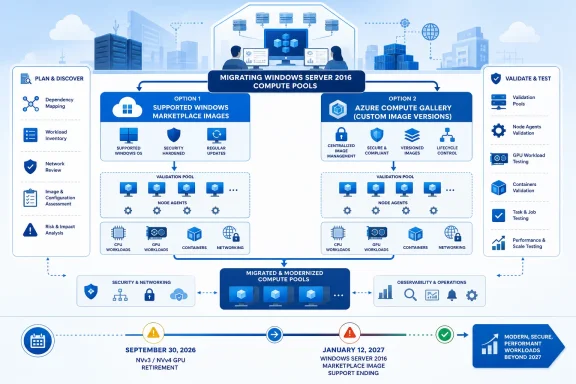
Azure Batch administrators should begin replacing Windows Server 2016 pools now, choosing a supported Marketplace image when it meets the workload’s requirements and an Azure Compute Gallery image when the workload requires a controlled custom baseline. Microsoft sets January 12, 2027 as the end of support for Windows Server 2016 Marketplace images in Azure Batch, matching the operating system’s end-of-support date.
That date corrects a costly timeline mix-up. September 30, 2026 is not the Windows Server 2016 Batch image cutoff; it is the retirement date for Azure Batch support involving the NVv3 and NVv4 VM series. For GPU-backed Windows pools, the VM-series deadline can require action before the operating-system deadline.
WindowsForum’s retirement coverage repeatedly points to the same operational lesson: discover dependencies before selecting a replacement. Its reporting on the retirement of Azure FXT Edge Filer and Azure API for FHIR emphasizes building a dependency record before committing to a migration path. The same applies to Batch. A healthy Windows Server 2016 pool is not proof that a replacement pool can be created, scaled, and run with the same workload behavior.
Create a migration record for every Windows Server 2016 Batch pool. Capture:
First authenticate and select the subscription:
Then export the current pool configuration. Replace the placeholders with the Batch account resource group, account name, and pool ID:
If the account uses Azure AD authentication and the CLI requires a Batch data-plane session, sign in to that account before running Batch commands:
Now retrieve the supported-image list from that Batch-account context and save it for the migration record:
Review
Work through the migration in this order:
This approach is appropriate when the workload does not depend on a fixed driver stack, manually installed node software, undocumented machine state, or an old host-image arrangement. It also gives administrators a clean baseline for separating actual application requirements from configuration that accumulated on long-lived nodes.
Review the start task and task submission process carefully. Check for assumptions about:
Containerized workloads need the same treatment. Test the actual sequence: node creation, startup configuration, registry authentication if applicable, container image pull, task launch, and output collection. A container image alone does not document every dependency involved in running the task on a Batch node.
WindowsForum’s report on unsupported Windows Server 2019 AKS pools is a useful warning against waiting for familiar infrastructure to become an emergency. That report notes that AKS support for Windows Server 2019 pools ended on March 1, 2026 and that those pools cannot be used with Kubernetes 1.33 or later. Batch has different services and dates, but the planning discipline is the same: inventory older Windows workloads before a compatibility boundary forces the decision.
Evidence for this path can include required proprietary components, fixed runtime versions, workload-specific drivers, machine-level settings, or startup installation that is too slow or unreliable at the intended scale.
Azure Batch retired custom pools sourced from VHD blobs in Azure Storage and Azure Managed Images on March 31, 2026. Azure Compute Gallery is the path for custom VM images.
Before building the image, verify the Batch account is configured and authorized for custom-image use, that the gallery image is available in the pool’s target region, and that the identity used by Batch has the required access to the gallery image version. Use a documented image-build process rather than capturing unknown state from an old node.
A practical gallery workflow is:
Record the resulting gallery image version resource ID. In the validation pool configuration, use that version ID as the custom image reference and use the node agent SKU identified for the planned Batch configuration. Keep the validation pool separate from production, start with a small fixed node count, and submit representative jobs before enabling autoscale or production scheduling.
The gallery image is a controlled baseline, not a bypass around Batch requirements. It still needs to be tested with the intended VM size, node agent, networking, and workload.
Evaluate the replacement Windows image and replacement VM size together. Inventory whether tasks use GPU acceleration directly, call vendor utilities, require a particular driver behavior, use remote visualization, or depend on local storage and memory characteristics.
Validate more than one node where production behavior depends on parallelism or autoscale. Capture task duration, failure patterns, output correctness, and capacity behavior at the scale that matters to the workload. A single successful task is useful, but it is not sufficient proof for a production GPU migration.
Make supported-image review a recurring control. Re-run the supported-images command during migration planning, before image-version changes, and before major pool-template releases. Store the exported results with the pool record so that the team can show which image and node-agent combinations were available when the validation was performed.
Retain the exported production-pool configuration, the supported-images result from the target Batch account, the selected image and node-agent pairing, validation-pool creation results, start-task logs, representative task results, and evidence that required networking, credentials, containers, drivers, and VM-size behavior work as expected.
Can Batch custom pools still use managed images or VHD blobs?
No. Azure Batch retired those legacy custom-image sources on March 31, 2026. Use Azure Compute Gallery for the custom-image path.
Does an empty
No. A missing value is not a permanent-support commitment. Continue reviewing the supported-image inventory and plan migrations before announced end-of-life dates.
The useful outcome is not merely a list of Windows Server 2016 pools. It is a tested decision for each pool: Marketplace image or Azure Compute Gallery image, with a confirmed node agent, VM-size path, and retained validation evidence.
That date corrects a costly timeline mix-up. September 30, 2026 is not the Windows Server 2016 Batch image cutoff; it is the retirement date for Azure Batch support involving the NVv3 and NVv4 VM series. For GPU-backed Windows pools, the VM-series deadline can require action before the operating-system deadline.
WindowsForum’s retirement coverage repeatedly points to the same operational lesson: discover dependencies before selecting a replacement. Its reporting on the retirement of Azure FXT Edge Filer and Azure API for FHIR emphasizes building a dependency record before committing to a migration path. The same applies to Batch. A healthy Windows Server 2016 pool is not proof that a replacement pool can be created, scaled, and run with the same workload behavior.
 Start With a Pool Dependency Record, Not an Image Swap
Create a migration record for every Windows Server 2016 Batch pool. Capture:- Pool ID and allocation mode
- Current image reference and node agent SKU
- VM size, target node counts, autoscale formula, and resize settings
- Start task command line, user identity, environment variables, and resource files
- Application packages and task command lines
- Container settings and image-pull requirements
- Certificates, credentials, managed identities, and Key Vault dependencies
- Network requirements, private endpoints, DNS dependencies, and outbound access
- Required drivers, runtime installers, proprietary software, and machine-level configuration
First authenticate and select the subscription:
Code:
az login
az account set --subscription "<subscription-id-or-name>"
Code:
az batch pool show \
  --resource-group "<batch-resource-group>" \
  --account-name "<batch-account-name>" \
  --pool-id "<existing-pool-id>" \
  --output json > existing-pool.json
Code:
az batch account login \
  --resource-group "<batch-resource-group>" \
  --name "<batch-account-name>"
Code:
az batch pool supported-images list \
  --resource-group "<batch-resource-group>" \
  --account-name "<batch-account-name>" \
--output json > supported-images.jsonexisting-pool.json beside supported-images.json. The important compatibility unit is the image and node-agent pairing returned by Batch. A VM image that is available elsewhere in Azure should not be assumed to be a valid Batch pool choice.Work through the migration in this order:
- Export the current pool configuration and document dependencies that are not represented in the JSON.
- Retrieve supported images from the relevant Batch account.
- Identify candidate Windows images and compatible node agent SKUs.
- Compare each candidate with the workload record, beginning with startup configuration, containers, drivers, installers, VM size, and networking.
- Create a separate validation pool rather than modifying the production pool in place.
- Test pool creation, node startup, task execution, autoscaling if used, and workload output.
- Move production submissions only after the replacement path has evidence behind it.
- Retire or redirect the Windows Server 2016 pool well before January 12, 2027.
Marketplace Images Are the First Validation Path
A supported Marketplace image is usually the first path to test when the workload can be configured through Batch settings, a documented start task, application packages, or task-level deployment.This approach is appropriate when the workload does not depend on a fixed driver stack, manually installed node software, undocumented machine state, or an old host-image arrangement. It also gives administrators a clean baseline for separating actual application requirements from configuration that accumulated on long-lived nodes.
Review the start task and task submission process carefully. Check for assumptions about:
- Windows version and build behavior
- Filesystem paths and local cache locations
- Installed command-line tools or runtimes
- Windows services and scheduled tasks
- Certificates and local certificate-store locations
- Network shares, DNS names, proxies, and firewall rules
- GPU tools and driver-dependent binaries
- Container image pulls, registries, and host prerequisites
Containerized workloads need the same treatment. Test the actual sequence: node creation, startup configuration, registry authentication if applicable, container image pull, task launch, and output collection. A container image alone does not document every dependency involved in running the task on a Batch node.
WindowsForum’s report on unsupported Windows Server 2019 AKS pools is a useful warning against waiting for familiar infrastructure to become an emergency. That report notes that AKS support for Windows Server 2019 pools ended on March 1, 2026 and that those pools cannot be used with Kubernetes 1.33 or later. Batch has different services and dates, but the planning discipline is the same: inventory older Windows workloads before a compatibility boundary forces the decision.
Azure Compute Gallery Is the Custom-Image Route
Use Azure Compute Gallery when the workload needs a controlled node baseline that cannot be recreated reliably through a supported Marketplace image and documented Batch configuration.Evidence for this path can include required proprietary components, fixed runtime versions, workload-specific drivers, machine-level settings, or startup installation that is too slow or unreliable at the intended scale.
Azure Batch retired custom pools sourced from VHD blobs in Azure Storage and Azure Managed Images on March 31, 2026. Azure Compute Gallery is the path for custom VM images.
Before building the image, verify the Batch account is configured and authorized for custom-image use, that the gallery image is available in the pool’s target region, and that the identity used by Batch has the required access to the gallery image version. Use a documented image-build process rather than capturing unknown state from an old node.
A practical gallery workflow is:
- Build a reference Windows VM from the chosen supported baseline.
- Install only documented workload dependencies.
- Remove obsolete tools and secrets; do not embed credentials in the image.
- Generalize the VM image according to the Windows image-preparation process used by your organization.
- Create a managed image from that prepared source.
- Create a gallery, image definition, and version.
- Publish the version to the region where Batch will allocate nodes.
- Create a small validation pool that references the gallery image version.
- Run the same startup and task tests used for the Marketplace candidate.
Code:
az sig create \
  --resource-group "<image-resource-group>" \
  --gallery-name "<gallery-name>"

az sig image-definition create \
  --resource-group "<image-resource-group>" \
  --gallery-name "<gallery-name>" \
  --gallery-image-definition "<image-definition-name>" \
  --publisher "<publisher>" \
  --offer "<offer>" \
  --sku "<sku>" \
  --os-type Windows \
  --os-state Generalized \
  --hyper-v-generation V2

az sig image-version create \
  --resource-group "<image-resource-group>" \
  --gallery-name "<gallery-name>" \
  --gallery-image-definition "<image-definition-name>" \
  --gallery-image-version "1.0.0" \
  --managed-image "<managed-image-resource-id>" \
--target-regions "<azure-region>=1"The gallery image is a controlled baseline, not a bypass around Batch requirements. It still needs to be tested with the intended VM size, node agent, networking, and workload.
GPU Pools Have a September Deadline Before the OS Deadline
Windows Server 2016 pools using NVv3 or NVv4 sizes should be treated as a combined migration project. Microsoft says NVv3 and NVv4 support retires on September 30, 2026, months before Windows Server 2016 Marketplace image support ends on January 12, 2027.Evaluate the replacement Windows image and replacement VM size together. Inventory whether tasks use GPU acceleration directly, call vendor utilities, require a particular driver behavior, use remote visualization, or depend on local storage and memory characteristics.
Validate more than one node where production behavior depends on parallelism or autoscale. Capture task duration, failure patterns, output correctness, and capacity behavior at the scale that matters to the workload. A single successful task is useful, but it is not sufficient proof for a production GPU migration.
Treat Image Metadata as Planning Data
Batch’s supported-image inventory can include abatchSupportEndOfLife value. Use the field as a planning signal when it is present, but do not interpret a missing value as an indefinite-support guarantee.Make supported-image review a recurring control. Re-run the supported-images command during migration planning, before image-version changes, and before major pool-template releases. Store the exported results with the pool record so that the team can show which image and node-agent combinations were available when the validation was performed.
Frequently Asked Questions
What is the minimum evidence needed before production cutover?Retain the exported production-pool configuration, the supported-images result from the target Batch account, the selected image and node-agent pairing, validation-pool creation results, start-task logs, representative task results, and evidence that required networking, credentials, containers, drivers, and VM-size behavior work as expected.
Can Batch custom pools still use managed images or VHD blobs?
No. Azure Batch retired those legacy custom-image sources on March 31, 2026. Use Azure Compute Gallery for the custom-image path.
Does an empty
batchSupportEndOfLife field mean an image has no retirement risk?No. A missing value is not a permanent-support commitment. Continue reviewing the supported-image inventory and plan migrations before announced end-of-life dates.
The useful outcome is not merely a list of Windows Server 2016 pools. It is a tested decision for each pool: Marketplace image or Azure Compute Gallery image, with a confirmed node agent, VM-size path, and retained validation evidence.
References
- Primary source: learn.microsoft.com
Windows Server 2016 - Microsoft Lifecycle | Microsoft Learn
Windows Server 2016 follows the Fixed Lifecycle Policy.learn.microsoft.com - Primary source: WindowsForum
AKS Windows Server 2019 Pools Unsupported—Replace by April 1, 2027 | Windows Forum
Windows Server 2019 node pools in Azure Kubernetes Service are already unsupported. Microsoft ended AKS support for those pools on March 1, 2026; they...windowsforum.com
