

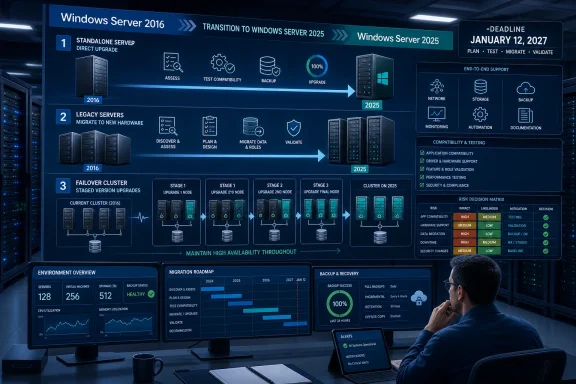
Verdict: directly upgrade eligible, nonclustered Windows Server 2016 systems to Windows Server 2025; migrate or rebuild servers with unsupported roles, aging hardware, application uncertainty, or configuration changes; and treat every 2016 failover cluster as a separate multistage project. The January 12, 2027 support deadline is fixed, but the lowest-risk exit path depends on the workload rather than the operating system label.
Microsoft’s current Windows Server upgrade guidance corrects a persistent piece of stale advice: a nonclustered Windows Server 2016 installation does not require intermediate upgrades through 2019 or 2022. Microsoft lists direct installation-media upgrades from Windows Server 2016 to Windows Server 2019, 2022, or 2025, with Server 2025 allowing nonclustered systems to move across as many as four versions.
That shortcut does not extend to clusters. Microsoft’s failover-clustering documentation limits Cluster OS Rolling Upgrade to one Windows Server version at a time, making a 2016 cluster a fundamentally different operation from upgrading a standalone application or infrastructure server.
The first decision should be whether the existing server is worth preserving. An in-place upgrade retains settings, installed roles, features, and data, which is useful when the hardware, application stack, and configuration are all known quantities. It is a poor substitute for application validation or overdue infrastructure replacement.
This matrix should be applied to each workload, not each server model or organizational unit. Two nominally identical Server 2016 virtual machines may warrant different choices if one runs a documented Windows role and the other hosts an abandoned line-of-business application.
Start by producing a fleet record that captures the installed edition, Server Core or Desktop Experience choice, system language, physical or virtual placement, boot configuration, networking configuration, installed roles and features, applications, service accounts, storage, upstream dependencies, downstream consumers, and availability requirements. Record whether each application vendor or internal development owner supports Windows Server 2025.
The discovery checklist should answer five operational questions:
This is where the operational decision becomes clearer. A supported role on stable hardware may be an excellent in-place candidate, while the same role on equipment due for replacement should usually move to a fresh system. Conversely, a simple-looking server with an unsupported application may require more engineering than an infrastructure server carrying several well-documented Microsoft roles.
A pilot should therefore be more than a spare Server 2016 virtual machine. It should reproduce the same roles, application versions, agents, network behavior, authentication dependencies, and storage layout as the production system being assessed.
Administrators must either plan sequential cluster transitions or migrate the workloads to a new cluster. The rolling approach preserves availability by moving workloads away from a node, upgrading that node, returning it to service, and repeating the operation across the cluster. The version limitation, however, turns a 2016-to-2025 destination into several controlled transitions rather than one maintenance event.
That changes the economics as well as the schedule. A multistage rolling plan must account for validation at every version boundary, mixed-version operating periods, repeated node maintenance, and the point at which a transition becomes final. If new hardware is already needed, building a Server 2025 cluster and migrating workloads may present less cumulative risk than carrying the old cluster through every intermediate generation.
Cluster owners should make this decision early. A standalone server pilot can be scheduled relatively late, but a high-availability platform may require multiple maintenance windows, application coordination, capacity checks, and fallback plans.
The next phase should validate representative systems. Test at least one server from each meaningful workload pattern, including the same roles, management agents, application stack, and installation type. Failures during this stage should update the decision matrix rather than trigger repeated production attempts.
Production execution should begin with low-impact, recoverable systems before moving to critical infrastructure and business applications. Each wave needs a change window, verified backup, restoration procedure, technical validation, application-owner acceptance, and a compliance record showing the server’s new state.
Temporary holds require the most scrutiny. The supplied facts do not establish current Extended Security Update pricing, eligibility, enrollment mechanics, or Azure Arc operational prerequisites, so those details must be confirmed against Microsoft’s current program documentation before budgets or compliance plans rely on them. A hold without verified enrollment, funding, connectivity, ownership, and an eventual migration date is not a strategy; it is an unmanaged exception.
WindowsForum’s earlier Server 2016 planning coverage has emphasized the January 12, 2027 deadline. The sharper task now is converting that date into a workload ledger that executives, auditors, and operations teams can all understand.
The final six months should be reserved for exceptions, not discovery. By then, direct-upgrade candidates should have passed testing, migration destinations should exist, cluster sequencing should be approved, and every remaining hold should have documented controls and an accountable owner.
Windows Server 2016 is not one migration project. It is a fleet of individual risk decisions, and Microsoft’s expanded Server 2025 upgrade path makes some of those decisions easier without making them automatic. The organizations best positioned for January 12, 2027 will be those that use the direct upgrade where it genuinely reduces change—and refuse to use it where migration, rebuilding, or a new cluster offers the cleaner recovery path.
Microsoft’s current Windows Server upgrade guidance corrects a persistent piece of stale advice: a nonclustered Windows Server 2016 installation does not require intermediate upgrades through 2019 or 2022. Microsoft lists direct installation-media upgrades from Windows Server 2016 to Windows Server 2019, 2022, or 2025, with Server 2025 allowing nonclustered systems to move across as many as four versions.
That shortcut does not extend to clusters. Microsoft’s failover-clustering documentation limits Cluster OS Rolling Upgrade to one Windows Server version at a time, making a 2016 cluster a fundamentally different operation from upgrading a standalone application or infrastructure server.
 The 2027 Decision Matrix
The first decision should be whether the existing server is worth preserving. An in-place upgrade retains settings, installed roles, features, and data, which is useful when the hardware, application stack, and configuration are all known quantities. It is a poor substitute for application validation or overdue infrastructure replacement.| Workload condition | Preferred exit path | Reason |
|---|---|---|
| A nonclustered server has supported roles, supported applications, suitable hardware, and no required installation-type change. | Direct in-place upgrade from Server 2016 to Server 2025. | Microsoft supports the direct path, and the upgrade preserves roles, settings, features, and data. |
| A server runs a role or feature that does not support in-place upgrade. | Build Server 2025 separately and migrate the role. | Microsoft requires role-specific validation and documents migration support for many roles. |
| A server hosts an application with uncertain Server 2025 support or undocumented dependencies. | Rebuild or migrate after application testing. | Operating-system support does not establish application compatibility. |
| Hardware replacement, storage redesign, or major cleanup is already required. | Deploy a clean Server 2025 system and migrate. | An in-place upgrade preserves technical debt along with the working configuration. |
| A failover cluster must remain available. | Use a sequential Cluster OS Rolling Upgrade or migrate to a new cluster. | Cluster nodes can advance only one Windows Server version at a time. |
| The target must change between Server Core and Desktop Experience. | Clean installation or migration. | In-place upgrade cannot switch installation types. |
| The system language must change. | Clean installation or migration. | Cross-language in-place upgrades are unsupported. |
| The server boots from VHD. | Rebuild or migrate. | Microsoft does not support in-place upgrade for boot-from-VHD systems. |
| The server uses NIC Teaming but otherwise qualifies. | Disable NIC Teaming, perform the upgrade, validate networking, and then restore the required configuration. | Microsoft requires NIC Teaming to be disabled before an in-place upgrade. |
Discovery Must Come Before Media
The most dangerous 2016 systems are not necessarily the largest. They are the servers whose owners, dependencies, and recovery procedures are unclear.Start by producing a fleet record that captures the installed edition, Server Core or Desktop Experience choice, system language, physical or virtual placement, boot configuration, networking configuration, installed roles and features, applications, service accounts, storage, upstream dependencies, downstream consumers, and availability requirements. Record whether each application vendor or internal development owner supports Windows Server 2025.
The discovery checklist should answer five operational questions:
- Each server must have a named workload owner and a technical owner.
- Every installed role, feature, and application must have a documented Server 2025 disposition.
- Dependencies such as DNS names, shares, certificates, scheduled tasks, service accounts, databases, and firewall rules must be mapped.
- Hardware, backup, monitoring, management, and recovery tooling must be validated against the target environment.
- The team must know how it will restore service if the upgrade or migration fails.
This is where the operational decision becomes clearer. A supported role on stable hardware may be an excellent in-place candidate, while the same role on equipment due for replacement should usually move to a fresh system. Conversely, a simple-looking server with an unsupported application may require more engineering than an infrastructure server carrying several well-documented Microsoft roles.
A Direct Upgrade Still Needs a Controlled Procedure
For a qualified standalone system, the practical path is straightforward but should not be improvised:- Confirm that the server is not a failover-cluster node and that every installed role and feature supports in-place upgrade.
- Verify the current edition, installation type, system language, hardware, boot configuration, applications, and available recovery method.
- Resolve application-support questions and remove or update components that cannot operate on Server 2025.
- Create and verify backups of the system, workload data, and configuration required for recovery.
- Disable NIC Teaming before beginning the upgrade.
- Mount or attach Windows Server 2025 installation media from within the running Server 2016 installation and launch Windows Setup.
- Select the compatible target edition and the option that retains files, settings, and applications.
- Complete Setup, allow the required restarts, and verify activation, networking, roles, services, applications, storage, monitoring, backups, and dependent systems.
- Re-establish the approved networking configuration and perform an application-level service test.
- Keep the rollback or restoration path available until the workload owner signs off.
A pilot should therefore be more than a spare Server 2016 virtual machine. It should reproduce the same roles, application versions, agents, network behavior, authentication dependencies, and storage layout as the production system being assessed.
Clusters Lose the Four-Version Shortcut
A direct Server 2016-to-2025 move is available only to nonclustered installations. Cluster OS Rolling Upgrade advances one version at a time, so a Server 2016 cluster cannot be treated as a group of standalone servers that happen to share workloads.Administrators must either plan sequential cluster transitions or migrate the workloads to a new cluster. The rolling approach preserves availability by moving workloads away from a node, upgrading that node, returning it to service, and repeating the operation across the cluster. The version limitation, however, turns a 2016-to-2025 destination into several controlled transitions rather than one maintenance event.
That changes the economics as well as the schedule. A multistage rolling plan must account for validation at every version boundary, mixed-version operating periods, repeated node maintenance, and the point at which a transition becomes final. If new hardware is already needed, building a Server 2025 cluster and migrating workloads may present less cumulative risk than carrying the old cluster through every intermediate generation.
Cluster owners should make this decision early. A standalone server pilot can be scheduled relatively late, but a high-availability platform may require multiple maintenance windows, application coordination, capacity checks, and fallback plans.
The Timeline Should Work Backward From January 2027
By mid-2026, discovery should already be under way. The first milestone is not “begin upgrades”; it is completing the inventory and assigning one of four dispositions to every Server 2016 workload: direct upgrade, migrate, rebuild, or approved temporary hold.The next phase should validate representative systems. Test at least one server from each meaningful workload pattern, including the same roles, management agents, application stack, and installation type. Failures during this stage should update the decision matrix rather than trigger repeated production attempts.
Production execution should begin with low-impact, recoverable systems before moving to critical infrastructure and business applications. Each wave needs a change window, verified backup, restoration procedure, technical validation, application-owner acceptance, and a compliance record showing the server’s new state.
Temporary holds require the most scrutiny. The supplied facts do not establish current Extended Security Update pricing, eligibility, enrollment mechanics, or Azure Arc operational prerequisites, so those details must be confirmed against Microsoft’s current program documentation before budgets or compliance plans rely on them. A hold without verified enrollment, funding, connectivity, ownership, and an eventual migration date is not a strategy; it is an unmanaged exception.
WindowsForum’s earlier Server 2016 planning coverage has emphasized the January 12, 2027 deadline. The sharper task now is converting that date into a workload ledger that executives, auditors, and operations teams can all understand.
The final six months should be reserved for exceptions, not discovery. By then, direct-upgrade candidates should have passed testing, migration destinations should exist, cluster sequencing should be approved, and every remaining hold should have documented controls and an accountable owner.
Windows Server 2016 is not one migration project. It is a fleet of individual risk decisions, and Microsoft’s expanded Server 2025 upgrade path makes some of those decisions easier without making them automatic. The organizations best positioned for January 12, 2027 will be those that use the direct upgrade where it genuinely reduces change—and refuse to use it where migration, rebuilding, or a new cluster offers the cleaner recovery path.
References
- Primary source: learn.microsoft.com
Plan Your Windows Server Upgrade Path | Microsoft Learn
Explore Windows Server upgrade options including in-place upgrade, clean install, migration, and cluster rolling upgrade. Find supported upgrade paths.learn.microsoft.com - Independent coverage: microsoft.com
Planning ahead for Windows Server 2016 end of support | Microsoft Windows Server Blog
In accordance with the Microsoft Lifecycle Policy, extended support for Windows Server 2016 will end on January 12, 2027. Learn more.www.microsoft.com - Primary source: WindowsForum
Windows Server 2016 End of Support Jan 12, 2027: Upgrade Planning Guide | Windows Forum
Microsoft’s planned end of support for Windows Server 2016 on January 12, 2027 is more than a calendar note for IT teams; it is a hard operational deadline...windowsforum.com
