

A large financial-services customer upgraded more than 2,000 Amazon EC2 instances from Windows Server 2016 to Windows Server 2025 by choosing an automated in-place upgrade path built around AWS Systems Manager, after AWS ruled out fresh migrations and clone-based cutovers as too disruptive at scale. The story matters because Windows Server 2016’s January 12, 2027 support deadline is no longer a distant lifecycle footnote. It is now an infrastructure program with licensing, identity, rollback, driver, and automation consequences.
The AWS case study is also a useful corrective to a fashionable cloud-modernization slogan: just rebuild it. Rebuilding is often the cleanest architectural answer, but real fleets contain embedded hostnames, firewall rules, static routes, certificate bindings, monitoring agents, and application assumptions that make “clean” look suspiciously like “months of risk.” In this case, the least glamorous option — upgrading the servers where they already sat — became the most practical one.
The looming end of Windows Server 2016 support gives every IT department the same calendar problem, but not the same migration problem. A small shop can treat a handful of servers as artisanal snowflakes. A financial-services enterprise with more than 2,000 EC2 instances across accounts and regions has to turn operating-system replacement into a factory process.
That is the key distinction in AWS’s account. The customer was not merely asking whether Windows Server 2025 could run its applications. It was asking how to move thousands of production machines while preserving IP addresses, hostnames, licensing compliance, and recovery paths, all without turning the migration itself into a bigger operational hazard than the aging OS.
This is where public cloud can be both the problem and the solution. EC2 makes it easy to accumulate fleets of long-lived Windows instances because they remain useful, reachable, and billable year after year. But the same APIs, snapshotting primitives, and orchestration tools that let server sprawl happen also provide the raw material for cleaning it up.
The phrase “upgrade over 2,000 servers” sounds like a single project. In practice, it is a choreography of prechecks, maintenance windows, failed boots, agent reconnections, licensing states, rollback decisions, and status reporting. The deciding technology was not Windows Setup alone; it was automation wrapped around Windows Setup.
But “fresh instance” migrations impose their own tax. Hostnames and IP addresses change unless carefully preserved through additional engineering. Applications must be reconfigured, data must be moved or synchronized, and any assumption embedded in a firewall rule or legacy connection string becomes a migration blocker.
For greenfield-style workloads, this is acceptable and often desirable. For a financial-services environment with critical workloads and strict change control, every new endpoint identity can become a security review. The technically cleaner answer can become the organizationally slower answer.
That is an uncomfortable truth for modernization programs. Many organizations say they want immutable infrastructure, but their production Windows fleets often still behave like named pets. A server’s identity is not just a compute resource; it is a bundle of approvals, trust relationships, monitoring rules, and operational memory.
At 2,000 instances, the rebuild plan would not merely have required application migration. It would have required the customer to rediscover and revalidate a large portion of its own infrastructure dependency map. AWS’s analysis implicitly acknowledges that the map was not cheap enough to redraw.
AWS already has an automation runbook for this pattern, AWSEC2-CloneInstanceAndUpgradeWindows, which creates an AMI from the source instance and upgrades the resulting image. That makes the approach more than a whiteboard idea. It is a recognizable EC2 operating model.
Yet clones introduce a different kind of complexity: synchronization. If a server is stateful, the cloned instance begins aging the moment it is created. Application data, local files, scheduled tasks, logs, certificates, and configuration changes can diverge. The longer validation takes, the larger the delta becomes.
The economics also matter. During the migration window, the organization may be running two instances for every server in scope. For a handful of systems, that is a rounding error. For more than 2,000 Windows instances, even temporary duplication can become a material line item and a capacity-management headache.
The clone strategy is safest when the final cutover can be cleanly bounded. In this customer’s environment, AWS appears to have concluded that the cutover itself would become the risky part. Preserving the old server was not enough if replacing it meant reworking identity and state across thousands of nodes.
This is not the most elegant approach in an idealized DevOps presentation. It modifies the original system and requires downtime. If the upgrade fails badly enough, recovery depends on backups or snapshots rather than simply discarding a clone.
But in this case, in-place upgrade solved the customer’s most expensive problems. It avoided data synchronization between old and new systems. It avoided the network-identity churn that would have rippled through firewall rules and DNS records. It provided a repeatable workflow that could be batched across accounts and regions.
That last point is crucial. In-place upgrade is sometimes treated as a one-off administrator’s shortcut, the kind of thing done through RDP at 2 a.m. AWS’s case study reframes it as a scalable automation target. The trick is to stop thinking of it as a human procedure and start treating it as a state machine.
The customer accepted one to two hours of downtime per instance. That is not trivial, but it is at least measurable. Compared with the uncertainty of thousands of application migrations or clone cutovers, a predictable maintenance window may be the more conservative choice.
That detail deserves attention because it is exactly the sort of thing that can sink a migration after the technical team believes the plan is sound. A server may be reachable, patched, backed up, and compatible — and still be unready because its licensing posture does not permit the target OS model.
AWS says the customer used billing inventory guidance and AWS License Manager to identify and convert instances before the upgrade. In other words, the migration began with accounting metadata as much as with operating-system checks. That will feel familiar to anyone who has managed Windows Server estates in cloud environments, where technical state and commercial state are intertwined.
This is also where automation helps prevent wishful thinking. A runbook that detects BYOL instances and stops with a warning is more useful than one that charges ahead into a licensing violation or activation failure. The boring precheck is the feature.
For Windows administrators, the lesson is blunt: lifecycle projects are compliance projects. If the inventory does not include licensing model, usage operation, activation path, and support status, it is not a complete inventory.
For an in-place operating-system upgrade, that agent becomes part of the survival kit. The system has to reboot, reappear, reconnect to management tooling, activate properly, and resume enough normal behavior for automation to verify success. If the launch agent is stale or unsupported, the upgrade may finish only to leave the instance awkwardly stranded.
AWS also recommends updating ENA and EBS drivers, though it frames that step as optional. In a fleet project, “optional but recommended” often means “skip it only if you have tested why it is safe to skip.” Network and storage drivers are not cosmetic during an OS upgrade; they are the bridge between the guest operating system and the cloud hardware abstraction beneath it.
The customer’s workflow also included backups, using AWS Backup in the described deployment. That is not surprising, but it is worth emphasizing because rollback from an in-place upgrade is fundamentally a restore operation. The snapshot is not paperwork. It is the exit door.
The strong version of this process is therefore not “run setup.exe quietly.” It is: confirm licensing, confirm platform compatibility, update launch plumbing, optionally refresh critical drivers, take recoverable backups, execute the upgrade, and verify that the instance returns to managed service.
This is the most important operational piece in the story. Windows in-place upgrades are not new. What is noteworthy is the encapsulation of the upgrade into an SSM workflow that can be applied to batches of instances and observed through a central console.
The runbook checked whether the source operating system was supported, whether the system had at least 20GB of free disk space, and whether the root volume was EBS-backed. It also checked for Nitro compatibility because AWS says Windows Server 2025 does not support Xen-based EC2 instances in this context. That turns platform eligibility from tribal knowledge into an automated gate.
The automation also discovered the Windows Server 2025 installation media snapshot, created a temporary EBS volume, attached it to the target, and ran setup in quiet mode. That is an elegant EC2-native way to distribute install media without asking administrators to manually mount ISOs or babysit sessions.
The post-upgrade steps are just as important as the upgrade itself. The document waited for the instance to return, confirmed the OS version, checked that the SSM agent reconnected, detached and deleted temporary media, updated the SSM agent, activated Windows through an AWS support runbook, ran EC2Launch migration, and could install critical and security updates. A migration is not done when Windows Setup exits; it is done when the management plane can prove the system is healthy enough to rejoin operations.
That distinction matters for scale. At 2,000 servers, nobody should be relying on a spreadsheet column that says “probably rebooted.” The automation’s value is not merely speed. It is the creation of auditable states: prechecked, backed up, upgrading, rebooting, verified, cleaned up, or failed.
The in-place upgrade path is honest about its disruption. The instance will be unavailable. RDP will not be useful during the upgrade. Administrators may need to rely on EC2 console screenshots to see what the guest display is doing while the machine is otherwise unreachable.
That does not make in-place upgrade suitable for every workload. AWS explicitly cautions against using it for instances managed by Auto Scaling groups, where replacement-based patterns are more natural. Certain Windows Server roles and features also have their own supported migration paths, and administrators should not assume that an OS-level upgrade is equivalent to an application-level migration.
The broader point is that “minimal downtime” and “minimal complexity” are not the same goal. Fresh builds may minimize OS inheritance but increase application and network migration work. Clones may minimize source-system risk but increase synchronization and cutover complexity. In-place upgrades concentrate risk into a scheduled maintenance event.
For this customer, concentration was preferable to diffusion. Better a known two-hour window per server than a sprawling, multi-variable migration where the hard part moves from Windows to everything around Windows.
This is a classic enterprise residue problem. Years of previous licensing decisions, image customizations, domain policies, and server builds do not disappear because the project plan says “convert licensing model.” Windows activation state is a technical artifact of commercial history.
The recommended fix is to follow AWS activation-failure guidance and, if needed, open a support case. That sounds mundane, but it reinforces the central theme: the migration’s hardest edges are not always in Windows Setup. They are in the accumulated assumptions around the server.
Administrators planning similar upgrades should expect surprises in activation, agents, monitoring tools, endpoint protection, and role-specific behavior. The goal of dev/test validation is not to prove that the happy path works once. It is to expose the unhappy paths before they arrive in production by the hundreds.
The FSI customer tested first in development and test environments, estimated downtime, and then rolled forward in controlled batches. That is not a dramatic cloud transformation story. It is better: a credible operations story.
That calendar is unforgiving for large Windows estates. The technical act of upgrading a server may take two hours, but the organizational act of approving a maintenance window may take weeks. Regulated industries must also account for change freezes, audit evidence, rollback rehearsals, and application-owner signoff.
The AWS example is useful precisely because it shows the kind of work that must happen before the first production upgrade. Licensing metadata must be collected. Instance families must be checked. Launch agents and drivers must be assessed. Backup policy must be validated. Application teams must confirm whether in-place upgrades are supported for their workloads.
There is also a SQL Server shadow in the background. AWS notes that SQL Server 2016 reaches end of support on July 14, 2026, a deadline that is even closer. Many Windows Server 2016 machines exist because they host older application stacks, and those stacks may include database engines, middleware, reporting tools, or vendor packages with their own lifecycle cliffs.
A server OS migration plan that ignores application lifecycle will produce false confidence. The operating system can be upgraded while the workload remains out of support, or vice versa. Mature migration programs track both.
Systems Manager is the glue here. It gives AWS a way to run commands, coordinate automation, verify state, and monitor progress without treating each server as a separate remote-desktop session. For Windows fleets, that is the difference between a project and a panic.
The custom SSM document is also a reminder that public cloud does not magically eliminate legacy operations. It gives teams better levers. You still need to understand Windows setup behavior, activation, drivers, snapshots, instance types, and role compatibility. The difference is that those checks can be encoded and repeated.
There is a subtle vendor message in the case study, too. AWS wants Windows workloads to remain first-class citizens on EC2, especially as customers face Microsoft lifecycle pressure that could otherwise push them toward Azure migration narratives. Showing a 2,000-instance Windows Server 2025 upgrade on EC2 is a statement: modernization does not have to mean leaving AWS.
Microsoft, for its part, is pushing Windows Server 2025 and Extended Security Updates enabled through Azure Arc. That gives customers multiple escape valves: upgrade, migrate, buy time, or combine approaches. The right answer depends less on vendor preference than on workload reality.
For WindowsForum readers, the practical conclusion is not that in-place upgrade is universally best. It is that the best migration path is the one that minimizes the scarcest resource. In this case, that resource was not CPU, storage, or even downtime. It was the organization’s ability to safely change thousands of network identities and application dependencies.
The AWS case study is also a useful corrective to a fashionable cloud-modernization slogan: just rebuild it. Rebuilding is often the cleanest architectural answer, but real fleets contain embedded hostnames, firewall rules, static routes, certificate bindings, monitoring agents, and application assumptions that make “clean” look suspiciously like “months of risk.” In this case, the least glamorous option — upgrading the servers where they already sat — became the most practical one.
 The Real Migration Was Not from 2016 to 2025, but from Craft Work to Fleet Work
The looming end of Windows Server 2016 support gives every IT department the same calendar problem, but not the same migration problem. A small shop can treat a handful of servers as artisanal snowflakes. A financial-services enterprise with more than 2,000 EC2 instances across accounts and regions has to turn operating-system replacement into a factory process.That is the key distinction in AWS’s account. The customer was not merely asking whether Windows Server 2025 could run its applications. It was asking how to move thousands of production machines while preserving IP addresses, hostnames, licensing compliance, and recovery paths, all without turning the migration itself into a bigger operational hazard than the aging OS.
This is where public cloud can be both the problem and the solution. EC2 makes it easy to accumulate fleets of long-lived Windows instances because they remain useful, reachable, and billable year after year. But the same APIs, snapshotting primitives, and orchestration tools that let server sprawl happen also provide the raw material for cleaning it up.
The phrase “upgrade over 2,000 servers” sounds like a single project. In practice, it is a choreography of prechecks, maintenance windows, failed boots, agent reconnections, licensing states, rollback decisions, and status reporting. The deciding technology was not Windows Setup alone; it was automation wrapped around Windows Setup.
The Clean Rebuild Was Too Clean for the Messy Enterprise
AWS’s first option was the one architects usually prefer: launch new Windows Server 2025 EC2 instances, migrate applications and data, and cut over when ready. It offers a clean baseline, current drivers, fresh Amazon Machine Images, and less inherited operating-system cruft. If the customer’s applications had been fully redeployable from code, this would likely have been the strategic favorite.But “fresh instance” migrations impose their own tax. Hostnames and IP addresses change unless carefully preserved through additional engineering. Applications must be reconfigured, data must be moved or synchronized, and any assumption embedded in a firewall rule or legacy connection string becomes a migration blocker.
For greenfield-style workloads, this is acceptable and often desirable. For a financial-services environment with critical workloads and strict change control, every new endpoint identity can become a security review. The technically cleaner answer can become the organizationally slower answer.
That is an uncomfortable truth for modernization programs. Many organizations say they want immutable infrastructure, but their production Windows fleets often still behave like named pets. A server’s identity is not just a compute resource; it is a bundle of approvals, trust relationships, monitoring rules, and operational memory.
At 2,000 instances, the rebuild plan would not merely have required application migration. It would have required the customer to rediscover and revalidate a large portion of its own infrastructure dependency map. AWS’s analysis implicitly acknowledges that the map was not cheap enough to redraw.
The Clone Strategy Bought Safety at the Price of Coordination
The second option — clone each instance, upgrade the clone, validate it, and cut over — is the compromise many cautious administrators would instinctively choose. It leaves the original untouched while providing a testable upgraded copy. In theory, rollback is simple because the old server remains available.AWS already has an automation runbook for this pattern, AWSEC2-CloneInstanceAndUpgradeWindows, which creates an AMI from the source instance and upgrades the resulting image. That makes the approach more than a whiteboard idea. It is a recognizable EC2 operating model.
Yet clones introduce a different kind of complexity: synchronization. If a server is stateful, the cloned instance begins aging the moment it is created. Application data, local files, scheduled tasks, logs, certificates, and configuration changes can diverge. The longer validation takes, the larger the delta becomes.
The economics also matter. During the migration window, the organization may be running two instances for every server in scope. For a handful of systems, that is a rounding error. For more than 2,000 Windows instances, even temporary duplication can become a material line item and a capacity-management headache.
The clone strategy is safest when the final cutover can be cleanly bounded. In this customer’s environment, AWS appears to have concluded that the cutover itself would become the risky part. Preserving the old server was not enough if replacing it meant reworking identity and state across thousands of nodes.
In-Place Won Because Identity Was the Hardest Thing to Move
The customer ultimately chose the third path: upgrade the existing EC2 instances in place. That means Windows Server setup runs directly on the source instance, transforming the installed operating system while preserving the machine’s hostname, IP address, attached volumes, and surrounding network configuration.This is not the most elegant approach in an idealized DevOps presentation. It modifies the original system and requires downtime. If the upgrade fails badly enough, recovery depends on backups or snapshots rather than simply discarding a clone.
But in this case, in-place upgrade solved the customer’s most expensive problems. It avoided data synchronization between old and new systems. It avoided the network-identity churn that would have rippled through firewall rules and DNS records. It provided a repeatable workflow that could be batched across accounts and regions.
That last point is crucial. In-place upgrade is sometimes treated as a one-off administrator’s shortcut, the kind of thing done through RDP at 2 a.m. AWS’s case study reframes it as a scalable automation target. The trick is to stop thinking of it as a human procedure and start treating it as a state machine.
The customer accepted one to two hours of downtime per instance. That is not trivial, but it is at least measurable. Compared with the uncertainty of thousands of application migrations or clone cutovers, a predictable maintenance window may be the more conservative choice.
Licensing Was the Gate That Could Stop the Whole Line
The most important prerequisite in AWS’s write-up is not disk space or driver freshness. It is licensing. Each EC2 instance has a usage-operation billing field that reflects its licensing model, and AWS says Windows Server 2022 and Windows Server 2025 support the License Included model only under the relevant Microsoft terms for this scenario.That detail deserves attention because it is exactly the sort of thing that can sink a migration after the technical team believes the plan is sound. A server may be reachable, patched, backed up, and compatible — and still be unready because its licensing posture does not permit the target OS model.
AWS says the customer used billing inventory guidance and AWS License Manager to identify and convert instances before the upgrade. In other words, the migration began with accounting metadata as much as with operating-system checks. That will feel familiar to anyone who has managed Windows Server estates in cloud environments, where technical state and commercial state are intertwined.
This is also where automation helps prevent wishful thinking. A runbook that detects BYOL instances and stops with a warning is more useful than one that charges ahead into a licensing violation or activation failure. The boring precheck is the feature.
For Windows administrators, the lesson is blunt: lifecycle projects are compliance projects. If the inventory does not include licensing model, usage operation, activation path, and support status, it is not a complete inventory.
EC2Launch v2 Was the Small Agent with Outsized Consequences
Another prerequisite was moving from EC2Launch v1 to EC2Launch v2. Windows Server 2016 instances commonly carry the older launch service, while AWS’s Windows Server 2022 and 2025 AMIs include EC2Launch v2 by default. The launch agent handles the kind of boot-time plumbing that users rarely notice until it breaks: initialization, network behavior, Windows activation, metadata-driven tasks, and Systems Manager integration.For an in-place operating-system upgrade, that agent becomes part of the survival kit. The system has to reboot, reappear, reconnect to management tooling, activate properly, and resume enough normal behavior for automation to verify success. If the launch agent is stale or unsupported, the upgrade may finish only to leave the instance awkwardly stranded.
AWS also recommends updating ENA and EBS drivers, though it frames that step as optional. In a fleet project, “optional but recommended” often means “skip it only if you have tested why it is safe to skip.” Network and storage drivers are not cosmetic during an OS upgrade; they are the bridge between the guest operating system and the cloud hardware abstraction beneath it.
The customer’s workflow also included backups, using AWS Backup in the described deployment. That is not surprising, but it is worth emphasizing because rollback from an in-place upgrade is fundamentally a restore operation. The snapshot is not paperwork. It is the exit door.
The strong version of this process is therefore not “run setup.exe quietly.” It is: confirm licensing, confirm platform compatibility, update launch plumbing, optionally refresh critical drivers, take recoverable backups, execute the upgrade, and verify that the instance returns to managed service.
The Custom SSM Runbook Turned a Risky Procedure into a Controlled Campaign
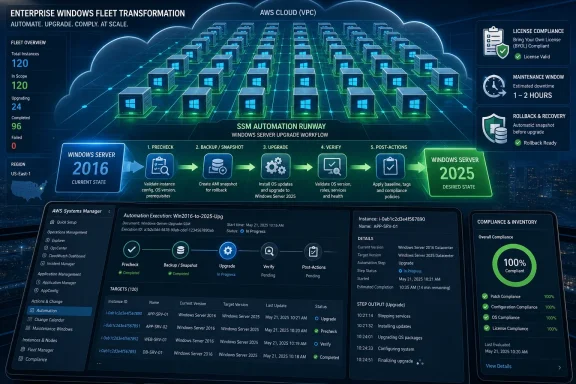
AWS provided the customer with a custom Systems Manager automation document named EC2-InPlaceUpgradeToWindows2025. The document automated validation, backup, installation-media handling, setup execution, reboot management, post-upgrade verification, activation, EC2Launch migration, SSM agent updates, cleanup, and optional Windows security updates.This is the most important operational piece in the story. Windows in-place upgrades are not new. What is noteworthy is the encapsulation of the upgrade into an SSM workflow that can be applied to batches of instances and observed through a central console.
The runbook checked whether the source operating system was supported, whether the system had at least 20GB of free disk space, and whether the root volume was EBS-backed. It also checked for Nitro compatibility because AWS says Windows Server 2025 does not support Xen-based EC2 instances in this context. That turns platform eligibility from tribal knowledge into an automated gate.
The automation also discovered the Windows Server 2025 installation media snapshot, created a temporary EBS volume, attached it to the target, and ran setup in quiet mode. That is an elegant EC2-native way to distribute install media without asking administrators to manually mount ISOs or babysit sessions.
The post-upgrade steps are just as important as the upgrade itself. The document waited for the instance to return, confirmed the OS version, checked that the SSM agent reconnected, detached and deleted temporary media, updated the SSM agent, activated Windows through an AWS support runbook, ran EC2Launch migration, and could install critical and security updates. A migration is not done when Windows Setup exits; it is done when the management plane can prove the system is healthy enough to rejoin operations.
That distinction matters for scale. At 2,000 servers, nobody should be relying on a spreadsheet column that says “probably rebooted.” The automation’s value is not merely speed. It is the creation of auditable states: prechecked, backed up, upgrading, rebooting, verified, cleaned up, or failed.
The Downtime Trade Was More Honest Than the Zero-Downtime Fantasy
AWS’s in-place option required a downtime window of roughly one to two hours per instance, depending on configuration. That is the cost the customer accepted. In many enterprise discussions, downtime is treated as a moral failure; in practice, hidden downtime often reappears as extended cutover risk, delayed validation, or midnight troubleshooting.The in-place upgrade path is honest about its disruption. The instance will be unavailable. RDP will not be useful during the upgrade. Administrators may need to rely on EC2 console screenshots to see what the guest display is doing while the machine is otherwise unreachable.
That does not make in-place upgrade suitable for every workload. AWS explicitly cautions against using it for instances managed by Auto Scaling groups, where replacement-based patterns are more natural. Certain Windows Server roles and features also have their own supported migration paths, and administrators should not assume that an OS-level upgrade is equivalent to an application-level migration.
The broader point is that “minimal downtime” and “minimal complexity” are not the same goal. Fresh builds may minimize OS inheritance but increase application and network migration work. Clones may minimize source-system risk but increase synchronization and cutover complexity. In-place upgrades concentrate risk into a scheduled maintenance event.
For this customer, concentration was preferable to diffusion. Better a known two-hour window per server than a sprawling, multi-variable migration where the hard part moves from Windows to everything around Windows.
Activation Problems Reveal the Ghosts of Old Cloud Choices
AWS also calls out a practical snag: after converting from BYOL to License Included, some instances may still point to a custom Microsoft Key Management Services server rather than AWS KMS. That can cause activation failures even after the operating system upgrade itself is otherwise successful.This is a classic enterprise residue problem. Years of previous licensing decisions, image customizations, domain policies, and server builds do not disappear because the project plan says “convert licensing model.” Windows activation state is a technical artifact of commercial history.
The recommended fix is to follow AWS activation-failure guidance and, if needed, open a support case. That sounds mundane, but it reinforces the central theme: the migration’s hardest edges are not always in Windows Setup. They are in the accumulated assumptions around the server.
Administrators planning similar upgrades should expect surprises in activation, agents, monitoring tools, endpoint protection, and role-specific behavior. The goal of dev/test validation is not to prove that the happy path works once. It is to expose the unhappy paths before they arrive in production by the hundreds.
The FSI customer tested first in development and test environments, estimated downtime, and then rolled forward in controlled batches. That is not a dramatic cloud transformation story. It is better: a credible operations story.
The Server 2016 Deadline Is Now a Budget and Scheduling Problem
Windows Server 2016 extended support ends on January 12, 2027. As of June 15, 2026, that leaves less than seven months for organizations to inventory, classify, test, schedule, execute, and validate migrations — or to arrange paid Extended Security Updates where upgrades cannot be completed in time.That calendar is unforgiving for large Windows estates. The technical act of upgrading a server may take two hours, but the organizational act of approving a maintenance window may take weeks. Regulated industries must also account for change freezes, audit evidence, rollback rehearsals, and application-owner signoff.
The AWS example is useful precisely because it shows the kind of work that must happen before the first production upgrade. Licensing metadata must be collected. Instance families must be checked. Launch agents and drivers must be assessed. Backup policy must be validated. Application teams must confirm whether in-place upgrades are supported for their workloads.
There is also a SQL Server shadow in the background. AWS notes that SQL Server 2016 reaches end of support on July 14, 2026, a deadline that is even closer. Many Windows Server 2016 machines exist because they host older application stacks, and those stacks may include database engines, middleware, reporting tools, or vendor packages with their own lifecycle cliffs.
A server OS migration plan that ignores application lifecycle will produce false confidence. The operating system can be upgraded while the workload remains out of support, or vice versa. Mature migration programs track both.
AWS’s Case Study Quietly Argues for Boring Automation
The fashionable parts of cloud computing are elasticity, managed services, and global-scale abstractions. This AWS story is about something less glamorous but equally important: using cloud control planes to make old-fashioned Windows administration repeatable.Systems Manager is the glue here. It gives AWS a way to run commands, coordinate automation, verify state, and monitor progress without treating each server as a separate remote-desktop session. For Windows fleets, that is the difference between a project and a panic.
The custom SSM document is also a reminder that public cloud does not magically eliminate legacy operations. It gives teams better levers. You still need to understand Windows setup behavior, activation, drivers, snapshots, instance types, and role compatibility. The difference is that those checks can be encoded and repeated.
There is a subtle vendor message in the case study, too. AWS wants Windows workloads to remain first-class citizens on EC2, especially as customers face Microsoft lifecycle pressure that could otherwise push them toward Azure migration narratives. Showing a 2,000-instance Windows Server 2025 upgrade on EC2 is a statement: modernization does not have to mean leaving AWS.
Microsoft, for its part, is pushing Windows Server 2025 and Extended Security Updates enabled through Azure Arc. That gives customers multiple escape valves: upgrade, migrate, buy time, or combine approaches. The right answer depends less on vendor preference than on workload reality.
For WindowsForum readers, the practical conclusion is not that in-place upgrade is universally best. It is that the best migration path is the one that minimizes the scarcest resource. In this case, that resource was not CPU, storage, or even downtime. It was the organization’s ability to safely change thousands of network identities and application dependencies.
The Concrete Lessons Hidden in a 2,000-Server Upgrade
The AWS customer’s path is not a template to copy blindly, but it is a pattern worth studying. The important part is the decision logic: evaluate rebuild, clone, and in-place strategies against the actual constraints of the fleet rather than against an abstract modernization ideal.- Organizations should inventory Windows Server 2016 instances now, including OS version, AWS account, Region, instance family, attached volumes, application owner, licensing model, and activation configuration.
- In-place upgrades are most attractive when preserving hostname, IP address, and existing network configuration is more valuable than starting from a clean server image.
- Clone-based upgrades can reduce source-system risk, but they introduce synchronization, cutover, identity, and temporary cost problems that become harder at fleet scale.
- Windows Server 2025 upgrades on EC2 require attention to EC2Launch v2, driver currency, Nitro compatibility, EBS-backed root volumes, disk space, and rollback snapshots.
- Licensing checks should be treated as a blocking technical prerequisite, not as an administrative task to reconcile after the upgrade.
- A successful fleet migration should produce machine-readable status at every stage, because manual confirmation does not scale to thousands of Windows servers.
References
- Primary source: Amazon Web Services (AWS)
Published: 2026-06-15T17:40:11.054749
How a Customer Upgraded over 2,000 Microsoft Windows Server 2016 to 2025 on Amazon EC2 | Microsoft Workloads on AWS
With Microsoft Windows Server 2016 reaching end of support in January 2027, organizations running workloads on Amazon Elastic Compute Cloud (Amazon EC2) need to plan their migration strategy now. Recently, a large financial services industry (FSI) customer approached Amazon Web Services (AWS)...aws.amazon.com - Official source: microsoft.com
Planning ahead for Windows Server 2016 end of support | Microsoft Windows Server Blog
In accordance with the Microsoft Lifecycle Policy, extended support for Windows Server 2016 will end on January 12, 2027. Learn more.www.microsoft.com - Related coverage: hypestkey.com
Windows Server 2016 End of Life — January 12, 2027 | HypestKey
Windows Server 2016 end of support happens January 12, 2027. No more security patches after that date. Here's what happens and how to upgrade.hypestkey.com - Related coverage: docs.aws.amazon.com
Use the EC2Launch v2 agent to perform tasks during EC2 Windows instance launch - Amazon Elastic Compute Cloud
Use EC2Launch v2 to perform tasks during instance launch or restart, for EC2 Windows instances. EC2Launch v2 replaces both the EC2Config service and the EC2Launch service.docs.aws.amazon.com
- Official source: support.microsoft.com
Support for Windows Server 2016 will end in January 2027 - Microsoft Support
 support.microsoft.com
- Related coverage: windowsforum.com
Windows Server 2016 End of Support Jan 12, 2027: Upgrade Planning Guide | Windows Forum
Microsoft’s planned end of support for Windows Server 2016 on January 12, 2027 is more than a calendar note for IT teams; it is a hard operational deadline...windowsforum.com
- Official source: learn.microsoft.com
End of service windows server 2016 & windows server 2019 - Microsoft Q&A
Dear Microsoft teams, may i know End of service windows server 2016 & windows server 2019?learn.microsoft.com - Related coverage: ebcgroup.co.uk
Windows Server 2016 End of Life: What It Means for Your Business
Windows Server 2016 reaches end of support in January 2027. Learn the security, compliance and business risks of doing nothing — and how EBC Group can help you plan your next steps. www.ebcgroup.co.uk
- Related coverage: polyu.edu.hk
Windows Server 2016 end of life on 12 Jan 2027 | Get Connected | ITS eNewsletter | News & Events | Information Technology Services Office
Windows Server 2016 will reach its end of life (EOL) on 12 January 2027.www.polyu.edu.hk - Related coverage: tsplus.net
Windows Server 2016 End of Support: Dates & Options | TSplus
Windows Server 2016 end of support is January 12, 2027. Learn ESU options, migration paths and how to reduce risk while keeping legacy apps running.tsplus.net - Related coverage: windowscentral.com
Windows 10 LTSB (LTSC) will get Extended Security Updates | Windows Central
Windows 10 2016 LTSB support ends in 2026. Microsoft details ESU costs, deadlines, and upgrade paths to LTSC and Server 2025.www.windowscentral.com - Related coverage: techradar.com
Windows Server 2008 is finally gone, after Microsoft pulls support at last | TechRadar
Windows Server 2008 (and Vista) are gone foreverwww.techradar.com - Related coverage: assets.beyondtrust.com
2016 U Series Virtual Appliance EOL Customer Announcement NOV 21 2025
PDF documentassets.beyondtrust.com
