

Google’s Android 17 beta adds a cross-device handoff feature called Continue On, letting users begin supported app activities on one Android device and resume them on a nearby Android tablet under the same Google account. The short version is that Android is finally treating device-switching as a first-class operating-system problem, not an app-by-app convenience hack. As detailed by Google’s Android Developers documentation and amplified by early coverage from Android Central, Tech Advisor, and NokiaPowerUser, the feature is aimed first at phone-to-tablet continuity. The bigger story is not that Android copied a familiar Apple idea; it is that Google is trying to make Android’s fragmented hardware ecosystem feel like one computing surface.
For years, Android’s multi-device story has been better in theory than in daily use. A phone, a tablet, a Chromebook, earbuds, a watch, and a TV could all be signed into the same Google account, yet the moment a user tried to move a real task between them, the seams showed. Notifications synced. Files could be shared. Passwords and tabs sometimes followed. But the state of work — the specific article, draft, message, or workflow — often stayed trapped on the device where it started.
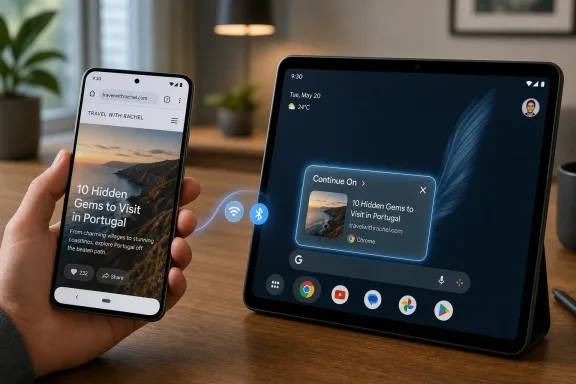
Continue On is Google’s attempt to close that gap. The feature lets a supported activity on a sending device surface as a handoff suggestion on a receiving device, with Google’s own examples focusing on a phone handing work to a tablet taskbar. Tap the prompt, and the receiving device opens the app or, where supported, a web fallback that reconstructs the user’s place.
That sounds deceptively small. It is not. Operating systems are increasingly judged not by what they can do on one screen, but by how little friction they impose when the user changes screens.
Apple understood this a decade ago with Handoff and Continuity. Microsoft has repeatedly tried to get there from the Windows side through Phone Link, Timeline, Cloud Clipboard, OneDrive, and Edge sync. Google, despite controlling Android, Chrome, Gmail, Drive, Docs, and an enormous services layer, has often shipped continuity as a scattered set of almost-there features. Android 17’s handoff work is a recognition that “almost there” is no longer good enough.
This matters because the hard problem in handoff is not detecting that two devices are near each other. Android already has layers for nearby discovery, account identity, Play services, Bluetooth, Wi-Fi, and cross-device services. The hard problem is recreating a meaningful point in a user journey without dumping them into an app’s home screen and calling it continuity.
A browser can reopen a page. A notes app must reopen the right note, ideally with cursor position or draft state intact. A mail app must surface the same thread. A media app must make choices about playback position, licensing, queue state, and output device. A banking app may decide that almost nothing should be eligible because the security boundary matters more than convenience.
That is why Android 17’s model appears to put responsibility on developers rather than pretending the OS can infer everything. Google handles the system affordance, background discovery, and receiving-device prompt. The app still has to make the resumed experience coherent. Continue On is therefore less a magic trick than a contract: if developers supply the right state, Android will provide a system-level path for the user to continue.
Android phones are dominant globally, but Android tablets have long lived in a more awkward space. They are plentiful, often affordable, and increasingly capable, yet the software story has lagged behind the hardware. Google has spent the last several Android releases pushing large-screen readiness, foldable support, adaptive layouts, desktop windowing concepts, and restrictions on apps that refuse to resize properly. Android 17 continues that campaign by removing more developer escape hatches around orientation and resizability on large screens.
Continue On fits directly into that agenda. A tablet becomes more valuable if it is not a separate destination but an extension of the phone. The taskbar suggestion is psychologically important: it tells the user, “This larger screen knows what you were doing.” That kind of cue is what makes an ecosystem feel alive.
The same logic applies to foldables. A foldable is already a device that changes shape in the middle of a task. If Android can preserve and move state across screen configurations, device classes, and app contexts, then the old distinction between phone, tablet, and small laptop starts to blur. Google does not need every Android tablet to beat the iPad in raw app polish if it can make the Android phone-to-tablet combination feel uniquely fluid.
But openness is also the trap. Apple’s Handoff works as well as it does because Apple controls the hardware lineup, the OS schedule, the default apps, the account system, and the customer expectation. Android has Google, device makers, silicon vendors, carriers, regional firmware variants, Play services dependencies, OEM skins, and uneven update policies. A feature can be present in AOSP-adjacent documentation and still arrive late, inconsistently, or with caveats on real devices.
Google’s documentation currently frames Continue On around Android 17 and eligible Pixel testing, with Cross-Device Services and Google system services beta components part of the setup. That is a reminder that the feature is not simply “any Android device to any Android device.” It depends on OS version, Google account state, nearby-device services, app support, and device-class decisions.
That complexity does not doom the feature. It does mean Google has to resist the old Android habit of announcing a powerful platform capability and then leaving users to discover that only three apps and two devices make it feel real.
That fallback is classic Google. Apple’s ecosystem generally assumes the native app exists or can be installed within a controlled environment. Google, by contrast, has always had one foot in apps and one foot in the web. Chrome, Gmail, Docs, Maps, YouTube, and Search are not just Android apps; they are web services with native shells.
If implemented well, web fallback could make Android’s handoff more forgiving than Apple’s. A user should not have to install every app on every device just to continue reading, editing, or reviewing something. In a work setting, the receiving tablet may be a shared or lightly provisioned device. In a school setting, the student may have a phone full of apps and a managed tablet with a narrower software load. In a household, the couch tablet may not mirror the phone.
But fallback is also where handoff can become messy. Native-to-web transitions need authentication, state restoration, permissions, and layout parity. A Gmail thread is one thing. A creative app project, a private health record, a locally cached file, or a partially completed form is another. If the web fallback lands the user close enough, it feels like magic. If it lands them at a login prompt or generic dashboard, it feels like marketing.
Imagine a tablet on a conference-room table suggesting a private messaging app from a phone. Imagine a family tablet surfacing a work document. Imagine a shared household device showing that someone was using a medical, dating, financial, or legal app. The handoff prompt is useful precisely because it exposes context. That same exposure can become a problem.
Google’s documentation emphasizes the developer-controlled nature of handoff support, and that is important. Some activities should not be eligible. Others should require reauthentication. Some should pass only a URL, while others should pass richer state. In enterprise and regulated environments, administrators will want policy controls over whether cross-device continuity is enabled, which accounts can use it, and whether managed and personal profiles can participate.
The lesson from Windows, iOS, and Android history is that convenience features become security features as soon as they cross device boundaries. The system needs clear user controls, predictable surfaces, and conservative defaults. A feature that surprises users with the wrong suggestion in the wrong place will generate distrust quickly.
Android already lives in a complicated enterprise reality. Work profiles, managed devices, conditional access, app protection policies, mobile threat defense, VPN requirements, and data loss prevention rules all exist because phones are no longer peripheral devices. A phone can be the primary endpoint for identity, messaging, document access, approvals, and customer data. If Android 17 makes it easier to move app state from phone to tablet, administrators will ask exactly what moved, where it moved, and under whose policy boundary.
The good news is that handoff is not the same as file sync. It can be narrower and more deliberate. A handoff event may pass a deep link or structured activity state rather than copying a document wholesale. The bad news is that deep links can still expose sensitive context, and a receiving device can still be less trusted than the sender.
This is where Google’s broader Android Enterprise story will matter. If Continue On respects work-profile separation, account boundaries, device management state, and app-level policy, it could become a useful enterprise convenience. If it behaves like a consumer-first feature bolted onto managed devices later, IT shops will disable it the moment they can.
The chore is that good handoff requires disciplined state management. Apps must know what part of the experience is resumable, what data is safe to transfer, whether the receiving device has the right app installed, and how to degrade gracefully to the web. That is not a trivial amount of design and testing, especially for apps that already struggle with tablets and foldables.
Google has been pushing developers toward adaptive design for years, and Android 17 raises the pressure. Large-screen restrictions, resizability changes, improved windowing behavior, and handoff all point in the same direction. The platform is telling developers to stop assuming that an Android app is a portrait phone rectangle.
This is healthy pressure. It is also likely to produce uneven results. Google’s own apps will probably show the best demos. Major productivity and media apps may follow. Smaller apps may ignore the feature until analytics prove users care. That means Android users should expect Continue On to feel impressive in some places and invisible in many others, at least early on.
That world includes tablets, foldables, Chromebooks, desktop modes, cars, watches, TVs, XR devices, and AI assistants. Google’s Android strategy increasingly depends on the idea that a user’s context should move across those surfaces without requiring the user to manually reconstruct it every time. Continue On is one visible manifestation of that larger shift.
The timing also matters. Google is turning Android into a platform for more than phones just as AI systems are becoming more persistent and context-aware. If an assistant can understand what a user is doing, and the OS can move that activity across devices, then the line between “handoff” and “ambient computing” starts to fade. That is powerful, but it raises the stakes for consent, visibility, and control.
Continue On is therefore not merely a usability feature. It is infrastructure for a more continuous Android. Whether that future feels helpful or intrusive will depend on execution.
Google has spent years telling users that Android is everywhere; with Android 17, it is finally trying to make everywhere feel connected.
 Google Is Finally Admitting That Android Users Own More Than One Screen
For years, Android’s multi-device story has been better in theory than in daily use. A phone, a tablet, a Chromebook, earbuds, a watch, and a TV could all be signed into the same Google account, yet the moment a user tried to move a real task between them, the seams showed. Notifications synced. Files could be shared. Passwords and tabs sometimes followed. But the state of work — the specific article, draft, message, or workflow — often stayed trapped on the device where it started.Continue On is Google’s attempt to close that gap. The feature lets a supported activity on a sending device surface as a handoff suggestion on a receiving device, with Google’s own examples focusing on a phone handing work to a tablet taskbar. Tap the prompt, and the receiving device opens the app or, where supported, a web fallback that reconstructs the user’s place.
That sounds deceptively small. It is not. Operating systems are increasingly judged not by what they can do on one screen, but by how little friction they impose when the user changes screens.
Apple understood this a decade ago with Handoff and Continuity. Microsoft has repeatedly tried to get there from the Windows side through Phone Link, Timeline, Cloud Clipboard, OneDrive, and Edge sync. Google, despite controlling Android, Chrome, Gmail, Drive, Docs, and an enormous services layer, has often shipped continuity as a scattered set of almost-there features. Android 17’s handoff work is a recognition that “almost there” is no longer good enough.
Continue On Turns Handoff Into a Platform Contract
The important part of Android 17’s approach is that Continue On is not merely a clever launcher shortcut. Google’s developer documentation describes it as a new Android 17, API level 37 capability that developers can implement per activity. That means an app can decide which screens are eligible for handoff, what state needs to travel, and whether the receiving device should open the native app or fall back to a web URL.This matters because the hard problem in handoff is not detecting that two devices are near each other. Android already has layers for nearby discovery, account identity, Play services, Bluetooth, Wi-Fi, and cross-device services. The hard problem is recreating a meaningful point in a user journey without dumping them into an app’s home screen and calling it continuity.
A browser can reopen a page. A notes app must reopen the right note, ideally with cursor position or draft state intact. A mail app must surface the same thread. A media app must make choices about playback position, licensing, queue state, and output device. A banking app may decide that almost nothing should be eligible because the security boundary matters more than convenience.
That is why Android 17’s model appears to put responsibility on developers rather than pretending the OS can infer everything. Google handles the system affordance, background discovery, and receiving-device prompt. The app still has to make the resumed experience coherent. Continue On is therefore less a magic trick than a contract: if developers supply the right state, Android will provide a system-level path for the user to continue.
The Tablet Taskbar Is the Tell
Google’s first target is not phone-to-phone or phone-to-TV. It is mobile-to-tablet. That choice says almost everything about where Android’s strategic anxiety lies.Android phones are dominant globally, but Android tablets have long lived in a more awkward space. They are plentiful, often affordable, and increasingly capable, yet the software story has lagged behind the hardware. Google has spent the last several Android releases pushing large-screen readiness, foldable support, adaptive layouts, desktop windowing concepts, and restrictions on apps that refuse to resize properly. Android 17 continues that campaign by removing more developer escape hatches around orientation and resizability on large screens.
Continue On fits directly into that agenda. A tablet becomes more valuable if it is not a separate destination but an extension of the phone. The taskbar suggestion is psychologically important: it tells the user, “This larger screen knows what you were doing.” That kind of cue is what makes an ecosystem feel alive.
The same logic applies to foldables. A foldable is already a device that changes shape in the middle of a task. If Android can preserve and move state across screen configurations, device classes, and app contexts, then the old distinction between phone, tablet, and small laptop starts to blur. Google does not need every Android tablet to beat the iPad in raw app polish if it can make the Android phone-to-tablet combination feel uniquely fluid.
Android’s Openness Is Both the Selling Point and the Trap
The optimistic read is that Android’s handoff can become more flexible than Apple’s because it is not limited to one hardware vendor’s devices. In principle, a Samsung phone, a Lenovo tablet, a Pixel foldable, and perhaps a Chromebook-adjacent Android environment could participate in the same continuity layer, provided they meet the platform and services requirements. That is the version of the story Android fans want: Apple-like convenience without Apple-like hardware lock-in.But openness is also the trap. Apple’s Handoff works as well as it does because Apple controls the hardware lineup, the OS schedule, the default apps, the account system, and the customer expectation. Android has Google, device makers, silicon vendors, carriers, regional firmware variants, Play services dependencies, OEM skins, and uneven update policies. A feature can be present in AOSP-adjacent documentation and still arrive late, inconsistently, or with caveats on real devices.
Google’s documentation currently frames Continue On around Android 17 and eligible Pixel testing, with Cross-Device Services and Google system services beta components part of the setup. That is a reminder that the feature is not simply “any Android device to any Android device.” It depends on OS version, Google account state, nearby-device services, app support, and device-class decisions.
That complexity does not doom the feature. It does mean Google has to resist the old Android habit of announcing a powerful platform capability and then leaving users to discover that only three apps and two devices make it feel real.
The App-to-Web Fallback Is the Most Google Part of the Feature
The most interesting piece of Continue On may be the least flashy: app-to-web handoff. Google’s documentation says developers can designate native app-to-app handoff when the same app is installed on the receiving device, but can also provide a web fallback through URL handoff. Tech Advisor highlighted Google’s example of moving from a native mobile app flow to a web experience on the receiving device.That fallback is classic Google. Apple’s ecosystem generally assumes the native app exists or can be installed within a controlled environment. Google, by contrast, has always had one foot in apps and one foot in the web. Chrome, Gmail, Docs, Maps, YouTube, and Search are not just Android apps; they are web services with native shells.
If implemented well, web fallback could make Android’s handoff more forgiving than Apple’s. A user should not have to install every app on every device just to continue reading, editing, or reviewing something. In a work setting, the receiving tablet may be a shared or lightly provisioned device. In a school setting, the student may have a phone full of apps and a managed tablet with a narrower software load. In a household, the couch tablet may not mirror the phone.
But fallback is also where handoff can become messy. Native-to-web transitions need authentication, state restoration, permissions, and layout parity. A Gmail thread is one thing. A creative app project, a private health record, a locally cached file, or a partially completed form is another. If the web fallback lands the user close enough, it feels like magic. If it lands them at a login prompt or generic dashboard, it feels like marketing.
Privacy Is the Feature’s Make-or-Break Layer
Cross-device continuity always carries a privacy tax. The system must know that a user is active in a supported app, that another device nearby belongs to the same account, and that a handoff suggestion should be displayed. Even if content is not broadly broadcast, the existence of an activity can itself be sensitive.Imagine a tablet on a conference-room table suggesting a private messaging app from a phone. Imagine a family tablet surfacing a work document. Imagine a shared household device showing that someone was using a medical, dating, financial, or legal app. The handoff prompt is useful precisely because it exposes context. That same exposure can become a problem.
Google’s documentation emphasizes the developer-controlled nature of handoff support, and that is important. Some activities should not be eligible. Others should require reauthentication. Some should pass only a URL, while others should pass richer state. In enterprise and regulated environments, administrators will want policy controls over whether cross-device continuity is enabled, which accounts can use it, and whether managed and personal profiles can participate.
The lesson from Windows, iOS, and Android history is that convenience features become security features as soon as they cross device boundaries. The system needs clear user controls, predictable surfaces, and conservative defaults. A feature that surprises users with the wrong suggestion in the wrong place will generate distrust quickly.
Enterprise IT Will Read This as Another State-Sync Surface
For consumers, Continue On is a productivity feature. For IT departments, it is another state-transfer mechanism that must be understood, governed, and audited.Android already lives in a complicated enterprise reality. Work profiles, managed devices, conditional access, app protection policies, mobile threat defense, VPN requirements, and data loss prevention rules all exist because phones are no longer peripheral devices. A phone can be the primary endpoint for identity, messaging, document access, approvals, and customer data. If Android 17 makes it easier to move app state from phone to tablet, administrators will ask exactly what moved, where it moved, and under whose policy boundary.
The good news is that handoff is not the same as file sync. It can be narrower and more deliberate. A handoff event may pass a deep link or structured activity state rather than copying a document wholesale. The bad news is that deep links can still expose sensitive context, and a receiving device can still be less trusted than the sender.
This is where Google’s broader Android Enterprise story will matter. If Continue On respects work-profile separation, account boundaries, device management state, and app-level policy, it could become a useful enterprise convenience. If it behaves like a consumer-first feature bolted onto managed devices later, IT shops will disable it the moment they can.
Developers Get Power, but They Also Get Another Obligation
From a developer’s point of view, Continue On is both an opportunity and a chore. The opportunity is obvious: apps that support handoff will feel more modern, especially on large screens. Productivity, reading, messaging, shopping, travel, education, and creative apps all have natural handoff moments.The chore is that good handoff requires disciplined state management. Apps must know what part of the experience is resumable, what data is safe to transfer, whether the receiving device has the right app installed, and how to degrade gracefully to the web. That is not a trivial amount of design and testing, especially for apps that already struggle with tablets and foldables.
Google has been pushing developers toward adaptive design for years, and Android 17 raises the pressure. Large-screen restrictions, resizability changes, improved windowing behavior, and handoff all point in the same direction. The platform is telling developers to stop assuming that an Android app is a portrait phone rectangle.
This is healthy pressure. It is also likely to produce uneven results. Google’s own apps will probably show the best demos. Major productivity and media apps may follow. Smaller apps may ignore the feature until analytics prove users care. That means Android users should expect Continue On to feel impressive in some places and invisible in many others, at least early on.
This Is Android’s Continuity Moment, Not Its Victory Lap
The temptation is to describe Continue On as Android “catching up” to Apple. That is true, but incomplete. Apple’s Handoff arrived in 2014, and the comparison is unavoidable. But Android in 2026 is not trying to recreate the 2014 Apple ecosystem. It is trying to support a messier, broader, more heterogeneous computing world.That world includes tablets, foldables, Chromebooks, desktop modes, cars, watches, TVs, XR devices, and AI assistants. Google’s Android strategy increasingly depends on the idea that a user’s context should move across those surfaces without requiring the user to manually reconstruct it every time. Continue On is one visible manifestation of that larger shift.
The timing also matters. Google is turning Android into a platform for more than phones just as AI systems are becoming more persistent and context-aware. If an assistant can understand what a user is doing, and the OS can move that activity across devices, then the line between “handoff” and “ambient computing” starts to fade. That is powerful, but it raises the stakes for consent, visibility, and control.
Continue On is therefore not merely a usability feature. It is infrastructure for a more continuous Android. Whether that future feels helpful or intrusive will depend on execution.
The Fine Print Users Should Actually Notice
Continue On is easy to describe and harder to deliver. The most concrete reading of Android 17’s handoff work is that Google has built the platform hooks, but the lived experience will depend on devices, apps, and rollout discipline.- Continue On is an Android 17, API level 37 feature that lets supported app activities move from one Android device to another.
- Google is initially emphasizing phone-to-tablet transitions, with suggestions appearing in places such as the tablet taskbar.
- Developers must implement handoff support per activity, so not every app or every screen will automatically participate.
- The feature can use native app-to-app handoff when the receiving device has the app installed, or app-to-web handoff when a web fallback makes more sense.
- The same Google account, nearby-device services, eligible devices, and current beta components are part of the early testing story.
- Privacy, work-profile separation, and enterprise policy support will determine whether this becomes a trusted productivity tool or another feature administrators switch off.
Google has spent years telling users that Android is everywhere; with Android 17, it is finally trying to make everywhere feel connected.
References
- Primary source: nokiapoweruser.com
Published: 2026-07-05T07:01:00.167969
Android 17 Gets Cross-Device Handoff: Seamless Phone
Android 17 Beta introduces Cross-device Handoff, letting you continue tasks instantly across nearby phones and tablets. Here’s how it works. nokiapoweruser.com
- Related coverage: androidcentral.com
- Related coverage: theandroidportal.com
Android 17 Cross-Device Continuity Explained
Android 17 cross-device continuity, letting you move apps between devices seamlessly. Here’s how the new feature works. www.theandroidportal.com
- Related coverage: developer.android.com
- Related coverage: mobilemarketingreads.com
Android 17 beta 2 introduces privacy controls, cross-device handoff and new system APIs
MMR reports on the latest news and up-to-date information on mobile games, mobile apps, mobile marketing & advertising, and much more.www.mobilemarketingreads.com - Related coverage: technobezz.com
Google's Android 17 Beta 2 Adds Floating App Bubbles and Cross-Device Handoff | Technobezz
Android 17 Beta 2 introduces floating app bubbles and cross-device handoff, advancing desktop features and ecosystem continuity.www.technobezz.com
- Related coverage: heise.de
Android 17 gets Handoff function for cross-device continuity | heise online
Android 17 is getting a so-called Handoff function, with which developers can integrate "cross-device continuity" into their apps. www.heise.de
- Related coverage: digitaltrends.com
Android 17 brings seamless app handoff across devices and web - Digital Trends
Android 17 enables app handoff between devices and web, allowing users to resume tasks seamlessly and improving cross-device continuity within Google’s ecosystem.www.digitaltrends.com - Related coverage: techadvisor.com
Google Announces Android 17 Handoff Feature Continue On - Tech Advisor
Continue On lets you pick up where you left off reading an article, answering an email and more from device to devicewww.techadvisor.com - Related coverage: android.gadgethacks.com

Android 17 Beta 2 Reveals Cross-Device Handoff Feature << Android :: Gadget Hacks
Android 17 Beta 2: New Multitasking Magic and Cross-Device Handoff That Changes Everything Android 17 beta 2 has landed, and let's just say Google isn't...
android.gadgethacks.com
- Related coverage: techedubyte.com
Android 17 Beta Introduces Handoff For Cross-Device App Workflows - Tech Edu Byte
Android 17 Beta 1 launches early support for a new Handoff feature that allows users to start an app activity on one device and continue it on another. Tha www.techedubyte.com
- Related coverage: maombi.com
Android 17 Beta Launches Handoff for App Continuity
Android 17 Beta introduces Handoff, enabling seamless app activity transfer between devices, enhancing cross-device continuity. maombi.com
- Related coverage: gadgets360.com
- Related coverage: source.android.com
