

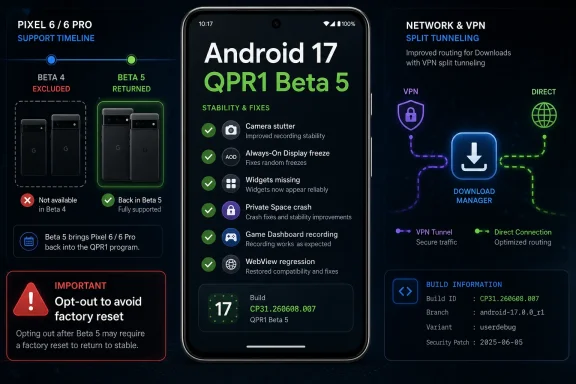
Google released Android 17 QPR1 Beta 5 on June 23, 2026, for eligible Pixel devices, with build CP31.260608.007, the June 2026 security patch, and a fix-heavy changelog aimed at stabilizing the first post-launch quarterly Android 17 update. This is not the kind of beta that sells itself with a marquee feature. It is the kind that tells you where the platform has been creaking.
That matters because QPR builds now sit in an awkward middle ground: more mature than old-school developer previews, but still risky enough to trap impatient Pixel owners on the wrong side of a factory reset. Beta 5 is useful, even reassuring, for testers already living on Android 17’s edge. For everyone else, it is another reminder that Google’s faster Android cadence has made version numbers less important than which branch your phone is actually running.
The headline bug fixes in Android 17 QPR1 Beta 5 read less like a list of exotic developer problems and more like a tour through everyday phone anxiety. The camera could stutter after waking from idle. The screen could freeze while coming out of Always-On Display, complete with a pixelated bottom bar. Widgets could disappear after rebooting.
None of those failures is obscure if the affected device is your daily driver. A camera that hesitates at launch is not merely a camera bug; it undermines the entire point of owning a Pixel. A lock screen that freezes after AOD is not merely a visual glitch; it makes the phone feel unreliable at the moment when users expect instant response.
That is why Beta 5 is more important than its lack of new features suggests. Late-cycle QPR builds are where Google stops marketing the platform and starts proving that it can withstand normal use. The fixes are small in isolation, but together they expose the broad surface area of Android’s modern complexity: launcher search, Private Space, Game Dashboard, Download Manager, VPN split tunneling, WebView rendering, archived apps, charging estimates, and widgets.
The interesting part is not that bugs exist in a beta. Betas have bugs by definition. The interesting part is how many of these bugs sit at the intersection of Android subsystems that Google has been expanding aggressively: privacy containers, game tooling, AI-era system surfaces, richer lock screens, and deeper app lifecycle controls.
That matters because the Pixel 6 generation still represents Google’s first Tensor-era promise. These were the phones that moved Pixel from Qualcomm reference-adjacent hardware into Google’s vertically controlled silicon story. When Pixel 6 and 6 Pro disappear from a beta, even temporarily, it is read by enthusiasts as more than a deployment quirk.
Google’s support commitments have grown longer and more prominent in recent years, but support is not only a calendar. It is also the quality of participation in the release train. A device can be technically supported and still feel like a second-class citizen if updates arrive late, features skip it, or beta access becomes unpredictable.
For Pixel 6 owners, Beta 5 is therefore both a fix and a signal. The fix is simple: the devices are back. The signal is more nuanced: older Tensor hardware remains part of the Android 17 QPR1 stabilization effort, but its place in that effort may require more caution than newer Pixel 8, Pixel 9, and Pixel 10 devices.
The AOD wake freeze points to another familiar tension. Lock screens are no longer static gateways. They are ambient displays, biometric prompts, notification surfaces, charging dashboards, smart home controls, and media panels. When that much state has to resume cleanly from a low-power mode, a pixelated bar at the bottom of the screen is not just cosmetic. It is a symptom of a rendering or composition path that failed at precisely the wrong time.
Private Space adds a different class of problem. Google fixed a crash in the Private Space interface and an issue where locked private apps could surface in launcher search. That second detail is the one administrators and security-minded users should notice. Privacy features do not merely need to hide data; they need to avoid leaking metadata in the ordinary convenience layers of the operating system.
This is the core lesson of Beta 5. Android’s newest features often fail not as standalone features, but where they touch older assumptions. Search assumes discoverability. Private Space assumes containment. Game Dashboard assumes capture controls. VPN split tunneling assumes routing exceptions. The bugs appear when those assumptions collide.
Gaming is also one of the places where Android’s fragmentation becomes most visible. Games lean heavily on graphics drivers, WebView components, Play services, storage, overlays, capture permissions, and network state. If any one of those layers regresses, the failure looks to the user like “my game froze,” even when the root cause is much deeper.
The Monopoly Go fix is a perfect example. A WebView rendering regression caused the game to freeze or crash when opening mini-games. That is narrow enough to sound almost comical, but WebView is one of Android’s most consequential shared components. When it breaks, it does not break in the abstract; it breaks inside banking apps, retail apps, games, identity flows, and embedded content panes.
Google’s ability to patch WebView independently has long been one of Android’s quiet strengths. But this bug is a reminder that shared components concentrate risk as well as maintenance benefits. A regression in a common rendering layer can travel farther than an app-specific defect ever could.
Download Manager is not glamorous, but it is infrastructure. If it times out under a split-tunnel configuration, the user may blame the app, the VPN provider, the carrier, the Wi-Fi network, or the device. In reality, the failure sits in the messy routing space between system services and network policy.
For enterprise IT, this is exactly the kind of bug that makes beta adoption difficult. The device might look stable in casual use, but then fail during a policy-shaped workflow that only appears in managed environments. A phone that works fine on a home network may behave differently once VPN exclusions, work profiles, private apps, and background restrictions enter the picture.
This is also where Android’s consumer-first update language can undersell the significance of a fix. “Download Manager timeout” is not a flashy release-note phrase. But for admins trying to keep mobile fleets predictable, it is the kind of plumbing defect that can generate help desk tickets for weeks.
The archived apps bubble bug sits in the same category of polish. Google removed a non-functional bubble option that appeared in the context menu of archived applications. This is not a catastrophic problem, but it is the sort of dead-end UI that makes a system feel unfinished. If a menu offers an action, the action should work, or it should not be there.
The inconsistent charging-time estimate fix is similarly mundane and similarly important. If the lock screen and charging screensaver disagree about when charging will complete, users lose confidence in both. Modern battery systems already involve adaptive charging, bypass modes, thermal management, charge limits, and health-preserving behavior. Conflicting estimates only make that complexity feel arbitrary.
Taken together, these fixes show Google sanding down the points where software behavior violates user expectation. Stability is not only about crashes. It is about whether the system keeps its promises from one screen to the next.
That is the part many enthusiasts still misunderstand. Android 17 stable and Android 17 QPR1 Beta are not the same destination with different labels. The QPR beta is the next quarterly branch, aimed at the later Feature Drop cycle. Once a phone is on that branch, moving backward to the public stable build is treated as a downgrade, and downgrades generally mean a factory reset.
This is not unique to Android 17, but the timing makes it easier to stumble into. Google’s stable Android 17 release and its first QPR testing cycle are close enough on the calendar that “latest update” can mean two different things. To an enthusiast, that is obvious. To a normal user enrolled months ago and tapping through OTA prompts, it is a trap.
Google has improved beta messaging over the years, but the branch model remains cognitively expensive. The safest rule is simple: if the phone is mission-critical and you care about preserving local data without drama, do not treat QPR beta OTAs as routine patches. They are previews of the next platform drop, not merely hotfixes for the stable release you already have.
That makes Android’s release model look more like a rolling platform than a traditional annual upgrade. The yearly Android release still matters for APIs, compatibility targets, and big behavior changes. But the user-facing experience now evolves through Pixel Drops, Play system components, app updates, AI service rollouts, and QPR branches that overlap with stable builds.
For developers, that means testing against the annual SDK is necessary but not sufficient. QPRs may not introduce app-impacting API changes in the formal sense, but they can affect app experience through rendering behavior, system UI changes, privacy surfaces, connectivity behavior, and device-specific fixes. A WebView regression that breaks a popular game is not an API change, but it is very much an app-impacting event.
For power users, the same shift changes the risk calculation. Installing a beta used to mean testing the next Android version. Now it may mean testing the next quarterly reality of the phone you already own. That is a subtler proposition, and arguably a more tempting one, because the branch sounds closer to stable than it really is.
Beta 5 lists a June 5, 2026 security patch level and Google Play services 26.18.35. Those details matter because they show how much of Android’s platform state is distributed across layers. A Pixel’s “version” is not a single number; it is a bundle of branch, build, patch level, services layer, and component updates.
This distributed model has advantages. Google can patch components faster, test features outside annual releases, and ship Pixel-specific improvements without waiting for a monolithic upgrade. It also gives enthusiasts more to test and developers more lead time before a Feature Drop lands broadly.
But there is a cost. The more granular the platform becomes, the harder it is for users to know whether they are accepting a security patch, a bug fix, a feature preview, or a branch migration. Google’s update UI has to carry more meaning than it used to, and users have to read more carefully than they would like.
But it also underlines a tension Google has not fully solved. The company wants Android to be continuously improving, especially on Pixel hardware, yet users still think in stable milestones. When those two realities overlap, the beta program becomes both a privilege and a footgun.
For WindowsForum readers, the parallel with Windows Insider rings familiar. Faster rings and preview channels can produce better software, but only when users understand what ring they are in, what branch they are testing, and how painful it will be to move backward. Google’s QPR program is now mature enough to deserve that same level of caution.
The next major checkpoint is the stable Feature Drop expected later in the cycle, when these fixes and whatever survives the QPR process should reach a broader audience. Until then, Beta 5 is best understood not as a shiny new Android 17 update, but as Google’s public repair log for the branch that will define Pixel’s next few months.
That matters because QPR builds now sit in an awkward middle ground: more mature than old-school developer previews, but still risky enough to trap impatient Pixel owners on the wrong side of a factory reset. Beta 5 is useful, even reassuring, for testers already living on Android 17’s edge. For everyone else, it is another reminder that Google’s faster Android cadence has made version numbers less important than which branch your phone is actually running.
 Google’s Latest Pixel Beta Is Really a Stability Audit
The headline bug fixes in Android 17 QPR1 Beta 5 read less like a list of exotic developer problems and more like a tour through everyday phone anxiety. The camera could stutter after waking from idle. The screen could freeze while coming out of Always-On Display, complete with a pixelated bottom bar. Widgets could disappear after rebooting.None of those failures is obscure if the affected device is your daily driver. A camera that hesitates at launch is not merely a camera bug; it undermines the entire point of owning a Pixel. A lock screen that freezes after AOD is not merely a visual glitch; it makes the phone feel unreliable at the moment when users expect instant response.
That is why Beta 5 is more important than its lack of new features suggests. Late-cycle QPR builds are where Google stops marketing the platform and starts proving that it can withstand normal use. The fixes are small in isolation, but together they expose the broad surface area of Android’s modern complexity: launcher search, Private Space, Game Dashboard, Download Manager, VPN split tunneling, WebView rendering, archived apps, charging estimates, and widgets.
The interesting part is not that bugs exist in a beta. Betas have bugs by definition. The interesting part is how many of these bugs sit at the intersection of Android subsystems that Google has been expanding aggressively: privacy containers, game tooling, AI-era system surfaces, richer lock screens, and deeper app lifecycle controls.
The Pixel 6 Return Is the Real Compatibility Story
The restoration of Pixel 6 and Pixel 6 Pro support is the symbolic win in this release. Beta 4 excluded those two devices, even as other eligible Pixels continued through the QPR1 track. Beta 5 brings them back into the fold, restoring the sense that Android 17 QPR1 remains a broad Pixel-family test rather than a newer-hardware-only exercise.That matters because the Pixel 6 generation still represents Google’s first Tensor-era promise. These were the phones that moved Pixel from Qualcomm reference-adjacent hardware into Google’s vertically controlled silicon story. When Pixel 6 and 6 Pro disappear from a beta, even temporarily, it is read by enthusiasts as more than a deployment quirk.
Google’s support commitments have grown longer and more prominent in recent years, but support is not only a calendar. It is also the quality of participation in the release train. A device can be technically supported and still feel like a second-class citizen if updates arrive late, features skip it, or beta access becomes unpredictable.
For Pixel 6 owners, Beta 5 is therefore both a fix and a signal. The fix is simple: the devices are back. The signal is more nuanced: older Tensor hardware remains part of the Android 17 QPR1 stabilization effort, but its place in that effort may require more caution than newer Pixel 8, Pixel 9, and Pixel 10 devices.
The Changelog Shows Android’s Hidden Fragility
The camera stutter fix will probably get the most attention because it touches one of Pixel’s flagship claims. Google’s camera pipeline is not just an app; it is a stack of sensor handling, computational photography, image processing, background services, and power-state transitions. A freeze after opening from idle suggests the kind of edge case that emerges when a phone tries to be both aggressively power-efficient and instantly ready.The AOD wake freeze points to another familiar tension. Lock screens are no longer static gateways. They are ambient displays, biometric prompts, notification surfaces, charging dashboards, smart home controls, and media panels. When that much state has to resume cleanly from a low-power mode, a pixelated bar at the bottom of the screen is not just cosmetic. It is a symptom of a rendering or composition path that failed at precisely the wrong time.
Private Space adds a different class of problem. Google fixed a crash in the Private Space interface and an issue where locked private apps could surface in launcher search. That second detail is the one administrators and security-minded users should notice. Privacy features do not merely need to hide data; they need to avoid leaking metadata in the ordinary convenience layers of the operating system.
This is the core lesson of Beta 5. Android’s newest features often fail not as standalone features, but where they touch older assumptions. Search assumes discoverability. Private Space assumes containment. Game Dashboard assumes capture controls. VPN split tunneling assumes routing exceptions. The bugs appear when those assumptions collide.
Game Dashboard and WebView Bugs Hit the Consumer Core
The Game Dashboard fixes are more than gamer niceties. Google says Beta 5 addresses a problem that prevented users from stopping screen recordings or saving video files, along with a system crash and device hang that could occur while downloading games. For a platform that increasingly treats mobile gaming as a mainstream workload, that kind of instability lands hard.Gaming is also one of the places where Android’s fragmentation becomes most visible. Games lean heavily on graphics drivers, WebView components, Play services, storage, overlays, capture permissions, and network state. If any one of those layers regresses, the failure looks to the user like “my game froze,” even when the root cause is much deeper.
The Monopoly Go fix is a perfect example. A WebView rendering regression caused the game to freeze or crash when opening mini-games. That is narrow enough to sound almost comical, but WebView is one of Android’s most consequential shared components. When it breaks, it does not break in the abstract; it breaks inside banking apps, retail apps, games, identity flows, and embedded content panes.
Google’s ability to patch WebView independently has long been one of Android’s quiet strengths. But this bug is a reminder that shared components concentrate risk as well as maintenance benefits. A regression in a common rendering layer can travel farther than an app-specific defect ever could.
VPN Split Tunneling Exposes the Enterprise Edge
One of the more interesting fixes involves Download Manager failing to complete downloads when excluded from an active VPN connection. That sounds niche until you remember how many managed and semi-managed Android environments now rely on split tunneling. Users and admins increasingly expect some traffic to flow through a VPN while other traffic bypasses it for performance, policy, or compatibility reasons.Download Manager is not glamorous, but it is infrastructure. If it times out under a split-tunnel configuration, the user may blame the app, the VPN provider, the carrier, the Wi-Fi network, or the device. In reality, the failure sits in the messy routing space between system services and network policy.
For enterprise IT, this is exactly the kind of bug that makes beta adoption difficult. The device might look stable in casual use, but then fail during a policy-shaped workflow that only appears in managed environments. A phone that works fine on a home network may behave differently once VPN exclusions, work profiles, private apps, and background restrictions enter the picture.
This is also where Android’s consumer-first update language can undersell the significance of a fix. “Download Manager timeout” is not a flashy release-note phrase. But for admins trying to keep mobile fleets predictable, it is the kind of plumbing defect that can generate help desk tickets for weeks.
Widgets, Archived Apps, and Charging Estimates Are About Trust
Beta 5 fixes a bug where home screen widgets could disappear or become unavailable in the widget picker after reboot. Widgets are an old Android feature, but they have taken on renewed importance as Google and app developers try to make home screens more glanceable and more personalized. When widgets vanish after a reboot, users do not experience that as a beta nuance. They experience it as the phone forgetting how they set it up.The archived apps bubble bug sits in the same category of polish. Google removed a non-functional bubble option that appeared in the context menu of archived applications. This is not a catastrophic problem, but it is the sort of dead-end UI that makes a system feel unfinished. If a menu offers an action, the action should work, or it should not be there.
The inconsistent charging-time estimate fix is similarly mundane and similarly important. If the lock screen and charging screensaver disagree about when charging will complete, users lose confidence in both. Modern battery systems already involve adaptive charging, bypass modes, thermal management, charge limits, and health-preserving behavior. Conflicting estimates only make that complexity feel arbitrary.
Taken together, these fixes show Google sanding down the points where software behavior violates user expectation. Stability is not only about crashes. It is about whether the system keeps its promises from one screen to the next.
The Opt-Out Trap Is Still the Most Practical Warning
The most consequential advice for ordinary users is not hidden in the bug list. It is the beta program warning: if you want to return to stable Android 17 without wiping your device, installation order matters. Users already in the beta program who want the public stable path should opt out at the right point and avoid applying a newer QPR beta that moves them beyond the stable branch.That is the part many enthusiasts still misunderstand. Android 17 stable and Android 17 QPR1 Beta are not the same destination with different labels. The QPR beta is the next quarterly branch, aimed at the later Feature Drop cycle. Once a phone is on that branch, moving backward to the public stable build is treated as a downgrade, and downgrades generally mean a factory reset.
This is not unique to Android 17, but the timing makes it easier to stumble into. Google’s stable Android 17 release and its first QPR testing cycle are close enough on the calendar that “latest update” can mean two different things. To an enthusiast, that is obvious. To a normal user enrolled months ago and tapping through OTA prompts, it is a trap.
Google has improved beta messaging over the years, but the branch model remains cognitively expensive. The safest rule is simple: if the phone is mission-critical and you care about preserving local data without drama, do not treat QPR beta OTAs as routine patches. They are previews of the next platform drop, not merely hotfixes for the stable release you already have.
QPRs Have Become Android’s Real Development Stage
Google describes QPRs as quarterly platform releases delivered to AOSP and Pixel devices as part of Feature Drops. In practice, they have become the place where Android’s post-launch identity takes shape. The major version number sets the baseline, but QPRs increasingly decide how the OS feels in the months after launch.That makes Android’s release model look more like a rolling platform than a traditional annual upgrade. The yearly Android release still matters for APIs, compatibility targets, and big behavior changes. But the user-facing experience now evolves through Pixel Drops, Play system components, app updates, AI service rollouts, and QPR branches that overlap with stable builds.
For developers, that means testing against the annual SDK is necessary but not sufficient. QPRs may not introduce app-impacting API changes in the formal sense, but they can affect app experience through rendering behavior, system UI changes, privacy surfaces, connectivity behavior, and device-specific fixes. A WebView regression that breaks a popular game is not an API change, but it is very much an app-impacting event.
For power users, the same shift changes the risk calculation. Installing a beta used to mean testing the next Android version. Now it may mean testing the next quarterly reality of the phone you already own. That is a subtler proposition, and arguably a more tempting one, because the branch sounds closer to stable than it really is.
Pixel Owners Are Becoming Release-Train Participants
Pixel users have always been closer to Android’s development process than most phone owners. The difference now is that Google’s cadence asks them to understand more of the machinery. Stable releases, QPR betas, Feature Drops, security patch levels, Play services versions, Play system updates, and app updates all arrive on overlapping schedules.Beta 5 lists a June 5, 2026 security patch level and Google Play services 26.18.35. Those details matter because they show how much of Android’s platform state is distributed across layers. A Pixel’s “version” is not a single number; it is a bundle of branch, build, patch level, services layer, and component updates.
This distributed model has advantages. Google can patch components faster, test features outside annual releases, and ship Pixel-specific improvements without waiting for a monolithic upgrade. It also gives enthusiasts more to test and developers more lead time before a Feature Drop lands broadly.
But there is a cost. The more granular the platform becomes, the harder it is for users to know whether they are accepting a security patch, a bug fix, a feature preview, or a branch migration. Google’s update UI has to carry more meaning than it used to, and users have to read more carefully than they would like.
The Beta 5 Fix List Tells Pixel Users Where to Be Careful
The practical story of Android 17 QPR1 Beta 5 is not that everyone should rush to install it. It is that anyone already on the QPR1 path should take it seriously, while anyone hoping to settle back onto stable Android 17 should slow down before tapping the OTA button. The release is useful, but it is still a beta branch with beta-branch consequences.- Android 17 QPR1 Beta 5 was released on June 23, 2026, with build CP31.260608.007 and the June 2026 security patch level.
- Pixel 6 and Pixel 6 Pro support has returned after those models were left out of the Beta 4 rollout.
- The most visible fixes target camera launch stutter, Always-On Display wake freezes, disappearing widgets, Private Space crashes, Game Dashboard recording failures, and WebView-related Monopoly Go crashes.
- The Download Manager fix matters for users and admins relying on VPN split tunneling, because routing-policy bugs often masquerade as app or network failures.
- Users who want to move from beta back to stable Android 17 without wiping data should avoid installing a newer QPR beta that places the device ahead of the stable branch.
- For daily-driver phones, stable Android 17 remains the safer choice unless the user is comfortable testing the September Feature Drop path.
Google’s Fast Cadence Needs Clearer Boundaries
Android 17 QPR1 Beta 5 is exactly the sort of release Google needs if it wants Pixel devices to feel polished by the time the next Feature Drop lands. It fixes real annoyances, restores confidence for Pixel 6 owners, and shows that late-cycle QPR testing is catching problems across the system rather than merely chasing cosmetic bugs. In that sense, the release is good news.But it also underlines a tension Google has not fully solved. The company wants Android to be continuously improving, especially on Pixel hardware, yet users still think in stable milestones. When those two realities overlap, the beta program becomes both a privilege and a footgun.
For WindowsForum readers, the parallel with Windows Insider rings familiar. Faster rings and preview channels can produce better software, but only when users understand what ring they are in, what branch they are testing, and how painful it will be to move backward. Google’s QPR program is now mature enough to deserve that same level of caution.
The next major checkpoint is the stable Feature Drop expected later in the cycle, when these fixes and whatever survives the QPR process should reach a broader audience. Until then, Beta 5 is best understood not as a shiny new Android 17 update, but as Google’s public repair log for the branch that will define Pixel’s next few months.
References
- Primary source: nokiapoweruser.com
Published: Wed, 24 Jun 2026 09:02:21 GMT
Android 17 QPR1 Beta 5 Arrives: Full Patch Notes & Pixel 6 Fixes - NPowerUser
Google drops Android 17 QPR1 Beta 5 for Pixel phones with massive bug fixes for the camera app, AOD, and Private Space UI. Here is what is new. - Read in Android News on NPowerUser nokiapoweruser.com
- Related coverage: androidcentral.com
Android 17 review: Bubbling with excitement | Android Central
With a new multitasking mode, even better customizability, and security tweaks, there's a lot to like in Android 17 today — with much more to come soon.www.androidcentral.com - Related coverage: developer.android.com
- Related coverage: techadvisor.com
Android 17 QPR1 Beta 1 Update Released For Pixel Phones - Tech Advisor
Android 17's first major update is being tested through a QPR1 beta release for Pixel phoneswww.techadvisor.com - Related coverage: phonearena.com
Android 17 QPR1 Beta 3 is here for Pixel 6 and newer models - PhoneArena
The latest Beta release for the June Pixel Feature Drop arrives.www.phonearena.com - Related coverage: betawiki.net
- Related coverage: developer.android.google.cn
版本说明 | Android Developers
最新 Android 17 QPR 1 build 的版本说明和已知问题。 developer.android.google.cn
- Related coverage: androidsage.com
Android 17 QPR1 Beta 2 Available for Google Pixel Devices
Google has released Android 17 QPR1 Beta 2 with critical bug fixes including F2FS data corruption, Bluetooth tethering resets, lock screen overlaps, and more. Here's a full breakdown of what's new and how to get it.www.androidsage.com - Related coverage: tomsguide.com
Android 17 officially rolls out to Pixel devices with new features — screen reactions, bubbles, gaming mode, and more | Tom's Guide
Google's massive June 2026 software drop delivers Android 17's productivity and security overhauls to Pixel devices, alongside new Wear OS 7 features.www.tomsguide.com - Related coverage: techradar.com
A new Android 17 beta has landed — and it brings an exciting Screen Reactions feature for social media creators | TechRadar
Record yourself and your screenwww.techradar.com
