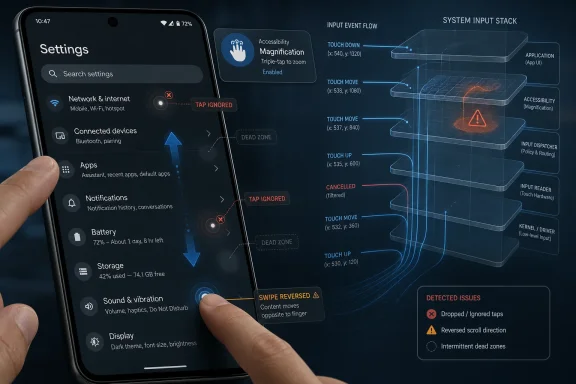
Google’s Android 17 update began reaching supported Pixel phones on June 16, 2026, and within days Pixel 7 through Pixel 10 owners were reporting touchscreen freezes, ignored taps, dead zones, and reversed scrolling, with Google acknowledging the issue but not yet shipping a permanent fix. The embarrassing part is not merely that a first-week bug exists; every platform has those. The problem is that this one attacks the most basic contract of a phone: when your finger moves, the device should understand it. For Pixel owners, Android 17’s first impression is becoming less about new features and more about whether the screen can be trusted.
Android 17 arrived as Google’s annual platform reset for Pixel devices, bundled into the June 2026 software wave and positioned as the stable release after months of beta testing. It was supposed to be the moment when Pixel owners moved from anticipation to adoption, especially because Google’s own phones are the reference hardware for Android’s newest code.
Instead, the earliest complaints have clustered around touch input. Users describe phones that briefly stop responding, taps that vanish into the void, scrolling gestures that go the wrong way, and touch zones that behave as if the display has forgotten where the finger is. This is not a cosmetic glitch hiding in a settings panel; it is the physical interface between the user and the operating system.
That distinction matters. A broken widget, a flaky modem handoff, or a missing shortcut can be annoying, but most users can route around it for a few days. A touchscreen issue turns the whole device into a negotiation. Every swipe becomes a test case, and every failed tap makes the “stable” label feel a little more contractual than descriptive.
The reports so far suggest a software-level regression rather than a single bad panel or a narrow manufacturing issue. Complaints have surfaced across multiple recent Pixel generations, including Pixel 7, Pixel 8, Pixel 9, and Pixel 10 families. The apparent breadth of affected devices is exactly what makes this more than an isolated support thread.
This is the trade that Pixel enthusiasts have long accepted. You get the new Android version first. You also absorb some of the risk that comes with being first. For power users, developers, and Android hobbyists, that can be part of the appeal.
But Google has spent years pushing Pixel beyond the enthusiast niche. The modern Pixel pitch is not “developer phone with a camera.” It is a mainstream flagship family, a workplace device, a camera-first consumer product, and increasingly an AI services showcase. A mainstream buyer does not experience a bad input bug as the cost of platform leadership. They experience it as a phone that suddenly became less usable after an official update.
That is why the touchscreen reports land harder than the usual early-rollout noise. Google owns both the software and the Pixel distribution channel. When a system-level bug appears across several generations of the company’s own hardware, the usual Android fragmentation excuses do not apply with much force.
Other users describe temporary freezes and ignored taps. Those symptoms may sound less exotic, but they are just as corrosive. A phone that occasionally stops listening teaches its owner to slow down, retry, and doubt every interaction. That is the opposite of what a mature mobile OS is supposed to do.
The uncertainty is part of the frustration. At this stage, public reporting is largely built on user reports, community responses, and Google’s apparent awareness of the issue rather than a detailed engineering postmortem. That means we should be careful not to overstate the cause. It may involve display refresh handling, launcher state, gesture navigation, driver-level behavior, or another system component entirely.
Still, users do not need root-cause analysis to know when the experience has crossed a line. Touch input is not an advanced feature. It is the keyboard, mouse, and monitor collapsed into one surface. When that surface becomes unreliable, everything above it becomes suspect.
Some users say clearing the launcher cache does not resolve the behavior. Others have reported mixed success toggling Smooth Display off and back on, which is interesting because it hints at a possible interaction between touch interpretation and refresh-rate behavior. But “interesting” is not the same as reliable, and a workaround that works for one phone and fails for another is not a fix.
This is where Google’s communication problem begins. If the company knows the issue exists but has not yet shipped a patch or a firm timeline, the user community fills the vacuum with rituals: clear this cache, reboot there, toggle this display option, try safe mode, wait for the next OTA. Some of those rituals may help. All of them impose the burden of experimentation on the owner.
For enthusiasts, that may be tolerable for a weekend. For ordinary users, it is absurd. A person who bought a Pixel for fast official updates should not have to become a field technician because a stable release is misreading swipes.
The difficulty is that a phased rollout only protects users if the signal is detected quickly and the brakes are used decisively. If enough affected devices have already updated, a bug that touches the input layer becomes a public support incident even if the percentage of affected users is relatively small. A low-frequency defect can still feel catastrophic when it interrupts every interaction.
There is also a perception gap. Users do not usually see the rollout machinery; they see an update notification that says the software is ready. Once they press install, they reasonably assume Google has decided the release is safe for their device class. If the update then breaks basic touch behavior, the distinction between “available to some users” and “fully rolled out” becomes academic.
For IT administrators managing Android fleets, the lesson is familiar from the Windows world: staged availability is useful, but deferral policy is still necessary. The first days of a major OS release are telemetry, not victory. That may be an uncomfortable truth for consumer devices, but it is standard operating procedure for managed endpoints.
Pixel phones are now important enough in workplaces that this is no longer just an Android enthusiast story. Many organizations allow personal or company-managed Pixels for email, messaging, authentication, and work-profile access. A touchscreen problem can interfere with multifactor prompts, secure apps, messaging workflows, and on-call tasks. It does not need to brick the phone to become an operational problem.
The work-profile angle is especially sensitive because Android 17 has reportedly attracted other early complaints, including widget and connectivity issues. Even if those problems are separate, they build the same narrative: the first stable release may not be the build administrators want to bless immediately. A consumer can gamble on a new OS for the novelty. A help desk cannot gamble on hundreds of users discovering that their phones scroll backward during a busy Monday.
This is where Google’s Pixel strategy meets enterprise reality. If Pixel is a premium reference device, its updates need to feel boringly dependable. If Android’s yearly platform release is also a feature showcase, Google must resist treating early adopters as unpaid QA after the “stable” switch has been flipped.
If the oldest supported Pixels are unaffected while newer generations are affected, the cause may be tied to display hardware paths, refresh-rate profiles, Tensor-era implementation differences, or configuration differences rather than Android 17’s core framework alone. If later evidence shows Pixel 6 devices are affected too, the case for a broader platform-level regression strengthens. Right now, the safest conclusion is that the issue appears multi-generational but not yet fully mapped.
That uncertainty should make users cautious, not complacent. The affected list is based on public reporting, and public reporting is noisy. People with broken phones post; people with unaffected phones usually do not. Conversely, some affected owners may not connect intermittent touch weirdness to the update immediately.
The correct posture is therefore neither panic nor dismissal. Pixel owners who rely on their phones for work should wait if they have not updated. Those already affected should document symptoms, try low-risk workarounds, and watch for Google’s official patch rather than assuming a factory reset is the only path.
But the narrative damage is harder to patch. The words “stable rollout” carry a promise, especially on first-party hardware. When the first-week conversation turns to ignored taps and reversed scrolling, the promise weakens. Users begin to ask whether the beta program tested the right things, whether Google’s internal dogfooding caught enough device combinations, and whether the company’s staged rollout reacted quickly enough once reports surfaced.
Google does not need to publish every engineering detail to rebuild confidence. It does need to communicate clearly when a basic interaction bug is acknowledged, what devices appear affected, what workarounds are genuinely recommended, and when users should expect a fix. Vague community replies are not enough when the symptom is so visible.
This is also a test of Pixel’s maturity. A platform can be judged not only by the absence of bugs but by the discipline of its response. The best update organizations are candid, fast, and boring. They do not make users hunt Reddit threads to decide whether a phone is safe to update.
If you have already updated and the touchscreen is misbehaving, the reported low-risk steps are worth trying: clear the Pixel Launcher cache, reboot, test safe mode, and experiment with Smooth Display only if you are comfortable changing display settings. But users should treat those as temporary mitigations, not confirmed cures. If the screen is unreliable across apps and system surfaces, the real fix almost certainly needs to come from Google.
The episode also reinforces a larger lesson about phones as infrastructure. Smartphones used to feel like personal gadgets with a work email app bolted on. Today they are identity devices, passkey carriers, MFA endpoints, cameras, wallets, navigation tools, and emergency communication systems. A touchscreen regression is therefore not a small UI bug. It is a reliability event.
The risk is that the issue lingers. Every day without a fix increases the chance that more users update into the problem, more support threads accumulate, and more cautious owners decide Pixel updates are something to delay by default. That would be a strange outcome for a brand built partly on timely software.
For Google, the stakes are bigger than one bug. Pixel is the clean-room Android experience, the device family where Google’s platform ambitions meet real pockets and real thumbs. If Android 17’s first stable impression is that a swipe may not mean what the user intended, Google has to do more than patch code. It has to reassert that the reference Android phone is still the safest place to receive Android first.
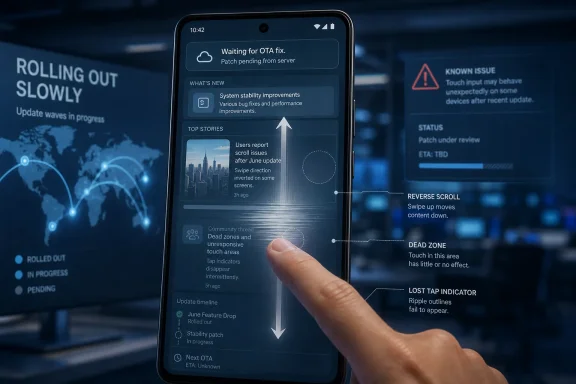 Android 17’s First Week Has Become a Touchscreen Story
Android 17 arrived as Google’s annual platform reset for Pixel devices, bundled into the June 2026 software wave and positioned as the stable release after months of beta testing. It was supposed to be the moment when Pixel owners moved from anticipation to adoption, especially because Google’s own phones are the reference hardware for Android’s newest code.Instead, the earliest complaints have clustered around touch input. Users describe phones that briefly stop responding, taps that vanish into the void, scrolling gestures that go the wrong way, and touch zones that behave as if the display has forgotten where the finger is. This is not a cosmetic glitch hiding in a settings panel; it is the physical interface between the user and the operating system.
That distinction matters. A broken widget, a flaky modem handoff, or a missing shortcut can be annoying, but most users can route around it for a few days. A touchscreen issue turns the whole device into a negotiation. Every swipe becomes a test case, and every failed tap makes the “stable” label feel a little more contractual than descriptive.
The reports so far suggest a software-level regression rather than a single bad panel or a narrow manufacturing issue. Complaints have surfaced across multiple recent Pixel generations, including Pixel 7, Pixel 8, Pixel 9, and Pixel 10 families. The apparent breadth of affected devices is exactly what makes this more than an isolated support thread.
The Pixel Promise Cuts Both Ways
Pixel phones occupy an unusual place in the Android ecosystem. They are not merely Google-branded handsets; they are the company’s public demonstration of what Android can be when the operating system vendor controls the update path, the integration priorities, and the hardware target list. That gives Pixel owners earlier access to major releases, but it also makes them the first large population to discover what the beta program missed.This is the trade that Pixel enthusiasts have long accepted. You get the new Android version first. You also absorb some of the risk that comes with being first. For power users, developers, and Android hobbyists, that can be part of the appeal.
But Google has spent years pushing Pixel beyond the enthusiast niche. The modern Pixel pitch is not “developer phone with a camera.” It is a mainstream flagship family, a workplace device, a camera-first consumer product, and increasingly an AI services showcase. A mainstream buyer does not experience a bad input bug as the cost of platform leadership. They experience it as a phone that suddenly became less usable after an official update.
That is why the touchscreen reports land harder than the usual early-rollout noise. Google owns both the software and the Pixel distribution channel. When a system-level bug appears across several generations of the company’s own hardware, the usual Android fragmentation excuses do not apply with much force.
A Bad Swipe Is Worse Than a Missing Feature
The most striking symptom being reported is reversed vertical scrolling. A user swipes in one direction, and the system behaves as though the gesture went the other way. If accurate and reproducible on affected devices, that points to something more unsettling than mere lag. It suggests the input stack, gesture interpretation layer, display refresh behavior, or some interaction among them is occasionally misclassifying intent.Other users describe temporary freezes and ignored taps. Those symptoms may sound less exotic, but they are just as corrosive. A phone that occasionally stops listening teaches its owner to slow down, retry, and doubt every interaction. That is the opposite of what a mature mobile OS is supposed to do.
The uncertainty is part of the frustration. At this stage, public reporting is largely built on user reports, community responses, and Google’s apparent awareness of the issue rather than a detailed engineering postmortem. That means we should be careful not to overstate the cause. It may involve display refresh handling, launcher state, gesture navigation, driver-level behavior, or another system component entirely.
Still, users do not need root-cause analysis to know when the experience has crossed a line. Touch input is not an advanced feature. It is the keyboard, mouse, and monitor collapsed into one surface. When that surface becomes unreliable, everything above it becomes suspect.
Google’s Temporary Fixes Have the Shape of Triage
Google’s early community-facing guidance reportedly includes clearing the Pixel Launcher cache, with safe mode also mentioned as a troubleshooting path. Those are familiar first-line support steps: low-risk, easy to communicate, and sometimes effective when the launcher, app state, or a third-party component is involved. They are also the kind of advice that can look thin when the bug appears across the system and across multiple device generations.Some users say clearing the launcher cache does not resolve the behavior. Others have reported mixed success toggling Smooth Display off and back on, which is interesting because it hints at a possible interaction between touch interpretation and refresh-rate behavior. But “interesting” is not the same as reliable, and a workaround that works for one phone and fails for another is not a fix.
This is where Google’s communication problem begins. If the company knows the issue exists but has not yet shipped a patch or a firm timeline, the user community fills the vacuum with rituals: clear this cache, reboot there, toggle this display option, try safe mode, wait for the next OTA. Some of those rituals may help. All of them impose the burden of experimentation on the owner.
For enthusiasts, that may be tolerable for a weekend. For ordinary users, it is absurd. A person who bought a Pixel for fast official updates should not have to become a field technician because a stable release is misreading swipes.
The Rollout Model Is Supposed to Contain This
Modern software rollouts are not supposed to be a single cliff edge. Google typically stages Pixel updates by device, carrier, and region, which gives the company room to detect problems before every eligible handset receives the update. In theory, that phased model is the safety valve.The difficulty is that a phased rollout only protects users if the signal is detected quickly and the brakes are used decisively. If enough affected devices have already updated, a bug that touches the input layer becomes a public support incident even if the percentage of affected users is relatively small. A low-frequency defect can still feel catastrophic when it interrupts every interaction.
There is also a perception gap. Users do not usually see the rollout machinery; they see an update notification that says the software is ready. Once they press install, they reasonably assume Google has decided the release is safe for their device class. If the update then breaks basic touch behavior, the distinction between “available to some users” and “fully rolled out” becomes academic.
For IT administrators managing Android fleets, the lesson is familiar from the Windows world: staged availability is useful, but deferral policy is still necessary. The first days of a major OS release are telemetry, not victory. That may be an uncomfortable truth for consumer devices, but it is standard operating procedure for managed endpoints.
Pixel Owners Are Learning a Windows Lesson the Hard Way
WindowsForum readers know this pattern. A major update ships, early adopters install it, edge-case bugs appear, and the practical advice becomes boring but correct: do not deploy broadly until the first wave has found the land mines. The platform changes, but the operational logic does not.Pixel phones are now important enough in workplaces that this is no longer just an Android enthusiast story. Many organizations allow personal or company-managed Pixels for email, messaging, authentication, and work-profile access. A touchscreen problem can interfere with multifactor prompts, secure apps, messaging workflows, and on-call tasks. It does not need to brick the phone to become an operational problem.
The work-profile angle is especially sensitive because Android 17 has reportedly attracted other early complaints, including widget and connectivity issues. Even if those problems are separate, they build the same narrative: the first stable release may not be the build administrators want to bless immediately. A consumer can gamble on a new OS for the novelty. A help desk cannot gamble on hundreds of users discovering that their phones scroll backward during a busy Monday.
This is where Google’s Pixel strategy meets enterprise reality. If Pixel is a premium reference device, its updates need to feel boringly dependable. If Android’s yearly platform release is also a feature showcase, Google must resist treating early adopters as unpaid QA after the “stable” switch has been flipped.
The Supported Device List Makes the Bug Harder to Dismiss
Android 17 is available for Pixel 6 and newer devices, but the touchscreen complaints highlighted so far appear concentrated across Pixel 7 through Pixel 10 families, with some reporting that Pixel 6 models have not shown the same pattern. That distribution may change as more users install the update, but it already complicates the story.If the oldest supported Pixels are unaffected while newer generations are affected, the cause may be tied to display hardware paths, refresh-rate profiles, Tensor-era implementation differences, or configuration differences rather than Android 17’s core framework alone. If later evidence shows Pixel 6 devices are affected too, the case for a broader platform-level regression strengthens. Right now, the safest conclusion is that the issue appears multi-generational but not yet fully mapped.
That uncertainty should make users cautious, not complacent. The affected list is based on public reporting, and public reporting is noisy. People with broken phones post; people with unaffected phones usually do not. Conversely, some affected owners may not connect intermittent touch weirdness to the update immediately.
The correct posture is therefore neither panic nor dismissal. Pixel owners who rely on their phones for work should wait if they have not updated. Those already affected should document symptoms, try low-risk workarounds, and watch for Google’s official patch rather than assuming a factory reset is the only path.
Google Needs a Patch, but It Also Needs a Better Narrative
A fast software fix would do the most to end this story. If Google can isolate the defect and push an OTA update quickly, many users will forget the episode by the time Android 17’s first maintenance release becomes the normal baseline. Mobile platforms survive bugs all the time.But the narrative damage is harder to patch. The words “stable rollout” carry a promise, especially on first-party hardware. When the first-week conversation turns to ignored taps and reversed scrolling, the promise weakens. Users begin to ask whether the beta program tested the right things, whether Google’s internal dogfooding caught enough device combinations, and whether the company’s staged rollout reacted quickly enough once reports surfaced.
Google does not need to publish every engineering detail to rebuild confidence. It does need to communicate clearly when a basic interaction bug is acknowledged, what devices appear affected, what workarounds are genuinely recommended, and when users should expect a fix. Vague community replies are not enough when the symptom is so visible.
This is also a test of Pixel’s maturity. A platform can be judged not only by the absence of bugs but by the discipline of its response. The best update organizations are candid, fast, and boring. They do not make users hunt Reddit threads to decide whether a phone is safe to update.
The Android 17 Launch Now Belongs to the Cautious
The practical advice is straightforward. If you have not installed Android 17 on a Pixel and your phone is important to work, travel, accessibility, or authentication, waiting for the first bug-fix update is the sensible move. The new features will still be there later.If you have already updated and the touchscreen is misbehaving, the reported low-risk steps are worth trying: clear the Pixel Launcher cache, reboot, test safe mode, and experiment with Smooth Display only if you are comfortable changing display settings. But users should treat those as temporary mitigations, not confirmed cures. If the screen is unreliable across apps and system surfaces, the real fix almost certainly needs to come from Google.
The episode also reinforces a larger lesson about phones as infrastructure. Smartphones used to feel like personal gadgets with a work email app bolted on. Today they are identity devices, passkey carriers, MFA endpoints, cameras, wallets, navigation tools, and emergency communication systems. A touchscreen regression is therefore not a small UI bug. It is a reliability event.
The First Patch Will Decide Whether This Becomes a Blip
Android 17 can still recover quickly. Early operating-system releases often develop a reputation in the first maintenance window, not the first week. If Google ships a targeted fix, explains the scope, and prevents recurrence in the next rollout, the touchscreen saga becomes a short-lived launch stumble.The risk is that the issue lingers. Every day without a fix increases the chance that more users update into the problem, more support threads accumulate, and more cautious owners decide Pixel updates are something to delay by default. That would be a strange outcome for a brand built partly on timely software.
For Google, the stakes are bigger than one bug. Pixel is the clean-room Android experience, the device family where Google’s platform ambitions meet real pockets and real thumbs. If Android 17’s first stable impression is that a swipe may not mean what the user intended, Google has to do more than patch code. It has to reassert that the reference Android phone is still the safest place to receive Android first.
The Pixel Update Button Now Comes With Fine Print
For now, the concrete read is simple, even if the underlying cause is not.- Android 17 began rolling out to supported Pixel phones on June 16, 2026, and touchscreen complaints appeared within the first week.
- Reported symptoms include brief freezes, ignored taps, dead zones, and vertical scrolling that appears to move in the opposite direction.
- Public reports point to Pixel 7, Pixel 8, Pixel 9, and Pixel 10 series devices, though the full affected-device scope remains uncertain.
- Google has reportedly acknowledged the issue, but a permanent patch or firm public timeline has not yet arrived.
- Clearing the Pixel Launcher cache, testing safe mode, or toggling Smooth Display may help some users, but none should be treated as a universal fix.
- Pixel owners who depend on their phones should consider delaying Android 17 until Google ships a dedicated bug-fix update.
References
- Primary source: Notebookcheck
Published: Mon, 22 Jun 2026 01:56:00 GMT
Android 17 update triggers freezing and scrolling issues on Pixel phones - Notebookcheck News
Pixel owners are reporting touchscreen problems following the update to Android 17, including brief freezes and reversed scrolling gestures. Google has acknowledged the issue but has not yet released a fix, leaving users with unreliable workarounds and recommendations to delay updating where... www.notebookcheck.net
- Independent coverage: Android Central
Published: Sun, 21 Jun 2026 11:44:55 GMT
Android 17 is off to a rough start with new Pixel touchscreen complaints | Android Central
Some Pixel users are reporting broken touch controls after updating to Android 17.www.androidcentral.com - Related coverage: techradar.com
7 of the best Android 17 features available now — from Bubbles to Screen Reactions | TechRadar
Expect new tools and upgraded abilitieswww.techradar.com - Official source: 9to5google.com
Android 17 June update rolling out with 38 Pixel fixes
The Android 17 update with the June 2026 security patch is rolling out today for the Pixel 10, 10 Pro, and 10a There are Pixel fixes across...9to5google.com - Related coverage: gizmochina.com
Stable Android 17 rolling out to Google Pixels: Check eligible devices, new features, and more - Gizmochina
Google rolls out stable Android 17 to Pixel devices. Discover new AI upgrades, Bubble bar enhancements, and see if your Pixel is eligible. www.gizmochina.com
- Related coverage: techcrunch.com
Android 17 launches with new multitasking tools as Google expands Gemini features | TechCrunch
Google has released Android 17 and Wear OS 7, introducing new multitasking features, parental controls, security tools, and smartwatch upgrades. The launch is also accompanied by a Pixel Drop that brings Google’s latest AI models to its devices.techcrunch.com
- Related coverage: phonearena.com
Android 17 just dropped for Pixel phones and Watch all at once - the biggest update of the year - PhoneArena
From real multitasking to better battery life, here is what landed today.www.phonearena.com - Related coverage: tomsguide.com
Android 17 officially rolls out to Pixel devices with new features — screen reactions, bubbles, gaming mode, and more | Tom's Guide
Google's massive June 2026 software drop delivers Android 17's productivity and security overhauls to Pixel devices, alongside new Wear OS 7 features.www.tomsguide.com - Related coverage: techtimes.com
Android 17 Update Lands on Pixel Today: Gemini Intelligence Skips Most Owners
Android 17 update is rolling out today to Pixel 6 through Pixel 10a devices, bringing App Bubbles, stronger privacy controls, and a redesigned location permission system. But Gemini Intelligence —www.techtimes.com - Related coverage: androidauthority.com
Android 17 stable is officially rolling out to Google Pixels, here's what's new!
Google launches Android 17 stable for Pixel 6 and newer, bringing App Bubbles, enhanced privacy controls, and security improvements.www.androidauthority.com - Related coverage: cincodias.elpais.com
Android 17 ya está aquí: esto es lo más importante que ofrece y los Pixel compatibles | Smartphones | Smartlife | Cinco Días
Ya ha comenzado el despliegue de esta iteración del sistema operativo de la firma de Mountain View para sus teléfonos Pixel.cincodias.elpais.com