

NASA’s Artemis II crew needed help from Mission Control on April 2, 2026, after Commander Reid Wiseman reported that his Surface Pro appeared to be running two broken instances of Microsoft Outlook during the mission’s early flight toward the Moon. The incident was not mission-threatening, and that is precisely why it matters. The most revealing technology failures are often not the spectacular ones, but the boring ones that survive every checklist and still make it into orbit. Artemis II reminded us that modern spaceflight is not just rockets, oxygen, and guidance software; it is also endpoint management, remote support, and the eternal mystery of why Outlook is open twice.
The clip that made the rounds was funny because it collapsed two worlds that are usually kept separate in our imagination. On one side was Artemis II, NASA’s first crewed lunar mission of the Artemis program and the first human voyage around the Moon since Apollo. On the other side was a work computer behaving like a work computer.
Wiseman’s reported complaint — that he had two Microsoft Outlooks and neither was working — sounded less like spaceflight audio than a Tuesday morning at a law firm, hospital, or city planning department. The detail that the device was reportedly a Microsoft Surface Pro only sharpened the comedy. A spacecraft headed for lunar distance was hosting the same kind of Microsoft 365-era confusion that fills corporate help desks on Earth.
But the easy punchline misses the more interesting point. The crew was not trying to hand-fly Orion with Outlook. The email issue was on a personal computing device, not the spacecraft’s core avionics. That separation is the reason the moment could be funny instead of alarming.
Still, “not mission-critical” does not mean “not operationally relevant.” Space missions are human systems, and human systems need documents, procedures, schedules, messages, task tracking, and coordination. A broken productivity app in space is still a broken productivity app in the middle of a tightly choreographed mission.
There are good reasons for that. Commodity devices are familiar, maintainable, and backed by vast ecosystems of accessories, management tools, and user knowledge. Astronauts are trained on specialized mission systems, but they are also professionals who need to read, write, coordinate, and reference information under time pressure. For many of those tasks, the best interface is not a glowing science-fiction panel. It is a tablet.
That is why the reported Surface Pro detail matters. The device represents the same trade-off every enterprise makes: use something specialized and expensive everywhere, or use commodity hardware where it is good enough and reserve custom engineering for the parts that truly demand it. NASA, like hospitals, airlines, militaries, factories, and banks, cannot build a unique computer for every mundane workflow.
The risk is that commodity software brings commodity failure modes with it. Outlook is not just an app; it is a dense bundle of identity, synchronization, cached data, profiles, add-ins, network assumptions, and user interface transitions between old and new Microsoft worlds. If it behaves strangely in an office, it may behave strangely in orbit too.
There is also a Windows-specific resonance here. Microsoft has spent years moving users through overlapping generations of Teams, Outlook, Edge, OneDrive, and Microsoft 365 experiences. The company’s cloud-first model often assumes persistent connectivity, fast authentication, and a user close enough to an admin that a broken profile is an annoyance rather than an operational detour.
Space is a brutal place to test those assumptions. Connectivity is constrained. Latency is real. Bandwidth is precious. Support windows are planned around mission operations rather than office hours. A trivial duplicate-instance problem becomes a reminder that software designed for ubiquitous terrestrial networks does not automatically become elegant when the network stretches toward the Moon.
That does not mean Microsoft failed Artemis II. It means the software stack we all use has become so universal that its problems now travel with us. If Windows and Outlook are part of the apparatus of modern work, then a lunar mission will include some modern work problems.
In space, remote support is not a convenience feature. It is part of the operational fabric. The crew’s time is scarce, their attention is divided, and troubleshooting a noncritical app is rarely the best use of a commander’s cognitive bandwidth. If Houston can fix the thing from the ground, Houston should fix the thing from the ground.
That turns an office help-desk ritual into an extension of mission control. The same broad idea behind remote monitoring of spacecraft systems applies at the endpoint layer: let specialists on the ground diagnose, intervene, and return the crew to the mission. The difference is that a spacecraft’s engineering channels are built for that world, while a Surface Pro running productivity software comes from a commercial ecosystem designed for conference rooms and airport lounges.
The episode also underscores a quiet dependency in modern operations. Remote management is only useful if the identity, connectivity, permissions, tooling, and procedural approvals are already in place. You do not improvise secure remote access to a spaceborne device casually. The fact that support could reportedly get in and resolve the issue suggests planning, not panic.
That makes them less glamorous than avionics but more intimate than almost anything else on board. A crew member may interact with a tablet more often than with many specialized spacecraft systems. The device becomes a bridge between NASA’s formal mission architecture and the ordinary cognitive habits of trained humans trying to get work done.
This is where enterprise IT and spaceflight unexpectedly rhyme. In both environments, the endpoint is where policy meets reality. The network architecture may be elegant, the security model may be documented, and the device image may have passed testing, but the user experiences the system through windows, prompts, stuck sync states, and half-open applications.
For administrators, that is a familiar lesson. The endpoint is never “just” an endpoint. It is the place where updates, identity, app packaging, certificates, cached credentials, local storage, and human impatience all meet. Artemis II merely placed that truth in a more photogenic setting.
For normal users, this can feel like software sprawl. An icon says Outlook, but which Outlook? A window opens, but is it the classic client, the new client, a web wrapper, a profile prompt, or a stuck session? The underlying explanation may be perfectly rational to the engineering team, but the user-facing experience can still collapse into “I have two Outlooks and neither works.”
That line will follow Microsoft around because it distills a decade of productivity software frustration into one sentence. Microsoft wants its cloud services to feel continuous across devices, platforms, and interfaces. Users often experience that continuity as ambiguity: two Teams, two OneDrives, two Outlooks, two account prompts, two places where the same thing appears to live.
In a lunar mission, ambiguity has a cost even when the app is not safety-critical. The crew should not have to spend precious time interpreting Microsoft’s product transition strategy. Software in operational environments should be boring in the best possible sense: predictable, legible, and consistent under stress.
The contrast is useful. A space toilet is a specialized piece of hardware operating in microgravity, where fluid behavior, airflow, containment, hygiene, and crew comfort all become engineering problems. Nobody expects it to behave like a household bathroom. Its failures feel exotic because the operating environment is exotic.
The Outlook problem feels mundane because the operating environment is familiar. Yet the mundane failure may be more predictive of the future. As missions become longer, more connected, more international, and more dependent on mixed commercial and government systems, crews will bring more ordinary digital infrastructure with them.
That means spaceflight will increasingly inherit the problems of Earth computing. Account states will desynchronize. Apps will hang. Interfaces will change. Update policies will need to be frozen, staged, or adapted to mission timelines. The further humans go, the more important it becomes to decide which parts of the software stack are allowed to behave like normal enterprise software and which must be treated as mission equipment.
Email is a classic example. Technically, a broken inbox may not stop a spacecraft, a factory line, or a hospital ward from functioning. Practically, email often carries instructions, approvals, attachments, calendar context, and human coordination. The system may be outside the safety boundary, yet still inside the operational rhythm.
That is why serious IT shops treat productivity software as part of resilience planning. They define offline access expectations. They control update timing. They test profile behavior. They document fallback communications. They make sure remote support is available without weakening the security model.
Artemis II dramatized that logic. The crew could continue the mission without Outlook, but the problem still deserved attention. Houston did not shrug because “it’s only email.” It appears to have treated the device as a managed operational endpoint, which is exactly the right instinct.
A Surface Pro running Outlook can contain communications, procedures, cached files, authentication tokens, and operational context. It can also become a source of distraction or a bridge into other systems if boundaries are poorly designed. The right answer is not paranoia; it is segmentation, least privilege, controlled tooling, and rehearsed support procedures.
This is where consumer instincts and enterprise instincts diverge. A home user wants remote support to be easy. An enterprise administrator wants it to be auditable, permissioned, scoped, and revocable. A space agency needs all of that, plus mission discipline.
The incident therefore lands as a small case study in endpoint governance. The device did not need to be sacred. It needed to be understood. The support path needed to be trusted before the problem occurred, because the middle of a lunar mission is not the time to invent a remote desktop policy.
The company’s defenders can reasonably say that one anecdote does not prove anything systemic. They would be right in a narrow sense. We do not know the full configuration of the device, the exact Outlook version, the account model, the network state, the management profile, or the underlying cause of the duplicate-instance behavior.
But reputation is not built in a narrow technical sense. It is built from repeated user experiences, and many users have spent years encountering Microsoft apps in overlapping, transitional states. The Artemis II clip went viral because it confirmed a feeling people already had: that even at the frontier of human exploration, someone is still wrestling with the same productivity stack that derails meetings on Earth.
That is the reputational trap for Microsoft. Its software is too important to dismiss and too familiar to romanticize. When it works, it disappears into the background. When it fails, the whole world recognizes the shape of the failure.
This is not an anti-cloud argument. Cloud services can improve resilience, collaboration, and manageability when the network model supports them. But the Artemis II Outlook moment is a reminder that software designed around constant service availability has to be rethought when constant availability is not guaranteed.
A lunar mission is an extreme case, but the pattern applies on Earth. Ships, aircraft, hospitals, emergency operations centers, military deployments, rural field offices, and industrial sites all face connectivity and support constraints. They all need software that degrades gracefully instead of turning a momentary failure into a maze of prompts and duplicate windows.
For Microsoft, and for every vendor selling into operational environments, the lesson is blunt: reliability is a feature users notice only after it fails. The more deeply software embeds itself in daily work, the less tolerance users have for ambiguity. There is no cosmic exemption for productivity apps.
Yet the boundary between flight software and work software is not the same as the boundary between important and unimportant. A crew’s productivity environment supports cognition, scheduling, documentation, and communication. Those functions matter because humans are part of the mission system.
The history of complex operations is full of small tools becoming essential because they reduce mental load. A checklist is not an engine, but it can save an engine. A calendar is not a life-support system, but it can help structure the work that keeps a mission orderly. A tablet is not a spacecraft, but it can be part of how the crew remains synchronized with the ground.
That is the mature reading of the incident. It was amusing, but it was not trivial. It showed a layered mission environment in which commercial software, managed endpoints, and remote support sit alongside world-class aerospace engineering.
Artemis II will be remembered for much more than a stuck email client, as it should be. But the Outlook moment deserves its small place in the mission’s public memory because it exposed the hidden continuity between Earthbound IT and human spaceflight. The future of exploration will still depend on engines, heat shields, navigation, and courage, but it will also depend on whether the tools humans use to organize their work can remain boring under pressure. If we are going back to the Moon to stay, the next giant leap will need fewer duplicate app windows.
 The Moon Mission Became an Office IT Ticket
The clip that made the rounds was funny because it collapsed two worlds that are usually kept separate in our imagination. On one side was Artemis II, NASA’s first crewed lunar mission of the Artemis program and the first human voyage around the Moon since Apollo. On the other side was a work computer behaving like a work computer.Wiseman’s reported complaint — that he had two Microsoft Outlooks and neither was working — sounded less like spaceflight audio than a Tuesday morning at a law firm, hospital, or city planning department. The detail that the device was reportedly a Microsoft Surface Pro only sharpened the comedy. A spacecraft headed for lunar distance was hosting the same kind of Microsoft 365-era confusion that fills corporate help desks on Earth.
But the easy punchline misses the more interesting point. The crew was not trying to hand-fly Orion with Outlook. The email issue was on a personal computing device, not the spacecraft’s core avionics. That separation is the reason the moment could be funny instead of alarming.
Still, “not mission-critical” does not mean “not operationally relevant.” Space missions are human systems, and human systems need documents, procedures, schedules, messages, task tracking, and coordination. A broken productivity app in space is still a broken productivity app in the middle of a tightly choreographed mission.
NASA Did Not Send Outlook to the Moon by Accident
It is tempting to treat Microsoft software in space as an absurdity, as if astronauts should be surrounded only by bespoke interfaces, hardened consoles, and blinking switches. That is a nostalgic view of spaceflight. The modern spacecraft is not a museum exhibit; it is a networked work environment with specialized systems at the center and commercial technology around the edges.There are good reasons for that. Commodity devices are familiar, maintainable, and backed by vast ecosystems of accessories, management tools, and user knowledge. Astronauts are trained on specialized mission systems, but they are also professionals who need to read, write, coordinate, and reference information under time pressure. For many of those tasks, the best interface is not a glowing science-fiction panel. It is a tablet.
That is why the reported Surface Pro detail matters. The device represents the same trade-off every enterprise makes: use something specialized and expensive everywhere, or use commodity hardware where it is good enough and reserve custom engineering for the parts that truly demand it. NASA, like hospitals, airlines, militaries, factories, and banks, cannot build a unique computer for every mundane workflow.
The risk is that commodity software brings commodity failure modes with it. Outlook is not just an app; it is a dense bundle of identity, synchronization, cached data, profiles, add-ins, network assumptions, and user interface transitions between old and new Microsoft worlds. If it behaves strangely in an office, it may behave strangely in orbit too.
The Funny Part Is Also the Serious Part
The viral framing writes itself: even astronauts cannot escape Microsoft Outlook. The joke works because Outlook has become a symbol of the modern workplace’s friction. It is indispensable, deeply integrated, frequently redesigned, and somehow always capable of producing a problem that sounds impossible until you see it on your own machine.There is also a Windows-specific resonance here. Microsoft has spent years moving users through overlapping generations of Teams, Outlook, Edge, OneDrive, and Microsoft 365 experiences. The company’s cloud-first model often assumes persistent connectivity, fast authentication, and a user close enough to an admin that a broken profile is an annoyance rather than an operational detour.
Space is a brutal place to test those assumptions. Connectivity is constrained. Latency is real. Bandwidth is precious. Support windows are planned around mission operations rather than office hours. A trivial duplicate-instance problem becomes a reminder that software designed for ubiquitous terrestrial networks does not automatically become elegant when the network stretches toward the Moon.
That does not mean Microsoft failed Artemis II. It means the software stack we all use has become so universal that its problems now travel with us. If Windows and Outlook are part of the apparatus of modern work, then a lunar mission will include some modern work problems.
Remote Support Is the Unsung Space Technology
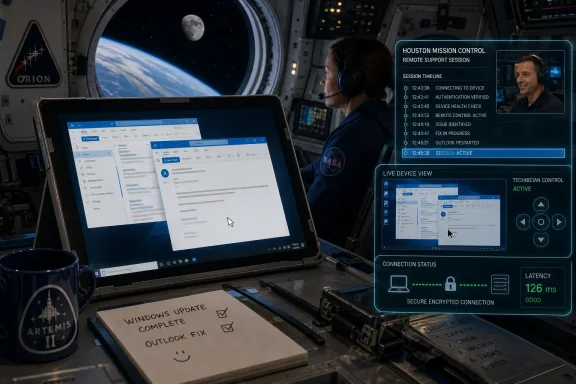
The most interesting part of the report is not that Outlook misbehaved. It is that the crew asked Houston to remote into the device, and ground support reportedly took control, fixed the issue, and got out. That is a familiar choreography to anyone who has ever watched an IT administrator open a remote support session, poke through a user’s environment, close a duplicate process, repair a profile, or restart an application.In space, remote support is not a convenience feature. It is part of the operational fabric. The crew’s time is scarce, their attention is divided, and troubleshooting a noncritical app is rarely the best use of a commander’s cognitive bandwidth. If Houston can fix the thing from the ground, Houston should fix the thing from the ground.
That turns an office help-desk ritual into an extension of mission control. The same broad idea behind remote monitoring of spacecraft systems applies at the endpoint layer: let specialists on the ground diagnose, intervene, and return the crew to the mission. The difference is that a spacecraft’s engineering channels are built for that world, while a Surface Pro running productivity software comes from a commercial ecosystem designed for conference rooms and airport lounges.
The episode also underscores a quiet dependency in modern operations. Remote management is only useful if the identity, connectivity, permissions, tooling, and procedural approvals are already in place. You do not improvise secure remote access to a spaceborne device casually. The fact that support could reportedly get in and resolve the issue suggests planning, not panic.
Personal Computing Devices Are Now Mission Furniture
The phrase personal computing device sounds bland, but it captures a major shift in crewed spaceflight. Tablets and laptops have become part of the furniture of complex operations. They carry checklists, reference material, messages, schedules, media, science tools, and personal communications.That makes them less glamorous than avionics but more intimate than almost anything else on board. A crew member may interact with a tablet more often than with many specialized spacecraft systems. The device becomes a bridge between NASA’s formal mission architecture and the ordinary cognitive habits of trained humans trying to get work done.
This is where enterprise IT and spaceflight unexpectedly rhyme. In both environments, the endpoint is where policy meets reality. The network architecture may be elegant, the security model may be documented, and the device image may have passed testing, but the user experiences the system through windows, prompts, stuck sync states, and half-open applications.
For administrators, that is a familiar lesson. The endpoint is never “just” an endpoint. It is the place where updates, identity, app packaging, certificates, cached credentials, local storage, and human impatience all meet. Artemis II merely placed that truth in a more photogenic setting.
Outlook Is a Symptom of Software Sprawl
The duplicate-Outlook detail is especially resonant because Microsoft’s productivity ecosystem has been living through an identity crisis of its own. Outlook exists as a classic Windows application, a newer web-based Outlook experience, mobile apps, web apps, Microsoft 365 integration points, and various shortcuts that may or may not behave like distinct applications depending on how they were launched and pinned.For normal users, this can feel like software sprawl. An icon says Outlook, but which Outlook? A window opens, but is it the classic client, the new client, a web wrapper, a profile prompt, or a stuck session? The underlying explanation may be perfectly rational to the engineering team, but the user-facing experience can still collapse into “I have two Outlooks and neither works.”
That line will follow Microsoft around because it distills a decade of productivity software frustration into one sentence. Microsoft wants its cloud services to feel continuous across devices, platforms, and interfaces. Users often experience that continuity as ambiguity: two Teams, two OneDrives, two Outlooks, two account prompts, two places where the same thing appears to live.
In a lunar mission, ambiguity has a cost even when the app is not safety-critical. The crew should not have to spend precious time interpreting Microsoft’s product transition strategy. Software in operational environments should be boring in the best possible sense: predictable, legible, and consistent under stress.
The Toilet Got the Headlines, but the Tablet Told the Future
The Outlook story arrived alongside another early Artemis II problem that was both more bodily and more obviously space-specific: the Orion toilet malfunction. NASA said the crew and ground teams worked through the issue, and later reporting indicated the lunar loo remained a point of operational attention during the mission. That problem was inherently tied to human spaceflight in a way no office worker needs explained.The contrast is useful. A space toilet is a specialized piece of hardware operating in microgravity, where fluid behavior, airflow, containment, hygiene, and crew comfort all become engineering problems. Nobody expects it to behave like a household bathroom. Its failures feel exotic because the operating environment is exotic.
The Outlook problem feels mundane because the operating environment is familiar. Yet the mundane failure may be more predictive of the future. As missions become longer, more connected, more international, and more dependent on mixed commercial and government systems, crews will bring more ordinary digital infrastructure with them.
That means spaceflight will increasingly inherit the problems of Earth computing. Account states will desynchronize. Apps will hang. Interfaces will change. Update policies will need to be frozen, staged, or adapted to mission timelines. The further humans go, the more important it becomes to decide which parts of the software stack are allowed to behave like normal enterprise software and which must be treated as mission equipment.
The Enterprise Lesson Is Hiding in Plain Sight
For WindowsForum readers, the episode is less a reason to dunk on Outlook than a reason to think about operational tiering. Every organization has systems that are mission-critical, systems that are important, and systems that are merely convenient. The trick is that users do not always experience those categories cleanly.Email is a classic example. Technically, a broken inbox may not stop a spacecraft, a factory line, or a hospital ward from functioning. Practically, email often carries instructions, approvals, attachments, calendar context, and human coordination. The system may be outside the safety boundary, yet still inside the operational rhythm.
That is why serious IT shops treat productivity software as part of resilience planning. They define offline access expectations. They control update timing. They test profile behavior. They document fallback communications. They make sure remote support is available without weakening the security model.
Artemis II dramatized that logic. The crew could continue the mission without Outlook, but the problem still deserved attention. Houston did not shrug because “it’s only email.” It appears to have treated the device as a managed operational endpoint, which is exactly the right instinct.
Security Cannot Be an Afterthought Just Because the Problem Is Boring
Remote access to any device in a sensitive environment raises security questions. Remote access to a device in a spacecraft makes those questions more vivid, even if the device is not controlling flight systems. The more ordinary the endpoint looks, the easier it is to forget that it sits inside an extraordinary operational context.A Surface Pro running Outlook can contain communications, procedures, cached files, authentication tokens, and operational context. It can also become a source of distraction or a bridge into other systems if boundaries are poorly designed. The right answer is not paranoia; it is segmentation, least privilege, controlled tooling, and rehearsed support procedures.
This is where consumer instincts and enterprise instincts diverge. A home user wants remote support to be easy. An enterprise administrator wants it to be auditable, permissioned, scoped, and revocable. A space agency needs all of that, plus mission discipline.
The incident therefore lands as a small case study in endpoint governance. The device did not need to be sacred. It needed to be understood. The support path needed to be trusted before the problem occurred, because the middle of a lunar mission is not the time to invent a remote desktop policy.
Microsoft’s Reputation Problem Reaches Escape Velocity
Microsoft is not uniquely guilty of software weirdness, but it is uniquely exposed to this kind of joke because its software is everywhere work happens. Nobody writes viral posts about obscure calendar clients failing in space. Outlook is funny because Outlook is universal, and universality turns every glitch into a cultural event.The company’s defenders can reasonably say that one anecdote does not prove anything systemic. They would be right in a narrow sense. We do not know the full configuration of the device, the exact Outlook version, the account model, the network state, the management profile, or the underlying cause of the duplicate-instance behavior.
But reputation is not built in a narrow technical sense. It is built from repeated user experiences, and many users have spent years encountering Microsoft apps in overlapping, transitional states. The Artemis II clip went viral because it confirmed a feeling people already had: that even at the frontier of human exploration, someone is still wrestling with the same productivity stack that derails meetings on Earth.
That is the reputational trap for Microsoft. Its software is too important to dismiss and too familiar to romanticize. When it works, it disappears into the background. When it fails, the whole world recognizes the shape of the failure.
Spaceflight Makes the Case for Boring Software
The best software for a mission is not necessarily the most advanced. It is the software that behaves predictably within known constraints. That may mean older interfaces, frozen versions, stripped-down configurations, limited add-ins, local caching, and fewer cloud dependencies than the vendor would prefer.This is not an anti-cloud argument. Cloud services can improve resilience, collaboration, and manageability when the network model supports them. But the Artemis II Outlook moment is a reminder that software designed around constant service availability has to be rethought when constant availability is not guaranteed.
A lunar mission is an extreme case, but the pattern applies on Earth. Ships, aircraft, hospitals, emergency operations centers, military deployments, rural field offices, and industrial sites all face connectivity and support constraints. They all need software that degrades gracefully instead of turning a momentary failure into a maze of prompts and duplicate windows.
For Microsoft, and for every vendor selling into operational environments, the lesson is blunt: reliability is a feature users notice only after it fails. The more deeply software embeds itself in daily work, the less tolerance users have for ambiguity. There is no cosmic exemption for productivity apps.
The Real Boundary Is Between Flight Software and Work Software
NASA’s architecture almost certainly separates the spacecraft systems that matter for flight from the personal devices used for crew productivity. That distinction should be central to how the story is understood. A broken Outlook window is not a broken Orion.Yet the boundary between flight software and work software is not the same as the boundary between important and unimportant. A crew’s productivity environment supports cognition, scheduling, documentation, and communication. Those functions matter because humans are part of the mission system.
The history of complex operations is full of small tools becoming essential because they reduce mental load. A checklist is not an engine, but it can save an engine. A calendar is not a life-support system, but it can help structure the work that keeps a mission orderly. A tablet is not a spacecraft, but it can be part of how the crew remains synchronized with the ground.
That is the mature reading of the incident. It was amusing, but it was not trivial. It showed a layered mission environment in which commercial software, managed endpoints, and remote support sit alongside world-class aerospace engineering.
The Clip Was a Meme, but the Checklist Is Real
The practical lessons from Artemis II’s Outlook detour are not exotic. They are the same lessons IT pros already know, made more visible by the setting. The Moon did not create the problem; it merely raised the stakes around the support model.- Organizations should classify productivity apps by operational dependency, not by whether they are formally mission-critical.
- Remote support paths should be tested before high-pressure operations begin, because improvising access during an incident creates both delay and risk.
- Endpoint configurations for constrained environments should favor stable versions, predictable interfaces, and minimal overlapping app experiences.
- Cloud-connected software should have documented degraded modes for latency, intermittent connectivity, and authentication failures.
- Users should not be expected to diagnose vendor product transitions when they are performing time-sensitive work.
- The funniest IT incidents are often the ones that reveal the most about how real systems are actually used.
Artemis II will be remembered for much more than a stuck email client, as it should be. But the Outlook moment deserves its small place in the mission’s public memory because it exposed the hidden continuity between Earthbound IT and human spaceflight. The future of exploration will still depend on engines, heat shields, navigation, and courage, but it will also depend on whether the tools humans use to organize their work can remain boring under pressure. If we are going back to the Moon to stay, the next giant leap will need fewer duplicate app windows.
References
- Primary source: Mashable
Published: 2026-06-14T09:52:23.194502
Artemis II astronauts are also having Microsoft Outlook issues | Mashable
If you've ever experienced problems with Microsoft Outlook, just know that you're in the same boat as a literal astronaut.mashable.com - Related coverage: nasa.gov
Artemis II Flight Update: Crew and Ground Teams Successfully Troubleshoot Orion’s Toilet - NASA
The Artemis II crew, working closely with mission control in Houston, were able to restore the Orion spacecraft’s toilet to normal operations following thewww.nasa.gov - Related coverage: windowscentral.com
Microsoft's buggy apps reach deep space — "I have two Microsoft Outlooks and neither one of those is working," says Artemis II commander | Windows Central
Commander Reid Wiseman reported a frustratingly familiar software glitch on his Surface Pro during the first crewed lunar mission in over 50 years.www.windowscentral.com - Related coverage: tomshardware.com
Artemis II astronaut finds two Outlook instances running on computers, calls on Houston to fix Microsoft anomaly — puzzled caller describes ‘two Outlooks, and neither one of those are working’ | Tom's Hardware
Meanwhile, we are happy to learn that the toilet urine extractor fan has been fixed.www.tomshardware.com - Related coverage: scientificamerican.com
NASA’s Artemis II was a major success—so why couldn’t the crew flush the toilet? | Scientific American
The space environment—microgravity, extreme temperatures and more—make it near-impossible to truly test a space toilet like Artemis II's ahead of launch, experts saywww.scientificamerican.com - Related coverage: space.com
The Artemis 2 space toilet is actually working fine. But there is another problem | Space
The Artemis 2 astronauts continue having issues with their lunar loo. But the problem isn't with the toilet itself, NASA officials say.www.space.com
- Related coverage: foro3d.com
NASA Fixes Outlook Issue on Artemis II Surface Pro
NASA remotely resolved an Outlook issue on the Artemis II commander's Surface Pro tablet during the trip to the Moon, highlighting the challenges of using commercial technology in space.foro3d.com - Related coverage: tmz.com
Artemis II Flight Endures Toilet Problem Hours After Takeoff
The astronauts on the Artemis II mission experienced some potty troubles just hours after takeoff Wednesday ... forcing them to hold number 1 or use a backup system until the issue was fixed.www.tmz.com - Related coverage: nbcchicago.com
- Related coverage: m.kuow.org
KUOW - Toilet's fixed, but Artemis II astronauts now have Microsoft Outlook problem
NASA's moonbound astronauts aboard Artemis II have their toilet functioning again, but now they're stuck with an equally annoying but perhaps less urgent issue: They can't open their email.m.kuow.org - Related coverage: astronomy.com
Artemis 2 crew fixes toilet, can now pee in it
Artemis 2's toilet was out of commission for the mission's first six hours but was successfully fixed — to the relief of the crew.www.astronomy.com - Related coverage: techspot.com
Humanity returns to the Moon, but Outlook still doesn't work | TechSpot
A clip from NASA's livestream quickly circulated on social media, capturing the moment astronauts flagged the problem. The glitch added an unexpectedly relatable note to an otherwise...www.techspot.com - Related coverage: techradar.com
'I have two Microsoft Outlooks and neither one is working': Artemis II astronauts have the most relatable complaint | TechRadar
Ground control to Major Redmondwww.techradar.com - Related coverage: axios.com
Hydrogen fuel leak pushes NASA's Artemis II launch - Axios Huntsville
Artemis II is now set for launch no earlier than March.www.axios.com
- Related coverage: lemonde.fr
Artemis II: The historic mission in photos, from liftoff to splashdown
Nine days, one hour, 32 minutes and 15 seconds after their launch from Cape Canaveral, the four crew members of Artemis II splashed down about 85 kilometers off the coast of California, near San Diego. A look back in pictures at a historic mission, from launch to splashdown.www.lemonde.fr - Related coverage: phys.org
