

Azure Blueprints estates that still need new assignments, policy changes, role changes, or template revisions should be migrated to supported infrastructure-as-code and deployment processes before October 31, 2026. After that date, existing Blueprint definitions cannot be modified and new Blueprint assignments cannot be created. January 31, 2027 is the final retirement date, when Azure Blueprints API, portal, CLI, and PowerShell access are removed.
Start with this migration order:
WindowsForum’s reporting on the Azure AD Graph API retirement and Azure FXT Edge Filer retirement points to the same operating rule: map live dependencies and ownership before replacing a retiring Azure control plane. For Blueprints, assignment inventory—not the number of definitions alone—should determine migration priority.
Microsoft’s phased Azure Blueprints retirement begins July 31, 2026. After that date, new Blueprint definitions and versions cannot be created.
This does not mean Microsoft requires every Blueprint migration to be complete by July 31. However, WindowsForum recommends completing discovery, record preservation, and a clean migration baseline before that date. That recommendation gives teams time to capture the estate while definitions and versions can still be created, reviewed, and compared.
Use the period before July 31 to establish what the Blueprint estate actually contains:
In the Azure portal, use the top search box to open Blueprint definitions. Review each definition, its published versions, artifacts, and the assignments associated with subscriptions using it. Record the definition name, version, assignment name, subscription, parameters, artifact purpose, technical owner, and any managed identity or access dependencies that matter to the deployment.
The portal review is useful for discovery, but simply opening definitions and assignments does not create an archival export. Before relying on any portal, CLI, PowerShell, or REST-based preservation method, confirm the exact supported export or retrieval procedure in current Microsoft documentation and test it against a nonproduction Blueprint. Azure Blueprints is retiring, so teams should not build a preservation plan around unverified command syntax, undocumented API versions, or assumptions about portal behavior.
For each active assignment, capture enough information to answer these questions later:
Use a nonproduction subscription or resource group to validate the converted content. Confirm that the deployment produces the intended resources and that policy and RBAC outcomes match the approved target design. For governance artifacts, inspect the effective state after deployment rather than treating a successful deployment result as proof that the intended controls are operating.
A migration register should identify the authoritative system after cutover. If a policy assignment is delivered through Bicep, record the repository and deployment process. If an RBAC baseline is managed through a pipeline, record the repository, approval path, branch protection, and deployment identity. Do not leave Azure Blueprints and the replacement process as competing sources of truth for the same governance requirement.
For every migration wave, retain the identifier that ties the deployed configuration back to its approved source. Depending on the organization’s process, that may be a repository commit, release tag, pipeline run, approved change record, or template version identifier.
Deployment Stacks should be evaluated when a team needs the capabilities Microsoft provides through that service for managing a deployment as a stack. The precise lifecycle and access-control choices need design and testing; they should not be copied from a Blueprint-era implementation without review.
In particular, do not enable deny-related settings or choose lifecycle actions based solely on a sample configuration. Platform administrators, security teams, deployment identities, workload owners, and incident-response teams should validate how the selected controls affect ordinary operations, emergency access, remediation, and future changes. The correct design depends on the organization’s access model and operating requirements.
A successful cutover has four concrete checks:
WindowsForum recommends using August and September for conversion, pilot deployments, validation, and migration waves. Reserve October for exceptions and cutover contingency—not for the first test of a replacement process. That is editorial operational guidance, not an additional Microsoft retirement requirement.
January 31, 2027 remains the final service-retirement endpoint. Archives and retention records should be complete well before then, particularly for Blueprints that may be needed for audit, incident review, or reconstruction of earlier governance decisions.
Azure Blueprints retirement is an opportunity to move governance intent into reviewed infrastructure code and a tested deployment process. The organizations best positioned for the change will be those that can identify every active assignment, name the owner of each replacement, preserve the records they need, and demonstrate how the new deployment path behaves before October 31, 2026.
Start with this migration order:
- Inventory Blueprint assignments and their owners.
- Export or otherwise preserve the records required for audit and recovery.
- Classify each Blueprint as active, archive-only, or obsolete.
- Convert and test active estates in a nonproduction scope.
- Cut over active deployments before October 31, 2026.
- Archive records and retire the remaining Blueprint estate before January 31, 2027.
WindowsForum’s reporting on the Azure AD Graph API retirement and Azure FXT Edge Filer retirement points to the same operating rule: map live dependencies and ownership before replacing a retiring Azure control plane. For Blueprints, assignment inventory—not the number of definitions alone—should determine migration priority.
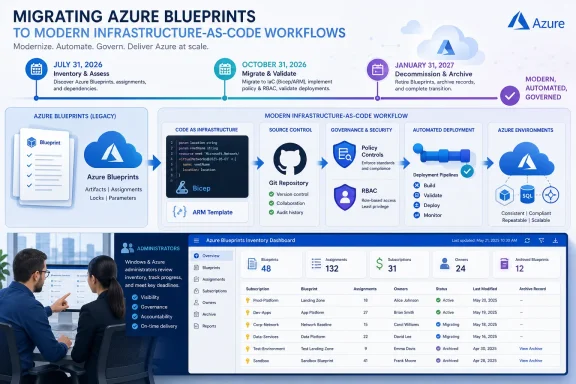 The Dates That Matter and the Work to Do Before Them
Microsoft’s phased Azure Blueprints retirement begins July 31, 2026. After that date, new Blueprint definitions and versions cannot be created.This does not mean Microsoft requires every Blueprint migration to be complete by July 31. However, WindowsForum recommends completing discovery, record preservation, and a clean migration baseline before that date. That recommendation gives teams time to capture the estate while definitions and versions can still be created, reviewed, and compared.
Use the period before July 31 to establish what the Blueprint estate actually contains:
- Identify definitions, published versions, assignments, owners, and dependent subscriptions.
- Preserve the definitions, versions, parameters, and assignment records required by security, audit, and records policies.
- Decide whether each assignment needs an active replacement or only an archive record.
- Convert active governance intent into ARM templates or Bicep modules.
- Establish an approved source of truth, such as a controlled Git repository or another organization-approved template distribution process.
- Test the replacement deployment pattern before production cutover.
Migration Decision Table
| Estate condition | Action | Replacement approach | Evidence to retain | Target date |
|---|---|---|---|---|
| Active subscription onboarding, policy, RBAC, or landing-zone deployment | Convert, test, and cut over | Versioned ARM or Bicep content with an approved deployment process; evaluate Deployment Stacks where appropriate | Blueprint records, assignment details, test evidence, cutover approval | Before October 31, 2026 |
| Active but low-volume or noncritical deployment | Move in a later wave after a pilot | Versioned ARM or Bicep, with operational controls suited to the workload | Export or preservation package, owner, dependency record, validation evidence | Before October 31, 2026 |
| Static historical or audit-only Blueprint | Preserve and archive | No active replacement unless future reuse is approved | Definition, versions, assignments, parameters, ownership, and retention classification | Before January 31, 2027; preferably before July 31 |
| Obsolete Blueprint | Preserve only what policy requires, then retire | None | Required archive record and retirement decision | Before January 31, 2027 |
Find and Preserve the Existing Blueprint Estate
Use the Azure portal for inventory and review, not as a substitute for an export process.In the Azure portal, use the top search box to open Blueprint definitions. Review each definition, its published versions, artifacts, and the assignments associated with subscriptions using it. Record the definition name, version, assignment name, subscription, parameters, artifact purpose, technical owner, and any managed identity or access dependencies that matter to the deployment.
The portal review is useful for discovery, but simply opening definitions and assignments does not create an archival export. Before relying on any portal, CLI, PowerShell, or REST-based preservation method, confirm the exact supported export or retrieval procedure in current Microsoft documentation and test it against a nonproduction Blueprint. Azure Blueprints is retiring, so teams should not build a preservation plan around unverified command syntax, undocumented API versions, or assumptions about portal behavior.
For each active assignment, capture enough information to answer these questions later:
- Which subscription or management scope uses it?
- Which Blueprint version was assigned?
- Which parameters were supplied at assignment time?
- Which artifacts create resources, assign policy, or establish RBAC?
- Who owns the intended outcome after Blueprints is retired?
- Is the assignment still used for new subscriptions or future changes?
- What is the authoritative replacement after cutover?
Convert Blueprints Into Deployable Infrastructure Code
A preserved Blueprint record is a migration input, not a ready-made replacement deployment. Break each Blueprint into functional parts and assign an owner to each part:- ARM templates or Bicep modules for resource deployment.
- Policy definitions, initiatives, and policy assignments.
- Role definitions or role assignments.
- Parameters, naming conventions, tags, and location rules.
- Governance requirements that require separate operational or security review.
Code:
landing-zone-baseline/
  main.bicep
  modules/
    policy.bicep
    rbac.bicep
    networking.bicep
  parameters/
    production.bicepparam
    nonproduction.bicepparam
README.mdA migration register should identify the authoritative system after cutover. If a policy assignment is delivered through Bicep, record the repository and deployment process. If an RBAC baseline is managed through a pipeline, record the repository, approval path, branch protection, and deployment identity. Do not leave Azure Blueprints and the replacement process as competing sources of truth for the same governance requirement.
Choose a Source and Deployment Process
Template Specs can be evaluated where the organization wants Azure-hosted template artifacts. Git repositories can be evaluated where the primary control model is pull requests, automated validation, release approvals, and deployment pipelines. The important requirement is not a particular product choice; it is a documented source of truth, named ownership, and a repeatable release process.For every migration wave, retain the identifier that ties the deployed configuration back to its approved source. Depending on the organization’s process, that may be a repository commit, release tag, pipeline run, approved change record, or template version identifier.
Deployment Stacks should be evaluated when a team needs the capabilities Microsoft provides through that service for managing a deployment as a stack. The precise lifecycle and access-control choices need design and testing; they should not be copied from a Blueprint-era implementation without review.
In particular, do not enable deny-related settings or choose lifecycle actions based solely on a sample configuration. Platform administrators, security teams, deployment identities, workload owners, and incident-response teams should validate how the selected controls affect ordinary operations, emergency access, remediation, and future changes. The correct design depends on the organization’s access model and operating requirements.
Test the Replacement Before Production Cutover
A pilot should use converted content in a nonproduction environment that resembles the intended target scope. The pilot is where teams discover whether a Blueprint artifact was actually enforcing a policy, establishing access, deploying a resource dependency, or simply documenting an expectation.A successful cutover has four concrete checks:
- The new ARM or Bicep source is reviewed, retained, and reproducible.
- The approved deployment process produces the intended resource collection in the pilot environment.
- Policy and RBAC outcomes are validated at the target scope.
- The Blueprint assignment is no longer treated as the authoritative mechanism for future changes.
Keep the October Deadline Operationally Visible
October 31, 2026 is the date to plan around because existing Blueprint definitions become unchangeable and new assignments cannot be created. Teams that discover an overlooked onboarding pattern after that point cannot simply update the Blueprint and continue operating as before.WindowsForum recommends using August and September for conversion, pilot deployments, validation, and migration waves. Reserve October for exceptions and cutover contingency—not for the first test of a replacement process. That is editorial operational guidance, not an additional Microsoft retirement requirement.
January 31, 2027 remains the final service-retirement endpoint. Archives and retention records should be complete well before then, particularly for Blueprints that may be needed for audit, incident review, or reconstruction of earlier governance decisions.
Frequently Asked Questions
Should every Azure Blueprint be migrated to Deployment Stacks?
No. Migrate Blueprints that still support active deployments, governance, onboarding, or future changes. Preserve and archive static or obsolete definitions when there is no business case to recreate their behavior. Evaluate Deployment Stacks only where their capabilities fit the replacement design.Can Template Specs replace Azure Blueprints by themselves?
Not necessarily. A template artifact can support distribution of infrastructure definitions, but an Azure Blueprint may also have represented policy, RBAC, assignment parameters, operational ownership, and deployment governance. Assess those functions separately during migration.What must be completed by July 31, 2026?
After July 31, new Blueprint definitions and versions cannot be created. WindowsForum recommends completing discovery, record preservation, and the migration baseline before that date, but the recommendation is distinct from Microsoft’s documented retirement milestone.Why is October 31 more urgent than January 31?
October 31 is when existing Blueprint definitions can no longer be modified and new assignments can no longer be created. January 31 is the final service-retirement endpoint, but October is when Blueprints stop being workable for ongoing deployment operations.Azure Blueprints retirement is an opportunity to move governance intent into reviewed infrastructure code and a tested deployment process. The organizations best positioned for the change will be those that can identify every active assignment, name the owner of each replacement, preserve the records they need, and demonstrate how the new deployment path behaves before October 31, 2026.
References
- Primary source: learn.microsoft.com
Azure Blueprints retirement - Azure Blueprints | Microsoft Learn
Learn when Azure Blueprints is retired, the phased retirement timeline, what changes in each phase, and how to migrate to Azure Deployment Stacks and template specs.learn.microsoft.com - Primary source: WindowsForum
Azure AD Graph API Retirement: Essential Migration Guide for 2025 | Windows Forum
Microsoft’s looming retirement of the Azure AD Graph API is no longer a warning on the horizon—it’s now a fixed endpoint for IT departments, software...windowsforum.com
