

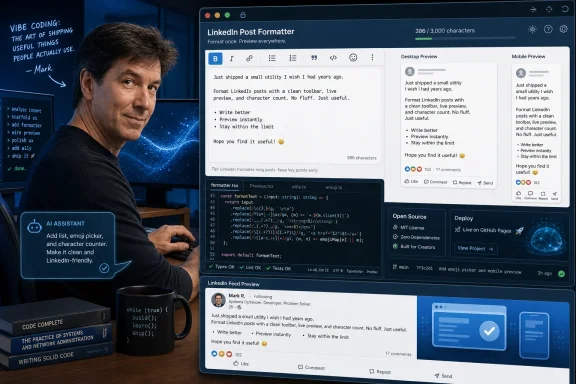
Microsoft Azure CTO Mark Russinovich said on Sunday, June 7, 2026, that he had “vibe coded” an open-source LinkedIn Post Formatter, a GitHub Pages utility for composing LinkedIn posts with bold, italic, bullets, emojis, character counts, and desktop and mobile previews. The joke writes itself because Microsoft owns LinkedIn, yet one of Microsoft’s most technically respected executives still had to build a side tool to make its post editor feel less hostile. But the more interesting story is not that LinkedIn lacks a formatting toolbar. It is that AI-assisted coding has reached the point where senior architects now casually patch the seams in billion-dollar platforms in public.
Russinovich’s tool is not, in the normal sense, a major software launch. It is a small web utility for people who write LinkedIn posts and want them to look a little less like plain text escaped from a corporate intranet. It supports in-place formatting, copy-ready output, character counting, and previews that mimic how posts will appear on mobile and desktop.
That would usually qualify as internet ephemera: useful, mildly viral, forgotten by Thursday. The reason this one has legs is the author. Russinovich is not an influencer who discovered JavaScript last weekend; he is the Azure CTO, a Technical Fellow, a Sysinternals legend, and one of the people Windows power users have trusted for decades when they wanted to understand what the operating system was actually doing.
That makes the project read like an accidental product review. A Microsoft executive who posts often on LinkedIn found the existing formatting ecosystem clunky enough to build his own alternative. The professional network that Microsoft bought for $26.2 billion in 2016 still pushes users toward unofficial workarounds for typographic niceties that blogging platforms, CMS editors, and even many forum systems have treated as table stakes for years.
The obvious dunk is that Microsoft owns both the cloud talent and the social network here. The better observation is that this is how modern software increasingly fails: not through one catastrophic missing feature, but through a thousand little paper cuts that sit beneath the priority threshold of a giant platform.
That restraint has benefits. Anyone who lived through MySpace profile pages, early web forums with rainbow signatures, or corporate emails that treated Comic Sans as a governance model can understand why a business network might be cautious. Rich text can improve readability, but it can also become a carnival.
The problem is that LinkedIn’s users long ago routed around the constraint. They copy stylized Unicode characters from third-party tools, paste symbol-heavy headings, and use emoji as structural markup. The result is not a cleaner feed. It is a feed where formatting exists anyway, but in a less accessible, less consistent, and less platform-aware form.
That is the irony Russinovich’s formatter highlights. When a platform refuses to provide sane formatting, users do not remain pure. They invent a shadow formatting layer.
This is the hidden cost of formatting by trickery. A post that appears tastefully emphasized to one reader may become noisy or awkward when read aloud by a screen reader. It may behave strangely in search, indexing, moderation, or downstream publishing tools. It may also create subtle compatibility problems in environments that do not render the chosen characters cleanly.
LinkedIn could address that by adding native formatting controls with clear guardrails. It could allow emphasis while preserving semantic text. It could render posts consistently across clients. Instead, like many large platforms, it leaves enough demand unmet that unofficial utilities flourish.
Russinovich’s tool appears to live in that gray zone: not a replacement for LinkedIn’s editor, but a pressure valve for users who want more control than the official composer provides. It is a practical answer to an impractical gap.
Russinovich has been unusually sober about that distinction. He has warned that AI coding tools are not ready to replace human programmers on complex software systems. He has also acknowledged that they are genuinely useful for small applications, prototypes, and personal utilities.
That is why this LinkedIn formatter is a perfect example. It is not an autonomous vehicle, a kernel subsystem, or a billing platform for Azure. It is a bounded, understandable web app with a narrow job and a clear user. If it breaks, no hospital scheduling system goes down and no enterprise loses its audit trail.
This is where AI coding currently looks strongest: compressing the distance between annoyance and remedy. A knowledgeable person can identify a problem, describe the desired behavior, inspect the result, adjust the implementation, and publish something useful. The human still supplies taste, judgment, scope control, and the decision that the problem is worth solving at all.
A novice can ask an AI tool to build a formatter and may get something that appears to work. A veteran can look at the generated code, understand whether it is brittle, avoid overengineering it, and recognize edge cases before users do. That is not a small advantage; it is the boundary between a demo and a tool.
Russinovich’s credibility comes from decades spent explaining complexity rather than hand-waving it away. Sysinternals tools earned loyalty because they exposed Windows internals with precision. They were not magic. They were instruments.
That background changes the meaning of “vibe coded.” In the hands of a technical leader, the vibe is not a substitute for engineering judgment. It is a faster input method for someone who already has judgment. The danger for the industry is pretending those two scenarios are equivalent.
LinkedIn may not see richer post formatting as a top priority. It may worry about spam, feed quality, accessibility, abuse, mobile consistency, or brand tone. It may have tested formatting controls and decided they made posts worse. Or it may simply have a backlog full of monetization, AI recruiting features, creator analytics, ads infrastructure, compliance, and engagement systems that outrank “make text italic.”
That does not make the gap imaginary. It just explains why obvious user-facing annoyances can persist inside wealthy, technically capable companies. The engineering capacity exists somewhere in the parent organization, but the incentive to spend it on this precise problem may not.
This is the part WindowsForum readers will recognize. Microsoft can produce extraordinary systems and still leave rough edges in the daily experience. Windows, Office, Teams, Azure, and LinkedIn all contain examples of deep engineering excellence sitting beside small interactions that make users wonder whether anyone internally has had to use the thing under deadline pressure.
That means the editor shapes the culture of the platform. If the composer makes structured writing awkward, users compensate with blank lines and emoji bullets. If emphasis requires third-party Unicode tools, the feed inherits their quirks. If previews are unreliable, users learn by posting and regretting.
Small composition tools also affect professional credibility. A malformed post on LinkedIn is not the same as a typo in a group chat. It may be read by hiring managers, customers, journalists, competitors, and colleagues. Users care about how posts render because LinkedIn has trained them to treat the feed as a résumé, press room, and conference hallway at once.
Russinovich’s formatter recognizes this. Character counts and previews are not flashy features. They are features for people who know that distribution is formatting plus timing plus context. On a platform built around professional performance, the act of composing deserves better than a minimalist text box and a prayer.
Open source also gives the project a second audience: developers who want to see how much of the app was AI-generated, how it handles formatting, and whether it reflects the sort of simple, self-contained architecture that vibe coding advocates often celebrate. A closed web app would be another formatter in a crowded field. An open one by a Microsoft technical leader becomes a case study.
It also functions as a polite escalation. Russinovich is not publicly demanding that LinkedIn change its editor. But an open, working utility makes the absence more visible. It demonstrates demand, provides a reference point, and invites the inevitable question of why the official product cannot do something similar with first-party semantics and accessibility.
That is the most productive form of internal critique in a company the size of Microsoft. Not a memo. Not a rant. A working artifact.
The first wave of AI coding hype leaned heavily on spectacle: generate a game from a sentence, build an app in five minutes, clone a website from a screenshot, replace the junior developer, disrupt the enterprise software stack. Much of that rhetoric was inflated, and some of it was irresponsible. Production software is not a parlor trick.
But a LinkedIn formatter is exactly the sort of “office chore” application that makes AI-assisted development compelling. It sits between a spreadsheet macro and a browser extension in spirit: a small tool that smooths a repetitive annoyance for a specific workflow. It may not justify a product team, but it absolutely justifies an afternoon.
This is where AI coding assistants could quietly change enterprise work. Not by letting every employee rebuild SAP in a chat window, but by enabling technically literate workers to create small, reviewable tools that automate friction. The history of computing is full of such layers: shell scripts, Access databases, Excel macros, PowerShell snippets, internal web dashboards, and now prompt-assisted microapps.
The risk is that organizations forget the lessons learned from all the earlier versions. Little tools become business-critical. Nobody documents them. Security review arrives late. The original author moves teams. A clever shortcut calcifies into infrastructure.
Microsoft eventually acquired Sysinternals in 2006, and Russinovich’s career became a rare example of outsider tooling becoming insider authority. That history gives this tiny LinkedIn project a pleasing symmetry. Once again, a gap in the official experience is answered by a tool from someone who understands both user frustration and platform internals.
Of course, the stakes are different. A LinkedIn formatter is not diagnosing a rootkit or enumerating startup entries on a compromised workstation. But the pattern is familiar: users need leverage, the platform does not provide enough of it, and a small utility changes the workflow.
That pattern is one reason Microsoft’s ecosystem has endured despite its messiness. Windows power users have always lived in the space between official features and practical tools. The healthiest version of Microsoft has usually been the one that accepts this ecosystem rather than pretending the first-party experience is complete.
A platform-level implementation could preserve the underlying text while applying visual emphasis in a way clients and assistive technologies understand. It could limit abuse without forcing users into Unicode mimicry. It could provide predictable rendering across mobile, desktop, and embeds. It could also make moderation and search cleaner because the platform would know what the user intended.
Third-party formatters can be useful, but they cannot fully solve those problems because they operate outside the platform’s content model. They can help users prepare text, but they cannot make LinkedIn treat that text as semantically bold or italic if LinkedIn does not support that representation. The workaround remains a workaround.
This is where the story stops being cute. When a massive professional platform leaves users dependent on pseudo-formatting, it is not just withholding decoration. It is allowing a less accessible pattern to become normalized because the official tool is too constrained.
That is why a formatter matters. It is part of the same trend that turned newsletters, slide decks, short videos, and conference clips into professional currency. LinkedIn users are not merely updating contacts; they are managing presence.
Microsoft understands this world well. It sells tools for productivity, collaboration, analytics, identity, and cloud infrastructure. LinkedIn sits awkwardly but powerfully in that portfolio: part social graph, part recruiting engine, part sales database, part media network. Every improvement to content creation potentially feeds engagement, ad inventory, and data signals.
So the absence of richer native composition tools is not a philosophical mystery. It is a product bet. LinkedIn has chosen a particular kind of feed discipline, and users keep finding ways around it. Russinovich’s formatter is merely the latest, most symbolically amusing workaround.
A small tool from a senior technical executive makes the pitch more concrete. Here is a person with a real annoyance, a narrow task, and enough AI-assisted development capability to produce a public utility. That is a more persuasive AI story than another cinematic keynote montage.
It is also more honest because the task is appropriately scoped. Nobody has to pretend the formatter proves AI can safely own a distributed cloud control plane. Nobody has to claim it invalidates software engineering as a profession. It simply shows that a certain class of web utility can be built faster than before.
That nuance is badly needed. The industry has spent too much energy swinging between “AI will replace all coders” and “AI produces only slop.” The truth is less dramatic and more disruptive: AI is becoming a competent accelerator for people who can define bounded problems and evaluate the output.
The enterprise already struggles with unsanctioned SaaS, browser extensions, macros, scripts, low-code apps, and shared spreadsheets that quietly become operational systems. AI coding assistants lower the barrier for another wave of internal utilities. Some will be harmless. Some will be brilliant. Some will handle sensitive data badly, leak tokens, bypass policy, or become impossible to maintain.
The right response is not to ban all small-tool creation. That would be futile and counterproductive. The right response is to build pathways for lightweight review, safe hosting, identity integration, secrets management, and documentation. In other words, treat AI-generated microapps as a governance problem, not just a novelty.
Russinovich’s formatter is public, open source, and aimed at a consumer-professional workflow. It is the friendly version of the pattern. The harder version is the employee who uses AI to build a customer-data parser, connects it to an internal export, and shares it with a department before security knows it exists.
That is where Microsoft, GitHub, and the broader developer tooling ecosystem have an opportunity. The next phase of AI coding needs fewer miracle demos and more guardrails for the mundane things people will actually build.
LinkedIn does not need to become WordPress. It does not need font menus, color pickers, animated headers, or the full horror of corporate newsletter design. A restrained toolbar for emphasis, lists, links, and previewing would be enough for most users and better than the current ecosystem of external paste tools.
The platform could also expose formatting differently depending on context. Company pages, newsletters, long-form articles, comments, and personal posts do not all need identical controls. The product challenge is not whether formatting is useful. It is how to add it without degrading the feed into engagement confetti.
Microsoft has the design and engineering capacity to do that. The question is whether LinkedIn’s incentives point there. Until they do, the shadow layer will keep growing.
For LinkedIn, the workaround has become culturally embedded. Users already format posts through spacing, emoji, symbols, and Unicode. Pretending the feed is plain text does not make it plain. It makes formatting less coherent.
For Microsoft, the episode is a reminder that ownership does not equal integration. Buying LinkedIn did not magically make every Microsoft sensibility appear in LinkedIn’s UX, nor did it make every LinkedIn irritation visible to the right product team. Ten years after the deal was announced, the network remains its own organism.
For AI-assisted coding, the episode is a useful correction to the hype cycle. The most credible story is not that AI built a world-changing app. It is that AI helped a world-class engineer scratch an itch quickly enough to share the result with everyone else.
 A Tiny Formatter Exposes a Very Microsoft-Sized Gap
Russinovich’s tool is not, in the normal sense, a major software launch. It is a small web utility for people who write LinkedIn posts and want them to look a little less like plain text escaped from a corporate intranet. It supports in-place formatting, copy-ready output, character counting, and previews that mimic how posts will appear on mobile and desktop.That would usually qualify as internet ephemera: useful, mildly viral, forgotten by Thursday. The reason this one has legs is the author. Russinovich is not an influencer who discovered JavaScript last weekend; he is the Azure CTO, a Technical Fellow, a Sysinternals legend, and one of the people Windows power users have trusted for decades when they wanted to understand what the operating system was actually doing.
That makes the project read like an accidental product review. A Microsoft executive who posts often on LinkedIn found the existing formatting ecosystem clunky enough to build his own alternative. The professional network that Microsoft bought for $26.2 billion in 2016 still pushes users toward unofficial workarounds for typographic niceties that blogging platforms, CMS editors, and even many forum systems have treated as table stakes for years.
The obvious dunk is that Microsoft owns both the cloud talent and the social network here. The better observation is that this is how modern software increasingly fails: not through one catastrophic missing feature, but through a thousand little paper cuts that sit beneath the priority threshold of a giant platform.
LinkedIn’s Plain-Text Culture Was Always a Product Choice
LinkedIn has never been a place where expressive formatting felt native. Its house style is the line break, the humble emoji, the faux-inspirational sentence fragment, and the pile of invisible Unicode tricks used to simulate bold or italic text. The platform’s visual sameness is part accident and part enforcement mechanism: LinkedIn wants a feed that feels professional, scannable, and relatively controlled.That restraint has benefits. Anyone who lived through MySpace profile pages, early web forums with rainbow signatures, or corporate emails that treated Comic Sans as a governance model can understand why a business network might be cautious. Rich text can improve readability, but it can also become a carnival.
The problem is that LinkedIn’s users long ago routed around the constraint. They copy stylized Unicode characters from third-party tools, paste symbol-heavy headings, and use emoji as structural markup. The result is not a cleaner feed. It is a feed where formatting exists anyway, but in a less accessible, less consistent, and less platform-aware form.
That is the irony Russinovich’s formatter highlights. When a platform refuses to provide sane formatting, users do not remain pure. They invent a shadow formatting layer.
The Unicode Workaround Is Clever, Ugly, and Everywhere
Most LinkedIn “bold” and “italic” generators do not apply actual semantic formatting in the way a word processor or HTML editor would. They transform ordinary letters into mathematical alphanumeric Unicode characters that merely look bold or italic. To a human skimming a feed, the effect is close enough. To software, accessibility tools, search systems, and copy-paste workflows, it can be something else entirely.This is the hidden cost of formatting by trickery. A post that appears tastefully emphasized to one reader may become noisy or awkward when read aloud by a screen reader. It may behave strangely in search, indexing, moderation, or downstream publishing tools. It may also create subtle compatibility problems in environments that do not render the chosen characters cleanly.
LinkedIn could address that by adding native formatting controls with clear guardrails. It could allow emphasis while preserving semantic text. It could render posts consistently across clients. Instead, like many large platforms, it leaves enough demand unmet that unofficial utilities flourish.
Russinovich’s tool appears to live in that gray zone: not a replacement for LinkedIn’s editor, but a pressure valve for users who want more control than the official composer provides. It is a practical answer to an impractical gap.
Vibe Coding Finds Its Most Honest Use Case
The phrase vibe coding has become one of those AI-era terms that simultaneously describes something real and irritates everyone who has ever maintained production software. At its best, it means describing intent to an AI coding assistant and iterating quickly until a useful program exists. At its worst, it means shipping code without understanding architecture, security, state, testing, or the future maintenance bill.Russinovich has been unusually sober about that distinction. He has warned that AI coding tools are not ready to replace human programmers on complex software systems. He has also acknowledged that they are genuinely useful for small applications, prototypes, and personal utilities.
That is why this LinkedIn formatter is a perfect example. It is not an autonomous vehicle, a kernel subsystem, or a billing platform for Azure. It is a bounded, understandable web app with a narrow job and a clear user. If it breaks, no hospital scheduling system goes down and no enterprise loses its audit trail.
This is where AI coding currently looks strongest: compressing the distance between annoyance and remedy. A knowledgeable person can identify a problem, describe the desired behavior, inspect the result, adjust the implementation, and publish something useful. The human still supplies taste, judgment, scope control, and the decision that the problem is worth solving at all.
The Senior Engineer Still Matters More Than the Prompt
The temptation is to make Russinovich’s project a story about AI replacing developers. It is more accurately a story about AI amplifying a developer who already knows what good software should do. The difference matters.A novice can ask an AI tool to build a formatter and may get something that appears to work. A veteran can look at the generated code, understand whether it is brittle, avoid overengineering it, and recognize edge cases before users do. That is not a small advantage; it is the boundary between a demo and a tool.
Russinovich’s credibility comes from decades spent explaining complexity rather than hand-waving it away. Sysinternals tools earned loyalty because they exposed Windows internals with precision. They were not magic. They were instruments.
That background changes the meaning of “vibe coded.” In the hands of a technical leader, the vibe is not a substitute for engineering judgment. It is a faster input method for someone who already has judgment. The danger for the industry is pretending those two scenarios are equivalent.
Microsoft’s LinkedIn Problem Is Not Ownership, It Is Incentives
The comment-section reaction practically writes the corporate satire: if Microsoft owns LinkedIn, why does an Azure executive need to build a formatting utility for it? But large companies do not behave like single brains. They behave like federations of roadmaps, budget lines, risk registers, and product managers defending finite engineering time.LinkedIn may not see richer post formatting as a top priority. It may worry about spam, feed quality, accessibility, abuse, mobile consistency, or brand tone. It may have tested formatting controls and decided they made posts worse. Or it may simply have a backlog full of monetization, AI recruiting features, creator analytics, ads infrastructure, compliance, and engagement systems that outrank “make text italic.”
That does not make the gap imaginary. It just explains why obvious user-facing annoyances can persist inside wealthy, technically capable companies. The engineering capacity exists somewhere in the parent organization, but the incentive to spend it on this precise problem may not.
This is the part WindowsForum readers will recognize. Microsoft can produce extraordinary systems and still leave rough edges in the daily experience. Windows, Office, Teams, Azure, and LinkedIn all contain examples of deep engineering excellence sitting beside small interactions that make users wonder whether anyone internally has had to use the thing under deadline pressure.
The Post Editor Is the Product, Not a Decorative Layer
Text composition sounds trivial until a platform depends on user-generated text. For LinkedIn, the editor is not merely a box at the top of the feed. It is where thought leadership, recruiting pitches, product launches, layoff notes, conference recaps, security warnings, and executive positioning all enter the network.That means the editor shapes the culture of the platform. If the composer makes structured writing awkward, users compensate with blank lines and emoji bullets. If emphasis requires third-party Unicode tools, the feed inherits their quirks. If previews are unreliable, users learn by posting and regretting.
Small composition tools also affect professional credibility. A malformed post on LinkedIn is not the same as a typo in a group chat. It may be read by hiring managers, customers, journalists, competitors, and colleagues. Users care about how posts render because LinkedIn has trained them to treat the feed as a résumé, press room, and conference hallway at once.
Russinovich’s formatter recognizes this. Character counts and previews are not flashy features. They are features for people who know that distribution is formatting plus timing plus context. On a platform built around professional performance, the act of composing deserves better than a minimalist text box and a prayer.
Open Source Turns a Side Project Into a Public Nudge
The decision to host the project on GitHub Pages and make it open source is more than a convenience. It changes the tone from “look what I made” to “this is inspectable, forkable, and improvable.” That is culturally important for a tool that manipulates text users will paste into a major social platform.Open source also gives the project a second audience: developers who want to see how much of the app was AI-generated, how it handles formatting, and whether it reflects the sort of simple, self-contained architecture that vibe coding advocates often celebrate. A closed web app would be another formatter in a crowded field. An open one by a Microsoft technical leader becomes a case study.
It also functions as a polite escalation. Russinovich is not publicly demanding that LinkedIn change its editor. But an open, working utility makes the absence more visible. It demonstrates demand, provides a reference point, and invites the inevitable question of why the official product cannot do something similar with first-party semantics and accessibility.
That is the most productive form of internal critique in a company the size of Microsoft. Not a memo. Not a rant. A working artifact.
AI Coding Is Moving From Spectacle to Office Chore
The most important thing about this project may be how boring it is. That is not an insult. Boring is where tools become real.The first wave of AI coding hype leaned heavily on spectacle: generate a game from a sentence, build an app in five minutes, clone a website from a screenshot, replace the junior developer, disrupt the enterprise software stack. Much of that rhetoric was inflated, and some of it was irresponsible. Production software is not a parlor trick.
But a LinkedIn formatter is exactly the sort of “office chore” application that makes AI-assisted development compelling. It sits between a spreadsheet macro and a browser extension in spirit: a small tool that smooths a repetitive annoyance for a specific workflow. It may not justify a product team, but it absolutely justifies an afternoon.
This is where AI coding assistants could quietly change enterprise work. Not by letting every employee rebuild SAP in a chat window, but by enabling technically literate workers to create small, reviewable tools that automate friction. The history of computing is full of such layers: shell scripts, Access databases, Excel macros, PowerShell snippets, internal web dashboards, and now prompt-assisted microapps.
The risk is that organizations forget the lessons learned from all the earlier versions. Little tools become business-critical. Nobody documents them. Security review arrives late. The original author moves teams. A clever shortcut calcifies into infrastructure.
Windows Veterans Have Seen This Movie Before
For Windows enthusiasts and administrators, the Russinovich name carries a particular resonance because Sysinternals began as a set of tools that filled gaps Microsoft itself had not fully addressed. Process Explorer, Autoruns, PsExec, and the rest became indispensable because they made Windows observable and controllable in ways the built-in tools often did not.Microsoft eventually acquired Sysinternals in 2006, and Russinovich’s career became a rare example of outsider tooling becoming insider authority. That history gives this tiny LinkedIn project a pleasing symmetry. Once again, a gap in the official experience is answered by a tool from someone who understands both user frustration and platform internals.
Of course, the stakes are different. A LinkedIn formatter is not diagnosing a rootkit or enumerating startup entries on a compromised workstation. But the pattern is familiar: users need leverage, the platform does not provide enough of it, and a small utility changes the workflow.
That pattern is one reason Microsoft’s ecosystem has endured despite its messiness. Windows power users have always lived in the space between official features and practical tools. The healthiest version of Microsoft has usually been the one that accepts this ecosystem rather than pretending the first-party experience is complete.
Accessibility Should Be the First-Party Argument
If LinkedIn ever does adopt native formatting, the strongest argument should not be that executives want prettier posts. It should be accessibility and semantic correctness.A platform-level implementation could preserve the underlying text while applying visual emphasis in a way clients and assistive technologies understand. It could limit abuse without forcing users into Unicode mimicry. It could provide predictable rendering across mobile, desktop, and embeds. It could also make moderation and search cleaner because the platform would know what the user intended.
Third-party formatters can be useful, but they cannot fully solve those problems because they operate outside the platform’s content model. They can help users prepare text, but they cannot make LinkedIn treat that text as semantically bold or italic if LinkedIn does not support that representation. The workaround remains a workaround.
This is where the story stops being cute. When a massive professional platform leaves users dependent on pseudo-formatting, it is not just withholding decoration. It is allowing a less accessible pattern to become normalized because the official tool is too constrained.
The Creator Economy Came for the Enterprise Feed
LinkedIn likes to present itself as a professional network rather than a social network, but the distinction has grown thinner every year. Executives, founders, recruiters, engineers, analysts, and job seekers now treat it as a publishing platform. Posts are written for reach. Formatting is used for retention. Hooks, line breaks, and visual rhythm are optimized like any other feed-native content.That is why a formatter matters. It is part of the same trend that turned newsletters, slide decks, short videos, and conference clips into professional currency. LinkedIn users are not merely updating contacts; they are managing presence.
Microsoft understands this world well. It sells tools for productivity, collaboration, analytics, identity, and cloud infrastructure. LinkedIn sits awkwardly but powerfully in that portfolio: part social graph, part recruiting engine, part sales database, part media network. Every improvement to content creation potentially feeds engagement, ad inventory, and data signals.
So the absence of richer native composition tools is not a philosophical mystery. It is a product bet. LinkedIn has chosen a particular kind of feed discipline, and users keep finding ways around it. Russinovich’s formatter is merely the latest, most symbolically amusing workaround.
The Corporate AI Message Gets More Nuanced When Executives Use the Tools
Microsoft has spent years telling customers that AI will transform work. Copilot is supposed to help users write, summarize, code, analyze, search, and automate across the Microsoft stack. That message can become abstract, especially when it is delivered through demos that look polished beyond recognition.A small tool from a senior technical executive makes the pitch more concrete. Here is a person with a real annoyance, a narrow task, and enough AI-assisted development capability to produce a public utility. That is a more persuasive AI story than another cinematic keynote montage.
It is also more honest because the task is appropriately scoped. Nobody has to pretend the formatter proves AI can safely own a distributed cloud control plane. Nobody has to claim it invalidates software engineering as a profession. It simply shows that a certain class of web utility can be built faster than before.
That nuance is badly needed. The industry has spent too much energy swinging between “AI will replace all coders” and “AI produces only slop.” The truth is less dramatic and more disruptive: AI is becoming a competent accelerator for people who can define bounded problems and evaluate the output.
The Shadow IT Version Will Be Messier
If senior engineers can now spin up small tools faster, so can everyone else. That has consequences for IT departments.The enterprise already struggles with unsanctioned SaaS, browser extensions, macros, scripts, low-code apps, and shared spreadsheets that quietly become operational systems. AI coding assistants lower the barrier for another wave of internal utilities. Some will be harmless. Some will be brilliant. Some will handle sensitive data badly, leak tokens, bypass policy, or become impossible to maintain.
The right response is not to ban all small-tool creation. That would be futile and counterproductive. The right response is to build pathways for lightweight review, safe hosting, identity integration, secrets management, and documentation. In other words, treat AI-generated microapps as a governance problem, not just a novelty.
Russinovich’s formatter is public, open source, and aimed at a consumer-professional workflow. It is the friendly version of the pattern. The harder version is the employee who uses AI to build a customer-data parser, connects it to an internal export, and shares it with a department before security knows it exists.
That is where Microsoft, GitHub, and the broader developer tooling ecosystem have an opportunity. The next phase of AI coding needs fewer miracle demos and more guardrails for the mundane things people will actually build.
LinkedIn Should Steal the Idea, Not the Shortcut
The cleanest outcome would be for LinkedIn to absorb the lesson without simply copying the workaround. Native formatting should not mean stuffing more Unicode lookalikes into the feed. It should mean real emphasis, constrained styles, accessible output, and accurate previews.LinkedIn does not need to become WordPress. It does not need font menus, color pickers, animated headers, or the full horror of corporate newsletter design. A restrained toolbar for emphasis, lists, links, and previewing would be enough for most users and better than the current ecosystem of external paste tools.
The platform could also expose formatting differently depending on context. Company pages, newsletters, long-form articles, comments, and personal posts do not all need identical controls. The product challenge is not whether formatting is useful. It is how to add it without degrading the feed into engagement confetti.
Microsoft has the design and engineering capacity to do that. The question is whether LinkedIn’s incentives point there. Until they do, the shadow layer will keep growing.
The Small Tool Says the Quiet Part About Platforms Out Loud
Russinovich’s formatter is a minor artifact with an outsized message: platforms do not get to decide which user needs are real merely by omitting them. If enough people want a capability, they will route around the absence. The only question is whether the workaround is better or worse than a native implementation.For LinkedIn, the workaround has become culturally embedded. Users already format posts through spacing, emoji, symbols, and Unicode. Pretending the feed is plain text does not make it plain. It makes formatting less coherent.
For Microsoft, the episode is a reminder that ownership does not equal integration. Buying LinkedIn did not magically make every Microsoft sensibility appear in LinkedIn’s UX, nor did it make every LinkedIn irritation visible to the right product team. Ten years after the deal was announced, the network remains its own organism.
For AI-assisted coding, the episode is a useful correction to the hype cycle. The most credible story is not that AI built a world-changing app. It is that AI helped a world-class engineer scratch an itch quickly enough to share the result with everyone else.
The Formatter Is Funny Because the Signal Is Serious
This is the part worth carrying past the initial chuckle.- Microsoft’s Azure CTO publicly built a small open-source tool to improve LinkedIn post formatting, highlighting a real usability gap in a Microsoft-owned platform.
- The project fits the strongest current case for AI-assisted coding: narrow utilities, rapid prototyping, and human-supervised implementation rather than autonomous software engineering.
- LinkedIn’s lack of native rich formatting pushes users toward Unicode-based workarounds that can be inconsistent and less accessible than semantic platform support.
- The episode underlines how large software companies can possess enormous engineering capacity while still leaving small, persistent workflow annoyances unresolved.
- For IT leaders, the broader lesson is that AI-generated microtools are coming to the workplace, and governance needs to make them safer rather than pretend they will not exist.
References
- Primary source: GeekWire
Published: Mon, 08 Jun 2026 16:19:07 GMT
This is bold ... and italic and more: Microsoft Azure CTO vibe codes a text formatter for LinkedIn posts – GeekWire
Mark Russinovich created a new utility called LinkedIn Post Formatter that allows users to easily get the look they want in text on the professional networking platform.www.geekwire.com - Official source: news.microsoft.com
Microsoft to acquire LinkedIn - Source
REDMOND, Wash., and MOUNTAIN VIEW, Calif. — June 13, 2016 — Microsoft Corp. (Nasdaq: MSFT) and LinkedIn Corporation (NYSE: LNKD) on Monday announced they have entered into a definitive agreement under which Microsoft will acquire LinkedIn for $196 per share in an all-cash transaction valued at...news.microsoft.com - Official source: blogs.microsoft.com
Microsoft-LinkedIn deal cleared by regulators, opening new doors for people around the world - The Official Microsoft Blog
It was roughly six months ago, on June 13, that we announced that Microsoft would acquire LinkedIn. At that time, we said that we aimed to close the deal by the end of the year. Today, the European Commission announced that it has cleared the acquisition. As a result, we’ve now obtained all of...blogs.microsoft.com - Related coverage: tomshardware.com
Microsoft CTO confesses that 30-year-old code from the mid-90s still forms the bedrock of Windows 11 — ancient Win32 API still the backbone, but CTO says it's 'more relevant than ever in 2026' | Tom's Hardware
Instead of 'flying cars and moon stations' in 2026, we still have Windows 11 using '90s code, admits Mark Russinovich.www.tomshardware.com - Related coverage: time.com
- Related coverage: engadget.com
Microsoft buys LinkedIn for $26.2 billion
You probably didn't expect your week to start this way: Microsoft has acquired LinkedIn for $26.2 billion. The company plans to integrate the career-oriented social network into many of its apps and services, including Office, Skype and Cortana. You'd get the details of the person you're meeting...www.engadget.com
- Related coverage: cbsnews.com
Microsoft To Buy LinkedIn For $26.2 Billion
In a surprise move, Microsoft said Monday that it is buying LinkedIn for about $26.2 billion. www.cbsnews.com
- Related coverage: linkedin.com
We’re excited to announce Mark Russinovich as a keynote speaker at BlueHat Redmond, taking place May 5-6, 2026. Mark Russinovich is the CTO, Deputy CISO, and Technical Fellow for Microsoft Azure. A… | Microsoft Security Response Center
We’re excited to announce Mark Russinovich as a keynote speaker at BlueHat Redmond, taking place May 5-6, 2026. Mark Russinovich is the CTO, Deputy CISO, and Technical Fellow for Microsoft Azure. A widely recognized expert in distributed systems, operating systems, and cybersecurity, Mark...www.linkedin.com
- Related coverage: news.linkedin.com

Microsoft completes acquisition of LinkedIn
Six months ago, we announced our intention to be acquired by Microsoft, and today, we're excited to share that we've officially closed ...
news.linkedin.com
- Related coverage: axios.com
LinkedIn acquires Israeli marketing analytics company Oribi
The deal aims to help clients of LinkedIn's growing ad business track how well their ads perform.www.axios.com
- Official source: microsoft.gcs-web.com
- Related coverage: cms.law
- Related coverage: phys.org
