

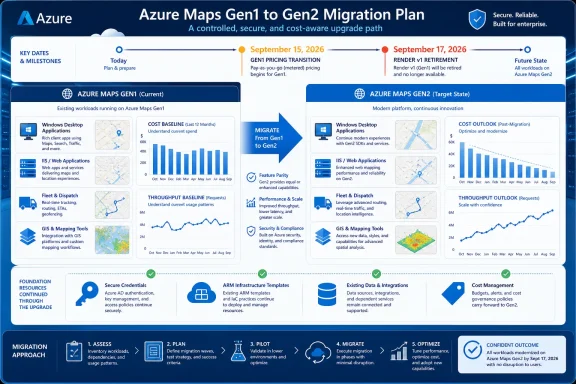
Azure Maps accounts still using Gen1 Standard S0 or Standard S1 should move to Gen2 before Microsoft’s automatic upgrade on September 15, 2026—but only after owners establish a cost and throughput baseline. Waiting for the auto-move may reduce migration work, yet it also hands the timing of a potentially material billing and capacity change to Microsoft rather than the organization operating the workload.
Microsoft’s retirement guidance says Gen2 replaces both Gen1 tiers with simplified pricing, broader feature access, and higher queries-per-second limits. The account transition does not require new subscription keys, Microsoft Entra client IDs, or shared access signature tokens, but that credential continuity should not be mistaken for proof that applications, budgets, and adjacent Azure Maps APIs are ready.
The immediate decision is not whether Gen1 will disappear. It will. Organizations must instead decide whether to schedule their own Gen2 cutover or accept the automatic upgrade on September 15.
A controlled move is the safer default for production fleet systems, dispatch consoles, Windows line-of-business applications, GIS tools, and customer-facing services. It allows IT to correlate the pricing change with known traffic, observe throughput under Gen2, and separate migration effects from seasonal demand or application releases.
Waiting can still be reasonable for a lightly used account with predictable transactions, a clear owner, and enough cost visibility to recognize a change immediately. It is harder to justify when several Windows applications share one Azure Maps account or when nobody can say which desktop tools, IIS services, scheduled jobs, and vendor integrations consume it.
This is why the retirement belongs in a FinOps and capacity-planning queue as well as a cloud-deprecation register. Microsoft is preserving account credentials, but it is changing the commercial tier and available capacity characteristics beneath workloads that may have grown without centralized governance.
WindowsForum’s earlier coverage of the Azure Maps Gen1 pricing retirement focused on preparing for Gen2 cost changes. The next step is to turn that warning into an account-by-account decision rather than allowing every remaining S0 and S1 resource to cross the deadline together.
A practical assessment can be completed in six steps:
The critical FinOps question is not whether Gen2 is marketed as simpler. It is whether the organization can predict its own bill under Gen2 from observed usage. If the answer is no, waiting for the automatic move preserves uncertainty rather than reducing effort.
It also creates a subtle operational trap. Because authentication material remains valid, an application may continue functioning immediately after the switch even though its transaction cost, request profile, or throttling behavior has not been evaluated. A successful login or returned map is therefore only the first test, not the acceptance criterion.
Teams using Azure Resource Manager-based deployments must also update their desired state. ARM definitions for Gen2 accounts need
Review the account after migration as both an application change and an infrastructure change. Confirm that calls still succeed, expected business workflows remain usable, transaction patterns match the baseline, and deployment definitions describe the resource that now exists.
This favors an early controlled move for accounts managed through repeatable infrastructure. The team can update and validate the templates while staff are available, rather than discovering stale Gen1 declarations during an unrelated deployment after Microsoft has performed the automatic upgrade.
Those dates are close enough to invite a dangerous assumption: that moving the account to Gen2 also modernizes its API calls. It does not. The pricing tier and Render API version are separate concerns, and Microsoft says Render v1 calls must be updated to the current Render API before its retirement.
A fleet dashboard, GIS utility, reporting service, or Windows application can therefore pass the Gen2 account migration and still face disruption two days later because it requests maps through Render v1. Authentication continuity makes this easier to overlook because the same account identity may remain valid while an endpoint used by the application approaches retirement.
Maintain two explicit checks for every affected workload:
The Render audit must reach into application code and configuration. Review Windows clients, IIS applications, scheduled report generators, GIS exports, fleet portals, and any service that creates map imagery for documents or dashboards. If a vendor owns the software, obtain a supported build or written migration plan rather than assuming the Azure account change will cover its API dependency.
The available verified retirement information establishes that Render v1 must move to the latest Render API, but it does not provide a universal one-for-one parameter and authentication mapping for every application pattern. Owners should validate their specific calls against Microsoft’s current Azure Maps REST documentation instead of guessing at renamed parameters or substituting endpoints mechanically.
An earlier move is also appropriate when several applications share one account. Shared consumption complicates cost attribution and makes it more likely that one batch process or newly deployed client will distort the post-migration bill. Separating or at least tagging ownership before the switch produces better evidence than investigating after an unexpected increase.
Waiting until September 15 is more defensible when usage is low, fully inventoried, and already covered by budget alerts and operational monitoring. Even then, the automatic upgrade date should appear on the change calendar. Automatic describes who changes the tier, not whether the event deserves oversight.
Organizations that choose to wait should still finish the inventory and Render v1 review beforehand. Otherwise they are not deliberately accepting an automatic transition; they are simply postponing discovery until the deadline.
The broader Windows mapping landscape has already shifted, as WindowsForum documented during the retirement of the Windows Maps app. Azure Maps is a different product and service model, but the lesson for IT remains familiar: mapping capabilities often sit inside applications whose owners do not think of themselves as running mapping infrastructure.
By September 15, the organization should know whether each account has been intentionally moved or consciously left for Microsoft’s automatic upgrade. By September 17, it should also know that no business-critical Windows, IIS, fleet, dispatch, GIS, or scheduled workload still depends on Render v1.
Microsoft’s retirement guidance says Gen2 replaces both Gen1 tiers with simplified pricing, broader feature access, and higher queries-per-second limits. The account transition does not require new subscription keys, Microsoft Entra client IDs, or shared access signature tokens, but that credential continuity should not be mistaken for proof that applications, budgets, and adjacent Azure Maps APIs are ready.
 Treat September 15 as a Change Window, Not a Billing Footnote
The immediate decision is not whether Gen1 will disappear. It will. Organizations must instead decide whether to schedule their own Gen2 cutover or accept the automatic upgrade on September 15.A controlled move is the safer default for production fleet systems, dispatch consoles, Windows line-of-business applications, GIS tools, and customer-facing services. It allows IT to correlate the pricing change with known traffic, observe throughput under Gen2, and separate migration effects from seasonal demand or application releases.
Waiting can still be reasonable for a lightly used account with predictable transactions, a clear owner, and enough cost visibility to recognize a change immediately. It is harder to justify when several Windows applications share one Azure Maps account or when nobody can say which desktop tools, IIS services, scheduled jobs, and vendor integrations consume it.
This is why the retirement belongs in a FinOps and capacity-planning queue as well as a cloud-deprecation register. Microsoft is preserving account credentials, but it is changing the commercial tier and available capacity characteristics beneath workloads that may have grown without centralized governance.
WindowsForum’s earlier coverage of the Azure Maps Gen1 pricing retirement focused on preparing for Gen2 cost changes. The next step is to turn that warning into an account-by-account decision rather than allowing every remaining S0 and S1 resource to cross the deadline together.
Build the Baseline Before Choosing the Date
Teams do not need an elaborate migration program to make a defensible decision. They do need evidence showing who calls Azure Maps, how frequently those calls occur, and which business processes would notice a change.A practical assessment can be completed in six steps:
- Inventory every Azure Maps account and identify which ones remain on Standard S0 or Standard S1. Use Azure Advisor’s impacted-resource recommendation as a starting point, but reconcile it against internal subscription and application ownership records.
- Assign a technical owner and a cost owner to each Gen1 account. If those are different people, both should approve the migration window because the service behavior and billing exposure belong to different operational disciplines.
- Trace account usage across Windows desktop applications, IIS-hosted APIs, fleet and dispatch systems, GIS tools, scheduled jobs, automation, and third-party line-of-business software. Search configuration stores, deployment templates, environment settings, source repositories, and operational documentation for references to the affected account and its authentication material.
- Record a representative transaction baseline before changing the tier. Capture normal demand, peak periods, batch activity, and any recurring operational event that produces bursts of map, routing, search, or geocoding requests.
- Define success thresholds for cost, request completion, latency, and throttling behavior. Microsoft says Gen2 supports higher QPS limits, but a higher ceiling does not remove the need to observe how a specific application behaves after the change.
- Select a controlled cutover date that leaves time to review results before September 15. Avoid placing the migration immediately beside a fleet rollout, dispatch software update, Windows desktop deployment, or other change that would make troubleshooting ambiguous.
The critical FinOps question is not whether Gen2 is marketed as simpler. It is whether the organization can predict its own bill under Gen2 from observed usage. If the answer is no, waiting for the automatic move preserves uncertainty rather than reducing effort.
Credential Continuity Lowers Risk but Does Not Eliminate Testing
Microsoft says changing an Azure Maps account’s pricing tier does not require replacement subscription keys, Microsoft Entra client IDs, or SAS tokens. That removes one of the most disruptive elements of a cloud migration: distributing new secrets and updating every dependent application at once.It also creates a subtle operational trap. Because authentication material remains valid, an application may continue functioning immediately after the switch even though its transaction cost, request profile, or throttling behavior has not been evaluated. A successful login or returned map is therefore only the first test, not the acceptance criterion.
Teams using Azure Resource Manager-based deployments must also update their desired state. ARM definitions for Gen2 accounts need
pricingTier set to G2 and kind set to Gen2. Leaving Gen1 assumptions in infrastructure code risks configuration drift, failed future deployments, or an environment that cannot be reproduced consistently.Review the account after migration as both an application change and an infrastructure change. Confirm that calls still succeed, expected business workflows remain usable, transaction patterns match the baseline, and deployment definitions describe the resource that now exists.
This favors an early controlled move for accounts managed through repeatable infrastructure. The team can update and validate the templates while staff are available, rather than discovering stale Gen1 declarations during an unrelated deployment after Microsoft has performed the automatic upgrade.
Two September Deadlines Require Two Separate Workstreams
The Gen1 pricing retirement occurs on September 15, 2026. Azure Maps Render v1 retires two days later, on September 17, 2026.Those dates are close enough to invite a dangerous assumption: that moving the account to Gen2 also modernizes its API calls. It does not. The pricing tier and Render API version are separate concerns, and Microsoft says Render v1 calls must be updated to the current Render API before its retirement.
A fleet dashboard, GIS utility, reporting service, or Windows application can therefore pass the Gen2 account migration and still face disruption two days later because it requests maps through Render v1. Authentication continuity makes this easier to overlook because the same account identity may remain valid while an endpoint used by the application approaches retirement.
Maintain two explicit checks for every affected workload:
- Confirm that the Azure Maps account has moved from Standard S0 or Standard S1 to Gen2.
- Confirm separately that the application makes no remaining Render v1 calls.
The Render audit must reach into application code and configuration. Review Windows clients, IIS applications, scheduled report generators, GIS exports, fleet portals, and any service that creates map imagery for documents or dashboards. If a vendor owns the software, obtain a supported build or written migration plan rather than assuming the Azure account change will cover its API dependency.
The available verified retirement information establishes that Render v1 must move to the latest Render API, but it does not provide a universal one-for-one parameter and authentication mapping for every application pattern. Owners should validate their specific calls against Microsoft’s current Azure Maps REST documentation instead of guessing at renamed parameters or substituting endpoints mechanically.
Move Early When the Account Carries Operational Weight
A controlled Gen2 migration is strongly preferable when an account supports dispatching, routing, field operations, customer applications, or shared GIS services. These workloads benefit from a known maintenance window, active monitoring, and a rollback or mitigation plan owned by people who understand the business impact.An earlier move is also appropriate when several applications share one account. Shared consumption complicates cost attribution and makes it more likely that one batch process or newly deployed client will distort the post-migration bill. Separating or at least tagging ownership before the switch produces better evidence than investigating after an unexpected increase.
Waiting until September 15 is more defensible when usage is low, fully inventoried, and already covered by budget alerts and operational monitoring. Even then, the automatic upgrade date should appear on the change calendar. Automatic describes who changes the tier, not whether the event deserves oversight.
Organizations that choose to wait should still finish the inventory and Render v1 review beforehand. Otherwise they are not deliberately accepting an automatic transition; they are simply postponing discovery until the deadline.
The broader Windows mapping landscape has already shifted, as WindowsForum documented during the retirement of the Windows Maps app. Azure Maps is a different product and service model, but the lesson for IT remains familiar: mapping capabilities often sit inside applications whose owners do not think of themselves as running mapping infrastructure.
The September Plan Should End Before September
The safest schedule is to identify Gen1 accounts now, baseline transactions and peaks, update ARM definitions, and migrate production accounts during a controlled window with enough time to inspect the resulting cost and throughput. The Render v1 audit should run alongside that work but remain a separate acceptance gate.By September 15, the organization should know whether each account has been intentionally moved or consciously left for Microsoft’s automatic upgrade. By September 17, it should also know that no business-critical Windows, IIS, fleet, dispatch, GIS, or scheduled workload still depends on Render v1.
References
- Primary source: learn.microsoft.com
Links to the Azure Maps REST API - Microsoft Azure Maps | Microsoft Learn
Links to the Azure Maps REST API.learn.microsoft.com - Primary source: WindowsForum
Azure Maps Gen1 Pricing Retirement (Sep 15, 2026): Prepare for Gen2 Cost Changes | Windows Forum
Microsoft will retire Azure Maps Gen1 pricing on September 15, 2026, automatically moving remaining Standard S0 and Standard S1 accounts to Gen2 pricing...windowsforum.com
