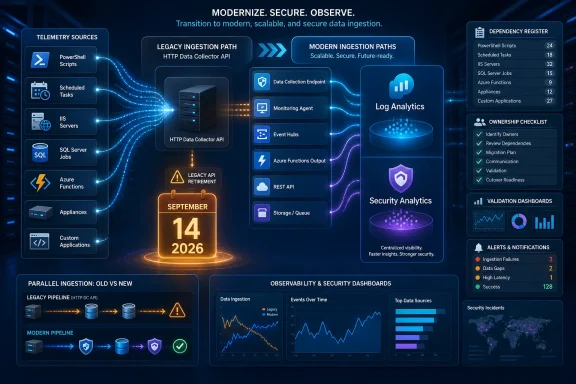
Azure Monitor’s legacy HTTP Data Collector API reaches end of support on September 14, 2026, but the urgent task is not upgrading the Azure Monitor Agent. It is finding every PowerShell script, scheduled task, IIS application, SQL job, Windows service, and line-of-business executable that still posts directly to Log Analytics with a workspace ID and shared key.
Microsoft Learn now clarifies that TLS 1.2-compliant senders are not scheduled to stop ingesting on September 14. Existing ingestion continues, but the API becomes an unsupported operational dependency receiving only critical security fixes. Clients unable to negotiate TLS 1.2 or later have faced the harder deadline already: the endpoint began rejecting legacy TLS on March 1, 2026.
The Data Collector API can be buried in ordinary Windows automation with no recognizable monitoring agent to inventory. A script copied into
Start by searching likely script and configuration locations for the legacy endpoint, headers, and signing vocabulary. This PowerShell example scans text-based files while avoiding access errors:
Treat those patterns as discovery indicators, not proof by themselves.
Next, enumerate scheduled tasks and inspect their actions rather than searching only task names:
A task may invoke a generic wrapper whose Azure Monitor logic sits several files away. Follow every script path, module import, configuration argument, and network utility referenced by the task action.
Windows services deserve the same treatment. The service executable may be a custom collector, or its command line may point to an application directory containing the real configuration:
Do not limit the review to matches returned by that filter. Use the complete service inventory to identify unfamiliar in-house and third-party programs, then inspect their installation folders for endpoint strings, workspace identifiers, and shared-key configuration.
Compiled applications require more than a text search. Check adjacent
SQL Server also creates several hiding places: SQL Server Agent jobs, PowerShell steps, command-line steps, integration packages, and stored procedures that invoke external code. Export or inspect job definitions and search their commands for the same endpoint, header, and signing patterns.
The distinction matters because replacing Microsoft Monitoring Agent-era collection is not the same project as replacing custom HTTP posts. Microsoft says tables shown as Custom table (classic) can include both Data Collector API destinations and tables populated through the legacy Log Analytics agent. Administrators must identify which sender actually writes to each table before converting it, or they risk treating two migration paths as one.
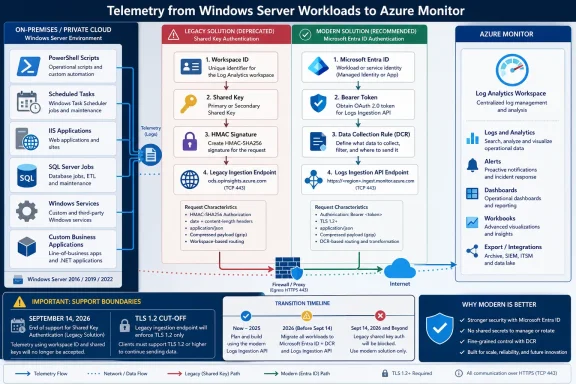
The Logs Ingestion API changes that contract rather than merely changing the hostname. The replacement request uses a DCR or DCE ingestion endpoint, the DCR’s immutable ID, and a stream name. Authentication uses a Microsoft Entra bearer token instead of a Log Analytics workspace shared key and custom HMAC calculation.
That creates a practical code-review map:
Use a separate destination during testing when that makes query comparison and rollback clearer. Microsoft’s migration guidance presents side-by-side implementation as the preferred option when changes to an existing table may be needed, while warning that direct conversion of a table is not reversible.
Validation should cover:
WindowsForum’s previous coverage of Azure Monitor Agent and DCR logging changes has emphasized the risk of cloud visibility shifting underneath SOC detections. This retirement creates a related failure mode: a legacy sender can remain operational today while its ownership, authentication model, and recovery path quietly decay after support ends.
The March 1 TLS cutoff also provides a useful diagnostic clue. If an expected custom table stopped receiving data around that date, investigate the sender’s TLS capabilities before blaming DCRs, Azure Monitor Agent, or table conversion. A client incapable of negotiating TLS 1.2 or later is already outside the functioning legacy path.
The inventory should therefore end with ownership, not just a spreadsheet of matches. Every discovered sender needs a responsible team, execution identity, source location, destination table, workspace-key dependency, migration status, and validation plan. Shared keys found in scripts or configuration also need to be treated as credentials, without copying their values into general-purpose discovery reports.
September 14 does not guarantee that a TLS 1.2 sender will suddenly go dark. It guarantees something operationally uncomfortable enough: any forgotten PowerShell script, IIS component, SQL job, or business application still using
Microsoft Learn now clarifies that TLS 1.2-compliant senders are not scheduled to stop ingesting on September 14. Existing ingestion continues, but the API becomes an unsupported operational dependency receiving only critical security fixes. Clients unable to negotiate TLS 1.2 or later have faced the harder deadline already: the endpoint began rejecting legacy TLS on March 1, 2026.
 Hunt for the Request Pattern, Not an Installed Agent
The Data Collector API can be buried in ordinary Windows automation with no recognizable monitoring agent to inventory. A script copied into C:\Scripts, an IIS-hosted internal application, a SQL Server Agent PowerShell step, or a vendor executable may construct and sign its own HTTPS request.Start by searching likely script and configuration locations for the legacy endpoint, headers, and signing vocabulary. This PowerShell example scans text-based files while avoiding access errors:
Code:
$Roots = @(
    'C:\Scripts',
    'C:\ProgramData',
    'C:\inetpub',
    'C:\Windows\System32\Tasks'
)

$Patterns = @(
    'ods\.opinsights\.azure\.com',
    'api/logs',
    'Log-Type',
    'x-ms-date',
    'Authorization:\s*SharedKey',
    'SharedKey',
    'HMAC',
    'workspaceId',
    'workspaceKey'
)

Get-ChildItem -Path $Roots -Recurse -File -ErrorAction SilentlyContinue |
    Where-Object {
        $_.Extension -in '.ps1', '.psm1', '.psd1', '.config',
                         '.json', '.xml', '.cmd', '.bat',
                         '.cs', '.vb', '.js'
    } |
    Select-String -Pattern $Patterns -AllMatches -ErrorAction SilentlyContinue |
Select-Object Path, LineNumber, LineHMAC or SharedKey can appear in unrelated authentication code, while an obfuscated or compiled integration may contain none of the obvious strings in a searchable configuration file.Next, enumerate scheduled tasks and inspect their actions rather than searching only task names:
Code:
Get-ScheduledTask | ForEach-Object {
    $Task = $_

    foreach ($Action in $Task.Actions) {
        [pscustomobject]@{
            TaskPath  = $Task.TaskPath
            TaskName  = $Task.TaskName
            Execute   = $Action.Execute
            Arguments = $Action.Arguments
        }
    }
} | Where-Object {
    $_.Execute -match 'powershell|pwsh|cmd|cscript|wscript' -or
    $_.Arguments -match 'ps1|opinsights|api/logs|SharedKey'
}Windows services deserve the same treatment. The service executable may be a custom collector, or its command line may point to an application directory containing the real configuration:
Code:
Get-CimInstance Win32_Service |
    Select-Object Name, DisplayName, State, StartName, PathName |
    Where-Object {
        $_.PathName -match 'powershell|pwsh|cmd|script|collector|monitor|log'
}IIS and SQL Can Hide the Last Legacy Senders
IIS applications are especially easy to miss because the sending code may run under an application pool identity and look like normal outbound HTTPS traffic. Search application directories underC:\inetpub, deployment folders outside the default web root, and configuration files associated with each site and application.Compiled applications require more than a text search. Check adjacent
.config, JSON, XML, environment, and deployment files first. If the endpoint or key is embedded in a binary, application ownership records and outbound network observations may be more useful than repeatedly scanning source extensions that are not present on the server.SQL Server also creates several hiding places: SQL Server Agent jobs, PowerShell steps, command-line steps, integration packages, and stored procedures that invoke external code. Export or inspect job definitions and search their commands for the same endpoint, header, and signing patterns.
The distinction matters because replacing Microsoft Monitoring Agent-era collection is not the same project as replacing custom HTTP posts. Microsoft says tables shown as Custom table (classic) can include both Data Collector API destinations and tables populated through the legacy Log Analytics agent. Administrators must identify which sender actually writes to each table before converting it, or they risk treating two migration paths as one.
Map Shared-Key Code to the DCR Ingestion Model
Legacy code commonly follows a recognizable sequence: serialize JSON, calculate content length, create anx-ms-date value, build a string to sign, calculate an HMAC using the workspace shared key, and send an Authorization: SharedKey header to a workspace-specific ods.opinsights.azure.com URL containing api/logs. A Log-Type header selects the destination custom log type.The Logs Ingestion API changes that contract rather than merely changing the hostname. The replacement request uses a DCR or DCE ingestion endpoint, the DCR’s immutable ID, and a stream name. Authentication uses a Microsoft Entra bearer token instead of a Log Analytics workspace shared key and custom HMAC calculation.
That creates a practical code-review map:
- Remove storage and retrieval of the workspace shared key.
- Remove the custom HMAC string-to-sign and signature-generation functions.
- Replace the legacy workspace endpoint and
api/logsURI construction. - Obtain a Microsoft Entra token and send it as bearer-token authorization.
- Address the correct DCR immutable ID and stream name through the configured ingestion endpoint.
- Ensure the JSON payload conforms to the input schema expected by the DCR.
- Move required filtering, routing, or reshaping into the DCR transformation where appropriate.
Dual-Write Before Removing the Old Path
Migration validation should measure data behavior, not settle for a successful HTTP response. Where the sender can support it safely, run the legacy and Logs Ingestion paths in parallel long enough to compare representative operating conditions.Use a separate destination during testing when that makes query comparison and rollback clearer. Microsoft’s migration guidance presents side-by-side implementation as the preferred option when changes to an existing table may be needed, while warning that direct conversion of a table is not reversible.
Validation should cover:
- Compare record counts and expected fields over matching time windows.
- Check timestamp handling and confirm events arrive in the intended table.
- Exercise large and bursty payloads rather than testing only one sample record.
- Review transformation results for dropped, empty, or incorrectly typed fields.
- Compare alerts, workbooks, dashboards, and queries that depend on the data.
- Monitor ingestion volume and cost during dual-write so duplicated telemetry does not become an unnoticed permanent expense.
- Retain a controlled rollback path until the new sender remains stable through normal and peak workloads.
WindowsForum’s previous coverage of Azure Monitor Agent and DCR logging changes has emphasized the risk of cloud visibility shifting underneath SOC detections. This retirement creates a related failure mode: a legacy sender can remain operational today while its ownership, authentication model, and recovery path quietly decay after support ends.
September 14 Is a Support Boundary, Not Permission to Wait
The revised timeline removes the assumption of a confirmed ingestion shutoff for compliant clients, but it does not make the dependency safe. After September 14, 2026, Microsoft promises only critical security fixes for the Data Collector API, leaving organizations exposed to future platform changes without normal support coverage.The March 1 TLS cutoff also provides a useful diagnostic clue. If an expected custom table stopped receiving data around that date, investigate the sender’s TLS capabilities before blaming DCRs, Azure Monitor Agent, or table conversion. A client incapable of negotiating TLS 1.2 or later is already outside the functioning legacy path.
The inventory should therefore end with ownership, not just a spreadsheet of matches. Every discovered sender needs a responsible team, execution identity, source location, destination table, workspace-key dependency, migration status, and validation plan. Shared keys found in scripts or configuration also need to be treated as credentials, without copying their values into general-purpose discovery reports.
September 14 does not guarantee that a TLS 1.2 sender will suddenly go dark. It guarantees something operationally uncomfortable enough: any forgotten PowerShell script, IIS component, SQL job, or business application still using
Authorization: SharedKey will be running on an API whose normal support lifecycle has ended.References
- Primary source: learn.microsoft.com
HTTP Data Collector API - Hard Stop or End Support - Microsoft Q&A
I'm trying to clarify if the HTTP Data Collector API feature that is being deprecated will stop working completely on 14 September 2026, or if only support will end. The learn page says support ends:…learn.microsoft.com - Primary source: WindowsForum
Azure Monitor Agent DCR logging changes: SOC blind spots and detection updates | Windows Forum
Vectra AI’s warning about Azure logging is more than another vendor alert; it is a reminder that cloud visibility can change when the platform underneath it...windowsforum.com