

TWM Solicitors has deployed about 240 Windows IoT LTSC-based 10ZiG thin clients across three Surrey offices for roughly 240 staff as part of a wider migration from Microsoft Remote Desktop Services to Azure Virtual Desktop. The headline is a tidy endpoint refresh, but the more interesting story is what it says about the new Windows desktop: increasingly cloud-hosted, centrally governed, and delivered through hardware that is deliberately meant to disappear. For IT teams, especially small ones, that disappearance is not cosmetic. It is the operational prize.
There was a time when a law firm’s desktop estate was a museum of accumulated compromises. A partner’s PC might run an old dictation driver. A secretary’s machine might have a locally installed practice-management dependency. A meeting-room workstation might be “special” for reasons nobody wanted to investigate because it still worked and nobody had time.
TWM Solicitors’ rollout is notable because it shows how far the cloud desktop has moved from theory into the unglamorous middle of professional services IT. This is not a hyperscale bank, a global outsourcer, or a greenfield startup with a blank architecture diagram. It is a regional legal practice with three sites, 240 staff, legacy desktop assumptions, dictation workflows, hybrid work expectations, and a four-person IT team expected to make the whole thing function.
That is exactly the kind of organisation where desktop modernisation usually becomes both necessary and painful. The firm was not simply swapping beige boxes for smaller boxes. It was moving from Microsoft Remote Desktop Services to Azure Virtual Desktop, shifting back-end infrastructure into Azure, upgrading to Microsoft 365, introducing new practice management software, and rolling out dual monitors across desks.
Taken together, that is not a hardware project. It is a redefinition of where the Windows workplace lives.
That tension is often underplayed in cloud desktop conversations. Vendors like to sell virtual desktop infrastructure as though endpoint choice becomes almost incidental once the “real” desktop runs elsewhere. Administrators know better. If the endpoint cannot drive two monitors properly, handle audio redirection cleanly, support a necessary driver, or recover quickly when something fails, users do not blame the architecture. They blame IT.
For TWM, the device requirements were practical rather than fashionable. The new hardware needed to support dual 24-inch displays at full resolution, run Windows drivers for SpeechWrite digital dictation software, and be manageable remotely across multiple sites. That pushed the firm toward Windows IoT LTSC-based 10ZiG thin clients sourced through Softcat after a trial.
The result is a hybrid of old and new thinking. The device is intentionally stripped of local importance: no user data, no full-fat local desktop lifecycle, no reason to treat a failed unit as a recovery project. Yet it still needs enough Windows compatibility to satisfy the awkward parts of a real workplace, including dictation and collaboration tools that do not always behave nicely inside virtual sessions.
That is the endpoint story cloud optimists often skip. You can centralise the desktop, but you cannot centralise the laws of peripherals, codecs, monitors, and user patience.
The advantage is not merely that employees can connect from the office or home. Remote access has been possible for decades, and Remote Desktop Services already gave many organisations a version of that world. The difference is that AVD fits a more modern operating model: desktops are built from images, session hosts can be scaled, and workloads can be placed closer to cloud-hosted back-end services.
TWM’s use of a single image across endpoints and session hosts is particularly important. It changes patching from a device-by-device chore into a centralised workflow. It also gives the firm a cleaner recovery path: if something goes badly wrong, infrastructure can be rebuilt from known-good components rather than nursed back to health one workstation at a time.
That matters in legal services, where downtime is not merely inconvenient. Fee earners need access to documents, case systems, dictation, email, calendars, and collaboration tools; back-office staff need predictable access to workflows that may be tightly tied to deadlines and client service obligations. A desktop model that can be rebuilt quickly has a resilience value that does not always show up in headline cost comparisons.
The lesson is not that Azure Virtual Desktop is automatically simpler than on-premises RDS. It is that AVD can make the desktop estate more replaceable. In infrastructure, replaceability is often the difference between a bad morning and a week of improvised recovery.
TWM’s numbers illustrate the point. The firm put the cost of each device at about £450 and estimated an eight- or nine-year lifespan, giving an annualised device cost of roughly £50. Barrett translated that into about £1 per week for an endpoint that demands little day-to-day management.
That does not mean every organisation should expect the same economics. Cloud desktops shift costs rather than abolish them. Azure compute, storage, networking, licensing, monitoring, backup, security tooling, and management layers all have to be accounted for. The endpoint saving is only one line in a wider operational model.
But the thin client changes the character of desktop support. A conventional PC estate accumulates entropy: local profiles, user-installed clutter, driver drift, storage failures, imaging exceptions, and “just this once” fixes that become permanent. A thin client connected to a centrally managed AVD environment has less room to become unique. In enterprise IT, uniqueness is usually another word for future labour.
The interesting part of TWM’s deployment is that the firm did not choose zero-client minimalism at any cost. It chose Windows IoT LTSC devices because the business still needed Windows driver compatibility and local resource handling for certain workloads. That is a reminder that the future of the Windows endpoint may not be a full PC or a browser-only appliance. It may be something in between: managed, durable, boring, and just local enough.
That preparation paid off during the physical rollout. At the firm’s largest office in Guildford, more than 100 machines and monitors were replaced in a single day. Anyone who has done an office-wide desktop swap knows that the technology is only half the battle. The rest is cardboard, monitor arms, cable routing, desk access, labels, old kit, recycling, and the grim arithmetic of getting everything ready before staff return.
Barrett’s remark to the managing partner — wondering where else so many computers could be changed over a weekend and still work on Monday — is more than a pleasing anecdote. It points to the central administrative win: the project moved endpoint deployment from artisanal rebuilds to repeatable production.
That is what small IT teams need most. A four-person department cannot afford heroics as a normal operating model. It needs standard images, remote management, predictable replacement workflows, and devices that do not require a site visit every time a setting changes.
This is where thin clients pair well with cloud desktops. The server side becomes image-driven and scalable; the endpoint side becomes remotely manageable and disposable in the best sense of the word. If a device fails, it can be swapped. If a configuration changes, it can be pushed. If a site needs standardisation, the work is done before the box lands on the desk.
The PC era trained organisations to treat every endpoint as a small computer with a local personality. The AVD thin-client model treats it as an access component. That shift may sound subtle, but it is the difference between managing a fleet and tending a garden.
The pitch for Azure Virtual Desktop often leans on elasticity. Session hosts can be powered on and off, pooled, scaled, and maintained centrally. But elasticity only becomes a saving when someone — or some policy engine — actually governs it. Otherwise, the organisation has merely traded capex for a meter.
That is why the combination of AVD and a management layer such as Nerdio is significant. It acknowledges that cloud desktops need active financial engineering. Usage varies by time of day, day of week, department, and working pattern. A legal firm may have bursts around deadlines, court dates, completions, month-end billing, or partner workflows. A static estate sized for peak demand can be expensive in the cloud, just as an underpowered estate can be intolerable for users.
The endpoint economics also need sober treatment. A £450 thin client with a long lifespan is appealing, but the business case depends on reduced support effort, lower failure impact, predictable replacement, and simpler remote administration. Those are real savings, but they sit in time, risk, and operational capacity as much as in a purchase ledger.
TWM says central management has reduced the need for engineers to travel between sites, saving hundreds of hours of IT time as well as transport costs. That is the kind of saving that resonates with administrators because it removes low-value work. Nobody joins IT to drive between offices to press buttons on endpoint hardware.
The larger point is that the cloud desktop does not eliminate management. It changes what must be managed. Compute, images, identity, policies, session performance, endpoint firmware, peripheral compatibility, and collaboration offload all become part of the same economic equation.
Voice and video are particularly unforgiving in virtual desktop environments. If media processing is handled poorly, users feel it immediately: lag, poor audio, camera issues, broken redirection, or degraded call quality. The same is true for dictation software, where latency and driver support can affect productivity directly.
TWM configured the endpoints to handle Teams and Zoom calls running within Azure Virtual Desktop by using local device resources where needed. This is a crucial piece of the story because it shows why the endpoint cannot be dismissed as a dumb terminal. Modern collaboration expects microphones, cameras, speakers, graphics acceleration, codecs, and real-time responsiveness. Some of that has to happen close to the user.
The legal-sector angle matters too. Dictation remains a serious workflow in many law firms, not a quaint holdover. If a new desktop model breaks dictation, it fails no matter how elegant the Azure architecture looks. Supporting SpeechWrite’s Windows drivers was therefore not a nice-to-have; it was a business requirement.
This is where Windows IoT LTSC has an obvious appeal. It offers a locked-down, long-servicing Windows platform suitable for appliance-like devices while preserving compatibility that some Linux-based or more constrained thin-client approaches may struggle to deliver. It is not glamorous, but it solves the problem that actually exists.
The lesson for Windows administrators is blunt: endpoint modernisation projects succeed or fail at the edges. Monitors, headsets, webcams, dictation pedals, printers, scanners, smartcards, and local network conditions are not footnotes. They are the difference between a cloud desktop that users accept and one they route around.
For a law firm, that is not a marginal benefit. Legal practices hold sensitive client information, privileged communications, financial data, and identity material. Reducing the amount of data stored on desks and endpoint disks is a meaningful risk reduction, especially across multiple offices and hybrid working patterns.
Centralised patching and image management also improve control. If session hosts are built from standard images and patched centrally, the IT team has a better chance of maintaining a consistent security posture. Endpoint configuration managed through 10ZiG Manager reduces another class of drift: the slow divergence of local machines from the intended baseline.
But the model also concentrates risk. Identity becomes more important. Conditional access, multifactor authentication, session controls, logging, endpoint trust, and administrator privilege all matter more when the desktop is essentially a gateway into cloud-hosted business systems. AVD reduces some old endpoint risks while raising the stakes around cloud configuration and account compromise.
That is not an argument against the move. It is an argument against magical thinking. The secure thin client is not secure because it is thin. It is secure because it participates in a disciplined architecture where data location, access policy, image control, patching, monitoring, and recovery are designed together.
For small IT teams, the centralisation can be liberating. Instead of chasing every endpoint, administrators can focus on the control planes that matter. But those control planes need attention, documentation, and regular testing. A rebuild path is only reassuring if someone has rehearsed it.
This is where the project becomes broadly relevant. Many mid-sized organisations are being asked to modernise like enterprises while staffing like small businesses. They are expected to deliver cloud migration, security uplift, hybrid working, endpoint management, compliance readiness, and user support without multiplying headcount.
A conventional desktop estate punishes that model. Every local variation becomes a future ticket. Every manually touched machine is a hidden liability. Every site visit steals time from strategic work. The promise of the TWM-style architecture is not that IT has less to understand. It is that repetitive work is pushed into systems rather than calendars.
10ZiG Manager gives TWM the ability to power devices on and off remotely, deploy patches, and maintain configuration across offices. That sounds routine until compared with the alternative: engineers travelling between sites to fix endpoints that should never have required physical attention in the first place.
The phrase “low maintenance” can sound like marketing. In this context, it has a harder operational meaning. Low maintenance means a failed endpoint is not an incident with data recovery attached. It means a patch can be pushed from a console. It means the Monday after a weekend cutover is not consumed by avoidable chaos.
That is why this project should interest sysadmins who do not work in law. The same pressures exist in accountancy, healthcare administration, education, local government, charities, and regional professional services. The shared problem is not a lack of technology. It is the shortage of time to manage technology that insists on being special.
Azure Virtual Desktop changes that mental model. The Windows desktop becomes a service boundary: something delivered, scaled, rebuilt, and governed centrally, while the local device becomes an access layer. That does not end endpoint management, but it demotes the endpoint from the centre of gravity.
This is not the same as saying the PC is dead. Laptops remain essential for mobile workers, developers, executives, offline scenarios, specialised workloads, and many power users. But for office-based task and knowledge workers whose key systems live in Microsoft 365, practice platforms, browser apps, and virtualised Windows sessions, the traditional desktop PC looks increasingly overbuilt.
TWM’s dual-monitor thin-client deployment is a case study in that middle ground. Staff still sit at desks. They still use Windows. They still need peripherals and collaboration tools. But the endpoint no longer needs to carry the full burden of compute, storage, application state, and data protection.
That is why the story matters to WindowsForum readers. It is not about a niche hardware refresh at a Surrey law firm. It is about the continuing unbundling of Windows from the physical PC, and the practical compromises required to make that unbundling tolerable for real users.
Microsoft has been moving in this direction for years with Azure Virtual Desktop, Windows 365, Intune, Entra, and Microsoft 365. The destination is not one single product. It is a management philosophy: identity-driven access, cloud-hosted state, policy-managed endpoints, and subscription-based capacity.
TWM’s deployment shows that philosophy becoming mundane. That is when a technology shift becomes important.
That trade-off is not a flaw. It is the actual decision. On-premises desktops and RDS environments carry their own risks: ageing hardware, patch inconsistency, limited remote access flexibility, capital refresh cycles, local data exposure, and slow recovery. Cloud desktops move the risk profile rather than erasing it.
For TWM, the move appears to align with business priorities. The firm wanted to reduce capital spending, shift toward predictable operating costs, and simplify delivery of new technology services to staff in the office and at home. Those are board-level outcomes, not just IT preferences.
Still, predictable operating cost does not mean inevitably lower cost. Azure bills must be watched. Session host sizing must be tuned. Storage profiles need care. Licensing assumptions need periodic review. User experience must be monitored because latency and resource contention can quietly erode confidence.
The endpoint estate also becomes dependent on vendor support and lifecycle planning. A promised eight- or nine-year lifespan is attractive, but firmware, OS servicing, AVD client compatibility, Teams and Zoom optimisation, and peripheral support will need attention over that period. Thin clients are low-maintenance, not no-maintenance.
The better reading of TWM’s project is that the firm chose which complexity it wanted to own. It traded many small, distributed endpoint problems for fewer, more centralised platform problems. For a four-person IT team serving 240 staff, that is a rational trade.
A successful weekend cutover is never just luck. It reflects standardisation, preparation, supplier coordination, image discipline, and a willingness to treat deployment logistics as seriously as platform design. The users who returned on Monday did not need to admire the architecture. They needed their desktops to work.
That is why the “invisible endpoint” is such a powerful idea. The best endpoint in a virtual desktop environment is not the one users praise every day. It is the one they stop thinking about. It turns on, connects, drives the monitors, handles calls and dictation, and gets out of the way.
There is an irony here. The more successful the endpoint strategy, the less visible the endpoint becomes. That can make it hard to communicate the value of the work, especially to executives who only notice IT when something breaks. But invisibility is often the highest form of infrastructure success.
For sysadmins, the project’s message is quietly encouraging. It suggests that even a small team can execute a broad desktop transformation if it reduces variation, leans on standard images, uses remote management, and respects the messy details of user workflows.
It also suggests that thin clients have found a more convincing role in the cloud era. They are not replacing PCs because PCs failed. They are replacing PCs where the desktop has moved somewhere else.
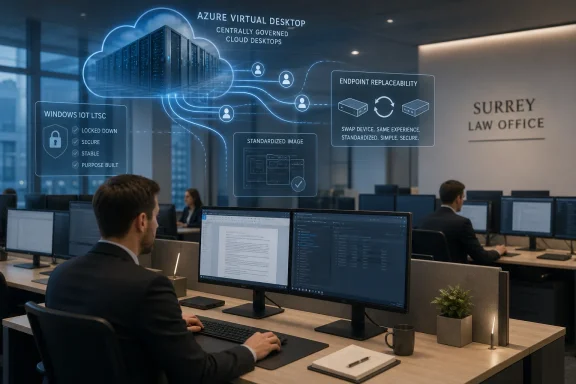 The Cloud Desktop Has Reached the Law Office
There was a time when a law firm’s desktop estate was a museum of accumulated compromises. A partner’s PC might run an old dictation driver. A secretary’s machine might have a locally installed practice-management dependency. A meeting-room workstation might be “special” for reasons nobody wanted to investigate because it still worked and nobody had time.TWM Solicitors’ rollout is notable because it shows how far the cloud desktop has moved from theory into the unglamorous middle of professional services IT. This is not a hyperscale bank, a global outsourcer, or a greenfield startup with a blank architecture diagram. It is a regional legal practice with three sites, 240 staff, legacy desktop assumptions, dictation workflows, hybrid work expectations, and a four-person IT team expected to make the whole thing function.
That is exactly the kind of organisation where desktop modernisation usually becomes both necessary and painful. The firm was not simply swapping beige boxes for smaller boxes. It was moving from Microsoft Remote Desktop Services to Azure Virtual Desktop, shifting back-end infrastructure into Azure, upgrading to Microsoft 365, introducing new practice management software, and rolling out dual monitors across desks.
Taken together, that is not a hardware project. It is a redefinition of where the Windows workplace lives.
The Endpoint Became Smaller, but the Decision Got Bigger
Alan Barrett, TWM’s Head of IT, captured the paradox neatly: when the firm moved to Azure Virtual Desktop, the endpoint became less important and more critical at the same time. Less important, because compute, applications, data, and session state moved into the cloud. More critical, because the endpoint remained the one piece of the stack every user physically touches all day.That tension is often underplayed in cloud desktop conversations. Vendors like to sell virtual desktop infrastructure as though endpoint choice becomes almost incidental once the “real” desktop runs elsewhere. Administrators know better. If the endpoint cannot drive two monitors properly, handle audio redirection cleanly, support a necessary driver, or recover quickly when something fails, users do not blame the architecture. They blame IT.
For TWM, the device requirements were practical rather than fashionable. The new hardware needed to support dual 24-inch displays at full resolution, run Windows drivers for SpeechWrite digital dictation software, and be manageable remotely across multiple sites. That pushed the firm toward Windows IoT LTSC-based 10ZiG thin clients sourced through Softcat after a trial.
The result is a hybrid of old and new thinking. The device is intentionally stripped of local importance: no user data, no full-fat local desktop lifecycle, no reason to treat a failed unit as a recovery project. Yet it still needs enough Windows compatibility to satisfy the awkward parts of a real workplace, including dictation and collaboration tools that do not always behave nicely inside virtual sessions.
That is the endpoint story cloud optimists often skip. You can centralise the desktop, but you cannot centralise the laws of peripherals, codecs, monitors, and user patience.
Azure Virtual Desktop Wins by Making the Old Estate Replaceable
The architectural centre of TWM’s project is Azure Virtual Desktop, Microsoft’s cloud-hosted desktop and app virtualisation platform. For a firm already operating heavily in the Microsoft ecosystem, the choice is unsurprising. Azure Virtual Desktop sits naturally alongside Microsoft 365, Entra identity, Azure infrastructure, and Windows session host management.The advantage is not merely that employees can connect from the office or home. Remote access has been possible for decades, and Remote Desktop Services already gave many organisations a version of that world. The difference is that AVD fits a more modern operating model: desktops are built from images, session hosts can be scaled, and workloads can be placed closer to cloud-hosted back-end services.
TWM’s use of a single image across endpoints and session hosts is particularly important. It changes patching from a device-by-device chore into a centralised workflow. It also gives the firm a cleaner recovery path: if something goes badly wrong, infrastructure can be rebuilt from known-good components rather than nursed back to health one workstation at a time.
That matters in legal services, where downtime is not merely inconvenient. Fee earners need access to documents, case systems, dictation, email, calendars, and collaboration tools; back-office staff need predictable access to workflows that may be tightly tied to deadlines and client service obligations. A desktop model that can be rebuilt quickly has a resilience value that does not always show up in headline cost comparisons.
The lesson is not that Azure Virtual Desktop is automatically simpler than on-premises RDS. It is that AVD can make the desktop estate more replaceable. In infrastructure, replaceability is often the difference between a bad morning and a week of improvised recovery.
The Thin Client Is Back Because the PC Became Too Capable
Thin clients have never quite gone away, but their reputation has moved in cycles. They were once pitched as the obvious successor to the PC, then became associated with limited, locked-down environments, then faded behind laptops and SaaS. Now they are returning in a more pragmatic form: not as anti-PC ideology, but as a way to make cloud desktop economics and management work.TWM’s numbers illustrate the point. The firm put the cost of each device at about £450 and estimated an eight- or nine-year lifespan, giving an annualised device cost of roughly £50. Barrett translated that into about £1 per week for an endpoint that demands little day-to-day management.
That does not mean every organisation should expect the same economics. Cloud desktops shift costs rather than abolish them. Azure compute, storage, networking, licensing, monitoring, backup, security tooling, and management layers all have to be accounted for. The endpoint saving is only one line in a wider operational model.
But the thin client changes the character of desktop support. A conventional PC estate accumulates entropy: local profiles, user-installed clutter, driver drift, storage failures, imaging exceptions, and “just this once” fixes that become permanent. A thin client connected to a centrally managed AVD environment has less room to become unique. In enterprise IT, uniqueness is usually another word for future labour.
The interesting part of TWM’s deployment is that the firm did not choose zero-client minimalism at any cost. It chose Windows IoT LTSC devices because the business still needed Windows driver compatibility and local resource handling for certain workloads. That is a reminder that the future of the Windows endpoint may not be a full PC or a browser-only appliance. It may be something in between: managed, durable, boring, and just local enough.
The Real Migration Was From Craft Work to Factory Work
The operational story is almost more compelling than the architecture. Before shipment, TWM worked with 10ZiG to create a standard device image containing the required software, drivers, and settings. The devices then arrived configured and ready to connect to the network.That preparation paid off during the physical rollout. At the firm’s largest office in Guildford, more than 100 machines and monitors were replaced in a single day. Anyone who has done an office-wide desktop swap knows that the technology is only half the battle. The rest is cardboard, monitor arms, cable routing, desk access, labels, old kit, recycling, and the grim arithmetic of getting everything ready before staff return.
Barrett’s remark to the managing partner — wondering where else so many computers could be changed over a weekend and still work on Monday — is more than a pleasing anecdote. It points to the central administrative win: the project moved endpoint deployment from artisanal rebuilds to repeatable production.
That is what small IT teams need most. A four-person department cannot afford heroics as a normal operating model. It needs standard images, remote management, predictable replacement workflows, and devices that do not require a site visit every time a setting changes.
This is where thin clients pair well with cloud desktops. The server side becomes image-driven and scalable; the endpoint side becomes remotely manageable and disposable in the best sense of the word. If a device fails, it can be swapped. If a configuration changes, it can be pushed. If a site needs standardisation, the work is done before the box lands on the desk.
The PC era trained organisations to treat every endpoint as a small computer with a local personality. The AVD thin-client model treats it as an access component. That shift may sound subtle, but it is the difference between managing a fleet and tending a garden.
Cost Control Is a Discipline, Not a Feature
TWM uses Nerdio to manage the scaling of AVD session hosts during the day, matching compute consumption to user demand and avoiding payment for unused capacity. That is a sensible move, because cloud desktop cost control is not automatic. Azure makes it easy to provision capacity; it also makes it easy to leave capacity running longer than necessary.The pitch for Azure Virtual Desktop often leans on elasticity. Session hosts can be powered on and off, pooled, scaled, and maintained centrally. But elasticity only becomes a saving when someone — or some policy engine — actually governs it. Otherwise, the organisation has merely traded capex for a meter.
That is why the combination of AVD and a management layer such as Nerdio is significant. It acknowledges that cloud desktops need active financial engineering. Usage varies by time of day, day of week, department, and working pattern. A legal firm may have bursts around deadlines, court dates, completions, month-end billing, or partner workflows. A static estate sized for peak demand can be expensive in the cloud, just as an underpowered estate can be intolerable for users.
The endpoint economics also need sober treatment. A £450 thin client with a long lifespan is appealing, but the business case depends on reduced support effort, lower failure impact, predictable replacement, and simpler remote administration. Those are real savings, but they sit in time, risk, and operational capacity as much as in a purchase ledger.
TWM says central management has reduced the need for engineers to travel between sites, saving hundreds of hours of IT time as well as transport costs. That is the kind of saving that resonates with administrators because it removes low-value work. Nobody joins IT to drive between offices to press buttons on endpoint hardware.
The larger point is that the cloud desktop does not eliminate management. It changes what must be managed. Compute, images, identity, policies, session performance, endpoint firmware, peripheral compatibility, and collaboration offload all become part of the same economic equation.
Teams, Zoom, and Dictation Keep the Edge Honest
The most revealing technical requirements in TWM’s project were not exotic. They were dual monitors, dictation software, Microsoft Teams, and Zoom. In other words, the everyday tools that turn elegant architecture diagrams into lived user experience.Voice and video are particularly unforgiving in virtual desktop environments. If media processing is handled poorly, users feel it immediately: lag, poor audio, camera issues, broken redirection, or degraded call quality. The same is true for dictation software, where latency and driver support can affect productivity directly.
TWM configured the endpoints to handle Teams and Zoom calls running within Azure Virtual Desktop by using local device resources where needed. This is a crucial piece of the story because it shows why the endpoint cannot be dismissed as a dumb terminal. Modern collaboration expects microphones, cameras, speakers, graphics acceleration, codecs, and real-time responsiveness. Some of that has to happen close to the user.
The legal-sector angle matters too. Dictation remains a serious workflow in many law firms, not a quaint holdover. If a new desktop model breaks dictation, it fails no matter how elegant the Azure architecture looks. Supporting SpeechWrite’s Windows drivers was therefore not a nice-to-have; it was a business requirement.
This is where Windows IoT LTSC has an obvious appeal. It offers a locked-down, long-servicing Windows platform suitable for appliance-like devices while preserving compatibility that some Linux-based or more constrained thin-client approaches may struggle to deliver. It is not glamorous, but it solves the problem that actually exists.
The lesson for Windows administrators is blunt: endpoint modernisation projects succeed or fail at the edges. Monitors, headsets, webcams, dictation pedals, printers, scanners, smartcards, and local network conditions are not footnotes. They are the difference between a cloud desktop that users accept and one they route around.
Security Improves When Data Stops Living Under Desks
The security case for thin clients and AVD is straightforward but should not be overstated. TWM’s devices are configured to open Azure Virtual Desktop sessions and hold no local user data. That reduces the exposure created by lost, stolen, failed, or improperly decommissioned endpoint hardware.For a law firm, that is not a marginal benefit. Legal practices hold sensitive client information, privileged communications, financial data, and identity material. Reducing the amount of data stored on desks and endpoint disks is a meaningful risk reduction, especially across multiple offices and hybrid working patterns.
Centralised patching and image management also improve control. If session hosts are built from standard images and patched centrally, the IT team has a better chance of maintaining a consistent security posture. Endpoint configuration managed through 10ZiG Manager reduces another class of drift: the slow divergence of local machines from the intended baseline.
But the model also concentrates risk. Identity becomes more important. Conditional access, multifactor authentication, session controls, logging, endpoint trust, and administrator privilege all matter more when the desktop is essentially a gateway into cloud-hosted business systems. AVD reduces some old endpoint risks while raising the stakes around cloud configuration and account compromise.
That is not an argument against the move. It is an argument against magical thinking. The secure thin client is not secure because it is thin. It is secure because it participates in a disciplined architecture where data location, access policy, image control, patching, monitoring, and recovery are designed together.
For small IT teams, the centralisation can be liberating. Instead of chasing every endpoint, administrators can focus on the control planes that matter. But those control planes need attention, documentation, and regular testing. A rebuild path is only reassuring if someone has rehearsed it.
The Small IT Team Is the Real Customer
The striking detail in TWM’s story is not the 240 devices. It is the four-person IT team. That is a modest staff for the scope of work described: AVD migration, Azure back-end infrastructure, Microsoft 365 upgrade, practice management rollout, dual monitors, endpoint refresh, imaging, remote management, and office-wide cutovers.This is where the project becomes broadly relevant. Many mid-sized organisations are being asked to modernise like enterprises while staffing like small businesses. They are expected to deliver cloud migration, security uplift, hybrid working, endpoint management, compliance readiness, and user support without multiplying headcount.
A conventional desktop estate punishes that model. Every local variation becomes a future ticket. Every manually touched machine is a hidden liability. Every site visit steals time from strategic work. The promise of the TWM-style architecture is not that IT has less to understand. It is that repetitive work is pushed into systems rather than calendars.
10ZiG Manager gives TWM the ability to power devices on and off remotely, deploy patches, and maintain configuration across offices. That sounds routine until compared with the alternative: engineers travelling between sites to fix endpoints that should never have required physical attention in the first place.
The phrase “low maintenance” can sound like marketing. In this context, it has a harder operational meaning. Low maintenance means a failed endpoint is not an incident with data recovery attached. It means a patch can be pushed from a console. It means the Monday after a weekend cutover is not consumed by avoidable chaos.
That is why this project should interest sysadmins who do not work in law. The same pressures exist in accountancy, healthcare administration, education, local government, charities, and regional professional services. The shared problem is not a lack of technology. It is the shortage of time to manage technology that insists on being special.
The Windows Desktop Is Becoming a Service Boundary
For decades, Windows was understood as something installed on a PC. Even when applications moved to servers or SaaS, the PC remained the primary unit of management. Group Policy, imaging, antivirus, local software deployment, printer mappings, and profile fixes all orbited the endpoint.Azure Virtual Desktop changes that mental model. The Windows desktop becomes a service boundary: something delivered, scaled, rebuilt, and governed centrally, while the local device becomes an access layer. That does not end endpoint management, but it demotes the endpoint from the centre of gravity.
This is not the same as saying the PC is dead. Laptops remain essential for mobile workers, developers, executives, offline scenarios, specialised workloads, and many power users. But for office-based task and knowledge workers whose key systems live in Microsoft 365, practice platforms, browser apps, and virtualised Windows sessions, the traditional desktop PC looks increasingly overbuilt.
TWM’s dual-monitor thin-client deployment is a case study in that middle ground. Staff still sit at desks. They still use Windows. They still need peripherals and collaboration tools. But the endpoint no longer needs to carry the full burden of compute, storage, application state, and data protection.
That is why the story matters to WindowsForum readers. It is not about a niche hardware refresh at a Surrey law firm. It is about the continuing unbundling of Windows from the physical PC, and the practical compromises required to make that unbundling tolerable for real users.
Microsoft has been moving in this direction for years with Azure Virtual Desktop, Windows 365, Intune, Entra, and Microsoft 365. The destination is not one single product. It is a management philosophy: identity-driven access, cloud-hosted state, policy-managed endpoints, and subscription-based capacity.
TWM’s deployment shows that philosophy becoming mundane. That is when a technology shift becomes important.
The Trade-Offs Hide in the Word “Modernise”
Modernisation is one of those vendor words that can mean almost anything. In this case, it means lower local complexity, greater central control, and better support for hybrid work. It also means dependence on cloud availability, network quality, Azure cost governance, identity security, and specialist management tooling.That trade-off is not a flaw. It is the actual decision. On-premises desktops and RDS environments carry their own risks: ageing hardware, patch inconsistency, limited remote access flexibility, capital refresh cycles, local data exposure, and slow recovery. Cloud desktops move the risk profile rather than erasing it.
For TWM, the move appears to align with business priorities. The firm wanted to reduce capital spending, shift toward predictable operating costs, and simplify delivery of new technology services to staff in the office and at home. Those are board-level outcomes, not just IT preferences.
Still, predictable operating cost does not mean inevitably lower cost. Azure bills must be watched. Session host sizing must be tuned. Storage profiles need care. Licensing assumptions need periodic review. User experience must be monitored because latency and resource contention can quietly erode confidence.
The endpoint estate also becomes dependent on vendor support and lifecycle planning. A promised eight- or nine-year lifespan is attractive, but firmware, OS servicing, AVD client compatibility, Teams and Zoom optimisation, and peripheral support will need attention over that period. Thin clients are low-maintenance, not no-maintenance.
The better reading of TWM’s project is that the firm chose which complexity it wanted to own. It traded many small, distributed endpoint problems for fewer, more centralised platform problems. For a four-person IT team serving 240 staff, that is a rational trade.
A Weekend Cutover Tells the Whole Story
The image that lingers is not Azure architecture or cloud cost modelling. It is the Guildford office, where more than 100 machines and monitors were replaced in a single day. That is the physical reality behind the abstract language of digital transformation.A successful weekend cutover is never just luck. It reflects standardisation, preparation, supplier coordination, image discipline, and a willingness to treat deployment logistics as seriously as platform design. The users who returned on Monday did not need to admire the architecture. They needed their desktops to work.
That is why the “invisible endpoint” is such a powerful idea. The best endpoint in a virtual desktop environment is not the one users praise every day. It is the one they stop thinking about. It turns on, connects, drives the monitors, handles calls and dictation, and gets out of the way.
There is an irony here. The more successful the endpoint strategy, the less visible the endpoint becomes. That can make it hard to communicate the value of the work, especially to executives who only notice IT when something breaks. But invisibility is often the highest form of infrastructure success.
For sysadmins, the project’s message is quietly encouraging. It suggests that even a small team can execute a broad desktop transformation if it reduces variation, leans on standard images, uses remote management, and respects the messy details of user workflows.
It also suggests that thin clients have found a more convincing role in the cloud era. They are not replacing PCs because PCs failed. They are replacing PCs where the desktop has moved somewhere else.
The £1-a-Week Endpoint Is Really a Bet on Boring IT
TWM’s deployment leaves a handful of practical lessons for organisations considering Azure Virtual Desktop, thin clients, or a broader endpoint reset. The most important is that success depends less on the glamour of cloud migration than on the dull virtues of standardisation, testing, and lifecycle discipline.- The endpoint still matters when the desktop runs in Azure, because monitors, audio, video, drivers, and peripherals define the user’s experience.
- A thin-client business case should include support time, site visits, replacement workflow, security exposure, and device lifespan, not just purchase price.
- Azure Virtual Desktop cost control requires active scaling and governance, because elasticity only saves money when capacity is actually managed.
- Windows IoT LTSC thin clients can be a practical compromise where organisations want appliance-like manageability without giving up Windows driver compatibility.
- A standard image and preconfigured shipment process can turn a risky office swap-out into a repeatable deployment exercise.
- Small IT teams benefit most when the desktop estate becomes less unique, because every exception is future operational debt.
References
- Primary source: ChannelLife UK
Published: Tue, 16 Jun 2026 07:30:00 GMT
TWM Solicitors rolls out 10ZiG thin clients for Azure AVD
The Surrey law firm cut desktop management overheads by moving 240 staff to cloud-based virtual desktops and centrally managed thin clients. channellife.co.uk
- Related coverage: 10zig.com
TWM Solicitors: Case Study | 10ZiG
TWM Solicitors & 10ZiG “I had a major IT infrastructure challenge, and we knew 10ZiG Technology was up for the job… switching 120 computers over to 10ZiG Windows-based Thin Clients and upgrading everyone to dual monitors in just one weekend.” – Alan Barrett, TWM Head of IT The Legal Firm Full...www.10zig.com - Official source: learn.microsoft.com
Connect to Azure Virtual Desktop with thin clients - Azure Virtual Desktop | Microsoft Learn
Learn how to connect to Azure Virtual Desktop using thin clients.learn.microsoft.com - Related coverage: digitalitnews.com
TWM Solicitors Deploys 10ZiG Thin Clients for Azure Migration | Digital IT News
TWM Solicitors adopts 10ZiG thin clients to support Azure Virtual Desktop, improving security, management, and efficiency. digitalitnews.com
- Related coverage: macle.com
10ZiG innovative thin & zero clients at macle
Hardware, software, support for cloud working environments & virtual desktops from 10ZiG. Everything from a single source. Find out more & request a demo device!macle.com - Related coverage: thinclients.10zig.com
Thin Clients - 10ZiG Technology
 thinclients.10zig.com
- Related coverage: colva-it.com
10ZiG | Colva
www.colva-it.com
