

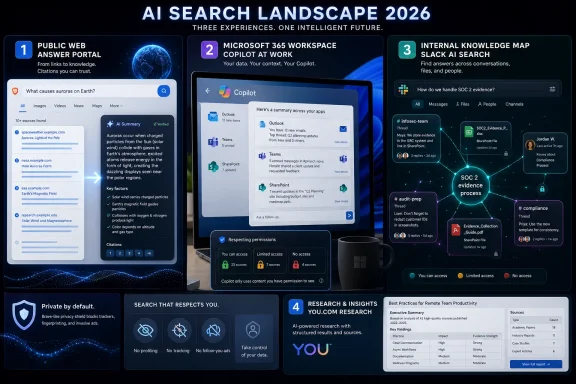
AI search engines in 2026 are led by tools including Microsoft Copilot, Google Gemini, Perplexity, ChatGPT Search, Brave Search AI, You.com, and enterprise systems such as Slack AI Search that retrieve, synthesize, and cite information from the web or workplace data. The important shift is not that search boxes got smarter. It is that the search market is splitting into public answer engines, office-suite copilots, privacy-first indexes, and internal knowledge systems. For Windows users and IT departments, that means “best search engine” has become the wrong question; the better one is where the answer is allowed to live.
For two decades, search meant delegation with homework attached. Google, Bing, and their rivals ranked documents, but the user still had to open tabs, compare claims, scan dates, and decide which source deserved trust. AI search changes the contract by offering the conclusion first and the sources second.
That is a convenience, but it is also a power shift. The search engine is no longer merely pointing at the web; it is interpreting the web, compressing it, and sometimes deciding what the user never sees. The old search result page was noisy, commercial, and manipulable, but it also exposed disagreement. AI search is cleaner, faster, and more conversational, but it can turn uncertainty into confident prose.
This is why 2026’s AI search race is not a simple beauty contest among chatbots. Perplexity, ChatGPT Search, Gemini, Copilot, Brave, You.com, and Slack-style enterprise search are solving adjacent but different problems. Some are trying to replace Google for open-web research. Others are trying to make Office documents, Teams chats, Slack channels, code repositories, and shared drives searchable by intent rather than by keyword.
The winners will not necessarily be the systems with the most charming answer tone. They will be the systems that can prove where an answer came from, respect permissions, surface fresh information, and admit when the evidence is thin.
That matters because AI search has a trust problem baked into its architecture. Large language models are fluent enough to make guesses sound like reporting. A search product that anchors claims to retrievable sources gives users a fighting chance to audit the answer, even if the synthesis still needs skepticism.
Perplexity is strongest when the user is exploring a topic rather than navigating to a known site. It is useful for comparing product specs, summarizing current reporting, tracing a technical issue across documentation and forums, or getting a first-pass map of a subject. Its Pro-style research modes and model-switching options make it particularly attractive to power users who want more control over depth and style.
The weakness is the same one that haunts the whole category: citations do not automatically equal correctness. A cited answer can still overstate a weak source, miss a better one, or flatten a disagreement into a consensus that does not exist. Perplexity is one of the better tools for sourced web research, but it is not a substitute for reading primary material when the stakes are high.
That gives Copilot a strategic advantage inside Microsoft shops. If the question is “What did finance change in the latest forecast?” or “Which customer commitments did we make last quarter?”, the best answer may require permission-aware access across mail, documents, meetings, and chats. Traditional web search cannot do that. A generic chatbot should not be allowed to do that without governance.
The practical issue for administrators is that Copilot’s value depends on the hygiene of the tenant underneath it. If SharePoint permissions are sloppy, if old files are overexposed, or if sensitive documents sit in broadly accessible locations, AI search can make existing access problems more visible. It does not necessarily create the permissions mess, but it can make the mess searchable.
Pricing and licensing also matter. Microsoft has kept enterprise Copilot positioned as a paid layer on top of qualifying Microsoft 365 subscriptions, while free or included Copilot Chat experiences have shifted over time. That means IT teams should not evaluate Copilot as a novelty button in Windows or Edge; they should evaluate it as a tenant-wide knowledge access system with licensing, compliance, training, and data-governance consequences.
Gemini’s advantage is ecosystem gravity. For users already living in Gmail, Docs, Drive, Calendar, Meet, Android, Chrome, and Google Search, the assistant does not need to feel like a separate destination. It can appear where the work already happens, and it can combine web retrieval with personal or organizational context when the user has granted access.
The company’s push toward AI Mode in Search and deeper Gemini integration across Workspace shows where this is heading. Search becomes less of a page and more of a session. The user asks, refines, uploads, compares, and delegates.
But Google’s problem is trust of another kind. The more AI answers replace blue links, the more publishers, regulators, advertisers, and users will scrutinize how those answers are assembled. Google can build one of the best AI search experiences in the market, but it must do so while defending the economics of the web that trained users to search in the first place.
This is why ChatGPT Search often feels less like a search engine than a general-purpose workbench with a browser attached. The user can ask for current information, then immediately transform the result into a table, memo, script, spreadsheet outline, or slide narrative. The search result is not the endpoint; it is raw material.
For individual users, that versatility is the attraction. For teams, it is also the risk. Once a system can search the web, read uploaded documents, remember preferences, call tools, and connect to cloud storage, it becomes part of the organization’s information flow. That raises familiar enterprise questions about retention, training use, connectors, identity, auditability, and whether employees understand what should not be pasted into a consumer-grade chat window.
OpenAI has been moving ChatGPT toward team and enterprise workflows, but the product’s cultural identity remains broader than search. That makes it powerful for creative synthesis and ad hoc research, yet less tidy for organizations that want search to behave like a governed corporate system. ChatGPT Search is often the most flexible tool in the room; flexibility is not the same thing as administrative simplicity.
That makes Brave Search AI and the Leo assistant attractive for users who want AI summaries without turning every query into a personalization signal. Not every search should become part of an ad profile or a model-improvement pipeline. Legal research, medical curiosity, workplace disputes, security incidents, and sensitive purchasing decisions all benefit from minimizing unnecessary data exposure.
The trade-off is that privacy-first tools can feel less deeply integrated than the giants’ assistants. Gemini knows Google’s ecosystem. Copilot knows Microsoft 365, if licensed and configured. ChatGPT can become a multi-tool workspace. Brave is more intentionally bounded.
That boundary is valuable. The AI market often treats more context as inherently better, but security-minded users know that context is also liability. Brave’s place in the 2026 lineup is not as the flashiest answer engine; it is as the reminder that not collecting something can be a product decision.
That includes analysts, consultants, policy teams, market researchers, developers building retrieval-augmented generation systems, and enterprise groups that need web data in a format machines can use. In that world, the answer is not just a paragraph. It may need source coverage, comparison tables, charts, reusable data, or an API-friendly structure.
The appeal is obvious in regulated or evidence-heavy environments. A quick chatbot answer is not enough when someone has to defend the finding in a meeting, memo, procurement review, or compliance process. You.com’s pitch is that research should be generated with a more explicit chain back to source material.
The limitation is that deep research tools can oversell completeness. “Hundreds of sources” sounds reassuring, but quality still beats volume. The researcher’s job changes from finding sources manually to auditing the machine’s selection, synthesis, and omissions.
That is a different technical and organizational problem. Company knowledge lives in messages, threads, canvases, files, app notifications, tickets, code links, meeting notes, and decisions made in passing. The hard part is not only retrieving a document; it is reconstructing the context around why a decision happened.
For teams that operate in Slack all day, enterprise AI search can make institutional memory less dependent on who happens to be online. A new employee can ask what the team decided about a launch. A manager can find the latest status without interrupting five people. A support engineer can trace a customer issue across channels and connected tools.
The caveat is that internal AI search must be more conservative than public web search. It needs to honor permissions, expose sources, avoid leaking private channel content, and fit existing retention and compliance policies. If an AI system becomes the fastest way to find confidential material that permissions technically allow but culture never intended to expose, admins will have a governance problem rather than a productivity win.
For public web research, citation-forward engines such as Perplexity, ChatGPT Search, Gemini, Brave, and You.com compete on freshness, source quality, synthesis, and interface. For workplace knowledge, Copilot and Slack-style enterprise search compete on identity, permissions, connectors, and proximity to where work happens. Those are different battlegrounds.
Windows-heavy organizations will naturally look at Copilot because Microsoft 365 is already the system of record for many businesses. Google Workspace organizations will gravitate toward Gemini. Teams that live in Slack may find Slack AI Search more immediately useful for day-to-day operational memory than a browser-based answer engine.
The real-world answer is often a portfolio. Use one tool for open-web research, another for office-suite knowledge, another for private search, and perhaps another for deep reports. Standardizing on a single AI search engine may be tidy for procurement, but it may not match how information actually moves.
Hallucinations are only one part of the problem. AI search can also cite weak sources, miss primary documentation, confuse similarly named products, surface stale pages, or summarize a controversy as if it has been settled. The answer may be mostly right and still wrong in the one detail that matters.
This is especially important for IT pros. A generated answer about licensing, security baselines, registry changes, PowerShell commands, or Windows update behavior can cause real damage if accepted uncritically. AI search is excellent for orientation and triage. It is not a replacement for release notes, vendor documentation, test rings, backups, and change control.
The better way to think about AI search is as a fast junior researcher with an impressive reading speed and uneven judgment. Ask it to gather, compare, summarize, and point you toward sources. Do not ask it to be the final authority on production changes without human review.
 Search Is No Longer a Page of Links
For two decades, search meant delegation with homework attached. Google, Bing, and their rivals ranked documents, but the user still had to open tabs, compare claims, scan dates, and decide which source deserved trust. AI search changes the contract by offering the conclusion first and the sources second.That is a convenience, but it is also a power shift. The search engine is no longer merely pointing at the web; it is interpreting the web, compressing it, and sometimes deciding what the user never sees. The old search result page was noisy, commercial, and manipulable, but it also exposed disagreement. AI search is cleaner, faster, and more conversational, but it can turn uncertainty into confident prose.
This is why 2026’s AI search race is not a simple beauty contest among chatbots. Perplexity, ChatGPT Search, Gemini, Copilot, Brave, You.com, and Slack-style enterprise search are solving adjacent but different problems. Some are trying to replace Google for open-web research. Others are trying to make Office documents, Teams chats, Slack channels, code repositories, and shared drives searchable by intent rather than by keyword.
The winners will not necessarily be the systems with the most charming answer tone. They will be the systems that can prove where an answer came from, respect permissions, surface fresh information, and admit when the evidence is thin.
Perplexity Made Citations the Product
Perplexity remains the cleanest expression of the AI answer-engine idea. Its core pitch is simple: ask a natural-language question, receive a synthesized answer, and inspect the sources behind it. That sounds mundane now, but it helped define the category because the citation was not an afterthought; it was part of the interface.That matters because AI search has a trust problem baked into its architecture. Large language models are fluent enough to make guesses sound like reporting. A search product that anchors claims to retrievable sources gives users a fighting chance to audit the answer, even if the synthesis still needs skepticism.
Perplexity is strongest when the user is exploring a topic rather than navigating to a known site. It is useful for comparing product specs, summarizing current reporting, tracing a technical issue across documentation and forums, or getting a first-pass map of a subject. Its Pro-style research modes and model-switching options make it particularly attractive to power users who want more control over depth and style.
The weakness is the same one that haunts the whole category: citations do not automatically equal correctness. A cited answer can still overstate a weak source, miss a better one, or flatten a disagreement into a consensus that does not exist. Perplexity is one of the better tools for sourced web research, but it is not a substitute for reading primary material when the stakes are high.
Copilot Turns Search Into a Microsoft 365 Permission Problem
Microsoft Copilot is not merely a search engine, and that is precisely why it matters to WindowsForum readers. In a Microsoft 365 environment, the valuable information is often not on the public web. It is in Outlook threads, SharePoint folders, Teams meetings, Word drafts, Excel models, OneDrive files, Planner tasks, and the Microsoft Graph relationships tying them together.That gives Copilot a strategic advantage inside Microsoft shops. If the question is “What did finance change in the latest forecast?” or “Which customer commitments did we make last quarter?”, the best answer may require permission-aware access across mail, documents, meetings, and chats. Traditional web search cannot do that. A generic chatbot should not be allowed to do that without governance.
The practical issue for administrators is that Copilot’s value depends on the hygiene of the tenant underneath it. If SharePoint permissions are sloppy, if old files are overexposed, or if sensitive documents sit in broadly accessible locations, AI search can make existing access problems more visible. It does not necessarily create the permissions mess, but it can make the mess searchable.
Pricing and licensing also matter. Microsoft has kept enterprise Copilot positioned as a paid layer on top of qualifying Microsoft 365 subscriptions, while free or included Copilot Chat experiences have shifted over time. That means IT teams should not evaluate Copilot as a novelty button in Windows or Edge; they should evaluate it as a tenant-wide knowledge access system with licensing, compliance, training, and data-governance consequences.
Gemini Is Google Search Learning to Answer Back
Google Gemini sits in the most awkward and consequential position in AI search. Google has the web-search empire, the browser reach, the mobile footprint, the advertising machine, and a mature productivity suite. It also has the most to lose if users stop scrolling through search results and start accepting generated answers at the top of the page.Gemini’s advantage is ecosystem gravity. For users already living in Gmail, Docs, Drive, Calendar, Meet, Android, Chrome, and Google Search, the assistant does not need to feel like a separate destination. It can appear where the work already happens, and it can combine web retrieval with personal or organizational context when the user has granted access.
The company’s push toward AI Mode in Search and deeper Gemini integration across Workspace shows where this is heading. Search becomes less of a page and more of a session. The user asks, refines, uploads, compares, and delegates.
But Google’s problem is trust of another kind. The more AI answers replace blue links, the more publishers, regulators, advertisers, and users will scrutinize how those answers are assembled. Google can build one of the best AI search experiences in the market, but it must do so while defending the economics of the web that trained users to search in the first place.
ChatGPT Search Wins by Being Where the Prompt Already Is
ChatGPT Search benefits from a habit that competitors envy: millions of users already begin tasks inside ChatGPT. They are drafting emails, writing code, analyzing files, planning trips, debugging scripts, summarizing PDFs, and brainstorming strategy. Adding live search to that environment turns the chatbot from a writing assistant into a research workstation.This is why ChatGPT Search often feels less like a search engine than a general-purpose workbench with a browser attached. The user can ask for current information, then immediately transform the result into a table, memo, script, spreadsheet outline, or slide narrative. The search result is not the endpoint; it is raw material.
For individual users, that versatility is the attraction. For teams, it is also the risk. Once a system can search the web, read uploaded documents, remember preferences, call tools, and connect to cloud storage, it becomes part of the organization’s information flow. That raises familiar enterprise questions about retention, training use, connectors, identity, auditability, and whether employees understand what should not be pasted into a consumer-grade chat window.
OpenAI has been moving ChatGPT toward team and enterprise workflows, but the product’s cultural identity remains broader than search. That makes it powerful for creative synthesis and ad hoc research, yet less tidy for organizations that want search to behave like a governed corporate system. ChatGPT Search is often the most flexible tool in the room; flexibility is not the same thing as administrative simplicity.
Brave Search AI Makes Privacy a Feature Instead of a Checkbox
Brave’s AI search story is different because it starts with the index. Brave Search is built around an independent web index rather than simply repackaging results from Google or Bing, and the company’s broader browser pitch has long centered on privacy, tracker blocking, and reduced profiling. In a market where many AI tools want more user context, Brave’s restraint is the feature.That makes Brave Search AI and the Leo assistant attractive for users who want AI summaries without turning every query into a personalization signal. Not every search should become part of an ad profile or a model-improvement pipeline. Legal research, medical curiosity, workplace disputes, security incidents, and sensitive purchasing decisions all benefit from minimizing unnecessary data exposure.
The trade-off is that privacy-first tools can feel less deeply integrated than the giants’ assistants. Gemini knows Google’s ecosystem. Copilot knows Microsoft 365, if licensed and configured. ChatGPT can become a multi-tool workspace. Brave is more intentionally bounded.
That boundary is valuable. The AI market often treats more context as inherently better, but security-minded users know that context is also liability. Brave’s place in the 2026 lineup is not as the flashiest answer engine; it is as the reminder that not collecting something can be a product decision.
You.com Chases the Researcher Who Needs Receipts
You.com has moved away from being merely another consumer search alternative and toward a more research-heavy identity. Its ARI research agent, structured outputs, and emphasis on citable reports point to a narrower but important audience: users who need to turn broad research questions into organized findings.That includes analysts, consultants, policy teams, market researchers, developers building retrieval-augmented generation systems, and enterprise groups that need web data in a format machines can use. In that world, the answer is not just a paragraph. It may need source coverage, comparison tables, charts, reusable data, or an API-friendly structure.
The appeal is obvious in regulated or evidence-heavy environments. A quick chatbot answer is not enough when someone has to defend the finding in a meeting, memo, procurement review, or compliance process. You.com’s pitch is that research should be generated with a more explicit chain back to source material.
The limitation is that deep research tools can oversell completeness. “Hundreds of sources” sounds reassuring, but quality still beats volume. The researcher’s job changes from finding sources manually to auditing the machine’s selection, synthesis, and omissions.
Slack Shows Why Internal Search Is Not Web Search With a Login
Slack’s presence in any “top AI search engines” list is revealing because it stretches the definition of search. Slack AI Search is not trying to index the public web better than Google or summarize news faster than Perplexity. It is trying to answer questions from the messy, conversational, semi-structured record of work.That is a different technical and organizational problem. Company knowledge lives in messages, threads, canvases, files, app notifications, tickets, code links, meeting notes, and decisions made in passing. The hard part is not only retrieving a document; it is reconstructing the context around why a decision happened.
For teams that operate in Slack all day, enterprise AI search can make institutional memory less dependent on who happens to be online. A new employee can ask what the team decided about a launch. A manager can find the latest status without interrupting five people. A support engineer can trace a customer issue across channels and connected tools.
The caveat is that internal AI search must be more conservative than public web search. It needs to honor permissions, expose sources, avoid leaking private channel content, and fit existing retention and compliance policies. If an AI system becomes the fastest way to find confidential material that permissions technically allow but culture never intended to expose, admins will have a governance problem rather than a productivity win.
The Best Tool Depends on Where the Truth Lives
The most common mistake in choosing an AI search engine is treating the category as if all questions are the same. They are not. “What changed in Windows 11 24H2?” is not the same as “What did our endpoint team decide about the rollout?” One answer lives in public documentation and reporting. The other lives inside the organization.For public web research, citation-forward engines such as Perplexity, ChatGPT Search, Gemini, Brave, and You.com compete on freshness, source quality, synthesis, and interface. For workplace knowledge, Copilot and Slack-style enterprise search compete on identity, permissions, connectors, and proximity to where work happens. Those are different battlegrounds.
Windows-heavy organizations will naturally look at Copilot because Microsoft 365 is already the system of record for many businesses. Google Workspace organizations will gravitate toward Gemini. Teams that live in Slack may find Slack AI Search more immediately useful for day-to-day operational memory than a browser-based answer engine.
The real-world answer is often a portfolio. Use one tool for open-web research, another for office-suite knowledge, another for private search, and perhaps another for deep reports. Standardizing on a single AI search engine may be tidy for procurement, but it may not match how information actually moves.
The New Search Risk Is a Confident Shortcut
AI search compresses time, and that is its greatest selling point. It is also the source of its most dangerous failure mode. When a tool returns a polished answer in seconds, users may skip the verification step that traditional search forced upon them.Hallucinations are only one part of the problem. AI search can also cite weak sources, miss primary documentation, confuse similarly named products, surface stale pages, or summarize a controversy as if it has been settled. The answer may be mostly right and still wrong in the one detail that matters.
This is especially important for IT pros. A generated answer about licensing, security baselines, registry changes, PowerShell commands, or Windows update behavior can cause real damage if accepted uncritically. AI search is excellent for orientation and triage. It is not a replacement for release notes, vendor documentation, test rings, backups, and change control.
The better way to think about AI search is as a fast junior researcher with an impressive reading speed and uneven judgment. Ask it to gather, compare, summarize, and point you toward sources. Do not ask it to be the final authority on production changes without human review.
The 2026 Shortlist Is Really a Map of Search’s Breakup
The most useful way to rank AI search engines in 2026 is not by declaring one universal winner. It is by matching each product to the job it is structurally best positioned to do. The market has already split, and that split is the story.- Perplexity is the clearest fit for fast, citation-forward public web research where the user wants an answer and immediate source trails.
- Microsoft Copilot is the strongest candidate for organizations whose knowledge and workflows are already concentrated in Microsoft 365.
- Google Gemini is the natural choice for users and businesses embedded in Google Search, Chrome, Android, and Workspace.
- ChatGPT Search is the most versatile general-purpose option when research needs to flow directly into writing, coding, analysis, or creative synthesis.
- Brave Search AI is the standout for privacy-conscious users who want AI assistance without making profiling the default bargain.
- You.com is best understood as a research and structured-output platform for users who need reports, source coverage, and API-ready search data.
- Slack AI Search belongs in a separate but crucial category: enterprise memory search for teams whose most important answers are buried in conversations, files, and connected work apps.
References
- Primary source: Slack
Published: 2026-06-21T16:50:21.788938
Top AI Search Engines for 2026 | Slack
Compare the best AI search engines for research, answers, privacy, and work. Learn how to choose the right tool, including enterprise search in Slack.slack.com - Related coverage: atonementlicensing.com
Microsoft 365 Copilot Pricing 2026: True Cost Decoded
Microsoft 365 Copilot lists at $30 per user per month. Realised cost lands at $66 to $87 after the E3 or E5 prerequisite. Get the 2026 pricing math.atonementlicensing.com
- Related coverage: velosio.com
Microsoft 365 Copilot Pricing Calculator (2026)| Velosio
Calculate your real Microsoft 365 Copilot cost - base plan plus add-on, small-business vs enterprise, and the July 1, 2026 changes. Free, instant, verified pricing.www.velosio.com - Related coverage: aguidetocloud.com
Microsoft Copilot Pricing & Tiers Explained (2026)
Microsoft Copilot pricing in plain English — Free, Microsoft 365 Premium, Microsoft 365 Copilot ($30), Studio & Credits. Plus what replaced Copilot Pro.www.aguidetocloud.com - Official source: openai.com
Introducing ChatGPT search | OpenAI
Get fast, timely answers with links to relevant web sourcesopenai.com - Related coverage: stork.ai
- Related coverage: brave.com
Brave Search API | Brave
Enterprise-grade Web search API accessing an index of 40+ billion pages. Specialized endpoints to train models, power search, and more. Real-time indexing, low latencies, and flexible pricing.brave.com - Related coverage: techcrunch.com
OpenAI upgrades ChatGPT search with shopping features | TechCrunch
OpenAI is updating ChatGPT Search to give users an improved shopping experience, the company announced in a blog post.techcrunch.com - Related coverage: tomshardware.com
Half of all US employees now use artificial intelligence at work, crossing landmark threshold for first time — Gallup data shows daily and weekly usage hitting all-time high of 28% in Q1 2026, with 65% feeling positive about its impact on produ
There's no stopping the growth of AI in the workforcewww.tomshardware.com
