

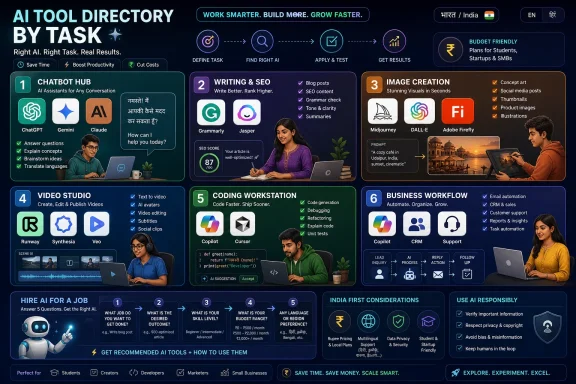
The best AI tools for 2026 are best understood as a practical directory by task: ChatGPT, Gemini and Claude for general assistance; Jasper and Grammarly for writing; Midjourney, DALL·E and Firefly for images; Runway, Synthesia and Veo for video; Copilot and Cursor for coding.
That answer is less glamorous than a ranked list, but it is far more useful. The AI market has moved past the stage where users needed to be convinced that the technology matters. The real problem now is tool sprawl: too many subscriptions, too many overlapping promises, and too little clarity about which product actually earns a place in a student’s browser, a founder’s workflow, or an IT department’s approved software list.
The explosion of AI software has created a strange new kind of inefficiency. Tools designed to save time now consume time through comparison shopping, onboarding, prompt experimentation, pricing confusion, and privacy anxiety. A founder in Bengaluru, a student in Pune, or a sysadmin in Hyderabad does not need “the top 100 AI tools.” They need the right tool for the next job.
That is why the sensible way to approach AI in 2026 is not by asking which company has the most impressive demo. It is by asking what work needs doing. Drafting an email, summarising a PDF, generating a product mock-up, writing code, transcribing a meeting, and routing support tickets are different jobs. A single chatbot may do several of them passably, but specialised tools still matter when volume, quality, workflow integration, or compliance enters the picture.
The market also changes too quickly for any directory to be permanent. Pricing, free tiers, model access, regional payment support, and enterprise controls can shift within months. That makes a rigid ranking fragile. A categorized directory is more durable because it maps tools to needs rather than pretending there is one universal “best” AI product.
A five-question filter remains the cheapest procurement strategy in AI. Define the exact job. Test the free tier. Use real data, not a polished demo. Check what happens to your inputs. Confirm that the tool works for your region, language, payment method, and daily workflow.
This matters especially in India, where practical friction can decide whether a tool is viable. A $20 monthly plan may look modest in Silicon Valley and steep once converted into rupees, taxed, and routed through a card that may or may not work. A brilliant tool that cannot handle the language mix of Hindi and English, or Tamil and English, may not be the best tool for a real Indian customer-support team.
The deeper point is discipline. AI rewards users who learn one tool well more than users who skim ten tools badly. The best setup for most people is boring: one general assistant, one writing or editing tool if needed, one design tool if needed, and a productivity assistant already embedded in the office suite they use.
ChatGPT remains the default for many users because of its ecosystem. It is not merely a chat window; it has become a place to work with files, images, voice, code, and structured tasks. Its strength is breadth. If someone wants a single assistant for brainstorming, rewriting, explaining, coding help, and lightweight research, ChatGPT is usually the first product they should test.
Gemini is the natural choice for users already deep inside Google’s world. Its advantage is not only the model but the surrounding context: Gmail, Docs, Sheets, Android, Drive, and Search-adjacent workflows. For professionals who live in Google Workspace, the best AI tool is often the one that appears inside the document or inbox they already have open.
Claude has carved out a reputation around long-context work, careful writing, and document analysis. It is particularly attractive to users who work with lengthy briefs, reports, contracts, transcripts, or research material. Claude’s tone can feel less frantic than some rivals, which matters when the task is not “give me ten catchy slogans” but “help me reason through this 80-page mess.”
Perplexity deserves its own lane because it is built around answer-finding with visible sources. That makes it useful for quick research, though users should still verify important claims. Meta AI, meanwhile, may be the most quietly important AI product for casual users in India because it sits inside WhatsApp and Instagram. It may not be the most powerful assistant, but distribution is power.
Jasper and Copy.ai are built for marketing teams and agencies that produce campaigns, ads, landing pages, emails, and blog drafts at volume. Their appeal is not that they magically write better than every chatbot. Their appeal is repeatability. A team can encode a brand voice, reuse templates, and move from brief to draft without reinventing the prompt each time.
Writesonic and Rytr occupy a more budget-conscious lane. Rytr in particular has found an audience among users who want low-cost assistance for short-form copy, outlines, descriptions, and simple content. For Indian freelancers and small businesses, price sensitivity is not a side issue; it is often the deciding factor.
Grammarly remains important because editing is different from generation. Many professionals do not want an AI to write the whole memo. They want it to catch awkward phrasing, sharpen tone, fix grammar, and reduce embarrassment before a client or manager sees the message. QuillBot similarly remains popular with students for paraphrasing and summarising, though academic users should be careful not to cross institutional rules.
SEO tools such as Surfer SEO and Frase are best understood as content operations software. They help writers compare pages, structure articles, and optimise for search intent. But the old warning has become more important, not less: publishing raw AI copy is a fast route to generic sludge. The winning content in 2026 will combine AI speed with human expertise, lived examples, and editorial judgment.
Midjourney remains a favourite among creators who want striking, stylised images. It is especially strong for concept art, mood boards, fantasy scenes, editorial visuals, and polished compositions. The trade-off is that it is not always the most natural fit for a casual business user who simply wants a social media post finished in ten minutes.
DALL·E’s advantage is its location. If a user already pays for ChatGPT, generating images inside the same assistant is frictionless. That matters because convenience often beats marginal quality differences. The best tool is frequently the one that sits where the work is already happening.
Adobe Firefly has a different pitch: commercial safety and integration. Adobe has consistently positioned Firefly as trained on licensed and public-domain material, making it attractive to designers, agencies, and companies worried about intellectual-property exposure. That does not eliminate every legal question around AI-generated work, but it does explain why Firefly is attractive to professional creative teams.
Canva is the pragmatic option for small businesses and non-designers. A bakery owner, tuition centre, boutique, or local services firm may not want an “image generator” as a standalone product. They want a festival post, flyer, thumbnail, or ad creative. Canva wins by placing AI image generation inside a broader design suite.
The rights issue remains unsettled. Copyright treatment of AI-generated images continues to evolve across jurisdictions, and commercial users should read tool terms rather than assume “AI-generated” means “free to use anywhere.” In practice, companies should treat brand-critical AI visuals with the same care they apply to stock imagery, fonts, music, and trademarks.
Text-to-video tools such as Runway and Pika are useful for short clips, creative experiments, storyboards, social media assets, and visual effects. Google Veo and OpenAI Sora have drawn attention because they point toward increasingly realistic generated video, though availability and access can vary. For most businesses, the near-term value is not replacing a production crew. It is speeding up drafts, concepts, and low-stakes content.
Avatar-video platforms such as Synthesia and HeyGen are more immediately practical. They turn scripts into presenter-style videos, often with multiple language options. That makes them useful for corporate training, onboarding, product explainers, compliance modules, and localization. In a multilingual country like India, this is not a novelty; it is a distribution strategy.
Voice tools such as ElevenLabs and Murf are valuable because audio production is expensive and time-consuming. Natural voice-overs, dubbing, and multilingual narration can help educators, YouTubers, marketers, and training teams produce more content with fewer studio dependencies. Descript remains notable because it treats audio and video editing like document editing, which lowers the barrier for people who are not traditional editors.
Music generators such as Suno and Udio raise the same opportunity-and-rights tension seen in image generation. They can be useful for demos, background tracks, drafts, and creative exploration. But commercial use requires caution, especially when a generated song begins to resemble a known artist, style, or copyrighted work too closely.
The category has shifted from autocomplete to agentic workflows. Early coding assistants suggested the next line or function. Newer tools can inspect larger codebases, propose multi-file edits, write tests, open pull requests, and help reason through architecture. That is powerful, but it also changes the risk profile.
A working developer should treat AI coding output like a junior contributor with supernatural typing speed. It can be helpful, fast, and occasionally brilliant. It can also misunderstand context, invent APIs, miss security implications, and produce code that passes a superficial glance but fails under real load.
For students, the educational upside is enormous if used correctly. A chatbot can explain an error message line by line, compare two approaches, generate practice problems, and review code patiently. The danger is dependency. If AI writes every solution, the learner may submit work without acquiring the mental model needed to debug it later.
For enterprise teams, the decision is less about whether coding AI works and more about governance. What code can be sent to the model? Are suggestions logged? Can the tool be configured for private repositories? How are licenses, secrets, and generated dependencies handled? Coding assistants are productivity tools, but they are also part of the software supply chain.
Microsoft Copilot’s advantage is obvious in Windows-heavy and Microsoft 365-heavy organizations. If employees already live in Word, Excel, Outlook, PowerPoint, and Teams, AI assistance inside those tools can reduce switching costs. The same logic applies to Gemini for companies standardized on Google Workspace.
Notion AI is compelling for teams that use Notion as a knowledge base, project hub, or personal workspace. Its strength is not simply writing paragraphs. It is summarising notes, reorganising messy information, drafting from existing pages, and helping users turn a chaotic workspace into something searchable and useful.
Meeting assistants such as Otter.ai, Fireflies, and Fathom solve a painfully ordinary problem: people forget what was said. Transcripts, summaries, action items, and searchable meeting histories can save hours. They can also create privacy issues if participants are not informed or if recordings are mishandled.
Automation tools such as Zapier and Make are where AI begins to connect business processes. A new lead can become a CRM entry, a draft email, a Slack notification, and a spreadsheet row. This is less glamorous than generating a cinematic video from a prompt, but it is often where small businesses see real returns.
Customer support is the obvious starting point. Many businesses answer the same questions every day: refund policies, delivery status, login trouble, pricing, appointment slots, documentation links. AI can deflect simple tickets, route complex ones, and help agents respond faster. The key is escalation. Customers forgive automation when it works; they resent it when it traps them.
CRM and sales tools are another strong fit. Salesforce Einstein, HubSpot AI, and Zoho can help with lead scoring, email drafting, forecasting, summaries, and next-step suggestions. For Indian small and medium businesses, Zoho has a local advantage: broad suite coverage, rupee pricing in many contexts, and familiarity among domestic SMEs.
Business intelligence is also becoming more conversational. Power BI and Tableau increasingly let users ask plain-language questions of structured data. This is useful, but not magical. If the underlying data is messy, duplicated, stale, or politically contested inside the organization, AI will not fix the governance problem.
The businesses that benefit most from AI tend to start small. They pick one repetitive workflow, measure time saved, and expand only after success. The businesses that struggle buy a bundle of tools, announce an AI initiative, and then discover that nobody changed the process around the software.
Language is the most obvious difference. India’s market is multilingual, code-mixed, and voice-heavy. Tools that handle Hindi, Tamil, Telugu, Bengali, Marathi, Kannada, Malayalam, Gujarati, Punjabi, Urdu, and English blends will be more useful than tools that assume polished English input. Voice support is not a luxury when large numbers of users are more comfortable speaking than typing.
Payments are the mundane gatekeeper. Indian cards, UPI, invoices, GST treatment, annual discounts, student pricing, and regional pricing can determine whether a tool is adopted. For students and freelancers especially, the gap between free and paid is not symbolic. It is budgetary reality.
Data protection is becoming more important as businesses move from experimentation to deployment. India’s Digital Personal Data Protection Act adds legal obligations around personal data, and AI tools complicate questions of consent, retention, processing, and cross-border handling. The practical rule is simple: do not paste sensitive customer data, financial records, credentials, source code, or confidential documents into consumer AI tools unless the provider’s terms and controls are suitable for that use.
There is also a growing Indian AI ecosystem, supported in part by national efforts such as the IndiaAI Mission and by startups building models and products tuned for Indian languages and contexts. That does not mean every Indian user should reject global tools. It means local relevance is now part of the buying equation.
AI in 2026 is no longer a single product category; it is becoming a layer across writing, coding, design, meetings, search, sales, support, and software development. That makes the market noisier, but the buying principle simpler: choose the tool that fits the work, fits the budget, fits the data risk, and fits the place where you already spend your day.
That answer is less glamorous than a ranked list, but it is far more useful. The AI market has moved past the stage where users needed to be convinced that the technology matters. The real problem now is tool sprawl: too many subscriptions, too many overlapping promises, and too little clarity about which product actually earns a place in a student’s browser, a founder’s workflow, or an IT department’s approved software list.
 The AI Tool Market Has Become a Productivity Tax
The explosion of AI software has created a strange new kind of inefficiency. Tools designed to save time now consume time through comparison shopping, onboarding, prompt experimentation, pricing confusion, and privacy anxiety. A founder in Bengaluru, a student in Pune, or a sysadmin in Hyderabad does not need “the top 100 AI tools.” They need the right tool for the next job.That is why the sensible way to approach AI in 2026 is not by asking which company has the most impressive demo. It is by asking what work needs doing. Drafting an email, summarising a PDF, generating a product mock-up, writing code, transcribing a meeting, and routing support tickets are different jobs. A single chatbot may do several of them passably, but specialised tools still matter when volume, quality, workflow integration, or compliance enters the picture.
The market also changes too quickly for any directory to be permanent. Pricing, free tiers, model access, regional payment support, and enterprise controls can shift within months. That makes a rigid ranking fragile. A categorized directory is more durable because it maps tools to needs rather than pretending there is one universal “best” AI product.
The First Rule Is to Hire AI for a Job, Not a Mood
The worst AI purchase begins with the sentence, “We should use AI.” That is not a requirement; it is a vibe. Better buying starts with a concrete job: “We need to summarise sales calls,” “We need to create Instagram product images,” “We need to draft support replies,” or “We need coding help inside VS Code.”A five-question filter remains the cheapest procurement strategy in AI. Define the exact job. Test the free tier. Use real data, not a polished demo. Check what happens to your inputs. Confirm that the tool works for your region, language, payment method, and daily workflow.
This matters especially in India, where practical friction can decide whether a tool is viable. A $20 monthly plan may look modest in Silicon Valley and steep once converted into rupees, taxed, and routed through a card that may or may not work. A brilliant tool that cannot handle the language mix of Hindi and English, or Tamil and English, may not be the best tool for a real Indian customer-support team.
The deeper point is discipline. AI rewards users who learn one tool well more than users who skim ten tools badly. The best setup for most people is boring: one general assistant, one writing or editing tool if needed, one design tool if needed, and a productivity assistant already embedded in the office suite they use.
Chatbots Are the New Default Application
For most users, the first AI subscription should be a general-purpose chatbot. ChatGPT, Google Gemini, and Anthropic Claude remain the three obvious starting points because they are broad, capable, and familiar. Microsoft Copilot, Perplexity, and Meta AI also matter, but for different reasons.ChatGPT remains the default for many users because of its ecosystem. It is not merely a chat window; it has become a place to work with files, images, voice, code, and structured tasks. Its strength is breadth. If someone wants a single assistant for brainstorming, rewriting, explaining, coding help, and lightweight research, ChatGPT is usually the first product they should test.
Gemini is the natural choice for users already deep inside Google’s world. Its advantage is not only the model but the surrounding context: Gmail, Docs, Sheets, Android, Drive, and Search-adjacent workflows. For professionals who live in Google Workspace, the best AI tool is often the one that appears inside the document or inbox they already have open.
Claude has carved out a reputation around long-context work, careful writing, and document analysis. It is particularly attractive to users who work with lengthy briefs, reports, contracts, transcripts, or research material. Claude’s tone can feel less frantic than some rivals, which matters when the task is not “give me ten catchy slogans” but “help me reason through this 80-page mess.”
Perplexity deserves its own lane because it is built around answer-finding with visible sources. That makes it useful for quick research, though users should still verify important claims. Meta AI, meanwhile, may be the most quietly important AI product for casual users in India because it sits inside WhatsApp and Instagram. It may not be the most powerful assistant, but distribution is power.
Writing Tools Survive by Becoming Workflow Tools
General chatbots can write well enough that many standalone writing products now have to justify their existence. The survivors do so by adding structure: templates, brand voice, SEO workflows, team collaboration, grammar checks, and approval processes. That is why Jasper, Copy.ai, Writesonic, Rytr, Grammarly, QuillBot, Surfer SEO, and Frase still have a place.Jasper and Copy.ai are built for marketing teams and agencies that produce campaigns, ads, landing pages, emails, and blog drafts at volume. Their appeal is not that they magically write better than every chatbot. Their appeal is repeatability. A team can encode a brand voice, reuse templates, and move from brief to draft without reinventing the prompt each time.
Writesonic and Rytr occupy a more budget-conscious lane. Rytr in particular has found an audience among users who want low-cost assistance for short-form copy, outlines, descriptions, and simple content. For Indian freelancers and small businesses, price sensitivity is not a side issue; it is often the deciding factor.
Grammarly remains important because editing is different from generation. Many professionals do not want an AI to write the whole memo. They want it to catch awkward phrasing, sharpen tone, fix grammar, and reduce embarrassment before a client or manager sees the message. QuillBot similarly remains popular with students for paraphrasing and summarising, though academic users should be careful not to cross institutional rules.
SEO tools such as Surfer SEO and Frase are best understood as content operations software. They help writers compare pages, structure articles, and optimise for search intent. But the old warning has become more important, not less: publishing raw AI copy is a fast route to generic sludge. The winning content in 2026 will combine AI speed with human expertise, lived examples, and editorial judgment.
Image Generators Split Between Beauty, Convenience, and Legal Comfort
AI image tools look like one category from the outside, but users choose them for very different reasons. Midjourney is about visual quality and style. DALL·E inside ChatGPT is about convenience. Adobe Firefly is about commercial positioning and integration with creative workflows. Canva’s Magic Media is about making design approachable for non-designers. Leonardo.Ai appeals to creators who want more control over assets and styles.Midjourney remains a favourite among creators who want striking, stylised images. It is especially strong for concept art, mood boards, fantasy scenes, editorial visuals, and polished compositions. The trade-off is that it is not always the most natural fit for a casual business user who simply wants a social media post finished in ten minutes.
DALL·E’s advantage is its location. If a user already pays for ChatGPT, generating images inside the same assistant is frictionless. That matters because convenience often beats marginal quality differences. The best tool is frequently the one that sits where the work is already happening.
Adobe Firefly has a different pitch: commercial safety and integration. Adobe has consistently positioned Firefly as trained on licensed and public-domain material, making it attractive to designers, agencies, and companies worried about intellectual-property exposure. That does not eliminate every legal question around AI-generated work, but it does explain why Firefly is attractive to professional creative teams.
Canva is the pragmatic option for small businesses and non-designers. A bakery owner, tuition centre, boutique, or local services firm may not want an “image generator” as a standalone product. They want a festival post, flyer, thumbnail, or ad creative. Canva wins by placing AI image generation inside a broader design suite.
The rights issue remains unsettled. Copyright treatment of AI-generated images continues to evolve across jurisdictions, and commercial users should read tool terms rather than assume “AI-generated” means “free to use anywhere.” In practice, companies should treat brand-critical AI visuals with the same care they apply to stock imagery, fonts, music, and trademarks.
Video and Voice Are Where the Demos Still Outrun the Workflow
AI video is the most spectacular category and often the least straightforward to deploy. Runway, Pika, Google Veo, OpenAI Sora, Synthesia, HeyGen, ElevenLabs, Murf, Descript, Suno, and Udio all represent different slices of a fast-moving market. The demos are dazzling, but the everyday value depends on the task.Text-to-video tools such as Runway and Pika are useful for short clips, creative experiments, storyboards, social media assets, and visual effects. Google Veo and OpenAI Sora have drawn attention because they point toward increasingly realistic generated video, though availability and access can vary. For most businesses, the near-term value is not replacing a production crew. It is speeding up drafts, concepts, and low-stakes content.
Avatar-video platforms such as Synthesia and HeyGen are more immediately practical. They turn scripts into presenter-style videos, often with multiple language options. That makes them useful for corporate training, onboarding, product explainers, compliance modules, and localization. In a multilingual country like India, this is not a novelty; it is a distribution strategy.
Voice tools such as ElevenLabs and Murf are valuable because audio production is expensive and time-consuming. Natural voice-overs, dubbing, and multilingual narration can help educators, YouTubers, marketers, and training teams produce more content with fewer studio dependencies. Descript remains notable because it treats audio and video editing like document editing, which lowers the barrier for people who are not traditional editors.
Music generators such as Suno and Udio raise the same opportunity-and-rights tension seen in image generation. They can be useful for demos, background tracks, drafts, and creative exploration. But commercial use requires caution, especially when a generated song begins to resemble a known artist, style, or copyrighted work too closely.
Coding Assistants Have Moved From Autocomplete to Agency
For developers, AI coding tools have become part of the modern workstation. GitHub Copilot is still the mainstream starting point because it integrates with popular editors and GitHub itself. Cursor has gained traction as an AI-first editor built around whole-project context. ChatGPT and Claude remain valuable for explanation, debugging, planning, and code review. Tabnine appeals to teams with privacy and deployment concerns, while Replit is excellent for beginners and fast prototypes.The category has shifted from autocomplete to agentic workflows. Early coding assistants suggested the next line or function. Newer tools can inspect larger codebases, propose multi-file edits, write tests, open pull requests, and help reason through architecture. That is powerful, but it also changes the risk profile.
A working developer should treat AI coding output like a junior contributor with supernatural typing speed. It can be helpful, fast, and occasionally brilliant. It can also misunderstand context, invent APIs, miss security implications, and produce code that passes a superficial glance but fails under real load.
For students, the educational upside is enormous if used correctly. A chatbot can explain an error message line by line, compare two approaches, generate practice problems, and review code patiently. The danger is dependency. If AI writes every solution, the learner may submit work without acquiring the mental model needed to debug it later.
For enterprise teams, the decision is less about whether coding AI works and more about governance. What code can be sent to the model? Are suggestions logged? Can the tool be configured for private repositories? How are licenses, secrets, and generated dependencies handled? Coding assistants are productivity tools, but they are also part of the software supply chain.
Productivity AI Wins by Disappearing Into Office Work
The most valuable AI tool for many professionals will not feel like a separate AI product at all. It will be a button inside Word, Excel, Outlook, Teams, Gmail, Docs, Sheets, Notion, Slack, or a meeting recorder. This is where Microsoft Copilot, Google Gemini in Workspace, Notion AI, Otter.ai, Fireflies, Fathom, Zapier, and Make become important.Microsoft Copilot’s advantage is obvious in Windows-heavy and Microsoft 365-heavy organizations. If employees already live in Word, Excel, Outlook, PowerPoint, and Teams, AI assistance inside those tools can reduce switching costs. The same logic applies to Gemini for companies standardized on Google Workspace.
Notion AI is compelling for teams that use Notion as a knowledge base, project hub, or personal workspace. Its strength is not simply writing paragraphs. It is summarising notes, reorganising messy information, drafting from existing pages, and helping users turn a chaotic workspace into something searchable and useful.
Meeting assistants such as Otter.ai, Fireflies, and Fathom solve a painfully ordinary problem: people forget what was said. Transcripts, summaries, action items, and searchable meeting histories can save hours. They can also create privacy issues if participants are not informed or if recordings are mishandled.
Automation tools such as Zapier and Make are where AI begins to connect business processes. A new lead can become a CRM entry, a draft email, a Slack notification, and a spreadsheet row. This is less glamorous than generating a cinematic video from a prompt, but it is often where small businesses see real returns.
Business AI Is Most Useful When It Is Boring
For companies, the highest-value AI often comes embedded in existing systems. Zendesk AI, Intercom Fin, Freshdesk, Salesforce Einstein, HubSpot AI, Zoho, Power BI, Tableau, Canva, Jasper, and HR software with built-in AI all represent this pattern. The value is not “AI transformation” as a slogan. It is fewer repetitive tickets, faster sales follow-ups, better campaign drafts, and easier access to data.Customer support is the obvious starting point. Many businesses answer the same questions every day: refund policies, delivery status, login trouble, pricing, appointment slots, documentation links. AI can deflect simple tickets, route complex ones, and help agents respond faster. The key is escalation. Customers forgive automation when it works; they resent it when it traps them.
CRM and sales tools are another strong fit. Salesforce Einstein, HubSpot AI, and Zoho can help with lead scoring, email drafting, forecasting, summaries, and next-step suggestions. For Indian small and medium businesses, Zoho has a local advantage: broad suite coverage, rupee pricing in many contexts, and familiarity among domestic SMEs.
Business intelligence is also becoming more conversational. Power BI and Tableau increasingly let users ask plain-language questions of structured data. This is useful, but not magical. If the underlying data is messy, duplicated, stale, or politically contested inside the organization, AI will not fix the governance problem.
The businesses that benefit most from AI tend to start small. They pick one repetitive workflow, measure time saved, and expand only after success. The businesses that struggle buy a bundle of tools, announce an AI initiative, and then discover that nobody changed the process around the software.
India Makes the AI Buying Decision More Specific
A global AI directory is useful, but Indian users face specific constraints and opportunities. Pricing, payments, language support, data protection, and local context all matter. A tool that looks dominant in the United States may be merely acceptable in India if it lacks regional payment support, performs poorly in Indian languages, or does not fit local business habits.Language is the most obvious difference. India’s market is multilingual, code-mixed, and voice-heavy. Tools that handle Hindi, Tamil, Telugu, Bengali, Marathi, Kannada, Malayalam, Gujarati, Punjabi, Urdu, and English blends will be more useful than tools that assume polished English input. Voice support is not a luxury when large numbers of users are more comfortable speaking than typing.
Payments are the mundane gatekeeper. Indian cards, UPI, invoices, GST treatment, annual discounts, student pricing, and regional pricing can determine whether a tool is adopted. For students and freelancers especially, the gap between free and paid is not symbolic. It is budgetary reality.
Data protection is becoming more important as businesses move from experimentation to deployment. India’s Digital Personal Data Protection Act adds legal obligations around personal data, and AI tools complicate questions of consent, retention, processing, and cross-border handling. The practical rule is simple: do not paste sensitive customer data, financial records, credentials, source code, or confidential documents into consumer AI tools unless the provider’s terms and controls are suitable for that use.
There is also a growing Indian AI ecosystem, supported in part by national efforts such as the IndiaAI Mission and by startups building models and products tuned for Indian languages and contexts. That does not mean every Indian user should reject global tools. It means local relevance is now part of the buying equation.
The 2026 AI Stack Should Be Smaller Than the 2026 AI Market
The best directory is not a shopping list. It is a deletion tool. Most users should walk away from the AI market with fewer choices, not more.- A general user should start with one chatbot, usually ChatGPT, Gemini, Claude, Copilot, Perplexity, or Meta AI, depending on where they already work.
- A writer or marketer should add a dedicated writing or SEO tool only if templates, brand voice, editing, or publishing volume justify the extra cost.
- A creator or small business should choose an image tool based on workflow: Midjourney for standout art, DALL·E for convenience, Firefly for Adobe-heavy commercial work, or Canva for finished designs.
- A developer should treat GitHub Copilot, Cursor, Claude, ChatGPT, Tabnine, or Replit as assistants that accelerate work but do not replace review, testing, and understanding.
- A business should begin with one measurable workflow, such as support replies, sales follow-ups, meeting summaries, or campaign drafts, before expanding AI across the company.
AI in 2026 is no longer a single product category; it is becoming a layer across writing, coding, design, meetings, search, sales, support, and software development. That makes the market noisier, but the buying principle simpler: choose the tool that fits the work, fits the budget, fits the data risk, and fits the place where you already spend your day.
References
- Primary source: Lapaas Voice
Published: 2026-06-25T11:02:51.651292
The Best AI Tools for 2026: A Categorized Directory - Lapaas Voice
Discover the best AI tools for 2026 in this categorized directory — chatbots, writing, image, video, coding and business AI, with India pricing and payment tips.voice.lapaas.com - Related coverage: techradar.com
Claude just made its most powerful tools free — from file creation to app integration, all without ads | TechRadar
Document creation, app integrations and custom Skills now come free to everyonewww.techradar.com - Related coverage: zerotwo.ai
ZeroTwo AI | ChatGPT, Claude, Gemini & More in One Hub
Cut the cost and chaos of multiple AI subscriptions. ZeroTwo unifies your tools into one powerful hub—saving money without losing capability.zerotwo.ai - Related coverage: techverdict.io
Best AI Subscription 2026: ChatGPT vs Claude vs Gemini vs Grok vs Perplexity — TechVerdict.io
Free, Plus, and Pro tiers of ChatGPT, Claude, Gemini, Grok, and Perplexity compared in 2026. Use-case-by-use-case verdict on which AI subscription is actually worth paying for. www.techverdict.io
- Related coverage: tomsguide.com
I found the best ChatGPT Plus alternative in 2026 — and it’s free | Tom's Guide
Thinking about canceling ChatGPT Plus? This free alternative delivers powerful AI tools without sacrificing your edge.www.tomsguide.com - Related coverage: toolchase.com
AI Tools Pricing Comparison 2026 (Every Major Tool) | ToolChase
Verified 2026 pricing for 50+ AI tools. ChatGPT, Claude, Midjourney, Cursor, Jasper, all tiers, all plans, side-by-side.toolchase.com
