

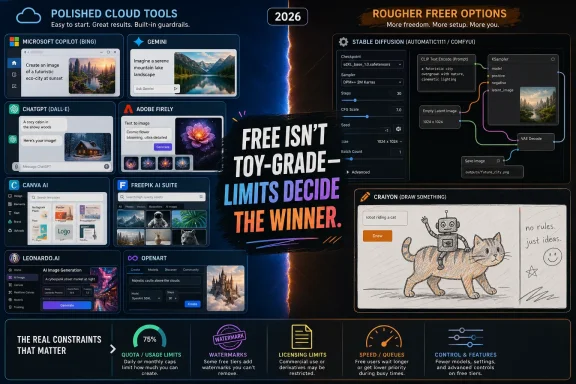
The best free AI image generators in 2026 are split between polished cloud tools such as Microsoft Copilot, Google Gemini, ChatGPT, Adobe Firefly, Canva, Freepik, Leonardo and OpenArt, and rougher but freer options such as Stable Diffusion and Craiyon. That split is the real story. “Free” no longer means toy-grade output, but it almost always means accepting limits somewhere else: volume, rights, watermarks, model access, speed, or control. The winner depends less on which model makes the prettiest demo image and more on whether the tool fits the work you actually need to ship.
AI image generators used to be judged mostly by spectacle. Could they make a convincing astronaut, a cyberpunk alley, a fantasy castle, or a product mockup without hands melting into furniture? In 2026, that bar is too low. The leading free tools can all produce usable images, and several can produce genuinely impressive ones.
The more important question is now operational. Can you generate enough images before hitting a cap? Can you use the output in a client deck, a newsletter, an app mockup, or a YouTube thumbnail without worrying about licensing? Does the image carry a visible watermark? Can the model render text accurately, maintain a character, or follow a specific layout?
That is why the “best” free generator is no longer a single answer. Microsoft Copilot is excellent for fast, clean, presentation-ready imagery. Google Gemini is formidable for photorealism. Adobe Firefly is the safer choice when copyright risk matters. Leonardo and OpenArt are more interesting for creative workflows. Stable Diffusion remains the escape hatch for users who want control instead of convenience.
The catch is that these tools evolve quickly. Free limits change, model names shift, and commercial terms are rewritten as companies figure out how to turn massive GPU bills into durable businesses. Any comparison in 2026 has to be treated as a snapshot, not scripture.
Its strongest advantage is polish. Copilot’s image outputs tend to look clean, composed, and broadly professional, with the same slightly frictionless sheen that now defines much of Microsoft’s AI layer. It is not always the most adventurous tool, but it is often the one least likely to embarrass you in a presentation.
Text rendering is one of its practical strengths. AI image systems have historically struggled to place readable words inside images, turning labels and signs into pseudo-language. Copilot is better than most free tools at producing usable text, which makes it unusually helpful for thumbnails, mock ads, posters, and quick visual concepts.
The trade-off is control. Copilot is not where you go to tune every sampling parameter, swap community models, or build a multi-stage creative workflow. Its guardrails are also firm, and prompts that trip safety systems can stop a workflow cold. For mainstream business imagery, that is acceptable; for experimental art direction, it can feel claustrophobic.
That strength reflects Google’s broader advantage in imaging. The company has spent years working on computational photography, visual search, multimodal models, and image understanding. Gemini’s best outputs often feel less like illustrations and more like highly composed stock photography.
The limitation is that photorealism can become a lane rather than a superpower. Push Gemini toward stylized fantasy, anime, painterly abstraction, or niche illustration, and other tools often feel more flexible. Gemini can still produce stylized images, but it is not where the platform feels most native.
There is also a recurring theme with Google’s consumer AI products: limits and availability can be opaque. Daily allowances may vary by plan, region, model, and current platform policy. The lesson for users is simple: Gemini is a terrific free option for realistic images, but do not build a production pipeline around an assumed fixed quota unless you have verified it inside your own account.
That matters because image prompting is often less like ordering a pizza and more like art direction. The first result may be close but not right. A character needs to face the other way. A background is too busy. The lighting is wrong. The sign says the wrong thing. ChatGPT’s interface makes those corrections feel natural.
The downside is that free access is limited. OpenAI has repeatedly had to balance demand against infrastructure cost, and image generation is expensive compared with ordinary text chat. Free users can sample the capability, but anyone producing many assets will quickly feel the ceiling.
There is also a branding wrinkle. Many users still say “DALL-E” as shorthand for OpenAI image generation, but the product experience has moved toward native image generation inside ChatGPT. For everyday users, the distinction matters less than the behavior: it follows prompts well, edits conversationally, and becomes much more useful when you pay.
Firefly’s pitch is that its models are designed for professional creative work, with training data and rights management positioned as safer for brands, agencies, and client-facing production. Adobe also attaches Content Credentials metadata to help identify AI-generated assets, which is invisible in normal viewing but important in the broader debate over provenance.
That makes Firefly especially relevant for designers who already live in Adobe’s ecosystem. If the image is going into Photoshop, Express, Illustrator-adjacent workflows, or a brand campaign, Firefly feels less like a novelty generator and more like a feature inside a professional production stack.
The limitation is not subtle. Twenty-five or so monthly credits will disappear quickly if you explore ideas aggressively. Firefly is best treated as a higher-trust finishing lane: use other tools for rough ideation, then spend Firefly credits where rights clarity and Adobe integration matter.
Leonardo’s free token system gives users a meaningful daily allowance, though the exact number of images depends on settings. A low-cost generation can stretch the quota; more advanced options consume it faster. That makes the platform feel less like a fixed “images per day” service and more like a creative budget.
Its strength is variety. Photorealism, concept art, anime-inspired work, product imagery, game assets, and stylized illustration all sit closer to the surface than they do in simpler tools. The interface asks users to learn more, but rewards that effort with more distinct outputs.
OpenArt follows a similar logic but leans into workflow depth. It is useful for creators who want to move beyond “type prompt, receive image” and into sketch-to-image, inpainting, upscaling, and reference-driven generation. It is less famous than the biggest names, but for serious hobbyists and solo creators it can be more useful than its profile suggests.
The caution for both platforms is commercial rights. Free tiers often come with conditions, and those conditions can change. If an image is going into a paid client project, merchandise, advertising, or a product UI, the correct move is not to assume; it is to read the current terms before publishing.
The major advantage is that generation happens inside the design workspace. You do not have to produce an image in one app, download it, upload it somewhere else, crop it, resize it, and then place it into a template. Canva collapses that loop.
For beginners, that is more important than marginal gains in image fidelity. A technically superior generator can still be the wrong tool if it adds five steps to a simple workflow. Canva knows its audience and keeps the experience approachable.
The ceiling is lower. Users who want granular model control, advanced editing, repeatable characters, or detailed prompt engineering will outgrow Canva quickly. But for the majority of small business users, educators, creators, and non-designers, the floor matters more than the ceiling.
The best use case is naturalistic, stock-like imagery. If you need a clean editorial visual, a business scene, a product-adjacent background, or a polished header image that does not scream “AI,” Freepik can be strong. Its outputs often aim for plausibility rather than flamboyance.
The free tier is not built for heavy use. Daily limits are relatively low, and commercial permissions on free plans may be restricted. That makes Freepik less compelling as a primary generator for high-volume creators.
Still, it fills an important role. Many real-world projects do not require artistic experimentation; they require a believable, publishable-looking image that fits next to conventional stock photography. Freepik understands that market better than many AI-first startups.
Self-hosted Stable Diffusion gives users the closest thing to unlimited free generation, assuming they already own the hardware to run it. There are no daily caps imposed by a consumer platform, no queue after a boost allowance expires, and no need to wait for a company to expose a feature in its interface.
The price is paid in setup time, maintenance, and learning curve. You need a capable machine, preferably with a decent GPU. You need to choose an interface. You need to understand that output quality depends heavily on the model and workflow you use. Stable Diffusion can produce magnificent images, but it rarely does so by accident.
For Windows enthusiasts and tinkerers, that may be a feature rather than a bug. Stable Diffusion is where AI image generation still feels like computing rather than software-as-a-service. It rewards experimentation, local control, and community knowledge.
Cloud demos and hosted notebooks can reduce the barrier, but they reintroduce the constraints that self-hosting avoids: queues, usage limits, changing availability, and dependence on someone else’s infrastructure. The purest version of Stable Diffusion is still local.
The outputs are weaker than the leading tools. Resolution, realism, speed, and polish all lag behind. A visible watermark and commercial restrictions on the free tier further limit its usefulness for finished work.
But a scratchpad has value. Craiyon is good for testing an idea before spending credits elsewhere. It can help answer whether a prompt concept is visually interesting, whether a composition might work, or whether a silly idea is worth refining.
That role should not be overstated. Craiyon is not the answer for client assets, brand work, or polished editorial imagery. It is useful precisely because expectations are low and friction is almost nonexistent.
For commercial projects, Adobe Firefly and Microsoft Copilot are easier to justify than tools with ambiguous free-tier terms. For photorealism, Gemini is often the fastest route to a convincing result. For creative range, Leonardo and OpenArt are stronger. For volume and control, Stable Diffusion remains unmatched if you can handle the setup.
Watermarks are not just cosmetic. A visible watermark can disqualify an image from professional use even if the image itself is good. Metadata watermarks and Content Credentials raise a different question: not whether the image looks clean, but whether AI provenance should travel with the asset.
Daily limits are also more important than they appear. Ten images per day sounds generous until you are trying to refine a banner for a product launch. Fifty generations sounds high until you discover that a single concept can burn through a dozen variations. Free tiers are excellent for exploration, but production work quickly exposes their boundaries.
The best workflow for many users will be hybrid. Use Gemini or Copilot for fast mainstream visuals. Use Leonardo or OpenArt when style matters. Use Firefly when rights anxiety matters. Use Stable Diffusion when you want control or volume. Use Canva when the image is only one piece of a larger design.
That does not make the free tiers fake. They are genuinely useful, and in 2026 they are better than many paid tools from only a few years ago. But users should understand the bargain. The free tier is often a funnel, a sampler, or a controlled allowance, not a permanent production entitlement.
This is why “unlimited” deserves skepticism. Craiyon is unlimited because expectations are low and quality is constrained. Stable Diffusion is unlimited only if you supply the machine and electricity. Cloud services that appear unlimited usually have some combination of slower queues, fair-use policies, model restrictions, or changing limits.
For IT pros and administrators, this matters beyond personal creativity. Employees are already using these tools for presentations, marketing drafts, internal documents, product mockups, and training material. Organizations that pretend otherwise are simply leaving the policy decisions to browser tabs.
A sane workplace policy should distinguish between experimentation and publication. It should also distinguish between internal drafts and external assets. The tool that is fine for a brainstorming slide may not be acceptable for a paid advertisement or customer-facing design.
AI image generation in 2026 is no longer a novelty contest; it is becoming another layer of everyday creative software. The free tools are good enough to change workflows, but not stable enough to trust blindly. The users who get the most out of them will be the ones who treat “free” as a starting point, keep an eye on changing terms, and build workflows that can survive the next model update, quota change, or licensing rewrite.
 Free Image Generation Has Grown Up, But the Fine Print Has Not
AI image generators used to be judged mostly by spectacle. Could they make a convincing astronaut, a cyberpunk alley, a fantasy castle, or a product mockup without hands melting into furniture? In 2026, that bar is too low. The leading free tools can all produce usable images, and several can produce genuinely impressive ones.The more important question is now operational. Can you generate enough images before hitting a cap? Can you use the output in a client deck, a newsletter, an app mockup, or a YouTube thumbnail without worrying about licensing? Does the image carry a visible watermark? Can the model render text accurately, maintain a character, or follow a specific layout?
That is why the “best” free generator is no longer a single answer. Microsoft Copilot is excellent for fast, clean, presentation-ready imagery. Google Gemini is formidable for photorealism. Adobe Firefly is the safer choice when copyright risk matters. Leonardo and OpenArt are more interesting for creative workflows. Stable Diffusion remains the escape hatch for users who want control instead of convenience.
The catch is that these tools evolve quickly. Free limits change, model names shift, and commercial terms are rewritten as companies figure out how to turn massive GPU bills into durable businesses. Any comparison in 2026 has to be treated as a snapshot, not scripture.
Microsoft Copilot Makes DALL-E-Style Polish Feel Like Office Plumbing
Microsoft Copilot Designer is the most obvious starting point for many Windows users because it is already sitting inside Microsoft’s broader consumer AI push. It asks very little of the user: sign in with a Microsoft account, describe what you want, and wait for the image. For people making slides, social graphics, posters, invitations, or mockups, that simplicity matters.Its strongest advantage is polish. Copilot’s image outputs tend to look clean, composed, and broadly professional, with the same slightly frictionless sheen that now defines much of Microsoft’s AI layer. It is not always the most adventurous tool, but it is often the one least likely to embarrass you in a presentation.
Text rendering is one of its practical strengths. AI image systems have historically struggled to place readable words inside images, turning labels and signs into pseudo-language. Copilot is better than most free tools at producing usable text, which makes it unusually helpful for thumbnails, mock ads, posters, and quick visual concepts.
The trade-off is control. Copilot is not where you go to tune every sampling parameter, swap community models, or build a multi-stage creative workflow. Its guardrails are also firm, and prompts that trip safety systems can stop a workflow cold. For mainstream business imagery, that is acceptable; for experimental art direction, it can feel claustrophobic.
Google Gemini Turns Photorealism Into the Default Expectation
Google Gemini’s image generation is strongest when the prompt asks for something that could plausibly be photographed. A street scene, a food shot, a product on a table, a travel-style image, or a cinematic portrait tends to land closer to reality than many rivals. If your benchmark is “would this look believable in an article header or mood board,” Gemini belongs near the top.That strength reflects Google’s broader advantage in imaging. The company has spent years working on computational photography, visual search, multimodal models, and image understanding. Gemini’s best outputs often feel less like illustrations and more like highly composed stock photography.
The limitation is that photorealism can become a lane rather than a superpower. Push Gemini toward stylized fantasy, anime, painterly abstraction, or niche illustration, and other tools often feel more flexible. Gemini can still produce stylized images, but it is not where the platform feels most native.
There is also a recurring theme with Google’s consumer AI products: limits and availability can be opaque. Daily allowances may vary by plan, region, model, and current platform policy. The lesson for users is simple: Gemini is a terrific free option for realistic images, but do not build a production pipeline around an assumed fixed quota unless you have verified it inside your own account.
ChatGPT’s Image Tool Wins When Iteration Matters More Than Volume
ChatGPT’s image generation advantage is not only output quality. It is the conversational workflow around the image. You can ask for an image, critique the result, request a change in tone, adjust composition, revise text, or try a different visual metaphor without switching interfaces.That matters because image prompting is often less like ordering a pizza and more like art direction. The first result may be close but not right. A character needs to face the other way. A background is too busy. The lighting is wrong. The sign says the wrong thing. ChatGPT’s interface makes those corrections feel natural.
The downside is that free access is limited. OpenAI has repeatedly had to balance demand against infrastructure cost, and image generation is expensive compared with ordinary text chat. Free users can sample the capability, but anyone producing many assets will quickly feel the ceiling.
There is also a branding wrinkle. Many users still say “DALL-E” as shorthand for OpenAI image generation, but the product experience has moved toward native image generation inside ChatGPT. For everyday users, the distinction matters less than the behavior: it follows prompts well, edits conversationally, and becomes much more useful when you pay.
Adobe Firefly Sells Trust More Than Abundance
Adobe Firefly is not the most generous free image generator. Its monthly credit allocation is modest, and that alone prevents it from being the default playground for people who want to generate dozens of variations every day. But Adobe is competing on a different axis: commercial confidence.Firefly’s pitch is that its models are designed for professional creative work, with training data and rights management positioned as safer for brands, agencies, and client-facing production. Adobe also attaches Content Credentials metadata to help identify AI-generated assets, which is invisible in normal viewing but important in the broader debate over provenance.
That makes Firefly especially relevant for designers who already live in Adobe’s ecosystem. If the image is going into Photoshop, Express, Illustrator-adjacent workflows, or a brand campaign, Firefly feels less like a novelty generator and more like a feature inside a professional production stack.
The limitation is not subtle. Twenty-five or so monthly credits will disappear quickly if you explore ideas aggressively. Firefly is best treated as a higher-trust finishing lane: use other tools for rough ideation, then spend Firefly credits where rights clarity and Adobe integration matter.
Leonardo and OpenArt Give Tinkerers the Controls the Big Platforms Hide
Leonardo AI and OpenArt occupy the middle ground between the simplicity of Copilot or Canva and the full DIY sprawl of Stable Diffusion. They are not as frictionless as the biggest consumer platforms, but they expose more creative machinery. For users who care about style, model choice, aspect ratios, character consistency, reference images, and iterative workflows, that trade-off is appealing.Leonardo’s free token system gives users a meaningful daily allowance, though the exact number of images depends on settings. A low-cost generation can stretch the quota; more advanced options consume it faster. That makes the platform feel less like a fixed “images per day” service and more like a creative budget.
Its strength is variety. Photorealism, concept art, anime-inspired work, product imagery, game assets, and stylized illustration all sit closer to the surface than they do in simpler tools. The interface asks users to learn more, but rewards that effort with more distinct outputs.
OpenArt follows a similar logic but leans into workflow depth. It is useful for creators who want to move beyond “type prompt, receive image” and into sketch-to-image, inpainting, upscaling, and reference-driven generation. It is less famous than the biggest names, but for serious hobbyists and solo creators it can be more useful than its profile suggests.
The caution for both platforms is commercial rights. Free tiers often come with conditions, and those conditions can change. If an image is going into a paid client project, merchandise, advertising, or a product UI, the correct move is not to assume; it is to read the current terms before publishing.
Canva Wins by Refusing to Make Image Generation Feel Technical
Canva’s AI image tools are not built for model obsessives. That is the point. Canva is for people who need a flyer, a presentation slide, a social post, a classroom graphic, a newsletter header, or a quick campaign visual without learning the vocabulary of generative AI.The major advantage is that generation happens inside the design workspace. You do not have to produce an image in one app, download it, upload it somewhere else, crop it, resize it, and then place it into a template. Canva collapses that loop.
For beginners, that is more important than marginal gains in image fidelity. A technically superior generator can still be the wrong tool if it adds five steps to a simple workflow. Canva knows its audience and keeps the experience approachable.
The ceiling is lower. Users who want granular model control, advanced editing, repeatable characters, or detailed prompt engineering will outgrow Canva quickly. But for the majority of small business users, educators, creators, and non-designers, the floor matters more than the ceiling.
Freepik Is the Stock-Photo Bridge Between AI and Ordinary Publishing
Freepik’s AI generator is interesting because it sits beside a traditional stock-asset library. That changes the user’s mental model. Instead of treating AI generation as a standalone toy, Freepik makes it part of a broader search for usable visual assets.The best use case is naturalistic, stock-like imagery. If you need a clean editorial visual, a business scene, a product-adjacent background, or a polished header image that does not scream “AI,” Freepik can be strong. Its outputs often aim for plausibility rather than flamboyance.
The free tier is not built for heavy use. Daily limits are relatively low, and commercial permissions on free plans may be restricted. That makes Freepik less compelling as a primary generator for high-volume creators.
Still, it fills an important role. Many real-world projects do not require artistic experimentation; they require a believable, publishable-looking image that fits next to conventional stock photography. Freepik understands that market better than many AI-first startups.
Stable Diffusion Remains the Power User’s Exit Door
Stable Diffusion is the opposite of Canva. It is not a single polished consumer product so much as an ecosystem: models, checkpoints, interfaces, extensions, workflows, community recipes, and local setups. That complexity is exactly why it remains indispensable.Self-hosted Stable Diffusion gives users the closest thing to unlimited free generation, assuming they already own the hardware to run it. There are no daily caps imposed by a consumer platform, no queue after a boost allowance expires, and no need to wait for a company to expose a feature in its interface.
The price is paid in setup time, maintenance, and learning curve. You need a capable machine, preferably with a decent GPU. You need to choose an interface. You need to understand that output quality depends heavily on the model and workflow you use. Stable Diffusion can produce magnificent images, but it rarely does so by accident.
For Windows enthusiasts and tinkerers, that may be a feature rather than a bug. Stable Diffusion is where AI image generation still feels like computing rather than software-as-a-service. It rewards experimentation, local control, and community knowledge.
Cloud demos and hosted notebooks can reduce the barrier, but they reintroduce the constraints that self-hosting avoids: queues, usage limits, changing availability, and dependence on someone else’s infrastructure. The purest version of Stable Diffusion is still local.
Craiyon Is a Scratchpad, Not a Studio
Craiyon earns a place in the free-generator conversation for one reason: access. No account, no payment, no elaborate onboarding, and no expectation that the user is building a professional workflow. You type a prompt and get an image.The outputs are weaker than the leading tools. Resolution, realism, speed, and polish all lag behind. A visible watermark and commercial restrictions on the free tier further limit its usefulness for finished work.
But a scratchpad has value. Craiyon is good for testing an idea before spending credits elsewhere. It can help answer whether a prompt concept is visually interesting, whether a composition might work, or whether a silly idea is worth refining.
That role should not be overstated. Craiyon is not the answer for client assets, brand work, or polished editorial imagery. It is useful precisely because expectations are low and friction is almost nonexistent.
The Real Comparison Is Rights, Limits, and Workflow
The old way to compare image generators was to put ten outputs side by side and pick the prettiest one. That is still entertaining, but it is not enough. A tool that produces the best single image may be the wrong choice if it only gives you a few tries, blocks commercial use, or forces an awkward workflow.For commercial projects, Adobe Firefly and Microsoft Copilot are easier to justify than tools with ambiguous free-tier terms. For photorealism, Gemini is often the fastest route to a convincing result. For creative range, Leonardo and OpenArt are stronger. For volume and control, Stable Diffusion remains unmatched if you can handle the setup.
Watermarks are not just cosmetic. A visible watermark can disqualify an image from professional use even if the image itself is good. Metadata watermarks and Content Credentials raise a different question: not whether the image looks clean, but whether AI provenance should travel with the asset.
Daily limits are also more important than they appear. Ten images per day sounds generous until you are trying to refine a banner for a product launch. Fifty generations sounds high until you discover that a single concept can burn through a dozen variations. Free tiers are excellent for exploration, but production work quickly exposes their boundaries.
The best workflow for many users will be hybrid. Use Gemini or Copilot for fast mainstream visuals. Use Leonardo or OpenArt when style matters. Use Firefly when rights anxiety matters. Use Stable Diffusion when you want control or volume. Use Canva when the image is only one piece of a larger design.
The Free Tier Is Becoming the Demo, Not the Destination
The economics of AI image generation are brutal. High-quality models require expensive compute, and image generation consumes more resources than ordinary chat. Companies are not offering free access because it is cheap; they are offering it because it drives adoption, habit formation, and eventual subscription revenue.That does not make the free tiers fake. They are genuinely useful, and in 2026 they are better than many paid tools from only a few years ago. But users should understand the bargain. The free tier is often a funnel, a sampler, or a controlled allowance, not a permanent production entitlement.
This is why “unlimited” deserves skepticism. Craiyon is unlimited because expectations are low and quality is constrained. Stable Diffusion is unlimited only if you supply the machine and electricity. Cloud services that appear unlimited usually have some combination of slower queues, fair-use policies, model restrictions, or changing limits.
For IT pros and administrators, this matters beyond personal creativity. Employees are already using these tools for presentations, marketing drafts, internal documents, product mockups, and training material. Organizations that pretend otherwise are simply leaving the policy decisions to browser tabs.
A sane workplace policy should distinguish between experimentation and publication. It should also distinguish between internal drafts and external assets. The tool that is fine for a brainstorming slide may not be acceptable for a paid advertisement or customer-facing design.
The 2026 Shortlist Belongs to Users Who Know Their Constraint
The practical answer is not to crown a universal winner, but to identify the constraint that matters most. A blogger, a sysadmin making documentation graphics, a designer prototyping concepts, and a marketing team preparing campaign assets are not solving the same problem.- Microsoft Copilot is the strongest free choice for quick, polished business visuals, especially when readable text and presentation-ready output matter.
- Google Gemini is the best first stop for photorealistic scenes, stock-style images, and natural-looking compositions.
- Adobe Firefly is the safest option when commercial rights, provenance, and client-facing work outweigh generation volume.
- Leonardo AI and OpenArt are better fits for creators who want style variety, model choice, and deeper workflow control.
- Stable Diffusion is the only serious answer for users who want local control, high volume, and freedom from platform quotas.
- Canva is the most approachable option for beginners who care more about finishing a design than learning an AI image stack.
AI image generation in 2026 is no longer a novelty contest; it is becoming another layer of everyday creative software. The free tools are good enough to change workflows, but not stable enough to trust blindly. The users who get the most out of them will be the ones who treat “free” as a starting point, keep an eye on changing terms, and build workflows that can survive the next model update, quota change, or licensing rewrite.
References
- Primary source: techiexpert.com
Published: 2026-06-19T06:37:27.687254
10 Best Free AI Image Generators in 2026: Tested & Compared
Compare the 10 best free AI image generators in 2026 — tested features, image quality, watermarks, and commercial use rights to find your perfect fit.techiexpert.com - Official source: help.openai.com
ChatGPT Free Tier FAQ | OpenAI Help Center
 help.openai.com
- Related coverage: aifreeapi.com
OpenAI Image Generation API Free in 2026? No, Here’s the Cheapest Path - ChatGPT free images are not the same as a free API | AI Free API
The honest answer is no: the current OpenAI image generation API is not free. This guide explains what is free in ChatGPT, the cheapest official way to use the API, and the misleading 'free API' offers you should ignore.www.aifreeapi.com - Related coverage: morphed.app
Bing AI Image Generator: Honest Review + Better Options (2026) | Morphed
We tested Bing Image Creator (DALL-E 3) against dedicated AI tools. Real boost limits, content filter behavior, resolution caps, and when to switch. morphed.app
- Related coverage: blog.laozhang.ai
Gemini 3 Pro Image Free Tier: Complete 2026 Guide (What's Actually Free + 5 Workarounds) | LaoZhang AI Blog
Gemini 3 Pro Image (Nano Banana Pro) has no free API tier as of February 2026. But you can still generate images for free through $300 new-user credits (2,238 images), AI Studio web access, Flash Image free tier, and more. This guide covers every free access path plus cost optimization strategies.blog.laozhang.ai - Related coverage: androidcentral.com
Google breaks down Gemini’s daily limits for prompts and image creation | Android Central
The vague language is gone—now you know exactly what you get.www.androidcentral.com
- Related coverage: techradar.com
OpenAI and Google quietly limit free Sora, Nano Banana Pro and Gemini 3 Pro use – here’s what it means for you | TechRadar
You get less daily prompts and video generations nowwww.techradar.com
