

The best AI image generators for 2026 are no longer just art engines: they are web-accessible creative services such as Google’s Gemini/Nano Banana Pro, OpenAI’s ChatGPT Images, Adobe Firefly, Microsoft Copilot/Image Creator, Grok, and several polished design suites that bundle generation, editing, safety controls, and export workflows.
That shift matters more than any single leaderboard result. The winner in 2026 is not simply the model that can paint the prettiest cyberpunk owl or the most cinematic spaceship. It is the service that can reliably turn a prompt into a usable asset, edit it without destroying the rest of the scene, render readable text, respect user intent, and fit into the messy workflow of ordinary people who are not going to install ComfyUI, tune LoRAs, or spend a weekend debugging GPU drivers.
For the first few years of mainstream AI image generation, the conversation was dominated by spectacle. People argued over whether Midjourney had the best taste, whether Stable Diffusion gave power users the most control, whether DALL-E understood language better, and whether any of it could survive contact with copyright law, public backlash, or a designer’s deadline.
By 2026, the argument has moved on. The important divide is no longer between “AI art” and “not AI art.” It is between services that behave like dependable creative tools and systems that still feel like slot machines with a prompt box attached.
That is why a serious comparison of AI image generators has to focus on services, not merely models. A raw model can be brilliant in the hands of an expert and miserable for everyone else. A service has to answer more practical questions: Can you access it easily? Does it preserve faces and objects during edits? Does it understand multi-step instructions? Can it create a diagram with legible labels? Does it impose sensible guardrails without making harmless work impossible?
This is also why some famous names do not automatically dominate a service-first list. Midjourney remains culturally important and aesthetically formidable, but it has historically been strongest as a model and creative community rather than a conventional, general-purpose web app. Stable Diffusion and its descendants are even more complicated: extraordinarily flexible, widely embedded, and beloved by tinkerers, but often dependent on front ends, checkpoints, workflows, and hardware choices that make direct consumer comparison difficult.
The market has learned the same lesson that PC users learned decades ago. Raw power matters, but packaging matters too. The best GPU in the world is not much use to someone who needs a reliable laptop for work tomorrow morning.
This does not mean photorealistic generation is solved. It means the failure modes have moved. Instead of producing grotesque anatomy or melted objects, weaker systems now betray themselves through subtle spatial nonsense: a chair leg that cannot physically support the chair, a light source that contradicts the shadows, a picture frame that appears both behind and in front of a plant, or a room that feels plausible only if the viewer refuses to inspect it.
The better services succeed because they understand scenes as arrangements of relationships, not just clusters of visual tokens. A prompt asking for a home interior with diverse objects is not merely asking for “sofa, lamp, table, books.” It is asking for proportion, hierarchy, material behavior, and believable clutter.
Google’s Nano Banana Pro, built around Gemini’s image capabilities, has leaned especially hard into this idea of generation as visual reasoning. Google has positioned it not just as a studio-quality image tool, but as a model with improved world knowledge and text rendering. That matters because the most useful image generation tasks are rarely pure fantasy. They require the model to know what an object is, how it is normally used, where it belongs, and how it should look when modified.
OpenAI’s ChatGPT Images has attacked the same problem from the interface side. Its advantage is not just image output, but the conversational loop around that output. Users can ask, revise, clarify, and edit in the same environment where they already work with text. That makes the tool feel less like a rendering engine and more like a creative collaborator, though the quality still depends heavily on prompt specificity and the limits of the service’s safety system.
Adobe Firefly approaches photorealism from a different direction: trust, commercial use, and integration. Its pitch is not simply that it can generate a nice image. It is that it can do so inside the workflows where designers already live, with licensing and enterprise adoption concerns closer to the center of the product.
The practical takeaway is blunt: if a generator cannot now produce a believable everyday scene, it is no longer competing for the top tier. The race has moved to harder ground.
Readable text inside images is brutally hard because it exposes whether the generator understands language, layout, and visual composition at the same time. A poster with a slogan, a product mockup with packaging copy, a labeled diagram, or a comic panel with dialogue cannot hide behind mood and atmosphere. Either the words are right or they are not.
That is why the most revealing tests now ask image generators to make diagrams, manuals, charts, signs, interface mockups, and multi-panel comics. These prompts demand more than style. They require continuity, sequencing, spatial logic, and written precision.
Google’s Nano Banana Pro has been marketed heavily around improved text rendering and visual information design. That is not a minor feature; it is a declaration that image generation is moving into territory once reserved for illustrators, presentation designers, and technical communicators. If a model can produce a labeled setup diagram that is both readable and correct, it is not just making art. It is doing a slice of knowledge work.
OpenAI’s newer image tools have similarly emphasized instruction following and dense text improvements. That fits OpenAI’s broader product logic: the image generator is most valuable when it inherits the conversational and reasoning strengths of the assistant around it. A user does not want to memorize syntax for “make the label smaller but keep the arrow and move it left.” They want to say that in plain English and have the tool obey.
This is where many artistic models still stumble. A beautiful image with garbled text is acceptable for mood boards, concept art, and decorative uses. It is much less acceptable for business collateral, educational diagrams, marketing assets, or anything that might be shown to a client without a cleanup pass.
The bar has changed because users have changed. Once people saw AI generators create stunning fantasy landscapes, they started asking for PowerPoint graphics, onboarding diagrams, Etsy product photos, thumbnails, ad creatives, recipe cards, and explainer images. The image generator that cannot spell is now the assistant that cannot count.
This distinction is central to 2026’s rankings because many services still struggle with localized edits. The user asks to change a small area, and the system quietly regenerates half the image. The subject’s face shifts. The background changes. The logo moves. The hand position mutates. The output may be attractive, but it has broken the contract.
The best tools increasingly treat editing as a controlled operation rather than a second roll of the dice. Selection tools, masks, natural-language edits, reference images, and iterative revision matter because they narrow the blast radius. The goal is not merely to make another image. It is to preserve the image the user already chose.
ChatGPT Images benefits from an interface that encourages iterative editing in conversation. Adobe benefits from its long history of professional editing metaphors and Creative Cloud integration. Google benefits from the multimodal logic of Gemini, where images, text, and instructions can be handled as parts of the same task. Each is trying to solve the same problem from a different institutional memory.
This is also where power-user systems remain attractive. Stable Diffusion-based workflows, ComfyUI graphs, ControlNet-style conditioning, inpainting, LoRAs, and reference adapters can deliver extraordinary control in trained hands. But that is precisely why they are awkward in a mainstream service ranking. They are less like a single product and more like a workshop full of specialized tools.
For Windows enthusiasts and sysadmins, this distinction should sound familiar. A hand-built workstation can outperform a sealed laptop in the right hands, but that does not make it the best answer for every user. The best consumer AI image generator is the one that delivers control without turning the workflow into a hobby.
High-end image generation is expensive to run. The models are large, the inference costs are real, and the demand is spiky. If a service gives away access to a flagship model, it usually does so with caps or with fallback behavior once the user hits a limit.
Google’s Gemini model structure illustrates the pattern. Users may get access to a stronger image model up to a cap, then be moved to a less advanced option. That can still be excellent for casual use, but it means “free” is not a stable product tier in the way users might expect from traditional software.
OpenAI, Microsoft, Adobe, and others face similar trade-offs. Free access is good for adoption and habit formation, but the most capable features tend to migrate toward paid plans, enterprise bundles, or premium credits. Faster generation, higher resolution, better editing, commercial rights clarity, and access to newer models are all obvious places to draw the line.
This is one reason rankings can frustrate users. A reviewer testing a paid tier may see a dramatically different product from someone using a free account at peak hours. The model name may be the same, the interface may look the same, and the outputs may not be comparable.
For buyers, the question should not be “Is it free?” The better question is “What happens when I use it heavily?” A tool that is wonderful for three images and then falls back to something mediocre is a demo. A tool that remains predictable under real use is a service.
The sharpest divide is around real people, sexual content, public figures, violence, political imagery, and deception. Some services refuse to generate recognizable real people or tightly restrict them. Others allow much more, including provocative or adult-adjacent material. Grok has stood out partly because it has been more permissive than mainstream corporate rivals, which makes it attractive to some users and worrying to others.
This is not merely a moral debate. It is a product-design debate. A permissive image generator may feel more powerful, but it also carries higher risks for harassment, impersonation, nonconsensual sexual imagery, and misinformation. A restrictive generator may be safer for a broad audience, schools, and businesses, but it may also block legitimate satire, journalism, historical illustration, or harmless fictional scenes.
For enterprise IT, safety rules matter because they turn into policy questions. Can employees upload internal reference images? Can the tool generate product mockups without leaking data? Are outputs labeled? Are prompts retained? Does the vendor indemnify commercial use? Can administrators restrict categories of generation? Does the service create audit headaches?
Adobe has made commercial safety central to Firefly’s pitch. Microsoft’s Copilot approach inherits the company’s enterprise instincts and its need to serve schools, businesses, and regulated environments. OpenAI and Google have to balance mass-market creativity with reputational risk at enormous scale. Grok’s looser personality is part of its brand, but that same quality makes it a harder default recommendation for conservative organizations.
The uncomfortable truth is that “best” depends on the user’s tolerance for risk. A hobbyist making absurd memes, a marketing department producing campaign drafts, a teacher making classroom diagrams, and a security team evaluating synthetic media threats do not need the same tool.
But ranking them beside web-first services can be misleading. Midjourney is often discussed as a model, a platform, a community, and an aesthetic movement all at once. Stable Diffusion is even more diffuse: a family of models, forks, fine-tunes, interfaces, hosted services, local installs, and workflows.
A mainstream buyer’s guide has to decide what it is evaluating. If the test is “What can a skilled operator produce with enough time?” Stable Diffusion-based workflows deserve a very high place. If the test is “What can a normal user open in a browser and use successfully today?” the answer changes.
The same is true for Midjourney. Its artistic quality can be exceptional, especially for stylized work, mood, concept art, and visual exploration. But if the goal is consistent photorealistic utility, structured diagrams, localized edits, and predictable service behavior, it may not always outrank the best integrated offerings from Google, OpenAI, Adobe, or Microsoft.
This distinction will become more important as model technology spreads. Midjourney-style capabilities can appear inside other platforms. Stable Diffusion-derived systems can be wrapped in friendly interfaces. Open models can power commercial tools. The brand on the model is not always the same thing as the product the user experiences.
In that sense, the exclusion of famous models from a “best services” list is not an insult. It is a taxonomy decision. The AI image market has become too mature for one leaderboard to serve artists, developers, businesses, hobbyists, and researchers equally well.
That is why the strongest evaluations now use varied prompts across rounds: basic scenes, complex actions, multi-panel comics, diagrams with labels, edits on existing images, and requests that combine multiple constraints. The goal is not to find the one prompt a model handles beautifully. It is to expose whether the system remains coherent when the task becomes slightly annoying.
Multi-panel comics are particularly revealing. They test character consistency, narrative sequencing, panel layout, dialogue, timing, and whether the model can carry an idea to a punchline without losing the plot. Many systems can make one funny image. Fewer can make four panels that tell the same story.
Instructional diagrams are just as unforgiving. A model that draws a setup process with mislabeled cables or impossible steps has failed even if the picture looks clean. In practical use, a pretty wrong diagram is worse than no diagram at all because it creates false confidence.
Editing tests complete the picture. A service that can generate but not revise is still a novelty generator. A service that can revise precisely starts to compete with traditional creative software.
This is why prompt tweaking remains part of the experience. Even the best tools may require multiple generations, stronger constraints, clearer scene descriptions, or paid-tier access. The technology has improved rapidly, but it has not abolished iteration. It has simply made iteration faster and more conversational.
Microsoft’s interest is obvious. Copilot is not just a chatbot bolted onto Windows and Microsoft 365; it is the company’s attempt to make AI a system-wide productivity layer. Image generation inside that world is not about replacing artists in isolation. It is about creating slides, mockups, social posts, internal diagrams, training material, and quick visuals without leaving the productivity stack.
Google is pursuing the same gravitational pull through Gemini, Workspace, Search, AI Studio, and developer platforms. If Nano Banana Pro can produce diagrams, posters, and blended reference-image compositions inside everyday Google surfaces, the standalone image generator becomes less important than the ecosystem.
Adobe’s position is different but equally strategic. It already owns much of the professional creative workflow. Firefly’s job is to make generative AI feel less like an external threat and more like an extension of Photoshop, Illustrator, Express, and enterprise content production.
OpenAI’s advantage is the conversational front door. ChatGPT is where many users already describe problems, draft text, brainstorm ideas, and ask for revisions. Adding image generation to that loop makes visual work feel like another mode of conversation.
The Windows angle is that these services will increasingly compete at the operating-environment level. The best AI image generator for a user may be the one bundled into their browser, productivity subscription, graphics suite, or chatbot account. Technical superiority still matters, but distribution may matter more.
In 2026, the honest answer to “Can you tell if an image is real?” is: not always. You can look for clues, analyze metadata, search for provenance, inspect lighting and geometry, and use detection tools. But a sufficiently good synthetic image, stripped of context, may not announce itself.
That creates a broader literacy challenge. Users need to become more skeptical of images that appear in emotionally charged contexts, especially around politics, disasters, crime, celebrity, war, and social conflict. The danger is not only that fake images exist. It is that real images will also be dismissed as fake when convenient.
Content credentials, watermarking, platform labels, provenance standards, and media verification workflows matter because eyeballing is not enough. But none of those systems is complete, universal, or immune to circumvention. The result is a transitional era in which image realism has outpaced public verification habits.
This is one reason safety policies around real people are so consequential. A tool that can easily generate convincing images of private individuals, public figures, or minors is not just a toy. It is a social risk multiplier. Services that restrict real-person generation may irritate users, but the restriction is not arbitrary. It reflects a world in which image evidence has become easier to manufacture than to disprove.
For IT professionals, this will become part of security awareness training. Phishing no longer has to rely on awkward text. Social engineering can include synthetic screenshots, fake executive photos, forged event images, artificial product mockups, and plausible visual “proof” of things that never happened.
That makes the 2026 field more pragmatic than glamorous. Google’s Nano Banana Pro looks strongest where photorealism, text rendering, diagrams, and visual reasoning matter. OpenAI’s ChatGPT Images is compelling where conversation, revision, and broad accessibility matter. Adobe Firefly is the obvious candidate where commercial workflow, brand safety, and creative-suite integration matter. Microsoft Copilot/Image Creator is important because distribution through Windows-adjacent and productivity surfaces can make it the default for millions. Grok is notable where permissiveness and edgy consumer use matter, though that same permissiveness complicates recommendations.
There are also specialist and design-suite tools that deserve attention depending on the job. Canva-style workflows, product-photography tools, logo and vector generators, marketing platforms, and developer APIs can beat general-purpose systems for narrow tasks. A small business owner making social posts may need templates and brand kits more than raw model quality. A developer may care more about API pricing, latency, and rights. A designer may care more about layers, masks, export formats, and predictable revisions.
The industry is settling into a familiar software pattern. Generalists dominate casual use. Specialists win professional niches. Open ecosystems remain the playground for power users. Enterprise tools sell governance as much as capability.
That shift matters more than any single leaderboard result. The winner in 2026 is not simply the model that can paint the prettiest cyberpunk owl or the most cinematic spaceship. It is the service that can reliably turn a prompt into a usable asset, edit it without destroying the rest of the scene, render readable text, respect user intent, and fit into the messy workflow of ordinary people who are not going to install ComfyUI, tune LoRAs, or spend a weekend debugging GPU drivers.
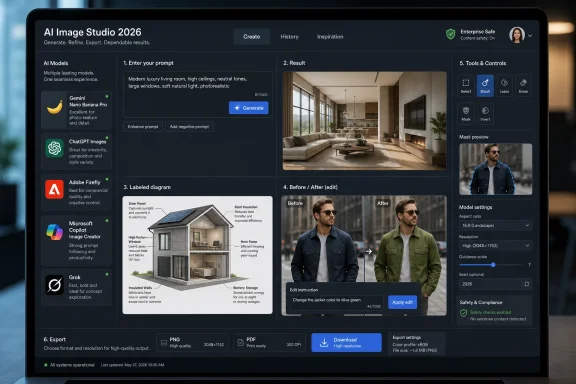 The AI Image Generator Has Become a Product, Not a Parlor Trick
For the first few years of mainstream AI image generation, the conversation was dominated by spectacle. People argued over whether Midjourney had the best taste, whether Stable Diffusion gave power users the most control, whether DALL-E understood language better, and whether any of it could survive contact with copyright law, public backlash, or a designer’s deadline.By 2026, the argument has moved on. The important divide is no longer between “AI art” and “not AI art.” It is between services that behave like dependable creative tools and systems that still feel like slot machines with a prompt box attached.
That is why a serious comparison of AI image generators has to focus on services, not merely models. A raw model can be brilliant in the hands of an expert and miserable for everyone else. A service has to answer more practical questions: Can you access it easily? Does it preserve faces and objects during edits? Does it understand multi-step instructions? Can it create a diagram with legible labels? Does it impose sensible guardrails without making harmless work impossible?
This is also why some famous names do not automatically dominate a service-first list. Midjourney remains culturally important and aesthetically formidable, but it has historically been strongest as a model and creative community rather than a conventional, general-purpose web app. Stable Diffusion and its descendants are even more complicated: extraordinarily flexible, widely embedded, and beloved by tinkerers, but often dependent on front ends, checkpoints, workflows, and hardware choices that make direct consumer comparison difficult.
The market has learned the same lesson that PC users learned decades ago. Raw power matters, but packaging matters too. The best GPU in the world is not much use to someone who needs a reliable laptop for work tomorrow morning.
Photorealism Is Now the Entry Fee
The most visible improvement in 2026 is that ordinary photorealism has become much less remarkable. A few years ago, a convincingly lit living room with coherent furniture, plausible reflections, and no obvious hand mutations felt like magic. Today, that is the baseline test a top-tier generator must pass before the real evaluation begins.This does not mean photorealistic generation is solved. It means the failure modes have moved. Instead of producing grotesque anatomy or melted objects, weaker systems now betray themselves through subtle spatial nonsense: a chair leg that cannot physically support the chair, a light source that contradicts the shadows, a picture frame that appears both behind and in front of a plant, or a room that feels plausible only if the viewer refuses to inspect it.
The better services succeed because they understand scenes as arrangements of relationships, not just clusters of visual tokens. A prompt asking for a home interior with diverse objects is not merely asking for “sofa, lamp, table, books.” It is asking for proportion, hierarchy, material behavior, and believable clutter.
Google’s Nano Banana Pro, built around Gemini’s image capabilities, has leaned especially hard into this idea of generation as visual reasoning. Google has positioned it not just as a studio-quality image tool, but as a model with improved world knowledge and text rendering. That matters because the most useful image generation tasks are rarely pure fantasy. They require the model to know what an object is, how it is normally used, where it belongs, and how it should look when modified.
OpenAI’s ChatGPT Images has attacked the same problem from the interface side. Its advantage is not just image output, but the conversational loop around that output. Users can ask, revise, clarify, and edit in the same environment where they already work with text. That makes the tool feel less like a rendering engine and more like a creative collaborator, though the quality still depends heavily on prompt specificity and the limits of the service’s safety system.
Adobe Firefly approaches photorealism from a different direction: trust, commercial use, and integration. Its pitch is not simply that it can generate a nice image. It is that it can do so inside the workflows where designers already live, with licensing and enterprise adoption concerns closer to the center of the product.
The practical takeaway is blunt: if a generator cannot now produce a believable everyday scene, it is no longer competing for the top tier. The race has moved to harder ground.
Text Rendering Has Become the New Hands Problem
For years, hands were the running joke of AI image generation. They were the easiest way to spot synthetic images and the most visible sign that the model understood surface patterns better than anatomy. In 2026, hands are still not perfect, but the new stress test is text.Readable text inside images is brutally hard because it exposes whether the generator understands language, layout, and visual composition at the same time. A poster with a slogan, a product mockup with packaging copy, a labeled diagram, or a comic panel with dialogue cannot hide behind mood and atmosphere. Either the words are right or they are not.
That is why the most revealing tests now ask image generators to make diagrams, manuals, charts, signs, interface mockups, and multi-panel comics. These prompts demand more than style. They require continuity, sequencing, spatial logic, and written precision.
Google’s Nano Banana Pro has been marketed heavily around improved text rendering and visual information design. That is not a minor feature; it is a declaration that image generation is moving into territory once reserved for illustrators, presentation designers, and technical communicators. If a model can produce a labeled setup diagram that is both readable and correct, it is not just making art. It is doing a slice of knowledge work.
OpenAI’s newer image tools have similarly emphasized instruction following and dense text improvements. That fits OpenAI’s broader product logic: the image generator is most valuable when it inherits the conversational and reasoning strengths of the assistant around it. A user does not want to memorize syntax for “make the label smaller but keep the arrow and move it left.” They want to say that in plain English and have the tool obey.
This is where many artistic models still stumble. A beautiful image with garbled text is acceptable for mood boards, concept art, and decorative uses. It is much less acceptable for business collateral, educational diagrams, marketing assets, or anything that might be shown to a client without a cleanup pass.
The bar has changed because users have changed. Once people saw AI generators create stunning fantasy landscapes, they started asking for PowerPoint graphics, onboarding diagrams, Etsy product photos, thumbnails, ad creatives, recipe cards, and explainer images. The image generator that cannot spell is now the assistant that cannot count.
Editing Is Where the Serious Tools Separate Themselves
Generation gets attention, but editing determines whether an AI image tool becomes part of a real workflow. A generator that produces a strong first image is impressive. A generator that can change only the jacket color, remove only the extra mug, keep the same face, preserve the lighting, and leave the rest of the composition alone is useful.This distinction is central to 2026’s rankings because many services still struggle with localized edits. The user asks to change a small area, and the system quietly regenerates half the image. The subject’s face shifts. The background changes. The logo moves. The hand position mutates. The output may be attractive, but it has broken the contract.
The best tools increasingly treat editing as a controlled operation rather than a second roll of the dice. Selection tools, masks, natural-language edits, reference images, and iterative revision matter because they narrow the blast radius. The goal is not merely to make another image. It is to preserve the image the user already chose.
ChatGPT Images benefits from an interface that encourages iterative editing in conversation. Adobe benefits from its long history of professional editing metaphors and Creative Cloud integration. Google benefits from the multimodal logic of Gemini, where images, text, and instructions can be handled as parts of the same task. Each is trying to solve the same problem from a different institutional memory.
This is also where power-user systems remain attractive. Stable Diffusion-based workflows, ComfyUI graphs, ControlNet-style conditioning, inpainting, LoRAs, and reference adapters can deliver extraordinary control in trained hands. But that is precisely why they are awkward in a mainstream service ranking. They are less like a single product and more like a workshop full of specialized tools.
For Windows enthusiasts and sysadmins, this distinction should sound familiar. A hand-built workstation can outperform a sealed laptop in the right hands, but that does not make it the best answer for every user. The best consumer AI image generator is the one that delivers control without turning the workflow into a hobby.
The Best Free Generator Is Usually a Paid Generator Wearing a Seatbelt
Free AI image generation exists in 2026, but “free” increasingly means throttled, downgraded, watermarked, queued, filtered, or limited by credits. That is not a scandal. It is economics.High-end image generation is expensive to run. The models are large, the inference costs are real, and the demand is spiky. If a service gives away access to a flagship model, it usually does so with caps or with fallback behavior once the user hits a limit.
Google’s Gemini model structure illustrates the pattern. Users may get access to a stronger image model up to a cap, then be moved to a less advanced option. That can still be excellent for casual use, but it means “free” is not a stable product tier in the way users might expect from traditional software.
OpenAI, Microsoft, Adobe, and others face similar trade-offs. Free access is good for adoption and habit formation, but the most capable features tend to migrate toward paid plans, enterprise bundles, or premium credits. Faster generation, higher resolution, better editing, commercial rights clarity, and access to newer models are all obvious places to draw the line.
This is one reason rankings can frustrate users. A reviewer testing a paid tier may see a dramatically different product from someone using a free account at peak hours. The model name may be the same, the interface may look the same, and the outputs may not be comparable.
For buyers, the question should not be “Is it free?” The better question is “What happens when I use it heavily?” A tool that is wonderful for three images and then falls back to something mediocre is a demo. A tool that remains predictable under real use is a service.
Safety Rules Are Now Product Features, Not Footnotes
Every major AI image generator is also a moderation system. That fact annoys users, constrains artists, protects platforms, frustrates bad actors, and shapes the outputs in ways that are not always obvious.The sharpest divide is around real people, sexual content, public figures, violence, political imagery, and deception. Some services refuse to generate recognizable real people or tightly restrict them. Others allow much more, including provocative or adult-adjacent material. Grok has stood out partly because it has been more permissive than mainstream corporate rivals, which makes it attractive to some users and worrying to others.
This is not merely a moral debate. It is a product-design debate. A permissive image generator may feel more powerful, but it also carries higher risks for harassment, impersonation, nonconsensual sexual imagery, and misinformation. A restrictive generator may be safer for a broad audience, schools, and businesses, but it may also block legitimate satire, journalism, historical illustration, or harmless fictional scenes.
For enterprise IT, safety rules matter because they turn into policy questions. Can employees upload internal reference images? Can the tool generate product mockups without leaking data? Are outputs labeled? Are prompts retained? Does the vendor indemnify commercial use? Can administrators restrict categories of generation? Does the service create audit headaches?
Adobe has made commercial safety central to Firefly’s pitch. Microsoft’s Copilot approach inherits the company’s enterprise instincts and its need to serve schools, businesses, and regulated environments. OpenAI and Google have to balance mass-market creativity with reputational risk at enormous scale. Grok’s looser personality is part of its brand, but that same quality makes it a harder default recommendation for conservative organizations.
The uncomfortable truth is that “best” depends on the user’s tolerance for risk. A hobbyist making absurd memes, a marketing department producing campaign drafts, a teacher making classroom diagrams, and a security team evaluating synthetic media threats do not need the same tool.
The Midjourney and Stable Diffusion Problem Is Really a Category Problem
Leaving Midjourney and Stable Diffusion out of a service-focused top list will always be controversial because both names remain central to AI image culture. Midjourney has shaped the visual grammar of the entire field. Stable Diffusion has powered an enormous ecosystem of open and semi-open experimentation. Dismissing either would be absurd.But ranking them beside web-first services can be misleading. Midjourney is often discussed as a model, a platform, a community, and an aesthetic movement all at once. Stable Diffusion is even more diffuse: a family of models, forks, fine-tunes, interfaces, hosted services, local installs, and workflows.
A mainstream buyer’s guide has to decide what it is evaluating. If the test is “What can a skilled operator produce with enough time?” Stable Diffusion-based workflows deserve a very high place. If the test is “What can a normal user open in a browser and use successfully today?” the answer changes.
The same is true for Midjourney. Its artistic quality can be exceptional, especially for stylized work, mood, concept art, and visual exploration. But if the goal is consistent photorealistic utility, structured diagrams, localized edits, and predictable service behavior, it may not always outrank the best integrated offerings from Google, OpenAI, Adobe, or Microsoft.
This distinction will become more important as model technology spreads. Midjourney-style capabilities can appear inside other platforms. Stable Diffusion-derived systems can be wrapped in friendly interfaces. Open models can power commercial tools. The brand on the model is not always the same thing as the product the user experiences.
In that sense, the exclusion of famous models from a “best services” list is not an insult. It is a taxonomy decision. The AI image market has become too mature for one leaderboard to serve artists, developers, businesses, hobbyists, and researchers equally well.
The Real Test Is Coherence Across Time
A single generated image can fool a reviewer. A workflow cannot.That is why the strongest evaluations now use varied prompts across rounds: basic scenes, complex actions, multi-panel comics, diagrams with labels, edits on existing images, and requests that combine multiple constraints. The goal is not to find the one prompt a model handles beautifully. It is to expose whether the system remains coherent when the task becomes slightly annoying.
Multi-panel comics are particularly revealing. They test character consistency, narrative sequencing, panel layout, dialogue, timing, and whether the model can carry an idea to a punchline without losing the plot. Many systems can make one funny image. Fewer can make four panels that tell the same story.
Instructional diagrams are just as unforgiving. A model that draws a setup process with mislabeled cables or impossible steps has failed even if the picture looks clean. In practical use, a pretty wrong diagram is worse than no diagram at all because it creates false confidence.
Editing tests complete the picture. A service that can generate but not revise is still a novelty generator. A service that can revise precisely starts to compete with traditional creative software.
This is why prompt tweaking remains part of the experience. Even the best tools may require multiple generations, stronger constraints, clearer scene descriptions, or paid-tier access. The technology has improved rapidly, but it has not abolished iteration. It has simply made iteration faster and more conversational.
Windows Users Should Care Because These Tools Are Becoming Office Software
For WindowsForum readers, AI image generation may sound like a creative niche until it shows up in the tools people already use. That is the real story for 2026. Image generation is becoming office software, presentation software, browser software, search software, and collaboration software.Microsoft’s interest is obvious. Copilot is not just a chatbot bolted onto Windows and Microsoft 365; it is the company’s attempt to make AI a system-wide productivity layer. Image generation inside that world is not about replacing artists in isolation. It is about creating slides, mockups, social posts, internal diagrams, training material, and quick visuals without leaving the productivity stack.
Google is pursuing the same gravitational pull through Gemini, Workspace, Search, AI Studio, and developer platforms. If Nano Banana Pro can produce diagrams, posters, and blended reference-image compositions inside everyday Google surfaces, the standalone image generator becomes less important than the ecosystem.
Adobe’s position is different but equally strategic. It already owns much of the professional creative workflow. Firefly’s job is to make generative AI feel less like an external threat and more like an extension of Photoshop, Illustrator, Express, and enterprise content production.
OpenAI’s advantage is the conversational front door. ChatGPT is where many users already describe problems, draft text, brainstorm ideas, and ask for revisions. Adding image generation to that loop makes visual work feel like another mode of conversation.
The Windows angle is that these services will increasingly compete at the operating-environment level. The best AI image generator for a user may be the one bundled into their browser, productivity subscription, graphics suite, or chatbot account. Technical superiority still matters, but distribution may matter more.
Synthetic Images Are Now a Literacy Problem
The better AI image generators become, the less reliable human intuition becomes. The old advice — count fingers, inspect teeth, look for warped text — is still sometimes useful, but it is fading as a universal detection method.In 2026, the honest answer to “Can you tell if an image is real?” is: not always. You can look for clues, analyze metadata, search for provenance, inspect lighting and geometry, and use detection tools. But a sufficiently good synthetic image, stripped of context, may not announce itself.
That creates a broader literacy challenge. Users need to become more skeptical of images that appear in emotionally charged contexts, especially around politics, disasters, crime, celebrity, war, and social conflict. The danger is not only that fake images exist. It is that real images will also be dismissed as fake when convenient.
Content credentials, watermarking, platform labels, provenance standards, and media verification workflows matter because eyeballing is not enough. But none of those systems is complete, universal, or immune to circumvention. The result is a transitional era in which image realism has outpaced public verification habits.
This is one reason safety policies around real people are so consequential. A tool that can easily generate convincing images of private individuals, public figures, or minors is not just a toy. It is a social risk multiplier. Services that restrict real-person generation may irritate users, but the restriction is not arbitrary. It reflects a world in which image evidence has become easier to manufacture than to disprove.
For IT professionals, this will become part of security awareness training. Phishing no longer has to rely on awkward text. Social engineering can include synthetic screenshots, fake executive photos, forged event images, artificial product mockups, and plausible visual “proof” of things that never happened.
The 2026 Shortlist Rewards Boring Reliability
The best AI image generator is not the one that wins every prompt. It is the one that fails least destructively across the prompts most users actually need.That makes the 2026 field more pragmatic than glamorous. Google’s Nano Banana Pro looks strongest where photorealism, text rendering, diagrams, and visual reasoning matter. OpenAI’s ChatGPT Images is compelling where conversation, revision, and broad accessibility matter. Adobe Firefly is the obvious candidate where commercial workflow, brand safety, and creative-suite integration matter. Microsoft Copilot/Image Creator is important because distribution through Windows-adjacent and productivity surfaces can make it the default for millions. Grok is notable where permissiveness and edgy consumer use matter, though that same permissiveness complicates recommendations.
There are also specialist and design-suite tools that deserve attention depending on the job. Canva-style workflows, product-photography tools, logo and vector generators, marketing platforms, and developer APIs can beat general-purpose systems for narrow tasks. A small business owner making social posts may need templates and brand kits more than raw model quality. A developer may care more about API pricing, latency, and rights. A designer may care more about layers, masks, export formats, and predictable revisions.
The industry is settling into a familiar software pattern. Generalists dominate casual use. Specialists win professional niches. Open ecosystems remain the playground for power users. Enterprise tools sell governance as much as capability.
The Buyer’s Guide Hidden Inside the Hype
The practical advice for 2026 is to choose the generator that matches the work, not the one that wins the most viral comparison thread. One short trial with your own prompts is worth more than a dozen abstract rankings.- Choose Google’s Gemini/Nano Banana Pro when readable text, diagrams, polished photorealism, and information-heavy visuals are central to the job.
- Choose ChatGPT Images when you want a conversational workflow that makes generation and revision feel like part of the same creative process.
- Choose Adobe Firefly when commercial safety, brand workflows, and integration with established creative tools matter more than maximum chaos or experimentation.
- Choose Microsoft Copilot or Image Creator when convenience inside a Microsoft-centric workflow is more important than having the most adventurous generator.
- Choose Grok only when its looser style and permissive behavior are genuinely what you need, and treat that freedom as a risk as well as a feature.
- Choose Midjourney or Stable Diffusion-based workflows when artistic control, experimentation, or power-user customization outweighs the need for a simple mainstream service.
References
- Primary source: PCMag UK
Published: 2026-06-24T20:50:12.007529
The Best AI Image Generators for 2026
We've tested the top AI image generation apps to help you find the one that produces the best results for the lowest price.uk.pcmag.com - Related coverage: aiunpacking.com
AI Image Generators 2026: Midjourney, GPT Image, Stable Diffusion, and Alternatives | AIUnpacking
A current comparison of AI image generators in 2026, including Midjourney V8.1, OpenAI GPT Image 2, Stable Diffusion 3.5, Adobe Firefly, Ideogram 3.0, FLUX.2, and more.aiunpacking.com - Related coverage: pick-right.com
Best AI Image Generation Tools in 2026 | Pick Right
The five AI image generators that actually matter in April 2026: GPT Image 1.5, Nano Banana Pro, Midjourney v8, Adobe Firefly, and FLUX/Stable Diffusion. Benchmark leaders, category specialists, ranked.pick-right.com - Related coverage: generateimage.io
Best AI Image Generators in 2026 - Models, Platforms, and Free Options
Compare the best AI image and video models of 2026: Nano Banana Pro, Midjourney v7, GPT Image, Seedream 5.0, Kling 3.0, Runway Gen-4.5, and more. Honest comparison with pricing, strengths, and limitations.generateimage.io - Related coverage: brndle.com
Best AI Image Generators in 2026: Midjourney V7, DALL-E 3, Flux, Ideogram & 12 More Tools Tested - Brndle
The AI Image Generation Revolution: What’s New in 2025-2026 AI image generation has undergone a dramatic transformation. What started as […]brndle.com - Related coverage: frankx.ai
Best AI Image Generators in 2026: GPT Image 2, Nano Banana, Midjourney, FLUX | FrankX
Every major AI image tool compared — quality, text rendering, pricing, and which to use for photorealism, design, and in-pipeline automation.www.frankx.ai
- Related coverage: gradually.ai
- Related coverage: interobservers.com
Best AI Image Generator (2026): 7 Tools We Tested
Best AI image generator tested: Nano Banana Pro, Midjourney, ChatGPT and Recraft compared on photorealistic output, price and licensing. See which fits.interobservers.com - Related coverage: tonaai.io
Best AI Image Generators 2026: Nano Banana, Midjourney, DALL-E & More | Tona.AI — Tona.AI Blog
Compare the best AI image generators of 2026 including Nano Banana Pro, Midjourney, DALL-E 3, Flux 2, and more. Tested with identical prompts for quality, speed, and pricing.tonaai.io - Related coverage: tomsguide.com
Best AI image generators of 2025 | Tom's Guide
Create stunning art from text or imageswww.tomsguide.com - Related coverage: diyai.io
Best AI Image Generators in 2026: Grok Imagine, Midjourney, FLUX and DALL-E Compared
We tested Grok Imagine vs Midjourney vs FLUX vs DALL-E (+14 more), with side-by-side comparisons. Click to see which model won! diyai.io
- Related coverage: toolradar.com
Best AI Image Generators in 2026 | Midjourney vs DALL-E vs Stable Diffusion
Expert comparison of AI image generators. Midjourney, DALL-E 3, Stable Diffusion, and Adobe Firefly compared. Find the right tool for your creative needs.toolradar.com - Related coverage: xainflow.com
8 Best AI Image Generators in 2026 (Tested) | XainFlow
Real tests of 8 AI image generators in 2026: Nano Banana Pro, GPT Image 1.5, Midjourney v7, Flux 2, Ideogram, Recraft. Quality + price verdict.www.xainflow.com - Related coverage: techradar.com
I matched Google's Nano Banana Pro AI image-maker against ByteDance's new Seedream 5.0 model and the real winner surprised me | TechRadar
ByteDance is giving Google a run for its AI-generated moneywww.techradar.com - Related coverage: axios.com
ChatGPT's new image update takes on Google's Nano Banana
OpenAI says the new model is up to four times faster.www.axios.com
