

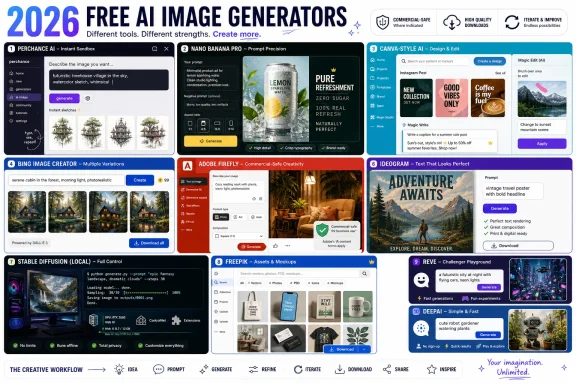
In 2026, the best free AI image generators are no longer novelty toys but practical creative tools, with Perchance AI, Nano Banana Pro, Canva AI, Bing Image Creator, Adobe Firefly, Ideogram, Stable Diffusion, Freepik AI, Reve Image, and DeepAI standing out for different kinds of users. The important shift is not simply that these tools are better; it is that “free” now covers everything from no-account experimentation to commercially safer brand work. That makes the category more useful, but also more confusing. The winning choice depends less on which model is most powerful and more on what kind of visual work you actually need to finish.
The old version of the AI image-generator market was easy to understand. You either used a free demo with obvious limits, paid for a serious tool, or installed something technical and hoped your GPU survived the evening. That division has mostly collapsed.
Today’s free tiers are good enough for blog illustrations, social posts, mood boards, presentation art, mockups, and quick campaign concepts. Some tools produce polished images in seconds; others offer workflow features that were once locked behind expensive creative suites. The result is a market where casual users get more power than ever, while professionals face a new kind of due diligence problem.
The biggest mistake is treating these products as interchangeable. A generator that makes beautiful fantasy art may fail badly at readable text. A tool that feels effortless for Instagram posts may be too restrictive for commercial licensing. A platform that offers unlimited experimentation may not be the one you want anywhere near a client campaign.
The best way to judge AI image generators in 2026 is not by asking which one is “best” in the abstract. The right question is what you are trying to make, how often you need to make it, and whether you can live with the tool’s limits on credits, editing, privacy, resolution, and commercial use.
Perchance is best understood as a creative sandbox rather than a polished production suite. Its community-driven Stable Diffusion roots give users room to experiment with characters, illustrations, landscapes, oddball concepts, and style variations without constantly watching a credit meter. That makes it especially valuable for beginners, hobbyists, writers, tabletop gamers, bloggers, and anyone who wants to explore ideas before committing to a more structured workflow.
Its weaknesses follow directly from its strengths. Perchance is not the most predictable tool for professional typography, brand-safe deliverables, or high-end commercial production. Performance can vary, and the interface does not have the careful product discipline of Adobe, Canva, or Google.
But the free AI image market needs a tool like this. Perchance keeps alive the early web spirit of “try it and see,” which is increasingly rare in generative AI. If your goal is unlimited ideation without an account, it remains one of the easiest recommendations on the list.
That matters because the biggest frustration with AI image tools has always been the gap between intention and output. Many models can create cinematic images from vague prompts, but they stumble when asked for a specific layout, a product beside a particular object, a poster with readable words, or a diagram with several required elements. Nano Banana Pro’s value lies in narrowing that gap.
For users making infographics, branded social graphics, mock advertisements, realistic scenes, or reference-driven campaigns, that kind of prompt adherence can save real time. A generator that gets close on the first or second attempt is more useful than one that produces ten gorgeous but wrong images. This is where Google’s broader Gemini ecosystem becomes part of the story: image generation is increasingly being folded into assistants, productivity software, developer tools, and cloud workflows.
The catch is access. Free users can try the model, but meaningful production use tends to push people toward paid Google plans or developer access. That does not make the free tier irrelevant, but it does mean Nano Banana Pro is best viewed as a premium-grade model with a taste available for free, not a permanently unlimited playground.
That distinction matters. A social media manager does not simply need “an image.” They need a square post, a story version, a LinkedIn banner, a presentation slide, brand colors, text overlays, background removal, and a deadline. Canva’s AI image features sit inside that workflow, which makes them far more practical than a standalone generator for many users.
Canva’s Dream Lab and broader Magic Studio tools turn image generation into one step in a larger production process. Generate the visual, drop it into a template, resize it, edit it, apply brand assets, and publish. For small businesses, educators, nonprofits, creators, and marketing teams, that integration is often more valuable than marginal improvements in texture or lighting.
The trade-off is control. Canva is not the place for users who want deep model customization, local workflows, experimental checkpoints, or obsessive parameter tuning. It is built for throughput, not tinkering. In 2026, that is exactly why it belongs near the top of the list.
The product’s biggest advantage is its low learning curve. Type a prompt, wait briefly, and receive several polished variations. For casual users, students, office workers, and Windows users already living inside Microsoft’s ecosystem, that convenience is hard to dismiss.
Bing Image Creator is especially useful for illustrations, quick concepts, social visuals, and general-purpose creative work. It does not demand knowledge of samplers, seeds, LoRAs, or model weights. It also benefits from Microsoft’s integration strategy: image creation is increasingly part of a broader Copilot experience rather than a standalone novelty.
Its constraints are real, however. Format options, content filters, commercial-use clarity, and workflow depth can all become limitations. For personal and exploratory use, it is excellent. For client-facing production, users should understand the licensing and control trade-offs before treating it as a complete creative platform.
Adobe has spent years positioning Firefly around commercially safer training sources, Creative Cloud integration, and enterprise-friendly terms. That matters in a legal and reputational environment where companies are increasingly nervous about provenance, copyright risk, brand safety, and client deliverables. A free image generator can be fun; a business image generator has to survive procurement.
Firefly’s strongest use case is editing and production. Generative Fill, image expansion, object replacement, and Creative Cloud integration make it more than a prompt box. If you already work in Photoshop, Illustrator, Express, or other Adobe tools, Firefly feels like an extension of an existing workflow rather than a separate destination.
The downside is Adobe’s familiar complexity. Credits, plan names, feature tiers, and usage limits can be difficult to parse. But for commercial design projects, Firefly’s value is not just output quality. It is the ability to tell a manager, client, or legal department that the tool was built for business use from the start.
That focus pays off. Posters, logos, product mockups, ad concepts, event graphics, stickers, and social images often need words inside the image itself. If those words are garbled, the image is not merely imperfect; it is unusable. Ideogram’s advantage is that it treats text rendering as central rather than incidental.
The platform is straightforward enough for beginners but specialized enough to appeal to designers who regularly need typographic concepts. Its Magic Prompt feature helps expand weak prompts into stronger instructions, which lowers the barrier for users who know what they want but not how to describe it to a model.
Ideogram is not a full design suite, and it is not a substitute for professional logo production. Vector workflows, brand systems, and final typography still belong in proper design tools. But as an AI generator for images where readable text matters, it remains one of the clearest category leaders.
That control comes in many forms. Users can run models locally, choose community checkpoints, install custom workflows, experiment with ComfyUI or Automatic1111, fine-tune styles, control resolution and sampling behavior, and generate without relying on a single company’s web interface. For artists, developers, researchers, and technical hobbyists, that flexibility is the whole point.
Stable Diffusion also matters because it keeps the category competitive. Hosted tools can change prices, filters, limits, and policies overnight. Local and open workflows give users an escape hatch, even if that escape hatch requires more technical skill.
The learning curve is the tax. New users may struggle with installation, hardware requirements, model selection, and the strange grammar of advanced prompting. But once learned, Stable Diffusion offers a degree of creative independence that no credit-metered web app can fully match.
The workflow is the selling point. Generate an image, compare models, use stock elements, remove backgrounds, create mockups, upscale assets, and keep moving. In a real production environment, the time saved by avoiding tool-hopping can outweigh small differences in raw image quality.
Freepik is especially compelling for users who create marketing visuals at volume. Agencies, content teams, ecommerce sellers, and social media managers often need lots of acceptable assets quickly, not one museum-grade image after hours of tuning. Freepik’s combination of AI generation and asset-library DNA fits that reality.
The complication is credits. Once a platform bundles image, video, editing, and stock workflows into one account, understanding consumption becomes a budgeting problem. Free can get users started, but heavy production use requires watching the meter carefully.
Its appeal is strongest for users who care about accurate interpretation. Complex prompts, reference images, detailed compositions, and higher-resolution outputs are the kinds of tasks that separate serious generators from casual toys. Reve’s early reputation suggests a platform focused less on ecosystem sprawl and more on getting the core image right.
That focus can be refreshing. Many AI platforms expand sideways into chat, video, audio, automation, enterprise dashboards, and marketplaces before the basic generator feels mature. Reve’s narrower emphasis gives it a clearer identity.
The risk is ecosystem maturity. Newer tools may have fewer tutorials, fewer integrations, less community knowledge, and more uncertainty around long-term pricing and policies. Still, the free tier makes it easy to test, and in 2026, any tool that consistently follows prompts deserves attention.
That makes it useful for experimentation. Users can move among image generation, editing, chat, music, video, and other creative tools without subscribing to a different service for every task. For hobbyists and casual creators, that variety is a real advantage.
Its image generator is simple to use and offers many styles, which lowers the barrier for people who want quick results rather than professional control. It is a good place to try ideas, generate rough visuals, or explore different aesthetics without needing to understand the deeper mechanics of image models.
The weakness is specialization. DeepAI does many things, but it does not consistently beat the best dedicated image tools on realism, typography, commercial design, or customization. Its value lies in breadth and affordability, not category dominance.
This matters because free-tier design shapes user behavior. Unlimited tools encourage exploration. Credit-based tools encourage caution. Account-based tools collect users into ecosystems. Commercially safer tools trade convenience and legal reassurance for more structured limits.
Watermarks are only one part of the story. A tool may let users download clean images while restricting commercial use, public visibility, privacy, or ownership claims. Another may offer fewer free generations but provide clearer business terms. For anyone publishing images beyond personal projects, licensing is not a footnote; it is part of the product.
The best free tool, then, is not always the one with the most generations. It is the one whose limits match your risk tolerance. A student making a presentation, a blogger making a header image, and a marketing agency making client assets should not evaluate “free” the same way.
Reference images have also become more important. For brand consistency, character continuity, product mockups, and campaign work, a reference image can communicate visual intent more efficiently than a paragraph of text. The best modern generators are not just text-to-image systems; they are increasingly multimodal creative collaborators.
Editing tools are where many users waste the most time. If one part of an image is wrong, starting over is often less efficient than inpainting, expanding, upscaling, or replacing the problem area. The difference between a fun demo and a usable workflow is often what happens after the first generation.
The smartest users treat AI image generation as iteration, not magic. Generate several variations, compare outputs, simplify prompts when models get confused, and learn which platform is best for each job. In 2026, tool selection is itself a creative skill.
Perchance is the frictionless experimenter. Nano Banana Pro is the prompt-following realist. Canva is the design-workflow accelerator. Bing Image Creator is the mainstream gateway. Adobe Firefly is the commercial safety play. Ideogram is the typography specialist. Stable Diffusion is the control freak’s paradise. Freepik is the marketing asset machine. Reve is the prompt-accuracy challenger. DeepAI is the broad creative playground.
That fragmentation is good for users, but it also demands more judgment. The wrong tool can make image generation feel random, expensive, or legally murky. The right tool can collapse an afternoon of design work into a few focused iterations.
For WindowsForum readers, the Stable Diffusion angle remains especially interesting. Local AI image generation turns a capable PC into a private creative workstation, while cloud tools trade that control for convenience. The old desktop-versus-cloud debate has returned, only this time the application is imagination itself.
 Free AI Art Has Grown Up, but It Has Not Become Simple
The old version of the AI image-generator market was easy to understand. You either used a free demo with obvious limits, paid for a serious tool, or installed something technical and hoped your GPU survived the evening. That division has mostly collapsed.Today’s free tiers are good enough for blog illustrations, social posts, mood boards, presentation art, mockups, and quick campaign concepts. Some tools produce polished images in seconds; others offer workflow features that were once locked behind expensive creative suites. The result is a market where casual users get more power than ever, while professionals face a new kind of due diligence problem.
The biggest mistake is treating these products as interchangeable. A generator that makes beautiful fantasy art may fail badly at readable text. A tool that feels effortless for Instagram posts may be too restrictive for commercial licensing. A platform that offers unlimited experimentation may not be the one you want anywhere near a client campaign.
The best way to judge AI image generators in 2026 is not by asking which one is “best” in the abstract. The right question is what you are trying to make, how often you need to make it, and whether you can live with the tool’s limits on credits, editing, privacy, resolution, and commercial use.
Perchance AI Wins the Fight for Frictionless Experimentation
Perchance AI’s appeal is almost aggressively simple: open the site, type a prompt, and start generating. In a market increasingly filled with subscriptions, account gates, credit systems, and upsell funnels, that lack of friction is not a small feature. It is the product.Perchance is best understood as a creative sandbox rather than a polished production suite. Its community-driven Stable Diffusion roots give users room to experiment with characters, illustrations, landscapes, oddball concepts, and style variations without constantly watching a credit meter. That makes it especially valuable for beginners, hobbyists, writers, tabletop gamers, bloggers, and anyone who wants to explore ideas before committing to a more structured workflow.
Its weaknesses follow directly from its strengths. Perchance is not the most predictable tool for professional typography, brand-safe deliverables, or high-end commercial production. Performance can vary, and the interface does not have the careful product discipline of Adobe, Canva, or Google.
But the free AI image market needs a tool like this. Perchance keeps alive the early web spirit of “try it and see,” which is increasingly rare in generative AI. If your goal is unlimited ideation without an account, it remains one of the easiest recommendations on the list.
Nano Banana Pro Turns Prompt Following Into the Main Event
Google’s Nano Banana Pro, officially tied to Gemini 3 Pro Image, represents a different vision of image generation. It is not just about making a pretty picture. It is about interpreting complex instructions, understanding relationships among objects, rendering text more reliably, and producing visuals that match the prompt rather than merely orbiting it.That matters because the biggest frustration with AI image tools has always been the gap between intention and output. Many models can create cinematic images from vague prompts, but they stumble when asked for a specific layout, a product beside a particular object, a poster with readable words, or a diagram with several required elements. Nano Banana Pro’s value lies in narrowing that gap.
For users making infographics, branded social graphics, mock advertisements, realistic scenes, or reference-driven campaigns, that kind of prompt adherence can save real time. A generator that gets close on the first or second attempt is more useful than one that produces ten gorgeous but wrong images. This is where Google’s broader Gemini ecosystem becomes part of the story: image generation is increasingly being folded into assistants, productivity software, developer tools, and cloud workflows.
The catch is access. Free users can try the model, but meaningful production use tends to push people toward paid Google plans or developer access. That does not make the free tier irrelevant, but it does mean Nano Banana Pro is best viewed as a premium-grade model with a taste available for free, not a permanently unlimited playground.
Canva AI Makes the Image Generator Disappear Into the Design Tool
Canva AI’s strength is not that it beats every specialist model on pure image quality. It usually does not. Its strength is that it understands where most people actually use images: inside a finished design.That distinction matters. A social media manager does not simply need “an image.” They need a square post, a story version, a LinkedIn banner, a presentation slide, brand colors, text overlays, background removal, and a deadline. Canva’s AI image features sit inside that workflow, which makes them far more practical than a standalone generator for many users.
Canva’s Dream Lab and broader Magic Studio tools turn image generation into one step in a larger production process. Generate the visual, drop it into a template, resize it, edit it, apply brand assets, and publish. For small businesses, educators, nonprofits, creators, and marketing teams, that integration is often more valuable than marginal improvements in texture or lighting.
The trade-off is control. Canva is not the place for users who want deep model customization, local workflows, experimental checkpoints, or obsessive parameter tuning. It is built for throughput, not tinkering. In 2026, that is exactly why it belongs near the top of the list.
Bing Image Creator Remains the Default Free Doorway for Millions
Microsoft’s Bing Image Creator, now closely associated with Microsoft Designer and Copilot, remains one of the most important free AI image tools because it sits at the intersection of quality and accessibility. A Microsoft account is enough to get started, and the results are often better than a free product has any right to be.The product’s biggest advantage is its low learning curve. Type a prompt, wait briefly, and receive several polished variations. For casual users, students, office workers, and Windows users already living inside Microsoft’s ecosystem, that convenience is hard to dismiss.
Bing Image Creator is especially useful for illustrations, quick concepts, social visuals, and general-purpose creative work. It does not demand knowledge of samplers, seeds, LoRAs, or model weights. It also benefits from Microsoft’s integration strategy: image creation is increasingly part of a broader Copilot experience rather than a standalone novelty.
Its constraints are real, however. Format options, content filters, commercial-use clarity, and workflow depth can all become limitations. For personal and exploratory use, it is excellent. For client-facing production, users should understand the licensing and control trade-offs before treating it as a complete creative platform.
Adobe Firefly Sells Trust as Much as Pixels
Adobe Firefly occupies a special place in this market because Adobe is not merely selling image generation. It is selling reassurance. For businesses, agencies, and creative departments, that reassurance may be more important than whether Firefly wins every visual bake-off.Adobe has spent years positioning Firefly around commercially safer training sources, Creative Cloud integration, and enterprise-friendly terms. That matters in a legal and reputational environment where companies are increasingly nervous about provenance, copyright risk, brand safety, and client deliverables. A free image generator can be fun; a business image generator has to survive procurement.
Firefly’s strongest use case is editing and production. Generative Fill, image expansion, object replacement, and Creative Cloud integration make it more than a prompt box. If you already work in Photoshop, Illustrator, Express, or other Adobe tools, Firefly feels like an extension of an existing workflow rather than a separate destination.
The downside is Adobe’s familiar complexity. Credits, plan names, feature tiers, and usage limits can be difficult to parse. But for commercial design projects, Firefly’s value is not just output quality. It is the ability to tell a manager, client, or legal department that the tool was built for business use from the start.
Ideogram Proves Typography Is Still a Killer Feature
AI image generation has improved dramatically, but text remains the category’s most embarrassing failure mode. A model can render cinematic lighting, realistic skin, and intricate backgrounds, then misspell a three-word headline. Ideogram built much of its reputation by attacking that specific weakness.That focus pays off. Posters, logos, product mockups, ad concepts, event graphics, stickers, and social images often need words inside the image itself. If those words are garbled, the image is not merely imperfect; it is unusable. Ideogram’s advantage is that it treats text rendering as central rather than incidental.
The platform is straightforward enough for beginners but specialized enough to appeal to designers who regularly need typographic concepts. Its Magic Prompt feature helps expand weak prompts into stronger instructions, which lowers the barrier for users who know what they want but not how to describe it to a model.
Ideogram is not a full design suite, and it is not a substitute for professional logo production. Vector workflows, brand systems, and final typography still belong in proper design tools. But as an AI generator for images where readable text matters, it remains one of the clearest category leaders.
Stable Diffusion Is Still the Freedom Machine
Stable Diffusion remains the most important counterweight to the cloud-platform model of AI image generation. It is not the easiest tool on this list, and it is not always the most polished out of the box. But its open ecosystem gives users something the big hosted platforms rarely do: control.That control comes in many forms. Users can run models locally, choose community checkpoints, install custom workflows, experiment with ComfyUI or Automatic1111, fine-tune styles, control resolution and sampling behavior, and generate without relying on a single company’s web interface. For artists, developers, researchers, and technical hobbyists, that flexibility is the whole point.
Stable Diffusion also matters because it keeps the category competitive. Hosted tools can change prices, filters, limits, and policies overnight. Local and open workflows give users an escape hatch, even if that escape hatch requires more technical skill.
The learning curve is the tax. New users may struggle with installation, hardware requirements, model selection, and the strange grammar of advanced prompting. But once learned, Stable Diffusion offers a degree of creative independence that no credit-metered web app can fully match.
Freepik AI Builds a Creative Department in a Browser Tab
Freepik AI’s advantage is breadth. It is not merely an image generator; it is a creative platform attached to a vast library of stock assets, editing features, and generative tools. For marketing teams and freelancers, that breadth can be more useful than having the single best model.The workflow is the selling point. Generate an image, compare models, use stock elements, remove backgrounds, create mockups, upscale assets, and keep moving. In a real production environment, the time saved by avoiding tool-hopping can outweigh small differences in raw image quality.
Freepik is especially compelling for users who create marketing visuals at volume. Agencies, content teams, ecommerce sellers, and social media managers often need lots of acceptable assets quickly, not one museum-grade image after hours of tuning. Freepik’s combination of AI generation and asset-library DNA fits that reality.
The complication is credits. Once a platform bundles image, video, editing, and stock workflows into one account, understanding consumption becomes a budgeting problem. Free can get users started, but heavy production use requires watching the meter carefully.
Reve Image Is the Newcomer With a Point to Prove
Reve Image is newer than most of the tools here, but its pitch is easy to understand: better prompt adherence, strong image quality, and less frustration between request and result. In a crowded market, that is a sensible place to compete.Its appeal is strongest for users who care about accurate interpretation. Complex prompts, reference images, detailed compositions, and higher-resolution outputs are the kinds of tasks that separate serious generators from casual toys. Reve’s early reputation suggests a platform focused less on ecosystem sprawl and more on getting the core image right.
That focus can be refreshing. Many AI platforms expand sideways into chat, video, audio, automation, enterprise dashboards, and marketplaces before the basic generator feels mature. Reve’s narrower emphasis gives it a clearer identity.
The risk is ecosystem maturity. Newer tools may have fewer tutorials, fewer integrations, less community knowledge, and more uncertainty around long-term pricing and policies. Still, the free tier makes it easy to test, and in 2026, any tool that consistently follows prompts deserves attention.
DeepAI Is a Creative Playground, Not a Specialist’s Workbench
DeepAI has longevity on its side. It has been around long enough to see several generations of AI hype cycles, and it now presents itself as a broad creative suite rather than a single-purpose image generator.That makes it useful for experimentation. Users can move among image generation, editing, chat, music, video, and other creative tools without subscribing to a different service for every task. For hobbyists and casual creators, that variety is a real advantage.
Its image generator is simple to use and offers many styles, which lowers the barrier for people who want quick results rather than professional control. It is a good place to try ideas, generate rough visuals, or explore different aesthetics without needing to understand the deeper mechanics of image models.
The weakness is specialization. DeepAI does many things, but it does not consistently beat the best dedicated image tools on realism, typography, commercial design, or customization. Its value lies in breadth and affordability, not category dominance.
The “Free” Label Now Hides Very Different Bargains
The phrase free AI image generator sounds straightforward, but in 2026 it covers several very different economic models. Some tools are truly open-ended for casual use. Some offer a small number of premium generations before downgrading quality or speed. Some are free only in the sense that you can test them before subscribing.This matters because free-tier design shapes user behavior. Unlimited tools encourage exploration. Credit-based tools encourage caution. Account-based tools collect users into ecosystems. Commercially safer tools trade convenience and legal reassurance for more structured limits.
Watermarks are only one part of the story. A tool may let users download clean images while restricting commercial use, public visibility, privacy, or ownership claims. Another may offer fewer free generations but provide clearer business terms. For anyone publishing images beyond personal projects, licensing is not a footnote; it is part of the product.
The best free tool, then, is not always the one with the most generations. It is the one whose limits match your risk tolerance. A student making a presentation, a blogger making a header image, and a marketing agency making client assets should not evaluate “free” the same way.
The Best Results Still Come From Better Human Direction
Even as models improve, prompting still matters. The strongest tools reward specificity: subject, setting, lighting, mood, aspect ratio, composition, style, and intended use. Vague prompts produce vague art, even on powerful models.Reference images have also become more important. For brand consistency, character continuity, product mockups, and campaign work, a reference image can communicate visual intent more efficiently than a paragraph of text. The best modern generators are not just text-to-image systems; they are increasingly multimodal creative collaborators.
Editing tools are where many users waste the most time. If one part of an image is wrong, starting over is often less efficient than inpainting, expanding, upscaling, or replacing the problem area. The difference between a fun demo and a usable workflow is often what happens after the first generation.
The smartest users treat AI image generation as iteration, not magic. Generate several variations, compare outputs, simplify prompts when models get confused, and learn which platform is best for each job. In 2026, tool selection is itself a creative skill.
The Real Winners Are the Tools That Know Their Lane
No single free AI image generator dominates every category. That is not a weakness in the market; it is a sign of maturity. The tools are beginning to specialize around workflows rather than all pretending to be the universal answer.Perchance is the frictionless experimenter. Nano Banana Pro is the prompt-following realist. Canva is the design-workflow accelerator. Bing Image Creator is the mainstream gateway. Adobe Firefly is the commercial safety play. Ideogram is the typography specialist. Stable Diffusion is the control freak’s paradise. Freepik is the marketing asset machine. Reve is the prompt-accuracy challenger. DeepAI is the broad creative playground.
That fragmentation is good for users, but it also demands more judgment. The wrong tool can make image generation feel random, expensive, or legally murky. The right tool can collapse an afternoon of design work into a few focused iterations.
For WindowsForum readers, the Stable Diffusion angle remains especially interesting. Local AI image generation turns a capable PC into a private creative workstation, while cloud tools trade that control for convenience. The old desktop-versus-cloud debate has returned, only this time the application is imagination itself.
The 2026 Shortlist Belongs to Workflows, Not Winners
The practical lesson from this year’s crop is that users should build a small toolkit rather than crown a single champion. One generator can handle ideation, another can manage text-heavy graphics, and a third can finish commercial work with better licensing confidence.- Perchance AI is the easiest starting point for free, no-account experimentation and rapid creative play.
- Nano Banana Pro is the strongest choice when prompt accuracy, realism, and text-aware image composition matter most.
- Canva AI is the most practical option for users who need finished social, marketing, or presentation designs rather than standalone images.
- Adobe Firefly is the safest bet for business users who care about licensing, Creative Cloud workflows, and commercially oriented editing.
- Ideogram should be near the top of the list whenever readable text inside the image is essential.
- Stable Diffusion remains the best route for users who want maximum customization, local control, and freedom from hosted-platform limits.
References
- Primary source: Memeburn
Published: 2026-06-06T17:50:18.645518
10 Best Free AI Image Generators to Try in 2026 - Memeburn
Discover the 10 best free AI image generators of 2026. From stunning prompts to fast editing tools, find out which platforms create the most impressive results.memeburn.com - Related coverage: androidcentral.com
Google just pulled the plug on Pixel's AI image generator | Android Central
Google is shutting down its AI image-generation app, Pixel Studio, less than two years after its launch.www.androidcentral.com - Related coverage: techcrunch.com
Google releases Nano Banana Pro, its latest image-generation model | TechCrunch
Google is upgrading its image generation model with new editing chops, higher resolutions, more accurate text rendering, and the ability to search the web.techcrunch.com - Related coverage: arstechnica.com
Google’s new Nano Banana Pro uses Gemini 3 power to generate more realistic AI images - Ars Technica
Google's new image-generator model is available to try globally today.arstechnica.com - Related coverage: nesyona.com
Best Free AI Image Generators: Tested and Ranked (2026)
Every major free AI image generator tested with identical prompts. Ranked by output quality, generation speed, and free tier limits so you pick the right one.nesyona.com - Related coverage: aiofm.info
Best Free AI Image Generators in 2026 · aiofm.info
Complete list of genuinely free AI image generators in 2026 — with quality, limits, commercial terms, and workflow. Which deliver actual value, which are lead-capture for paid upsells.aiofm.info
- Related coverage: aifreeplan.com
- Related coverage: wavespeed.ai
10 Best Free AI Image Generators in 2026 | WaveSpeed Blog
The best free AI image generators in 2026, compared by free tier limits, quality, and features. From Flux and Ideogram to GPT Image 1.5 and Midjourney.wavespeed.ai - Related coverage: zsky.ai
Best Free AI Image Generator 2026: 7 Tested + Ranked | ZSky
Best free AI image generators of 2026, ranked by real output — quality, speed, limits. One pick is truly unlimited free, no signup, small wordmark on free, removed on paid plans.zsky.ai - Related coverage: bigbangindex.com
Best Free AI Image Generators in 2026 (Including Unlimited Options) | BigBangIndex
We re-tested the major free AI image generators in July 2026 and ranked them on quality, free-tier limits, and which are actually unlimited - including the open models you can run for free with no daily cap.www.bigbangindex.com
- Related coverage: smashingapps.com
9 Best Free AI Image Generators in 2026 - SmashingApps.com
Finding the best free AI image generators in 2026 has become harder, This guide cuts through all of that. Nine tools tested, honest free-tier limits documented.www.smashingapps.com - Related coverage: techradar.com
Google launches Nano Banana Pro, a massive leap in AI image editing powered by Gemini 3 Pro | TechRadar
Visualize any idea and design anythingwww.techradar.com - Related coverage: digitalcameraworld.com
The best AI image generators in 2026 | Digital Camera World
The best AI image generators compared – for photo editing, moodboarding and more.www.digitalcameraworld.com - Related coverage: tomsguide.com
Best AI image generators of 2025 | Tom's Guide
Create stunning art from text or imageswww.tomsguide.com
