

The best free team chat app in 2026 is not the one with the longest feature table, but the one whose free limits match how your team actually works: Slack, Microsoft Teams, Discord, Google Chat, Chanty, Rocket.Chat, and BridgeApp each solve a different version of the same collaboration problem. The market has matured enough that “free chat” is no longer a novelty. The catch is that free tiers now function less like gifts and more like carefully engineered ramps into paid ecosystems. Choosing well means identifying which ceiling you are willing to hit first.
Team chat used to be sold as liberation from email. In 2026, the better way to understand it is as the front door to a workplace operating system. The chat window is where links, decisions, files, approvals, meeting notes, alerts, automations, and increasingly AI agents all try to live.
That shift makes free plans both more useful and more dangerous. They are useful because even zero-dollar tiers often include polished apps, file sharing, video calls, channels, searchable conversations, and integrations that would have looked premium a decade ago. They are dangerous because the free tier is where vendors teach your team a workflow, collect your context, and wait until the cost of leaving is higher than the cost of upgrading.
The important question, then, is not whether a tool is free. It is whether the free version preserves the thing your organization is likely to value most. For some teams, that is message history. For others, it is integration breadth, meetings, voice channels, self-hosting, or the ability to turn conversations into tasks and documents without adding another app.
A tiny nonprofit, a three-person startup, a Minecraft modding community, a Windows admin team, and a regulated contractor should not pick the same chat app just because they all have a zero-dollar plan. Free is the entry condition. Fit is the actual decision.
That polish matters. Teams adopt chat tools socially before they adopt them administratively, and Slack has an advantage because so many workers already understand its grammar. A new workspace rarely needs a training deck. People join channels, send messages, react, mute noisy rooms, and move on.
The free plan’s biggest limitation is also the most important one: Slack’s free tier exposes only a limited recent window of message history, with its current public pricing page describing 90 days of searchable messages. That is acceptable if Slack is being used as a real-time coordination layer. It is a serious compromise if the workspace becomes the place where decisions are made and later retrieved.
This is where Slack’s elegance becomes a trap. The better your team gets at using Slack, the more painful the history limit becomes. A casual “does anyone remember why we changed that deployment script?” becomes a paid-plan moment when the answer is buried just outside the accessible archive.
Slack’s free tier is therefore best understood as a superb trial of a mature collaboration culture, not as a permanent knowledge system. If your team already knows it will pay once chat becomes central, Slack is a safe bet. If you are choosing a free tool because your budget is genuinely fixed, the message-history ceiling should make you pause.
The free version of Teams includes core messaging, meetings, calling, screen sharing, file sharing, and Microsoft’s familiar identity and productivity orbit. Microsoft currently advertises 60-minute group meetings, up to 100 participants, and 5GB of cloud storage for the free consumer-oriented Teams experience. For many small groups, that is more than enough to coordinate work without paying.
Teams makes the most sense when the files are already Word documents, the calendar is already Outlook, and the people already have Microsoft accounts. In that environment, Teams does not need to win a beauty contest. It just needs to keep conversations close to the files and meetings people already use.
The problem is that Teams often feels heavier than a chat app should. Its information architecture reflects Microsoft’s broader ambitions: meetings, communities, files, apps, calendars, calls, and accounts all compete for attention. For a small team that wants quick channels and lightweight messaging, Teams can feel like walking into an office tower to borrow a whiteboard marker.
There is also a distinction that casual users often miss. Microsoft’s free Teams offering is not the same as a full Teams business deployment with all the administrative, compliance, channel, and tenant-management expectations of Microsoft 365. That does not make it weak; it makes it specific. Free Teams is good for small-group collaboration and meetings, but organizations expecting the full managed business experience should plan around Microsoft 365 licensing rather than treating the free tier as a long-term enterprise substitute.
That heritage gives Discord an unusually generous free experience. Persistent voice channels, text channels, direct messages, screen sharing, bots, roles, and long-running community history make it feel less constrained than many workplace tools. If your team collaborates by talking through problems in real time, Discord can be more natural than Slack or Teams.
For open-source projects, gaming-adjacent communities, student groups, creator teams, and informal technical collectives, Discord’s culture is a feature rather than a flaw. The server model encourages presence. People can see who is around, join a voice channel, stream a screen, and solve something without scheduling a meeting.
But Discord’s weakness is exactly where business buyers start asking harder questions. It does not feel like a document system, a project-management layer, or a compliance-friendly corporate archive. Its interface and norms can feel too casual for client-facing work, HR-sensitive conversations, regulated industries, or organizations that need formal retention and administrative controls.
Discord is the right free tool when the work is conversational and communal. It is the wrong tool when chat needs to become part of a governed business process. The same informality that makes it delightful for a volunteer developer community can make it uncomfortable for a finance department.
The free story is straightforward for personal Google accounts and Google-native groups: direct messages, group conversations, spaces, file sharing through Drive, and calendar-aware collaboration are available without a separate chat subscription. The paid Workspace versions add the administrative context that businesses expect, but the basic experience is easy to start.
Google Chat’s appeal is low friction. A team that already shares Docs and meets in Google Meet does not have to persuade everyone to install another app or remember another login. Spaces can organize conversations around projects, and Drive links behave like first-class citizens rather than foreign objects pasted into a chat stream.
The trade-off is depth. Google Chat is competent, but it is not as socially expressive as Slack, as voice-native as Discord, as infrastructure-oriented as Rocket.Chat, or as all-in-one as newer workspace products trying to merge chat with databases and tasks. It is best when the chat layer should stay modest.
For many small organizations, that modesty is a virtue. Not every team wants an extensible command center with bots in every corner. Some just want a place to discuss the spreadsheet, share the document, and schedule the meeting. Google Chat handles that job cleanly, especially when Google is already the default office suite.
The obvious constraint is size. Chanty’s free plan is capped at up to five team members. That makes it unsuitable for larger organizations, but it also makes the product’s pitch refreshingly clear: if you are a compact team, you can get a lightweight chat-and-task environment without immediately running into a message-history wall.
That matters because many teams outgrow email before they have the budget or appetite for enterprise software. A five-person agency, consultancy, repair shop, indie software project, or local nonprofit may not need elaborate governance. It may simply need a place where messages can turn into tasks and old decisions can be searched later.
Chanty’s limitation is not that it is too small to be useful. It is that it tells you exactly when the free ride ends. The sixth person changes the economics, and more advanced collaboration features require a paid plan. For a growing startup, that may happen quickly. For a stable small team, it may never happen.
In a market obsessed with AI layers and platform narratives, Chanty’s value is almost old-fashioned. It does not need to be the future of work. It needs to be a calm, searchable, task-aware chat app for a handful of people. That is a real niche, and the free plan serves it well.
The current Rocket.Chat lineup distinguishes between a free Starter plan with limits and a Community Edition aimed at self-managed use. The company describes the free Starter path as suitable for small teams and technical evaluation, while the Community Edition remains the open-source route for basic self-hosted collaboration. Channels, direct messages, file sharing, search, identity options, and deployment control are the draw.
That control is not cosmetic. For some organizations, the ability to host chat internally, manage data locality, integrate with existing identity infrastructure, and avoid a purely cloud-hosted collaboration model is the entire reason to choose Rocket.Chat. In that context, Slack’s polish or Discord’s ease is less important than ownership.
But self-hosting is never truly free. Someone has to deploy the service, patch it, secure it, back it up, monitor it, troubleshoot mobile notifications, handle upgrades, and explain outages. The cost may not appear on a vendor invoice, but it appears in staff time and operational risk.
Rocket.Chat is therefore a serious answer for serious administrators. It is not the right recommendation for a small nontechnical team that just wants to stop losing links in email. It is a strong recommendation for teams that already know why self-hosting matters and are prepared to live with the consequences.
That is a timely claim. The last decade of workplace software created a sprawl problem: Slack for chat, Jira or Trello for tasks, Notion or Confluence for docs, Airtable for databases, Google Drive or OneDrive for files, Zoom or Meet for calls, and now a separate layer of AI tools trying to summarize or automate all of it. The promise of a unified workspace is that the decision, the task, the document, and the automation can share context instead of being scattered across tabs.
BridgeApp’s public materials describe a free entry point with basic chats, calls, tasks, documents, unlimited projects, limited storage, and basic access to AI agents where token usage is paid separately. Its paid plan adds heavier organizational features such as CRM functionality, messenger integrations, role-based access control, broader database capacity, and advanced search. That positions the free tier less as a simple chat app and more as a starter workspace.
The opportunity is obvious. If a team is choosing a chat app in 2026, it should ask whether chat is the destination or the notification layer for actual work. A product that starts with chat but already includes projects, docs, and structured data may reduce the pressure to assemble a stack from five vendors.
The caution is equally obvious. Newer collaboration platforms tend to sound best before they meet the messy reality of team adoption, migration, permissions, mobile reliability, integrations, export needs, and long-term vendor trust. Slack, Teams, Google, Discord, and Rocket.Chat have known flaws, but they also have years of operational proof.
BridgeApp is the intriguing choice for teams that want to bet on consolidation and AI-native workflows. It is not the safest choice for organizations whose primary requirement is a mature ecosystem, deep third-party validation, or conservative procurement. The right posture is neither hype nor dismissal: BridgeApp belongs on the shortlist because its direction matches where collaboration software is going, but buyers should test the free plan with real work before declaring it the new center of operations.
Slack’s constraint is memory. Its free plan is excellent until the inaccessible past becomes a business problem. That makes it ideal for teams that value its ecosystem and expect to upgrade, but less ideal for groups that need a permanent free archive.
Teams’ constraint is weight. It is compelling when Microsoft 365 is already the organizational center of gravity, and less compelling when a team wants a nimble chat-first tool. Its meeting allowances and Office connections are practical, but the product’s broader suite DNA is always present.
Discord’s constraint is professionalism. It is arguably the best free voice-and-community platform in the bunch, but the same community-first design that makes it fast and alive can make it feel wrong for formal business operations.
Google Chat’s constraint is ambition. It works well inside Google’s ecosystem, but it is not trying to be the deepest standalone collaboration platform. That is fine for teams that want simple Google-native messaging, and limiting for teams that want chat to become a more powerful command center.
Chanty’s constraint is headcount. For up to five people, the free plan is practical and generous in the ways that matter, especially searchable history and task management. Beyond that, it becomes a paid decision.
Rocket.Chat’s constraint is operational maturity. It is the control pick, not the convenience pick. If your team can run infrastructure, it offers freedoms that SaaS tools do not. If your team cannot, it may create more work than it removes.
BridgeApp’s constraint is proof. Its all-in-one AI workspace pitch is strategically attractive, but newer platforms must earn trust through daily reliability, migration paths, administrative clarity, and demonstrated staying power.
That raises the stakes for free tiers. A chat app that limits message history does not merely hide old conversations from humans; it also weakens the context that future automation might need. If the AI assistant cannot see the decision that shaped a task, it may summarize confidently and incorrectly. If the workspace cannot connect a chat thread to a document, ticket, database row, or customer record, the AI layer becomes another clever silo.
This is why BridgeApp’s positioning is notable even if it is not yet the default recommendation. It reflects a larger industry move away from chat as a standalone stream and toward chat as a context layer for structured work. Microsoft is pursuing that through Microsoft 365 and Copilot. Google is pursuing it through Workspace and Gemini. Slack is pursuing it through Salesforce’s broader enterprise ecosystem and Slack AI. Smaller vendors are trying to do it by collapsing the stack into one product.
For Windows admins and IT pros, this should sound familiar. The collaboration tool is becoming part of the organization’s data estate. That means retention, export, identity, device management, auditability, and permission boundaries matter more than emoji support or theme customization.
The free plan is where those issues are easiest to ignore. It is also where they are most important to evaluate, because the habits formed in the first month often become the workflows that are painful to unwind later.
A team that needs searchable institutional memory should be wary of any free tier that narrows the archive. A team that needs meetings should compare call duration, participant limits, recordings, and screen sharing before comparing emoji packs. A team that needs voice presence should treat Discord seriously, even if it does not look like enterprise software. A team that needs control should evaluate Rocket.Chat with the same discipline it would apply to any self-hosted service.
The harder evaluation is tool consolidation. If chat is merely one of many places where work happens, you may end up paying not for chat but for the glue between chat, tasks, docs, and data. That is where all-in-one workspaces have a credible argument: the fewer seams in the system, the fewer decisions get lost between systems.
But consolidation is not automatically better. A best-of-breed stack can be more flexible, more mature, and easier to replace piece by piece. An all-in-one system can be simpler, but it can also become a larger lock-in. The right answer depends on whether your team’s pain is too many tools or not enough capability in the tools it already uses.
This is where administrators should push back against generic recommendations. The best free team chat app for a company that lives in Microsoft 365 is probably not the best one for a volunteer open-source project. The best one for a five-person studio is probably not the best one for a school district. The best one for a privacy-sensitive engineering team is probably not the best one for a sales team that wants every SaaS integration under the sun.
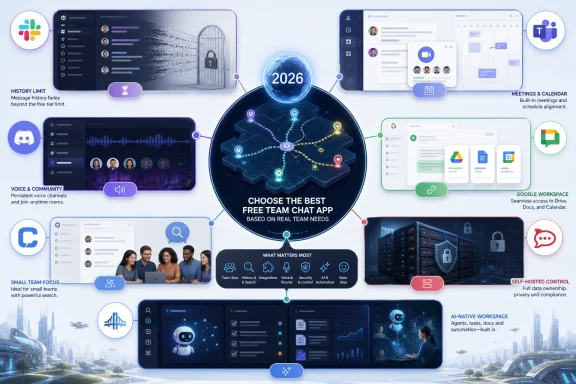 Free Team Chat Has Become a Business Model, Not a Feature
Team chat used to be sold as liberation from email. In 2026, the better way to understand it is as the front door to a workplace operating system. The chat window is where links, decisions, files, approvals, meeting notes, alerts, automations, and increasingly AI agents all try to live.That shift makes free plans both more useful and more dangerous. They are useful because even zero-dollar tiers often include polished apps, file sharing, video calls, channels, searchable conversations, and integrations that would have looked premium a decade ago. They are dangerous because the free tier is where vendors teach your team a workflow, collect your context, and wait until the cost of leaving is higher than the cost of upgrading.
The important question, then, is not whether a tool is free. It is whether the free version preserves the thing your organization is likely to value most. For some teams, that is message history. For others, it is integration breadth, meetings, voice channels, self-hosting, or the ability to turn conversations into tasks and documents without adding another app.
A tiny nonprofit, a three-person startup, a Minecraft modding community, a Windows admin team, and a regulated contractor should not pick the same chat app just because they all have a zero-dollar plan. Free is the entry condition. Fit is the actual decision.
Slack Is Still the Default, but the Default Has a Timer
Slack remains the reference point for modern team chat. Its interface is fast, familiar, and widely copied. Channels, direct messages, threads, emoji reactions, huddles, app integrations, notifications, and search all feel like parts of one coherent product rather than a bolted-together suite.That polish matters. Teams adopt chat tools socially before they adopt them administratively, and Slack has an advantage because so many workers already understand its grammar. A new workspace rarely needs a training deck. People join channels, send messages, react, mute noisy rooms, and move on.
The free plan’s biggest limitation is also the most important one: Slack’s free tier exposes only a limited recent window of message history, with its current public pricing page describing 90 days of searchable messages. That is acceptable if Slack is being used as a real-time coordination layer. It is a serious compromise if the workspace becomes the place where decisions are made and later retrieved.
This is where Slack’s elegance becomes a trap. The better your team gets at using Slack, the more painful the history limit becomes. A casual “does anyone remember why we changed that deployment script?” becomes a paid-plan moment when the answer is buried just outside the accessible archive.
Slack’s free tier is therefore best understood as a superb trial of a mature collaboration culture, not as a permanent knowledge system. If your team already knows it will pay once chat becomes central, Slack is a safe bet. If you are choosing a free tool because your budget is genuinely fixed, the message-history ceiling should make you pause.
Microsoft Teams Free Works Best When Microsoft Is Already the Answer
Microsoft Teams occupies a different part of the market. Slack is chat that grew toward the enterprise; Teams is an enterprise suite that absorbed chat. That distinction explains both its strength and its friction.The free version of Teams includes core messaging, meetings, calling, screen sharing, file sharing, and Microsoft’s familiar identity and productivity orbit. Microsoft currently advertises 60-minute group meetings, up to 100 participants, and 5GB of cloud storage for the free consumer-oriented Teams experience. For many small groups, that is more than enough to coordinate work without paying.
Teams makes the most sense when the files are already Word documents, the calendar is already Outlook, and the people already have Microsoft accounts. In that environment, Teams does not need to win a beauty contest. It just needs to keep conversations close to the files and meetings people already use.
The problem is that Teams often feels heavier than a chat app should. Its information architecture reflects Microsoft’s broader ambitions: meetings, communities, files, apps, calendars, calls, and accounts all compete for attention. For a small team that wants quick channels and lightweight messaging, Teams can feel like walking into an office tower to borrow a whiteboard marker.
There is also a distinction that casual users often miss. Microsoft’s free Teams offering is not the same as a full Teams business deployment with all the administrative, compliance, channel, and tenant-management expectations of Microsoft 365. That does not make it weak; it makes it specific. Free Teams is good for small-group collaboration and meetings, but organizations expecting the full managed business experience should plan around Microsoft 365 licensing rather than treating the free tier as a long-term enterprise substitute.
Discord Is the Best Free Chat App for Teams That Actually Talk
Discord remains the oddball on any business-chat list, and that is precisely why it deserves serious attention. It was not built for corporate work. It was built for communities that live in voice, move quickly, and need persistent rooms where people can drop in and out without ceremony.That heritage gives Discord an unusually generous free experience. Persistent voice channels, text channels, direct messages, screen sharing, bots, roles, and long-running community history make it feel less constrained than many workplace tools. If your team collaborates by talking through problems in real time, Discord can be more natural than Slack or Teams.
For open-source projects, gaming-adjacent communities, student groups, creator teams, and informal technical collectives, Discord’s culture is a feature rather than a flaw. The server model encourages presence. People can see who is around, join a voice channel, stream a screen, and solve something without scheduling a meeting.
But Discord’s weakness is exactly where business buyers start asking harder questions. It does not feel like a document system, a project-management layer, or a compliance-friendly corporate archive. Its interface and norms can feel too casual for client-facing work, HR-sensitive conversations, regulated industries, or organizations that need formal retention and administrative controls.
Discord is the right free tool when the work is conversational and communal. It is the wrong tool when chat needs to become part of a governed business process. The same informality that makes it delightful for a volunteer developer community can make it uncomfortable for a finance department.
Google Chat Is the Quiet Choice for Teams Already Living in Gmail
Google Chat rarely inspires the same loyalty as Slack or the same complaints as Teams. It is quieter than both, and that is partly the point. For teams already working in Gmail, Drive, Docs, Sheets, Meet, and Calendar, Google Chat is less a separate destination than another surface inside the Google workspace.The free story is straightforward for personal Google accounts and Google-native groups: direct messages, group conversations, spaces, file sharing through Drive, and calendar-aware collaboration are available without a separate chat subscription. The paid Workspace versions add the administrative context that businesses expect, but the basic experience is easy to start.
Google Chat’s appeal is low friction. A team that already shares Docs and meets in Google Meet does not have to persuade everyone to install another app or remember another login. Spaces can organize conversations around projects, and Drive links behave like first-class citizens rather than foreign objects pasted into a chat stream.
The trade-off is depth. Google Chat is competent, but it is not as socially expressive as Slack, as voice-native as Discord, as infrastructure-oriented as Rocket.Chat, or as all-in-one as newer workspace products trying to merge chat with databases and tasks. It is best when the chat layer should stay modest.
For many small organizations, that modesty is a virtue. Not every team wants an extensible command center with bots in every corner. Some just want a place to discuss the spreadsheet, share the document, and schedule the meeting. Google Chat handles that job cleanly, especially when Google is already the default office suite.
Chanty Shows That Small Teams Still Need Purpose-Built Simplicity
Chanty is less famous than Slack, Teams, Discord, or Google Chat, but its free plan remains interesting because it focuses on the practical needs of small teams. The current free tier advertises unlimited searchable history, public and private chats, voice messages, one-on-one audio and video calls, built-in task management, and 20GB of storage per team.The obvious constraint is size. Chanty’s free plan is capped at up to five team members. That makes it unsuitable for larger organizations, but it also makes the product’s pitch refreshingly clear: if you are a compact team, you can get a lightweight chat-and-task environment without immediately running into a message-history wall.
That matters because many teams outgrow email before they have the budget or appetite for enterprise software. A five-person agency, consultancy, repair shop, indie software project, or local nonprofit may not need elaborate governance. It may simply need a place where messages can turn into tasks and old decisions can be searched later.
Chanty’s limitation is not that it is too small to be useful. It is that it tells you exactly when the free ride ends. The sixth person changes the economics, and more advanced collaboration features require a paid plan. For a growing startup, that may happen quickly. For a stable small team, it may never happen.
In a market obsessed with AI layers and platform narratives, Chanty’s value is almost old-fashioned. It does not need to be the future of work. It needs to be a calm, searchable, task-aware chat app for a handful of people. That is a real niche, and the free plan serves it well.
Rocket.Chat Is Free Only If You Can Afford the Responsibility
Rocket.Chat is the strongest option for teams that hear “free” and think about control rather than convenience. Its open-source and self-managed roots make it appealing to technical groups, privacy-conscious organizations, and administrators who would rather run their own collaboration stack than hand everything to a SaaS vendor.The current Rocket.Chat lineup distinguishes between a free Starter plan with limits and a Community Edition aimed at self-managed use. The company describes the free Starter path as suitable for small teams and technical evaluation, while the Community Edition remains the open-source route for basic self-hosted collaboration. Channels, direct messages, file sharing, search, identity options, and deployment control are the draw.
That control is not cosmetic. For some organizations, the ability to host chat internally, manage data locality, integrate with existing identity infrastructure, and avoid a purely cloud-hosted collaboration model is the entire reason to choose Rocket.Chat. In that context, Slack’s polish or Discord’s ease is less important than ownership.
But self-hosting is never truly free. Someone has to deploy the service, patch it, secure it, back it up, monitor it, troubleshoot mobile notifications, handle upgrades, and explain outages. The cost may not appear on a vendor invoice, but it appears in staff time and operational risk.
Rocket.Chat is therefore a serious answer for serious administrators. It is not the right recommendation for a small nontechnical team that just wants to stop losing links in email. It is a strong recommendation for teams that already know why self-hosting matters and are prepared to live with the consequences.
BridgeApp Makes the Most Ambitious Claim, and That Requires the Most Skepticism
BridgeApp is the newest and least battle-tested name in this group, but it is also the one making the most modern argument. Its pitch is not merely that teams need chat. It is that chat should sit inside a broader AI-native workspace that also includes projects, documents, databases, calls, tasks, and agents.That is a timely claim. The last decade of workplace software created a sprawl problem: Slack for chat, Jira or Trello for tasks, Notion or Confluence for docs, Airtable for databases, Google Drive or OneDrive for files, Zoom or Meet for calls, and now a separate layer of AI tools trying to summarize or automate all of it. The promise of a unified workspace is that the decision, the task, the document, and the automation can share context instead of being scattered across tabs.
BridgeApp’s public materials describe a free entry point with basic chats, calls, tasks, documents, unlimited projects, limited storage, and basic access to AI agents where token usage is paid separately. Its paid plan adds heavier organizational features such as CRM functionality, messenger integrations, role-based access control, broader database capacity, and advanced search. That positions the free tier less as a simple chat app and more as a starter workspace.
The opportunity is obvious. If a team is choosing a chat app in 2026, it should ask whether chat is the destination or the notification layer for actual work. A product that starts with chat but already includes projects, docs, and structured data may reduce the pressure to assemble a stack from five vendors.
The caution is equally obvious. Newer collaboration platforms tend to sound best before they meet the messy reality of team adoption, migration, permissions, mobile reliability, integrations, export needs, and long-term vendor trust. Slack, Teams, Google, Discord, and Rocket.Chat have known flaws, but they also have years of operational proof.
BridgeApp is the intriguing choice for teams that want to bet on consolidation and AI-native workflows. It is not the safest choice for organizations whose primary requirement is a mature ecosystem, deep third-party validation, or conservative procurement. The right posture is neither hype nor dismissal: BridgeApp belongs on the shortlist because its direction matches where collaboration software is going, but buyers should test the free plan with real work before declaring it the new center of operations.
The Real Divide Is Memory, Meetings, Voice, Control, and Sprawl
The free team chat market looks crowded until you reduce it to the constraints that actually hurt. Every serious option can send messages. The differences emerge when the team tries to remember, meet, automate, govern, or grow.Slack’s constraint is memory. Its free plan is excellent until the inaccessible past becomes a business problem. That makes it ideal for teams that value its ecosystem and expect to upgrade, but less ideal for groups that need a permanent free archive.
Teams’ constraint is weight. It is compelling when Microsoft 365 is already the organizational center of gravity, and less compelling when a team wants a nimble chat-first tool. Its meeting allowances and Office connections are practical, but the product’s broader suite DNA is always present.
Discord’s constraint is professionalism. It is arguably the best free voice-and-community platform in the bunch, but the same community-first design that makes it fast and alive can make it feel wrong for formal business operations.
Google Chat’s constraint is ambition. It works well inside Google’s ecosystem, but it is not trying to be the deepest standalone collaboration platform. That is fine for teams that want simple Google-native messaging, and limiting for teams that want chat to become a more powerful command center.
Chanty’s constraint is headcount. For up to five people, the free plan is practical and generous in the ways that matter, especially searchable history and task management. Beyond that, it becomes a paid decision.
Rocket.Chat’s constraint is operational maturity. It is the control pick, not the convenience pick. If your team can run infrastructure, it offers freedoms that SaaS tools do not. If your team cannot, it may create more work than it removes.
BridgeApp’s constraint is proof. Its all-in-one AI workspace pitch is strategically attractive, but newer platforms must earn trust through daily reliability, migration paths, administrative clarity, and demonstrated staying power.
AI Changes the Chat App From a Room Into a Record
The next phase of team chat is not just better messaging. It is machine-readable organizational memory. Once AI agents enter the workspace, the value of chat history changes from “can a person search this?” to “can a system safely understand what happened here?”That raises the stakes for free tiers. A chat app that limits message history does not merely hide old conversations from humans; it also weakens the context that future automation might need. If the AI assistant cannot see the decision that shaped a task, it may summarize confidently and incorrectly. If the workspace cannot connect a chat thread to a document, ticket, database row, or customer record, the AI layer becomes another clever silo.
This is why BridgeApp’s positioning is notable even if it is not yet the default recommendation. It reflects a larger industry move away from chat as a standalone stream and toward chat as a context layer for structured work. Microsoft is pursuing that through Microsoft 365 and Copilot. Google is pursuing it through Workspace and Gemini. Slack is pursuing it through Salesforce’s broader enterprise ecosystem and Slack AI. Smaller vendors are trying to do it by collapsing the stack into one product.
For Windows admins and IT pros, this should sound familiar. The collaboration tool is becoming part of the organization’s data estate. That means retention, export, identity, device management, auditability, and permission boundaries matter more than emoji support or theme customization.
The free plan is where those issues are easiest to ignore. It is also where they are most important to evaluate, because the habits formed in the first month often become the workflows that are painful to unwind later.
The Six-Month Test Beats the Feature Matrix
The safest way to choose a free team chat app is to imagine the team six months after adoption, not six minutes after signup. The signup experience is designed to be frictionless. The six-month experience is where limits become strategy.A team that needs searchable institutional memory should be wary of any free tier that narrows the archive. A team that needs meetings should compare call duration, participant limits, recordings, and screen sharing before comparing emoji packs. A team that needs voice presence should treat Discord seriously, even if it does not look like enterprise software. A team that needs control should evaluate Rocket.Chat with the same discipline it would apply to any self-hosted service.
The harder evaluation is tool consolidation. If chat is merely one of many places where work happens, you may end up paying not for chat but for the glue between chat, tasks, docs, and data. That is where all-in-one workspaces have a credible argument: the fewer seams in the system, the fewer decisions get lost between systems.
But consolidation is not automatically better. A best-of-breed stack can be more flexible, more mature, and easier to replace piece by piece. An all-in-one system can be simpler, but it can also become a larger lock-in. The right answer depends on whether your team’s pain is too many tools or not enough capability in the tools it already uses.
This is where administrators should push back against generic recommendations. The best free team chat app for a company that lives in Microsoft 365 is probably not the best one for a volunteer open-source project. The best one for a five-person studio is probably not the best one for a school district. The best one for a privacy-sensitive engineering team is probably not the best one for a sales team that wants every SaaS integration under the sun.
Where Each Free Plan Actually Wins
The practical shortlist is smaller than the market suggests. Pick based on the constraint you refuse to compromise, and the answer becomes much clearer.- Slack is the strongest free starting point for teams that want the most familiar chat interface and deep integrations, provided they can live with a limited recent message archive or expect to upgrade.
- Microsoft Teams Free is the best fit for groups already committed to Microsoft accounts, Office files, and meeting-heavy collaboration.
- Discord is the most generous free choice for communities and informal teams that rely on persistent voice, fast screen sharing, and always-on presence.
- Google Chat is the lowest-friction option for teams already organized around Gmail, Drive, Docs, Calendar, and Meet.
- Chanty is a strong small-team pick when five or fewer people need searchable chat, file storage, and lightweight task management without paying.
- Rocket.Chat is the free control option for technical teams that can self-manage infrastructure and care more about ownership than convenience.
- BridgeApp is the ambitious all-in-one contender for teams that want chat to grow into projects, documents, databases, and AI-assisted workflows rather than remain a standalone messaging stream.
References
- Primary source: PlayStation Universe
Published: 2026-06-02T01:42:06.123174
The Best Free Team Chat Apps in 2026 - PlayStation Universe
Every team eventually reaches the point where email and a group text thread stop scaling. Messages get buried, decisions disappear …www.psu.com - Official source: support.microsoft.com
Learn more about subscriptions for Microsoft Teams Free | Microsoft Support
Use a Microsoft Teams Free subscription to keep in touch with all the people in your life. Learn about subscription options for personal or small business use.support.microsoft.com - Related coverage: rocket.chat
Rocket.Chat FAQ
Rocket.Chat FAQ for government agencies. Explore deployment options, security standards, compliance, and how we support mission-critical communications. www.rocket.chat
- Official source: microsoft.com
Your request has been blocked. This could be due to several reasons.
www.microsoft.com
- Related coverage: besttool.io
Is Slack Free? Free Plan vs Paid Plans Explained (2026) | BestTool
Is Slack really free in 2026? Full breakdown of Slack's free plan limits (90-day history, 10 integrations) vs Pro, Business+, and Enterprise Grid.besttool.io - Related coverage: docs.rocket.chat

Rocket Chat Plans for Secure Collaboration Solutions
ECompare Rocket Chat plans. Choose the right secure communications platform with cloud or on-prem deployment, zero-trust security, and advanced collaboration tools.
docs.rocket.chat
- Related coverage: es.rocket.chat
Rocket.Chat FAQ
Preguntas frecuentes sobre Rocket.Chat para organismos gubernamentales. Explore las opciones de despliegue, las normas de seguridad, el cumplimiento y cómo apoyamos las comunicaciones de misión crítica.
es.rocket.chat
- Related coverage: toolpick.dev
Slack Free Plan Limits 2026: What You Lose (and When to Upgrade)
Slack's free plan changed dramatically. Here's exactly what you get, what's hidden behind the paywall, and the exact moment your team should upgrade to Pro.www.toolpick.dev
- Related coverage: content.rocket.chat
- Related coverage: cdn.us.document360.io
- Official source: support.google.com

Send a direct message - Computer - Google Chat Help
You can send a direct message (DM) to a person or group in Google Chat. Learn how DMs work DMs can be from you to another person or include multiple people. When one or more people r
support.google.com
- Related coverage: reload.chat
Reload — Team Chat For AI Agents.
Everyone on your team has their own AI agents. Reload is where they all work together.www.reload.chat - Related coverage: familylocket.com
- Related coverage: hf-files-oregon.s3.amazonaws.com
- Related coverage: downehouse.net
</rdf:Alt> </dc:title> <dc:description> <rdf:Alt> <rdf:li xml:lang="x-default"/> </rdf:Alt> </dc:description> <dc:creator> <rdf:Seq> <rdf:li>C Rich
</rdf:Alt> </dc:description> <dc:creator> <rdf:Seq> <rdf:li>C Richwww.downehouse.net

