

In 2026, the best team chat app for a modern workplace depends less on who sends the fastest message and more on whether Slack, BridgeApp, Microsoft Teams, Discord, Google Chat, Element, or Chanty best matches the company’s workflow, security model, and software stack. The category has grown up from “office instant messaging” into something closer to the nervous system of hybrid work. That makes the choice more consequential than a feature checklist suggests. Pick badly, and the chat app becomes another noisy tab; pick well, and it becomes the place where decisions, files, tasks, meetings, and institutional memory actually connect.
The market’s center of gravity is shifting. Slack and Microsoft Teams still define the mainstream enterprise conversation, but the interesting pressure now comes from two sides: privacy-first tools like Element, and AI-native workspaces like BridgeApp that argue chat should no longer be a standalone product at all. The best team chat app in 2026 is not merely the one with the cleanest interface. It is the one that turns communication into execution without making workers feel trapped inside yet another productivity machine.
The old version of workplace chat had a simple job: replace hallway conversations and endless email chains. Channels, direct messages, file uploads, and search were enough to justify the move. For a time, that was revolutionary. It gave distributed teams a shared room even when no one was in the same building.
That premise now feels quaint. Hybrid work has turned chat into the default record of how decisions happen. A product debate starts in a channel, becomes a thread, produces a document, triggers a task, gets discussed in a video call, and resurfaces months later when someone asks why the company chose one path over another. The chat app is not adjacent to the work anymore. It is where much of the work is born.
That is why the best tools in this category increasingly compete on context. Search matters because chat without memory becomes corporate amnesia. Integrations matter because notifications scattered across ten systems become a second inbox. Audio and video matter because some conversations still need tone, urgency, and shared attention. Security matters because the chat archive is often full of customer data, credentials, financial assumptions, personnel issues, and executive decision-making.
The winner for any given organization will depend on whether it wants a communications hub, a Microsoft or Google extension, a privacy enclave, a voice-first room, or an all-in-one workspace. The mistake is treating those as interchangeable.
Its ecosystem is the main attraction. A software team can pipe in GitHub activity, incident alerts, deployment notices, Jira updates, calendar reminders, customer feedback, and support escalations without asking employees to monitor every source directly. A sales team can connect CRM alerts. An operations team can build lightweight automations around approvals and reminders. Slack works best when a company already has a messy but deliberate software stack and needs one place where signals can converge.
The trade-off is that Slack’s greatest strength can become its operational tax. Every integration, channel, bot, and workflow adds convenience, but also noise. Slack cultures often learn the hard way that channel hygiene is a management practice, not a settings menu. Without discipline, “transparent communication” turns into an infinite scroll of semi-relevant updates.
Cost is the other pressure point. Slack’s free tier is useful for testing and very small teams, but modern organizations quickly run into limits around history, administration, compliance, and scale. Paid plans are not unusual by SaaS standards, but per-user pricing becomes more visible as the team grows. Slack is easy to adopt gradually; it is less easy to justify casually once hundreds or thousands of workers are inside it.
Still, for organizations that prize integrations, searchable history, and a mature collaboration culture, Slack remains one of the safest choices. It is not the cheapest or the simplest. It is the most fluent in the language of modern digital work.
The core appeal is consolidation. BridgeApp includes messenger-style communication, channels and threads, audio and video calls, task tracking with views such as Kanban and lists, collaborative documents, custom databases, and a no-code or low-code AI agent builder. In plain English, it wants to reduce the number of times a worker has to jump from chat to project manager to document editor to database to meeting tool just to complete a fairly ordinary piece of work.
That argument will resonate with small and midsized businesses that feel SaaS sprawl as both a budget problem and a cognitive problem. The modern employee often spends the day dragging context between systems: the decision is in chat, the task is in a board, the supporting data is in a spreadsheet, the explanation is in a document, and the next step is trapped in someone’s meeting notes. BridgeApp’s wager is that the workspace should hold those objects together.
Its AI story is more central than the “AI assistant” branding now sprinkled across almost every productivity product. BridgeApp describes AI agents as configurable digital workers that can operate across company context, chats, databases, knowledge hubs, and workflows. They can summarize conversations, create tasks from discussions, populate databases, generate reports, and execute custom processes. Support for multiple AI models and MCP-style connections points toward a future where the workspace is not just where humans talk, but where software agents act.
That future is promising, but it also raises the bar for trust. An AI agent that summarizes a thread is convenient. An AI agent that creates tasks, updates records, or triggers workflows needs governance, permissions, auditability, and predictable failure modes. The more a platform sells automation, the more buyers should ask what happens when automation is wrong.
BridgeApp’s pricing is aggressive in the context of all-in-one software. Its free plan offers unlimited members and includes major workspace components such as messenger, documents, task tracker, AI builder, databases, calls, and search, while the Pro plan adds capabilities such as advanced search, role-based access control, messenger integrations, real-time collaboration, security controls, and expanded database functionality. Enterprise buyers can look for deployment options such as private cloud, on-premise, white labeling, account management, BYOK, priority support, and uptime commitments.
The caution is maturity. BridgeApp is newer than Slack, Teams, or Google Chat, and that matters. Its ecosystem is smaller, some advanced capabilities are still developing, and buyers should distinguish between features available today and features on the roadmap. The platform’s direction is compelling precisely because it is ambitious. Ambition, in enterprise software, is a feature and a risk.
Its strengths are obvious in large organizations. Teams integrates naturally with Outlook, SharePoint, OneDrive, Word, Excel, PowerPoint, Microsoft Entra ID, and Microsoft’s security and compliance stack. Files can be shared and edited in the flow of conversation. Meetings, transcripts, recordings, calendars, and enterprise policies all sit inside a familiar administrative model. For regulated firms and large IT departments, that coherence matters.
Teams is also a video and meetings powerhouse. While Slack has huddles and calls, Teams is often treated as the default meeting room for Microsoft shops. Screen sharing, meeting controls, calendar integration, webinars, phone capabilities, and policy management make it less a chat app with meetings attached and more a communications suite where chat is one mode among many.
The downside is weight. Teams can feel bloated when the job is simple messaging. Its information architecture can be confusing, especially in organizations that allow teams, channels, chats, meetings, and SharePoint-backed files to grow organically. What looks like integration from the CIO’s office can feel like clutter from a user’s desk.
There is also a cultural distinction. Slack often feels like a tool teams choose; Teams often feels like infrastructure the organization standardizes on. That is not inherently bad. Infrastructure is exactly what many enterprises need. But the emotional experience is different, and adoption suffers when employees feel that a communication tool was imposed rather than embraced.
For companies already deep in Microsoft 365, Teams is usually the rational default. For smaller, non-Microsoft-heavy teams that want lightweight, joyful chat, it can be too much machine for the job.
That makes Google Chat particularly attractive for teams that want adoption without ceremony. Spaces, direct messages, file sharing, and meetings connect naturally to Google’s productivity suite. A worker can move from a message to a document to a Meet call with little setup. For many organizations, that is enough.
Google’s AI push also matters. Gemini-powered summaries, smart replies, message help, translation, and side-panel assistance point toward a more ambient version of workplace chat. The direction is clear: Google wants Workspace conversations, files, and action items to become machine-readable context for assistance. That could make Google Chat more useful over time, especially for teams that already trust Google with their documents and email.
The limitation is that Google Chat can feel restrained compared with specialized tools. Its integration ecosystem is not Slack’s. Its enterprise communications depth is not Teams’. Its privacy posture is not Element’s. Its all-in-one operational ambition is not BridgeApp’s. It wins when simplicity, Google-native workflows, and minimal training matter more than maximum flexibility.
For schools, startups, agencies, nonprofits, and Workspace-first businesses, that is a serious advantage. Not every team wants a chat platform that becomes a hobby.
For certain teams, that is exactly the point. Creative groups, small studios, community-led companies, independent developers, and distributed teams that want ambient presence may find Discord more natural than corporate collaboration suites. Always-on voice channels can create a feeling of shared workspace without requiring everyone to sit in a video meeting. Text channels are easy to spin up, and the free tier is generous enough for many lightweight uses.
Discord’s appeal is cultural more than administrative. It feels less like office software and more like a living room with project rooms attached. That can lower communication barriers and make quick collaboration easier, especially among teams already comfortable with the platform.
But the same informality limits its fit. Discord is not designed primarily for regulated internal communication, enterprise retention, legal discovery, complex access governance, or formal compliance workflows. Companies handling sensitive customer data, financial records, healthcare information, government work, or strict audit requirements should be cautious. Discord can be useful at work without being an enterprise system of record.
In other words, Discord works best when workplace communication is closer to collaboration among a tight crew than governance across a large institution. It is excellent at presence. It is weaker as corporate memory.
The strongest case for Element comes from sectors where communication infrastructure is itself a security decision: government, defense, healthcare, research, critical infrastructure, activist organizations, and enterprises with strict residency or confidentiality requirements. In those environments, “Where is the data?” and “Who controls the server?” are not procurement trivia. They are risk questions.
Element’s open and federated model is philosophically different from mainstream SaaS chat. Instead of one vendor’s cloud serving as the universal center, Matrix allows independently operated servers to communicate. That gives organizations more control over deployment, identity, and data location while still enabling communication across boundaries.
The cost is complexity. Encryption key management, server administration, federation choices, user support, and integration work can be more demanding than buying Slack or enabling Teams. Non-technical teams may find the setup less forgiving. Enterprise buyers will need the right internal expertise or a managed deployment path.
Element is not trying to be the easiest team chat app. It is trying to be the one that security-conscious organizations can actually defend. That distinction matters.
The task-management angle is its differentiator. Turning messages into tasks helps smaller teams avoid the common trap where action items disappear into chat history. That may sound modest, but it solves a real problem. Many teams do not need elaborate project management. They need a way to make sure “we should do this” becomes “someone owns this.”
Chanty also benefits from being easier to reason about. Startups, agencies, and budget-conscious teams often do not need enterprise-grade compliance dashboards or thousands of integrations. They need channels, direct messages, search, file sharing, voice, video, and task follow-through. Chanty’s simplicity is part of the value.
The ceiling is lower. Larger organizations may outgrow its integration catalog, administrative depth, automation options, and governance features. It is not the platform for a sprawling multinational with complex compliance demands. But not every product needs to become enterprise infrastructure to be useful.
For small teams that want chat plus basic execution at a lower cost, Chanty deserves its place in the conversation.
A Microsoft 365 organization should start with Teams because identity, files, meetings, and administration are already aligned. A Google Workspace organization should test Google Chat first because adoption friction will be low. A company with a best-of-breed SaaS stack should give Slack serious attention because integrations are still its native language. A privacy-sensitive organization should evaluate Element before defaulting to a mainstream cloud suite.
BridgeApp enters when the problem is not merely communication but fragmentation. If workers are losing time moving between chat, tasks, documents, databases, and AI tools, then an all-in-one workspace has a stronger argument. That does not mean consolidation is always better. Specialized tools often beat bundled tools at their specialty. But the cost of context switching is now high enough that consolidation deserves a fair trial.
Discord and Chanty prove the market still has room for narrower fits. Discord is compelling when voice presence and informal collaboration matter more than enterprise controls. Chanty is compelling when affordability and task follow-through matter more than platform breadth. The “best” app is sometimes the one that refuses to solve problems your team does not have.
Security should cut across all of these decisions. Teams need to examine encryption, retention, audit logs, access controls, guest access, data residency, compliance certifications, and administrative visibility. A chat app is not harmless just because it looks conversational. It may contain the most candid and sensitive information the company produces.
Slack, Teams, and Google Chat are all adding AI features that summarize conversations, surface information, draft responses, identify action items, or connect workplace data. BridgeApp goes further by making AI agents part of the workspace architecture. Even smaller tools are under pressure to add AI-powered search or organization because users increasingly expect chat to explain itself.
This is useful because workplace chat has become too large for humans to parse unaided. No employee can reasonably read every channel, every thread, every meeting transcript, and every document update. Summaries and search are not luxuries; they are survival mechanisms. AI can reduce the burden of staying informed.
But AI also turns messy communication habits into operational risk. If decisions are vague, channels are chaotic, permissions are sloppy, and sensitive data is casually pasted into chats, AI will not magically fix the underlying governance problem. It may amplify it. A bad knowledge base with an AI interface is still a bad knowledge base, only faster.
The right question is not whether a chat app has AI. By 2026, that is becoming table stakes. The better question is whether its AI features respect permissions, expose reasoning where needed, support auditability, and help people act without pretending uncertainty does not exist.
That framing is more useful than asking which product is best in the abstract. A fast-growing startup may fear cost and context switching more than formal compliance. A bank may fear data leakage more than user delight. A software company may fear losing integration flexibility. A public agency may fear vendor lock-in and data residency exposure. The right tool is the one whose weaknesses are acceptable in your environment.
There is also a human factor that procurement teams underestimate. Chat apps shape culture. Slack encourages channel-based transparency and rapid informal exchange. Teams reinforces Microsoft-centered process and meeting integration. Discord creates presence and informality. Element signals privacy and control. BridgeApp pushes toward unified execution and automation. Chanty nudges small teams toward task clarity.
Software does not merely reflect how teams communicate. It teaches them how to communicate.
The workplace chat market in 2026 is no longer a contest to replace email with faster messages. It is a contest to become the place where work gathers enough context to move. The winners will be the platforms that reduce noise, preserve memory, respect security, and turn conversation into accountable action without making employees feel like they live inside a ticketing system. For WindowsForum readers managing real teams, the lesson is simple: choose the chat app not for the messages it can send today, but for the decisions it will help your organization understand tomorrow.
The market’s center of gravity is shifting. Slack and Microsoft Teams still define the mainstream enterprise conversation, but the interesting pressure now comes from two sides: privacy-first tools like Element, and AI-native workspaces like BridgeApp that argue chat should no longer be a standalone product at all. The best team chat app in 2026 is not merely the one with the cleanest interface. It is the one that turns communication into execution without making workers feel trapped inside yet another productivity machine.
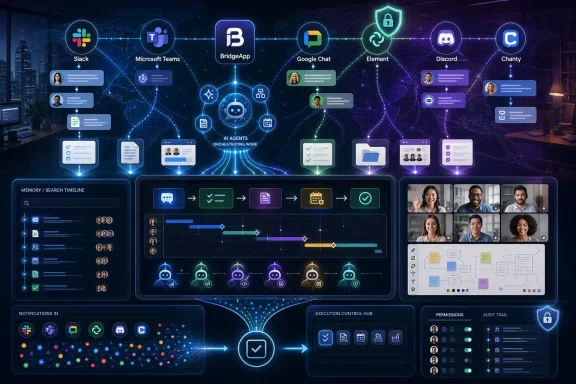 Team Chat Has Become the Workplace Operating Layer
The old version of workplace chat had a simple job: replace hallway conversations and endless email chains. Channels, direct messages, file uploads, and search were enough to justify the move. For a time, that was revolutionary. It gave distributed teams a shared room even when no one was in the same building.That premise now feels quaint. Hybrid work has turned chat into the default record of how decisions happen. A product debate starts in a channel, becomes a thread, produces a document, triggers a task, gets discussed in a video call, and resurfaces months later when someone asks why the company chose one path over another. The chat app is not adjacent to the work anymore. It is where much of the work is born.
That is why the best tools in this category increasingly compete on context. Search matters because chat without memory becomes corporate amnesia. Integrations matter because notifications scattered across ten systems become a second inbox. Audio and video matter because some conversations still need tone, urgency, and shared attention. Security matters because the chat archive is often full of customer data, credentials, financial assumptions, personnel issues, and executive decision-making.
The winner for any given organization will depend on whether it wants a communications hub, a Microsoft or Google extension, a privacy enclave, a voice-first room, or an all-in-one workspace. The mistake is treating those as interchangeable.
Slack Still Owns the Grammar of Modern Work Chat
Slack remains the reference point because so many modern workplace habits were either popularized by it or copied from it. Channels, threads, emoji reactions, integrations, workflow automations, and searchable team memory all feel obvious now because Slack made them feel native. For teams that live across many third-party tools, Slack’s strongest argument is still that it can become the connective tissue among them.Its ecosystem is the main attraction. A software team can pipe in GitHub activity, incident alerts, deployment notices, Jira updates, calendar reminders, customer feedback, and support escalations without asking employees to monitor every source directly. A sales team can connect CRM alerts. An operations team can build lightweight automations around approvals and reminders. Slack works best when a company already has a messy but deliberate software stack and needs one place where signals can converge.
The trade-off is that Slack’s greatest strength can become its operational tax. Every integration, channel, bot, and workflow adds convenience, but also noise. Slack cultures often learn the hard way that channel hygiene is a management practice, not a settings menu. Without discipline, “transparent communication” turns into an infinite scroll of semi-relevant updates.
Cost is the other pressure point. Slack’s free tier is useful for testing and very small teams, but modern organizations quickly run into limits around history, administration, compliance, and scale. Paid plans are not unusual by SaaS standards, but per-user pricing becomes more visible as the team grows. Slack is easy to adopt gradually; it is less easy to justify casually once hundreds or thousands of workers are inside it.
Still, for organizations that prize integrations, searchable history, and a mature collaboration culture, Slack remains one of the safest choices. It is not the cheapest or the simplest. It is the most fluent in the language of modern digital work.
BridgeApp Makes the Case That Chat Alone Is No Longer Enough
BridgeApp is the most interesting entry in this comparison because it does not present itself as merely a chat app. It pitches a broader idea: chat, tasks, documents, databases, calls, knowledge, search, and AI agents should live in one workspace. That places it less in direct opposition to Slack as a messenger and more against the growing pile of SaaS subscriptions that surround Slack in many organizations.The core appeal is consolidation. BridgeApp includes messenger-style communication, channels and threads, audio and video calls, task tracking with views such as Kanban and lists, collaborative documents, custom databases, and a no-code or low-code AI agent builder. In plain English, it wants to reduce the number of times a worker has to jump from chat to project manager to document editor to database to meeting tool just to complete a fairly ordinary piece of work.
That argument will resonate with small and midsized businesses that feel SaaS sprawl as both a budget problem and a cognitive problem. The modern employee often spends the day dragging context between systems: the decision is in chat, the task is in a board, the supporting data is in a spreadsheet, the explanation is in a document, and the next step is trapped in someone’s meeting notes. BridgeApp’s wager is that the workspace should hold those objects together.
Its AI story is more central than the “AI assistant” branding now sprinkled across almost every productivity product. BridgeApp describes AI agents as configurable digital workers that can operate across company context, chats, databases, knowledge hubs, and workflows. They can summarize conversations, create tasks from discussions, populate databases, generate reports, and execute custom processes. Support for multiple AI models and MCP-style connections points toward a future where the workspace is not just where humans talk, but where software agents act.
That future is promising, but it also raises the bar for trust. An AI agent that summarizes a thread is convenient. An AI agent that creates tasks, updates records, or triggers workflows needs governance, permissions, auditability, and predictable failure modes. The more a platform sells automation, the more buyers should ask what happens when automation is wrong.
BridgeApp’s pricing is aggressive in the context of all-in-one software. Its free plan offers unlimited members and includes major workspace components such as messenger, documents, task tracker, AI builder, databases, calls, and search, while the Pro plan adds capabilities such as advanced search, role-based access control, messenger integrations, real-time collaboration, security controls, and expanded database functionality. Enterprise buyers can look for deployment options such as private cloud, on-premise, white labeling, account management, BYOK, priority support, and uptime commitments.
The caution is maturity. BridgeApp is newer than Slack, Teams, or Google Chat, and that matters. Its ecosystem is smaller, some advanced capabilities are still developing, and buyers should distinguish between features available today and features on the roadmap. The platform’s direction is compelling precisely because it is ambitious. Ambition, in enterprise software, is a feature and a risk.
Microsoft Teams Wins When the Company Already Chose Microsoft
Microsoft Teams is not really bought as a chat app by many organizations. It arrives as part of a broader Microsoft 365 estate, wrapped into identity, calendaring, meetings, file storage, compliance, administration, and Office documents. That changes the evaluation. Teams does not need to be the most elegant chat product if it is already the path of least resistance for a Microsoft-centered business.Its strengths are obvious in large organizations. Teams integrates naturally with Outlook, SharePoint, OneDrive, Word, Excel, PowerPoint, Microsoft Entra ID, and Microsoft’s security and compliance stack. Files can be shared and edited in the flow of conversation. Meetings, transcripts, recordings, calendars, and enterprise policies all sit inside a familiar administrative model. For regulated firms and large IT departments, that coherence matters.
Teams is also a video and meetings powerhouse. While Slack has huddles and calls, Teams is often treated as the default meeting room for Microsoft shops. Screen sharing, meeting controls, calendar integration, webinars, phone capabilities, and policy management make it less a chat app with meetings attached and more a communications suite where chat is one mode among many.
The downside is weight. Teams can feel bloated when the job is simple messaging. Its information architecture can be confusing, especially in organizations that allow teams, channels, chats, meetings, and SharePoint-backed files to grow organically. What looks like integration from the CIO’s office can feel like clutter from a user’s desk.
There is also a cultural distinction. Slack often feels like a tool teams choose; Teams often feels like infrastructure the organization standardizes on. That is not inherently bad. Infrastructure is exactly what many enterprises need. But the emotional experience is different, and adoption suffers when employees feel that a communication tool was imposed rather than embraced.
For companies already deep in Microsoft 365, Teams is usually the rational default. For smaller, non-Microsoft-heavy teams that want lightweight, joyful chat, it can be too much machine for the job.
Google Chat Is the Sensible Choice for Workspace Loyalists
Google Chat has improved from its awkward early identity crisis into a more straightforward proposition: if your organization lives in Gmail, Drive, Docs, Calendar, and Meet, Chat is the lowest-friction team messaging layer. It is not trying to out-Slack Slack on extensibility, nor out-Teams Teams on enterprise sprawl. Its best feature is that it is already close to where Google Workspace users spend their day.That makes Google Chat particularly attractive for teams that want adoption without ceremony. Spaces, direct messages, file sharing, and meetings connect naturally to Google’s productivity suite. A worker can move from a message to a document to a Meet call with little setup. For many organizations, that is enough.
Google’s AI push also matters. Gemini-powered summaries, smart replies, message help, translation, and side-panel assistance point toward a more ambient version of workplace chat. The direction is clear: Google wants Workspace conversations, files, and action items to become machine-readable context for assistance. That could make Google Chat more useful over time, especially for teams that already trust Google with their documents and email.
The limitation is that Google Chat can feel restrained compared with specialized tools. Its integration ecosystem is not Slack’s. Its enterprise communications depth is not Teams’. Its privacy posture is not Element’s. Its all-in-one operational ambition is not BridgeApp’s. It wins when simplicity, Google-native workflows, and minimal training matter more than maximum flexibility.
For schools, startups, agencies, nonprofits, and Workspace-first businesses, that is a serious advantage. Not every team wants a chat platform that becomes a hobby.
Discord Is the Informal Office Some Teams Actually Want
Discord is the oddball in workplace chat comparisons because it did not begin as workplace software. Its roots are in gaming and communities, and that heritage shows. It is fast, informal, voice-first, and built around persistent spaces where people can drop in and out without the stiffness of scheduled meetings.For certain teams, that is exactly the point. Creative groups, small studios, community-led companies, independent developers, and distributed teams that want ambient presence may find Discord more natural than corporate collaboration suites. Always-on voice channels can create a feeling of shared workspace without requiring everyone to sit in a video meeting. Text channels are easy to spin up, and the free tier is generous enough for many lightweight uses.
Discord’s appeal is cultural more than administrative. It feels less like office software and more like a living room with project rooms attached. That can lower communication barriers and make quick collaboration easier, especially among teams already comfortable with the platform.
But the same informality limits its fit. Discord is not designed primarily for regulated internal communication, enterprise retention, legal discovery, complex access governance, or formal compliance workflows. Companies handling sensitive customer data, financial records, healthcare information, government work, or strict audit requirements should be cautious. Discord can be useful at work without being an enterprise system of record.
In other words, Discord works best when workplace communication is closer to collaboration among a tight crew than governance across a large institution. It is excellent at presence. It is weaker as corporate memory.
Element Turns Privacy From a Checkbox Into the Product
Element stands apart because its premise is not convenience first. It is control. Built on the Matrix protocol, Element emphasizes end-to-end encryption, federation, open standards, and deployment flexibility. For organizations that care about data sovereignty, self-hosting, or avoiding vendor lock-in, that is not a niche feature. It is the reason to buy.The strongest case for Element comes from sectors where communication infrastructure is itself a security decision: government, defense, healthcare, research, critical infrastructure, activist organizations, and enterprises with strict residency or confidentiality requirements. In those environments, “Where is the data?” and “Who controls the server?” are not procurement trivia. They are risk questions.
Element’s open and federated model is philosophically different from mainstream SaaS chat. Instead of one vendor’s cloud serving as the universal center, Matrix allows independently operated servers to communicate. That gives organizations more control over deployment, identity, and data location while still enabling communication across boundaries.
The cost is complexity. Encryption key management, server administration, federation choices, user support, and integration work can be more demanding than buying Slack or enabling Teams. Non-technical teams may find the setup less forgiving. Enterprise buyers will need the right internal expertise or a managed deployment path.
Element is not trying to be the easiest team chat app. It is trying to be the one that security-conscious organizations can actually defend. That distinction matters.
Chanty Keeps the Small-Team Argument Alive
Chanty occupies a practical lane: affordable team chat with built-in task management and enough collaboration features for small and midsized teams that do not want the overhead of Slack or Teams. Its pitch is not grand transformation. It is that everyday communication should be simple, organized, and reasonably priced.The task-management angle is its differentiator. Turning messages into tasks helps smaller teams avoid the common trap where action items disappear into chat history. That may sound modest, but it solves a real problem. Many teams do not need elaborate project management. They need a way to make sure “we should do this” becomes “someone owns this.”
Chanty also benefits from being easier to reason about. Startups, agencies, and budget-conscious teams often do not need enterprise-grade compliance dashboards or thousands of integrations. They need channels, direct messages, search, file sharing, voice, video, and task follow-through. Chanty’s simplicity is part of the value.
The ceiling is lower. Larger organizations may outgrow its integration catalog, administrative depth, automation options, and governance features. It is not the platform for a sprawling multinational with complex compliance demands. But not every product needs to become enterprise infrastructure to be useful.
For small teams that want chat plus basic execution at a lower cost, Chanty deserves its place in the conversation.
The Real Buying Decision Is About Workflow, Not Messaging
The easiest way to choose a team chat app is also the least useful: compare feature grids and pick the tool with the most checkmarks. That approach mistakes availability for fit. Most serious products now offer channels, direct messages, file sharing, search, mobile apps, and some form of calling. The difference is how those features behave inside a company’s actual workflow.A Microsoft 365 organization should start with Teams because identity, files, meetings, and administration are already aligned. A Google Workspace organization should test Google Chat first because adoption friction will be low. A company with a best-of-breed SaaS stack should give Slack serious attention because integrations are still its native language. A privacy-sensitive organization should evaluate Element before defaulting to a mainstream cloud suite.
BridgeApp enters when the problem is not merely communication but fragmentation. If workers are losing time moving between chat, tasks, documents, databases, and AI tools, then an all-in-one workspace has a stronger argument. That does not mean consolidation is always better. Specialized tools often beat bundled tools at their specialty. But the cost of context switching is now high enough that consolidation deserves a fair trial.
Discord and Chanty prove the market still has room for narrower fits. Discord is compelling when voice presence and informal collaboration matter more than enterprise controls. Chanty is compelling when affordability and task follow-through matter more than platform breadth. The “best” app is sometimes the one that refuses to solve problems your team does not have.
Security should cut across all of these decisions. Teams need to examine encryption, retention, audit logs, access controls, guest access, data residency, compliance certifications, and administrative visibility. A chat app is not harmless just because it looks conversational. It may contain the most candid and sensitive information the company produces.
AI Is Turning Chat History Into Corporate Fuel
The most important change in 2026 is that chat history is no longer just an archive. It is training ground, context source, task generator, meeting summarizer, and workflow trigger. That changes the stakes for every product in the category.Slack, Teams, and Google Chat are all adding AI features that summarize conversations, surface information, draft responses, identify action items, or connect workplace data. BridgeApp goes further by making AI agents part of the workspace architecture. Even smaller tools are under pressure to add AI-powered search or organization because users increasingly expect chat to explain itself.
This is useful because workplace chat has become too large for humans to parse unaided. No employee can reasonably read every channel, every thread, every meeting transcript, and every document update. Summaries and search are not luxuries; they are survival mechanisms. AI can reduce the burden of staying informed.
But AI also turns messy communication habits into operational risk. If decisions are vague, channels are chaotic, permissions are sloppy, and sensitive data is casually pasted into chats, AI will not magically fix the underlying governance problem. It may amplify it. A bad knowledge base with an AI interface is still a bad knowledge base, only faster.
The right question is not whether a chat app has AI. By 2026, that is becoming table stakes. The better question is whether its AI features respect permissions, expose reasoning where needed, support auditability, and help people act without pretending uncertainty does not exist.
The Best App Depends on the Failure You Can Least Afford
Every team chat app fails in a different way. Slack can become noisy and expensive. Teams can become heavy and bureaucratic. Google Chat can feel limited. Discord can fall short on governance. Element can demand more technical ownership. Chanty can hit a ceiling as organizations grow. BridgeApp can ask buyers to bet on a newer, more ambitious platform.That framing is more useful than asking which product is best in the abstract. A fast-growing startup may fear cost and context switching more than formal compliance. A bank may fear data leakage more than user delight. A software company may fear losing integration flexibility. A public agency may fear vendor lock-in and data residency exposure. The right tool is the one whose weaknesses are acceptable in your environment.
There is also a human factor that procurement teams underestimate. Chat apps shape culture. Slack encourages channel-based transparency and rapid informal exchange. Teams reinforces Microsoft-centered process and meeting integration. Discord creates presence and informality. Element signals privacy and control. BridgeApp pushes toward unified execution and automation. Chanty nudges small teams toward task clarity.
Software does not merely reflect how teams communicate. It teaches them how to communicate.
The 2026 Shortlist Is Really Seven Different Bets
The practical shortlist is less confusing once each product is treated as a distinct bet rather than a near-identical messaging tool. The decision should start with the organization’s existing stack, risk tolerance, and appetite for consolidation.- Slack is the strongest fit for teams that need structured channels, mature search, and a broad third-party integration ecosystem.
- BridgeApp is the strongest fit for teams that want chat, tasks, documents, databases, calls, and AI agents in one consolidated workspace.
- Microsoft Teams is the strongest fit for organizations already standardized on Microsoft 365 and enterprise administration.
- Google Chat is the strongest fit for Google Workspace teams that want simple messaging with low adoption friction.
- Element is the strongest fit for privacy-conscious organizations that need encryption, self-hosting, federation, or data sovereignty.
- Discord is the strongest fit for informal, voice-heavy teams that value always-on presence more than formal governance.
- Chanty is the strongest fit for budget-conscious small teams that want chat with practical task management.
The workplace chat market in 2026 is no longer a contest to replace email with faster messages. It is a contest to become the place where work gathers enough context to move. The winners will be the platforms that reduce noise, preserve memory, respect security, and turn conversation into accountable action without making employees feel like they live inside a ticketing system. For WindowsForum readers managing real teams, the lesson is simple: choose the chat app not for the messages it can send today, but for the decisions it will help your organization understand tomorrow.
References
- Primary source: The AI Journal
Published: 2026-06-08T12:15:07.020431
Best Team Chat Apps for Modern Workplace Communication | The AI Journal
In 2026, team chat apps have become essential for maintaining communication in hybrid work environments, where employees split their time between the officeaijourn.com - Official source: support.google.com

Summarize chats in Google Chat - Computer - Google Chat Help
If you're a Google Workspace user, conversation summaries are now automatically available by default in spaces with many read and unread messages. Some users can use Gemini to request summaries for re
support.google.com
- Official source: workspace.google.com
Google Chat with Gemini for Messaging and Team Collaboration | Google Workspace
Learn how Google Chat helps individuals, groups, and businesses to connect and collaborate online with secure messaging and powerful features from Google Workspace. workspace.google.com
- Related coverage: androidcentral.com
Workspace Intelligence is Google's agentic AI era for true assistance with Gemini | Android Central
Cloud Next 2026 had a lot in store, so we're breaking it down.www.androidcentral.com - Official source: apps.apple.com
BridgeApp - Team Collaboration App - App Store
Download BridgeApp - Team Collaboration by Math and Magic on the App Store. See screenshots, ratings and reviews, user tips and more games like BridgeApp - Team… apps.apple.com
- Related coverage: glama.ai
All-in-one AI workspace
The Model Context Protocol registry, hosting platform, and gateway. Proxy every MCP call through a gateway you control – with full logging and access control.glama.ai
- Related coverage: team-gpt.com
