

On July 11, 2026, Microsoft was using Bing to compare Edge with Chrome across four claims—Rewards, a built-in VPN, AI personalization, and “Microsoft recommended”—with Edge checked in every row and Chrome crossed out, a pitch that exposed how little of Edge’s real value Microsoft now markets. The panel was supposed to make switching browsers look rational. Instead, it turned Microsoft’s recommendation of its own product into a punchline.
The viral response was blunt: “Bro Microsoft ran out of reasons to use their own browser.” That X post drew more than 380,000 views because it captured the deeper problem better than Microsoft’s comparison did. Edge is not a bad browser struggling to justify its existence; it is a capable browser trapped inside an increasingly self-defeating sales campaign.
Microsoft’s four checkmarks collapse under inspection. Rewards no longer requires users to stay inside Edge, Secure Network is narrower than the word “VPN” suggests, AI personalization is no longer a distinctive advantage, and “Microsoft recommended” is persuasive only if users trust the company making the recommendation. This is not merely weak advertising. It is a marketing credibility problem that Microsoft has spent years creating through defaults, interruptions, account pressure, feature churn, and an insistence on promoting Edge’s least convincing attributes.
The Bing panel is designed like a feature matrix, but it does not behave like an honest comparison. Its four rows are Earn Rewards, Built-in VPN, AI personalization, and Microsoft recommended; Edge receives four checks, while Chrome receives four crosses. The visual language implies that Chrome lacks capabilities rather than that Microsoft has chosen categories favorable to its own browser.
That distinction matters. A useful browser comparison would weigh compatibility, extension support, performance, memory management, tab handling, privacy controls, cross-device synchronization, administrative policy support, accessibility, and workflow tools. Microsoft’s panel instead selects three ecosystem services and one corporate endorsement, then presents the result as if the verdict followed naturally from the evidence.
Windows Report, Tom’s Guide, and Windows Central have all previously documented versions of Bing’s Edge-versus-Chrome promotion. The criticism is not that Microsoft advertises Edge on Microsoft-owned surfaces; Google promotes Chrome, Apple promotes Safari, and browser distribution has always been entangled with platform ownership. The criticism is that Microsoft’s comparison borrows the visual authority of a factual scorecard while avoiding the hard categories in which a browser should actually compete.
The effect becomes worse when the call to action fails. Windows Latest reported that the “Get started” button beneath the panel opened a blank page during testing, while a sponsored Firefox result below it offered a functioning download button. Microsoft had bought itself the most valuable position on the page, written the rules of the comparison, awarded itself every point, and still failed to complete the handoff.
The final row is why the screenshot spread. “Microsoft recommended” is not a feature, benchmark, or technical distinction. It is the software equivalent of a manufacturer adding “recommended by us” to its own comparison chart and treating that recommendation as evidence.
The panel therefore says something unintended: Microsoft can still control the surface on which the browser decision appears, but it can no longer assume that control translates into persuasion. Users recognize the difference between a product advantage and a distribution advantage, especially after years of Windows prompts steering them toward Edge.
That logic weakened when Microsoft confirmed that users can sign in to Bing with a Google or Apple account, without needing a conventional Microsoft account. A Chrome user can therefore remain in Chrome, use a familiar identity provider, select Bing, and participate without adopting Edge as the primary browser. As Windows Latest dryly summarized the new proposition, users can simply “make Bing your Search engine in Chrome.”
The distinction between Bing and Edge is important because Microsoft’s panel deliberately blurs it. Rewards is fundamentally attached to Microsoft’s search and services ecosystem, not to the rendering engine or browser interface that displays it. Edge may provide convenient entry points, but convenience is not exclusivity.
Microsoft’s May sweepstakes made the acquisition strategy unusually visible. The company put up $2 million in total value, including a $1,000,000 cash prize and three Mercedes-Benz cars, alongside daily instant-win prizes. That level of promotion can attract sign-ups, but it also signals that Microsoft is willing to subsidize attention rather than rely on organic preference.
Windows Central’s coverage reflected the resulting skepticism, while also noting that some Edge users still praise the browser’s efficiency and Windows integration. Both observations can be true. Edge may perform well on a Windows PC, and Microsoft may still be spending aggressively because performance alone has not been enough to change entrenched habits.
Rewards also creates a mismatch between the user Microsoft attracts and the behavior Microsoft needs. A person who arrives for points may use Bing just enough to meet a target, enter a promotion, or redeem an offer. That does not necessarily create loyalty to Edge, particularly when the same activity can occur in another browser.
The browser-agnostic sign-in change is defensible as an ecosystem decision. Reducing account friction can increase Bing usage, and Bing is strategically important to Microsoft regardless of which browser hosts it. But Microsoft cannot simultaneously make Rewards easier to access outside Edge and continue presenting Rewards as proof that Chrome deserves a red cross.
That is the recurring failure of the panel: it describes Microsoft’s ecosystem as though every ecosystem service were an Edge feature. It awards the browser credit for benefits Microsoft has intentionally begun decoupling from the browser.
Those limits do not make Secure Network useless. Encrypting browser traffic over an untrusted connection and obscuring a user’s specific IP address can provide meaningful protection in a narrow context. The problem lies in presenting that narrow context with language consumers commonly associate with whole-device VPN software.
A privacy researcher cited by Windows Latest described Secure Network as “an HTTP CONNECT proxy on Cloudflare’s infrastructure that only tunnels traffic inside Edge.” That description draws the operational boundary more clearly than the checkmark does. Traffic from another browser, an email client, a game launcher, a file-transfer tool, a remote administration utility, or another Windows application does not become protected merely because Secure Network is enabled inside Edge.
Microsoft also does not let users select a country. Its product page says websites will see a geographically similar location, preserving access to local information. That is appropriate for a privacy layer intended to obscure a precise address, but it differs from commercial VPN services marketed for system-wide tunneling or deliberate geographic routing.
The 5GB monthly allowance further defines the service as an occasional browser safeguard rather than persistent connectivity infrastructure. Microsoft excludes Netflix and Hulu specifically to preserve that quota. A user who reads “Built-in VPN” without opening the details may reasonably infer a broader service than Microsoft actually supplies.
The account requirement introduces another tension. Rewards is being opened to Google and Apple identities, lowering Microsoft-account friction, while Edge Secure Network requires a personal Microsoft account. The comparison panel combines both under a single Edge endorsement even though the two services now follow opposing identity strategies.
Microsoft once tested a “Get VPN for free” promotional button, language that emphasizes the familiar category rather than the narrower architecture. The company still describes Secure Network as a VPN on its Edge product page. Yet the practical security message for administrators remains straightforward: it is a browser-contained privacy feature, not a substitute for an organization’s approved remote-access, endpoint, or full-tunnel VPN service.
This difference is not semantic hair-splitting. Security tools are evaluated by their boundaries, and a tool’s boundary determines what remains exposed. Calling Secure Network a browser-only protection layer would be less dramatic, but it would tell users what the product actually protects.
For IT departments, the danger is not necessarily that Secure Network will weaken security. It is that employees may misunderstand it, believing the shield icon covers applications or traffic that never pass through Edge. Microsoft’s comparison earns an easy checkmark by compressing a complicated security product into two words, leaving administrators to explain the exclusions afterward.
The browser market did respond. AI is now becoming part of every major platform’s identity, search, tab management, writing assistance, and browsing interface. That makes “AI personalization” less of an Edge-specific differentiator and more of a category in which Microsoft, Google, Apple, and others are all competing.
Chrome users already living in a Google account have a direct path into Google’s AI ecosystem. Android reinforces that relationship across mobile devices, identity, search, browsing history, and cloud services. Microsoft may offer its own tightly integrated experience, but it can no longer claim that Chrome simply sits on the other side of an AI red cross.
Microsoft’s broader Copilot adoption figures make the checkmark look more aspirational than conclusive. The company has a commercial Microsoft 365 customer base of 450 million, yet fewer than 4.5% pay for Copilot. Among those paying customers, only 20 to 30% reportedly open it weekly, putting estimated weekly-active use near 1% when measured against the full commercial customer base.
Those figures do not prove that AI is unwanted, nor do they measure every consumer use of Copilot in Edge or Windows. They do show that availability, bundling, executive enthusiasm, and interface placement do not automatically produce habitual use. Microsoft can put AI in the browser, the operating system, Office, and a dedicated keyboard key; users still decide whether opening it is worth interrupting their work.
The Copilot key illustrates the gap between symbolic commitment and practical ergonomics. Microsoft described the key as having “main character energy,” but its placement affected the Right Ctrl key used in established keyboard workflows. The marketing celebrated the presence of Copilot while users had to absorb the cost of changing muscle memory.
Edge’s strongest AI implementation may be the one that avoids this branding excess. Windows Latest praised AI Tab Organizer after testing it with more than 40 tabs across unrelated subjects, reporting that the browser created specific, accurate groups without turning the workflow into a Copilot spectacle. That is what successful browser AI looks like: it resolves visible clutter, acts on the user’s current context, and then gets out of the way.
At WWDC 2026, Apple presented a related Safari capability under the Apple Intelligence name. Windows Latest argued that Apple’s demonstration was slicker but its implementation less capable. Whether users accept that assessment will depend on real-world deployment, but the comparison exposes the feature Microsoft should be advertising: Edge can already apply AI to a concrete browser problem that almost every heavy user recognizes.
“AI personalization,” by contrast, is too vague to carry the argument. It says Microsoft has AI and may adapt something to the user. It does not explain whether the browser will organize a research session, reduce tab overload, summarize a page accurately, improve accessibility, control data use, or save measurable time.
Microsoft’s browser marketing keeps choosing the largest possible AI claim instead of the smallest provable benefit. The result is a checkmark that looks impressive only until someone asks what task it completes.
There is no independent test behind the checkmark, no stated methodology, and no definition of “recommended.” It appears to mean that Microsoft recommends Microsoft Edge on Microsoft Windows through Microsoft Bing. That may be unsurprising, but unsurprising is not the same as informative.
The label also arrives with years of accumulated distrust. Microsoft has repeatedly used Windows and Edge surfaces to discourage users from switching, reclaim defaults, or reopen promotional experiences. Windows Latest reported that a mandatory Windows 11 update auto-opened Edge on some PCs following a restart, placing users in a product demonstration they had not deliberately requested.
Each individual intervention may appear small. Together, they teach users that “recommended” can mean “preferred by the platform owner,” not “best for the person sitting at the PC.” Once that association forms, more prompts do not reinforce the message; they reduce its credibility.
Privacy reporting adds another layer. Windows Latest recently reported on GDID, described as a persistent device identifier that helped the FBI trace a hacker across VPNs and three countries by connecting a Windows installation back to accounts. That investigative outcome may sound desirable in a criminal case, but it also demonstrates why users ask difficult questions about persistent identifiers and account linkage.
The existence of an investigative use does not by itself establish misconduct by Microsoft, and it should not be stretched into claims the reporting does not support. It does, however, make unqualified trust language harder to sell. A company recommending its own browser while operating the identity, operating system, search, advertising, synchronization, and AI layers has to explain boundaries more clearly, not merely add another checkmark.
Google has its own substantial trust and data-collection problems. The choice between Edge and Chrome is not a morality play in which one vendor collects data and the other does not. The relevant point is that Microsoft cannot win by saying Chrome deserves a cross because Microsoft recommends Edge; it must explain why Edge’s controls, architecture, policies, or workflows produce a better outcome.
Trust is earned through restraint as much as functionality. A browser that respects a rejected prompt, preserves a user’s default, describes security features precisely, and keeps valued tools stable can build credibility over time. A browser that interrupts the user and then cites its manufacturer’s recommendation as a competitive advantage spends that credibility.
The move also eliminated one of Microsoft’s clearest ways to describe Edge as technologically distinct. Edge and Chrome now share the Chromium foundation, even though Microsoft changes the interface, services, privacy controls, performance behavior, enterprise management, and surrounding integrations. Microsoft has also become a significant outside contributor to the Chromium project.
This does not make the two browsers identical. A browser is more than its rendering engine, just as two operating systems using related components are not necessarily the same product. But sharing Chromium raises the standard for differentiation: Microsoft must sell the experience around the engine.
That experience includes vertical tabs, split-screen browsing, tab search, capture tools, Immersive Reader, tab organization, and Windows-oriented administration. Those are understandable capabilities with visible effects. They can be demonstrated without requiring users to accept an abstract claim about Microsoft’s recommendation.
Vertical tabs help people manage wide collections of pages without compressing every title into an unreadable strip. Split screen brings two sites into a single browser workspace. Immersive Reader can reduce visual noise and improve accessibility. AI Tab Organizer can convert a chaotic session into labeled groups.
These are browser reasons rather than ecosystem reasons. They explain what changes after a person switches. Microsoft’s panel largely ignores them.
There is a strategic irony here. Chromium gave Edge the compatibility credibility it needed, but Microsoft continues to market the browser as though distribution and ecosystem attachment were sufficient. The company solved the old Edge problem—websites working better elsewhere—only to preserve the old Microsoft habit of treating Windows ownership as the main argument.
Chrome’s dominance means Microsoft needs to be exceptionally specific. Most users do not switch browsers because a competing vendor says its product is recommended. They switch when an existing frustration becomes severe enough and another browser offers a credible, low-risk solution.
Edge has several such solutions. Its marketing rarely names the frustration.
Edge 149 removed Collections and Sidebar. Collections had been promoted as a way to gather pages, images, notes, research, and shopping material into structured sets. Sidebar let users keep tools and services accessible alongside the active page, supporting the kind of multitasking Microsoft had once advertised as an Edge advantage.
Microsoft said the changes were intended to “simplify” Edge. Yet simplification is not automatically an improvement, particularly when it removes tools with stored information or established workflows. Users experience simplification from the outside: if a frequently used function disappears, the browser has not become simpler; the user’s job has become harder.
Drop was subsequently removed as well. The cross-device file-sharing feature was another example of the practical ecosystem integration Microsoft could have used to distinguish Edge. Its removal reinforced the perception that Copilot was taking priority over the browser’s accumulated workflow tools.
Windows Central reported user opposition to the Sidebar decision, including users who said it was the reason they remained on Edge. Microsoft Q&A discussions similarly filled with requests to restore Collections and the right sidebar. Those reactions do not establish how widely the features were used across the entire Edge population, but they identify a highly relevant group: the people who had found a non-default reason to choose Edge.
That group should be strategically valuable. Windows can place Edge on hundreds of millions of PCs, but installation is not preference. Users who deliberately adopt Collections, vertical tabs, Drop, Sidebar, or other differentiated tools represent something Microsoft has struggled to manufacture through prompts: voluntary loyalty.
Removing those tools while preserving broad Copilot promotion sends a dangerous message about product stability. Users may hesitate to build a workflow around the next distinctive Edge feature if they suspect Microsoft will retire it to make room for the current corporate priority.
The problem extends beyond the immediate inconvenience. Browser choice involves migration costs: passwords, history, bookmarks, extensions, profiles, workspaces, habits, keyboard shortcuts, and trust. A feature must be not only useful but dependable enough to justify moving that accumulated state.
Microsoft’s “simplify” rationale therefore collides directly with its acquisition campaign. Bing asks users to switch because Edge contains Microsoft services, while Edge removes some of the utilities existing users considered uniquely valuable. One team advertises differentiation as another team reduces it.
This is how a good browser becomes difficult to recommend. The technical experience may remain fast and capable, but the product story no longer feels stable.
February 2023 — Microsoft CEO Satya Nadella told The Verge that Microsoft’s early AI move in search had made Google “dance.”
May 2026 — Microsoft ran a Rewards sweepstakes worth $2 million, including a $1,000,000 cash prize and three Mercedes-Benz cars.
WWDC 2026 — Apple demonstrated a Safari tab-organizing feature under the Apple Intelligence brand, echoing a problem Edge’s AI Tab Organizer already addressed.
Edge 149 — Microsoft removed Collections and Sidebar as part of its effort to “simplify” Edge.
July 11, 2026 — Windows Latest documented Bing’s four-row Edge comparison and the viral criticism of “Microsoft recommended” as a supposed advantage over Chrome.
“Built-in VPN” is the clearest example. An administrator hearing that phrase must immediately ask which processes are tunneled, how identity is handled, whether traffic can be inspected, what regions are supported, whether managed devices receive the feature, how logs are treated, and whether it conflicts with existing network controls. The consumer panel answers none of those questions.
The same applies to AI personalization. Organizations need to distinguish local browser features, account-based personalization, commercial data protections, consumer services, and information sent into AI systems. A generic checkmark cannot tell employees which experience is approved for business data.
Feature removal creates operational work as well. If employees have stored research in Collections, depended on Sidebar apps, or used Drop for cross-device transfers, administrators need to identify that dependency before an update changes the workflow. Even unofficial restoration methods should be treated cautiously because they may disappear and can leave the organization supporting an unapproved configuration.
Default-browser campaigns also complicate help-desk communication. An organization may standardize on Edge for policy management, compatibility, identity integration, or support reasons. That is a defensible enterprise decision, but employees are less likely to respect it when Microsoft’s public argument resembles an advertisement that awards itself four points.
IT teams should therefore make their own case. If Edge is required, explain the organization-specific benefits: supported extensions, managed profiles, compatibility testing, security configuration, application integration, or reduced support complexity. “Microsoft recommended” is not a deployment rationale.
The Windows Latest author reported using Edge 70% of the time, with Chrome, Brave, and Firefox sharing the remaining 30%. That is not the usage pattern of someone predisposed to reject the browser. It is evidence that Edge can win sustained, voluntary use when its actual tools fit the job.
Microsoft should build its pitch around those tools. Show a researcher organizing more than 40 tabs into accurate groups. Show a widescreen user keeping vertical tabs legible. Show two documents open in split screen, a cluttered article becoming readable through Immersive Reader, or a capture workflow that avoids a separate application.
A persuasive comparison might even concede areas where Chrome is stronger. Honest trade-offs establish that the categories were not designed solely to predetermine the outcome. Microsoft could acknowledge Chrome’s connection to Google services while explaining where Edge offers a better Windows workflow.
Instead, the current panel acts as though browser choice can be solved by stacking Microsoft-owned services on one side. That approach confuses ecosystem reach with product quality and assumes users will not inspect the labels.
The correct Edge strategy is not to stop marketing. It is to stop marketing the browser as a delivery mechanism for whatever Microsoft most urgently wants adopted that quarter. Rewards, Secure Network, and Copilot can remain available, but they should support the browser story rather than replace it.
Product stability belongs in that story. Microsoft cannot ask users to discover Edge’s overlooked capabilities while retiring the capabilities they discovered last time. Distinctive tools need clear road maps, migration plans, and enough continuity for people and businesses to trust them with real work.
The viral response was blunt: “Bro Microsoft ran out of reasons to use their own browser.” That X post drew more than 380,000 views because it captured the deeper problem better than Microsoft’s comparison did. Edge is not a bad browser struggling to justify its existence; it is a capable browser trapped inside an increasingly self-defeating sales campaign.
Microsoft’s four checkmarks collapse under inspection. Rewards no longer requires users to stay inside Edge, Secure Network is narrower than the word “VPN” suggests, AI personalization is no longer a distinctive advantage, and “Microsoft recommended” is persuasive only if users trust the company making the recommendation. This is not merely weak advertising. It is a marketing credibility problem that Microsoft has spent years creating through defaults, interruptions, account pressure, feature churn, and an insistence on promoting Edge’s least convincing attributes.
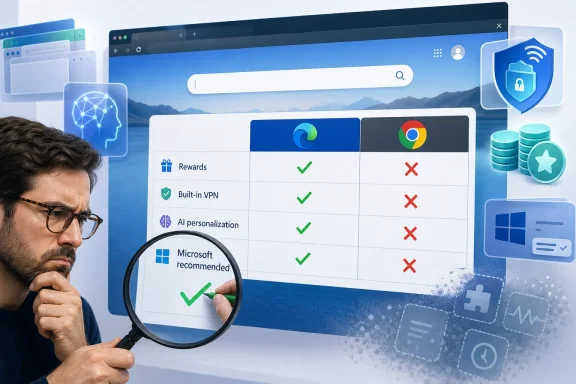 Bing’s Comparison Panel Turns Preference Into a Verdict
The Bing panel is designed like a feature matrix, but it does not behave like an honest comparison. Its four rows are Earn Rewards, Built-in VPN, AI personalization, and Microsoft recommended; Edge receives four checks, while Chrome receives four crosses. The visual language implies that Chrome lacks capabilities rather than that Microsoft has chosen categories favorable to its own browser.That distinction matters. A useful browser comparison would weigh compatibility, extension support, performance, memory management, tab handling, privacy controls, cross-device synchronization, administrative policy support, accessibility, and workflow tools. Microsoft’s panel instead selects three ecosystem services and one corporate endorsement, then presents the result as if the verdict followed naturally from the evidence.
Windows Report, Tom’s Guide, and Windows Central have all previously documented versions of Bing’s Edge-versus-Chrome promotion. The criticism is not that Microsoft advertises Edge on Microsoft-owned surfaces; Google promotes Chrome, Apple promotes Safari, and browser distribution has always been entangled with platform ownership. The criticism is that Microsoft’s comparison borrows the visual authority of a factual scorecard while avoiding the hard categories in which a browser should actually compete.
The effect becomes worse when the call to action fails. Windows Latest reported that the “Get started” button beneath the panel opened a blank page during testing, while a sponsored Firefox result below it offered a functioning download button. Microsoft had bought itself the most valuable position on the page, written the rules of the comparison, awarded itself every point, and still failed to complete the handoff.
| Bing comparison category | Edge status | Chrome status | What the checkmark leaves out |
|---|---|---|---|
| Earn Rewards | Checked | Crossed out | Bing sign-in now works with a Google or Apple account without requiring an MSA |
| Built-in VPN | Checked | Crossed out | Edge Secure Network is limited to Edge traffic, requires a Microsoft account, and provides 5GB a month |
| AI personalization | Checked | Crossed out | AI integration is now a platform-wide competition rather than an Edge-exclusive advantage |
| Microsoft recommended | Checked | Crossed out | This is Microsoft endorsing its own browser, not an independently measured capability |
The panel therefore says something unintended: Microsoft can still control the surface on which the browser decision appears, but it can no longer assume that control translates into persuasion. Users recognize the difference between a product advantage and a distribution advantage, especially after years of Windows prompts steering them toward Edge.
Rewards Escaped the Browser Microsoft Used to Contain It
Microsoft Rewards was once a plausible reason to use Edge. It gave users a tangible benefit for remaining inside Microsoft’s search and browser ecosystem, even if the benefit was modest. For regular Bing users, the points could turn an everyday habit into gift cards, subscriptions, sweepstakes entries, or other redemptions.That logic weakened when Microsoft confirmed that users can sign in to Bing with a Google or Apple account, without needing a conventional Microsoft account. A Chrome user can therefore remain in Chrome, use a familiar identity provider, select Bing, and participate without adopting Edge as the primary browser. As Windows Latest dryly summarized the new proposition, users can simply “make Bing your Search engine in Chrome.”
The distinction between Bing and Edge is important because Microsoft’s panel deliberately blurs it. Rewards is fundamentally attached to Microsoft’s search and services ecosystem, not to the rendering engine or browser interface that displays it. Edge may provide convenient entry points, but convenience is not exclusivity.
Microsoft’s May sweepstakes made the acquisition strategy unusually visible. The company put up $2 million in total value, including a $1,000,000 cash prize and three Mercedes-Benz cars, alongside daily instant-win prizes. That level of promotion can attract sign-ups, but it also signals that Microsoft is willing to subsidize attention rather than rely on organic preference.
Windows Central’s coverage reflected the resulting skepticism, while also noting that some Edge users still praise the browser’s efficiency and Windows integration. Both observations can be true. Edge may perform well on a Windows PC, and Microsoft may still be spending aggressively because performance alone has not been enough to change entrenched habits.
Rewards also creates a mismatch between the user Microsoft attracts and the behavior Microsoft needs. A person who arrives for points may use Bing just enough to meet a target, enter a promotion, or redeem an offer. That does not necessarily create loyalty to Edge, particularly when the same activity can occur in another browser.
The browser-agnostic sign-in change is defensible as an ecosystem decision. Reducing account friction can increase Bing usage, and Bing is strategically important to Microsoft regardless of which browser hosts it. But Microsoft cannot simultaneously make Rewards easier to access outside Edge and continue presenting Rewards as proof that Chrome deserves a red cross.
That is the recurring failure of the panel: it describes Microsoft’s ecosystem as though every ecosystem service were an Edge feature. It awards the browser credit for benefits Microsoft has intentionally begun decoupling from the browser.
Secure Network Protects a Session, Not the Whole PC
The “Built-in VPN” row is more consequential because it risks creating the wrong security expectation. Microsoft’s own Edge Secure Network page says that users signed into Edge with a personal Microsoft account receive 5GB of protected data each month. It also says streaming services including Netflix and Hulu are not routed through the service, conserving the allowance.Those limits do not make Secure Network useless. Encrypting browser traffic over an untrusted connection and obscuring a user’s specific IP address can provide meaningful protection in a narrow context. The problem lies in presenting that narrow context with language consumers commonly associate with whole-device VPN software.
A privacy researcher cited by Windows Latest described Secure Network as “an HTTP CONNECT proxy on Cloudflare’s infrastructure that only tunnels traffic inside Edge.” That description draws the operational boundary more clearly than the checkmark does. Traffic from another browser, an email client, a game launcher, a file-transfer tool, a remote administration utility, or another Windows application does not become protected merely because Secure Network is enabled inside Edge.
Microsoft also does not let users select a country. Its product page says websites will see a geographically similar location, preserving access to local information. That is appropriate for a privacy layer intended to obscure a precise address, but it differs from commercial VPN services marketed for system-wide tunneling or deliberate geographic routing.
The 5GB monthly allowance further defines the service as an occasional browser safeguard rather than persistent connectivity infrastructure. Microsoft excludes Netflix and Hulu specifically to preserve that quota. A user who reads “Built-in VPN” without opening the details may reasonably infer a broader service than Microsoft actually supplies.
The account requirement introduces another tension. Rewards is being opened to Google and Apple identities, lowering Microsoft-account friction, while Edge Secure Network requires a personal Microsoft account. The comparison panel combines both under a single Edge endorsement even though the two services now follow opposing identity strategies.
Microsoft once tested a “Get VPN for free” promotional button, language that emphasizes the familiar category rather than the narrower architecture. The company still describes Secure Network as a VPN on its Edge product page. Yet the practical security message for administrators remains straightforward: it is a browser-contained privacy feature, not a substitute for an organization’s approved remote-access, endpoint, or full-tunnel VPN service.
This difference is not semantic hair-splitting. Security tools are evaluated by their boundaries, and a tool’s boundary determines what remains exposed. Calling Secure Network a browser-only protection layer would be less dramatic, but it would tell users what the product actually protects.
For IT departments, the danger is not necessarily that Secure Network will weaken security. It is that employees may misunderstand it, believing the shield icon covers applications or traffic that never pass through Edge. Microsoft’s comparison earns an easy checkmark by compressing a complicated security product into two words, leaving administrators to explain the exclusions afterward.
The AI Checkmark Is Fighting the Last Browser War
The AI-personalization row would have been more persuasive when Microsoft first integrated generative AI into Bing and Edge. In February 2023, Microsoft CEO Satya Nadella told The Verge that the company’s early lead had made Google “dance.” At that moment, the line reflected a genuine strategic shock: Microsoft had made Bing culturally relevant and forced Google to respond visibly.The browser market did respond. AI is now becoming part of every major platform’s identity, search, tab management, writing assistance, and browsing interface. That makes “AI personalization” less of an Edge-specific differentiator and more of a category in which Microsoft, Google, Apple, and others are all competing.
Chrome users already living in a Google account have a direct path into Google’s AI ecosystem. Android reinforces that relationship across mobile devices, identity, search, browsing history, and cloud services. Microsoft may offer its own tightly integrated experience, but it can no longer claim that Chrome simply sits on the other side of an AI red cross.
Microsoft’s broader Copilot adoption figures make the checkmark look more aspirational than conclusive. The company has a commercial Microsoft 365 customer base of 450 million, yet fewer than 4.5% pay for Copilot. Among those paying customers, only 20 to 30% reportedly open it weekly, putting estimated weekly-active use near 1% when measured against the full commercial customer base.
Those figures do not prove that AI is unwanted, nor do they measure every consumer use of Copilot in Edge or Windows. They do show that availability, bundling, executive enthusiasm, and interface placement do not automatically produce habitual use. Microsoft can put AI in the browser, the operating system, Office, and a dedicated keyboard key; users still decide whether opening it is worth interrupting their work.
The Copilot key illustrates the gap between symbolic commitment and practical ergonomics. Microsoft described the key as having “main character energy,” but its placement affected the Right Ctrl key used in established keyboard workflows. The marketing celebrated the presence of Copilot while users had to absorb the cost of changing muscle memory.
Edge’s strongest AI implementation may be the one that avoids this branding excess. Windows Latest praised AI Tab Organizer after testing it with more than 40 tabs across unrelated subjects, reporting that the browser created specific, accurate groups without turning the workflow into a Copilot spectacle. That is what successful browser AI looks like: it resolves visible clutter, acts on the user’s current context, and then gets out of the way.
At WWDC 2026, Apple presented a related Safari capability under the Apple Intelligence name. Windows Latest argued that Apple’s demonstration was slicker but its implementation less capable. Whether users accept that assessment will depend on real-world deployment, but the comparison exposes the feature Microsoft should be advertising: Edge can already apply AI to a concrete browser problem that almost every heavy user recognizes.
“AI personalization,” by contrast, is too vague to carry the argument. It says Microsoft has AI and may adapt something to the user. It does not explain whether the browser will organize a research session, reduce tab overload, summarize a page accurately, improve accessibility, control data use, or save measurable time.
Microsoft’s browser marketing keeps choosing the largest possible AI claim instead of the smallest provable benefit. The result is a checkmark that looks impressive only until someone asks what task it completes.
“Microsoft Recommended” Is a Trust Claim Disguised as a Feature
A corporate recommendation can be useful when it communicates testing, compatibility, support, or a defined standard. Windows administrators routinely deploy Microsoft-recommended configurations because those recommendations may map to documented security baselines or supported operating states. But Bing’s browser panel provides no such scope.There is no independent test behind the checkmark, no stated methodology, and no definition of “recommended.” It appears to mean that Microsoft recommends Microsoft Edge on Microsoft Windows through Microsoft Bing. That may be unsurprising, but unsurprising is not the same as informative.
The label also arrives with years of accumulated distrust. Microsoft has repeatedly used Windows and Edge surfaces to discourage users from switching, reclaim defaults, or reopen promotional experiences. Windows Latest reported that a mandatory Windows 11 update auto-opened Edge on some PCs following a restart, placing users in a product demonstration they had not deliberately requested.
Each individual intervention may appear small. Together, they teach users that “recommended” can mean “preferred by the platform owner,” not “best for the person sitting at the PC.” Once that association forms, more prompts do not reinforce the message; they reduce its credibility.
Privacy reporting adds another layer. Windows Latest recently reported on GDID, described as a persistent device identifier that helped the FBI trace a hacker across VPNs and three countries by connecting a Windows installation back to accounts. That investigative outcome may sound desirable in a criminal case, but it also demonstrates why users ask difficult questions about persistent identifiers and account linkage.
The existence of an investigative use does not by itself establish misconduct by Microsoft, and it should not be stretched into claims the reporting does not support. It does, however, make unqualified trust language harder to sell. A company recommending its own browser while operating the identity, operating system, search, advertising, synchronization, and AI layers has to explain boundaries more clearly, not merely add another checkmark.
Google has its own substantial trust and data-collection problems. The choice between Edge and Chrome is not a morality play in which one vendor collects data and the other does not. The relevant point is that Microsoft cannot win by saying Chrome deserves a cross because Microsoft recommends Edge; it must explain why Edge’s controls, architecture, policies, or workflows produce a better outcome.
Trust is earned through restraint as much as functionality. A browser that respects a rejected prompt, preserves a user’s default, describes security features precisely, and keeps valued tools stable can build credibility over time. A browser that interrupts the user and then cites its manufacturer’s recommendation as a competitive advantage spends that credibility.
Chromium Solved Edge’s Compatibility Problem but Erased an Easy Identity
Microsoft abandoned EdgeHTML in 2019 and rebuilt Edge on Chromium. Microsoft’s Edge developer material presented the move as a route to stronger website and extension compatibility, modern rendering support, cross-platform delivery, and access to the broader Chromium ecosystem. From a technical perspective, it was a rational response to a browser whose release model and compatibility gaps had limited adoption.The move also eliminated one of Microsoft’s clearest ways to describe Edge as technologically distinct. Edge and Chrome now share the Chromium foundation, even though Microsoft changes the interface, services, privacy controls, performance behavior, enterprise management, and surrounding integrations. Microsoft has also become a significant outside contributor to the Chromium project.
This does not make the two browsers identical. A browser is more than its rendering engine, just as two operating systems using related components are not necessarily the same product. But sharing Chromium raises the standard for differentiation: Microsoft must sell the experience around the engine.
That experience includes vertical tabs, split-screen browsing, tab search, capture tools, Immersive Reader, tab organization, and Windows-oriented administration. Those are understandable capabilities with visible effects. They can be demonstrated without requiring users to accept an abstract claim about Microsoft’s recommendation.
Vertical tabs help people manage wide collections of pages without compressing every title into an unreadable strip. Split screen brings two sites into a single browser workspace. Immersive Reader can reduce visual noise and improve accessibility. AI Tab Organizer can convert a chaotic session into labeled groups.
These are browser reasons rather than ecosystem reasons. They explain what changes after a person switches. Microsoft’s panel largely ignores them.
There is a strategic irony here. Chromium gave Edge the compatibility credibility it needed, but Microsoft continues to market the browser as though distribution and ecosystem attachment were sufficient. The company solved the old Edge problem—websites working better elsewhere—only to preserve the old Microsoft habit of treating Windows ownership as the main argument.
Chrome’s dominance means Microsoft needs to be exceptionally specific. Most users do not switch browsers because a competing vendor says its product is recommended. They switch when an existing frustration becomes severe enough and another browser offers a credible, low-risk solution.
Edge has several such solutions. Its marketing rarely names the frustration.
Microsoft Is Removing the Differentiators It Should Be Selling
The panel’s weakness would be less damaging if Microsoft were steadily expanding Edge’s unique identity. Instead, recent product decisions have removed some of the features that gave committed Edge users a reason to stay.Edge 149 removed Collections and Sidebar. Collections had been promoted as a way to gather pages, images, notes, research, and shopping material into structured sets. Sidebar let users keep tools and services accessible alongside the active page, supporting the kind of multitasking Microsoft had once advertised as an Edge advantage.
Microsoft said the changes were intended to “simplify” Edge. Yet simplification is not automatically an improvement, particularly when it removes tools with stored information or established workflows. Users experience simplification from the outside: if a frequently used function disappears, the browser has not become simpler; the user’s job has become harder.
Drop was subsequently removed as well. The cross-device file-sharing feature was another example of the practical ecosystem integration Microsoft could have used to distinguish Edge. Its removal reinforced the perception that Copilot was taking priority over the browser’s accumulated workflow tools.
Windows Central reported user opposition to the Sidebar decision, including users who said it was the reason they remained on Edge. Microsoft Q&A discussions similarly filled with requests to restore Collections and the right sidebar. Those reactions do not establish how widely the features were used across the entire Edge population, but they identify a highly relevant group: the people who had found a non-default reason to choose Edge.
That group should be strategically valuable. Windows can place Edge on hundreds of millions of PCs, but installation is not preference. Users who deliberately adopt Collections, vertical tabs, Drop, Sidebar, or other differentiated tools represent something Microsoft has struggled to manufacture through prompts: voluntary loyalty.
Removing those tools while preserving broad Copilot promotion sends a dangerous message about product stability. Users may hesitate to build a workflow around the next distinctive Edge feature if they suspect Microsoft will retire it to make room for the current corporate priority.
The problem extends beyond the immediate inconvenience. Browser choice involves migration costs: passwords, history, bookmarks, extensions, profiles, workspaces, habits, keyboard shortcuts, and trust. A feature must be not only useful but dependable enough to justify moving that accumulated state.
Microsoft’s “simplify” rationale therefore collides directly with its acquisition campaign. Bing asks users to switch because Edge contains Microsoft services, while Edge removes some of the utilities existing users considered uniquely valuable. One team advertises differentiation as another team reduces it.
This is how a good browser becomes difficult to recommend. The technical experience may remain fast and capable, but the product story no longer feels stable.
Timeline
2019 — Microsoft ditched EdgeHTML and moved Edge to Chromium, prioritizing compatibility and a more flexible browser release model.February 2023 — Microsoft CEO Satya Nadella told The Verge that Microsoft’s early AI move in search had made Google “dance.”
May 2026 — Microsoft ran a Rewards sweepstakes worth $2 million, including a $1,000,000 cash prize and three Mercedes-Benz cars.
WWDC 2026 — Apple demonstrated a Safari tab-organizing feature under the Apple Intelligence brand, echoing a problem Edge’s AI Tab Organizer already addressed.
Edge 149 — Microsoft removed Collections and Sidebar as part of its effort to “simplify” Edge.
July 11, 2026 — Windows Latest documented Bing’s four-row Edge comparison and the viral criticism of “Microsoft recommended” as a supposed advantage over Chrome.
Enterprise IT Sees a Governance Problem, Not a Browser Meme
For consumers, the Bing panel is annoying or funny. For administrators, it illustrates a broader governance issue: Microsoft’s consumer marketing language can overlap with enterprise security, identity, and configuration concepts without observing the precision IT teams require.“Built-in VPN” is the clearest example. An administrator hearing that phrase must immediately ask which processes are tunneled, how identity is handled, whether traffic can be inspected, what regions are supported, whether managed devices receive the feature, how logs are treated, and whether it conflicts with existing network controls. The consumer panel answers none of those questions.
The same applies to AI personalization. Organizations need to distinguish local browser features, account-based personalization, commercial data protections, consumer services, and information sent into AI systems. A generic checkmark cannot tell employees which experience is approved for business data.
Feature removal creates operational work as well. If employees have stored research in Collections, depended on Sidebar apps, or used Drop for cross-device transfers, administrators need to identify that dependency before an update changes the workflow. Even unofficial restoration methods should be treated cautiously because they may disappear and can leave the organization supporting an unapproved configuration.
Default-browser campaigns also complicate help-desk communication. An organization may standardize on Edge for policy management, compatibility, identity integration, or support reasons. That is a defensible enterprise decision, but employees are less likely to respect it when Microsoft’s public argument resembles an advertisement that awards itself four points.
IT teams should therefore make their own case. If Edge is required, explain the organization-specific benefits: supported extensions, managed profiles, compatibility testing, security configuration, application integration, or reduced support complexity. “Microsoft recommended” is not a deployment rationale.
Action checklist for admins
- Verify whether Edge Secure Network is available or permitted in the managed environment, and tell users that it does not replace an approved system-wide or enterprise VPN.
- Inventory teams that relied on Collections, Sidebar, or Drop, then preserve important links, notes, files, and workflow documentation before access disappears.
- Test major Edge updates with a controlled deployment group before broad rollout, especially where browser workflows support research, communications, or line-of-business applications.
- Review browser sign-in, synchronization, AI, extension, and data-personalization settings against organizational policy rather than accepting consumer defaults.
- Document why the organization standardizes on Edge, Chrome, or another browser using measurable support and security requirements.
- Train help-desk staff to distinguish Bing, Microsoft Rewards, Edge Secure Network, Microsoft accounts, and Google or Apple sign-in so users receive accurate guidance.
Edge Needs to Sell Workflows, Not Microsoft’s Corporate Priorities
The most revealing reaction to the panel was not the familiar joke that Edge exists only to download Chrome. It was the observation, highlighted by Windows Latest, that Edge is better than Microsoft’s advertising makes it appear. That is a harsher criticism because it cannot be dismissed as reflexive anti-Microsoft sentiment.The Windows Latest author reported using Edge 70% of the time, with Chrome, Brave, and Firefox sharing the remaining 30%. That is not the usage pattern of someone predisposed to reject the browser. It is evidence that Edge can win sustained, voluntary use when its actual tools fit the job.
Microsoft should build its pitch around those tools. Show a researcher organizing more than 40 tabs into accurate groups. Show a widescreen user keeping vertical tabs legible. Show two documents open in split screen, a cluttered article becoming readable through Immersive Reader, or a capture workflow that avoids a separate application.
A persuasive comparison might even concede areas where Chrome is stronger. Honest trade-offs establish that the categories were not designed solely to predetermine the outcome. Microsoft could acknowledge Chrome’s connection to Google services while explaining where Edge offers a better Windows workflow.
Instead, the current panel acts as though browser choice can be solved by stacking Microsoft-owned services on one side. That approach confuses ecosystem reach with product quality and assumes users will not inspect the labels.
The correct Edge strategy is not to stop marketing. It is to stop marketing the browser as a delivery mechanism for whatever Microsoft most urgently wants adopted that quarter. Rewards, Secure Network, and Copilot can remain available, but they should support the browser story rather than replace it.
Product stability belongs in that story. Microsoft cannot ask users to discover Edge’s overlooked capabilities while retiring the capabilities they discovered last time. Distinctive tools need clear road maps, migration plans, and enough continuity for people and businesses to trust them with real work.
What Microsoft’s Four Checkmarks Actually Establish
The viral panel does not prove that Chrome is better than Edge. It proves that Microsoft selected a weak argument for a browser that has stronger ones available. Once each row is unpacked, the comparison becomes a lesson in how not to convert platform ownership into user preference.- Rewards can be reached through Bing without making Edge the primary browser.
- Edge Secure Network protects a limited amount of browser traffic, not every application on the Windows device.
- AI is now a competitive browser category, not an uncontested Microsoft advantage.
- “Microsoft recommended” measures Microsoft’s preference, not browser performance.
- Edge’s workflow features provide a more credible reason to switch than its ecosystem checkmarks.
- Removing Collections, Sidebar, and Drop weakens the differentiated product Microsoft should be promoting.
References
- Primary source: Windows Latest
Published: 2026-07-11T03:10:08.336572
Loading…
www.windowslatest.com - Official source: support.microsoft.com
Loading…
support.microsoft.com - Official source: microsoft.com
Loading…
www.microsoft.com - Official source: learn.microsoft.com
Loading…
learn.microsoft.com - Related coverage: windowsreport.com
Loading…
windowsreport.com - Related coverage: windowscentral.com
Loading…
www.windowscentral.com
- Official source: download.microsoft.com
Microsoft - Technology Support for our Older Adults Community
Global Playbookdownload.microsoft.com
- Related coverage: tomsguide.com
Searching for Chrome on Bing? Microsoft has a new clingy tactic to beg you to stay | Tom's Guide
Microsoft's latest move to convince Bing users to stop switching to Google Chrome includes a new comparison banner promoting the perks of using the default Windows browser.www.tomsguide.com - Related coverage: techradar.com
Microsoft Edge Review: Features, Usage, and Competition | TechRadar
Outstanding performance at surprisingly low battery consumptionwww.techradar.com - Related coverage: guidingtech.com
What Happened to Collections in Edge, and How to Get It Back - Guiding Tech
What happened to Collections in Edge? Learn why Microsoft removed the feature and how to restore or recover your saved collections.www.guidingtech.com
- Related coverage: ebisuda.net
Loading…
www.ebisuda.net - Related coverage: piunikaweb.com
Loading…
piunikaweb.com - Related coverage: askvg.com
Loading…
www.askvg.com - Official source: blogs.windows.com
Loading…
blogs.windows.com - Related coverage: thewincentral.com
Loading…
thewincentral.com - Related coverage: digitaltrends.com
Loading…
www.digitaltrends.com - Related coverage: dtptips.com
Loading…
dtptips.com - Related coverage: letsdatascience.com
Loading…
letsdatascience.com - Official source: info.microsoft.com
- Related coverage: edgeuser.com
The Edge User Guide
The Edge retail jewelry store management system by Abbott Jewelry Systems, Inc.edgeuser.com