

A Khadas Mind 2 owner upgrading the mini PC’s BIOS in May 2026 found that Windows 11 Pro, BitLocker device encryption, and a post-flash PIN reset turned a five-minute firmware job into a roughly two-hour recovery exercise. The episode is not a freak accident so much as a collision between modern Windows security assumptions and the messier reality of enthusiast hardware maintenance. BitLocker did what it was designed to do: distrust a changed boot environment. The problem is that the path back to trust still feels like it was designed for administrators with runbooks, not users staring at a reboot loop.
The first uncomfortable truth is that BitLocker was behaving rationally. A BIOS or UEFI update changes part of the pre-boot environment that Windows and the TPM use to decide whether the machine is still the same machine. If that measurement changes unexpectedly, BitLocker can demand the recovery key before releasing access to the encrypted operating system volume.
That is the security model working as intended. The TPM is not supposed to shrug when firmware changes beneath it. If malware, an evil-maid attack, or a compromised boot chain tampers with the platform, the encrypted drive should not quietly unlock just because the user wants to get to the desktop.
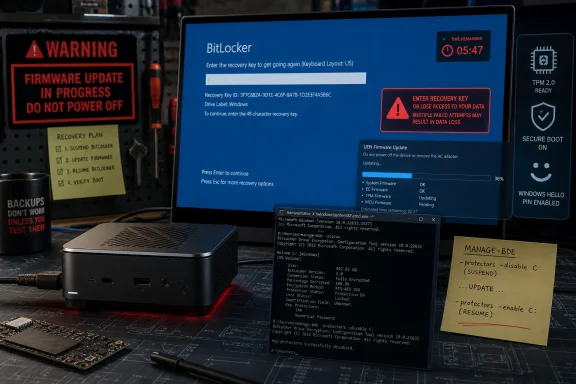
But “working as intended” is a thin comfort when the recovery screen appears for only a few seconds before the machine reboots. A 48-digit recovery key is intentionally long and unguessable; it is also practically impossible to type under a five-second countdown. At that moment, BitLocker stops feeling like a guardrail and starts feeling like a trapdoor.
The distinction matters because the fix is not to weaken disk encryption. The fix is to make firmware updates, recovery prompts, and account-based key retrieval behave like parts of one system rather than three teams shipping adjacent features.
The flashing itself apparently succeeded. The machine did not brick, the update ran, and the reboot occurred. The failure came afterward, in the seam between vendor utility and Windows security state.
That seam is where a lot of modern Windows pain lives. Firmware updates are no longer purely motherboard-level events, and disk encryption is no longer an enterprise-only feature that users knowingly enable after reading a policy document. Windows 11 systems commonly ship with device encryption or BitLocker enabled, TPM-backed unlock, Secure Boot, Microsoft account recovery, and Windows Hello PIN sign-in all layered together.
For a mainstream laptop from a major OEM, the update utility may suspend BitLocker automatically or route firmware delivery through mechanisms that know how to handle the encryption state. For smaller vendors, enthusiast mini PCs, and niche hardware, the update flow can be much more literal: flash the firmware, reboot, and let Windows deal with the consequences.
That is not good enough anymore. If a vendor ships a Windows 11 PC with encryption enabled, its BIOS updater has to treat BitLocker state as part of the update preflight, not as a support article users discover after the lockout.
Microsoft’s account-centric model has an obvious logic. If consumer devices are encrypted by default, users need a recovery mechanism that survives drive removal, motherboard failure, forgotten passwords, and accidental firmware changes. A cloud-backed recovery key is vastly better than a sticky note, a missing USB drive, or no key at all.
Still, the experience reveals a tradeoff Microsoft rarely explains clearly during setup. The Microsoft account is not merely a convenience layer for app store downloads and OneDrive prompts. On many Windows 11 devices, it may be the practical difference between recovering an encrypted installation and wiping the machine.
That helps explain why Microsoft pushes online accounts so aggressively during setup. It is not the only reason, and users are right to be skeptical of the broader account funnel. But encryption recovery is one of the strongest functional arguments Microsoft has for binding a Windows installation to an online identity.
The trouble is that Microsoft’s strongest argument often arrives at the worst possible time. A user facing BitLocker recovery after a BIOS update is not learning about a thoughtfully designed safety net. They are being told, under pressure, that the machine they own now depends on credentials and a 48-digit key that may or may not have been saved years earlier.
The workaround was to skip the drive, enter Windows recovery options, open the Command Prompt, unlock the volume from there, and suspend BitLocker manually. That is a perfectly reasonable move for an experienced user. It is also far beyond what a normal PC owner should be expected to improvise.
This is where the Windows ecosystem’s split personality becomes visible. Microsoft has worked for years to make Windows feel appliance-like: sign in with a PIN, unlock with biometrics, let updates install in the background, trust the TPM, trust Secure Boot, trust recovery in the cloud. Then a firmware update goes sideways and the user is suddenly expected to know
The command-line answer is powerful. Running
But consumer and enthusiast devices increasingly sit in the uncanny valley between managed enterprise PCs and hobbyist boxes. They have enterprise-grade security defaults without enterprise-grade orchestration. That mismatch is why a successful BIOS update can still become a multi-hour diagnostic session.
A Windows Hello PIN is not just a local password shortcut. It is bound to the device and protected by hardware-backed secrets. If the firmware or TPM state changes, Windows may decide that the old PIN binding can no longer be trusted. From a security architecture standpoint, invalidating or resetting the PIN after a sensitive platform change can be reasonable.
From a user-experience standpoint, it compounds the sense of cascading failure. First the encrypted drive will not unlock without a recovery key. Then, after recovery, the familiar sign-in method is unavailable. The user must authenticate again, reset the PIN, accept warnings, and hope the account recovery path works.
The issue is not that Microsoft is wrong to protect Windows Hello. The issue is that Windows presents these events as separate emergencies rather than one coherent firmware-change recovery flow. To the user, it is all one operation: “I updated the BIOS.” To Windows, it is BitLocker recovery, then Windows RE, then TPM state, then PIN provisioning, then device encryption suspension state.
That internal modularity may make sense in engineering terms. It does not make sense at the kitchen table, on a workbench, or in a small office where the person doing the update is also the person who needs the machine back online.
In a better flow, the BIOS updater would check whether BitLocker or device encryption is active on the operating system volume. If it is, the tool would warn the user, confirm that the recovery key is backed up, offer to suspend protection for a defined number of reboots, and then proceed. After the firmware update succeeds, the tool or Windows would verify that protection resumed.
This is not science fiction. Enterprise deployment tooling often treats BitLocker state as a precondition for firmware work. Large OEM utilities frequently warn users to suspend BitLocker before BIOS updates, and some update paths handle suspension automatically. The missing piece is consistency across the long tail of Windows hardware.
That long tail matters more than it used to. Mini PCs, handhelds, eGPU docks, modular compute devices, and small-form-factor enthusiast systems are no longer fringe toys. They are often sold with Windows 11 Pro, TPM support, Secure Boot, and default encryption, which means they inherit the same recovery complexity as a corporate laptop.
The Khadas Mind 2 is exactly the kind of machine that attracts technically capable users who are likely to update firmware, attach docks, test displays, and dual-boot Linux. If even that audience can lose hours to the security choreography, the average user has little chance of understanding what happened.
That shift is broadly positive. Stolen laptops should not yield readable drives. Bootkits should face real obstacles. Users should not have to become cryptographers to benefit from full-disk encryption.
But security defaults become a political problem when users experience them as surprise lockouts. Microsoft’s language around device encryption and BitLocker often softens the distinction between “your data is protected” and “your data may become inaccessible unless this recovery path works.” The first message is reassuring. The second is the one users need before they update firmware, swap boards, change TPM settings, or experiment with dual boot.
Windows 11 also blurs product boundaries. Many users associate “BitLocker” with Pro, Enterprise, and corporate management, while “device encryption” appears on some consumer systems with fewer visible controls. In practice, both can lead to a recovery-key moment after platform changes. The branding distinction matters less than the operational reality: encrypted boot volumes need recoverable keys and predictable maintenance flows.
This is where Windows still feels like it is negotiating with its past. Microsoft wants appliance-like security, OEMs want simple update utilities, enthusiasts want hardware freedom, and administrators want policy-driven control. The BIOS update is where all four expectations collide.
That does not mean users should avoid Linux. It means they should treat the Windows encryption state as part of the installation plan. Before repartitioning, changing bootloaders, disabling Secure Boot, or altering firmware settings, they should know where the recovery key is and decide whether to suspend BitLocker temporarily.
For enthusiasts, this has become the new normal. The old pre-dual-boot checklist was about shrinking partitions and writing ISOs. The modern checklist includes recovery keys, Secure Boot policy, TPM-bound protectors, Windows Hello reset expectations, and whether the firmware setup screen exposes the options needed to recover gracefully.
That is progress if the result is safer machines. It is regression if the documentation is scattered across vendor PDFs, Microsoft Learn pages, forum posts, and trial-and-error. Security that depends on folklore is not mature security.
The irony is that the people most likely to explore alternative operating systems are often the people most capable of understanding the risks. They will tolerate complexity if the system tells the truth. What drives frustration is not that BitLocker exists; it is that Windows rarely says, in plain language, “You are about to change something that may require your recovery key on next boot.”
Microsoft has a role too. Windows could expose a clearer maintenance mode for firmware and boot-chain changes: time-limited, explicit, auditable, and reversible. Instead of burying the sane workflow in command-line tools and control panel remnants, Windows could present it as a first-class “prepare this PC for firmware update” action.
The recovery environment also needs to be less hostile. If BitLocker recovery is required, the prompt should remain available long enough to use, and repeated reboot behavior should be treated as a bug, not an acceptable edge case. A recovery key prompt that users cannot complete undermines trust in the entire encryption story.
For administrators, none of this is new. The answer is inventory, policy, escrowed recovery keys, update rings, vendor tooling validation, and post-update compliance checks. But the consumerization of enterprise security means individual users now face administrator-grade consequences without administrator-grade preparation.
The shortest safe version is to verify the recovery key, suspend BitLocker, apply firmware, boot successfully, reset Windows Hello if needed, and confirm BitLocker protection has resumed. That is not as elegant as a five-minute updater, but it is far better than discovering the workflow from inside Windows Recovery.
The next generation of Windows firmware updates should not ask users to choose between security and sanity. BitLocker, TPM-backed unlock, Windows Hello, and secure firmware delivery are all defensible pieces of the modern PC, but they need to behave like a coordinated system rather than a sequence of ambushes. Until Microsoft and OEMs make that handoff smoother, the humble BIOS update will remain one of the fastest ways to learn how much invisible security infrastructure is holding a Windows 11 machine together.
Source: CNX Software My experience upgrading the BIOS of a Windows 11 mini PC (with BitLocker) in 2026 - CNX Software
 BitLocker Was Not Broken, Which Is Exactly the Problem
The first uncomfortable truth is that BitLocker was behaving rationally. A BIOS or UEFI update changes part of the pre-boot environment that Windows and the TPM use to decide whether the machine is still the same machine. If that measurement changes unexpectedly, BitLocker can demand the recovery key before releasing access to the encrypted operating system volume.That is the security model working as intended. The TPM is not supposed to shrug when firmware changes beneath it. If malware, an evil-maid attack, or a compromised boot chain tampers with the platform, the encrypted drive should not quietly unlock just because the user wants to get to the desktop.
But “working as intended” is a thin comfort when the recovery screen appears for only a few seconds before the machine reboots. A 48-digit recovery key is intentionally long and unguessable; it is also practically impossible to type under a five-second countdown. At that moment, BitLocker stops feeling like a guardrail and starts feeling like a trapdoor.
The distinction matters because the fix is not to weaken disk encryption. The fix is to make firmware updates, recovery prompts, and account-based key retrieval behave like parts of one system rather than three teams shipping adjacent features.
The Five-Minute BIOS Update Still Assumes a Perfect Windows World
Khadas’ BIOS flashing process, as described in the user’s report, looked straightforward: download the BIOS archive, extract it, run the Flash_BIOS upgrade tool, wait for completion, and let the device reboot. That is the consumer-friendly version of firmware maintenance, and on paper it is exactly what PC makers should provide. Nobody wants to be told to make a FreeDOS USB stick in 2026 just to update a mini PC.The flashing itself apparently succeeded. The machine did not brick, the update ran, and the reboot occurred. The failure came afterward, in the seam between vendor utility and Windows security state.
That seam is where a lot of modern Windows pain lives. Firmware updates are no longer purely motherboard-level events, and disk encryption is no longer an enterprise-only feature that users knowingly enable after reading a policy document. Windows 11 systems commonly ship with device encryption or BitLocker enabled, TPM-backed unlock, Secure Boot, Microsoft account recovery, and Windows Hello PIN sign-in all layered together.
For a mainstream laptop from a major OEM, the update utility may suspend BitLocker automatically or route firmware delivery through mechanisms that know how to handle the encryption state. For smaller vendors, enthusiast mini PCs, and niche hardware, the update flow can be much more literal: flash the firmware, reboot, and let Windows deal with the consequences.
That is not good enough anymore. If a vendor ships a Windows 11 PC with encryption enabled, its BIOS updater has to treat BitLocker state as part of the update preflight, not as a support article users discover after the lockout.
The Recovery Key Is Easy to Store and Hard to Use
The user’s recovery key was available through Microsoft’s recovery key page, which is the happy version of this story. Many Windows 11 users do not remember enabling encryption, do not know whether their recovery key is tied to a Microsoft account, and discover the entire arrangement only when a blue recovery screen blocks the boot.Microsoft’s account-centric model has an obvious logic. If consumer devices are encrypted by default, users need a recovery mechanism that survives drive removal, motherboard failure, forgotten passwords, and accidental firmware changes. A cloud-backed recovery key is vastly better than a sticky note, a missing USB drive, or no key at all.
Still, the experience reveals a tradeoff Microsoft rarely explains clearly during setup. The Microsoft account is not merely a convenience layer for app store downloads and OneDrive prompts. On many Windows 11 devices, it may be the practical difference between recovering an encrypted installation and wiping the machine.
That helps explain why Microsoft pushes online accounts so aggressively during setup. It is not the only reason, and users are right to be skeptical of the broader account funnel. But encryption recovery is one of the strongest functional arguments Microsoft has for binding a Windows installation to an online identity.
The trouble is that Microsoft’s strongest argument often arrives at the worst possible time. A user facing BitLocker recovery after a BIOS update is not learning about a thoughtfully designed safety net. They are being told, under pressure, that the machine they own now depends on credentials and a 48-digit key that may or may not have been saved years earlier.
A Five-Second Recovery Window Turns Security Into Theater
The most damning detail in the Khadas episode is not that BitLocker asked for a key. It is that the recovery screen reportedly vanished after a few seconds and dropped the system into a reboot loop. A secure recovery process that cannot practically be completed is not a secure recovery process; it is a denial-of-service condition wearing a security badge.The workaround was to skip the drive, enter Windows recovery options, open the Command Prompt, unlock the volume from there, and suspend BitLocker manually. That is a perfectly reasonable move for an experienced user. It is also far beyond what a normal PC owner should be expected to improvise.
This is where the Windows ecosystem’s split personality becomes visible. Microsoft has worked for years to make Windows feel appliance-like: sign in with a PIN, unlock with biometrics, let updates install in the background, trust the TPM, trust Secure Boot, trust recovery in the cloud. Then a firmware update goes sideways and the user is suddenly expected to know
manage-bde, recovery environments, protector states, and drive letters.The command-line answer is powerful. Running
manage-bde -protectors -disable C: suspends BitLocker protection for the operating system volume, and manage-bde -protectors -enable C: resumes it. Administrators know this pattern well, and many enterprise maintenance procedures include a BitLocker suspend step before BIOS or TPM-related changes.But consumer and enthusiast devices increasingly sit in the uncanny valley between managed enterprise PCs and hobbyist boxes. They have enterprise-grade security defaults without enterprise-grade orchestration. That mismatch is why a successful BIOS update can still become a multi-hour diagnostic session.
Windows Hello Adds a Second Lock After the First One Opens
After the BitLocker recovery hurdle, the user hit another Windows security artifact: the PIN was no longer available and had to be set up again. Khadas apparently documents this for Mind devices after BIOS updates, noting that Windows may flag the PIN as a security risk and clear it. Once again, that behavior is defensible in theory.A Windows Hello PIN is not just a local password shortcut. It is bound to the device and protected by hardware-backed secrets. If the firmware or TPM state changes, Windows may decide that the old PIN binding can no longer be trusted. From a security architecture standpoint, invalidating or resetting the PIN after a sensitive platform change can be reasonable.
From a user-experience standpoint, it compounds the sense of cascading failure. First the encrypted drive will not unlock without a recovery key. Then, after recovery, the familiar sign-in method is unavailable. The user must authenticate again, reset the PIN, accept warnings, and hope the account recovery path works.
The issue is not that Microsoft is wrong to protect Windows Hello. The issue is that Windows presents these events as separate emergencies rather than one coherent firmware-change recovery flow. To the user, it is all one operation: “I updated the BIOS.” To Windows, it is BitLocker recovery, then Windows RE, then TPM state, then PIN provisioning, then device encryption suspension state.
That internal modularity may make sense in engineering terms. It does not make sense at the kitchen table, on a workbench, or in a small office where the person doing the update is also the person who needs the machine back online.
The Manual Fix Is Simple Only If You Already Know It
The lesson many IT pros will draw is familiar: suspend BitLocker before flashing firmware. That is sound advice, but it also exposes the weakness of the current model. The safest workflow depends on knowing about a failure mode before you encounter it.In a better flow, the BIOS updater would check whether BitLocker or device encryption is active on the operating system volume. If it is, the tool would warn the user, confirm that the recovery key is backed up, offer to suspend protection for a defined number of reboots, and then proceed. After the firmware update succeeds, the tool or Windows would verify that protection resumed.
This is not science fiction. Enterprise deployment tooling often treats BitLocker state as a precondition for firmware work. Large OEM utilities frequently warn users to suspend BitLocker before BIOS updates, and some update paths handle suspension automatically. The missing piece is consistency across the long tail of Windows hardware.
That long tail matters more than it used to. Mini PCs, handhelds, eGPU docks, modular compute devices, and small-form-factor enthusiast systems are no longer fringe toys. They are often sold with Windows 11 Pro, TPM support, Secure Boot, and default encryption, which means they inherit the same recovery complexity as a corporate laptop.
The Khadas Mind 2 is exactly the kind of machine that attracts technically capable users who are likely to update firmware, attach docks, test displays, and dual-boot Linux. If even that audience can lose hours to the security choreography, the average user has little chance of understanding what happened.
Microsoft’s Defaults Have Outrun Microsoft’s Explanations
Microsoft has spent the Windows 11 era tightening the baseline. TPM 2.0, Secure Boot-capable systems, virtualization-based security, Windows Hello, and broader encryption defaults all point in the same direction: the PC is no longer assumed to be a loose collection of replaceable parts. It is a measured platform with an expected chain of trust.That shift is broadly positive. Stolen laptops should not yield readable drives. Bootkits should face real obstacles. Users should not have to become cryptographers to benefit from full-disk encryption.
But security defaults become a political problem when users experience them as surprise lockouts. Microsoft’s language around device encryption and BitLocker often softens the distinction between “your data is protected” and “your data may become inaccessible unless this recovery path works.” The first message is reassuring. The second is the one users need before they update firmware, swap boards, change TPM settings, or experiment with dual boot.
Windows 11 also blurs product boundaries. Many users associate “BitLocker” with Pro, Enterprise, and corporate management, while “device encryption” appears on some consumer systems with fewer visible controls. In practice, both can lead to a recovery-key moment after platform changes. The branding distinction matters less than the operational reality: encrypted boot volumes need recoverable keys and predictable maintenance flows.
This is where Windows still feels like it is negotiating with its past. Microsoft wants appliance-like security, OEMs want simple update utilities, enthusiasts want hardware freedom, and administrators want policy-driven control. The BIOS update is where all four expectations collide.
Linux Plans Make the Warning Light Blink Brighter
The user’s closing note about possibly installing Ubuntu 26.04 on the Mind 2 is more than a joke. Dual-booting on a BitLocker-protected Windows 11 machine is exactly the kind of platform change that can trigger more recovery prompts if Secure Boot, boot order, partitions, or TPM measurements shift.That does not mean users should avoid Linux. It means they should treat the Windows encryption state as part of the installation plan. Before repartitioning, changing bootloaders, disabling Secure Boot, or altering firmware settings, they should know where the recovery key is and decide whether to suspend BitLocker temporarily.
For enthusiasts, this has become the new normal. The old pre-dual-boot checklist was about shrinking partitions and writing ISOs. The modern checklist includes recovery keys, Secure Boot policy, TPM-bound protectors, Windows Hello reset expectations, and whether the firmware setup screen exposes the options needed to recover gracefully.
That is progress if the result is safer machines. It is regression if the documentation is scattered across vendor PDFs, Microsoft Learn pages, forum posts, and trial-and-error. Security that depends on folklore is not mature security.
The irony is that the people most likely to explore alternative operating systems are often the people most capable of understanding the risks. They will tolerate complexity if the system tells the truth. What drives frustration is not that BitLocker exists; it is that Windows rarely says, in plain language, “You are about to change something that may require your recovery key on next boot.”
Firmware Updates Need a Preflight Checklist, Not a Prayer
The fix should start with vendors, because the BIOS updater is the front door. If an updater can detect the system model and flash firmware, it can also detect whether the Windows OS volume is encrypted. If it cannot safely suspend BitLocker itself, it can at least stop and tell the user what to do before proceeding.Microsoft has a role too. Windows could expose a clearer maintenance mode for firmware and boot-chain changes: time-limited, explicit, auditable, and reversible. Instead of burying the sane workflow in command-line tools and control panel remnants, Windows could present it as a first-class “prepare this PC for firmware update” action.
The recovery environment also needs to be less hostile. If BitLocker recovery is required, the prompt should remain available long enough to use, and repeated reboot behavior should be treated as a bug, not an acceptable edge case. A recovery key prompt that users cannot complete undermines trust in the entire encryption story.
For administrators, none of this is new. The answer is inventory, policy, escrowed recovery keys, update rings, vendor tooling validation, and post-update compliance checks. But the consumerization of enterprise security means individual users now face administrator-grade consequences without administrator-grade preparation.
The Mind 2 Incident Leaves a Small but Useful Runbook
The practical lesson from this BIOS update is not “disable BitLocker forever.” That would solve the annoyance by surrendering the protection. The better lesson is to treat firmware updates as security-sensitive maintenance, even on a small Windows mini PC.The shortest safe version is to verify the recovery key, suspend BitLocker, apply firmware, boot successfully, reset Windows Hello if needed, and confirm BitLocker protection has resumed. That is not as elegant as a five-minute updater, but it is far better than discovering the workflow from inside Windows Recovery.
- Confirm that the BitLocker or device encryption recovery key is available before any BIOS, UEFI, TPM, Secure Boot, or bootloader change.
- Suspend BitLocker protection before flashing firmware when the update tool does not clearly do it for you.
- Expect Windows Hello PINs to require reset after some firmware or TPM-related changes, especially on devices whose vendor documents that behavior.
- Resume BitLocker manually if Windows still reports protection as suspended after the expected reboot cycle.
- Treat dual-boot installation as another platform-change event that can trigger BitLocker recovery if the boot chain or firmware settings change.
The next generation of Windows firmware updates should not ask users to choose between security and sanity. BitLocker, TPM-backed unlock, Windows Hello, and secure firmware delivery are all defensible pieces of the modern PC, but they need to behave like a coordinated system rather than a sequence of ambushes. Until Microsoft and OEMs make that handoff smoother, the humble BIOS update will remain one of the fastest ways to learn how much invisible security infrastructure is holding a Windows 11 machine together.
Source: CNX Software My experience upgrading the BIOS of a Windows 11 mini PC (with BitLocker) in 2026 - CNX Software
