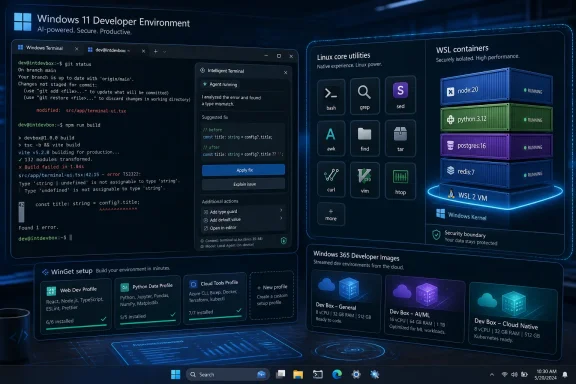
Microsoft used Build 2026 on June 2 to announce a developer-optimized Windows 11 experience that folds Linux-style command-line tools, WSL containers, AI-assisted terminals, and one-command workstation setup into the operating system’s developer story. The move is not Windows suddenly becoming Linux, nor is it a quiet retreat from native Windows development. It is Microsoft admitting, in product form, that the modern developer workstation is no longer a single-platform machine. Windows now wants to be the place where Windows apps, Linux workloads, cloud services, and AI agents all meet.
That is a sharper claim than the usual Build keynote optimism. For years, Microsoft has talked about Windows as the “best place to build,” while developers quietly kept separate Linux boxes, remote dev containers, MacBooks, cloud workstations, or elaborate WSL setups to get real work done. This year’s announcements suggest Redmond understands that developer loyalty is not won by nostalgia for Win32 or by Copilot branding alone. It is won by reducing the number of times a developer has to stop, translate, reconfigure, or reboot.
The headline feature for many developers will be Coreutils for Windows reaching general availability. That sounds small if your daily computing life begins and ends in Explorer, Outlook, and Edge. For anyone who lives in a terminal, it is an ideological marker as much as a convenience feature.
Coreutils brings familiar Unix-style command-line utilities to Windows natively. Commands such as
Microsoft’s version is not merely a grudging compatibility shim. The company is presenting these tools as part of the Windows developer environment itself, installable through WinGet and maintained as a Windows-facing package. That matters because developer workflows are built from assumptions. If a script assumes
This is the long tail of a transformation that began when Microsoft stopped treating Linux as a competitive contaminant. WSL was the first obvious breach in the wall. Windows Terminal made the command line feel modern again. OpenSSH,
The irony is that Microsoft’s pitch for Windows increasingly depends on making Windows less lonely. A useful developer OS in 2026 is not defined by how pure its lineage is. It is defined by how quickly it lets a developer move between a repository, a shell, a container, a GPU-backed model, a cloud environment, a package manager, and a deployment target. On that axis, native Linux-style utilities are not cosmetic. They are table stakes.
That is an important distinction. WSL began as a way to run Linux userland tools without leaving Windows. WSL 2 made the architecture more realistic for serious development by using a lightweight virtual machine. But container workflows have still often depended on Docker Desktop, custom WSL distributions, remote Linux environments, or team-specific setup documents that age badly.
By giving containers a more direct WSL-facing interface, Microsoft is trying to make Linux container development feel less bolted on. This is particularly relevant for AI and cloud-native development, where the “real” runtime environment is often a Linux container whether the developer’s laptop says Windows, macOS, or Ubuntu on the outside.
The bigger strategic play is that WSL is no longer just a concession to developers who prefer Bash. It is becoming one of the runtime layers through which Windows participates in modern software development. If Windows can host native apps, Linux shells, Linux containers, GPU-accelerated AI workloads, and managed cloud PCs without forcing a developer to mentally switch operating systems, the old platform boundaries start to blur.
That blurring is exactly what Microsoft wants. The company does not need every developer to love Windows in the old sense. It needs Windows to remain unavoidable, productive, and manageable in the workflows that matter. WSL Containers are not about converting Linux developers into Windows traditionalists. They are about making the Windows machine good enough that developers stop reaching for another device.
Every engineering organization has its own version of this problem. New hire receives laptop. New hire follows wiki. Wiki is stale. Package versions differ. Some tools require admin rights. Some settings live in obscure Windows panels. A script partially works, then fails, then someone says, “Oh, that part changed last quarter.”
Declarative setup is not new, and Windows is not the first platform to chase it. But Microsoft has a particular opportunity because Windows remains common in corporate environments where device management, identity, compliance, and endpoint security are not optional. A developer-ready workstation that can be provisioned consistently is not just a productivity perk. It is an IT governance story.
That helps explain why Microsoft is also extending the idea to Windows 365 with Developer Configuration. A preconfigured Cloud PC is not exciting in the way a new terminal demo is exciting, but it speaks directly to enterprise pain. Contractors, distributed teams, regulated workloads, and short-lived projects all benefit from environments that can be created, managed, audited, and retired without shipping hardware around the world.
The risk, as ever, is that Microsoft over-abstracts the mess without eliminating it. Developers are allergic to “easy setup” tools that become yet another layer to debug. If Windows Developer Configurations produce predictable, inspectable, version-controlled setups, they will be welcomed. If they become wizard-driven marketing around opaque defaults, they will join the pile of enterprise tooling that developers route around.
This is both obvious and fraught. The terminal is where developers encounter some of their most concrete failures: a command exits nonzero, a dependency is missing, a path is wrong, a branch is stale, a build breaks, a container refuses to start. An AI assistant that can see that context may be far more useful than a chatbot waiting in a sidebar for a carefully phrased prompt.
But the terminal is also where an overconfident assistant can do real damage. A bad suggestion in a document is annoying. A bad suggestion in a shell can delete files, expose secrets, mutate infrastructure, or push broken code. That is why the product boundary matters. Microsoft says Intelligent Terminal is experimental and open-source, and it is maintaining Windows Terminal for users who do not want agent integration.
That separation is wise. Developers do not all want the same level of automation, and many will want to inspect exactly what an assistant plans to run before it touches the shell. The terminal is a place where trust is earned through transparency, not personality.
Still, the direction is hard to dismiss. AI code completion changed the editor. AI terminal assistance may change the loop around build, test, debug, and deploy. The question is not whether developers will use agents in the terminal. The question is whether Microsoft can make that feel controlled rather than haunted.
Building for Windows has often meant navigating generations of overlapping frameworks, packaging systems, UI stacks, compatibility layers, and naming schemes. Win32 never really went away. UWP rose and faded. WinUI, Windows App SDK, MSIX, .NET, Electron, WebView2, and cross-platform frameworks all coexist. Choice is useful until it becomes cognitive debt.
AI agents trained or guided with structured Windows-specific development knowledge could make the platform more approachable. A developer should be able to ask for a native Windows app pattern and receive guidance that reflects the current stack rather than a museum tour of deprecated possibilities. If Microsoft wants more high-quality Windows apps, it must make the “right way” easier to discover.
There is a defensive angle here too. AI assistants are increasingly becoming the first interface to platform documentation. If they produce stale Windows guidance, developers will blame Windows, not the model. By packaging Windows development knowledge as skills, Microsoft is trying to shape the answers before they become code.
That does not solve the underlying fragmentation. It may even obscure it if developers are encouraged to let agents paper over complexity they should understand. But as a practical matter, Microsoft knows that the next generation of platform adoption will be mediated by agents. Documentation that is not agent-readable is becoming a second-class asset.
That future is risky by default. An agent that can read files, access networks, operate applications, and execute tasks is not just a productivity tool. It is a new class of workload living on the endpoint. Enterprises already struggle with human users, service accounts, scripts, macros, browser extensions, and background updaters. Agents add autonomy to that list.
Microsoft Execution Containers, or MXC, are Microsoft’s attempt to define a policy-driven execution layer for agents. Developers can specify which files, networks, applications, and resources an agent can access, while containment can reportedly adjust based on risk and intent. Agent 365 integration is expected to bring Microsoft Defender, Entra, Intune, and Purview into that management picture.
This is Microsoft at its most Microsoft: the company sees a new computing behavior, then tries to wrap it in identity, policy, compliance, and management. That may sound dull compared with a dazzling AI demo, but it is how new technology becomes deployable in large organizations. Enterprises do not adopt agents because a keynote says they are magical. They adopt them when someone can answer who the agent is, what it touched, what it was allowed to do, and how to shut it down.
The open question is whether developers will accept the security model or treat it as enterprise drag. If MXC is too heavy, local agent frameworks will route around it. If it is too permissive, security teams will block it. The sweet spot is narrow: agents need enough freedom to be useful and enough containment to be trusted.
That matters for three reasons. First, latency matters. A feature that waits on a remote model for every small interaction will feel different from one that responds locally. Second, cost matters. Developers and organizations cannot send every agentic task to a metered cloud endpoint forever without thinking about the bill. Third, privacy and governance matter. Some workloads are easier to approve if data stays on the device.
The hardware landscape makes this urgent. Copilot+ PCs pushed NPUs into the Windows conversation, but developer adoption depends on APIs that work across the messy installed base of real hardware. Microsoft’s broader support for speech-to-text, local language models, text intelligence, and video super resolution suggests an attempt to make Windows AI development less dependent on one perfect device profile.
There is a trap here. “On-device AI” can become a label slapped onto demos that only run well on the newest premium hardware. Windows has to serve developers with desktops, gaming laptops, workstations, thin corporate notebooks, and cloud PCs. If Microsoft can provide graceful scaling across CPU, NPU, and GPU paths, it will have something meaningful. If not, developers will keep targeting cloud APIs and treating local acceleration as a bonus.
Still, the direction is logical. Windows has always been strongest when it turns broad hardware diversity into a platform advantage. AI gives Microsoft a reason to make the local PC feel strategically important again.
That is a more credible strategy than another branding reset. Windows users have lived through enough version promises to know that a new name does not guarantee a better experience. Developers care less about what the Start menu is called than whether the shell, package manager, container story, terminal, SDKs, and security model get out of the way.
The developer-optimized Windows 11 experience also fits Microsoft’s broader need to win back credibility with power users. Windows 11 has often felt split between consumer upsell surfaces, AI branding, enterprise manageability, and unfinished quality-of-life repairs. Developer announcements do not fix every consumer annoyance, but they show where Microsoft thinks Windows can still command loyalty: among people who build, automate, test, administer, and integrate systems.
That audience is demanding. It will not be satisfied by a settings toggle labeled “developer optimized” if the OS still interrupts with noise, inconsistent UI, unpredictable updates, or brittle tooling. The burden now shifts from keynote coherence to shipped reliability.
The best version of this strategy is a Windows that respects expertise. It gives developers powerful defaults, transparent configuration, native access to cross-platform tools, local AI capabilities, and security controls that do not smother experimentation. The worst version is a Windows that bundles more agents, more background services, more prompts, and more half-finished abstractions into an already crowded operating system.
That is powerful, but it complicates administration. Inventory tools must understand more than installed MSI packages. Security baselines must account for Linux filesystems, container images, model artifacts, terminal agents, and developer-specific configuration. Endpoint controls must distinguish between legitimate automation and suspicious behavior without breaking the workflows they are supposed to protect.
Microsoft’s advantage is that it already owns much of the enterprise management stack. Entra, Intune, Defender, Purview, Windows 365, and the Windows endpoint itself give the company a distribution channel for agent governance that smaller tooling vendors cannot match. If Microsoft can make these pieces work together cleanly, Windows could become the default managed platform for agent-era development.
But that integration also raises lock-in concerns. A developer-optimized Windows that works best when paired with Microsoft identity, Microsoft security, Microsoft cloud PCs, Microsoft agents, Microsoft package configuration, and Microsoft AI services is not neutral infrastructure. It is an ecosystem play. That does not make it bad, but organizations should recognize the trade.
The practical question for IT is not whether to resist the trend. Developers are already using WSL, containers, AI assistants, and remote environments. The practical question is whether Microsoft’s integrated approach gives administrators enough visibility and control to support those workflows safely.
The Build 2026 announcements try to bring that developer goodwill back to the desktop. Coreutils says Windows understands Unix habits. WSL Containers say Linux workloads belong here. Intelligent Terminal says the shell is not legacy plumbing. Developer Configurations say setup friction is a product problem, not an individual rite of passage.
This is a meaningful change in posture. Microsoft is no longer asking developers to adapt themselves to Windows first. It is adapting Windows to the workflows developers already use. That is the difference between platform arrogance and platform pragmatism.
The company still has to prove the implementation. Native tools must behave predictably. WSL Containers must be reliable enough to trust. AI terminal features must be controllable. Dev configurations must be transparent. Agent containment must be understandable. Without that, the whole developer-optimized story becomes another layer of glossy complexity.
But the center of gravity has shifted. The Windows developer story is no longer just Visual Studio and Win32, nor even VS Code and WSL. It is a hybrid machine model: local and cloud, Windows and Linux, human and agent, managed and hackable.
That is a sharper claim than the usual Build keynote optimism. For years, Microsoft has talked about Windows as the “best place to build,” while developers quietly kept separate Linux boxes, remote dev containers, MacBooks, cloud workstations, or elaborate WSL setups to get real work done. This year’s announcements suggest Redmond understands that developer loyalty is not won by nostalgia for Win32 or by Copilot branding alone. It is won by reducing the number of times a developer has to stop, translate, reconfigure, or reboot.
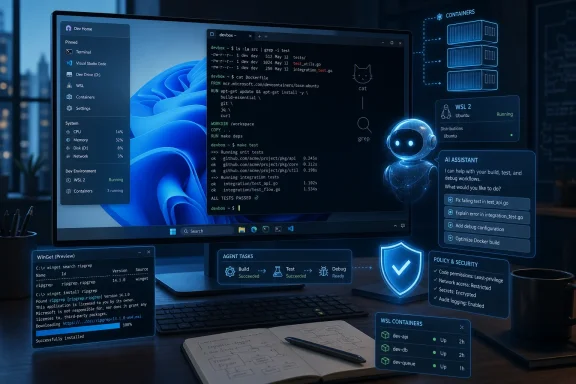 Microsoft Stops Treating Linux as a Guest in the Windows House
The headline feature for many developers will be Coreutils for Windows reaching general availability. That sounds small if your daily computing life begins and ends in Explorer, Outlook, and Edge. For anyone who lives in a terminal, it is an ideological marker as much as a convenience feature.Coreutils brings familiar Unix-style command-line utilities to Windows natively. Commands such as
cat, grep, find, and related tools are the connective tissue of scripting culture across Linux and macOS. Windows has long had equivalents, substitutes, aliases, ports, and third-party packages, but that was exactly the problem: there were always caveats.Microsoft’s version is not merely a grudging compatibility shim. The company is presenting these tools as part of the Windows developer environment itself, installable through WinGet and maintained as a Windows-facing package. That matters because developer workflows are built from assumptions. If a script assumes
grep exists and behaves predictably, the difference between “install this unofficial bundle first” and “this is a supported Microsoft component” can decide whether Windows is a first-class development target or the weird machine in the corner.This is the long tail of a transformation that began when Microsoft stopped treating Linux as a competitive contaminant. WSL was the first obvious breach in the wall. Windows Terminal made the command line feel modern again. OpenSSH,
curl, tar, WinGet, PowerToys, Dev Home, and various Windows App SDK efforts each filled in part of the story. Coreutils now adds something more basic: muscle memory.The irony is that Microsoft’s pitch for Windows increasingly depends on making Windows less lonely. A useful developer OS in 2026 is not defined by how pure its lineage is. It is defined by how quickly it lets a developer move between a repository, a shell, a container, a GPU-backed model, a cloud environment, a package manager, and a deployment target. On that axis, native Linux-style utilities are not cosmetic. They are table stakes.
WSL Containers Turn a Compatibility Layer Into a Development Substrate
The next piece is WSL Containers, a coming public preview that gives developers a built-in way to create, run, and interact with Linux containers on Windows. Microsoft says the newwslc.exe command-line tool will let users build and run containers, while APIs will allow Windows applications to use Linux containers as part of their own logic.That is an important distinction. WSL began as a way to run Linux userland tools without leaving Windows. WSL 2 made the architecture more realistic for serious development by using a lightweight virtual machine. But container workflows have still often depended on Docker Desktop, custom WSL distributions, remote Linux environments, or team-specific setup documents that age badly.
By giving containers a more direct WSL-facing interface, Microsoft is trying to make Linux container development feel less bolted on. This is particularly relevant for AI and cloud-native development, where the “real” runtime environment is often a Linux container whether the developer’s laptop says Windows, macOS, or Ubuntu on the outside.
The bigger strategic play is that WSL is no longer just a concession to developers who prefer Bash. It is becoming one of the runtime layers through which Windows participates in modern software development. If Windows can host native apps, Linux shells, Linux containers, GPU-accelerated AI workloads, and managed cloud PCs without forcing a developer to mentally switch operating systems, the old platform boundaries start to blur.
That blurring is exactly what Microsoft wants. The company does not need every developer to love Windows in the old sense. It needs Windows to remain unavoidable, productive, and manageable in the workflows that matter. WSL Containers are not about converting Linux developers into Windows traditionalists. They are about making the Windows machine good enough that developers stop reaching for another device.
The New Developer Setup Pitch Is Really an Attack on Friction
Microsoft’s Windows Developer Configurations may be less glamorous than Linux containers or AI agents, but they may be more important in practice. The promise is straightforward: use WinGet-powered configuration to turn a Windows 11 device into a ready-to-code environment with Visual Studio Code, GitHub Copilot, WSL, PowerShell 7, and developer-oriented Windows settings.Every engineering organization has its own version of this problem. New hire receives laptop. New hire follows wiki. Wiki is stale. Package versions differ. Some tools require admin rights. Some settings live in obscure Windows panels. A script partially works, then fails, then someone says, “Oh, that part changed last quarter.”
Declarative setup is not new, and Windows is not the first platform to chase it. But Microsoft has a particular opportunity because Windows remains common in corporate environments where device management, identity, compliance, and endpoint security are not optional. A developer-ready workstation that can be provisioned consistently is not just a productivity perk. It is an IT governance story.
That helps explain why Microsoft is also extending the idea to Windows 365 with Developer Configuration. A preconfigured Cloud PC is not exciting in the way a new terminal demo is exciting, but it speaks directly to enterprise pain. Contractors, distributed teams, regulated workloads, and short-lived projects all benefit from environments that can be created, managed, audited, and retired without shipping hardware around the world.
The risk, as ever, is that Microsoft over-abstracts the mess without eliminating it. Developers are allergic to “easy setup” tools that become yet another layer to debug. If Windows Developer Configurations produce predictable, inspectable, version-controlled setups, they will be welcomed. If they become wizard-driven marketing around opaque defaults, they will join the pile of enterprise tooling that developers route around.
Intelligent Terminal Puts the AI Assistant Where Mistakes Happen
The Intelligent Terminal preview is Microsoft’s clearest attempt to move AI assistance from the editor into the operational flow of development. Rather than treating the terminal as a dumb text box, Microsoft is experimenting with a terminal that understands shell state, command history, working directories, exit codes, and repository context well enough to suggest fixes or execute multi-step tasks.This is both obvious and fraught. The terminal is where developers encounter some of their most concrete failures: a command exits nonzero, a dependency is missing, a path is wrong, a branch is stale, a build breaks, a container refuses to start. An AI assistant that can see that context may be far more useful than a chatbot waiting in a sidebar for a carefully phrased prompt.
But the terminal is also where an overconfident assistant can do real damage. A bad suggestion in a document is annoying. A bad suggestion in a shell can delete files, expose secrets, mutate infrastructure, or push broken code. That is why the product boundary matters. Microsoft says Intelligent Terminal is experimental and open-source, and it is maintaining Windows Terminal for users who do not want agent integration.
That separation is wise. Developers do not all want the same level of automation, and many will want to inspect exactly what an assistant plans to run before it touches the shell. The terminal is a place where trust is earned through transparency, not personality.
Still, the direction is hard to dismiss. AI code completion changed the editor. AI terminal assistance may change the loop around build, test, debug, and deploy. The question is not whether developers will use agents in the terminal. The question is whether Microsoft can make that feel controlled rather than haunted.
Windows Development Skills Try to Fix the Platform’s Own Documentation Problem
Microsoft is also making Windows Development Skills generally available, giving AI agents structured knowledge for building native Windows apps with technologies such as WinUI 3 and the Windows App Development CLI. On paper, this is another AI-enablement announcement. Underneath, it reveals a long-running weakness in the Windows developer ecosystem.Building for Windows has often meant navigating generations of overlapping frameworks, packaging systems, UI stacks, compatibility layers, and naming schemes. Win32 never really went away. UWP rose and faded. WinUI, Windows App SDK, MSIX, .NET, Electron, WebView2, and cross-platform frameworks all coexist. Choice is useful until it becomes cognitive debt.
AI agents trained or guided with structured Windows-specific development knowledge could make the platform more approachable. A developer should be able to ask for a native Windows app pattern and receive guidance that reflects the current stack rather than a museum tour of deprecated possibilities. If Microsoft wants more high-quality Windows apps, it must make the “right way” easier to discover.
There is a defensive angle here too. AI assistants are increasingly becoming the first interface to platform documentation. If they produce stale Windows guidance, developers will blame Windows, not the model. By packaging Windows development knowledge as skills, Microsoft is trying to shape the answers before they become code.
That does not solve the underlying fragmentation. It may even obscure it if developers are encouraged to let agents paper over complexity they should understand. But as a practical matter, Microsoft knows that the next generation of platform adoption will be mediated by agents. Documentation that is not agent-readable is becoming a second-class asset.
The Agent Security Story Is the Part Enterprises Will Actually Care About
The most consequential announcements may not be the ones developers cheer first. Microsoft’s secure agent infrastructure, including Microsoft Execution Containers, OS-enforced agent identities, runtime containment, and management controls, is aimed at a future where AI agents do more than suggest code. They act.That future is risky by default. An agent that can read files, access networks, operate applications, and execute tasks is not just a productivity tool. It is a new class of workload living on the endpoint. Enterprises already struggle with human users, service accounts, scripts, macros, browser extensions, and background updaters. Agents add autonomy to that list.
Microsoft Execution Containers, or MXC, are Microsoft’s attempt to define a policy-driven execution layer for agents. Developers can specify which files, networks, applications, and resources an agent can access, while containment can reportedly adjust based on risk and intent. Agent 365 integration is expected to bring Microsoft Defender, Entra, Intune, and Purview into that management picture.
This is Microsoft at its most Microsoft: the company sees a new computing behavior, then tries to wrap it in identity, policy, compliance, and management. That may sound dull compared with a dazzling AI demo, but it is how new technology becomes deployable in large organizations. Enterprises do not adopt agents because a keynote says they are magical. They adopt them when someone can answer who the agent is, what it touched, what it was allowed to do, and how to shut it down.
The open question is whether developers will accept the security model or treat it as enterprise drag. If MXC is too heavy, local agent frameworks will route around it. If it is too permissive, security teams will block it. The sweet spot is narrow: agents need enough freedom to be useful and enough containment to be trusted.
On-Device AI Makes Windows a Local Runtime Again
Microsoft’s Build 2026 Windows story also leans into on-device AI. The company is introducing small language models called Aion 1.0 Instruct and Aion 1.0 Plan, while expanding Windows AI APIs across CPUs, NPUs, and supported discrete GPUs. The message is that Windows should not merely call cloud AI services. It should run useful AI workloads locally.That matters for three reasons. First, latency matters. A feature that waits on a remote model for every small interaction will feel different from one that responds locally. Second, cost matters. Developers and organizations cannot send every agentic task to a metered cloud endpoint forever without thinking about the bill. Third, privacy and governance matter. Some workloads are easier to approve if data stays on the device.
The hardware landscape makes this urgent. Copilot+ PCs pushed NPUs into the Windows conversation, but developer adoption depends on APIs that work across the messy installed base of real hardware. Microsoft’s broader support for speech-to-text, local language models, text intelligence, and video super resolution suggests an attempt to make Windows AI development less dependent on one perfect device profile.
There is a trap here. “On-device AI” can become a label slapped onto demos that only run well on the newest premium hardware. Windows has to serve developers with desktops, gaming laptops, workstations, thin corporate notebooks, and cloud PCs. If Microsoft can provide graceful scaling across CPU, NPU, and GPU paths, it will have something meaningful. If not, developers will keep targeting cloud APIs and treating local acceleration as a bonus.
Still, the direction is logical. Windows has always been strongest when it turns broad hardware diversity into a platform advantage. AI gives Microsoft a reason to make the local PC feel strategically important again.
Build 2026 Was Not Windows 12, and That Was the Point
There was no Windows 12 reveal here, and the absence is telling. Microsoft is not trying to reboot the Windows story around a new version number. It is trying to reposition Windows 11 as a continuously evolving development and AI platform.That is a more credible strategy than another branding reset. Windows users have lived through enough version promises to know that a new name does not guarantee a better experience. Developers care less about what the Start menu is called than whether the shell, package manager, container story, terminal, SDKs, and security model get out of the way.
The developer-optimized Windows 11 experience also fits Microsoft’s broader need to win back credibility with power users. Windows 11 has often felt split between consumer upsell surfaces, AI branding, enterprise manageability, and unfinished quality-of-life repairs. Developer announcements do not fix every consumer annoyance, but they show where Microsoft thinks Windows can still command loyalty: among people who build, automate, test, administer, and integrate systems.
That audience is demanding. It will not be satisfied by a settings toggle labeled “developer optimized” if the OS still interrupts with noise, inconsistent UI, unpredictable updates, or brittle tooling. The burden now shifts from keynote coherence to shipped reliability.
The best version of this strategy is a Windows that respects expertise. It gives developers powerful defaults, transparent configuration, native access to cross-platform tools, local AI capabilities, and security controls that do not smother experimentation. The worst version is a Windows that bundles more agents, more background services, more prompts, and more half-finished abstractions into an already crowded operating system.
The Windows Workstation Is Becoming a Managed Cross-Platform Machine
For sysadmins and IT pros, the most interesting implication is that Windows is becoming less of a single operating environment and more of a managed host for multiple execution models. A developer workstation may now include native Windows applications, WSL distributions, Linux containers, AI agents, local models, cloud-connected services, and policy-contained automation.That is powerful, but it complicates administration. Inventory tools must understand more than installed MSI packages. Security baselines must account for Linux filesystems, container images, model artifacts, terminal agents, and developer-specific configuration. Endpoint controls must distinguish between legitimate automation and suspicious behavior without breaking the workflows they are supposed to protect.
Microsoft’s advantage is that it already owns much of the enterprise management stack. Entra, Intune, Defender, Purview, Windows 365, and the Windows endpoint itself give the company a distribution channel for agent governance that smaller tooling vendors cannot match. If Microsoft can make these pieces work together cleanly, Windows could become the default managed platform for agent-era development.
But that integration also raises lock-in concerns. A developer-optimized Windows that works best when paired with Microsoft identity, Microsoft security, Microsoft cloud PCs, Microsoft agents, Microsoft package configuration, and Microsoft AI services is not neutral infrastructure. It is an ecosystem play. That does not make it bad, but organizations should recognize the trade.
The practical question for IT is not whether to resist the trend. Developers are already using WSL, containers, AI assistants, and remote environments. The practical question is whether Microsoft’s integrated approach gives administrators enough visibility and control to support those workflows safely.
The Command Line Is Where Microsoft’s Old Reputation Is Being Rewritten
There is a cultural dimension to all this that should not be overlooked. Microsoft’s standing with developers has improved dramatically over the past decade, but Windows itself has not always benefited from that goodwill. Visual Studio Code, GitHub, TypeScript, .NET’s open-source evolution, Azure tooling, and WSL helped Microsoft recover developer credibility. Windows, however, often remained the corporate laptop OS people tolerated.The Build 2026 announcements try to bring that developer goodwill back to the desktop. Coreutils says Windows understands Unix habits. WSL Containers say Linux workloads belong here. Intelligent Terminal says the shell is not legacy plumbing. Developer Configurations say setup friction is a product problem, not an individual rite of passage.
This is a meaningful change in posture. Microsoft is no longer asking developers to adapt themselves to Windows first. It is adapting Windows to the workflows developers already use. That is the difference between platform arrogance and platform pragmatism.
The company still has to prove the implementation. Native tools must behave predictably. WSL Containers must be reliable enough to trust. AI terminal features must be controllable. Dev configurations must be transparent. Agent containment must be understandable. Without that, the whole developer-optimized story becomes another layer of glossy complexity.
But the center of gravity has shifted. The Windows developer story is no longer just Visual Studio and Win32, nor even VS Code and WSL. It is a hybrid machine model: local and cloud, Windows and Linux, human and agent, managed and hackable.
The Real Build 2026 Message Fits in a Terminal Window
The practical readout from Build 2026 is not that every developer should immediately rebuild their workflow around Microsoft’s previews. Some of these pieces are generally available, some are experimental, and some are still on the way. The smarter interpretation is that Microsoft has revealed where it thinks the Windows developer platform must go.- Windows 11 is being positioned as a cross-platform development host, not merely as the target for native Windows applications.
- Coreutils for Windows makes Unix-style terminal habits a supported part of the Windows workflow rather than a third-party afterthought.
- WSL Containers could reduce dependence on heavier or more fragmented container setups if Microsoft ships the preview with enough reliability and compatibility.
- Intelligent Terminal shows that Microsoft wants AI assistance to operate inside the shell, where build and runtime failures actually happen.
- Microsoft Execution Containers and Agent 365 integration suggest that agent security will be treated as an endpoint management problem, not just an app developer concern.
- Windows Developer Configurations and Windows 365 developer Cloud PCs make workstation setup a repeatable IT workflow rather than a tribal onboarding ritual.
References
- Primary source: The Verge
Published: Tue, 02 Jun 2026 16:30:00 GMT
Microsoft’s new developer-optimized Windows embraces Linux even more | The Verge
Microsoft is embracing Linux-like command line utilities and integrating its Linux subsystem even further into Windows.www.theverge.com
- Independent coverage: thewincentral.com
Published: 2026-06-02T18:10:07.538194
Developer-Optimized Windows 11 Experience Announced at Build 2026 - WinCentral
Microsoft unveils a developer-optimized Windows 11 experience with AI tools, WSL Containers, Coreutils, and secure agent technologies at Build 2026. - Read in Latest News on WinCentral thewincentral.com
- Related coverage: techradar.com
10 products that launched at Microsoft Build — and what happened to them | TechRadar
From Windows 8 to Copilot, here’s everything that was born at Buildwww.techradar.com - Official source: blogs.windows.com
Build 2026: Furthering Windows as the trusted platform for development
Build is one of our favorite moments each year - a chance to connect with the global developer community and share what we’ve been building. Over the past year, we have connected with many developers pushing the boundaries of what’s possible onblogs.windows.com - Official source: developer.microsoft.com
Developer Tools for Windows | Microsoft Developer
Discover the best developer tools for Windows — Windows Terminal, WSL, PowerToys, WinGet, and more.developer.microsoft.com - Official source: opensource.microsoft.com
From open source to agentic systems: Microsoft at Open Source Summit North America 2026 | Microsoft Open Source Blog
Discover how Azure Linux 4.0 and Azure Container Linux deliver a secure, scalable Linux foundation for cloud native apps, containers, and AI workloads.opensource.microsoft.com
- Related coverage: phoronix.com
Microsoft Announces Open-Source "Intelligent Terminal" - Phoronix
Microsoft today announced their newest open-source creation..www.phoronix.com
- Related coverage: pcworld.com
No Windows 12 at Build, but Microsoft has something else up its sleeve | PCWorld
Microsoft's Pavan Davuluri confirmed Windows 12 won't appear at Build 2026, but the new Surface Laptop Ultra with Nvidia N1X might steal the show.www.pcworld.com - Related coverage: windowscentral.com
Microsoft announces Litebox, a Rust‑based security OS | Windows Central
LiteBox offers developers a new way to sandbox apps while reducing the system's attack surface.www.windowscentral.com - Official source: news.microsoft.com
Microsoft Build Live
The home for real-time coverage of the news as it is announced from Microsoft Build, June 2-3, 2026.news.microsoft.com - Related coverage: techtimes.com
WSL 3 at Build 2026: Near-Native GPU and NPU Passthrough Brings Local AI to Windows
WSL 3 GPU passthrough for Windows arrives at Microsoft Build 2026, letting developers run Ollama, PyTorch, and llama.cpp inside Linux on Windows at near-native GPU and NPU speed. Qualcomm Snapdragonwww.techtimes.com - Related coverage: techspot.com
Microsoft admits Windows 11 lost its way, Nadella pledges to "win back fans" | TechSpot
During Microsoft's fiscal Q3 2026 earnings call, Nadella put consumer Windows front and center. As part of Microsoft's broader push to reconnect with users across its platforms,...www.techspot.com - Related coverage: windowslatest.com
Microsoft confirms it's not launching Windows 12, as it teases a big announcement
Microsoft officially shut down Windows 12 rumors to make way for a hardware breakthrough with the new NVIDIA N1X coming for Windows on ARM www.windowslatest.com
- Related coverage: ca.investing.com
Microsoft to unveil developer tools and AI models at Build conference By Investing.com
Microsoft to unveil developer tools and AI models at Build conferenceca.investing.com - Official source: marketingassets.microsoft.com