

Microsoft used Build 2026 in early June to tell Windows developers that WinUI is now the native production platform for modern Windows apps, while promising stability, lower memory use, new controls, and AI-assisted tooling rather than another UI-framework reset. That is not quite a banishment of Electron, React Native, WebView2, or the browser-in-a-box model that has crept across Windows 11. It is something more interesting: Microsoft is trying to make native Windows development feel like the safe bet again. For users and administrators who have spent years watching inbox apps turn into sluggish web shells, the question is whether Redmond can turn a conference-track promise into a platform habit.
For much of the Windows 11 era, Microsoft’s app story has felt less like a strategy than a compromise with entropy. The operating system shipped with a new visual language, but too many of its own surfaces felt like they had arrived from different departments, different decades, and different runtime assumptions. Win32, UWP, WPF, WinForms, WebView2, React Native, Electron, XAML Islands, and Windows App SDK were all technically part of the answer, which is another way of saying that no single answer existed.
That fragmentation mattered because ordinary users could feel it. A Windows app might look modern but resize poorly, launch slowly, chew through memory, ignore expected keyboard conventions, or behave like a website wearing a taskbar icon. Enthusiasts called this “web app slop,” a crude phrase but an effective one, because it captured the sense that the desktop had been demoted into a delivery container for whatever stack was most convenient to ship.
At Build 2026, Microsoft’s message was unusually direct by recent standards: WinUI is not an experiment waiting to be superseded. It is not the latest bridge technology before the next grand unification. It is, according to the company’s developer messaging, the production platform for Windows apps.
That matters because Microsoft’s credibility problem is not that developers have never heard of WinUI. It is that Windows developers have heard too many similar pitches before.
That sounds boring. In Windows development, boring is radical.
Microsoft has spent two decades asking developers to move from one preferred future to another. WinForms was the practical business-app workhorse. WPF was the richer XAML future. Silverlight briefly looked like a cross-platform future. UWP was the Windows 8 and Store-era future. Project Reunion tried to reconcile the Win32 world with the UWP-era platform model. The Windows App SDK and WinUI 3 then became the modern desktop answer, but even the “3” in WinUI 3 carried the smell of version churn.
Dropping the “3” branding and calling it simply WinUI is therefore more than a naming cleanup. It is a signal aimed at the developer who has been burned before: Microsoft is trying to say that the migration target will not move again next year.
The company needs that signal because native Windows development is no longer the default cultural choice for many app teams. If a company can ship one web front end across Windows, macOS, Linux, and the browser, it will often do so, even if the result feels worse on every platform than a well-built native client. The argument for WinUI cannot be nostalgia. It has to be certainty, tooling, performance, and business payoff.
A web stack lets companies hire from a broader labor pool, reuse code across platforms, deploy changes faster, and keep product behavior aligned across devices. Electron and WebView2-heavy designs may irritate desktop purists, but they solve real organizational problems. In many companies, the Windows client is no longer a flagship product; it is an endpoint for a service whose center of gravity lives in the cloud.
Microsoft helped normalize that bargain. The company promoted WebView2 as a pragmatic way to embed modern web content in Windows apps, and in many cases that was the correct technical choice. A banking sign-in flow, documentation pane, store catalog, or collaboration surface may reasonably use web technology inside a broader native shell.
The problem is that the exception became the architecture. Once the browser engine is already in the process, it is tempting to put more and more of the app there. Soon the “native app” is a title bar, a tray icon, a few integration hooks, and a memory footprint that looks suspiciously like a second browser session.
Users do not diagnose this in framework terms. They notice that launching a mail app feels like opening a portal, that simple controls lag, that multiple apps each carry their own runtime baggage, and that Windows no longer feels as tight as it should on hardware that is objectively powerful.
Developers have complained about gaps in controls, inconsistent documentation, packaging friction, and rough edges that make WinUI feel less mature than older Windows frameworks. Users have seen visual tearing, resize artifacts, and performance stumbles in apps that are supposed to represent the modern Windows design system. The promise of a native framework only works if the result is visibly better than the web wrappers it seeks to displace.
That is why Microsoft’s emphasis on fundamentals is more important than any headline feature. Lower memory use, better resize behavior, compositor improvements, and bug fixing are not glamorous Build-stage material. They are the work required to make developers stop hedging.
The mention of DataGrid and charting support is also telling. Those are not influencer-demo controls. They are enterprise controls. They live in line-of-business apps, admin consoles, HR dashboards, finance tools, inventory systems, fleet-management software, reporting surfaces, and internal utilities that keep organizations running.
If Microsoft wants WinUI to matter beyond a handful of showcase apps, it has to court the people building boring software at scale. The Windows desktop remains deeply entrenched in business precisely because of those boring apps. A UI framework without first-class enterprise controls is not a platform; it is a demo kit.
Reports that Microsoft is rewriting parts of the Start menu experience away from React Native and toward WinUI strike a nerve because the Start menu is not just another component. It is the handshake between the user and the operating system. If that surface feels slow, inconsistent, overstuffed, or webby, then Microsoft’s whole native-app sermon sounds hollow.
Windows users have been remarkably patient with the Start menu’s modern identity crisis. They have watched it become a launcher, a search box, a recommendation surface, an advertising channel, a Microsoft account nudge, and a cloud document portal. The complaint is not merely that Microsoft used the wrong framework. It is that the Start menu often feels as if it serves too many masters before it serves the person sitting at the keyboard.
A WinUI rewrite will not automatically fix that. A native implementation can still be cluttered, noisy, and hostile to local-first workflows. But a native rewrite would at least remove one easy excuse for sluggishness and inconsistency.
The larger test is whether Microsoft uses native code to restore confidence or simply to deliver the same product instincts faster. Users do not want a more efficient recommendation feed. They want a Start menu that behaves like the front door to their PC.
One of the reasons web stacks win is not only that they are portable, but that their development loops feel fast and familiar. If Microsoft can make native Windows app creation more approachable through command-line tooling, templates, agent-readable documentation, and automated migration assistance, then WinUI becomes less intimidating. Developers may be more willing to modernize old WPF and WinForms apps if the tooling can shoulder some of the mechanical work.
But there is a trap here. AI-generated native slop would not be an improvement over web app slop. If the new pipeline produces apps that technically use WinUI but still feel generic, bloated, inaccessible, inconsistent, or carelessly structured, users will not care that the bad experience is now native.
The phrase “agentic era” will excite some developers and exhaust others. Windows does not need every app to become an AI app. It needs modern Windows apps to be easier to build well than to build badly. If Microsoft’s AI tooling helps developers respect platform conventions, performance budgets, accessibility, and deployment discipline, it could be valuable. If it merely accelerates the production of mediocre UI, it will become another layer in the stack Windows users already resent.
WinUI’s future depends on confidence, and confidence is built through boring public evidence. Are controls arriving when promised? Are memory regressions treated as serious bugs? Are migration blockers documented honestly? Are samples maintained? Are breaking changes rare and justified? Are community complaints answered before they become folklore?
Microsoft has learned this lesson in other parts of its developer universe. .NET regained enormous trust through openness, cross-platform seriousness, performance work, and clear stewardship. Visual Studio Code became a default tool not because Microsoft declared it one, but because developers experienced it improving quickly without the usual enterprise baggage.
WinUI needs a version of that transformation. Not the same cross-platform story, because Windows-native development has different goals, but the same cultural posture: visible work, fewer surprises, and a bias toward developer reality over platform theater.
The Windows software estate is old, sprawling, and profitable. It includes WinForms apps that have survived multiple platform revolutions, WPF apps that still serve complex internal workflows, native Win32 software that businesses depend on, and hybrid applications that cannot simply be thrown away because a Build session declared a new direction. A viable WinUI strategy must respect that inheritance.
That is why stronger WinForms interop and smoother WPF migration matter. The path forward for many organizations will not be a clean rewrite. It will be gradual modernization: a new settings panel here, a redesigned dashboard there, a WinUI surface embedded in an older shell, or a staged move away from aging UI components.
This is where Microsoft can win back pragmatic developers. The company does not need to convince every team to become a WinUI-first shop tomorrow. It needs to make the incremental path rational enough that teams stop choosing the browser engine by default.
A good Windows strategy meets developers where they are. A bad one tells them the future is beautiful if only they abandon everything that pays the bills.
Every embedded browser surface carries patching, policy, identity, and data-flow implications. WebView2 can be managed, and web technology is not inherently unsafe, but a fleet of pseudo-browser applications complicates the mental model. Administrators must understand which runtime is in play, how authentication is handled, where data is cached, how extensions or web policies interact, and whether application boundaries are as clear as they appear.
Native Windows apps are not automatically secure. Poorly written native code can be disastrous. But a stronger native platform gives Microsoft a better chance to align app behavior with Windows security, identity, deployment, accessibility, and management primitives.
This becomes especially important as Microsoft pushes agent-based workflows into Windows. If apps increasingly expose actions, context, and automation hooks to AI agents, administrators will care about containment, permissions, logging, and predictable behavior. A messy app platform becomes a messy automation substrate.
The browser-in-a-box model was tolerable when the desktop app was mostly a front end for human clicks. It becomes more consequential when software agents start acting across local resources, enterprise data, and user workflows.
That means Microsoft must compete with the web stack on more than purity. The tooling has to be excellent. The design system has to be coherent. The performance advantage has to be measurable. The Store and distribution story has to be predictable. The documentation has to be current. The migration path has to be credible. The platform team has to stop giving developers reasons to wait.
Microsoft also has to use WinUI visibly in its own house. Developers notice hypocrisy quickly. If Microsoft tells the ecosystem to build native Windows apps while shipping major Windows experiences as web wrappers whenever deadlines tighten, the message collapses.
The company does not have to outlaw Electron or shame React Native. Windows has always been valuable partly because it is permissive. But permissiveness is not the same as leadership. Microsoft can allow many stacks while still making the native path the most polished path.
This is not about romanticizing the past. Old Windows had plenty of inconsistency, cruft, and bad UI. But classic desktop software often had a directness that modern wrapper-heavy apps lack. Clicks felt local. Menus behaved predictably. Windows resized without drama. Memory use was not free, but it was legible.
Modern Windows cannot simply go backward. Users expect cloud sync, live content, rich media, account integration, AI features, cross-device continuity, and rapid service updates. Some of that naturally pulls developers toward web architecture. The challenge is to absorb those expectations without making the PC feel like a thin client for Redmond’s priorities.
A serious WinUI push is one way to reassert the PC as a first-class environment. Not because native code is morally superior, but because the desktop deserves software that respects its strengths.
There is also a skeptical reading: Microsoft has made this sort of turn before. It often rediscovered Windows when it needed developers, then wandered away when Azure, Teams, Copilot, or whatever came next demanded the spotlight. Windows enthusiasts have long memories because Microsoft has trained them to.
Both readings can be true. Build 2026 can be a meaningful pivot and still be only a down payment.
The next year will matter more than the conference. If users see the Start menu become faster and cleaner, if File Explorer and inbox apps feel more consistent, if developers see WinUI bugs close and missing controls arrive, the narrative changes. If not, “we are committed to WinUI” will join a long shelf of Windows platform promises that sounded better onstage than they felt on the desktop.
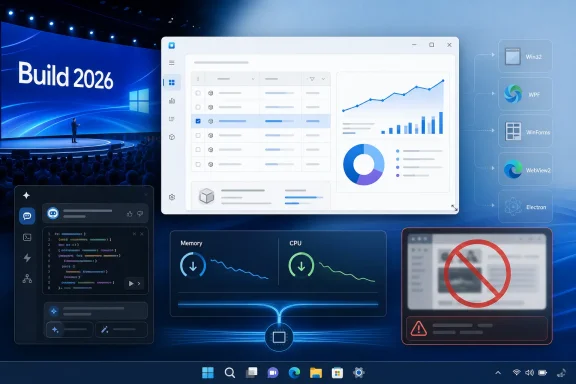 Microsoft Is Trying to Make “Native” Mean Something Again
For much of the Windows 11 era, Microsoft’s app story has felt less like a strategy than a compromise with entropy. The operating system shipped with a new visual language, but too many of its own surfaces felt like they had arrived from different departments, different decades, and different runtime assumptions. Win32, UWP, WPF, WinForms, WebView2, React Native, Electron, XAML Islands, and Windows App SDK were all technically part of the answer, which is another way of saying that no single answer existed.That fragmentation mattered because ordinary users could feel it. A Windows app might look modern but resize poorly, launch slowly, chew through memory, ignore expected keyboard conventions, or behave like a website wearing a taskbar icon. Enthusiasts called this “web app slop,” a crude phrase but an effective one, because it captured the sense that the desktop had been demoted into a delivery container for whatever stack was most convenient to ship.
At Build 2026, Microsoft’s message was unusually direct by recent standards: WinUI is not an experiment waiting to be superseded. It is not the latest bridge technology before the next grand unification. It is, according to the company’s developer messaging, the production platform for Windows apps.
That matters because Microsoft’s credibility problem is not that developers have never heard of WinUI. It is that Windows developers have heard too many similar pitches before.
The Real Announcement Was Not a Feature, but a Vow of Restraint
The most important line from Microsoft’s Build messaging was not DataGrid support, charting controls, AI-assisted app generation, or even the promise of better performance. It was the company’s insistence that it has no intention of building yet another replacement framework.That sounds boring. In Windows development, boring is radical.
Microsoft has spent two decades asking developers to move from one preferred future to another. WinForms was the practical business-app workhorse. WPF was the richer XAML future. Silverlight briefly looked like a cross-platform future. UWP was the Windows 8 and Store-era future. Project Reunion tried to reconcile the Win32 world with the UWP-era platform model. The Windows App SDK and WinUI 3 then became the modern desktop answer, but even the “3” in WinUI 3 carried the smell of version churn.
Dropping the “3” branding and calling it simply WinUI is therefore more than a naming cleanup. It is a signal aimed at the developer who has been burned before: Microsoft is trying to say that the migration target will not move again next year.
The company needs that signal because native Windows development is no longer the default cultural choice for many app teams. If a company can ship one web front end across Windows, macOS, Linux, and the browser, it will often do so, even if the result feels worse on every platform than a well-built native client. The argument for WinUI cannot be nostalgia. It has to be certainty, tooling, performance, and business payoff.
Windows Paid the Price for Convenience
The rise of web-wrapped desktop apps did not happen because developers hate users. It happened because the economics of software distribution changed.A web stack lets companies hire from a broader labor pool, reuse code across platforms, deploy changes faster, and keep product behavior aligned across devices. Electron and WebView2-heavy designs may irritate desktop purists, but they solve real organizational problems. In many companies, the Windows client is no longer a flagship product; it is an endpoint for a service whose center of gravity lives in the cloud.
Microsoft helped normalize that bargain. The company promoted WebView2 as a pragmatic way to embed modern web content in Windows apps, and in many cases that was the correct technical choice. A banking sign-in flow, documentation pane, store catalog, or collaboration surface may reasonably use web technology inside a broader native shell.
The problem is that the exception became the architecture. Once the browser engine is already in the process, it is tempting to put more and more of the app there. Soon the “native app” is a title bar, a tray icon, a few integration hooks, and a memory footprint that looks suspiciously like a second browser session.
Users do not diagnose this in framework terms. They notice that launching a mail app feels like opening a portal, that simple controls lag, that multiple apps each carry their own runtime baggage, and that Windows no longer feels as tight as it should on hardware that is objectively powerful.
WinUI Has to Earn the Trust Microsoft Is Asking For
Microsoft’s pitch would be easier if WinUI’s reputation were spotless. It is not.Developers have complained about gaps in controls, inconsistent documentation, packaging friction, and rough edges that make WinUI feel less mature than older Windows frameworks. Users have seen visual tearing, resize artifacts, and performance stumbles in apps that are supposed to represent the modern Windows design system. The promise of a native framework only works if the result is visibly better than the web wrappers it seeks to displace.
That is why Microsoft’s emphasis on fundamentals is more important than any headline feature. Lower memory use, better resize behavior, compositor improvements, and bug fixing are not glamorous Build-stage material. They are the work required to make developers stop hedging.
The mention of DataGrid and charting support is also telling. Those are not influencer-demo controls. They are enterprise controls. They live in line-of-business apps, admin consoles, HR dashboards, finance tools, inventory systems, fleet-management software, reporting surfaces, and internal utilities that keep organizations running.
If Microsoft wants WinUI to matter beyond a handful of showcase apps, it has to court the people building boring software at scale. The Windows desktop remains deeply entrenched in business precisely because of those boring apps. A UI framework without first-class enterprise controls is not a platform; it is a demo kit.
The Start Menu Is the Symbol Microsoft Cannot Escape
The most politically loaded part of this story is not a third-party app. It is the Windows shell itself.Reports that Microsoft is rewriting parts of the Start menu experience away from React Native and toward WinUI strike a nerve because the Start menu is not just another component. It is the handshake between the user and the operating system. If that surface feels slow, inconsistent, overstuffed, or webby, then Microsoft’s whole native-app sermon sounds hollow.
Windows users have been remarkably patient with the Start menu’s modern identity crisis. They have watched it become a launcher, a search box, a recommendation surface, an advertising channel, a Microsoft account nudge, and a cloud document portal. The complaint is not merely that Microsoft used the wrong framework. It is that the Start menu often feels as if it serves too many masters before it serves the person sitting at the keyboard.
A WinUI rewrite will not automatically fix that. A native implementation can still be cluttered, noisy, and hostile to local-first workflows. But a native rewrite would at least remove one easy excuse for sluggishness and inconsistency.
The larger test is whether Microsoft uses native code to restore confidence or simply to deliver the same product instincts faster. Users do not want a more efficient recommendation feed. They want a Start menu that behaves like the front door to their PC.
The AI Layer Could Help, but It Could Also Recreate the Mess
Microsoft’s Build 2026 framing inevitably put WinUI inside the company’s larger AI developer story. The company wants agents and AI-assisted coding tools to help developers plan, build, modernize, and migrate Windows apps. In theory, this could be exactly what WinUI needs.One of the reasons web stacks win is not only that they are portable, but that their development loops feel fast and familiar. If Microsoft can make native Windows app creation more approachable through command-line tooling, templates, agent-readable documentation, and automated migration assistance, then WinUI becomes less intimidating. Developers may be more willing to modernize old WPF and WinForms apps if the tooling can shoulder some of the mechanical work.
But there is a trap here. AI-generated native slop would not be an improvement over web app slop. If the new pipeline produces apps that technically use WinUI but still feel generic, bloated, inaccessible, inconsistent, or carelessly structured, users will not care that the bad experience is now native.
The phrase “agentic era” will excite some developers and exhaust others. Windows does not need every app to become an AI app. It needs modern Windows apps to be easier to build well than to build badly. If Microsoft’s AI tooling helps developers respect platform conventions, performance budgets, accessibility, and deployment discipline, it could be valuable. If it merely accelerates the production of mediocre UI, it will become another layer in the stack Windows users already resent.
Open Source Is the Trust Mechanism, Not a Marketing Checkbox
Microsoft’s promise to work more directly in public repositories is another credibility test. Developers do not just want a roadmap slide. They want to see issues triaged, pull requests reviewed, regressions acknowledged, and real engineering velocity in the open.WinUI’s future depends on confidence, and confidence is built through boring public evidence. Are controls arriving when promised? Are memory regressions treated as serious bugs? Are migration blockers documented honestly? Are samples maintained? Are breaking changes rare and justified? Are community complaints answered before they become folklore?
Microsoft has learned this lesson in other parts of its developer universe. .NET regained enormous trust through openness, cross-platform seriousness, performance work, and clear stewardship. Visual Studio Code became a default tool not because Microsoft declared it one, but because developers experienced it improving quickly without the usual enterprise baggage.
WinUI needs a version of that transformation. Not the same cross-platform story, because Windows-native development has different goals, but the same cultural posture: visible work, fewer surprises, and a bias toward developer reality over platform theater.
Interop Is the Bridge for the Apps That Actually Exist
The most sensible part of Microsoft’s pitch is that it is not asking everyone to rewrite their applications overnight. That would be fantasy.The Windows software estate is old, sprawling, and profitable. It includes WinForms apps that have survived multiple platform revolutions, WPF apps that still serve complex internal workflows, native Win32 software that businesses depend on, and hybrid applications that cannot simply be thrown away because a Build session declared a new direction. A viable WinUI strategy must respect that inheritance.
That is why stronger WinForms interop and smoother WPF migration matter. The path forward for many organizations will not be a clean rewrite. It will be gradual modernization: a new settings panel here, a redesigned dashboard there, a WinUI surface embedded in an older shell, or a staged move away from aging UI components.
This is where Microsoft can win back pragmatic developers. The company does not need to convince every team to become a WinUI-first shop tomorrow. It needs to make the incremental path rational enough that teams stop choosing the browser engine by default.
A good Windows strategy meets developers where they are. A bad one tells them the future is beautiful if only they abandon everything that pays the bills.
Native Apps Are Also a Security and Manageability Story
The native-versus-web debate is often framed as a matter of taste: smooth scrolling, lower RAM use, better animations, fewer resize glitches. For IT departments, the stakes are broader.Every embedded browser surface carries patching, policy, identity, and data-flow implications. WebView2 can be managed, and web technology is not inherently unsafe, but a fleet of pseudo-browser applications complicates the mental model. Administrators must understand which runtime is in play, how authentication is handled, where data is cached, how extensions or web policies interact, and whether application boundaries are as clear as they appear.
Native Windows apps are not automatically secure. Poorly written native code can be disastrous. But a stronger native platform gives Microsoft a better chance to align app behavior with Windows security, identity, deployment, accessibility, and management primitives.
This becomes especially important as Microsoft pushes agent-based workflows into Windows. If apps increasingly expose actions, context, and automation hooks to AI agents, administrators will care about containment, permissions, logging, and predictable behavior. A messy app platform becomes a messy automation substrate.
The browser-in-a-box model was tolerable when the desktop app was mostly a front end for human clicks. It becomes more consequential when software agents start acting across local resources, enterprise data, and user workflows.
Developers Will Follow Incentives, Not Speeches
The obvious caveat is that Microsoft cannot conference-session its way out of the economics that created web-wrapper Windows apps in the first place. Developers will use WinUI if it makes their jobs easier, their apps better, and their businesses more successful. They will avoid it if it feels like a Windows-only cost center with uncertain payoff.That means Microsoft must compete with the web stack on more than purity. The tooling has to be excellent. The design system has to be coherent. The performance advantage has to be measurable. The Store and distribution story has to be predictable. The documentation has to be current. The migration path has to be credible. The platform team has to stop giving developers reasons to wait.
Microsoft also has to use WinUI visibly in its own house. Developers notice hypocrisy quickly. If Microsoft tells the ecosystem to build native Windows apps while shipping major Windows experiences as web wrappers whenever deadlines tighten, the message collapses.
The company does not have to outlaw Electron or shame React Native. Windows has always been valuable partly because it is permissive. But permissiveness is not the same as leadership. Microsoft can allow many stacks while still making the native path the most polished path.
Windows Needs a Premium Feel Before It Needs Another Platform Slogan
The deeper problem Microsoft is trying to solve is that Windows 11 often feels less premium than the hardware it runs on. A high-end laptop with a modern CPU, fast SSD, and ample memory should not make users wonder which built-in app is secretly a browser tab. A desktop operating system with Windows’ history should not feel like a patchwork of competing UI ideologies.This is not about romanticizing the past. Old Windows had plenty of inconsistency, cruft, and bad UI. But classic desktop software often had a directness that modern wrapper-heavy apps lack. Clicks felt local. Menus behaved predictably. Windows resized without drama. Memory use was not free, but it was legible.
Modern Windows cannot simply go backward. Users expect cloud sync, live content, rich media, account integration, AI features, cross-device continuity, and rapid service updates. Some of that naturally pulls developers toward web architecture. The challenge is to absorb those expectations without making the PC feel like a thin client for Redmond’s priorities.
A serious WinUI push is one way to reassert the PC as a first-class environment. Not because native code is morally superior, but because the desktop deserves software that respects its strengths.
The Burden Now Shifts Back to Microsoft
There is a generous reading of Build 2026: Microsoft has listened. It sees the complaints about performance, memory use, web wrappers, and inconsistent Windows experiences. It understands that developers need reassurance, not another reset. It is investing in WinUI fundamentals, enterprise controls, public development, AI-assisted workflows, and shell modernization.There is also a skeptical reading: Microsoft has made this sort of turn before. It often rediscovered Windows when it needed developers, then wandered away when Azure, Teams, Copilot, or whatever came next demanded the spotlight. Windows enthusiasts have long memories because Microsoft has trained them to.
Both readings can be true. Build 2026 can be a meaningful pivot and still be only a down payment.
The next year will matter more than the conference. If users see the Start menu become faster and cleaner, if File Explorer and inbox apps feel more consistent, if developers see WinUI bugs close and missing controls arrive, the narrative changes. If not, “we are committed to WinUI” will join a long shelf of Windows platform promises that sounded better onstage than they felt on the desktop.
The WinUI Bet Comes Down to These Receipts
Microsoft’s new native-app posture is worth taking seriously, but only if it produces visible receipts. The company is not asking for applause so much as another chance to prove that Windows can still be a coherent developer platform.- Microsoft is positioning WinUI as the stable native UI path for Windows apps, not as a temporary bridge to another framework.
- The most important promised work is in fundamentals: memory use, performance, resize behavior, compositor changes, and long-standing bug fixes.
- Enterprise developers will watch DataGrid, charting, WPF migration, and WinForms interop more closely than stage demos.
- The Start menu rewrite matters because Microsoft’s own shell is the credibility test for its native-app message.
- AI-assisted development could make WinUI more approachable, but it will only help if it improves quality rather than accelerating mediocre app generation.
- Developers will judge Microsoft by public engineering velocity, first-party adoption, and whether native Windows apps become easier to build and maintain than web wrappers.
References
- Primary source: Windows Latest
Published: Wed, 03 Jun 2026 22:17:54 GMT
Microsoft is killing Windows 11's web app slop, encourages devs to build native apps using WinUI
At the Build 2026 developer conference, Microsoft encouraged developers to build more native apps for Windows 11. www.windowslatest.com
- Related coverage: windowscentral.com
I dug into the Windows 11 features insiders got in May 2026 and here’s what matters most | Windows Central
May 2026 brought a wave of Windows 11 improvements, focusing on accessibility, productivity, personalization, and system modernization.www.windowscentral.com - Official source: blogs.microsoft.com
Microsoft Build 2026: Be yourself at work - The Official Microsoft Blog
Platforms shift when developers build. We explore, choose tools, dream, create. This platform shift comes with more information than ever, ready at your fingertips. This shift, it’s about building fast AND THEN: it’s about building, operating, optimizing and observing. Securing your...blogs.microsoft.com - Official source: developer.microsoft.com
Developing Apps for Windows | Microsoft Developer
Create exceptional desktop experiences for Windows with the latest tools and frameworks.developer.microsoft.com - Official source: news.microsoft.com
- Related coverage: windowsreport.com
Microsoft Replaces Native Copilot With Web App on Windows 11, RAM Usage Spikes
Microsoft replaces native Copilot with a web app on Windows 11, embedding Edge and increasing RAM usage significantly. windowsreport.com

- Related coverage: techradar.com
Did Microsoft not hear about the RAM crisis? Windows 11's new Copilot app is quite the memory hog | TechRadar
Hands off my memory, Edge… I mean, Copilotwww.techradar.com - Related coverage: turbolab.it
Windows 11 abbandona le PWA: le app integrate diventano 100% native con WinUI | TurboLab.it
Microsoft ha confermato l'intenzione di ricostruire le applicazioni integrate di Windows 11 come software interamente nativo, abbandonando i wrapper web e i componenti basati su WebView che oggi appesantiscono buona parte dell'esperienza utente.turbolab.it - Related coverage: tomshardware.com
Microsoft confirms Windows 11 26H1 will be for Arm devices only at launch — Snapdragon X2-powered devices officially shipping with 26H1 | Tom's Hardware
It's 24H2 all over again, but with the caveat that 26H1 will only support specific hardware for its entire lifecycle. Devices running 26H1 will not be able to upgrade to 26H2.www.tomshardware.com - Related coverage: pcgamer.com
Microsoft is building new '100% native' Windows programs to replace memory-hogging web apps | PC Gamer
Microsoft shows Windows 11 yet more love.www.pcgamer.com - Official source: blogs.windows.com
Build 2026: Furthering Windows as the trusted platform for development
Build is one of our favorite moments each year - a chance to connect with the global developer community and share what we’ve been building. Over the past year, we have connected with many developers pushing the boundaries of what’s possible onblogs.windows.com
