

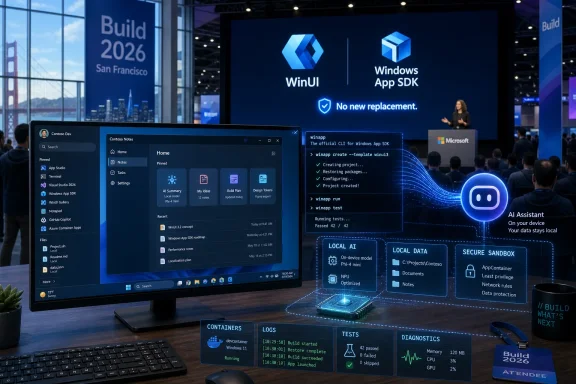
Microsoft used Build 2026 in San Francisco this week to make a renewed pitch for native Windows development, pairing WinUI and the Windows App SDK with AI-assisted command-line tooling, local models, and a public promise that no replacement framework is waiting offstage. That is the practical answer to the question Windows developers have been asking for years: Microsoft is not rebooting the stack again, at least not this time. It is trying to repair the one it already told everyone to use. The more interesting question is whether developers, after a decade of whiplash, still believe the company when it says this Windows app platform is the one.
For years, Windows development has suffered from a credibility problem that no sample app, keynote demo, or design refresh could solve. Microsoft kept telling developers to build for Windows while shipping first-party experiences that looked like they had been assembled from whatever framework happened to be politically convenient that quarter. Win32, UWP, React Native, Electron, WebView, WinUI, XAML Islands, WPF, MAUI-adjacent experiments — the result was not a platform so much as a sedimentary record of abandoned enthusiasm.
Build 2026 matters because Microsoft appears to have understood that the framework churn itself became the story. The company’s message around WinUI was unusually direct: WinUI is the modern UI framework for Windows, the Windows App SDK is the app platform underneath it, and Microsoft has no intention of creating yet another replacement. Even the branding is being simplified, with “WinUI 3” giving way to just “WinUI,” a small naming change that carries a larger message: this is supposed to be the line, not another waypoint.
That clarity is overdue. Windows developers are not short of APIs; they are short of confidence. The technical gaps in WinUI have always been painful, but the strategic ambiguity was worse. No serious developer wants to spend years moving a mature WPF or WinForms application to a platform that Microsoft itself may quietly stop investing in.
The presence of Chris Anderson in this story is not cosmetic. Anderson’s association with XAML, Avalon, and the Longhorn-era vision of Windows client development gives Microsoft’s latest pitch a kind of historical weight that a generic product manager could not provide. When someone from that lineage says the company is fixing the platform instead of inventing a new one, Windows developers are inclined to listen — even if they do so with arms folded.
AI changes that calculation. If Microsoft wants agents that can interact with local apps, reason over local files, use hardware acceleration, and perform tasks without shipping every token and gesture to a datacenter, Windows becomes infrastructure again. The operating system is no longer just the place where Microsoft advertises cloud services; it is the place where those services can be grounded, constrained, accelerated, and, in theory, made useful.
That is why the Build 2026 developer announcements should not be read as isolated tooling updates. Windows Developer Skills, the winapp CLI, Microsoft Execution Containers, Foundry Local, expanded local AI APIs, WSL improvements, Terminal work, and AI-aware developer configuration all orbit the same idea. Microsoft wants Windows to become a serious host for AI-assisted development and AI-assisted applications, not merely a client for Copilot chat windows.
This is also why the renewed interest in native apps is not nostalgia. AI agents that operate locally need apps with reliable accessibility surfaces, predictable controls, scriptable packaging, observable runtime behavior, and strong process boundaries. Web wrappers can be good enough for many business workflows, but they are not necessarily the ideal substrate for an agentic Windows platform. If Microsoft wants agents to use Windows well, it needs Windows apps to behave like first-class Windows apps again.
That is the context for Microsoft’s new emphasis on fundamentals. Performance, reliability, missing controls, system tray support, windowing limitations, migration paths, testing hooks, and packaging workflows are not glamorous keynote fodder. They are the difference between a framework developers experiment with and a framework they bet a business on.
The announced additions of DataGrid and charting controls are good examples. They are not revolutionary; they are basic table stakes for line-of-business software. But their absence signaled something damaging: Microsoft was asking developers to modernize serious desktop apps using a stack that still required third-party patches for ordinary application needs.
This is why “fixing the current thing” is more important than “announcing the next thing.” Microsoft has trained its developer community to expect abandonment dressed up as innovation. A new framework would have been easier to market and harder to trust. A serious repair campaign is less exciting, but it is the only path that could plausibly rebuild confidence.
That matters because AI coding agents do not want to click through property pages. They need commands they can run, logs they can inspect, tests they can execute, UI trees they can query, packages they can build, and errors they can loop on. A framework that is theoretically powerful but practically trapped behind manual tooling is poorly suited to an agentic development environment.
The winapp CLI is therefore more than a convenience. It is part of the contract between Windows app development and AI pair programming. If an agent can scaffold a WinUI app, run it, inspect its UI, diagnose a crash, package it, and consult structured Windows development guidance, then Microsoft has made native Windows development legible to the tools developers are increasingly using.
The Build CLI is more meta, and perhaps more awkward, but it fits the same pattern. A conference catalog turned into an AI skill sounds faintly absurd until you consider how much developer knowledge now arrives as videos, transcripts, demos, and half-documented announcements. Microsoft is effectively acknowledging that its own ecosystem has become too large for traditional browsing and search to handle gracefully.
But speed is not the same as software. AI-generated Windows apps still need architecture, error handling, accessibility, localization, installer discipline, data management, test coverage, update strategy, and respect for platform conventions. The risk is that Microsoft’s AI-assisted Windows tooling creates a new wave of demos that look native while inheriting all the brittleness of generated code.
This is where Microsoft’s emphasis on structured skills and grounding becomes important. A generic coding model can hallucinate Windows APIs, misuse packaging patterns, or produce code that compiles only in the happy path. A Windows-specific agent skill, tied to current documentation and a purpose-built CLI, at least gives the model rails.
Even so, the real test will not be whether an AI agent can create a Notepad clone. The real test will be whether it can help a team modernize a 15-year-old WPF application without turning it into an unmaintainable pile of generated glue. Enterprise Windows development is not a greenfield playground. It is full of old code that still pays the bills.
But Microsoft’s willingness to support declarative UI in C# is an admission that XAML is no longer the only plausible way to describe a Windows interface. Modern developers increasingly expect UI and logic to live closer together, with state changes flowing naturally through code rather than being split across markup, bindings, converters, code-behind, and generated partial classes. AI coding tools amplify that preference because they are often better at editing ordinary language-integrated code than juggling framework-specific markup conventions.
This does not mean XAML was a mistake. XAML was an ambitious and influential answer to a specific era of client development. It allowed designers and developers to reason about interface structure separately from application logic, and it powered some of the most sophisticated Windows UI work Microsoft ever attempted.
But the center of gravity has moved. If WinUI is to compete for developer attention in 2026 and beyond, it cannot behave as if React never happened, as if SwiftUI never happened, and as if Compose never happened. Declarative C# gives Windows developers a modern path without forcing Microsoft to throw away the existing XAML world.
That does not make Microsoft’s work irrelevant. It narrows the audience. The best case for WinUI is not that every startup suddenly decides to build Windows-exclusive software. The best case is that developers who already have a reason to care deeply about Windows finally get a modern, supported, performant, trustworthy stack.
That includes hardware utilities, creative tools, enterprise clients, developer tools, security software, system management consoles, medical and industrial applications, and internal line-of-business software that still depends on the PC as a serious workstation. It also includes Microsoft itself, which has too often shipped Windows experiences that felt disconnected from the platform story it was selling to everyone else.
If Microsoft wants third-party developers to believe in WinUI, it has to visibly use WinUI. Not selectively, not as a demo island, and not only for new surfaces no one depends on. The Windows shell, inbox apps, developer tools, and first-party utilities need to reflect the platform’s supposed future.
Still, the slogan landed because users know what they dislike. They dislike slow settings pages, inconsistent context menus, memory-heavy web shells, duplicate controls, laggy search boxes, and apps that look like Windows 11 but behave like a browser tab wearing a costume. “Native” has become shorthand for software that feels fast, integrated, respectful of system conventions, and not like a shortcut to a website.
Microsoft’s challenge is to convert that emotional demand into engineering discipline. A native app is not automatically good, and a web app is not automatically bad. But for core Windows experiences, users are right to expect responsiveness, accessibility, offline capability, sensible resource use, and integration with the shell.
That is where the WinUI push intersects with the larger Windows quality push. If Microsoft is serious about performance, latency, reliability, and reduced user hostility, it cannot treat the app platform as a side quest. The framework and the operating system are now part of the same credibility repair job.
That matters for app development because enterprises do not modernize in a vacuum. A company deciding whether to move a major internal application to WinUI needs confidence not only in the framework but in the deployment model, runtime stability, support lifecycle, policy controls, and compatibility story. If the platform keeps shifting under monthly updates, developer enthusiasm will not survive administrator resistance.
Microsoft appears to know this, or at least to have heard it loudly enough. The broader Windows quality narrative around 2026 — redesigned update experiences, performance work, reliability improvements, and more explicit attention to pain points — is a necessary backdrop for the developer push. You cannot ask enterprises to build more deeply on Windows while treating Windows itself as a moving target.
The agentic AI angle raises the stakes further. Local agents, execution containers, and AI-accessible app surfaces create new governance questions. What can an agent touch? What can it read? What can it automate? How are boundaries declared, audited, and enforced? The answers will matter more than the demos.
This is not merely an aesthetic complaint. Dogfooding is how a platform discovers its own pain. If Microsoft’s internal teams avoid WinUI because it lacks controls, has poor performance, complicates deployment, or slows iteration, then third-party developers learn everything they need to know from that avoidance. If Microsoft’s own apps embrace the stack and force the framework team to solve real problems, the platform improves.
The Build 2026 message suggests Microsoft now understands this dynamic. Bringing WinUI into more of the Windows shell and first-party features would be a much stronger signal than any conference session. Developers do not need another aspirational architecture diagram. They need proof that Microsoft is willing to live with the platform it recommends.
There is precedent for why this matters. Windows 7 restored confidence not because Microsoft invented an exotic new model, but because it made the existing PC experience feel coherent, fast, and less antagonistic after the Vista backlash. The current moment is different, but the lesson rhymes: trust returns when the product gets better in ways users and developers can feel.
That history does not make the Build 2026 announcements meaningless. It makes them fragile. A company with Microsoft’s resources can always produce a convincing reset story. The harder task is sustaining investment after the keynote lights go out and after the first wave of blog posts has been written.
The encouraging sign this time is that the work appears tied to several strategic pressures at once. Microsoft needs local AI to reduce cloud dependency and improve latency. It needs Windows to remain a credible developer workstation. It needs Copilot and agents to interact with real desktop workflows. It needs its own first-party Windows experiences to stop feeling like a framework museum. Those incentives make the WinUI push more durable than a purely aesthetic platform campaign.
But incentives are not guarantees. The Windows App SDK will be judged by releases, not roadmaps. WinUI will be judged by apps, not sessions. AI-assisted development will be judged by maintainable projects, not one-hour demos. Developers have heard enough promises; now they need the boring miracle of steady progress.
The near-term implications are concrete:
 Microsoft Finally Says the Quiet Part Out Loud
For years, Windows development has suffered from a credibility problem that no sample app, keynote demo, or design refresh could solve. Microsoft kept telling developers to build for Windows while shipping first-party experiences that looked like they had been assembled from whatever framework happened to be politically convenient that quarter. Win32, UWP, React Native, Electron, WebView, WinUI, XAML Islands, WPF, MAUI-adjacent experiments — the result was not a platform so much as a sedimentary record of abandoned enthusiasm.Build 2026 matters because Microsoft appears to have understood that the framework churn itself became the story. The company’s message around WinUI was unusually direct: WinUI is the modern UI framework for Windows, the Windows App SDK is the app platform underneath it, and Microsoft has no intention of creating yet another replacement. Even the branding is being simplified, with “WinUI 3” giving way to just “WinUI,” a small naming change that carries a larger message: this is supposed to be the line, not another waypoint.
That clarity is overdue. Windows developers are not short of APIs; they are short of confidence. The technical gaps in WinUI have always been painful, but the strategic ambiguity was worse. No serious developer wants to spend years moving a mature WPF or WinForms application to a platform that Microsoft itself may quietly stop investing in.
The presence of Chris Anderson in this story is not cosmetic. Anderson’s association with XAML, Avalon, and the Longhorn-era vision of Windows client development gives Microsoft’s latest pitch a kind of historical weight that a generic product manager could not provide. When someone from that lineage says the company is fixing the platform instead of inventing a new one, Windows developers are inclined to listen — even if they do so with arms folded.
Build’s AI Story Accidentally Makes Windows Important Again
The irony of Microsoft’s AI era is that it has done what years of Windows advocacy could not: it has made the PC strategically useful again. During the long Azure-first period, Windows often felt like a distribution surface for Microsoft accounts, Edge prompts, telemetry plumbing, and subscription upsells. The client OS was important because it was installed everywhere, not because it was where Microsoft’s most ambitious computing ideas lived.AI changes that calculation. If Microsoft wants agents that can interact with local apps, reason over local files, use hardware acceleration, and perform tasks without shipping every token and gesture to a datacenter, Windows becomes infrastructure again. The operating system is no longer just the place where Microsoft advertises cloud services; it is the place where those services can be grounded, constrained, accelerated, and, in theory, made useful.
That is why the Build 2026 developer announcements should not be read as isolated tooling updates. Windows Developer Skills, the winapp CLI, Microsoft Execution Containers, Foundry Local, expanded local AI APIs, WSL improvements, Terminal work, and AI-aware developer configuration all orbit the same idea. Microsoft wants Windows to become a serious host for AI-assisted development and AI-assisted applications, not merely a client for Copilot chat windows.
This is also why the renewed interest in native apps is not nostalgia. AI agents that operate locally need apps with reliable accessibility surfaces, predictable controls, scriptable packaging, observable runtime behavior, and strong process boundaries. Web wrappers can be good enough for many business workflows, but they are not necessarily the ideal substrate for an agentic Windows platform. If Microsoft wants agents to use Windows well, it needs Windows apps to behave like first-class Windows apps again.
The Windows App SDK Has to Become Boring Before It Can Become Strategic
The Windows App SDK has long had the shape of a good idea and the feel of an unfinished bargain. It promised to decouple modern Windows app capabilities from the OS release cycle, unify desktop app development, and free developers from the constraints and reputational baggage of UWP. In practice, it often left developers wrestling with missing controls, packaging complexity, incomplete documentation, awkward interop, and gaps that older frameworks had solved years earlier.That is the context for Microsoft’s new emphasis on fundamentals. Performance, reliability, missing controls, system tray support, windowing limitations, migration paths, testing hooks, and packaging workflows are not glamorous keynote fodder. They are the difference between a framework developers experiment with and a framework they bet a business on.
The announced additions of DataGrid and charting controls are good examples. They are not revolutionary; they are basic table stakes for line-of-business software. But their absence signaled something damaging: Microsoft was asking developers to modernize serious desktop apps using a stack that still required third-party patches for ordinary application needs.
This is why “fixing the current thing” is more important than “announcing the next thing.” Microsoft has trained its developer community to expect abandonment dressed up as innovation. A new framework would have been easier to market and harder to trust. A serious repair campaign is less exciting, but it is the only path that could plausibly rebuild confidence.
The Command Line Becomes Microsoft’s New Developer Interface
One of the stranger threads running through Build 2026 is Microsoft’s rediscovery of the command line as the connective tissue of modern development. The winapp CLI, Windows Developer Skills, Build CLI, and related Copilot and Claude Code integrations point to a future in which Windows development is less dependent on a heavyweight Visual Studio-first workflow and more accessible to agents, scripts, editors, and repeatable automation.That matters because AI coding agents do not want to click through property pages. They need commands they can run, logs they can inspect, tests they can execute, UI trees they can query, packages they can build, and errors they can loop on. A framework that is theoretically powerful but practically trapped behind manual tooling is poorly suited to an agentic development environment.
The winapp CLI is therefore more than a convenience. It is part of the contract between Windows app development and AI pair programming. If an agent can scaffold a WinUI app, run it, inspect its UI, diagnose a crash, package it, and consult structured Windows development guidance, then Microsoft has made native Windows development legible to the tools developers are increasingly using.
The Build CLI is more meta, and perhaps more awkward, but it fits the same pattern. A conference catalog turned into an AI skill sounds faintly absurd until you consider how much developer knowledge now arrives as videos, transcripts, demos, and half-documented announcements. Microsoft is effectively acknowledging that its own ecosystem has become too large for traditional browsing and search to handle gracefully.
Vibe Coding Is a Demo Until the Maintenance Bill Arrives
The most seductive part of this new model is the speed. A developer, or even a determined non-developer, can ask an AI agent to generate a WinUI application and have something plausible running in under an hour. For a platform that has often made “hello world” feel heavier than it should, that is not nothing.But speed is not the same as software. AI-generated Windows apps still need architecture, error handling, accessibility, localization, installer discipline, data management, test coverage, update strategy, and respect for platform conventions. The risk is that Microsoft’s AI-assisted Windows tooling creates a new wave of demos that look native while inheriting all the brittleness of generated code.
This is where Microsoft’s emphasis on structured skills and grounding becomes important. A generic coding model can hallucinate Windows APIs, misuse packaging patterns, or produce code that compiles only in the happy path. A Windows-specific agent skill, tied to current documentation and a purpose-built CLI, at least gives the model rails.
Even so, the real test will not be whether an AI agent can create a Notepad clone. The real test will be whether it can help a team modernize a 15-year-old WPF application without turning it into an unmaintainable pile of generated glue. Enterprise Windows development is not a greenfield playground. It is full of old code that still pays the bills.
Declarative C# Is Microsoft Admitting XAML Has Competition
The plan to bring React-, SwiftUI-, and Jetpack Compose-style declarative UI development to WinUI may be the most consequential technical shift in the announcement set. XAML is not disappearing, and it should not. It remains deeply embedded in WPF, UWP, WinUI, tooling, documentation, and the mental model of countless Windows developers.But Microsoft’s willingness to support declarative UI in C# is an admission that XAML is no longer the only plausible way to describe a Windows interface. Modern developers increasingly expect UI and logic to live closer together, with state changes flowing naturally through code rather than being split across markup, bindings, converters, code-behind, and generated partial classes. AI coding tools amplify that preference because they are often better at editing ordinary language-integrated code than juggling framework-specific markup conventions.
This does not mean XAML was a mistake. XAML was an ambitious and influential answer to a specific era of client development. It allowed designers and developers to reason about interface structure separately from application logic, and it powered some of the most sophisticated Windows UI work Microsoft ever attempted.
But the center of gravity has moved. If WinUI is to compete for developer attention in 2026 and beyond, it cannot behave as if React never happened, as if SwiftUI never happened, and as if Compose never happened. Declarative C# gives Windows developers a modern path without forcing Microsoft to throw away the existing XAML world.
Native Windows Apps Are Back, But the Market Has Moved
The awkward truth is that Microsoft can fix WinUI and still fail to create a renaissance in Windows-only app development. The market has changed. Many consumer apps are web services with desktop shells. Many enterprise apps are browser-first for deployment and compliance reasons. Many developers who once would have built a Windows desktop app now target the web, mobile, or cross-platform frameworks by default.That does not make Microsoft’s work irrelevant. It narrows the audience. The best case for WinUI is not that every startup suddenly decides to build Windows-exclusive software. The best case is that developers who already have a reason to care deeply about Windows finally get a modern, supported, performant, trustworthy stack.
That includes hardware utilities, creative tools, enterprise clients, developer tools, security software, system management consoles, medical and industrial applications, and internal line-of-business software that still depends on the PC as a serious workstation. It also includes Microsoft itself, which has too often shipped Windows experiences that felt disconnected from the platform story it was selling to everyone else.
If Microsoft wants third-party developers to believe in WinUI, it has to visibly use WinUI. Not selectively, not as a demo island, and not only for new surfaces no one depends on. The Windows shell, inbox apps, developer tools, and first-party utilities need to reflect the platform’s supposed future.
The “100 Percent Native” Promise Needs Adult Supervision
The phrase “100 percent native” was always more slogan than architecture. Modern Windows is not a single native stack. It is Win32, COM, .NET, XAML, DirectX, WebView, WinRT, packaged apps, unpackaged apps, services, bridges, and compatibility layers all pretending to be one thing because the Start menu has to make it look coherent.Still, the slogan landed because users know what they dislike. They dislike slow settings pages, inconsistent context menus, memory-heavy web shells, duplicate controls, laggy search boxes, and apps that look like Windows 11 but behave like a browser tab wearing a costume. “Native” has become shorthand for software that feels fast, integrated, respectful of system conventions, and not like a shortcut to a website.
Microsoft’s challenge is to convert that emotional demand into engineering discipline. A native app is not automatically good, and a web app is not automatically bad. But for core Windows experiences, users are right to expect responsiveness, accessibility, offline capability, sensible resource use, and integration with the shell.
That is where the WinUI push intersects with the larger Windows quality push. If Microsoft is serious about performance, latency, reliability, and reduced user hostility, it cannot treat the app platform as a side quest. The framework and the operating system are now part of the same credibility repair job.
Enterprise IT Will Believe the Roadmap When It Survives Contact With Servicing
For administrators, the WinUI story is inseparable from the Windows servicing story. Microsoft has spent the Windows 11 era blurring the line between security updates, feature delivery, app updates, cloud-controlled experiences, and policy-managed behavior. The result has been a sense that Windows changes because Microsoft wants it to, not because organizations have accepted a planned upgrade.That matters for app development because enterprises do not modernize in a vacuum. A company deciding whether to move a major internal application to WinUI needs confidence not only in the framework but in the deployment model, runtime stability, support lifecycle, policy controls, and compatibility story. If the platform keeps shifting under monthly updates, developer enthusiasm will not survive administrator resistance.
Microsoft appears to know this, or at least to have heard it loudly enough. The broader Windows quality narrative around 2026 — redesigned update experiences, performance work, reliability improvements, and more explicit attention to pain points — is a necessary backdrop for the developer push. You cannot ask enterprises to build more deeply on Windows while treating Windows itself as a moving target.
The agentic AI angle raises the stakes further. Local agents, execution containers, and AI-accessible app surfaces create new governance questions. What can an agent touch? What can it read? What can it automate? How are boundaries declared, audited, and enforced? The answers will matter more than the demos.
Microsoft’s Dogfood Problem Is Now a Platform Problem
Microsoft has long preached platform coherence while shipping products that undermine it. New Outlook is the obvious punching bag, but it is hardly alone. Windows users have grown accustomed to first-party apps that behave inconsistently, depend heavily on web technologies, ignore established conventions, or use Microsoft’s own design language only cosmetically.This is not merely an aesthetic complaint. Dogfooding is how a platform discovers its own pain. If Microsoft’s internal teams avoid WinUI because it lacks controls, has poor performance, complicates deployment, or slows iteration, then third-party developers learn everything they need to know from that avoidance. If Microsoft’s own apps embrace the stack and force the framework team to solve real problems, the platform improves.
The Build 2026 message suggests Microsoft now understands this dynamic. Bringing WinUI into more of the Windows shell and first-party features would be a much stronger signal than any conference session. Developers do not need another aspirational architecture diagram. They need proof that Microsoft is willing to live with the platform it recommends.
There is precedent for why this matters. Windows 7 restored confidence not because Microsoft invented an exotic new model, but because it made the existing PC experience feel coherent, fast, and less antagonistic after the Vista backlash. The current moment is different, but the lesson rhymes: trust returns when the product gets better in ways users and developers can feel.
The Real Competition Is Developer Memory
Microsoft is not competing only with Electron, React, SwiftUI, Compose, Qt, Flutter, or the web. It is competing with memory. Windows developers remember Silverlight. They remember UWP. They remember Windows 8’s app model. They remember Project Reunion’s promise to clean things up. They remember WPF being declared legacy, then revived, then left in a strange half-modernized state. They remember being told that the future was here, more than once.That history does not make the Build 2026 announcements meaningless. It makes them fragile. A company with Microsoft’s resources can always produce a convincing reset story. The harder task is sustaining investment after the keynote lights go out and after the first wave of blog posts has been written.
The encouraging sign this time is that the work appears tied to several strategic pressures at once. Microsoft needs local AI to reduce cloud dependency and improve latency. It needs Windows to remain a credible developer workstation. It needs Copilot and agents to interact with real desktop workflows. It needs its own first-party Windows experiences to stop feeling like a framework museum. Those incentives make the WinUI push more durable than a purely aesthetic platform campaign.
But incentives are not guarantees. The Windows App SDK will be judged by releases, not roadmaps. WinUI will be judged by apps, not sessions. AI-assisted development will be judged by maintainable projects, not one-hour demos. Developers have heard enough promises; now they need the boring miracle of steady progress.
The Windows Developer Bet Now Has Receipts to Produce
Microsoft’s Build 2026 Windows story is compelling because it is finally specific enough to be falsifiable. The company has named the stack, simplified the branding, tied it to AI-era tooling, promised feature-gap work, and connected native app development to the future of Windows itself. That gives developers a clearer signal than they have had in years.The near-term implications are concrete:
- Developers building new Windows-first applications should treat WinUI and the Windows App SDK as Microsoft’s intended path, while still evaluating whether a Windows-only app makes business sense.
- Teams maintaining WPF and WinForms applications should watch the migration and interop work closely, because incremental modernization is more realistic than wholesale rewrites.
- Administrators should view AI-enabled Windows development as both a productivity opportunity and a governance problem, especially as agents gain access to local apps and files.
- Microsoft’s first-party Windows apps and shell experiences will be the most important evidence of whether the WinUI commitment is real.
- The winapp CLI and Windows Developer Skills are early signs that Microsoft is designing Windows development for AI agents, not just human developers using Visual Studio.
- The biggest risk is not that Microsoft lacks a plan, but that it loses patience before the plan earns back developer trust.
References
- Primary source: thurrott.com
Published: 2026-06-04T16:22:06.946793
Developers, Developers, Developers! ⭐ - Thurrott.com
Microsoft is taking steps to truly modernize Windows app development, and these changes will impact developers and users alike.www.thurrott.com - Related coverage: windowscentral.com
Microsoft uses Build 2026 to push developers toward fully native Windows apps, not web wrappers, with new tools and a clearer roadmap | Windows Central
Microsoft wants more WinUI 3 apps across Windows 11, and Build 2026 shows how developers can get there with new tools, agents, and hardware.www.windowscentral.com
