

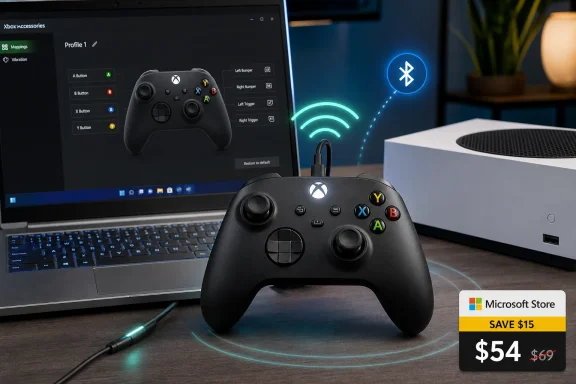
Verdict: the standard Xbox Wireless Controller is the best buy for most Xbox and Windows PC players right now because Microsoft’s store lists it from $54.00, undercutting premium pads while preserving the compatibility that matters most across console and PC. If you mainly need a controller that works broadly, connects without drama, and can be remapped in Windows, this is the sensible purchase. Spend more only if you know you need rear paddles, trigger locks, multiple onboard profiles, or other enthusiast features.
The controller market has spent the last few years trying to convince players that “better” means more: more buttons, more profiles, more lighting, more polling-rate claims, more proprietary software, and more money. That is true for some players, especially competitive PC users with specific input needs. But for the vast middle of the Xbox-and-PC audience, the smarter buy is usually the pad that disappears into the setup.
That is why the current Microsoft Store pricing matters. Microsoft lists the Xbox Wireless Controller from $54.00, while several special editions are also discounted from their usual $69.99 street-price neighborhood. That puts the official controller in the zone where it stops being merely the default option and becomes the value pick.
The point is not that the standard Xbox controller is the most feature-rich pad available. It is not. The point is that for most Windows and Xbox users, compatibility is a feature, and Microsoft’s own controller still buys more of it per dollar than most alternatives.
This is especially true for players who split time between an Xbox console, a Windows 10 or Windows 11 PC, and the occasional couch setup. A controller that can move between those worlds with minimal fuss has value beyond its spec sheet.
If you play mostly single-player games, racing games, platformers, emulators, sports titles, or controller-friendly PC games, the standard pad is likely the right answer. You are not paying for hardware you will ignore. You are paying for broad support, familiar layout, and predictable behavior.
If you play competitive shooters or action games where rear inputs, trigger stops, or fast profile switching are core to your setup, the standard controller is less compelling. That is where premium pads, Elite-style controllers, and licensed third-party alternatives earn their keep. But that is a narrower use case than the accessory market likes to admit.
The best way to frame the deal is not “cheap controller versus expensive controller.” It is “known-good official controller versus additional features you may or may not use.” At $54.00 from Microsoft’s own store, the official pad moves from safe choice to default recommendation.
Microsoft’s own Windows guidance makes the connection story plain: Xbox controllers connect to a PC via USB, Bluetooth, or Xbox Wireless. That matters because “works with PC” can mean very different things across the controller market. With the Xbox pad, the compatibility story starts from the operating system and radiates outward.
For the WindowsForum audience, that is not a trivial point. Forum threads about Xbox controllers on PC tend to begin with the same practical problem: a user has a controller, a PC, a game that may or may not recognize it, and uncertainty about whether the issue is Bluetooth, drivers, the game, or the controller itself. The official Xbox pad does not eliminate every edge case, but it reduces the number of variables.
This is where cheaper alternatives become more complicated than their sticker prices suggest. A third-party controller can be a great buy, especially when it is wired, officially licensed, or designed for a specific niche. But once the troubleshooting burden shifts to a vendor utility, a firmware updater, a dongle, or per-game compatibility, the savings start to look less clean.
The Windows gamer’s most precious resource is not always money. Sometimes it is the willingness to troubleshoot after work. On that metric, the official Xbox controller has an advantage that does not fit neatly on a product comparison chart.
Bluetooth is the convenience mode. It is the option many laptop users and small-form-factor PC owners will try first, because it does not require a cable or a dedicated adapter. For casual play, it is often good enough, and the controller’s Bluetooth support is part of why it works well as a shared PC-and-console accessory.
Xbox Wireless is the more Xbox-native wireless path. For users who care about a console-like connection on PC, it remains part of the controller’s appeal. The important thing is not that every user should use every mode; it is that the same controller gives you fallbacks.
That fallback value is easy to underestimate until something breaks. If Bluetooth pairing gets flaky, try USB. If a desktop is awkwardly positioned for wired play, use wireless. If a game behaves strangely, remove the connection method from the list of suspects before blaming the game.
This is why the official pad’s feature list undersells it. The real feature is boring resilience: several supported ways to get from the controller in your hand to the game on your screen.
For many users, basic remapping is enough. Swapping a button assignment, accommodating a personal preference, or adapting to a game’s awkward default layout can make a controller feel much more personal. You do not need rear paddles to benefit from a layout that better matches your hands.
This is one of the places where Microsoft’s ecosystem advantage shows up quietly. The remapping path is part of the Windows-and-Xbox experience rather than a separate third-party software bet. For sysadmins and IT pros who support shared gaming PCs, labs, lounges, or accessibility-adjacent setups, that standardization matters.
It also matters for families and multi-user PCs. A premium controller with deep configuration is useful when one player owns and tunes it. A standard controller with basic mapping is often better when several people just need something that works.
The danger is assuming every customization feature is equally valuable. Most buyers do not need the full ladder. They need one or two practical adjustments, and the standard controller covers more of that ground than its “basic” reputation implies.
The Xbox Elite Series 2 and similar pro-style pads exist because some users really do benefit from those features. WindowsForum has covered the Elite line as a customizable pro pad, and that framing remains fair. A premium pad is not just a more expensive version of the standard controller; it is a different answer to a different set of demands.
But the purchase has to begin with the player’s actual behavior. If you cannot name the function you need before you see the marketing page, you probably do not need to pay for it. “Maybe I’ll use paddles someday” is a weak reason to double or triple the budget.
The same is true of profile swapping. It sounds powerful, but it is only meaningful if you actually maintain different layouts and move between them. Plenty of players never do. They settle into one layout, one grip, and one set of games.
That is why the standard controller becomes so attractive at $54.00. It covers the common case and leaves money for the things that often matter more: games, rechargeable batteries, a longer USB cable, or simply a second controller for local play.
For Xbox-only players, the official controller has the cleanest argument. It is built for the console, uses the expected layout, and avoids the “will this work with my game?” dance. If it is discounted, the case gets stronger.
For PC-only players, the decision is slightly more nuanced. A wired third-party controller may be appealing if the only goal is the lowest possible price. But if the buyer wants wireless play, broad compatibility, and minimal setup weirdness, the standard Xbox Wireless Controller still lands in the sweet spot.
For hybrid Xbox-and-PC players, the standard pad is the easiest recommendation. One controller that can move between both environments is worth more than a bargain device that is comfortable in one and finicky in the other.
For enthusiasts, the calculus changes only when the missing features are genuinely part of play. If back buttons are required, buy a controller with back buttons. If trigger locks are required, buy a controller with trigger locks. If they are not required, the discounted official pad is the cleaner buy.
That is the key timing issue. Discounts compress the market. When the official controller drops, third-party pads must compete not just against Microsoft’s brand but against Microsoft’s integration.
Special editions complicate the picture in a useful way. If several are discounted from the usual $69.99 street-price range, buyers have more room to choose based on color or design without automatically paying a large style tax. That does not make a special edition a better controller, but it can make it a better gift or second-pad purchase.
Availability is the caveat. Store pricing can change, colors can move in and out of stock, and special-edition discounts tend to be less predictable than the existence of the standard controller itself. The practical advice is to treat the $54.00 listing as a buy signal, not a permanent entitlement.
If you already need a controller, waiting for an even lower price may be false economy. If you do not need one, this is not a reason to manufacture urgency. The deal is strongest for buyers who were already in the market.
For Bluetooth, put the controller into pairing mode, open Windows Bluetooth settings, add a Bluetooth device, and select the controller when it appears. On Windows 10 and Windows 11 systems, this is the route many users will take for laptops and desktops with built-in Bluetooth. If pairing fails, the first troubleshooting step should be to test over USB rather than assuming the controller is defective.
For Xbox Wireless, use the Xbox Wireless path supported by the controller and PC hardware setup. This is the mode for users who prefer Microsoft’s Xbox-native wireless approach rather than standard Bluetooth. It is also the option that makes the controller feel most like part of the Xbox ecosystem when used at a desk.
After connection, install or open the Xbox Accessories app if you want to adjust button mapping. The standard controller does not become a pro pad, but it does support remapping on Windows 10 and Windows 11 through that app. That is the practical finishing step many users overlook.
This setup flow is also the best troubleshooting flow. Start wired, confirm the game sees the controller, then move to wireless. That sequence saves time because it tells you whether the problem is the controller, the connection, or the software expecting input.
That is where the official controller earns its keep. It gives the community a known baseline. When a user says they are using an Xbox Wireless Controller on Windows, the troubleshooting conversation can move quickly to connection mode, game support, and the Xbox Accessories app rather than first establishing whether the hardware is obscure.
This is also why premium-controller coverage needs a reality check. A high-end pad can be excellent, but it adds layers: extra inputs, profiles, firmware behavior, vendor utilities, or platform-specific modes. Those layers may be worth it for serious players. They are not automatically worth it for the person who just wants Forza, FIFA, Elden Ring, Minecraft, or a Game Pass title to recognize a controller.
WindowsForum’s existing controller coverage spans standard buying guides, Elite-style pro pads, and newer licensed controllers with PC-oriented features. That broader context is useful because it shows the market is not lacking options. The harder problem is knowing when not to overbuy.
At $54.00, the standard Xbox Wireless Controller answers that problem neatly. It is not the fantasy pick. It is the sensible one.
For Windows PC users, buy it if you want a controller that most PC games are likely to understand without drama. PC gaming is flexible, but that flexibility is also where compatibility problems breed. The official Xbox controller remains the safest default.
For laptop users, Bluetooth makes the controller especially appealing because it avoids a permanent cable or dongle in the bag. For desktop users, USB remains the boringly excellent fallback. If you are building a living-room PC, the controller’s multiple connection options become even more valuable.
For Steam-heavy players, the official controller is still a strong practical choice because the wider PC ecosystem has normalized Xbox-style inputs. That does not mean every game behaves perfectly. It means the Xbox layout is the least surprising place to start.
For users shopping purely on price, the answer is more conditional. If the only thing that matters is spending the least money possible, there may be cheaper wired pads. But if the goal is the lowest-risk controller for both Xbox and Windows PC, the discounted official pad is the better value.
That restraint is easy to underrate because accessory marketing sells aspiration. A premium controller implies you are a more serious player. A standard controller implies you are settling. The current price flips that logic: not buying features you do not need is the smart move.
There is also a maintenance advantage. Fewer special features mean fewer things to configure, forget, misconfigure, or explain to another person using the same system. In shared spaces, that simplicity is not a limitation. It is an asset.
The Windows Accessories app support gives the standard pad just enough flexibility without dragging users into enthusiast territory. That balance is precisely why it works as a default recommendation. It is configurable, but not complicated.
If the controller market had no premium options, this would be a weaker argument. But because the premium options are there, the standard controller’s role becomes clearer. It is the baseline you should only leave with a reason.
This is the practical read for WindowsForum buyers:
 Microsoft’s Cheapest Smart Controller Deal Is Hiding in Plain Sight
The controller market has spent the last few years trying to convince players that “better” means more: more buttons, more profiles, more lighting, more polling-rate claims, more proprietary software, and more money. That is true for some players, especially competitive PC users with specific input needs. But for the vast middle of the Xbox-and-PC audience, the smarter buy is usually the pad that disappears into the setup.That is why the current Microsoft Store pricing matters. Microsoft lists the Xbox Wireless Controller from $54.00, while several special editions are also discounted from their usual $69.99 street-price neighborhood. That puts the official controller in the zone where it stops being merely the default option and becomes the value pick.
The point is not that the standard Xbox controller is the most feature-rich pad available. It is not. The point is that for most Windows and Xbox users, compatibility is a feature, and Microsoft’s own controller still buys more of it per dollar than most alternatives.
This is especially true for players who split time between an Xbox console, a Windows 10 or Windows 11 PC, and the occasional couch setup. A controller that can move between those worlds with minimal fuss has value beyond its spec sheet.
The Buying Advice Is Simple: Get the Standard Pad Unless You Already Know Why You Shouldn’t
For most readers, the recommendation is straightforward: buy the standard Xbox Wireless Controller at the discounted Microsoft Store price if you want one controller for Xbox and PC. It connects over USB, Bluetooth, or Xbox Wireless, and Windows treats Xbox controllers as the path of least resistance. That is the entire case, and it is stronger than it looks.If you play mostly single-player games, racing games, platformers, emulators, sports titles, or controller-friendly PC games, the standard pad is likely the right answer. You are not paying for hardware you will ignore. You are paying for broad support, familiar layout, and predictable behavior.
If you play competitive shooters or action games where rear inputs, trigger stops, or fast profile switching are core to your setup, the standard controller is less compelling. That is where premium pads, Elite-style controllers, and licensed third-party alternatives earn their keep. But that is a narrower use case than the accessory market likes to admit.
The best way to frame the deal is not “cheap controller versus expensive controller.” It is “known-good official controller versus additional features you may or may not use.” At $54.00 from Microsoft’s own store, the official pad moves from safe choice to default recommendation.
Windows Compatibility Is the Real Discount
There is a reason PC gamers keep coming back to Xbox controllers even when the market is full of alternatives. Windows support is not a side benefit; it is the product. The Xbox controller is the controller most Windows games expect, the one most setup guides assume, and the one least likely to turn a Saturday night into driver archaeology.Microsoft’s own Windows guidance makes the connection story plain: Xbox controllers connect to a PC via USB, Bluetooth, or Xbox Wireless. That matters because “works with PC” can mean very different things across the controller market. With the Xbox pad, the compatibility story starts from the operating system and radiates outward.
For the WindowsForum audience, that is not a trivial point. Forum threads about Xbox controllers on PC tend to begin with the same practical problem: a user has a controller, a PC, a game that may or may not recognize it, and uncertainty about whether the issue is Bluetooth, drivers, the game, or the controller itself. The official Xbox pad does not eliminate every edge case, but it reduces the number of variables.
This is where cheaper alternatives become more complicated than their sticker prices suggest. A third-party controller can be a great buy, especially when it is wired, officially licensed, or designed for a specific niche. But once the troubleshooting burden shifts to a vendor utility, a firmware updater, a dongle, or per-game compatibility, the savings start to look less clean.
The Windows gamer’s most precious resource is not always money. Sometimes it is the willingness to troubleshoot after work. On that metric, the official Xbox controller has an advantage that does not fit neatly on a product comparison chart.
USB, Bluetooth, and Xbox Wireless Are Three Different Answers to the Same Problem
The standard controller’s value also comes from having three practical ways to connect. USB is the simplest answer when reliability matters most. Plugging in is not glamorous, but it is the fastest way to separate controller problems from wireless problems.Bluetooth is the convenience mode. It is the option many laptop users and small-form-factor PC owners will try first, because it does not require a cable or a dedicated adapter. For casual play, it is often good enough, and the controller’s Bluetooth support is part of why it works well as a shared PC-and-console accessory.
Xbox Wireless is the more Xbox-native wireless path. For users who care about a console-like connection on PC, it remains part of the controller’s appeal. The important thing is not that every user should use every mode; it is that the same controller gives you fallbacks.
That fallback value is easy to underestimate until something breaks. If Bluetooth pairing gets flaky, try USB. If a desktop is awkwardly positioned for wired play, use wireless. If a game behaves strangely, remove the connection method from the list of suspects before blaming the game.
This is why the official pad’s feature list undersells it. The real feature is boring resilience: several supported ways to get from the controller in your hand to the game on your screen.
Button Mapping Makes the Standard Pad More Flexible Than Its Price Suggests
The standard Xbox Wireless Controller also supports button mapping through the Xbox Accessories app on Windows 10 and Windows 11. That does not turn it into an Elite controller, and it should not be sold as one. But it does mean the discounted pad is not locked to one rigid layout.For many users, basic remapping is enough. Swapping a button assignment, accommodating a personal preference, or adapting to a game’s awkward default layout can make a controller feel much more personal. You do not need rear paddles to benefit from a layout that better matches your hands.
This is one of the places where Microsoft’s ecosystem advantage shows up quietly. The remapping path is part of the Windows-and-Xbox experience rather than a separate third-party software bet. For sysadmins and IT pros who support shared gaming PCs, labs, lounges, or accessibility-adjacent setups, that standardization matters.
It also matters for families and multi-user PCs. A premium controller with deep configuration is useful when one player owns and tunes it. A standard controller with basic mapping is often better when several people just need something that works.
The danger is assuming every customization feature is equally valuable. Most buyers do not need the full ladder. They need one or two practical adjustments, and the standard controller covers more of that ground than its “basic” reputation implies.
Premium Controllers Still Win, but Only for Premium Problems
None of this makes premium controllers pointless. Rear paddles can be genuinely useful. Trigger locks can change how a shooter feels. Profile swapping can matter when a player moves constantly between genres and wants different layouts ready instantly.The Xbox Elite Series 2 and similar pro-style pads exist because some users really do benefit from those features. WindowsForum has covered the Elite line as a customizable pro pad, and that framing remains fair. A premium pad is not just a more expensive version of the standard controller; it is a different answer to a different set of demands.
But the purchase has to begin with the player’s actual behavior. If you cannot name the function you need before you see the marketing page, you probably do not need to pay for it. “Maybe I’ll use paddles someday” is a weak reason to double or triple the budget.
The same is true of profile swapping. It sounds powerful, but it is only meaningful if you actually maintain different layouts and move between them. Plenty of players never do. They settle into one layout, one grip, and one set of games.
That is why the standard controller becomes so attractive at $54.00. It covers the common case and leaves money for the things that often matter more: games, rechargeable batteries, a longer USB cable, or simply a second controller for local play.
The Alternative Isn’t Always Cheaper Once You Price the Whole Setup
The competitive gap in most controller deal coverage is the total-cost question. A cheaper pad can be cheaper at checkout and still worse for the person buying it. The comparison has to include platform support, connection reliability, remapping, replacement risk, and the cost of your own time.For Xbox-only players, the official controller has the cleanest argument. It is built for the console, uses the expected layout, and avoids the “will this work with my game?” dance. If it is discounted, the case gets stronger.
For PC-only players, the decision is slightly more nuanced. A wired third-party controller may be appealing if the only goal is the lowest possible price. But if the buyer wants wireless play, broad compatibility, and minimal setup weirdness, the standard Xbox Wireless Controller still lands in the sweet spot.
For hybrid Xbox-and-PC players, the standard pad is the easiest recommendation. One controller that can move between both environments is worth more than a bargain device that is comfortable in one and finicky in the other.
For enthusiasts, the calculus changes only when the missing features are genuinely part of play. If back buttons are required, buy a controller with back buttons. If trigger locks are required, buy a controller with trigger locks. If they are not required, the discounted official pad is the cleaner buy.
Sale Timing Changes the Math More Than the Spec Sheet Does
Controller recommendations are unusually price-sensitive. At full price, the standard Xbox Wireless Controller is a safe default, but not always an exciting deal. At $54.00 from Microsoft’s own store, it becomes much harder for midrange alternatives to win unless they offer a feature the buyer will definitely use.That is the key timing issue. Discounts compress the market. When the official controller drops, third-party pads must compete not just against Microsoft’s brand but against Microsoft’s integration.
Special editions complicate the picture in a useful way. If several are discounted from the usual $69.99 street-price range, buyers have more room to choose based on color or design without automatically paying a large style tax. That does not make a special edition a better controller, but it can make it a better gift or second-pad purchase.
Availability is the caveat. Store pricing can change, colors can move in and out of stock, and special-edition discounts tend to be less predictable than the existence of the standard controller itself. The practical advice is to treat the $54.00 listing as a buy signal, not a permanent entitlement.
If you already need a controller, waiting for an even lower price may be false economy. If you do not need one, this is not a reason to manufacture urgency. The deal is strongest for buyers who were already in the market.
The PC Setup Path Should Be Boring, and That Is the Point
For a Windows PC, the practical setup is refreshingly ordinary. Use USB if you want the fastest test: connect the controller with a compatible cable and launch a controller-supported game. If the game recognizes it, you have confirmed the controller and the game path before introducing wireless variables.For Bluetooth, put the controller into pairing mode, open Windows Bluetooth settings, add a Bluetooth device, and select the controller when it appears. On Windows 10 and Windows 11 systems, this is the route many users will take for laptops and desktops with built-in Bluetooth. If pairing fails, the first troubleshooting step should be to test over USB rather than assuming the controller is defective.
For Xbox Wireless, use the Xbox Wireless path supported by the controller and PC hardware setup. This is the mode for users who prefer Microsoft’s Xbox-native wireless approach rather than standard Bluetooth. It is also the option that makes the controller feel most like part of the Xbox ecosystem when used at a desk.
After connection, install or open the Xbox Accessories app if you want to adjust button mapping. The standard controller does not become a pro pad, but it does support remapping on Windows 10 and Windows 11 through that app. That is the practical finishing step many users overlook.
This setup flow is also the best troubleshooting flow. Start wired, confirm the game sees the controller, then move to wireless. That sequence saves time because it tells you whether the problem is the controller, the connection, or the software expecting input.
WindowsForum Readers Have Seen This Movie Before
The WindowsForum context makes the recommendation less abstract. Users have long asked what they need to use an Xbox controller with a PC, why a wired Xbox controller works in one game but not another, and whether a more advanced controller is worth the money. Those are not spec-sheet questions. They are support questions.That is where the official controller earns its keep. It gives the community a known baseline. When a user says they are using an Xbox Wireless Controller on Windows, the troubleshooting conversation can move quickly to connection mode, game support, and the Xbox Accessories app rather than first establishing whether the hardware is obscure.
This is also why premium-controller coverage needs a reality check. A high-end pad can be excellent, but it adds layers: extra inputs, profiles, firmware behavior, vendor utilities, or platform-specific modes. Those layers may be worth it for serious players. They are not automatically worth it for the person who just wants Forza, FIFA, Elden Ring, Minecraft, or a Game Pass title to recognize a controller.
WindowsForum’s existing controller coverage spans standard buying guides, Elite-style pro pads, and newer licensed controllers with PC-oriented features. That broader context is useful because it shows the market is not lacking options. The harder problem is knowing when not to overbuy.
At $54.00, the standard Xbox Wireless Controller answers that problem neatly. It is not the fantasy pick. It is the sensible one.
The Platform-by-Platform Recommendation Is Narrower Than the Marketing
For Xbox Series X|S and Xbox One users, the recommendation is the easiest: buy the official controller if you need another pad and the discounted color you want is available. It is the controller the platform is built around. The only strong reason to step up is a known need for competitive or accessibility-related customization beyond basic remapping.For Windows PC users, buy it if you want a controller that most PC games are likely to understand without drama. PC gaming is flexible, but that flexibility is also where compatibility problems breed. The official Xbox controller remains the safest default.
For laptop users, Bluetooth makes the controller especially appealing because it avoids a permanent cable or dongle in the bag. For desktop users, USB remains the boringly excellent fallback. If you are building a living-room PC, the controller’s multiple connection options become even more valuable.
For Steam-heavy players, the official controller is still a strong practical choice because the wider PC ecosystem has normalized Xbox-style inputs. That does not mean every game behaves perfectly. It means the Xbox layout is the least surprising place to start.
For users shopping purely on price, the answer is more conditional. If the only thing that matters is spending the least money possible, there may be cheaper wired pads. But if the goal is the lowest-risk controller for both Xbox and Windows PC, the discounted official pad is the better value.
The Features You Don’t Buy Are Part of the Savings
The standard controller’s strongest argument is restraint. It does not ask most buyers to pay for a pro workflow they do not have. It does not pretend every couch player needs a tournament pad. It does not require a new control philosophy.That restraint is easy to underrate because accessory marketing sells aspiration. A premium controller implies you are a more serious player. A standard controller implies you are settling. The current price flips that logic: not buying features you do not need is the smart move.
There is also a maintenance advantage. Fewer special features mean fewer things to configure, forget, misconfigure, or explain to another person using the same system. In shared spaces, that simplicity is not a limitation. It is an asset.
The Windows Accessories app support gives the standard pad just enough flexibility without dragging users into enthusiast territory. That balance is precisely why it works as a default recommendation. It is configurable, but not complicated.
If the controller market had no premium options, this would be a weaker argument. But because the premium options are there, the standard controller’s role becomes clearer. It is the baseline you should only leave with a reason.
The $54 Test Separates Real Needs From Controller FOMO
The cleanest way to decide is to run the $54 test: if the standard Xbox Wireless Controller at Microsoft’s current store price solves your actual use case, stop shopping. The longer you keep comparing after that point, the more likely you are paying for imagined needs rather than real ones.This is the practical read for WindowsForum buyers:
- The standard Xbox Wireless Controller is the best buy for most Xbox-and-PC players at Microsoft’s listed price from $54.00.
- Windows users should prefer it when they want the most seamless controller path across USB, Bluetooth, and Xbox Wireless.
- Premium pads make sense when rear paddles, trigger locks, or profile switching are requirements rather than curiosities.
- Cheaper alternatives can win on sticker price, but they have to overcome the official controller’s compatibility advantage.
- Buyers who already need a controller should treat the current Microsoft Store discount as a strong purchase signal, while remembering that availability and special-edition pricing can change.
References
- Primary source: microsoft.com
Windows Learning Center | Microsoft
Whether you’re working, gaming, or just browsing, Windows Learning Center has helpful tips, tricks, and tools to help make the everyday easier.www.microsoft.com
- Independent coverage: turtlebeach.com
Pacific Skyline Wireless Controller | Turtle Beach
Pacific Skyline Wireless Controller blends San Diego-inspired art, RGB lighting, TMR thumbsticks, Bluetooth®, and wireless Xbox/PC gameplay.www.turtlebeach.com - Primary source: WindowsForum
Windows 7 - XBOX controller and pc | Windows Forum
The thread discusses how to connect an Xbox controller to a PC, with initial inquiries about compatibility and setup. A contributor provides information...windowsforum.com
