

Call of Duty: Black Ops 7 arrives with clear, tiered PC requirements and a strict anti‑cheat posture that will affect almost every Windows desktop player — the publisher has published Minimum, Recommended, and Competitive / 4K Ultra hardware targets, requires TPM 2.0 and UEFI Secure Boot for anti‑cheat to function, and schedules a regional midnight launch on November 14 with a timed preload window beginning November 10.
Beenox (in cooperation with Treyarch and Activision) prepared the Black Ops 7 PC build as a full‑featured Windows client with deep graphics controls, vendor upscaling/frame‑generation support, and a built‑in benchmark to help players tune settings. The official guidance published in the lead‑up to launch splits the experience into three practical tiers: Minimum (get in and play), Recommended (comfortable 60 FPS), and Competitive / 4K Ultra (high‑refresh or native 4K targets). Storage is large for a modern shooter — plan for at least 116 GB on an SSD at launch — and the anti‑cheat system now enforces firmware‑level protections (TPM 2.0 + Secure Boot).
This article consolidates the published PC requirements, verifies key platform and security claims against publisher guidance, analyzes how the numbers map to real‑world play, and highlights the most likely upgrade and troubleshooting steps PC players will face on day one.
Practical advice:
General driver checklist:
For most mainstream players with a modestly modern PC (mid‑range GPU, SSD, and a relatively recent CPU), the Recommended tier will be attainable with judicious use of vendor upscalers. For competitive, high‑refresh or 4K players, expect to invest in stronger GPUs and larger VRAM budgets. Be prepared to enable TPM and Secure Boot in UEFI/BIOS well before the launch window to avoid unpleasant doorstops at first run.
Source: Khel Now Call of Duty Black Ops 7 PC requirements & more details
 Background / Overview
Beenox (in cooperation with Treyarch and Activision) prepared the Black Ops 7 PC build as a full‑featured Windows client with deep graphics controls, vendor upscaling/frame‑generation support, and a built‑in benchmark to help players tune settings. The official guidance published in the lead‑up to launch splits the experience into three practical tiers: Minimum (get in and play), Recommended (comfortable 60 FPS), and Competitive / 4K Ultra (high‑refresh or native 4K targets). Storage is large for a modern shooter — plan for at least 116 GB on an SSD at launch — and the anti‑cheat system now enforces firmware‑level protections (TPM 2.0 + Secure Boot).This article consolidates the published PC requirements, verifies key platform and security claims against publisher guidance, analyzes how the numbers map to real‑world play, and highlights the most likely upgrade and troubleshooting steps PC players will face on day one.
The official PC requirements — numbers you need
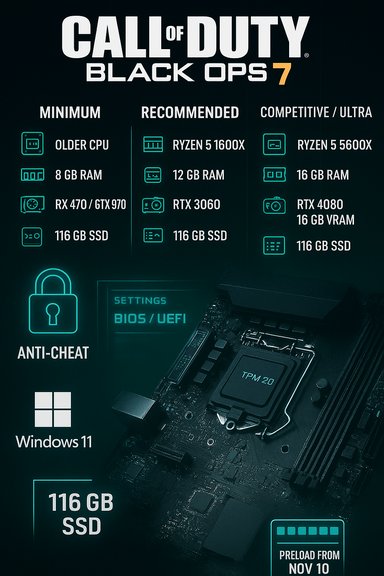
Below is a concise, readable distillation of the three published hardware tiers as reported in pre‑launch materials and the publisher’s PC notes. These are the figures players should plan for when sizing their rigs and deciding whether to upgrade before November 14.Minimum (Playable)
- OS: Windows 10 64‑bit (latest update)
- CPU: AMD Ryzen 5 1400 or Intel Core i5‑6600
- RAM: 8 GB
- GPU: AMD RX 470 or NVIDIA GTX 970 / GTX 1060 or Intel Arc A580
- VRAM: 3 GB
- Storage: SSD with 116 GB available
- Other: Broadband, DirectX 12, TPM 2.0 + Secure Boot required for anti‑cheat.
Recommended (Comfortable / 60 FPS)
- OS: Windows 11 64‑bit (latest update)
- CPU: AMD Ryzen 5 1600X or Intel Core i7‑6700K
- RAM: 12 GB
- GPU: AMD RX 6600 XT / NVIDIA RTX 3060 / Intel Arc B580
- VRAM: 8 GB
- Storage: SSD with 116 GB available.
Competitive / 4K Ultra (Pro‑level)
- OS: Windows 11 64‑bit (latest update)
- CPU: AMD Ryzen 5 5600X / Intel Core i7‑10700K
- RAM: 16 GB
- GPU: AMD RX 7900 XT / NVIDIA RTX 4080 or high‑end equivalents (16 GB VRAM)
- VRAM: 16 GB
- Storage: SSD with 116 GB available.
Verifying platform security and anti‑cheat requirements
This launch is notable not only for the hardware envelope but for the anti‑cheat enforcement approach. Activision has explicitly stated that TPM 2.0 and UEFI Secure Boot will be required for the Black Ops 7 Beta and at launch. The publisher’s support documentation explains how TPM and Secure Boot feed into the RICOCHET anti‑cheat improvements and a planned remote attestation mechanism that validates firmware settings via cloud validation.- Activision’s guidance shows the requirement and provides practical checks (tpm.msc, msinfo32) and BIOS/UEFI settings steps for players to validate TPM 2.0 and Secure Boot on their systems.
- Blizzard/Blizzard Support (Battle.net) echoes the same requirement in their knowledge base, confirming that players who do not enable both features may be unable to play.
What the tiers actually mean for different players
Raw spec lists are useful; the critical question is what players can expect in real play. Below is a practical mapping of the tiers to resolutions, framerates, and expected visual compromises.For modest / older rigs (Minimum)
Minimum targets are focused on “get in and play” at 1080p with lowered settings. Expect:- 1080p at ~30 FPS on Low settings for the oldest supported GPUs.
- Heavier effects (high‑res textures, long view distances, ray tracing) will be disabled or severely cut back.
- A major gating factor will be the firmware requirements: even if the GPU/CPU meets the minimum, you must enable TPM 2.0 + Secure Boot to launch.
For mainstream players (Recommended)
Recommended hardware aims at 60 FPS at 1080p to 1440p with a good balance of visual quality:- Expect consistent 60 FPS at 1080p / medium to high settings on cards like RTX 3060 / RX 6600 XT, especially when vendor upscalers are used.
- Native 1440p/60 is achievable on recommended hardware if you use FSR/XeSS/DLSS modes or fine‑tune a few heavy settings (shadows, reflections).
- Windows 11 is recommended in this bracket to ensure feature compatibility and to satisfy anti‑cheat expectations more easily.
For competitive and 4K enthusiasts (Competitive / Ultra)
This tier targets high‑refresh or native 4K play:- For native 4K/60 or stable 1440p/144 you’ll need high‑end GPUs with large VRAM pools and fast CPUs to avoid CPU bottlenecks.
- Frame generation / AI upscaling will be the fastest path to triple‑digit framerates at high resolution, but achieving truly native 4K with maxed ray tracing and no upscaling still requires flagship silicon and a well‑balanced CPU/RAM/SSD stack.
Storage, install size and preload guidance
Black Ops 7’s installer footprint is substantial and — importantly — SSD is required. The published launch guidance lists 116 GB of free SSD space as the headline requirement. This number typically reflects the installed base game at launch but does not include post‑launch patches, DLC, or temporary download caches. Plan for extra headroom.Practical advice:
- Reserve at least 150–200 GB of free space on your game drive during preload to avoid installer errors and to leave room for day‑one patches.
- Preload windows are being used to reduce morning‑of server congestion; the publisher specified preorder/preload availability beginning November 10 with the full playable unlock at midnight local time on November 14. If you have a capped or slow connection, start the preload as early as possible within that window.
Driver and vendor feature guidance
Publisher notes include recommended driver versions at launch to ensure vendor upscalers and frame‑generation features work correctly. At the time of pre‑launch, recommended drivers were published alongside system guidance — players should install the vendor drivers called out in the official notes (these were listed in the PC guidance to help avoid day‑one regressions).General driver checklist:
- Install the latest validated WHQL drivers from NVIDIA / AMD / Intel that correspond to the publisher’s recommended builds.
- If you rely on DLSS / FSR / XeSS frame‑generation features, ensure you install drivers that include support for the newest API/feature releases or the GPU vendor’s hotfixes.
- Verify GPU control‑panel settings and game profile defaults after driver installation.
TPM 2.0 and Secure Boot: enabling, troubleshooting, and common pitfalls
Activision’s steps to check and enable TPM 2.0 and Secure Boot are straightforward but require caution. Follow these validated steps before launch to avoid being blocked:- Check TPM status:
- Run tpm.msc from the Run dialog. Look for “The TPM is ready for use” and check the version (must be 2.0).
- Check Secure Boot status:
- Run msinfo32 and confirm BIOS Mode = UEFI and Secure Boot State = On. If Secure Boot is Off, you will need to enable it in UEFI.
- Enabling in BIOS/UEFI:
- Enable firmware TPM (Intel PTT / AMD fTPM) or dTPM if available.
- Set Boot Mode to UEFI and enable Secure Boot (ensure disk is GPT; converting MBR → GPT may be required).
- Update your motherboard firmware if enrollaik.exe or other registration steps fail — Activision notes some firmware revisions cause repeated prompts and require BIOS updates from vendors.
- Older motherboards may lack firmware TPM or a compatible Secure Boot implementation — check vendor support pages.
- Some virtualization or hypervisor setups may interfere with expected security features (VBS/HVCI); temporarily disabling conflicting hypervisors for the launch test may be necessary.
- If the game fails to register TPM via the publisher’s enrollaik.exe flow, update UEFI/BIOS and ensure TPM firmware is updated per manufacturer guidance.
Risks, trade‑offs and what to watch for on launch day
Black Ops 7’s technical posture delivers security and a wide range of PC options, but there are notable trade‑offs that will matter to different segments of the community.- Accessibility vs. anti‑cheat: requiring TPM 2.0 and Secure Boot increases anti‑cheat assurance but excludes some older hardware and many Linux/Proton environments until workarounds or vendor cooperation arrives. Expect Steam Deck and many Linux gamers to be unable to run the PC client at launch due to the Secure Boot / kernel anti‑cheat constraints.
- Kernel‑level anti‑cheat friction: RICOCHET and its firmware attestation increase detection capability but also raise potential for driver/compatibility conflicts. Users running other kernel anti‑cheats or security drivers may see installer or runtime conflicts that require careful removal or vendor guidance. Independent reporting has documented these kinds of frictions in other AAA launches.
- Disk and patch headroom: the published 116 GB figure uses a concrete baseline but is likely to expand as day‑one patches and early seasons arrive. Players with smaller SSDs should plan to clear substantial headroom in advance.
- Driver maturity: new upscaling/frame‑generation integrations sometimes require vendor driver patches to stabilize. Expect initial hotfix drivers and micro‑patches within days/weeks if launcher telemetry reveals issues.
Upgrade and tuning checklist — prioritized steps
If you plan to play Black Ops 7 at launch and want a smooth, low‑friction experience, prioritize the following upgrades and checks in order:- SSD (NVMe preferred) — move the game to an SSD and free 150–200 GB of headroom.
- Firmware & Windows updates — update UEFI/BIOS, enable TPM 2.0/Intel PTT/AMD fTPM, set Secure Boot to On, and ensure Windows 10 22H2+ or Windows 11 is installed.
- GPU driver update — install the publisher‑recommended driver or the latest WHQL driver that supports vendor upscalers and frame generation.
- RAM — increase to 12–16 GB if you’re targeting Recommended/Competitive; 16 GB is listed for Competitive and is the minimum for high‑refresh/4K ambitions in official materials.
- CPU — ensure a modern multi‑core CPU; Competitive targets rely on strong multi‑core performance for stable frame pacing.
- Benchmark & tune — run the in‑game benchmark, then iteratively reduce the heaviest settings (ray tracing, shadows, ambient occlusion) and enable vendor upscaler modes for the best balance of framerate and fidelity.
Conclusion — the practical verdict
Call of Duty: Black Ops 7’s PC requirements reflect a careful balancing act: preserve reach for mid‑range rigs while locking down anti‑cheat at the firmware level. The 116 GB SSD and the TPM 2.0 + Secure Boot enforcement are the two headline changes that will most affect players — SSD for reasonable load/streaming behavior, and firmware attestation to ensure the new RICOCHET anti‑cheat can operate effectively.For most mainstream players with a modestly modern PC (mid‑range GPU, SSD, and a relatively recent CPU), the Recommended tier will be attainable with judicious use of vendor upscalers. For competitive, high‑refresh or 4K players, expect to invest in stronger GPUs and larger VRAM budgets. Be prepared to enable TPM and Secure Boot in UEFI/BIOS well before the launch window to avoid unpleasant doorstops at first run.
Short checklist (at a glance)
- Ensure Windows 10 (22H2+) or Windows 11 is installed.
- Enable TPM 2.0 (Intel PTT / AMD fTPM) and UEFI Secure Boot in BIOS.
- Free at least 150–200 GB on your SSD; final install ~116 GB.
- Update GPU drivers to the publisher‑recommended builds.
- Preload begins November 10; full unlock at local midnight on November 14.
Source: Khel Now Call of Duty Black Ops 7 PC requirements & more details
