Woodman78
Member
- Joined
- May 7, 2026
- Messages
- 2
- Thread Author
- #1
Hey,
I got an email yesterday from Microsoft saying that "Security Info was Added" to my account. I did not add this.
Then I could not access Minecraft and when I tried to login into it, it would not accept the Password that I had been using. I reset the password but that did nothing. Eventually gave up and turned the machine off. Turned it on this morning and I could not even log in. It kept saying that my password was not correct. I went to another PC and signed into Microsoft there and changed my password thinking that might be the issue. I now have access to my Microsoft account on that other PC but I cannot access Windows on my main PC. I booted into the Recovery menu and when I started that I got an error saying "Your device ran into a problem and couldn't be repaired.". I am stumped. I tried to boot into Safe Mode with Networking but that will not accept the password either. I tried to go to the Command Line and load the Hive to remove that error but I cannot access that either and it says that it is currently in use. I don't see how that is since I just turned the PC on.
Is this something to do with the local password being out of sync with the online one? Something happened yesterday and I don't know what.
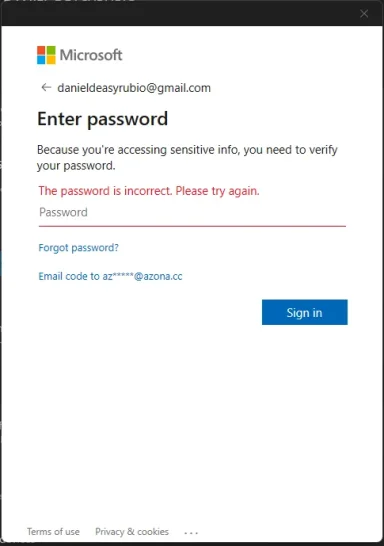
Yesterday I was getting the window in the attached image but it was showing an email address that had nothing to do with me.
I would appreciate any help that anyone can give on how to get back into Windows?
I got an email yesterday from Microsoft saying that "Security Info was Added" to my account. I did not add this.
Then I could not access Minecraft and when I tried to login into it, it would not accept the Password that I had been using. I reset the password but that did nothing. Eventually gave up and turned the machine off. Turned it on this morning and I could not even log in. It kept saying that my password was not correct. I went to another PC and signed into Microsoft there and changed my password thinking that might be the issue. I now have access to my Microsoft account on that other PC but I cannot access Windows on my main PC. I booted into the Recovery menu and when I started that I got an error saying "Your device ran into a problem and couldn't be repaired.". I am stumped. I tried to boot into Safe Mode with Networking but that will not accept the password either. I tried to go to the Command Line and load the Hive to remove that error but I cannot access that either and it says that it is currently in use. I don't see how that is since I just turned the PC on.
Is this something to do with the local password being out of sync with the online one? Something happened yesterday and I don't know what.
Yesterday I was getting the window in the attached image but it was showing an email address that had nothing to do with me.
I would appreciate any help that anyone can give on how to get back into Windows?