Windows 7 Cant turn on system restore ( safe mode ) please help !!

Taz Tribal

New Member
Joined
Jun 12, 2011
Messages
2
hello ,


im currently in safe mode as im having issues with my win 7 , i would like to restore my system but system restore is turned off
i read that to turn it on i have to press a 'sytem protection ' when i right click computer then properties but theres no 'system protection' link there . c814281ca8a21b7d81eeab9570ab0868.png


what could i do ?
 

Solution
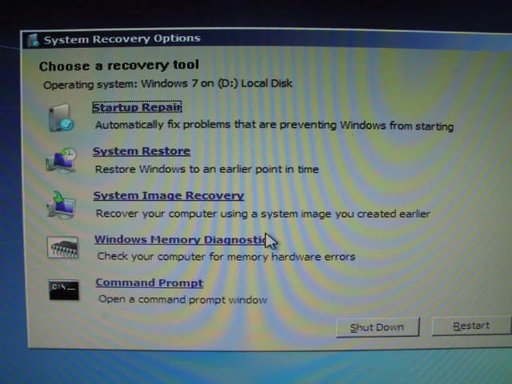
System restore may be turned off in Safe Mode, not sure. But you should be able to use the F8 key during boot to do the same thing if you select the "Repair Your Computer" option. Or if necessary, boot to a recovery CD or Install DVD.

See the attachment and use the System Restore option.
hello ,


im currently in safe mode as im having issues with my win 7 , i would like to restore my system but system restore is turned off
i read that to turn it on i have to press a 'sytem protection ' when i right click computer then properties but theres no 'system protection' link there . c814281ca8a21b7d81eeab9570ab0868.png


what could i do ?

Link Removed

Open up System Restore and click on configure.

Link Removed

Next, Choose what you would like. What I circled will turn on system restore.

My mistake. I never noticed that System Restore wasn't even showing up on your computer.
 

Last edited:
System restore may be turned off in Safe Mode, not sure. But you should be able to use the F8 key during boot to do the same thing if you select the "Repair Your Computer" option. Or if necessary, boot to a recovery CD or Install DVD.

See the attachment and use the System Restore option.
 

Attachments

  • Recovery Options.webp
    Recovery Options.webp
    35.8 KB · Views: 1,061
Solution
Back
Top