CData Connect AI Becomes MCP Provider in Microsoft Copilot for Real‑Time Enterprise Data

  • Thread Author
CData and Microsoft have moved from discussion to delivery: CData’s Connect AI platform is now available as a managed Model Context Protocol (MCP) provider inside Microsoft Copilot Studio and Microsoft Agent 365, promising real‑time, semantic access to live enterprise systems and a single integration layer that claims to remove much of the plumbing that has blocked agent rollouts to date.

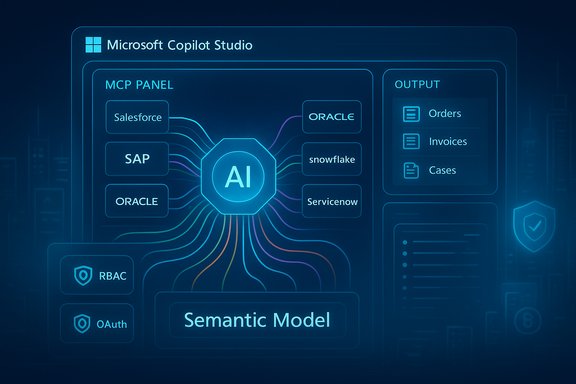
Microsoft Copilot Studio AI hub linking CRM/ERP apps (Salesforce, SAP, Oracle) to a semantic model.Background​

Enterprises building agentic AI face three consistent production‑grade obstacles: connectivity to dozens or hundreds of systems, context so models can reason about business objects rather than raw JSON, and control so IT and security teams can govern what agents do. CData positions Connect AI as a managed MCP platform that addresses those three gaps with a library of prebuilt connectors, semantic source models, and governance integration with Microsoft’s agent control plane. The vendor and the announcement materials emphasize broad connector coverage (advertised at roughly 300–350+ sources), semantic metadata extraction, and inherited identity controls intended to preserve source permissions. The timing matters because Microsoft has made MCP a first‑class extensibility mechanism across Copilot Studio and related agent surfaces. Microsoft recently announced general availability for MCP support in Copilot Studio and published detailed onboarding and usage guidance, which lets tenants register external MCP servers (including third‑party managed offerings) for agent tooling and tracing. That platform readiness is the practical enabler for a third‑party MCP provider to appear as a discoverable toolset inside Copilot Studio and Agent 365.

What CData says Connect AI delivers​

CData’s public materials and press release describe the Connect AI offering with three core capabilities that map directly to enterprise needs:
  • Universal MCP connectivity: a single, hosted MCP endpoint that exposes hundreds of prebuilt connectors to common enterprise systems — CRM, ERP, data warehouses, and ITSM platforms — so agents can discover and call source‑native operations without bespoke adapters. CData’s messaging repeatedly cites a 350+ connector footprint across product pages and the press release.
  • Semantic intelligence: connectors do more than pass rows; Connect AI claims to expose source schemas, table/field metadata, entity relationships and business logic so an LLM‑driven agent reasons in business concepts (orders, invoices, cases) instead of opaque JSON. This semantic layer is marketed as a guardrail against hallucination and “context overload.”
  • Enterprise control and governance: identity‑first security that supports OAuth/SSO, RBAC passthrough, CRUD‑level scoping for agent actions, and audit trails integrated with Microsoft’s Agent 365 governance surfaces, intended to keep IT in the loop and provide provenance for agent activity. Managed workspaces and curated toolsets are also called out as governance primitives.
Those claims are presented as a packaged, hosted service that enterprises can register into Copilot Studio and Agent 365, enabling agents to “read, write, and act” on live data from sources such as Salesforce, Snowflake, NetSuite, SAP and ServiceNow — without wholesale data ingestion into separate indexes.

How the MCP integration actually works (practical anatomy)​

MCP as the interoperability fabric​

Model Context Protocol (MCP) is a manifest‑first, tool/resource oriented spec that lets an agent client discover and call external tools and data resources in structured form. Copilot Studio supports MCP tools and resources and provides an onboarding wizard for connecting an MCP server to an agent workspace. Once an MCP server is registered, its tools, inputs/outputs, and metadata become available in Copilot Studio and are reflected dynamically as the server evolves. That pattern replaces brittle ad‑hoc prompt engineering with deterministic tool calls and structured I/O.

CData’s role: managed MCP server + connector runtime​

Connect AI runs connector instances behind an MCP server manifest. Each connector advertises APIs and schema information to Copilot as MCP tools and resources. When an agent needs data or an action, it issues structured MCP calls; Connect AI executes optimized queries against the target system, performs server‑side pushdown and aggregation, and returns compact, semantically labeled results to the agent. The claimed benefits are smaller LLM context payloads, lower token consumption, and improved response determinism compared with sending raw extractions into an LLM.

Governance integration with Agent 365​

Because Copilot Studio and Microsoft’s Agent 365 provide the governance and observability layer for agents, registering a third‑party MCP server like Connect AI exposes each tool invocation to Microsoft’s tracing and governance surfaces. CData says the service preserves source authentication and can map agent requests to tenant identities, enabling audit trails and admin oversight; Microsoft documents both the tracing features and the responsibilities that arise when tenants use external MCP providers. This alignment is fundamental to the trust model that enterprises require before they permit agent writebacks or automated approvals.

Semantic context: why it matters—and what to test​

One of Connect AI’s headline propositions is that connectors are semantic, not just syntactic. That means the MCP manifest surfaces:
  • field names and types,
  • entity relationships (foreign keys, parent/child links),
  • enumerations and domain constraints,
  • business logic hints (status lifecycles, soft deletes),
  • and human‑readable labels so agents can map tokens to business concepts.
Semantic modeling matters because agents that understand relationships can join across CRM → ERP → tickets and produce coherent, auditable plans instead of stitching facts with error‑prone prompt heuristics. Microsoft’s MCP model supports exposing resources (file‑like items) and tools (actions), which provides the technical surface for that semantic exposure. Practical validation steps organisations should include in pilots:
  • Verify per‑source depth, not just breadth: confirm the connector covers the API endpoints and versions you rely on (custom fields, bulk APIs, stored procedures).
  • Test schema fidelity: ensure labels, data types, and relationships are exposed correctly and in the locale/format your business uses.
  • Measure token savings: compare full‑dump RAG prompts versus MCP pushdown results to quantify cost and latency improvements.
  • Simulate joins and cross‑system queries under representative loads to surface edge cases (rate limits, pagination, multi‑tenant nuances).
Note: marketing materials show connector counts that vary slightly across vendor pages; organisations must validate availability for mission‑critical systems rather than assuming parity from headline numbers.

Security, governance and the trust boundary​

Inherited identity, but expanded responsibility​

CData and Microsoft both frame the model as identity‑first: authentication and source RBAC should flow through OAuth/SSO into the MCP layer, and Connect AI says it enforces CRUD scoping and logs actions. That model is stronger than a simplistic service account pattern because it preserves least privilege and per‑actor audit trails — assuming the passthrough is implemented correctly and end‑to‑end cryptography and token handling are robust. However, using a third‑party, hosted MCP server expands the organisation’s attack surface. Key security considerations:
  • Third‑party egress: any managed MCP provider receives or proxies query results and may see sensitive content. Contracts must specify data handling, encryption in transit and at rest, retention periods, and breach obligations.
  • Prompt and tool injection: structured responses from MCP tools must be validated; malicious or compromised manifests can instruct agents to take undesired actions. Runtime sanity checks and human‑in‑the‑loop approvals for high‑risk writebacks are essential.
  • Audit and forensic readiness: ensure audit logs are immutable, integrate with SIEM/UEBA, and retain sufficient context to reconstruct agent decisions.
  • SLA and incident response: understand the provider’s uptime SLAs, escalation paths, and the impact of connector outages on critical workflows.
Microsoft explicitly warns that tenants using non‑Microsoft MCP servers are responsible for the policies and charges associated with those external tools; this places operational risk on the tenant to validate enforcement semantics and contractual protections.

Operational efficiency: token economy, query execution and cost​

CData markets Connect AI as a performance and cost optimisation layer: by performing heavy retrievals and joins server‑side, returning distilled semantic context, and normalising pagination and schema differences, Connect AI says agents will consume fewer tokens and see lower latency. This is plausible in principle — moving extraction, filtering and aggregation outside the LLM can reduce the model’s input size — but the actual savings depend on query patterns, cardinality, and how much pre‑processing the MCP server performs versus leaving reasoning to the model.
Practical finance and engineering steps before committing:
  • Run A/B tests measuring token consumption and latency for representative flows.
  • Model the platform TCO: third‑party platform fees + additional API request charges + Copilot credits + model inference costs.
  • Include cost governance in AgentOps runbooks and set per‑agent and per‑workspace budgets to prevent runaway consumption.

Benefits and strengths — where this integration is genuinely useful​

  • Speed to pilot and production: prebuilt connectors reduce bespoke integration effort, which is the largest early blocker for agent projects spanning many SaaS systems. Copilot Studio’s MCP onboarding makes registration straightforward for administrators.
  • More reliable multi‑system reasoning: semantic exposure of schemas and relationships lets agents produce more explainable, auditable outputs across CRM, ERP and data warehouses rather than stitching disparate fragments via brittle prompt tricks.
  • Governance alignment: integration with Microsoft Agent 365’s tracing and control plane gives IT a single surface for visibility, approvals and policy enforcement when used correctly.
  • Ecosystem fit: MCP is gaining broad vendor traction (Microsoft, Anthropic and others), which reduces lock‑in risk for the protocol level and makes vendor ecosystems interoperable in practice. Independent reporting shows MCP is being discussed as a standard integration fabric for agentic apps.

Risks, limits and caveats — the hard realities​

  • Connector claims vary: CData markets “300–350+” connectors across materials; counts are headline metrics and can vary by product page and marketplace listing. Enterprises must verify connector coverage for their specific API surface and customizations before committing.
  • Third‑party trust and egress liability: handing live data access to a hosted provider requires contractual, technical and operational controls — encryption, data residency, access reviews and audit capabilities — and introduces potential compliance and contractual risk.
  • Operational dependency: although MCP is a standard protocol, the semantic models, curated workspaces and optimization plans that give Connect AI its value are proprietary. Migrating off a managed provider could require significant rework unless export and portability are explicitly supported.
  • Attack surface for agents: agents calling external tools create new vectors for injection and supply‑chain compromise. Validate manifests, monitor anomalous tool behavior, and require human approval for sensitive actions.
  • Real cost benefit depends on workload: the token savings and latency improvements are workload dependent. For heavy aggregation and high‑cardinality joins, server‑side pushdown will help; for tasks that require extensive natural language reasoning on long text corpora, savings may be smaller.
These caveats are not hypothetical. Industry commentary and technical analyses caution that MCP‑style integrations expand responsibility onto tenants, and that careful AgentOps and identity governance are prerequisites for safe scaling.

Practical rollout recommendations for Windows and Microsoft environments​

For Windows‑centric organisations or those using Microsoft 365 and Copilot Studio, the following phased approach reduces risk while proving value:
  • Inventory and classify: map the exact systems you intend to expose, including custom fields, API versions and sensitivity levels.
  • Start small: pilot with a low‑risk, high‑ROI workflow that spans no more than two or three systems and requires read or read‑only interactions initially.
  • Validate connector fidelity: confirm the connector supports your API surface (bulk, filters, transforms) and correctly exposes schema metadata.
  • Integrate governance: register the MCP server via Copilot Studio’s onboarding wizard, enable tracing, and route logs into your SIEM and Purview classification where applicable.
  • Harden agent writebacks: require explicit human approvals for any automated writes or financial/HR operations; implement least‑privilege CRUD scoping.
  • Measure: quantify token and latency improvements, agent error rates, human intervention frequency and business KPIs (time saved, incidents avoided).
  • Contract and audit: review SLAs, data handling, retention, right to audit and breach obligations with the provider before expanding to sensitive data.

The competitive and industry context​

This integration is part of a broader industry push to make agents actionable and enterprise‑safe. MCP’s rapid adoption by platform vendors is turning it into a practical integration fabric for agentic workflows, and providers like CData aim to monetize their connector expertise by offering hosted MCP runtimes with semantic modelling and operational features. But the vendor landscape remains early and fragmented: some organisations will prefer to self‑host an MCP server to retain maximum control; others will trade that control for speed and scale via managed services. Independent reporting highlights Microsoft’s strategy of treating MCP as a standard integration point across Copilot and Windows surfaces, which increases the value of broad connector libraries for enterprises seeking rapid agent deployment.

Conclusion​

CData’s Connect AI appearing as a managed MCP provider inside Microsoft Copilot Studio and Agent 365 is a meaningful step toward practical, production‑grade agents in enterprises: it bundles connector breadth, semantic modeling, and governance hooks into a discoverable MCP toolset that Copilot authors can easily register and use. For organisations that have struggled with bespoke adapters, brittle RAG patterns and the governance burden of agentic automation, this integration offers a faster on‑ramp to pilot and—if validated—production scenarios. At the same time, the integration transfers significant responsibility to IT and security teams. Connector counts vary across vendor pages, third‑party egress raises compliance questions, and the proprietary semantic models that power the value proposition create migration and supply‑chain considerations. The prudent path is a measured one: pilot with representative data, validate enforcement semantics and logging, quantify cost and token benefits, and harden AgentOps before broadening scope. When those steps are followed, agents with semantic, live access to enterprise systems can finally shift from promising prototypes into controlled, auditable automation that materially reduces operational friction.
Source: IT Brief Australia CData, Microsoft unlock broad MCP data connectivity
 

CData’s Connect AI has been plugged directly into Microsoft Copilot Studio and Microsoft Agent 365, delivering a managed Model Context Protocol (MCP) gateway that promises semantic, real‑time access to hundreds of enterprise systems for AI agents — and in doing so it tackles three persistent bottlenecks for enterprise agents: connectivity, context, and control.

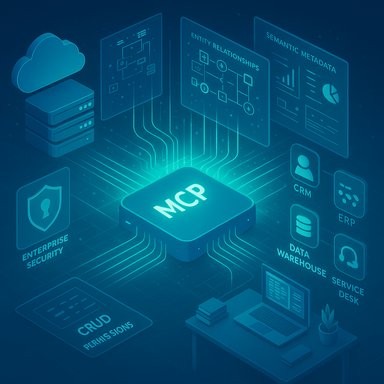
A glowing MCP chip orchestrates enterprise systems (CRM, ERP, data warehouse) with security.Background​

The last 18 months have seen enterprises race to put AI agents into production for workflows that span CRM, ERP, data warehouses, service desks, and file stores. Practical deployments repeatedly stumble on three technical problems: reliable, secure connectivity to legacy and SaaS systems; meaningful semantic context so agents understand schema, relationships and business logic; and governance controls that let IT retain visibility and access policies while business teams move fast.
CData’s Connect AI, now exposed to Microsoft Copilot Studio and Agent 365 via MCP, is positioned as a single managed connectivity layer addressing all three. The vendor describes a hosted MCP server fronting its catalog of connectors so Copilot agents can query and act on live data across “hundreds” of systems. The announcement emphasizes semantic enrichment (system metadata, entity relationships and business logic), enterprise authentication and granular CRUD controls, and features intended to reduce token consumption and operational overhead for agent workloads.

What is MCP and why it matters​

Model Context Protocol in a nutshell​

The Model Context Protocol (MCP) is an emerging, open specification designed to let LLM‑based agents interact with external systems in a structured, discoverable and secure way. MCP defines how an agent can discover available endpoints, inspect schema and metadata, run queries and invoke actions — all while exchanging structured results the model can reason about.
The protocol’s value-add is twofold:
  • It standardizes how agents learn what data exists and how to ask for it. That prevents ad hoc prompt engineering against raw APIs and reduces brittle, error‑prone integrations.
  • It makes it feasible to attach semantic metadata and capabilities to endpoints (for example: “this table contains invoices, keyed by invoice_id, with a date and an amount”), which improves the model’s reasoning and reduces hallucination risk.

MCP adoption and ecosystem context​

MCP adoption is accelerating among platform vendors and connector providers because it’s the first viable route to secure, controlled agentic access to enterprise systems at scale. Microsoft’s Copilot Studio and Agent 365 have explicit hooks for MCP tools, enabling customers to add MCP servers as “tools” for agents. That shift matters because platform‑level support reduces friction and accelerates pilot‑to‑production timelines.

What CData Connect AI brings to Microsoft Copilot Studio and Agent 365​

Universal connectivity, managed​

CData positions Connect AI as a managed MCP server that exposes a broad connector catalog to agents built in Copilot Studio. Key capabilities advertised include:
  • Access to hundreds of prebuilt connectors covering databases, SaaS apps and cloud services.
  • A unified MCP endpoint that handles schema translation, protocol differences and multi‑source queries.
  • A hosted, managed service model so enterprises can add sources and deploy agents without building bespoke middleware.
This model is intended to let organizations connect multiple source systems once inside Connect AI, and then let all their Copilot agents access those sources through a single MCP gateway. For teams that have historically invested months in bespoke integrations, this is a compelling operational simplification.

Semantic intelligence and context​

Beyond simple connectivity, Connect AI claims to provide semantic intelligence — essentially, packaged metadata and behavioral descriptions that teach agents how to interpret each system. That includes:
  • System‑level metadata and schema definitions.
  • Entity relationships and foreign‑key mappings.
  • Business logic or rules surfaced as context to help agent reasoning.
The net effect is that agents receive pre‑filtered, structured context rather than raw tables or API responses. That can reduce prompt engineering and improve the accuracy of cross‑system queries and multi‑step workflows.

Support for structured and unstructured data​

Connect AI supports both structured data and unstructured file artifacts. The platform advertises native handling of files so agents can read, edit and track revisions without constructing heavyweight retrieval‑augmented generation (RAG) layers. For workflows that join transactional data with documents (for example, matching contracts to order records), this capability can simplify agent design.

Security, governance and enterprise controls​

Security and compliance are repeatedly highlighted:
  • Identity‑first security with inherited permissions — agents operate with the same identity and access constraints users or service accounts have across the connected systems.
  • Support for OAuth and single sign‑on (SSO) flows.
  • Granular CRUD (create, read, update, delete) permission enforcement per tool and workspace.
  • Full audit trails logging agent data activity.
  • Integration into Microsoft Agent 365’s governance framework so IT retains visibility and policy enforcement.
These elements are critical for regulated industries and enterprises that cannot accept agents operating with broad, uncontrolled privileges.

Operational efficiency and token governance​

Two operational claims are important for IT budgets and agent design:
  • Connect AI exposes unified endpoints and optimized query execution intended to reduce token consumption during LLM interactions. This matters because API token usage — and the cost associated with LLM prompts — is a major operational expense for large agent deployments.
  • The managed, hosted nature of Connect AI reduces the need for bespoke infrastructure and integration teams, enabling faster pilot cycles.

Verified claims and areas to watch​

Several of CData’s core claims line up with available technical documentation and platform pages; independent verification is possible on multiple fronts. At the same time, a few points require caution.
What is verifiable now:
  • Copilot Studio and Agent 365 support adding MCP servers as tools, enabling agents to connect to MCP endpoints.
  • CData offers a Connect AI MCP server implementation and Microsoft publishes a connector entry for CData Connect AI in its connectors catalog.
  • The Connect AI marketing and PR materials consistently describe a hosted MCP service intended to surface connector catalogs to agents.
Claims that warrant caution or further verification:
  • Connector counts vary across materials: some marketing assets state “over 300” sources while the announcement headline and press materials reference “350+” systems. Enterprises should validate the actual connector list and any licensing or edition differences before relying on a specific system count.
  • Performance and token‑savings claims are plausible (unified queries and pre‑computed semantic context should reduce redundant prompt work) but actual impact depends heavily on query patterns, prompt design and agent architecture. Proof in your environment is necessary.
  • Enterprise‑grade security posture (e.g., data residency, private cloud deployment options, encryption key management and SOC/ISO certifications) must be validated contractually — the vendor’s hosted model introduces choices and constraints for compliance teams.

Technical deep dive: how this works in practice​

Connector model and schema translation​

CData’s approach is connector‑first: every data source is encapsulated by a connector providing a normalized metadata model. The MCP server exposes:
  • Schema discovery APIs for agents to learn tables, columns and relationships.
  • Query operations that translate a logical query into the native API or SQL dialect of the target source.
  • Action APIs for agents to perform updates, inserts or other business operations, subject to CRUD permissions.
This design abstracts away varied protocols (REST, SOAP, proprietary SDKs, JDBC/ODBC) and lets an agent interact with a consistent MCP surface.

Semantic enrichment pipeline​

Connect AI layers semantic annotations on top of raw metadata. That pipeline typically includes:
  • Entity detection and canonical naming.
  • Relationship mapping (e.g., join keys across systems).
  • Business‑logic notes (validation, immutability, typical usage).
  • Field‑level sensitivity tagging for governance.
These annotations are what turn raw data into context an LLM can reason with reliably.

Query optimization and token minimization​

Connect AI advertises unified endpoints and advanced query execution strategies designed to limit the amount of raw text that needs to be passed to models. Techniques include:
  • Pushing computation to the connector where possible (e.g., run aggregations in Snowflake rather than streaming rows).
  • Returning compact, structured results (JSON) rather than narrative text.
  • Precomputing summaries and semantic indices for frequently accessed entities.
While these techniques are standard practice, the real-world efficacy depends on how agents are coded and where the compute is performed.

Files, RAG replacement and versioning​

Where many teams build heavy retrieval‑augmented generation (RAG) pipelines to index documents for LLM consumption, Connect AI claims to offer native file access and revision tracking so agents can read and edit documents in place. That simplifies architecture but raises governance and audit questions around document provenance and safe editing that must be addressed.

Security, governance and compliance: what IT needs to validate​

CData and its Microsoft integration emphasize governance integration with Agent 365, but IT teams must still validate critical capabilities:
  • Identity and delegation: Confirm whether Connect AI can operate using customer‑managed service principals, or whether it requires managed service identities. Verify how permissions are inherited and mapped across systems.
  • Encryption and key management: Determine how data in transit and at rest is encrypted, and whether Bring Your Own Key (BYOK) is supported.
  • Auditability: Validate the granularity and retention of audit logs, log export capabilities, and integration with SIEMs.
  • Data residency and isolation: For regulated workloads, clarify whether the managed MCP server can be deployed inside a customer VNet or region, or whether data traverses vendor-managed infrastructure.
  • Certifications and third‑party audits: Confirm SOC 2 / ISO 27001 status if your compliance program requires them.
  • Least privilege and separation: Ensure workspaces and toolsets can be curated to limit cross‑workspace access and minimize blast radius.
If any of those items are not contractually guaranteed, organizations should treat claims of “enterprise‑grade security” as aspirational until verified.

Practical use cases and early deployment patterns​

CData’s integration is relevant across multiple scenarios:
  • Cross‑system reporting and dashboards: Agents that join CRM records (Salesforce) to billing (NetSuite) and support tickets (ServiceNow) to assemble actionable summaries for sales or finance.
  • Workflow automation: Agents that can read a purchase order, validate inventory levels in ERP, trigger an approval and update records across systems.
  • Knowledge worker assistants: Copilot agents that use semantic metadata to answer complex queries like “Which customers have overdue invoices and open support tickets in the last 30 days?” without manual data pulls.
  • Contract and document operations: Agents that can retrieve a contract, find related purchase orders, propose edits, and update document revisions while tracking audit trails.
Early deployments will likely follow a pattern:
  • Pilot with read‑only access to low‑risk systems.
  • Validate semantic enrichment accuracy and token usage.
  • Expand to write actions with strict, audited toolsets.
  • Harden governance and operational monitoring before broad rollout.

Benefits for IT and business — and the tradeoffs​

Immediate upsides​

  • Faster agent development: Developers and business teams can onboard data sources quickly without building bespoke connectors.
  • Improved model reasoning: Semantic metadata reduces hallucinations and improves cross‑source joins.
  • Reduced infrastructure overhead: A managed MCP reduces the need for custom middleware and long integration projects.
  • Better governance fit: Integration with Microsoft Agent 365’s governance model can centralize visibility and policy enforcement.

Key tradeoffs and risks​

  • Operational dependency on a hosted gateway: Using a vendor‑hosted MCP server centralizes risk. Outages, vendor changes, or contract issues could impact agent availability.
  • Potential for hidden costs: Managed connectors and token usage optimization may reduce some costs but introduce new subscription or per‑connector fees. True TCO requires careful analysis.
  • Data residency and compliance constraints: For highly regulated data, the hosted model may require hybrid or on‑prem options that aren’t always available.
  • Connector parity and coverage: Marketing counts (300+ vs 350+) are useful as indicators, but teams should validate support for the specific endpoints and API versions they depend on.
  • Vendor lock‑in of semantic models: Semantic annotations that speed agent reasoning across systems might not easily transfer to an in‑house or competing system, creating migration costs.

How to evaluate Connect AI integration — a short checklist​

  • Inventory critical sources and prioritize: list the systems your agents must access and mark them as mandatory/optional.
  • Validate connector parity: confirm each required system is supported and verify which API versions and features are covered.
  • Pilot with well‑scoped agents: start with read‑only pilots to measure latency, token consumption and semantic accuracy.
  • Measure token and cost impacts: record actual token usage and compare it with a non‑MCP baseline to validate vendor claims about savings.
  • Test governance end‑to‑end: confirm identity inheritance, CRUD enforcement, audit trails and SIEM integration in live scenarios.
  • Review deployment options: clarify data residency options, VNet or private link support, and encryption key management.
  • Contract and SLA negotiation: obtain clear SLAs for uptime, support and data processing obligations, and include exit and migration terms.

Market and strategic implications​

This integration is notable for several strategic reasons:
  • It illustrates Microsoft’s pragmatic embrace of MCP as a bridging standard that enables multi‑model and multi‑vendor agent ecosystems inside Copilot Studio and Agent 365.
  • It gives connector vendors a straightforward route to surface enterprise data to agents without each customer doing heavy lifting.
  • It creates a commercial opportunity for managed MCP layers: vendors can convert their existing connector portfolios into packaged MCP services.
  • For enterprises, the choice becomes not just which models to use, but how to manage the plumbing that lets those models operate safely across systems.
Competition will likely intensify: system integrators and cloud vendors may offer alternative managed MCP gateways or native connectors. Enterprises should expect a period of consolidation where standards evolve, connectors mature, and pricing models stabilize.

Final assessment: why this matters — and what IT leaders should do next​

CData’s Connect AI integration into Microsoft Copilot Studio and Agent 365 is an important step toward practical, enterprise‑grade AI agents. By combining a broad connector catalog with semantic metadata and governance hooks, the platform addresses familiar obstacles that have slowed agent deployment.
That said, measurable benefits depend on the specifics of each environment. Claims about connector counts, token savings and security posture are promising but vary between marketing assets and technical documentation; these must be validated in pilot projects and contractual terms. The hosted MCP model reduces integration effort but concentrates operational risk and raises important questions about data residency, encryption, auditability and long‑term costs.
Recommended next moves for IT leaders:
  • Run a focused pilot that validates both technical and governance claims in your environment.
  • Require supplier commitments about connector coverage, SLAs, data residency and exit terms.
  • Quantify token usage and cost implications before scaling agent workloads.
  • Expand governance playbooks to explicitly include agent behaviors, toolsets and workspace curation.
CData’s managed MCP gateway makes the promise of multi‑system, semantically aware AI agents more attainable, but success will come from disciplined pilots, measured validation and governance‑first rollout plans.

Source: IT Brief UK CData, Microsoft unlock broad MCP data connectivity
 

Back
Top