

Google’s Chrome 148 desktop update, released May 5, 2026 for Windows, macOS, and Linux, fixes CVE-2026-7923, a high-severity out-of-bounds write in Skia that could let an attacker who already compromised Chrome’s renderer attempt a sandbox escape through a crafted HTML page. That sentence is dry by design, because the bug is not a cinematic “click once and lose the machine” headline. It is more interesting than that. CVE-2026-7923 is a reminder that the modern browser war is now fought less over tabs and toolbars than over the narrow, brittle boundary between web content and the operating system beneath it.
The practical message is simple: Chrome before 148.0.7778.96 is affected, and Chromium-based browsers need their downstream fixes. The strategic message is sharper: once a rendering engine bug becomes a sandbox-escape primitive, every enterprise browser deployment becomes a race between automatic update machinery and the attacker’s ability to chain vulnerabilities faster than IT can inventory them.
Skia is not a household name, but it sits in the hot path of the modern web. It is the graphics library Chrome uses to draw, rasterize, and accelerate the visual mess that arrives in a browser tab: text, shapes, images, canvas operations, PDFs, SVG-like rendering paths, and the increasingly GPU-adjacent workload of web applications that behave less like pages and more like operating systems in miniature.
That matters because bugs in graphics code are rarely decorative. The renderer is where untrusted web content is parsed, shaped, decoded, composited, painted, and sent toward the screen. If an attacker can influence enough of that pipeline with a crafted page, a memory corruption flaw in a graphics component can become the first or second link in an exploit chain.
CVE-2026-7923 is described as an out-of-bounds write in Skia. In plain English, that means code wrote data somewhere it was not supposed to write it. The affected condition existed in Google Chrome prior to 148.0.7778.96, and the reported impact was not merely a crash: a remote attacker who had already compromised the renderer process could potentially use the bug to escape Chrome’s sandbox.
That “who had compromised the renderer process” clause is the hinge of the story. It narrows the immediate exploitability of the bug, but it does not make the bug academic. Browser exploitation is often a chain: one flaw gets code running inside the renderer, another weakens or breaks the sandbox, and a third may be used to reach persistence, credential theft, or lateral movement. CVE-2026-7923 sits squarely in the part of the chain defenders most hate, because sandbox escapes convert a contained browser compromise into a host-level problem.
The phrase sandbox escape should therefore carry more weight than the average CVE description. A renderer compromise trapped in a sandbox is bad. A renderer compromise that can pivot out of the sandbox is the kind of bug class that moves a browser issue into incident-response territory.
CVE-2026-7923’s severity rating reflects that nuance. CISA’s ADP enrichment assigned it a CVSS 3.1 score of 8.3, rated High, with a vector that includes network attackability, required user interaction, changed scope, and high impact to confidentiality, integrity, and availability. The attack complexity is marked high, which is important. It suggests this is not being represented as a trivial drive-by in isolation.
But defenders should not confuse “high complexity” with “low priority.” Modern exploit brokers, intrusion operators, and well-funded criminal groups are not deterred by complexity when the target surface is Chrome, Edge, or any Chromium-derived browser sitting on millions of endpoints. The economics of browser exploitation reward the hard work because one reliable chain can scale across operating systems and organizations.
The industry has trained users to think in terms of “don’t click suspicious links.” That advice is necessary and hopelessly insufficient. The attacker does not need a user to install malware if the browser can be induced to process a hostile page. The real defense is rapid patch adoption, hardened configuration, exploit mitigation, and reducing the blast radius when a browser process is inevitably exposed to hostile input.
This was also not a surgical one-CVE patch. Reporting around the release notes shows Chrome 148 addressed a very large set of security issues, including critical and high-severity bugs across major browser components. CVE-2026-7923 is one notable entry in a broader patch bundle that landed at the same time.
That context changes the operational calculation. When a browser release fixes more than a hundred security issues, the question for IT is not whether each individual CVE is being actively exploited. The question is whether the organization can tolerate running a pre-fix browser while attackers and researchers compare public advisories, binary diffs, and delayed bug disclosures.
Google, like other browser vendors, routinely restricts access to detailed bug information until most users have received a fix. That practice is sometimes frustrating for defenders who want technical clarity, but it exists for a reason. The moment a patch ships, attackers can start reverse-engineering the delta. The delay between vendor release and fleet adoption is not a bureaucratic inconvenience; it is an attack window.
That sentence is short, but it tells admins exactly where the risk concentrates. Chrome’s patch is out. Edge’s downstream delivery depends on Microsoft’s release pipeline. Until the relevant Edge build ships and lands on endpoints, organizations standardizing on Edge cannot treat the Chrome version number alone as proof of immunity.
This is the recurring bargain of Chromium consolidation. Microsoft, Brave, Opera, Vivaldi, and other Chromium-derived browsers benefit from the scale and engineering velocity of the Chromium project. They also inherit its fire drills. A serious bug in Blink, V8, Skia, ANGLE, WebGPU, or another shared component becomes a cross-browser concern almost immediately, even if the final packaging and release cadence vary by vendor.
Enterprise IT has to account for that lag. A vulnerability management system that flags Google Chrome but ignores Edge, WebView2, embedded Chromium runtimes, Electron applications, and unmanaged Chromium forks is telling only part of the truth. The browser is no longer one application. It is an application platform, a rendering subsystem, an identity surface, and, in Windows environments, an increasingly embedded dependency.
CPE data is useful, but it is not a complete software bill of materials. It tells scanners what products and versions may be vulnerable. It does not necessarily capture every Chromium-based application, embedded browser control, bundled runtime, kiosk shell, portable browser, developer tool, collaboration app, or WebView-dependent enterprise workflow that carries the same vulnerable code path.
That is why browser CVEs produce so much noise in vulnerability programs. The vulnerability might be recorded against Chrome, described by Chromium, mirrored by Microsoft, carried by Linux distributions, and quietly inherited by a desktop application that has not updated its embedded runtime in months. The CPE can be technically correct and operationally incomplete at the same time.
For CVE-2026-7923, the cleanest immediate answer is that Google Chrome before 148.0.7778.96 is the named affected product in the record, with platform applicability across desktop operating systems. The more useful answer for admins is broader: if a product embeds Chromium or depends on Skia through a browser-like rendering pipeline, it should not be assumed safe merely because the NVD entry has not yet named it.
This is where vulnerability management still lags software reality. Asset databases are good at finding installed products with familiar names. They are much worse at finding duplicated rendering engines inside chat apps, developer tools, helpdesk consoles, management agents, and internal line-of-business applications. Attackers do not care whether the vulnerable code arrived as “Chrome,” “Edge,” “WebView2,” or “that app nobody has repackaged since last quarter.”
CVE-2026-7923 is High, not Critical, and the stated path requires a compromised renderer process. On paper, that makes it less alarming than a single-bug remote code execution flaw reachable from a page load. In practice, it may still be valuable as a chain component, especially if paired with a separate renderer flaw in the same release or another issue already known to attackers.
The CISA vector’s “user interaction required” element should also be interpreted carefully. In browser terms, user interaction can mean visiting a web page or opening content rendered by the browser. It does not necessarily mean downloading a suspicious executable, bypassing SmartScreen, or approving a macro. The bar can be low enough that phishing, malvertising, compromised legitimate sites, or poisoned search results become viable delivery paths.
The right mental model is not “can this one CVE own a machine by itself?” The better model is “does this CVE make an exploit chain more complete?” Sandbox escapes are valuable precisely because they solve the second half of a chain. If an attacker already has a renderer entry point, CVE-2026-7923 is the sort of bug that could turn containment into compromise.
That is why browser patching cannot wait for perfect public exploit intelligence. By the time defenders see widespread exploitation, the attackers who matter most may already have spent days or weeks testing against real-world browser versions. Waiting for exploit confirmation is often another way of volunteering to be part of the telemetry.
The modern renderer ingests JavaScript, WebAssembly, fonts, images, video, GPU commands, compression formats, CSS, canvas operations, and increasingly complex APIs that reach into local capabilities. Every expansion of what web apps can do is also an expansion of what the renderer must safely parse. The browser’s attack surface grows because the web keeps demanding that it become a universal application runtime.
Skia sits in that transformation. It is part of the machinery that makes the web visually rich, fast, and portable. It is also part of the machinery that must process attacker-controlled data at speed, often with performance optimizations that live closer to memory-management danger than anyone would like.
This is not an argument against Skia, Chrome, or Chromium. It is an argument against pretending that “just a graphics bug” is a comforting category. Graphics stacks have repeatedly produced serious vulnerabilities because they combine complicated file and drawing formats, performance-sensitive code, GPU interaction, and untrusted input. If anything, the web’s visual sophistication has made graphics code more security-critical, not less.
Enterprises, however, complicate the picture. Managed browsers may be pinned, staged, delayed, tested, repackaged, or routed through update controls that exist for valid operational reasons. A hospital cannot treat every browser release like a casual reboot prompt. A factory floor, call center, trading desk, or school district may have web applications that break when rendering behavior changes.
The problem is that attackers do not respect maintenance rings. When Google says a release rolls out over days and weeks, that is a consumer-friendly deployment strategy and an enterprise risk calculation. The longer an organization sits on the wrong side of 148.0.7778.96, the longer it exposes itself to vulnerabilities whose technical details are only becoming easier to infer.
The answer is not reckless patching. It is disciplined acceleration. Browser security updates should have a faster lane than feature updates, especially when the release includes memory corruption flaws, renderer compromise paths, sandbox escapes, or publicly visible CVE metadata. Testing should be real, but it should be measured in hours or a small number of days for high-risk browser fixes, not in leisurely monthly cycles.
Microsoft’s Edge situation underscores the same point. If Edge is your standard browser, you need monitoring that confirms when Microsoft’s Chromium-integrated fix actually arrives, not just when Google’s advisory appears. If Chrome and Edge coexist in your fleet, both need version compliance. If WebView2 is present, applications using it need attention as well.
That asymmetry is intentional. Full disclosure before patch adoption would make users less safe. But it also means defenders must act on incomplete information. CVE-2026-7923’s reference to a restricted Chromium issue tracker entry is typical; the most sensitive details are not public while the installed base is still catching up.
Attackers face the same information gap, but with different incentives. They can diff the patched and vulnerable builds, inspect changed code paths, look for related tests, and map the fix back to reachable web features. The better the attacker, the less they need a public proof of concept.
This is why “no known exploitation” is not the same as “no risk.” Public exploitation status is useful, but it is a lagging indicator. For high-value targets, the period immediately after a patch release can be dangerous precisely because defenders are waiting for confirmation while attackers are extracting the lesson from the patch.
CVE-2026-7923 also arrives in a year that has already seen other browser zero-day activity and Skia-related concern. The specific bug should not be conflated with earlier vulnerabilities, but the pattern is hard to ignore: graphics and rendering components remain attractive, and Chromium’s scale makes every serious defect worth studying.
Microsoft Edge is the visible piece. WebView2 is the embedded piece. Electron applications are the sprawling shadow estate. Security tools, developer utilities, productivity apps, chat clients, password managers, remote support consoles, and internal apps may all carry Chromium-derived components or rely on a system runtime whose update status varies by deployment model.
The inventory problem becomes especially messy in mixed environments. Some applications bundle their own Chromium runtime and update it only when the application vendor ships a new build. Others use WebView2 Evergreen Runtime and benefit from Microsoft’s update channel. Still others live as portable or user-installed binaries outside standard software management.
CVE-2026-7923 should therefore trigger two workflows. The first is immediate browser version enforcement. The second is a slower but more durable review of where Chromium and Skia-like rendering exposure actually exist in the environment. If the only dashboard you trust is “installed Chrome version,” your visibility is already behind your risk.
The same logic applies outside Windows. Linux distributions may wrap Chromium differently, macOS fleets may mix Chrome with other Chromium browsers, and managed devices may carry policies that delay restarts. The vulnerable version threshold is clear for Chrome, but real exposure follows deployment practices, not advisory prose.
A compromised browser session can expose tokens, session cookies, cloud dashboards, password vault workflows, device enrollment portals, and privileged web admin interfaces. If a sandbox escape enters the picture, the risk expands from session theft to host compromise. That is the difference between “reset the user’s password” and “assume the endpoint may need full investigation.”
CVE-2026-7923 is not proof of a widespread campaign. It is not, from the public description alone, a standalone catastrophe. But it is exactly the kind of vulnerability that should make patch management teams behave like incident responders for a day: identify exposure, accelerate deployment, verify installation, force restarts where necessary, and watch for users who have not actually relaunched the browser.
There is a human factor here that security dashboards often miss. Chrome can download an update and still remain on the old executable until the browser restarts. Users with dozens of tabs and weeks-long sessions are not patched merely because the update mechanism did its part. Managed restarts, user communication, and compliance reporting all matter.
The same applies to Edge when Microsoft’s fix lands. A browser that says “up to date” before the downstream build exists is not protected against a Chromium flaw fixed only in a later release. Version numbers, not vibes, decide the answer.
CVE-2026-7923 will probably disappear into the churn of Chromium advisories within days, replaced by the next renderer bug, the next V8 issue, the next GPU-process flaw, or the next emergency Edge note. But the lesson should stick around longer: the browser is now one of the most important security boundaries in the enterprise, and every serious graphics, rendering, or sandbox bug is a stress test of whether organizations can patch at the speed of the web they depend on.
Source: NVD / Chromium Security Update Guide - Microsoft Security Response Center
The practical message is simple: Chrome before 148.0.7778.96 is affected, and Chromium-based browsers need their downstream fixes. The strategic message is sharper: once a rendering engine bug becomes a sandbox-escape primitive, every enterprise browser deployment becomes a race between automatic update machinery and the attacker’s ability to chain vulnerabilities faster than IT can inventory them.
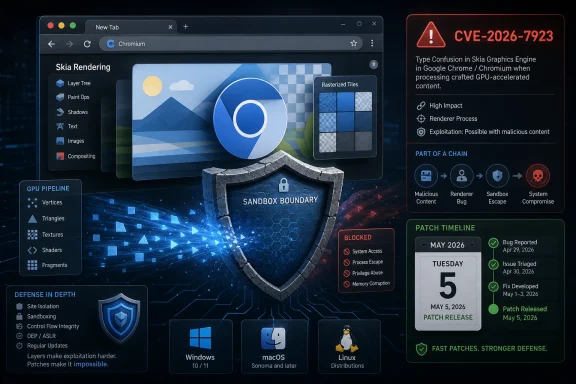 Skia Turns a Graphics Bug Into a Boundary Problem
Skia is not a household name, but it sits in the hot path of the modern web. It is the graphics library Chrome uses to draw, rasterize, and accelerate the visual mess that arrives in a browser tab: text, shapes, images, canvas operations, PDFs, SVG-like rendering paths, and the increasingly GPU-adjacent workload of web applications that behave less like pages and more like operating systems in miniature.That matters because bugs in graphics code are rarely decorative. The renderer is where untrusted web content is parsed, shaped, decoded, composited, painted, and sent toward the screen. If an attacker can influence enough of that pipeline with a crafted page, a memory corruption flaw in a graphics component can become the first or second link in an exploit chain.
CVE-2026-7923 is described as an out-of-bounds write in Skia. In plain English, that means code wrote data somewhere it was not supposed to write it. The affected condition existed in Google Chrome prior to 148.0.7778.96, and the reported impact was not merely a crash: a remote attacker who had already compromised the renderer process could potentially use the bug to escape Chrome’s sandbox.
That “who had compromised the renderer process” clause is the hinge of the story. It narrows the immediate exploitability of the bug, but it does not make the bug academic. Browser exploitation is often a chain: one flaw gets code running inside the renderer, another weakens or breaks the sandbox, and a third may be used to reach persistence, credential theft, or lateral movement. CVE-2026-7923 sits squarely in the part of the chain defenders most hate, because sandbox escapes convert a contained browser compromise into a host-level problem.
The Sandbox Is Doing Its Job Until It Isn’t
Chrome’s security model assumes hostile web content. That is why the browser isolates sites, restricts renderer processes, and tries to keep the code that handles arbitrary pages away from sensitive operating-system resources. The sandbox is not a magic force field; it is a set of deliberately constrained privileges that make exploitation harder and less useful.The phrase sandbox escape should therefore carry more weight than the average CVE description. A renderer compromise trapped in a sandbox is bad. A renderer compromise that can pivot out of the sandbox is the kind of bug class that moves a browser issue into incident-response territory.
CVE-2026-7923’s severity rating reflects that nuance. CISA’s ADP enrichment assigned it a CVSS 3.1 score of 8.3, rated High, with a vector that includes network attackability, required user interaction, changed scope, and high impact to confidentiality, integrity, and availability. The attack complexity is marked high, which is important. It suggests this is not being represented as a trivial drive-by in isolation.
But defenders should not confuse “high complexity” with “low priority.” Modern exploit brokers, intrusion operators, and well-funded criminal groups are not deterred by complexity when the target surface is Chrome, Edge, or any Chromium-derived browser sitting on millions of endpoints. The economics of browser exploitation reward the hard work because one reliable chain can scale across operating systems and organizations.
The industry has trained users to think in terms of “don’t click suspicious links.” That advice is necessary and hopelessly insufficient. The attacker does not need a user to install malware if the browser can be induced to process a hostile page. The real defense is rapid patch adoption, hardened configuration, exploit mitigation, and reducing the blast radius when a browser process is inevitably exposed to hostile input.
Chrome 148 Was Not a One-Bug Release
The release containing the CVE-2026-7923 fix is part of Chrome 148, which Google promoted to the stable channel for desktop platforms on May 5, 2026. The version numbers matter: 148.0.7778.96 for Linux, and 148.0.7778.96 or 148.0.7778.97 for Windows and macOS depending on channel packaging. Google said the release would roll out over the coming days and weeks, which is normal Chrome language and a constant source of tension for enterprise defenders.This was also not a surgical one-CVE patch. Reporting around the release notes shows Chrome 148 addressed a very large set of security issues, including critical and high-severity bugs across major browser components. CVE-2026-7923 is one notable entry in a broader patch bundle that landed at the same time.
That context changes the operational calculation. When a browser release fixes more than a hundred security issues, the question for IT is not whether each individual CVE is being actively exploited. The question is whether the organization can tolerate running a pre-fix browser while attackers and researchers compare public advisories, binary diffs, and delayed bug disclosures.
Google, like other browser vendors, routinely restricts access to detailed bug information until most users have received a fix. That practice is sometimes frustrating for defenders who want technical clarity, but it exists for a reason. The moment a patch ships, attackers can start reverse-engineering the delta. The delay between vendor release and fleet adoption is not a bureaucratic inconvenience; it is an attack window.
Microsoft Edge Inherits the Chromium Clock
For WindowsForum readers, the Chrome advisory is only half the story. Microsoft Edge is Chromium-based, and Microsoft tracks Chromium security fixes through its Security Update Guide and Edge release notes. As of May 6, Microsoft’s Edge security release notes said the company was aware of the recent Chromium security fixes and was actively working on releasing a security fix.That sentence is short, but it tells admins exactly where the risk concentrates. Chrome’s patch is out. Edge’s downstream delivery depends on Microsoft’s release pipeline. Until the relevant Edge build ships and lands on endpoints, organizations standardizing on Edge cannot treat the Chrome version number alone as proof of immunity.
This is the recurring bargain of Chromium consolidation. Microsoft, Brave, Opera, Vivaldi, and other Chromium-derived browsers benefit from the scale and engineering velocity of the Chromium project. They also inherit its fire drills. A serious bug in Blink, V8, Skia, ANGLE, WebGPU, or another shared component becomes a cross-browser concern almost immediately, even if the final packaging and release cadence vary by vendor.
Enterprise IT has to account for that lag. A vulnerability management system that flags Google Chrome but ignores Edge, WebView2, embedded Chromium runtimes, Electron applications, and unmanaged Chromium forks is telling only part of the truth. The browser is no longer one application. It is an application platform, a rendering subsystem, an identity surface, and, in Windows environments, an increasingly embedded dependency.
The CPE Question Is Really an Inventory Question
The user-facing CVE record raises an awkward operational note: the affected software configuration includes Google Chrome up to but excluding 148.0.7778.96, alongside Windows, Linux, and macOS platform entries. The “Are we missing a CPE here?” prompt is a familiar NVD artifact, but in this case it points to a real defender problem.CPE data is useful, but it is not a complete software bill of materials. It tells scanners what products and versions may be vulnerable. It does not necessarily capture every Chromium-based application, embedded browser control, bundled runtime, kiosk shell, portable browser, developer tool, collaboration app, or WebView-dependent enterprise workflow that carries the same vulnerable code path.
That is why browser CVEs produce so much noise in vulnerability programs. The vulnerability might be recorded against Chrome, described by Chromium, mirrored by Microsoft, carried by Linux distributions, and quietly inherited by a desktop application that has not updated its embedded runtime in months. The CPE can be technically correct and operationally incomplete at the same time.
For CVE-2026-7923, the cleanest immediate answer is that Google Chrome before 148.0.7778.96 is the named affected product in the record, with platform applicability across desktop operating systems. The more useful answer for admins is broader: if a product embeds Chromium or depends on Skia through a browser-like rendering pipeline, it should not be assumed safe merely because the NVD entry has not yet named it.
This is where vulnerability management still lags software reality. Asset databases are good at finding installed products with familiar names. They are much worse at finding duplicated rendering engines inside chat apps, developer tools, helpdesk consoles, management agents, and internal line-of-business applications. Attackers do not care whether the vulnerable code arrived as “Chrome,” “Edge,” “WebView2,” or “that app nobody has repackaged since last quarter.”
High Severity Is Not the Same as Low Urgency
Security teams sometimes reserve emergency handling for Critical ratings or confirmed exploitation in the wild. That triage instinct is understandable; every month brings too many CVEs and too few maintenance windows. But browser bugs need a different lens because the browser is an always-on parser for adversarial content.CVE-2026-7923 is High, not Critical, and the stated path requires a compromised renderer process. On paper, that makes it less alarming than a single-bug remote code execution flaw reachable from a page load. In practice, it may still be valuable as a chain component, especially if paired with a separate renderer flaw in the same release or another issue already known to attackers.
The CISA vector’s “user interaction required” element should also be interpreted carefully. In browser terms, user interaction can mean visiting a web page or opening content rendered by the browser. It does not necessarily mean downloading a suspicious executable, bypassing SmartScreen, or approving a macro. The bar can be low enough that phishing, malvertising, compromised legitimate sites, or poisoned search results become viable delivery paths.
The right mental model is not “can this one CVE own a machine by itself?” The better model is “does this CVE make an exploit chain more complete?” Sandbox escapes are valuable precisely because they solve the second half of a chain. If an attacker already has a renderer entry point, CVE-2026-7923 is the sort of bug that could turn containment into compromise.
That is why browser patching cannot wait for perfect public exploit intelligence. By the time defenders see widespread exploitation, the attackers who matter most may already have spent days or weeks testing against real-world browser versions. Waiting for exploit confirmation is often another way of volunteering to be part of the telemetry.
The Renderer Is the New Email Attachment
Twenty years ago, much of the endpoint security conversation revolved around attachments. Executables, Office documents, macro-laden spreadsheets, and archive files were the obvious places where untrusted input became code. Those threats remain, but the browser has absorbed a vast amount of that risk.The modern renderer ingests JavaScript, WebAssembly, fonts, images, video, GPU commands, compression formats, CSS, canvas operations, and increasingly complex APIs that reach into local capabilities. Every expansion of what web apps can do is also an expansion of what the renderer must safely parse. The browser’s attack surface grows because the web keeps demanding that it become a universal application runtime.
Skia sits in that transformation. It is part of the machinery that makes the web visually rich, fast, and portable. It is also part of the machinery that must process attacker-controlled data at speed, often with performance optimizations that live closer to memory-management danger than anyone would like.
This is not an argument against Skia, Chrome, or Chromium. It is an argument against pretending that “just a graphics bug” is a comforting category. Graphics stacks have repeatedly produced serious vulnerabilities because they combine complicated file and drawing formats, performance-sensitive code, GPU interaction, and untrusted input. If anything, the web’s visual sophistication has made graphics code more security-critical, not less.
Automatic Updates Are Necessary but Not Sufficient
Consumer Chrome users are generally well served by automatic updates. The browser downloads updates in the background and applies them after restart. That model has done more for real-world browser security than any amount of user education.Enterprises, however, complicate the picture. Managed browsers may be pinned, staged, delayed, tested, repackaged, or routed through update controls that exist for valid operational reasons. A hospital cannot treat every browser release like a casual reboot prompt. A factory floor, call center, trading desk, or school district may have web applications that break when rendering behavior changes.
The problem is that attackers do not respect maintenance rings. When Google says a release rolls out over days and weeks, that is a consumer-friendly deployment strategy and an enterprise risk calculation. The longer an organization sits on the wrong side of 148.0.7778.96, the longer it exposes itself to vulnerabilities whose technical details are only becoming easier to infer.
The answer is not reckless patching. It is disciplined acceleration. Browser security updates should have a faster lane than feature updates, especially when the release includes memory corruption flaws, renderer compromise paths, sandbox escapes, or publicly visible CVE metadata. Testing should be real, but it should be measured in hours or a small number of days for high-risk browser fixes, not in leisurely monthly cycles.
Microsoft’s Edge situation underscores the same point. If Edge is your standard browser, you need monitoring that confirms when Microsoft’s Chromium-integrated fix actually arrives, not just when Google’s advisory appears. If Chrome and Edge coexist in your fleet, both need version compliance. If WebView2 is present, applications using it need attention as well.
The Public Bug Is Only the Tip of the Patch
One of the uncomfortable truths about Chrome security releases is that the named CVEs are not always the full story an attacker can use. A release note gives defenders the affected versions, broad component names, severity, and sometimes researcher credit. It usually does not give exploit strategy, proof-of-concept code, detailed root cause, or a neatly packaged list of every application that inherited the vulnerable library.That asymmetry is intentional. Full disclosure before patch adoption would make users less safe. But it also means defenders must act on incomplete information. CVE-2026-7923’s reference to a restricted Chromium issue tracker entry is typical; the most sensitive details are not public while the installed base is still catching up.
Attackers face the same information gap, but with different incentives. They can diff the patched and vulnerable builds, inspect changed code paths, look for related tests, and map the fix back to reachable web features. The better the attacker, the less they need a public proof of concept.
This is why “no known exploitation” is not the same as “no risk.” Public exploitation status is useful, but it is a lagging indicator. For high-value targets, the period immediately after a patch release can be dangerous precisely because defenders are waiting for confirmation while attackers are extracting the lesson from the patch.
CVE-2026-7923 also arrives in a year that has already seen other browser zero-day activity and Skia-related concern. The specific bug should not be conflated with earlier vulnerabilities, but the pattern is hard to ignore: graphics and rendering components remain attractive, and Chromium’s scale makes every serious defect worth studying.
Windows Shops Need to Look Beyond the Browser Icon
For Windows administrators, the temptation is to check Chrome, check Edge, close the ticket, and move on. That is better than doing nothing, but it is still too narrow. Chromium has become infrastructure.Microsoft Edge is the visible piece. WebView2 is the embedded piece. Electron applications are the sprawling shadow estate. Security tools, developer utilities, productivity apps, chat clients, password managers, remote support consoles, and internal apps may all carry Chromium-derived components or rely on a system runtime whose update status varies by deployment model.
The inventory problem becomes especially messy in mixed environments. Some applications bundle their own Chromium runtime and update it only when the application vendor ships a new build. Others use WebView2 Evergreen Runtime and benefit from Microsoft’s update channel. Still others live as portable or user-installed binaries outside standard software management.
CVE-2026-7923 should therefore trigger two workflows. The first is immediate browser version enforcement. The second is a slower but more durable review of where Chromium and Skia-like rendering exposure actually exist in the environment. If the only dashboard you trust is “installed Chrome version,” your visibility is already behind your risk.
The same logic applies outside Windows. Linux distributions may wrap Chromium differently, macOS fleets may mix Chrome with other Chromium browsers, and managed devices may carry policies that delay restarts. The vulnerable version threshold is clear for Chrome, but real exposure follows deployment practices, not advisory prose.
Patch Management Is Now Browser Incident Response
There is an old enterprise habit of treating browser updates as routine hygiene. That was defensible when browsers were mostly document viewers with plugins bolted on. It is much harder to defend now that the browser is the primary delivery platform for identity, SaaS, collaboration, device management, and privileged administrative consoles.A compromised browser session can expose tokens, session cookies, cloud dashboards, password vault workflows, device enrollment portals, and privileged web admin interfaces. If a sandbox escape enters the picture, the risk expands from session theft to host compromise. That is the difference between “reset the user’s password” and “assume the endpoint may need full investigation.”
CVE-2026-7923 is not proof of a widespread campaign. It is not, from the public description alone, a standalone catastrophe. But it is exactly the kind of vulnerability that should make patch management teams behave like incident responders for a day: identify exposure, accelerate deployment, verify installation, force restarts where necessary, and watch for users who have not actually relaunched the browser.
There is a human factor here that security dashboards often miss. Chrome can download an update and still remain on the old executable until the browser restarts. Users with dozens of tabs and weeks-long sessions are not patched merely because the update mechanism did its part. Managed restarts, user communication, and compliance reporting all matter.
The same applies to Edge when Microsoft’s fix lands. A browser that says “up to date” before the downstream build exists is not protected against a Chromium flaw fixed only in a later release. Version numbers, not vibes, decide the answer.
The May 2026 Browser Drill Has a Short Checklist
The useful response to CVE-2026-7923 is not panic. It is a fast, boring, verifiable patch cycle that treats browser exposure as a first-class endpoint risk. The organizations that do this well will not be the ones with the longest CVE committee meeting; they will be the ones that can prove version compliance quickly.- Chrome desktop installations should be updated to 148.0.7778.96 or later, with Windows and macOS systems accepting the applicable 148.0.7778.96 or 148.0.7778.97 builds.
- Edge administrators should track Microsoft’s Chromium security update status and deploy the corresponding Edge build as soon as it is released for their channel.
- Vulnerability teams should search beyond the Chrome application and include Edge, WebView2, Electron applications, portable Chromium builds, and other embedded browser runtimes in their exposure review.
- Help desks should remind users that a downloaded browser update may not take effect until the browser is restarted.
- Security teams should treat renderer and sandbox-escape bugs as chain components, even when a single CVE description does not claim full remote system compromise.
- Change managers should give high-severity browser memory-corruption fixes a faster lane than ordinary feature and reliability updates.
CVE-2026-7923 will probably disappear into the churn of Chromium advisories within days, replaced by the next renderer bug, the next V8 issue, the next GPU-process flaw, or the next emergency Edge note. But the lesson should stick around longer: the browser is now one of the most important security boundaries in the enterprise, and every serious graphics, rendering, or sandbox bug is a stress test of whether organizations can patch at the speed of the web they depend on.
Source: NVD / Chromium Security Update Guide - Microsoft Security Response Center
