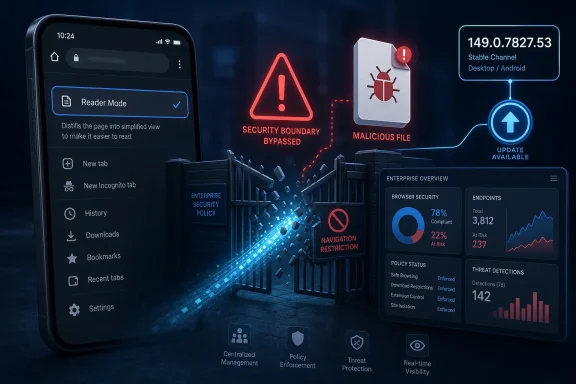
Google Chrome on Android before version 149.0.7827.53 contains CVE-2026-11297, a Reader Mode input-validation flaw disclosed on June 4, 2026, that can let a local attacker bypass navigation restrictions by using a malicious file. The bug is officially tagged as low severity by Chromium, but the surrounding metadata tells a messier story. CISA’s ADP scoring gives it a high CVSS 3.1 score of 7.7, while NVD has not yet supplied its own CVSS assessment. That gap is the real story: not a browser apocalypse, but a reminder that Chrome’s smallest mobile features now sit inside an enterprise-scale risk machine.
CVE-2026-11297 is not the kind of vulnerability that usually gets security teams sprinting through the halls. It is local, Android-specific, and tied to Reader Mode rather than to V8, WebGPU, Skia, or the browser sandbox machinery that tends to dominate emergency patch bulletins. The description says the attacker needs a malicious file and can use insufficient validation of untrusted input to bypass navigation restrictions.
That last phrase matters. Navigation restrictions are part of the browser’s promise that content stays inside the route the browser, user, or policy expects. When that promise weakens, the bug may not read like remote code execution, but it can still become useful glue in a larger attack chain.
The severity split is also worth pausing over. Chromium calls the issue low severity, which likely reflects exploit preconditions and the limited scope Google sees in the vulnerable component. CISA-ADP, meanwhile, attached a CVSS 3.1 vector with local attack vector, low complexity, no privileges, no user interaction, unchanged scope, no confidentiality impact, and high integrity and availability impact. That scoring model produces a high number even when the real-world exploit story is narrower than the word “high” suggests.
This is why CVE triage cannot be outsourced to a single adjective. Low from the vendor and high from an enrichment source are not always contradictory; they are often measuring different dimensions of risk. One speaks from component knowledge and exploitability judgment, the other from a standardized scoring grammar that can amplify certain impact assumptions.
But Reader Mode also has to decide what content is trustworthy enough to transform. It takes input that may have originated in a page, a file, a document, or a rendered web context, then repackages it into a browser-controlled presentation. That is exactly the sort of translation layer where input validation bugs can become subtle.
The vulnerability description says the issue is in “untrusted input,” and that is the phrase administrators should care about. Browser security depends on a sprawling set of trust boundaries: web content versus browser UI, local file versus network document, user gesture versus automatic navigation, regular page versus privileged internal surface. Reader Mode may be a convenience feature, but it still has to preserve those boundaries when it simplifies content.
A bypass of navigation restrictions does not necessarily mean a full compromise. It does, however, mean the browser may be persuaded to go somewhere or do something outside the intended rules. On Android, where files, intents, content providers, downloads, and app-to-app handoffs all intersect with the browser, even a local bug can be more operationally interesting than it first appears.
That distinction should lower the temperature. For most home users, the practical fix is straightforward: update Chrome, avoid opening unexpected files, and let Android’s app update mechanisms do their job. For enterprises, the issue belongs in normal mobile browser patch compliance rather than in a crisis bridge.
Still, “local” should not be mistaken for “irrelevant.” Many successful intrusions are assembled from pieces that look unimpressive in isolation. A malicious file can arrive through email, messaging apps, cloud storage sync, sideloading, QR-code workflows, helpdesk exchanges, shared folders, or line-of-business apps that shuttle documents between systems. The attacker does not always need physical access to make a local file appear on a device.
That is especially true on managed Android fleets. Phones and tablets used by field workers, retail staff, warehouse teams, clinicians, and contractors often handle files from outside the organization’s clean perimeter. When Chrome is the default viewer or a common fallback for opening web-adjacent content, a bug in file-mediated browser navigation deserves more than a shrug.
That context matters because it changes how administrators should read this CVE. The Reader Mode flaw is not the headliner of the Chrome 149 cycle. It is one item in a broad hardening release, and it sits alongside more conventional browser dangers such as memory-safety bugs, sandbox-related issues, and policy enforcement failures.
For WindowsForum readers, the Android label may make this sound like someone else’s problem. That would be too neat. Chrome is a cross-platform browser, Chromium is the substrate for much of the modern browser market, and Microsoft Edge’s security posture is tied to the same upstream engine even when individual features differ. A bug limited to Chrome for Android may not map directly to Edge on Windows, but the patch cadence, CVE flood, and triage burden absolutely do.
The Chrome 149 cycle is a reminder of how browsers have become operating-system-scale software. A “browser update” now touches rendering, JavaScript, PDF handling, GPU paths, permissions, enterprise controls, mobile UI features, and file handling. Security teams do not patch a browser anymore; they patch a platform that happens to have an address bar.
CPEs are supposed to make vulnerability matching machine-readable. In practice, browser-on-mobile vulnerabilities often expose the limits of that model. Chrome is an application, Android is an operating system, and the vulnerable condition is not simply “Chrome anywhere” or “Android alone.” It is Chrome for Android before a particular version.
That distinction matters in asset management. A desktop Chrome installation below 149.0.7827.53 is not necessarily affected by this Reader Mode CVE merely because it is Chrome. Likewise, an Android device is not affected merely because it runs Android. The vulnerable configuration is the intersection: the Chrome application on the Android platform, before the fixed version.
The “Are we missing a CPE?” prompt in NVD is not just bureaucratic noise. It captures a real problem for defenders who rely on automated vulnerability ingestion. If a tool flattens the CPE logic incorrectly, it may over-report the bug across every Chrome desktop or under-report it across mobile devices that are not inventoried with app-level precision.
Some organizations manage Android devices tightly through Android Enterprise. Others have a mixture of corporate-owned devices, BYOD profiles, kiosk devices, ruggedized scanners, shared tablets, and personal phones that touch email or identity portals. Chrome may update through Google Play, through managed Play, through OEM channels, or not at all if the device is stale, restricted, offline, or out of support.
That is where CVE-2026-11297 becomes a useful test case. The bug itself is not the scariest Chrome issue of the month, but it asks whether the organization can answer three simple questions quickly: which Android devices have Chrome, which version are they running, and can the fleet enforce an update to at least 149.0.7827.53?
If the answer is no, the organization has a bigger problem than Reader Mode. It has a mobile browser governance problem. CVEs like this one are then less about emergency exploitation and more about exposing the operational gaps that attackers hope nobody has closed.
This is a familiar browser-security pattern. Vendors often limit details until fixes are broadly deployed, which is sensible when exploit development could be helped by a full technical write-up. But limited disclosure also leaves security teams parsing short descriptions, CVSS vectors, and release-note fragments while management asks whether the issue is “critical.”
CVSS is useful, but it is not a substitute for judgment. A local, Android-only Reader Mode bypass with no stated confidentiality impact does not deserve the same response as an actively exploited remote code execution flaw in V8. At the same time, a no-privilege, no-user-interaction vector with high integrity and availability impact cannot be dismissed just because the Chromium label says low.
The right reading is conditional. For ordinary users, update and move on. For enterprises with managed Android fleets, treat it as a compliance and exposure check. For security teams building exploit-chain models, flag it as a possible navigation-control bypass that may matter more when paired with file delivery, app handoff, or another local weakness.
The modern enterprise browser is also a policy enforcement point. Conditional access, device compliance, web filtering, file download controls, password managers, SSO sessions, and SaaS access all depend on browsers behaving predictably. A navigation-restriction bypass is therefore not just a browser oddity; it touches the assumptions behind managed access.
There is no public indication from the CVE description that this bug breaks enterprise policy controls directly. That caveat is important. But navigation restrictions are adjacent to the kinds of controls administrators care about, and the lack of public technical detail means defenders should avoid overconfident claims in either direction.
For Microsoft Edge administrators, the lesson is broader than this specific CVE. Edge’s Chromium base means many upstream fixes arrive through Microsoft’s own release process, while Chrome-specific Android features may not apply one-to-one. Admins need to track both the Chromium layer and the product-specific layer, because “not affected” can be true for one component and irrelevant to the larger patching obligation.
Consumer devices will generally receive Chrome updates through Google Play, assuming automatic updates are enabled and the device still supports current Chrome builds. Managed devices require a policy check. If Chrome updates are deferred, pinned, blocked, or dependent on a maintenance window, the organization needs to know whether the deferral still makes sense after the June security release.
Administrators should also be careful with dashboards that only show OS patch level. Android’s monthly security patch date is not the same thing as Chrome’s application version. A device can look healthy at the OS level while carrying a stale browser, especially if app updates are controlled separately.
The same caution applies to vulnerability scanners that ingest NVD data. If the CPE logic is interpreted poorly, a scanner may generate noise for desktop Chrome or miss unmanaged Android browsers entirely. The operational fix is to verify application inventory directly rather than assume the CVE feed has expressed the vulnerable population exactly the way your tooling needs it.
That ecosystem is powerful but messy. A browser feature such as Reader Mode may become involved after content has already passed through another trust decision. The user may think they are opening a file from a colleague, a vendor portal, a chat thread, or a shared storage location, not “visiting a website.”
Security teams should therefore resist a web-only mental model. If a malicious file can trigger a navigation bypass locally, the practical exposure depends on where files come from and what Chrome is allowed to do with them. Download restrictions, attachment scanning, mobile threat defense, app protection policies, and user training all shape the real risk.
This does not mean organizations need to ban Reader Mode or panic over every saved page. It means browser security is increasingly inseparable from document security. The browser is not merely rendering the internet; it is rendering the organization’s daily file traffic.
That pipeline is brittle. A CVE can be correctly described by the vendor, partially enriched by one authority, differently scored by another, and imperfectly mapped by asset tools. By the time it reaches a patch dashboard, the nuance may have collapsed into a red number.
CVE-2026-11297 is a small example, but small examples are useful because they reveal the machinery without the pressure of a full-scale zero-day. The record says Chrome on Android before 149.0.7827.53. If an internal report says “all Chrome before 149 is vulnerable” without platform context, it is too broad. If it says “no Windows assets affected” but ignores corporate Android devices, it is too narrow.
Good security operations live in that middle ground. They preserve enough specificity to avoid panic while still acting quickly where the vulnerable configuration exists. That is harder than simply sorting by CVSS.
Chrome 149’s large patch set underscores that reality. The browser is improved through constant churn, and that churn lands directly on administrators who must balance compatibility, testing, and exposure. Holding back a browser update may protect a brittle workflow for a week, but it also stretches the window for every fixed vulnerability in that release.
The better model is not blind auto-update everywhere or frozen versions everywhere. It is tiered adoption: fast update rings for most users, a short validation window for sensitive workflows, and emergency override paths when exploitation or severity justifies it. Mobile Chrome deserves the same discipline as desktop Chrome, even if the tooling is different.
For Windows-heavy shops, this should sound familiar. The Windows update world has already taught administrators that patch policy is not just a technical switch; it is an organizational habit. Browsers now demand the same maturity, only with a faster clock.
The sane response is focused rather than theatrical:
CVE-2026-11297 is a modest vulnerability with an immodest message: the browser is no longer just an app, and mobile Chrome is no longer peripheral to enterprise security. The organizations that handle this well will not be the ones that panic over every high CVSS score or ignore every vendor-low bug; they will be the ones that can translate a sparse CVE record into an accurate asset question, a fast patch decision, and a verified result. That discipline will matter far more when the next Chrome flaw is not a Reader Mode bypass, but the first link in a chain already being used in the wild.
 A Low-Severity Chrome Bug Lands in a High-Severity Workflow
CVE-2026-11297 is not the kind of vulnerability that usually gets security teams sprinting through the halls. It is local, Android-specific, and tied to Reader Mode rather than to V8, WebGPU, Skia, or the browser sandbox machinery that tends to dominate emergency patch bulletins. The description says the attacker needs a malicious file and can use insufficient validation of untrusted input to bypass navigation restrictions.That last phrase matters. Navigation restrictions are part of the browser’s promise that content stays inside the route the browser, user, or policy expects. When that promise weakens, the bug may not read like remote code execution, but it can still become useful glue in a larger attack chain.
The severity split is also worth pausing over. Chromium calls the issue low severity, which likely reflects exploit preconditions and the limited scope Google sees in the vulnerable component. CISA-ADP, meanwhile, attached a CVSS 3.1 vector with local attack vector, low complexity, no privileges, no user interaction, unchanged scope, no confidentiality impact, and high integrity and availability impact. That scoring model produces a high number even when the real-world exploit story is narrower than the word “high” suggests.
This is why CVE triage cannot be outsourced to a single adjective. Low from the vendor and high from an enrichment source are not always contradictory; they are often measuring different dimensions of risk. One speaks from component knowledge and exploitability judgment, the other from a standardized scoring grammar that can amplify certain impact assumptions.
Reader Mode Is Small, but It Sits on a Dangerous Boundary
Reader Mode sounds harmless because it is designed to make the web quieter. Strip the clutter, simplify the page, present text in a more legible view, and let the user read without autoplaying sludge and aggressive layouts. On mobile, that kind of feature is especially attractive because screen space is scarce and websites are increasingly heavy.But Reader Mode also has to decide what content is trustworthy enough to transform. It takes input that may have originated in a page, a file, a document, or a rendered web context, then repackages it into a browser-controlled presentation. That is exactly the sort of translation layer where input validation bugs can become subtle.
The vulnerability description says the issue is in “untrusted input,” and that is the phrase administrators should care about. Browser security depends on a sprawling set of trust boundaries: web content versus browser UI, local file versus network document, user gesture versus automatic navigation, regular page versus privileged internal surface. Reader Mode may be a convenience feature, but it still has to preserve those boundaries when it simplifies content.
A bypass of navigation restrictions does not necessarily mean a full compromise. It does, however, mean the browser may be persuaded to go somewhere or do something outside the intended rules. On Android, where files, intents, content providers, downloads, and app-to-app handoffs all intersect with the browser, even a local bug can be more operationally interesting than it first appears.
The Malicious File Requirement Narrows the Blast Radius
The most important limiting factor is the local attack vector. This is not described as a drive-by web exploit where visiting a page is enough. The attacker needs a malicious file placed into the relevant path of interaction, and the vulnerability is described as local rather than network-based.That distinction should lower the temperature. For most home users, the practical fix is straightforward: update Chrome, avoid opening unexpected files, and let Android’s app update mechanisms do their job. For enterprises, the issue belongs in normal mobile browser patch compliance rather than in a crisis bridge.
Still, “local” should not be mistaken for “irrelevant.” Many successful intrusions are assembled from pieces that look unimpressive in isolation. A malicious file can arrive through email, messaging apps, cloud storage sync, sideloading, QR-code workflows, helpdesk exchanges, shared folders, or line-of-business apps that shuttle documents between systems. The attacker does not always need physical access to make a local file appear on a device.
That is especially true on managed Android fleets. Phones and tablets used by field workers, retail staff, warehouse teams, clinicians, and contractors often handle files from outside the organization’s clean perimeter. When Chrome is the default viewer or a common fallback for opening web-adjacent content, a bug in file-mediated browser navigation deserves more than a shrug.
Chrome 149 Was Already a Heavy Patch Train
CVE-2026-11297 arrived as part of the Chrome 149 security wave, with Chrome 149.0.7827.53 identified as the fixed Android threshold in the CVE record. Chrome 149 also brought a large desktop security update, with reporting around the release noting hundreds of fixes and a striking number of critical issues elsewhere in the browser.That context matters because it changes how administrators should read this CVE. The Reader Mode flaw is not the headliner of the Chrome 149 cycle. It is one item in a broad hardening release, and it sits alongside more conventional browser dangers such as memory-safety bugs, sandbox-related issues, and policy enforcement failures.
For WindowsForum readers, the Android label may make this sound like someone else’s problem. That would be too neat. Chrome is a cross-platform browser, Chromium is the substrate for much of the modern browser market, and Microsoft Edge’s security posture is tied to the same upstream engine even when individual features differ. A bug limited to Chrome for Android may not map directly to Edge on Windows, but the patch cadence, CVE flood, and triage burden absolutely do.
The Chrome 149 cycle is a reminder of how browsers have become operating-system-scale software. A “browser update” now touches rendering, JavaScript, PDF handling, GPU paths, permissions, enterprise controls, mobile UI features, and file handling. Security teams do not patch a browser anymore; they patch a platform that happens to have an address bar.
NVD’s CPE Record Is Awkward but Not Meaningless
The user-supplied NVD change history shows an initial NIST analysis adding a CPE configuration that combines Google Chrome versions up to, but excluding, 149.0.7827.53 with Android as an operating system. That makes sense at a high level because the vulnerability is explicitly in Google Chrome on Android. It is also the sort of CPE expression that can confuse scanners, dashboards, and asset owners.CPEs are supposed to make vulnerability matching machine-readable. In practice, browser-on-mobile vulnerabilities often expose the limits of that model. Chrome is an application, Android is an operating system, and the vulnerable condition is not simply “Chrome anywhere” or “Android alone.” It is Chrome for Android before a particular version.
That distinction matters in asset management. A desktop Chrome installation below 149.0.7827.53 is not necessarily affected by this Reader Mode CVE merely because it is Chrome. Likewise, an Android device is not affected merely because it runs Android. The vulnerable configuration is the intersection: the Chrome application on the Android platform, before the fixed version.
The “Are we missing a CPE?” prompt in NVD is not just bureaucratic noise. It captures a real problem for defenders who rely on automated vulnerability ingestion. If a tool flattens the CPE logic incorrectly, it may over-report the bug across every Chrome desktop or under-report it across mobile devices that are not inventoried with app-level precision.
Asset Inventory Is Where Mobile Browser Security Gets Embarrassing
On Windows, most organizations have a reasonably mature answer to “which browser version is installed?” They may not like the answer, but they can usually get one through Intune, Configuration Manager, Defender, third-party RMM, EDR telemetry, or software inventory. On Android, the same question can be surprisingly slippery.Some organizations manage Android devices tightly through Android Enterprise. Others have a mixture of corporate-owned devices, BYOD profiles, kiosk devices, ruggedized scanners, shared tablets, and personal phones that touch email or identity portals. Chrome may update through Google Play, through managed Play, through OEM channels, or not at all if the device is stale, restricted, offline, or out of support.
That is where CVE-2026-11297 becomes a useful test case. The bug itself is not the scariest Chrome issue of the month, but it asks whether the organization can answer three simple questions quickly: which Android devices have Chrome, which version are they running, and can the fleet enforce an update to at least 149.0.7827.53?
If the answer is no, the organization has a bigger problem than Reader Mode. It has a mobile browser governance problem. CVEs like this one are then less about emergency exploitation and more about exposing the operational gaps that attackers hope nobody has closed.
Severity Inflation Meets Vendor Minimalism
The split between Chromium’s “low” severity and CISA-ADP’s “high” CVSS score is not unique, but it is particularly visible here. The vendor description is sparse, the issue tracker link requires permissions, NVD has not yet provided its own score, and the public record gives defenders just enough information to patch but not enough to model the exploit in detail.This is a familiar browser-security pattern. Vendors often limit details until fixes are broadly deployed, which is sensible when exploit development could be helped by a full technical write-up. But limited disclosure also leaves security teams parsing short descriptions, CVSS vectors, and release-note fragments while management asks whether the issue is “critical.”
CVSS is useful, but it is not a substitute for judgment. A local, Android-only Reader Mode bypass with no stated confidentiality impact does not deserve the same response as an actively exploited remote code execution flaw in V8. At the same time, a no-privilege, no-user-interaction vector with high integrity and availability impact cannot be dismissed just because the Chromium label says low.
The right reading is conditional. For ordinary users, update and move on. For enterprises with managed Android fleets, treat it as a compliance and exposure check. For security teams building exploit-chain models, flag it as a possible navigation-control bypass that may matter more when paired with file delivery, app handoff, or another local weakness.
Windows Shops Should Still Care About an Android Chrome CVE
This site’s core audience lives in Windows, but Windows environments are no longer Windows-only environments. Microsoft 365, Entra ID, Edge, Chrome, Android Enterprise, Intune, Defender, and third-party mobile management all meet at the same identity and data boundary. A phone with a vulnerable browser may be a route into corporate workflows even if the vulnerable code never runs on a Windows endpoint.The modern enterprise browser is also a policy enforcement point. Conditional access, device compliance, web filtering, file download controls, password managers, SSO sessions, and SaaS access all depend on browsers behaving predictably. A navigation-restriction bypass is therefore not just a browser oddity; it touches the assumptions behind managed access.
There is no public indication from the CVE description that this bug breaks enterprise policy controls directly. That caveat is important. But navigation restrictions are adjacent to the kinds of controls administrators care about, and the lack of public technical detail means defenders should avoid overconfident claims in either direction.
For Microsoft Edge administrators, the lesson is broader than this specific CVE. Edge’s Chromium base means many upstream fixes arrive through Microsoft’s own release process, while Chrome-specific Android features may not apply one-to-one. Admins need to track both the Chromium layer and the product-specific layer, because “not affected” can be true for one component and irrelevant to the larger patching obligation.
The Patch Answer Is Simple; the Verification Answer Is Not
The direct remediation is to run Chrome for Android at version 149.0.7827.53 or later. That is the clean part. The messy part is proving that every relevant device actually got there.Consumer devices will generally receive Chrome updates through Google Play, assuming automatic updates are enabled and the device still supports current Chrome builds. Managed devices require a policy check. If Chrome updates are deferred, pinned, blocked, or dependent on a maintenance window, the organization needs to know whether the deferral still makes sense after the June security release.
Administrators should also be careful with dashboards that only show OS patch level. Android’s monthly security patch date is not the same thing as Chrome’s application version. A device can look healthy at the OS level while carrying a stale browser, especially if app updates are controlled separately.
The same caution applies to vulnerability scanners that ingest NVD data. If the CPE logic is interpreted poorly, a scanner may generate noise for desktop Chrome or miss unmanaged Android browsers entirely. The operational fix is to verify application inventory directly rather than assume the CVE feed has expressed the vulnerable population exactly the way your tooling needs it.
The Hidden Risk Is the File-Handling Path
The malicious-file requirement should push attention toward file-handling policy. On Android, Chrome often participates in workflows that do not look like traditional browsing. Users open downloaded HTML files, saved pages, documents with embedded links, attachments, exports from business apps, and content passed from one app to another.That ecosystem is powerful but messy. A browser feature such as Reader Mode may become involved after content has already passed through another trust decision. The user may think they are opening a file from a colleague, a vendor portal, a chat thread, or a shared storage location, not “visiting a website.”
Security teams should therefore resist a web-only mental model. If a malicious file can trigger a navigation bypass locally, the practical exposure depends on where files come from and what Chrome is allowed to do with them. Download restrictions, attachment scanning, mobile threat defense, app protection policies, and user training all shape the real risk.
This does not mean organizations need to ban Reader Mode or panic over every saved page. It means browser security is increasingly inseparable from document security. The browser is not merely rendering the internet; it is rendering the organization’s daily file traffic.
The CPE Footnote Is Really a Supply-Chain Footnote
The awkwardness around affected software configuration hints at a broader supply-chain issue in vulnerability management. Chromium is upstream, Chrome is Google’s product, Android is the platform, Edge and other browsers consume Chromium in different ways, and scanners translate all of that into CPE matches that procurement and security teams are expected to trust.That pipeline is brittle. A CVE can be correctly described by the vendor, partially enriched by one authority, differently scored by another, and imperfectly mapped by asset tools. By the time it reaches a patch dashboard, the nuance may have collapsed into a red number.
CVE-2026-11297 is a small example, but small examples are useful because they reveal the machinery without the pressure of a full-scale zero-day. The record says Chrome on Android before 149.0.7827.53. If an internal report says “all Chrome before 149 is vulnerable” without platform context, it is too broad. If it says “no Windows assets affected” but ignores corporate Android devices, it is too narrow.
Good security operations live in that middle ground. They preserve enough specificity to avoid panic while still acting quickly where the vulnerable configuration exists. That is harder than simply sorting by CVSS.
Patch Management Has Become Browser Fleet Management
A decade ago, browser patching was often framed as a desktop endpoint chore. Today it is a fleet-management problem that spans laptops, phones, tablets, kiosks, virtual desktops, remote browser isolation, embedded WebViews, and managed app containers. Chrome’s rapid release cadence is a security advantage, but only if organizations can absorb it.Chrome 149’s large patch set underscores that reality. The browser is improved through constant churn, and that churn lands directly on administrators who must balance compatibility, testing, and exposure. Holding back a browser update may protect a brittle workflow for a week, but it also stretches the window for every fixed vulnerability in that release.
The better model is not blind auto-update everywhere or frozen versions everywhere. It is tiered adoption: fast update rings for most users, a short validation window for sensitive workflows, and emergency override paths when exploitation or severity justifies it. Mobile Chrome deserves the same discipline as desktop Chrome, even if the tooling is different.
For Windows-heavy shops, this should sound familiar. The Windows update world has already taught administrators that patch policy is not just a technical switch; it is an organizational habit. Browsers now demand the same maturity, only with a faster clock.
The Reader Mode Bug Leaves a Practical Checklist
CVE-2026-11297 will not be remembered as the defining Chrome vulnerability of 2026, and that is precisely why it is useful. It is the sort of bug that gets lost in a crowded release, even though it exposes the everyday seams between mobile devices, browser features, file handling, and vulnerability data.The sane response is focused rather than theatrical:
- Chrome for Android should be updated to version 149.0.7827.53 or later wherever the app is installed.
- Vulnerability dashboards should confirm that the affected configuration is Chrome on Android, not every Chrome deployment by default.
- Mobile device inventories should report browser application versions, not just Android OS patch levels.
- Managed Play, Intune, Android Enterprise, and any third-party MDM policies should be checked for update deferrals or pinned Chrome versions.
- File-handling workflows on mobile devices should be treated as part of browser exposure, especially where users receive documents from outside the organization.
- Chromium-based browser patching should be tracked as an ongoing fleet process, not as an occasional desktop maintenance task.
CVE-2026-11297 is a modest vulnerability with an immodest message: the browser is no longer just an app, and mobile Chrome is no longer peripheral to enterprise security. The organizations that handle this well will not be the ones that panic over every high CVSS score or ignore every vendor-low bug; they will be the ones that can translate a sparse CVE record into an accurate asset question, a fast patch decision, and a verified result. That discipline will matter far more when the next Chrome flaw is not a Reader Mode bypass, but the first link in a chain already being used in the wild.
References
- Primary source: NVD / Chromium
Published: 2026-06-09T07:00:44-07:00
NVD - CVE-2026-11297
 nvd.nist.gov
- Security advisory: MSRC
Published: 2026-06-09T07:00:44-07:00
Original feed URL
Security Update Guide - Microsoft Security Response Center
 msrc.microsoft.com
- Related coverage: stack.watch