

Google published CVE-2026-11690 on June 8, 2026, describing a high-severity out-of-bounds read and write flaw in Chrome’s Media component on macOS before version 149.0.7827.103 that could let an attacker with a compromised renderer execute code inside Chrome’s sandbox through a crafted HTML page. The narrow wording matters: this is not a generic “visit a page and lose the machine” bug, but it is also not a harmless browser crash. It sits in the uncomfortable middle where modern browser exploitation usually lives — chained, sandbox-aware, and dependent on the thin line between containment and escape. For WindowsForum readers, the bigger story is less “Mac-only Chrome bug” than another reminder that Chromium’s security model is now a moving target every administrator has to track across browsers, platforms, and patch systems.
The word Media in a Chrome CVE can sound mundane, as if the bug lives somewhere near autoplay settings or a flaky video decoder. In practice, media handling is one of the browser’s richest attack surfaces because it must parse untrusted, complex, highly compressed data from the open web at speed. Every video call, embedded clip, advertising unit, preview thumbnail, and codec negotiation path increases the amount of code exposed to hostile input.
CVE-2026-11690 is described as both an out-of-bounds read and an out-of-bounds write. That pairing is significant. A read can disclose memory that should not be exposed; a write can corrupt memory in ways that may alter control flow, damage object state, or help stage a more serious exploit. The public description does not reveal the vulnerable code path, and the linked Chromium issue requires permission, which is normal while a patch is still rolling out.
Google classified the issue as high severity rather than critical. That is consistent with the precondition in the CVE text: the attacker must already have compromised the renderer process. But in Chromium security terms, that condition is not a footnote. Renderer compromise is often the first stage of a browser exploit chain, not the end of one.
A modern browser is designed on the assumption that renderer bugs will happen. The renderer is supposed to be boxed in, denied direct access to sensitive system resources, and treated as a hostile tenant once exploited. A vulnerability that lets an attacker execute additional arbitrary code inside the sandbox after a renderer compromise may not be a full sandbox escape by itself, but it can still sharpen the attacker’s position.
Chrome’s renderer sandbox is one of the major reasons drive-by browser exploitation is harder today than it was in the plug-in era. It limits what a compromised tab can do, forcing attackers to find secondary flaws, logic mistakes, broker weaknesses, kernel vulnerabilities, or browser service bugs to move beyond the renderer. That architecture has made exploitation more expensive, but it has not made exploitation obsolete.
This is why the phrase “inside a sandbox” deserves careful reading. It does not say the vulnerability escapes the sandbox. It says that, once the renderer is compromised, a crafted HTML page can trigger code execution in a sandboxed context. That still matters because better code execution inside a constrained process can improve reliability, bypass mitigations, or prepare the ground for a later step.
Security teams often triage browser flaws by asking whether a bug is remote, whether it requires user interaction, and whether exploitation is known in the wild. CVE-2026-11690’s CISA ADP score puts it at 7.5 high, with network attack vector, no privileges required, user interaction required, high attack complexity, and high impact across confidentiality, integrity, and availability. That is the signature of a bug that may be technically demanding but potentially serious in the hands of a capable attacker.
The most dangerous mistake would be to treat “high complexity” as “low urgency.” High complexity means exploitation is harder, not impossible. Browser exploit developers who can compromise renderers are precisely the group that may be able to make use of bugs like this.
For Windows admins, the temptation is to mentally file this under “not my platform.” That is too easy. Enterprises are rarely single-platform anymore, and Windows shops often manage macOS endpoints for executives, developers, designers, finance teams, or mobile workforces. The browser is one of the few applications that cuts across all of those populations and carries enterprise identity, password managers, SaaS sessions, device trust tokens, and privileged admin portals with it.
There is also the Chromium ecosystem problem. A vulnerability may be documented against Chrome, but many organizations standardize on multiple Chromium-based browsers: Chrome, Edge, Brave, Opera, Vivaldi, and specialized embedded Chromium runtimes inside desktop apps. Not every Chrome CVE maps cleanly to every Chromium derivative, and platform-specific fixes may differ. But once a bug lands in the shared project orbit, administrators need to know where the same code exists and whether downstream vendors have shipped their own patched builds.
Microsoft Edge is the obvious WindowsForum angle, but caution is required. This particular CVE is described for Google Chrome on macOS, not as a confirmed Windows Edge vulnerability. Still, Edge admins should watch Microsoft’s release notes whenever Chromium updates contain media, GPU, V8, WebRTC, or sandbox-adjacent fixes. In 2026, browser patch management is no longer about a single vendor’s executable; it is about a shared codebase moving through different release trains.
This is where consumer advice and enterprise advice diverge. For an individual user, “open Chrome, go to About Chrome, let it update, relaunch” is usually enough. For an enterprise, the version number has to be visible in inventory, validated after deployment, and correlated with policy exceptions. A machine that downloads an update but does not relaunch remains a machine running old browser code.
Chrome’s update model has improved dramatically over the years, but the browser still cannot fully protect users from deferred restarts, frozen sessions, nonstandard packaging, third-party patch tools, and managed policies that slow rollout. Security teams should care less about whether a patch has been “approved” and more about whether the vulnerable binary is still in memory on endpoints.
That distinction is especially important for browser vulnerabilities because the exploit path is immediate. Users do not need to open an attachment from a suspicious email if the malicious content is on a web page, inside a compromised ad chain, behind a shortened link, or loaded into a SaaS workflow. The browser is already the application users trust to cross security boundaries all day.
If the concern is whether Windows, Linux, or other Chromium-based products should appear in the same affected configuration, the safest answer is: not based on the public CVE text alone. The description says Chrome on Mac. The configuration shown by NVD reflects that. Expanding the CPE list beyond the stated affected platform would create noise unless Google, Chromium, Microsoft, or another vendor confirms that the same vulnerable code path applies elsewhere.
But that does not mean defenders should stop at the CPE. CPEs are useful for scanners, dashboards, and procurement-era software identity, but they are blunt instruments for modern browser risk. They often struggle with products that share engines, ship rapid builds, embed third-party libraries, or differ by platform. A missing downstream CPE can hide risk; an overbroad one can produce false positives that teams learn to ignore.
The better operational habit is to treat CPE as the beginning of analysis, not the end. If your fleet includes Chrome on macOS, this CVE applies directly. If your fleet includes other Chromium browsers or applications with embedded Chromium, this CVE should trigger vendor-note monitoring and version verification, not automatic panic.
Google commonly restricts bug details until most users have received the fix. The reason is simple: a well-written bug report can become a roadmap for attackers. It may include proof-of-concept behavior, vulnerable functions, crash traces, test cases, or enough technical breadcrumbs to accelerate exploit development. Public transparency is valuable, but so is not giving the internet a recipe while millions of browsers remain unpatched.
That tradeoff is uncomfortable because defenders are being asked to act without full information. They must patch first and learn the technical details later. In an ideal world, every vulnerability would arrive with a complete exploitability analysis, mitigation matrix, and affected-code explanation. In the browser world, timing often beats elegance.
This is also why severity language can feel vague. “High” does not tell you whether the bug is easy to weaponize, whether it was found internally, whether it is reachable from common media formats, or whether mitigations make exploitation unreliable. It tells you enough to prioritize the update. For most enterprises, that is the decision that matters this week.
The modern browser is no longer a document viewer. It is a video platform, application runtime, identity surface, graphics stack, PDF reader, extension host, WebUSB negotiator, passkey container, password manager, WebRTC endpoint, and sometimes the only user interface for corporate work. Its attack surface looks less like a single app and more like a mini operating system.
This is why browser patching has become one of the purest tests of endpoint maturity. Organizations that can quickly identify browser versions, force restarts, handle user disruption, and validate post-patch state are in a strong position. Organizations that still rely on monthly manual checks are betting against the release cadence of the web.
The density of memory-safety issues in Chrome updates also explains why Google, Microsoft, Mozilla, and Apple have all invested in sandboxing, site isolation, fuzzing, and memory-safe rewrites where feasible. Yet the update still matters. Mitigations reduce exploitability; patches remove known flaws. Enterprises need both.
That is why “crafted HTML page” remains such an effective phrase in vulnerability descriptions. HTML is not suspicious. It is the normal substance of the workday. A malicious page can be reached through phishing, malvertising, compromised websites, poisoned search results, messaging apps, or links in business platforms that users open because opening links is their job.
On macOS, the perception of lower malware risk can make browser vulnerabilities feel less urgent. That perception is obsolete. Attackers targeting executives, developers, cryptocurrency users, journalists, government workers, or managed service providers care about access and leverage, not operating-system brand identity. A Mac running an unpatched browser is still an endpoint with credentials and network reach.
For Windows-heavy organizations, the important lesson is cultural. Do not allow macOS endpoints to live in a patch-management side channel because they are a smaller slice of the fleet. Small populations often include high-value users, and high-value users are exactly where browser exploit chains are most attractive.
Inventory tools should report both installed version and last-seen execution state where possible. A machine can have the updated application package available while a user continues running the old process for days. Browser vendors have tried to make restart prompts less disruptive, but the enterprise security model still depends on old code leaving memory.
Security teams should also check whether patch tools are normalizing version strings correctly. The 149.0.7827.102/.103 split across platforms is the kind of detail that can confuse dashboards built around a single “latest Chrome” number. A scanner that expects 149.0.7827.103 everywhere might flag Linux incorrectly; one that treats 149.0.7827.102 as universally sufficient might miss the macOS boundary for this CVE.
For home users, the advice is simpler: update Chrome, restart it, and avoid assuming that automatic updates have already finished the job. On macOS especially, users who keep browsers open for weeks can quietly extend the life of vulnerable code.
This creates a management problem. If every browser update is treated as an emergency, users and help desks burn out. If no browser update is treated as urgent, organizations accumulate exposure in the very application most likely to touch untrusted content. The right answer is not panic; it is automation plus exception handling.
The best-run environments reduce the drama by making browser updates boring. They maintain current channels, test rapidly, deploy in rings, enforce relaunch deadlines, and reserve human attention for failures and high-risk advisories. The goal is not to read every Chromium bug in depth. The goal is to ensure that when a serious bug appears, the update machinery already works.
CVE-2026-11690 is a useful case study because it is serious but bounded. It has a specific platform, a specific version cutoff, a sandbox-related precondition, and no public exploit claim in the CVE text. That is exactly the kind of vulnerability that rewards disciplined patch operations over theatrical incident response.
That said, CPE completeness and security completeness are different things. Vulnerability scanners want crisp product identities; attackers care about reachable code. A fleet owner should not invent affected products in a vulnerability record, but they should monitor adjacent products when shared browser components are involved.
This is especially true for media bugs. Media pipelines may be compiled differently by platform, protected by different sandbox policies, or reachable through different hardware acceleration paths. A bug that is exploitable on macOS may not behave the same way on Windows or Linux, even if similar source code exists. Conversely, a fix in shared Chromium code may be inherited by downstream browsers before a separate CVE mapping ever becomes visible.
The practical posture is therefore split. For reporting and compliance, follow the CVE as written. For defense, use the CVE as a signal to verify Chromium-based browser currency across the fleet.
A crafted page, a compromised renderer, and a memory-corruption flaw in a complex subsystem are not exotic ingredients anymore. They are the standard grammar of modern browser exploitation. The browser vendors have built impressive defenses around that grammar, but the defenses only work if the patched versions actually reach the machines users rely on.
For WindowsForum’s audience, the lesson is not to overstate a Mac Chrome CVE into a Windows emergency. The lesson is to build a browser security program that can handle this kind of nuance without freezing. Some vulnerabilities demand immediate all-hands response; others demand fast, quiet hygiene. This one belongs in the second category unless new evidence changes the picture.
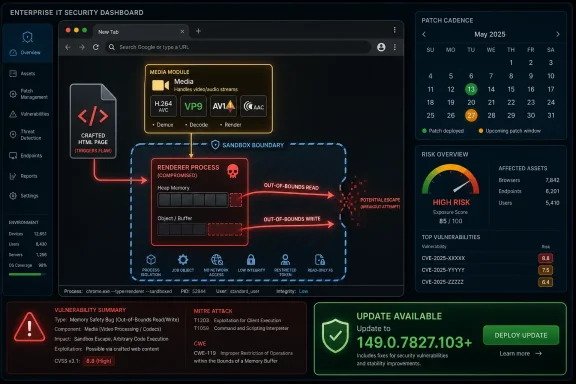 Chrome’s Media Stack Is Once Again Part of the Attack Surface
The word Media in a Chrome CVE can sound mundane, as if the bug lives somewhere near autoplay settings or a flaky video decoder. In practice, media handling is one of the browser’s richest attack surfaces because it must parse untrusted, complex, highly compressed data from the open web at speed. Every video call, embedded clip, advertising unit, preview thumbnail, and codec negotiation path increases the amount of code exposed to hostile input.CVE-2026-11690 is described as both an out-of-bounds read and an out-of-bounds write. That pairing is significant. A read can disclose memory that should not be exposed; a write can corrupt memory in ways that may alter control flow, damage object state, or help stage a more serious exploit. The public description does not reveal the vulnerable code path, and the linked Chromium issue requires permission, which is normal while a patch is still rolling out.
Google classified the issue as high severity rather than critical. That is consistent with the precondition in the CVE text: the attacker must already have compromised the renderer process. But in Chromium security terms, that condition is not a footnote. Renderer compromise is often the first stage of a browser exploit chain, not the end of one.
A modern browser is designed on the assumption that renderer bugs will happen. The renderer is supposed to be boxed in, denied direct access to sensitive system resources, and treated as a hostile tenant once exploited. A vulnerability that lets an attacker execute additional arbitrary code inside the sandbox after a renderer compromise may not be a full sandbox escape by itself, but it can still sharpen the attacker’s position.
The Sandbox Precondition Is a Warning, Not a Comfort Blanket
The comforting version of this story is that CVE-2026-11690 requires a renderer compromise first, so ordinary users should not panic. The more realistic version is that exploit developers do not think in single CVEs. They think in chains.Chrome’s renderer sandbox is one of the major reasons drive-by browser exploitation is harder today than it was in the plug-in era. It limits what a compromised tab can do, forcing attackers to find secondary flaws, logic mistakes, broker weaknesses, kernel vulnerabilities, or browser service bugs to move beyond the renderer. That architecture has made exploitation more expensive, but it has not made exploitation obsolete.
This is why the phrase “inside a sandbox” deserves careful reading. It does not say the vulnerability escapes the sandbox. It says that, once the renderer is compromised, a crafted HTML page can trigger code execution in a sandboxed context. That still matters because better code execution inside a constrained process can improve reliability, bypass mitigations, or prepare the ground for a later step.
Security teams often triage browser flaws by asking whether a bug is remote, whether it requires user interaction, and whether exploitation is known in the wild. CVE-2026-11690’s CISA ADP score puts it at 7.5 high, with network attack vector, no privileges required, user interaction required, high attack complexity, and high impact across confidentiality, integrity, and availability. That is the signature of a bug that may be technically demanding but potentially serious in the hands of a capable attacker.
The most dangerous mistake would be to treat “high complexity” as “low urgency.” High complexity means exploitation is harder, not impossible. Browser exploit developers who can compromise renderers are precisely the group that may be able to make use of bugs like this.
The Mac-Only Wording Narrows the Blast Radius, but Not the Lesson
The CVE description is explicit: Google Chrome on Mac prior to 149.0.7827.103. NVD’s analyzed configuration pairs Google Chrome versions before that build with Apple macOS, which makes this a platform-specific vulnerability as currently documented. That distinction matters for asset owners who must decide whether a finding applies to their fleet.For Windows admins, the temptation is to mentally file this under “not my platform.” That is too easy. Enterprises are rarely single-platform anymore, and Windows shops often manage macOS endpoints for executives, developers, designers, finance teams, or mobile workforces. The browser is one of the few applications that cuts across all of those populations and carries enterprise identity, password managers, SaaS sessions, device trust tokens, and privileged admin portals with it.
There is also the Chromium ecosystem problem. A vulnerability may be documented against Chrome, but many organizations standardize on multiple Chromium-based browsers: Chrome, Edge, Brave, Opera, Vivaldi, and specialized embedded Chromium runtimes inside desktop apps. Not every Chrome CVE maps cleanly to every Chromium derivative, and platform-specific fixes may differ. But once a bug lands in the shared project orbit, administrators need to know where the same code exists and whether downstream vendors have shipped their own patched builds.
Microsoft Edge is the obvious WindowsForum angle, but caution is required. This particular CVE is described for Google Chrome on macOS, not as a confirmed Windows Edge vulnerability. Still, Edge admins should watch Microsoft’s release notes whenever Chromium updates contain media, GPU, V8, WebRTC, or sandbox-adjacent fixes. In 2026, browser patch management is no longer about a single vendor’s executable; it is about a shared codebase moving through different release trains.
Version Numbers Are the Real Patch Boundary
Google’s stable desktop update moved Chrome to 149.0.7827.102/.103 for Windows and Mac, and 149.0.7827.102 for Linux. For CVE-2026-11690 specifically, the public vulnerability record calls out Mac versions before 149.0.7827.103. That gives administrators a concrete line: anything earlier than 149.0.7827.103 on macOS Chrome should be treated as vulnerable for this CVE.This is where consumer advice and enterprise advice diverge. For an individual user, “open Chrome, go to About Chrome, let it update, relaunch” is usually enough. For an enterprise, the version number has to be visible in inventory, validated after deployment, and correlated with policy exceptions. A machine that downloads an update but does not relaunch remains a machine running old browser code.
Chrome’s update model has improved dramatically over the years, but the browser still cannot fully protect users from deferred restarts, frozen sessions, nonstandard packaging, third-party patch tools, and managed policies that slow rollout. Security teams should care less about whether a patch has been “approved” and more about whether the vulnerable binary is still in memory on endpoints.
That distinction is especially important for browser vulnerabilities because the exploit path is immediate. Users do not need to open an attachment from a suspicious email if the malicious content is on a web page, inside a compromised ad chain, behind a shortened link, or loaded into a SaaS workflow. The browser is already the application users trust to cross security boundaries all day.
NVD’s CPE Entry Tells a Small but Familiar Story
The user-facing question — “Are we missing a CPE here?” — points at a recurring weakness in vulnerability management: the formal product mapping often lags the practical exposure. In this case, NVD’s change history added a configuration for Google Chrome versions up to but excluding 149.0.7827.103, combined with Apple macOS. That is the core CPE relationship for the CVE as publicly described.If the concern is whether Windows, Linux, or other Chromium-based products should appear in the same affected configuration, the safest answer is: not based on the public CVE text alone. The description says Chrome on Mac. The configuration shown by NVD reflects that. Expanding the CPE list beyond the stated affected platform would create noise unless Google, Chromium, Microsoft, or another vendor confirms that the same vulnerable code path applies elsewhere.
But that does not mean defenders should stop at the CPE. CPEs are useful for scanners, dashboards, and procurement-era software identity, but they are blunt instruments for modern browser risk. They often struggle with products that share engines, ship rapid builds, embed third-party libraries, or differ by platform. A missing downstream CPE can hide risk; an overbroad one can produce false positives that teams learn to ignore.
The better operational habit is to treat CPE as the beginning of analysis, not the end. If your fleet includes Chrome on macOS, this CVE applies directly. If your fleet includes other Chromium browsers or applications with embedded Chromium, this CVE should trigger vendor-note monitoring and version verification, not automatic panic.
Google’s Restricted Bug Details Are a Feature, Not a Cover-Up
The Chromium issue linked from the advisory is not publicly readable without permission. That will frustrate researchers, admins, and anyone trying to understand whether a specific control blocks exploitation. It is also a deliberate part of browser security operations.Google commonly restricts bug details until most users have received the fix. The reason is simple: a well-written bug report can become a roadmap for attackers. It may include proof-of-concept behavior, vulnerable functions, crash traces, test cases, or enough technical breadcrumbs to accelerate exploit development. Public transparency is valuable, but so is not giving the internet a recipe while millions of browsers remain unpatched.
That tradeoff is uncomfortable because defenders are being asked to act without full information. They must patch first and learn the technical details later. In an ideal world, every vulnerability would arrive with a complete exploitability analysis, mitigation matrix, and affected-code explanation. In the browser world, timing often beats elegance.
This is also why severity language can feel vague. “High” does not tell you whether the bug is easy to weaponize, whether it was found internally, whether it is reachable from common media formats, or whether mitigations make exploitation unreliable. It tells you enough to prioritize the update. For most enterprises, that is the decision that matters this week.
The Other Chrome Fixes Make This Bigger Than One CVE
CVE-2026-11690 arrived as part of a much larger stable channel update containing dozens of security fixes. Google’s June 8 advisory listed 74 security fixes, including a run of critical use-after-free issues and many high-severity flaws across components such as V8, GPU, WebRTC, Media, PDF, Network, Extensions, Skia, Dawn, Payments, and browser UI code. That breadth is the real story.The modern browser is no longer a document viewer. It is a video platform, application runtime, identity surface, graphics stack, PDF reader, extension host, WebUSB negotiator, passkey container, password manager, WebRTC endpoint, and sometimes the only user interface for corporate work. Its attack surface looks less like a single app and more like a mini operating system.
This is why browser patching has become one of the purest tests of endpoint maturity. Organizations that can quickly identify browser versions, force restarts, handle user disruption, and validate post-patch state are in a strong position. Organizations that still rely on monthly manual checks are betting against the release cadence of the web.
The density of memory-safety issues in Chrome updates also explains why Google, Microsoft, Mozilla, and Apple have all invested in sandboxing, site isolation, fuzzing, and memory-safe rewrites where feasible. Yet the update still matters. Mitigations reduce exploitability; patches remove known flaws. Enterprises need both.
The Practical Risk Is Session Theft, Not Movie-Plot Hacking
A browser exploit does not need to end in full device takeover to be damaging. If an attacker can gain reliable code execution in a browser context and chain it with other weaknesses, the practical targets are often web sessions, authentication flows, document access, internal portals, browser-stored secrets, and lateral movement opportunities. For many workers, the browser is where the company lives.That is why “crafted HTML page” remains such an effective phrase in vulnerability descriptions. HTML is not suspicious. It is the normal substance of the workday. A malicious page can be reached through phishing, malvertising, compromised websites, poisoned search results, messaging apps, or links in business platforms that users open because opening links is their job.
On macOS, the perception of lower malware risk can make browser vulnerabilities feel less urgent. That perception is obsolete. Attackers targeting executives, developers, cryptocurrency users, journalists, government workers, or managed service providers care about access and leverage, not operating-system brand identity. A Mac running an unpatched browser is still an endpoint with credentials and network reach.
For Windows-heavy organizations, the important lesson is cultural. Do not allow macOS endpoints to live in a patch-management side channel because they are a smaller slice of the fleet. Small populations often include high-value users, and high-value users are exactly where browser exploit chains are most attractive.
Admins Should Patch the Running Browser, Not Just the Installed Browser
The operational response to CVE-2026-11690 is straightforward but not trivial. Chrome on macOS should be updated to 149.0.7827.103 or later, and administrators should confirm that users have relaunched the browser. In managed environments, that may mean enforcing relaunch notifications, setting a maximum update age, and watching for devices that remain stuck on earlier builds.Inventory tools should report both installed version and last-seen execution state where possible. A machine can have the updated application package available while a user continues running the old process for days. Browser vendors have tried to make restart prompts less disruptive, but the enterprise security model still depends on old code leaving memory.
Security teams should also check whether patch tools are normalizing version strings correctly. The 149.0.7827.102/.103 split across platforms is the kind of detail that can confuse dashboards built around a single “latest Chrome” number. A scanner that expects 149.0.7827.103 everywhere might flag Linux incorrectly; one that treats 149.0.7827.102 as universally sufficient might miss the macOS boundary for this CVE.
For home users, the advice is simpler: update Chrome, restart it, and avoid assuming that automatic updates have already finished the job. On macOS especially, users who keep browsers open for weeks can quietly extend the life of vulnerable code.
The Browser Has Become the Patch Tuesday That Never Ends
Windows administrators used to organize their mental calendar around Patch Tuesday. That rhythm still matters, but browser security runs on its own clock. Chrome updates can land any day, Edge may follow Chromium on a related but distinct cadence, and emergency browser fixes can be more urgent than operating-system patches because the exposure is directly web-facing.This creates a management problem. If every browser update is treated as an emergency, users and help desks burn out. If no browser update is treated as urgent, organizations accumulate exposure in the very application most likely to touch untrusted content. The right answer is not panic; it is automation plus exception handling.
The best-run environments reduce the drama by making browser updates boring. They maintain current channels, test rapidly, deploy in rings, enforce relaunch deadlines, and reserve human attention for failures and high-risk advisories. The goal is not to read every Chromium bug in depth. The goal is to ensure that when a serious bug appears, the update machinery already works.
CVE-2026-11690 is a useful case study because it is serious but bounded. It has a specific platform, a specific version cutoff, a sandbox-related precondition, and no public exploit claim in the CVE text. That is exactly the kind of vulnerability that rewards disciplined patch operations over theatrical incident response.
The CPE Answer Is Narrow, but the Defensive Answer Is Wider
The immediate CPE mapping for CVE-2026-11690 appears aligned with the public record: Google Chrome before 149.0.7827.103 on Apple macOS. If someone is asking whether NVD should add a Windows Chrome CPE, an Edge CPE, or a generic Chromium CPE, the answer should be evidence-driven. The current description does not justify broadening the affected configuration beyond what Google and NVD have stated.That said, CPE completeness and security completeness are different things. Vulnerability scanners want crisp product identities; attackers care about reachable code. A fleet owner should not invent affected products in a vulnerability record, but they should monitor adjacent products when shared browser components are involved.
This is especially true for media bugs. Media pipelines may be compiled differently by platform, protected by different sandbox policies, or reachable through different hardware acceleration paths. A bug that is exploitable on macOS may not behave the same way on Windows or Linux, even if similar source code exists. Conversely, a fix in shared Chromium code may be inherited by downstream browsers before a separate CVE mapping ever becomes visible.
The practical posture is therefore split. For reporting and compliance, follow the CVE as written. For defense, use the CVE as a signal to verify Chromium-based browser currency across the fleet.
The Patch Is Small; the Signal Is Not
CVE-2026-11690 will probably not be remembered as the defining Chrome vulnerability of 2026. It is one high-severity bug in a large Chrome security update, with restricted technical details and a Mac-specific public description. But it captures the shape of browser risk in a way that deserves attention.A crafted page, a compromised renderer, and a memory-corruption flaw in a complex subsystem are not exotic ingredients anymore. They are the standard grammar of modern browser exploitation. The browser vendors have built impressive defenses around that grammar, but the defenses only work if the patched versions actually reach the machines users rely on.
For WindowsForum’s audience, the lesson is not to overstate a Mac Chrome CVE into a Windows emergency. The lesson is to build a browser security program that can handle this kind of nuance without freezing. Some vulnerabilities demand immediate all-hands response; others demand fast, quiet hygiene. This one belongs in the second category unless new evidence changes the picture.
The Admin’s Real Checklist Fits on One Screen
The useful response to CVE-2026-11690 is concrete, not theatrical. Treat the advisory as a prompt to verify browser currency, relaunch behavior, scanner logic, and downstream Chromium coverage.- Chrome on macOS should be updated to version 149.0.7827.103 or later to address the CVE as publicly described.
- Administrators should confirm that Chrome has actually relaunched after updating, because installed bits do not protect users while old browser processes remain active.
- Vulnerability teams should avoid expanding the formal affected CPE list beyond the public Chrome-on-macOS record unless a vendor confirms broader exposure.
- Organizations using Chromium-based browsers should monitor their vendors’ release notes, because shared code can move faster than vulnerability database mappings.
- Patch dashboards should handle platform-specific Chrome version numbers carefully, especially when Windows, macOS, and Linux builds do not share the exact same final version.
- Security teams should treat browser media, GPU, WebRTC, PDF, and JavaScript engine fixes as high-priority signals because those components process complex untrusted content.
References
- Primary source: NVD / Chromium
Published: 2026-06-15T19:14:54-07:00
NVD - CVE-2026-11690
 nvd.nist.gov
- Security advisory: MSRC
Published: 2026-06-15T19:14:54-07:00
Original feed URL
Security Update Guide - Microsoft Security Response Center
 msrc.microsoft.com
- Related coverage: vulnerability.circl.lu
Vulnerability-Lookup
Vulnerability-Lookup - Fast vulnerability lookup correlation from different sources.vulnerability.circl.lu - Related coverage: cvepremium.circl.lu
Vulnerability-Lookup
Vulnerability-Lookup - Fast vulnerability lookup correlation from different sources.cvepremium.circl.lu
