

Google and NVD published CVE-2026-11632 on June 8, 2026, describing a critical use-after-free flaw in Chrome’s TabStrip component before version 149.0.7827.103 that could let a remote attacker execute code through a crafted HTML page after specific user interface gestures. The awkward phrasing is doing a lot of work: this is not simply “visit a page and lose the machine,” but neither is it harmless because a click, drag, tab action, or other browser gesture is required. For Windows users and administrators, the practical answer is dull but urgent: update Chrome and verify the build, because browser UI bugs sit uncomfortably close to the trust boundary most people forget exists. The larger story is that Chrome’s interface chrome — the tabs, strips, windows, and controls around the web page — has become part of the attack surface, not just the frame around it.
For years, browser security advice has trained users to think in terms of hostile web content: JavaScript engines, media parsers, fonts, images, WebAssembly, extensions, and the long parade of inputs a website can feed into a renderer. CVE-2026-11632 points at something less intuitive but just as important. The vulnerable component is the TabStrip, the browser UI responsible for presenting and manipulating tabs.
That matters because users tend to trust browser interface elements more than page content. A tab is not an ad, not a pop-up, not a random DOM element dressed up to look like a system dialog. It is part of Chrome itself, and that distinction is exactly why UI-adjacent vulnerabilities deserve attention beyond their CVSS score.
The CVE description says an attacker would need to convince a user to engage in specific UI gestures. That requirement lowers the ease of exploitation compared with a no-click drive-by, but it does not move the bug into academic territory. Modern phishing already depends on convincing users to click, drag, approve, switch context, open pop-ups, interact with fake login flows, and follow browser prompts that look ordinary enough to pass through habit.
This is the central uncomfortable fact: a browser UI vulnerability does not have to defeat user suspicion if it can borrow from normal behavior. We all move tabs. We all click tab close buttons. We all switch windows, restore sessions, pin tabs, drag tabs between monitors, and let web applications shepherd us through choreographed flows. The attacker’s job is not necessarily to invent a strange gesture; it may be to wrap a dangerous one in a familiar task.
Chromium severity is tied to product-specific impact and exploitability inside Chrome’s architecture. If a memory-safety flaw can plausibly lead to arbitrary code execution in the browser context, Google has every reason to treat it as a serious release-blocking class of defect. The browser team is thinking about exploit chains, process boundaries, bug class history, and whether a flaw pierces assumptions made by other mitigations.
CVSS is more formal and more constrained. The vector for this vulnerability marks network attack vector, high attack complexity, no privileges required, required user interaction, unchanged scope, and high confidentiality, integrity, and availability impact. In plain English, that says the bug is remotely reachable and damaging if exploited, but not trivially automatic.
For defenders, the right response is not to split the difference and call it “medium in spirit.” A browser flaw that can execute arbitrary code after user interaction belongs in the patch-now bucket, especially on managed Windows fleets where Chrome is both a productivity dependency and a privileged window into corporate identity, SaaS applications, password managers, session cookies, intranet portals, and device management flows.
The better reading is this: CVE-2026-11632 may not be the easiest Chrome bug to exploit, but the consequence column is ugly enough that administrators should not wait for exploit code to appear in the open before acting.
In a complex C++ codebase like Chromium, object lifetime is not an abstract programming concern. Tabs are created, closed, detached, grouped, animated, restored, discarded, moved between windows, synchronized across profiles, and integrated with accessibility, theming, session restore, extensions, and operating-system window management. Every one of those transitions is a chance for object ownership to become complicated.
The TabStrip is especially interesting because it is a state machine with a human attached. A JavaScript engine bug can often be hammered programmatically with carefully groomed heap state. A UI bug may require timing, gesture choreography, focus changes, animation state, and a browser window arranged just so. That explains the high attack complexity in the CVSS vector, but it does not make the underlying memory corruption less dangerous.
Use-after-free bugs are also stubborn because they often survive layers of defensive engineering. Sandboxing, partition allocators, MiraclePtr-style protections, fuzzing, and safer APIs all help, but they do not erase the fundamental difficulty of coordinating object lifetimes across a huge browser. The fact that Chrome still ships fixes for memory lifetime bugs is not evidence that its security program is weak. It is evidence that browsers are operating systems in all but name, and operating systems accumulate weird edges.
Google’s restriction of Chromium issue details is standard practice while users are still updating. That leaves defenders with the CVE wording, the severity label, the patched version, and the general shape of the flaw. We do not know which gesture triggers the memory error, whether the exploit requires tab dragging, tab closing, window detachment, focus switching, full-screen transitions, a permission prompt, a crafted sequence of pop-ups, or something else entirely.
But attackers rarely need to say, “Please perform a suspicious exploit gesture.” They say, “Drag this tab into a new window for the demo.” They say, “Click and hold to verify.” They say, “Move this meeting tab to your second monitor.” They say, “Close the duplicate tab.” User interaction is not a rare commodity; it is the currency of the web.
This is why Chrome UI bugs deserve a different mental model from ordinary webpage bugs. The attacker may be able to design the page to make the required gesture feel like part of the application. The victim does not need to know they are interacting with the browser’s TabStrip as an attack surface. They only need to follow a plausible workflow.
Enterprise security teams should also remember that “user interaction required” is often less reassuring in targeted environments. Help desks, recruiters, finance staff, administrators, engineers, and executives are routinely asked to open browser-based documents, dashboards, portals, and meetings. If the attack requires a guided sequence, a targeted lure can supply the guide.
That version-number wrinkle is not just pedantry. Chrome’s cross-platform build numbers often differ slightly across Windows, macOS, and Linux, and vulnerability scanners sometimes flatten that nuance into a single “fixed version.” When the NVD says “prior to 149.0.7827.103,” Windows administrators should verify how their tools map Google’s Windows stable build to the CVE rather than assuming every scanner will interpret the boundary perfectly.
On unmanaged home PCs, Chrome’s auto-update system usually does the right thing quietly. The browser downloads updates in the background and applies them when Chrome restarts. The weak point is that users often keep sessions open for days, especially on laptops that sleep rather than shut down.
In managed environments, the weak point is more bureaucratic. Some organizations delay browser updates to protect line-of-business web apps, extensions, kiosk setups, or compatibility-sensitive workflows. That caution is understandable, but Chrome is not a quarterly desktop application anymore. It is an internet-facing runtime with a security cadence measured in days.
The correct administrative posture is not reckless auto-update everywhere with no testing. It is rapid-ring deployment: a small validation group, quick telemetry, then broad rollout. If an organization cannot push a critical Chrome fix within a business day or two, the browser is already moving faster than the process built to govern it.
CVE-2026-11632 reinforces the point because it is not a weird optional plugin bug. It is in Chrome’s UI layer, affecting the everyday browser surface on Windows, macOS, and Linux. A Windows workstation with a fully patched OS but an outdated Chrome build is not meaningfully “current” from a risk perspective.
The practical controls are familiar, but they need executive permission to be boring and fast. Managed Chrome deployments should enforce update policies, monitor version drift, and require relaunch when a critical security update is pending. Security teams should know which machines are stuck because of user behavior, which are stuck because of policy, and which are stuck because update services are broken.
Browser extensions deserve attention here as well, though CVE-2026-11632 is not an extension vulnerability. Extensions can influence tab behavior, session management, content scripts, and user workflows. In any environment investigating suspicious browser activity, the extension inventory is part of the context.
The same goes for alternative Chromium-based browsers. A Chrome CVE does not automatically mean every Chromium derivative is vulnerable in the same way at the same time, but it is a signal to check Edge, Brave, Vivaldi, Opera, Electron-based applications, and embedded Chromium runtimes where relevant. Microsoft Edge ships on its own update channel and often picks up Chromium security fixes quickly, but administrators should verify rather than assume.
This is where vulnerability management becomes messy. CPEs are necessary for scanners, dashboards, compliance reports, and ticketing systems, but they are blunt instruments for software that self-updates, ships per-user installations, exists in enterprise and consumer channels, and may appear in multiple package managers. Chrome on Windows can be installed system-wide or per-user. It can be managed by Group Policy, cloud policy, enterprise installers, third-party patch tools, or left to its own updater.
So, are we “missing a CPE”? In the narrow NVD sense, the visible configuration captures Google Chrome on the major desktop operating systems. In the operational sense, a CPE list is never the whole inventory. It will not tell you whether a stale Chrome binary sits in a VDI gold image, whether a disabled Google Update service stranded a subset of machines, whether a packaging tool has misdetected the fixed Windows build, or whether a Chromium-based application embeds vulnerable code paths.
That distinction matters for Windows administrators because vulnerability dashboards can create false confidence. A clean CPE match is not the same thing as a clean endpoint. The only satisfying answer is endpoint-level version telemetry: what browser executable is present, what channel is it on, what version is running, and has the user relaunched into the patched build?
NVD’s enrichment also lagged the CVE receipt by roughly a day, which is normal. The CVE arrived from Chrome on June 8, CISA-ADP added the CVSS vector shortly after, and NIST’s initial analysis followed on June 9. That chronology is a reminder that vendor advisories often carry the actionable fix before national databases finish their metadata.
Google’s position is that details remain restricted until most users are updated, and that is the only sane default for a widely deployed browser. Publishing exact trigger conditions for a critical memory corruption bug before the update has saturated the installed base would turn a patch into a roadmap. The tradeoff is that defenders must act on incomplete public information.
That incompleteness should shape the article’s tone. It would be irresponsible to claim this vulnerability is being exploited in the wild unless Google or another reliable source says so for this specific CVE. The same Chrome desktop update also addressed CVE-2026-11645, a V8 issue that Google reportedly acknowledged as having an exploit in the wild, but that is a different vulnerability. Conflating the two would turn a real Chrome emergency into sloppy threat inflation.
The responsible reading is narrower and still serious. CVE-2026-11632 is a critical Chrome vulnerability with potential arbitrary code execution, requiring user interaction and specific UI gestures, fixed in the 149.0.7827.102/.103 stable update train. It is not, based on the public record, the zero-day exploitation story in that release. That distinction matters because security teams need prioritization, not panic.
Still, the presence of multiple serious Chrome fixes in the same update should increase urgency. Attackers reverse patches. They diff code. They watch release notes. Once a fix lands, the clock starts for defenders and adversaries alike.
CVE-2026-11632’s public description says arbitrary code execution via crafted HTML after user gestures. It does not say sandbox escape. That distinction is important. Chrome’s multi-process sandbox is designed to contain compromised rendering or browser-adjacent code paths where possible, and the exact execution context for this bug is not publicly detailed.
But from an enterprise risk perspective, even “inside the browser” can be a rich place to be. Browser processes handle cookies, OAuth flows, password manager interactions, autofill, WebAuthn prompts, downloaded files, clipboard operations, and user sessions into critical systems. A sandboxed foothold may still be useful if paired with a second bug or if it enables data access within the browser’s authority.
That is why patch prioritization should not wait for a perfect exploit-chain diagram. Defenders should ask a simpler question: if an attacker could reliably induce code execution through browser UI behavior on machines that handle privileged web sessions, would we accept the delay? The answer should be no.
This also explains why consumer advice and enterprise advice diverge. A home user should update and relaunch. An enterprise should update, verify, hunt for laggards, monitor browser crash telemetry where available, review unusual extension changes, and make sure privileged admin workflows are not performed from stale browsers.
CVE-2026-11632 lands squarely in that reality. The vulnerable surface is not a website feature that a content blocker can reliably neutralize. It is not a risky download that SmartScreen can always intercept. It is not a malicious extension that can be removed from a blocklist. It is a browser component that users touch as part of normal computing.
This makes user training necessary but insufficient. Telling users not to perform strange gestures is meaningless when the exploit condition may be indistinguishable from normal tab management. Telling them not to visit suspicious sites is useful in a general sense, but crafted pages can arrive through compromised legitimate sites, ad networks, chat links, support portals, shared documents, or internal collaboration tools.
The defense is therefore architectural. Keep Chrome current. Reduce unnecessary extensions. Segment privileged browsing. Use separate browser profiles for administration where feasible. Prefer phishing-resistant authentication. Restrict local admin rights. Treat browser crashes and repeated renderer failures on high-value machines as signals worth investigating.
None of that is new, but each critical browser CVE makes the same argument more forcefully. The browser is no longer just where users go to reach risk. It is part of the risk.
That means the first task is verification, not assumption. Open Chrome’s About page, force the update check, and relaunch. In managed environments, query browser versions through endpoint management, vulnerability scanners, EDR inventory, or Chrome Browser Cloud Management. A machine that has downloaded the update but not restarted the browser is still a machine running old code.
The second task is policy. Chrome can be configured to notify users, force relaunch after an update period, and prevent indefinite deferral. Those controls can annoy users, especially those with sprawling tab sessions, but tab hoarding is not a security strategy. If the browser is carrying a critical code-execution fix, uptime pride becomes liability.
The third task is exception handling. Some systems will fail to update because they are offline, frozen, kiosked, misconfigured, blocked by proxy rules, or running unsupported packaging. Those exceptions should not disappear into a dashboard. They are the machines most likely to remain exposed after everyone declares victory.
There is also a communications lesson. Security teams should resist vague alerts that say “Chrome vulnerability patched.” Tell users what to do: restart Chrome, confirm the version, and expect a forced relaunch if they do not. The more precise the instruction, the less likely it becomes another ignored red banner in the corporate noise.
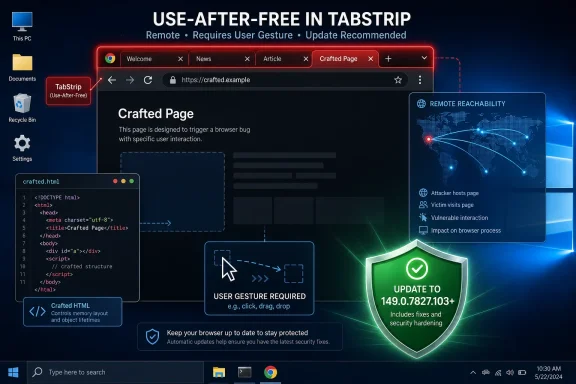 The Browser Frame Is No Longer a Safe Bystander
For years, browser security advice has trained users to think in terms of hostile web content: JavaScript engines, media parsers, fonts, images, WebAssembly, extensions, and the long parade of inputs a website can feed into a renderer. CVE-2026-11632 points at something less intuitive but just as important. The vulnerable component is the TabStrip, the browser UI responsible for presenting and manipulating tabs.That matters because users tend to trust browser interface elements more than page content. A tab is not an ad, not a pop-up, not a random DOM element dressed up to look like a system dialog. It is part of Chrome itself, and that distinction is exactly why UI-adjacent vulnerabilities deserve attention beyond their CVSS score.
The CVE description says an attacker would need to convince a user to engage in specific UI gestures. That requirement lowers the ease of exploitation compared with a no-click drive-by, but it does not move the bug into academic territory. Modern phishing already depends on convincing users to click, drag, approve, switch context, open pop-ups, interact with fake login flows, and follow browser prompts that look ordinary enough to pass through habit.
This is the central uncomfortable fact: a browser UI vulnerability does not have to defeat user suspicion if it can borrow from normal behavior. We all move tabs. We all click tab close buttons. We all switch windows, restore sessions, pin tabs, drag tabs between monitors, and let web applications shepherd us through choreographed flows. The attacker’s job is not necessarily to invent a strange gesture; it may be to wrap a dangerous one in a familiar task.
“Critical” and “7.5 High” Are Both Telling the Truth
One of the first oddities in the public record is the apparent mismatch between Chromium’s security severity and the CVSS score contributed by CISA’s ADP enrichment. Chromium labels the issue Critical, while the CVSS 3.1 vector listed in the NVD record yields a 7.5 High score. That is not a contradiction so much as a reminder that vendor severity and CVSS are answering different questions.Chromium severity is tied to product-specific impact and exploitability inside Chrome’s architecture. If a memory-safety flaw can plausibly lead to arbitrary code execution in the browser context, Google has every reason to treat it as a serious release-blocking class of defect. The browser team is thinking about exploit chains, process boundaries, bug class history, and whether a flaw pierces assumptions made by other mitigations.
CVSS is more formal and more constrained. The vector for this vulnerability marks network attack vector, high attack complexity, no privileges required, required user interaction, unchanged scope, and high confidentiality, integrity, and availability impact. In plain English, that says the bug is remotely reachable and damaging if exploited, but not trivially automatic.
For defenders, the right response is not to split the difference and call it “medium in spirit.” A browser flaw that can execute arbitrary code after user interaction belongs in the patch-now bucket, especially on managed Windows fleets where Chrome is both a productivity dependency and a privileged window into corporate identity, SaaS applications, password managers, session cookies, intranet portals, and device management flows.
The better reading is this: CVE-2026-11632 may not be the easiest Chrome bug to exploit, but the consequence column is ugly enough that administrators should not wait for exploit code to appear in the open before acting.
Use-After-Free Remains the Bug Class That Will Not Die
The weakness assigned to CVE-2026-11632 is CWE-416, the familiar use-after-free. This is one of those bug classes that sounds mechanical until you remember what it means in a browser. Software frees a chunk of memory, later uses it as though it were still valid, and an attacker may be able to influence what now occupies that memory.In a complex C++ codebase like Chromium, object lifetime is not an abstract programming concern. Tabs are created, closed, detached, grouped, animated, restored, discarded, moved between windows, synchronized across profiles, and integrated with accessibility, theming, session restore, extensions, and operating-system window management. Every one of those transitions is a chance for object ownership to become complicated.
The TabStrip is especially interesting because it is a state machine with a human attached. A JavaScript engine bug can often be hammered programmatically with carefully groomed heap state. A UI bug may require timing, gesture choreography, focus changes, animation state, and a browser window arranged just so. That explains the high attack complexity in the CVSS vector, but it does not make the underlying memory corruption less dangerous.
Use-after-free bugs are also stubborn because they often survive layers of defensive engineering. Sandboxing, partition allocators, MiraclePtr-style protections, fuzzing, and safer APIs all help, but they do not erase the fundamental difficulty of coordinating object lifetimes across a huge browser. The fact that Chrome still ships fixes for memory lifetime bugs is not evidence that its security program is weak. It is evidence that browsers are operating systems in all but name, and operating systems accumulate weird edges.
The Required Gesture Is a Speed Bump, Not a Wall
The phrase “specific UI gestures” will tempt some readers into complacency. It sounds like the user must do something so unusual that exploitation would be implausible outside a lab. That may be true for some bugs, but the public description does not give enough detail to justify that conclusion.Google’s restriction of Chromium issue details is standard practice while users are still updating. That leaves defenders with the CVE wording, the severity label, the patched version, and the general shape of the flaw. We do not know which gesture triggers the memory error, whether the exploit requires tab dragging, tab closing, window detachment, focus switching, full-screen transitions, a permission prompt, a crafted sequence of pop-ups, or something else entirely.
But attackers rarely need to say, “Please perform a suspicious exploit gesture.” They say, “Drag this tab into a new window for the demo.” They say, “Click and hold to verify.” They say, “Move this meeting tab to your second monitor.” They say, “Close the duplicate tab.” User interaction is not a rare commodity; it is the currency of the web.
This is why Chrome UI bugs deserve a different mental model from ordinary webpage bugs. The attacker may be able to design the page to make the required gesture feel like part of the application. The victim does not need to know they are interacting with the browser’s TabStrip as an attack surface. They only need to follow a plausible workflow.
Enterprise security teams should also remember that “user interaction required” is often less reassuring in targeted environments. Help desks, recruiters, finance staff, administrators, engineers, and executives are routinely asked to open browser-based documents, dashboards, portals, and meetings. If the attack requires a guided sequence, a targeted lure can supply the guide.
Chrome’s Patch Cadence Is Fast, but the Fleet Is Always Slower
The fix line is straightforward: Chrome prior to 149.0.7827.103 is affected according to the CVE record. Google’s Stable Channel update for desktop moved users to patched 149 builds, with Windows and Linux build numbering appearing as 149.0.7827.102 in some release reporting and macOS as 149.0.7827.103. The NVD record uses 149.0.7827.103 as the exclusion boundary, which is the cleanest threshold for vulnerability management systems to reason about.That version-number wrinkle is not just pedantry. Chrome’s cross-platform build numbers often differ slightly across Windows, macOS, and Linux, and vulnerability scanners sometimes flatten that nuance into a single “fixed version.” When the NVD says “prior to 149.0.7827.103,” Windows administrators should verify how their tools map Google’s Windows stable build to the CVE rather than assuming every scanner will interpret the boundary perfectly.
On unmanaged home PCs, Chrome’s auto-update system usually does the right thing quietly. The browser downloads updates in the background and applies them when Chrome restarts. The weak point is that users often keep sessions open for days, especially on laptops that sleep rather than shut down.
In managed environments, the weak point is more bureaucratic. Some organizations delay browser updates to protect line-of-business web apps, extensions, kiosk setups, or compatibility-sensitive workflows. That caution is understandable, but Chrome is not a quarterly desktop application anymore. It is an internet-facing runtime with a security cadence measured in days.
The correct administrative posture is not reckless auto-update everywhere with no testing. It is rapid-ring deployment: a small validation group, quick telemetry, then broad rollout. If an organization cannot push a critical Chrome fix within a business day or two, the browser is already moving faster than the process built to govern it.
Windows Admins Should Treat Chrome Like Core Infrastructure
WindowsForum readers know the old patch hierarchy by heart: Windows cumulative updates, Defender signatures, Office fixes, driver updates, firmware when absolutely necessary, and then third-party applications when time allows. That hierarchy no longer matches the way work happens. Chrome is where identity tokens live, where SaaS data is edited, where admin consoles are opened, where support sessions begin, and where half the “desktop applications” in a company actually run.CVE-2026-11632 reinforces the point because it is not a weird optional plugin bug. It is in Chrome’s UI layer, affecting the everyday browser surface on Windows, macOS, and Linux. A Windows workstation with a fully patched OS but an outdated Chrome build is not meaningfully “current” from a risk perspective.
The practical controls are familiar, but they need executive permission to be boring and fast. Managed Chrome deployments should enforce update policies, monitor version drift, and require relaunch when a critical security update is pending. Security teams should know which machines are stuck because of user behavior, which are stuck because of policy, and which are stuck because update services are broken.
Browser extensions deserve attention here as well, though CVE-2026-11632 is not an extension vulnerability. Extensions can influence tab behavior, session management, content scripts, and user workflows. In any environment investigating suspicious browser activity, the extension inventory is part of the context.
The same goes for alternative Chromium-based browsers. A Chrome CVE does not automatically mean every Chromium derivative is vulnerable in the same way at the same time, but it is a signal to check Edge, Brave, Vivaldi, Opera, Electron-based applications, and embedded Chromium runtimes where relevant. Microsoft Edge ships on its own update channel and often picks up Chromium security fixes quickly, but administrators should verify rather than assume.
NVD’s CPE Entry Is Useful and Imperfect
The user-facing NVD entry includes a CPE configuration that pairs Google Chrome versions before the fixed threshold with Windows, Linux, and macOS operating-system CPEs. That is meant to express affected software configurations, not to imply the operating systems themselves contain the vulnerability. The vulnerable product is Chrome; the OS entries scope where the affected Chrome builds run.This is where vulnerability management becomes messy. CPEs are necessary for scanners, dashboards, compliance reports, and ticketing systems, but they are blunt instruments for software that self-updates, ships per-user installations, exists in enterprise and consumer channels, and may appear in multiple package managers. Chrome on Windows can be installed system-wide or per-user. It can be managed by Group Policy, cloud policy, enterprise installers, third-party patch tools, or left to its own updater.
So, are we “missing a CPE”? In the narrow NVD sense, the visible configuration captures Google Chrome on the major desktop operating systems. In the operational sense, a CPE list is never the whole inventory. It will not tell you whether a stale Chrome binary sits in a VDI gold image, whether a disabled Google Update service stranded a subset of machines, whether a packaging tool has misdetected the fixed Windows build, or whether a Chromium-based application embeds vulnerable code paths.
That distinction matters for Windows administrators because vulnerability dashboards can create false confidence. A clean CPE match is not the same thing as a clean endpoint. The only satisfying answer is endpoint-level version telemetry: what browser executable is present, what channel is it on, what version is running, and has the user relaunched into the patched build?
NVD’s enrichment also lagged the CVE receipt by roughly a day, which is normal. The CVE arrived from Chrome on June 8, CISA-ADP added the CVSS vector shortly after, and NIST’s initial analysis followed on June 9. That chronology is a reminder that vendor advisories often carry the actionable fix before national databases finish their metadata.
The Locked Bug Is Part of the Security Model
The Chromium issue linked from the CVE is permission-restricted. Some users find that frustrating, and understandably so. Security researchers want details; administrators want confidence; journalists want specificity; attackers want proof-of-concept material.Google’s position is that details remain restricted until most users are updated, and that is the only sane default for a widely deployed browser. Publishing exact trigger conditions for a critical memory corruption bug before the update has saturated the installed base would turn a patch into a roadmap. The tradeoff is that defenders must act on incomplete public information.
That incompleteness should shape the article’s tone. It would be irresponsible to claim this vulnerability is being exploited in the wild unless Google or another reliable source says so for this specific CVE. The same Chrome desktop update also addressed CVE-2026-11645, a V8 issue that Google reportedly acknowledged as having an exploit in the wild, but that is a different vulnerability. Conflating the two would turn a real Chrome emergency into sloppy threat inflation.
The responsible reading is narrower and still serious. CVE-2026-11632 is a critical Chrome vulnerability with potential arbitrary code execution, requiring user interaction and specific UI gestures, fixed in the 149.0.7827.102/.103 stable update train. It is not, based on the public record, the zero-day exploitation story in that release. That distinction matters because security teams need prioritization, not panic.
Still, the presence of multiple serious Chrome fixes in the same update should increase urgency. Attackers reverse patches. They diff code. They watch release notes. Once a fix lands, the clock starts for defenders and adversaries alike.
The Real Risk Is the Chain, Not the Single CVE
A single Chrome remote code execution flaw is bad enough, but browser compromise rarely ends with one bug. The modern exploit story is a chain: renderer compromise, sandbox escape, credential theft, token abuse, persistence through extensions or profile manipulation, lateral movement through SaaS and identity systems, and sometimes endpoint compromise if additional local vulnerabilities are available.CVE-2026-11632’s public description says arbitrary code execution via crafted HTML after user gestures. It does not say sandbox escape. That distinction is important. Chrome’s multi-process sandbox is designed to contain compromised rendering or browser-adjacent code paths where possible, and the exact execution context for this bug is not publicly detailed.
But from an enterprise risk perspective, even “inside the browser” can be a rich place to be. Browser processes handle cookies, OAuth flows, password manager interactions, autofill, WebAuthn prompts, downloaded files, clipboard operations, and user sessions into critical systems. A sandboxed foothold may still be useful if paired with a second bug or if it enables data access within the browser’s authority.
That is why patch prioritization should not wait for a perfect exploit-chain diagram. Defenders should ask a simpler question: if an attacker could reliably induce code execution through browser UI behavior on machines that handle privileged web sessions, would we accept the delay? The answer should be no.
This also explains why consumer advice and enterprise advice diverge. A home user should update and relaunch. An enterprise should update, verify, hunt for laggards, monitor browser crash telemetry where available, review unusual extension changes, and make sure privileged admin workflows are not performed from stale browsers.
The Enterprise Browser Has Become a Managed Endpoint
For years, the browser was treated as an application installed on endpoints. Now it is better understood as a managed endpoint in its own right. It has policies, identities, profiles, extension stores, update rings, telemetry, storage, permissions, and a threat model that overlaps with both the OS and the cloud.CVE-2026-11632 lands squarely in that reality. The vulnerable surface is not a website feature that a content blocker can reliably neutralize. It is not a risky download that SmartScreen can always intercept. It is not a malicious extension that can be removed from a blocklist. It is a browser component that users touch as part of normal computing.
This makes user training necessary but insufficient. Telling users not to perform strange gestures is meaningless when the exploit condition may be indistinguishable from normal tab management. Telling them not to visit suspicious sites is useful in a general sense, but crafted pages can arrive through compromised legitimate sites, ad networks, chat links, support portals, shared documents, or internal collaboration tools.
The defense is therefore architectural. Keep Chrome current. Reduce unnecessary extensions. Segment privileged browsing. Use separate browser profiles for administration where feasible. Prefer phishing-resistant authentication. Restrict local admin rights. Treat browser crashes and repeated renderer failures on high-value machines as signals worth investigating.
None of that is new, but each critical browser CVE makes the same argument more forcefully. The browser is no longer just where users go to reach risk. It is part of the risk.
The Patch Window Is the Story Windows Shops Can Control
The most concrete fact in this case is the fixed version threshold. Everything else — exploitability in practice, gesture mechanics, likely targeting, and whether public proof-of-concept code will appear — is downstream from that. For Windows administrators, the patch window is the part they can control.That means the first task is verification, not assumption. Open Chrome’s About page, force the update check, and relaunch. In managed environments, query browser versions through endpoint management, vulnerability scanners, EDR inventory, or Chrome Browser Cloud Management. A machine that has downloaded the update but not restarted the browser is still a machine running old code.
The second task is policy. Chrome can be configured to notify users, force relaunch after an update period, and prevent indefinite deferral. Those controls can annoy users, especially those with sprawling tab sessions, but tab hoarding is not a security strategy. If the browser is carrying a critical code-execution fix, uptime pride becomes liability.
The third task is exception handling. Some systems will fail to update because they are offline, frozen, kiosked, misconfigured, blocked by proxy rules, or running unsupported packaging. Those exceptions should not disappear into a dashboard. They are the machines most likely to remain exposed after everyone declares victory.
There is also a communications lesson. Security teams should resist vague alerts that say “Chrome vulnerability patched.” Tell users what to do: restart Chrome, confirm the version, and expect a forced relaunch if they do not. The more precise the instruction, the less likely it becomes another ignored red banner in the corporate noise.
The TabStrip Bug Leaves a Short Checklist for a Long Week
CVE-2026-11632 is a small entry in a large Chrome security update, but it is the kind of entry that exposes whether an organization’s browser management is real or decorative. The details are limited, yet the operational path is clear enough.- Chrome versions before the fixed 149.0.7827.103 threshold should be treated as exposed to CVE-2026-11632 until endpoint telemetry proves otherwise.
- The vulnerability is a critical Chromium use-after-free in the TabStrip, not a generic web content warning or an operating-system flaw.
- The exploit path requires user interaction and specific UI gestures, but that requirement should be viewed as friction rather than protection.
- Windows administrators should verify actual running Chrome versions, because downloaded updates do not protect users until the browser relaunches.
- Vulnerability teams should avoid conflating this CVE with the separate Chrome V8 zero-day fixed in the same update, while still treating the full update as urgent.
- CPE data is useful for matching affected Chrome-on-desktop configurations, but it does not replace software inventory across users, profiles, images, and managed deployment tools.
References
- Primary source: NVD / Chromium
Published: 2026-06-15T19:13:35-07:00
NVD - CVE-2026-11632
 nvd.nist.gov
- Security advisory: MSRC
Published: 2026-06-15T19:13:35-07:00
Original feed URL
Security Update Guide - Microsoft Security Response Center
 msrc.microsoft.com
- Related coverage: radar.offseq.com
CVE-2026-11671: Use after free in Google Chrome - Live Threat Intelligence - Threat Radar | OffSeq.com
Detailed information about CVE-2026-11671: Use after free in Google Chrome affecting Google Chrome. Get real-time updates, technical details, and mitigation strradar.offseq.com
