

CVE-2026-11663 is a high-severity Google Chrome vulnerability published on June 8, 2026, affecting Chrome versions before 149.0.7827.103, where a use-after-free flaw in Skia could let an attacker who already compromised the renderer attempt a sandbox escape through crafted HTML. That is the dry registry version of the story. The practical version is more uncomfortable: Chrome’s security model is still only as strong as the seams between its sandboxed renderer, its graphics stack, and the enormous shared codebase that turns web pages into pixels. For Windows users and enterprise administrators, this is not a panic button so much as a reminder that browser patching has become operating-system hygiene.
Skia is not a household name, but it sits in the path of almost everything a Chrome user sees. It is Google’s 2D graphics library, used to draw text, shapes, images, and interface elements across Chrome and other software that depends on Chromium. When a flaw appears there, the vulnerability is not merely “in rendering” in the abstract sense; it is in the machinery that processes hostile web content into trusted screen output.
CVE-2026-11663 is described as a use-after-free vulnerability, a familiar class of memory safety bug in which software continues to use memory after it has been released. In the worst cases, an attacker can manipulate what occupies that freed memory and bend program behavior in a direction the developer never intended. That is why CWE-416 continues to show up in browser advisories year after year despite massive investments in fuzzing, sandboxing, and safer programming practices.
The important phrase in this CVE description is not just “crafted HTML page.” It is “who had compromised the renderer process.” That means this bug is not presented as a one-click, single-stage route from web page to full system compromise. It is a second act: the kind of flaw that becomes far more dangerous when chained with another vulnerability that first gets code running inside Chrome’s renderer sandbox.
That distinction matters, but it should not lull anyone into comfort. Modern browser exploitation is often about chains, not isolated bugs. A renderer compromise without a sandbox escape is bad; a renderer compromise with a viable sandbox escape is the kind of sequence that turns a browser bug into a host-level security event.
CVE-2026-11663 fits squarely into that model. The attacker first needs the renderer process compromised, which raises the bar. But once that condition is met, the vulnerability potentially allows the attacker to move beyond the containment boundary that Chrome depends on.
For security teams, that is why the CVSS vector deserves more attention than the headline severity alone. CISA’s contributed CVSS 3.1 score of 8.3 rates the issue as High, with network attack vector, no privileges required, user interaction required, high attack complexity, changed scope, and high impact to confidentiality, integrity, and availability. In plain English: the exploit path is not trivial, but the consequences are serious if the attacker can pull it off.
The “user interaction required” component should also be interpreted soberly. In browser land, user interaction often means visiting a malicious or compromised web page. That is not a meaningful barrier in a world of malvertising, poisoned search results, hijacked legitimate sites, phishing links, and chat platforms where URLs are ambient background noise.
This is where Chrome’s rapid update model is both a strength and a source of operational friction. Consumer machines often patch quickly, especially when users restart the browser. Enterprises, however, may stagger browser updates for compatibility testing, change-control windows, or simple fleet-management inertia. Those delays are understandable, but they are increasingly difficult to defend when the browser is one of the most exposed pieces of software on a Windows desktop.
The remediation is not exotic. Users should open Chrome’s update screen, allow the browser to update, and restart it. Administrators should verify deployed versions through their endpoint management platform, not merely assume auto-update did its work.
The most common failure mode is not that Chrome cannot patch itself. It is that Chrome updates are downloaded but not activated because users keep sessions open for days or weeks. On shared workstations, VDI pools, kiosk systems, and developer machines with long-running browser sessions, “patched” can become a dangerously optimistic word.
This distinction is easy to lose in automated vulnerability management. A scanner may surface the CVE on a Windows asset, and the presence of operating-system CPEs can make the finding look broader than it is. The vulnerable product is Chrome; the platforms are where Chrome runs.
The user’s question — “Are we missing a CPE here?” — is therefore the right kind of boring. It is not glamorous, but it is the kind of metadata issue that can distort vulnerability tracking. If an organization relies on CPE matching to drive dashboards, SLAs, or exposure reports, missing or overly broad CPE data can create false negatives, false positives, and policy arguments that waste the hours that should be spent patching.
The CPE entry for Chrome appears to capture the core affected software:
That is where CPE-based vulnerability management starts to show its age. Chrome is only the flagship. Chromium-derived browsers, Electron applications, embedded web views, and Linux distribution packages can all complicate the question of “affected software” even when the original CVE is assigned to Chrome.
Microsoft Edge, Brave, Vivaldi, Opera, and other Chromium-based browsers generally track Chromium security fixes, but not always at the exact same hour. Enterprise software built on Electron can lag further, depending on how quickly maintainers move to newer Chromium builds. Linux distributions add another layer because Chromium packaging is mediated by distro maintainers and repository policies.
That does not mean every Chromium-adjacent product is automatically exploitable in the same way. Build flags, component versions, sandbox architecture, and platform integration all matter. But it does mean defenders should treat the Chrome version check as the start of the review, not the whole review.
For WindowsForum readers, the obvious adjacent product is Microsoft Edge. Edge has its own update channel, its own enterprise controls, and its own versioning. The right operational response is to verify Edge separately rather than assume that Chrome’s update status says anything about Edge.
The same logic applies to “hidden browsers.” Teams often inventory Chrome and Edge while missing Electron-based apps that quietly bundle Chromium. Slack, Teams, code editors, password managers, device consoles, and admin tools may all depend on browser-engine components. Not every CVE maps cleanly to every app, but the direction of travel is clear: the browser engine has escaped the browser.
This is one of the most common traps in security reporting. A release fixes one vulnerability known to be exploited and dozens of others that are not known to be exploited, and the internet rapidly compresses the nuance into “Chrome zero-day update.” That shorthand may be useful for urgency, but it can blur which CVE actually has observed exploitation.
For CVE-2026-11663, the safer reading is that it is a serious sandbox-escape-class issue requiring a prior renderer compromise. That is enough to justify urgent patching. It is not enough, based on the provided record, to claim confirmed real-world exploitation of this specific flaw.
Security teams do not need exploitation proof to act. Waiting for confirmed exploitation is a luxury most organizations do not have when a browser sandbox escape is involved. But accuracy still matters, especially when prioritizing incident response versus routine emergency patching.
Chrome is a JavaScript engine, a graphics engine, a PDF viewer, a media player, a network client, a password manager, a certificate validator, a UI framework, and an extension platform wrapped into a single application that opens hostile content by design. Every one of those roles adds attack surface. Every performance optimization risks making memory management more intricate.
Skia is a particularly interesting target because graphics code must be fast, flexible, and deeply integrated. It handles untrusted inputs constantly, from images and fonts to canvas operations and rendering primitives. That makes it fertile ground for bugs that are difficult to reason about and valuable when chained with other flaws.
The industry’s move toward Rust and other memory-safe approaches is real, but it is not a time machine. The browser ecosystem still contains enormous C and C++ codebases that will be with us for years. Until that changes, memory-corruption vulnerabilities will remain a recurring tax on the modern web.
The reason is exposure. Most users spend more time in the browser than in any other application, and the browser is where trusted corporate identity meets untrusted external content. Email links, SaaS dashboards, admin consoles, customer portals, OAuth flows, and document previews all converge there.
For administrators, CVE-2026-11663 should trigger a familiar workflow: identify vulnerable versions, push updates, enforce restarts where needed, verify compliance, and watch for lagging machines. The wrinkle is that browser patching often crosses organizational boundaries. Security may own vulnerability management, desktop engineering may own browser deployment, and application teams may object when updates threaten compatibility.
That friction is real, but it should be measured against the risk class. A potential sandbox escape is not a cosmetic bug. It is the sort of issue that can turn a successful browser exploit into a broader endpoint compromise, especially when paired with credential theft, token access, or local privilege escalation.
This is especially relevant on Windows laptops that sleep instead of shutting down. Users can go weeks without a clean browser restart. Tabs become a workspace, sessions become state, and the small “update” indicator is ignored because closing the browser feels like interrupting work.
Enterprise policy can help. Administrators can configure relaunch notifications, enforce update deadlines, and shorten the window between patch availability and mandatory restart. Those policies are sometimes unpopular, but they are less disruptive than incident response.
The lesson is not that users are careless. It is that software has normalized endless uptime for applications that were never meant to be security boundaries forever. Browser restart discipline is now a security control.
CVE-2026-11663 illustrates the gap between registry data and operational meaning. The entry tells us the affected Chrome version range, the vulnerability class, the platform context, and the broad exploit precondition. It does not tell us whether a specific organization has vulnerable browser sessions still running, whether downstream Chromium apps are exposed, whether compensating controls matter, or whether attackers have folded the bug into exploit chains.
That is not a criticism of NVD. It is a reminder that vulnerability management is partly translation. Someone has to convert “CWE-416 in Skia before 149.0.7827.103” into “which laptops, which browsers, which app bundles, which users, and by when?”
Automated scanners help, but they can also overfit to what is easy to identify. Installed Chrome version is easy. Running process version is harder. Embedded Chromium is harder still. Exploitability in the presence of enterprise hardening is harder again.
That makes habits decisive. Organizations that already have aggressive browser update policies will absorb CVE-2026-11663 as another routine high-priority patch. Organizations that treat browser updates as user-managed background noise will have a longer and less visible tail.
Home users face the same issue in simpler form. If Chrome says it needs to relaunch, relaunch it. If multiple profiles or browser channels are installed, check each one. If another Chromium-based browser is the daily driver, update that too.
Security advice often sounds repetitive because the same weak links keep reappearing. Patch quickly. Restart the application. Verify the version. Do not assume one browser’s update covers another. Those are not glamorous controls, but they are the controls that close this class of exposure.
But “not apocalyptic” is not the same as “low priority.” A potential sandbox escape in Chrome is the kind of vulnerability attackers value precisely because it completes a chain. If another bug gets them into the renderer, CVE-2026-11663 may be the door that gets them out.
That is why the practical response is straightforward. Chrome should be updated to 149.0.7827.103 or later, and administrators should validate the result rather than trust intention. Downstream Chromium products should be reviewed according to vendor advisories and actual deployed versions.
The CPE question also deserves a pragmatic answer. The core Chrome CPE appears present for the affected application, with platform CPEs reflecting Windows, Linux, and macOS. The harder missing piece is not necessarily a single NVD CPE line; it is the wider inventory of Chromium-derived software that may not map neatly to Chrome’s own record.
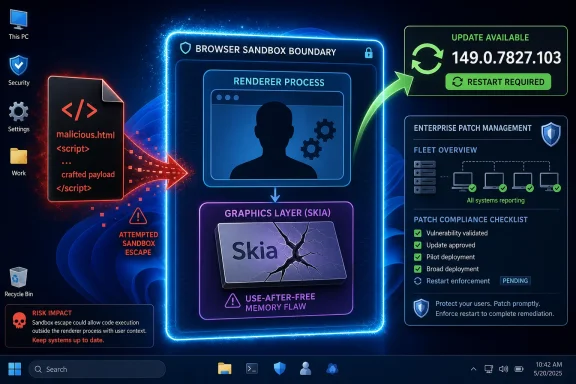 The Bug Is in the Graphics Layer, but the Risk Is in the Boundary
Skia is not a household name, but it sits in the path of almost everything a Chrome user sees. It is Google’s 2D graphics library, used to draw text, shapes, images, and interface elements across Chrome and other software that depends on Chromium. When a flaw appears there, the vulnerability is not merely “in rendering” in the abstract sense; it is in the machinery that processes hostile web content into trusted screen output.CVE-2026-11663 is described as a use-after-free vulnerability, a familiar class of memory safety bug in which software continues to use memory after it has been released. In the worst cases, an attacker can manipulate what occupies that freed memory and bend program behavior in a direction the developer never intended. That is why CWE-416 continues to show up in browser advisories year after year despite massive investments in fuzzing, sandboxing, and safer programming practices.
The important phrase in this CVE description is not just “crafted HTML page.” It is “who had compromised the renderer process.” That means this bug is not presented as a one-click, single-stage route from web page to full system compromise. It is a second act: the kind of flaw that becomes far more dangerous when chained with another vulnerability that first gets code running inside Chrome’s renderer sandbox.
That distinction matters, but it should not lull anyone into comfort. Modern browser exploitation is often about chains, not isolated bugs. A renderer compromise without a sandbox escape is bad; a renderer compromise with a viable sandbox escape is the kind of sequence that turns a browser bug into a host-level security event.
Chrome’s Sandbox Does Its Job Until Attackers Find the Door
Chrome’s security architecture assumes the web is hostile. Untrusted pages are pushed into restricted renderer processes, and those processes are supposed to have limited access to the operating system. That model has been enormously successful, but it has also shifted attacker attention toward escape routes: graphics components, inter-process communication, GPU paths, broker processes, and privileged services that renderers must talk to in order to be useful.CVE-2026-11663 fits squarely into that model. The attacker first needs the renderer process compromised, which raises the bar. But once that condition is met, the vulnerability potentially allows the attacker to move beyond the containment boundary that Chrome depends on.
For security teams, that is why the CVSS vector deserves more attention than the headline severity alone. CISA’s contributed CVSS 3.1 score of 8.3 rates the issue as High, with network attack vector, no privileges required, user interaction required, high attack complexity, changed scope, and high impact to confidentiality, integrity, and availability. In plain English: the exploit path is not trivial, but the consequences are serious if the attacker can pull it off.
The “user interaction required” component should also be interpreted soberly. In browser land, user interaction often means visiting a malicious or compromised web page. That is not a meaningful barrier in a world of malvertising, poisoned search results, hijacked legitimate sites, phishing links, and chat platforms where URLs are ambient background noise.
The Version Number Is the Real Remediation
Google fixed the issue in Chrome before version 149.0.7827.103, and the NVD entry identifies Chrome versions up to but excluding that build as affected. That gives administrators a concrete line to draw. If a managed endpoint is running an older Chrome build, it is on the wrong side of the boundary.This is where Chrome’s rapid update model is both a strength and a source of operational friction. Consumer machines often patch quickly, especially when users restart the browser. Enterprises, however, may stagger browser updates for compatibility testing, change-control windows, or simple fleet-management inertia. Those delays are understandable, but they are increasingly difficult to defend when the browser is one of the most exposed pieces of software on a Windows desktop.
The remediation is not exotic. Users should open Chrome’s update screen, allow the browser to update, and restart it. Administrators should verify deployed versions through their endpoint management platform, not merely assume auto-update did its work.
The most common failure mode is not that Chrome cannot patch itself. It is that Chrome updates are downloaded but not activated because users keep sessions open for days or weeks. On shared workstations, VDI pools, kiosk systems, and developer machines with long-running browser sessions, “patched” can become a dangerously optimistic word.
The CPE Entry Tells a Messier Story Than the CVE Description
The NVD configuration shown for CVE-2026-11663 includes Google Chrome as the affected application and lists Windows, Linux, and macOS operating systems as part of the affected platform configuration. That is not the same thing as saying Windows, Linux, or macOS are themselves vulnerable to this flaw. It means the vulnerable application exists on those platforms.This distinction is easy to lose in automated vulnerability management. A scanner may surface the CVE on a Windows asset, and the presence of operating-system CPEs can make the finding look broader than it is. The vulnerable product is Chrome; the platforms are where Chrome runs.
The user’s question — “Are we missing a CPE here?” — is therefore the right kind of boring. It is not glamorous, but it is the kind of metadata issue that can distort vulnerability tracking. If an organization relies on CPE matching to drive dashboards, SLAs, or exposure reports, missing or overly broad CPE data can create false negatives, false positives, and policy arguments that waste the hours that should be spent patching.
The CPE entry for Chrome appears to capture the core affected software:
cpe:2.3:a:google:chrome:*:*:*:*:*:*:*:* for versions before 149.0.7827.103. The platform CPEs for Windows, Linux kernel, and macOS are consistent with a desktop Chrome vulnerability that spans the major operating systems. What may still be incomplete in a broader ecosystem sense is the downstream Chromium universe: browsers and applications that embed Chromium, ship their own update cadence, or consume Skia independently.That is where CPE-based vulnerability management starts to show its age. Chrome is only the flagship. Chromium-derived browsers, Electron applications, embedded web views, and Linux distribution packages can all complicate the question of “affected software” even when the original CVE is assigned to Chrome.
The Chromium Ecosystem Turns One Fix Into Many Patch Timelines
A Chrome CVE rarely stays confined to Chrome in practical risk discussions. Chromium is the upstream foundation for multiple browsers, and Skia itself is a widely used graphics library. Google’s advisory may be the first and cleanest place where a fix appears, but it is not always the last place defenders need to look.Microsoft Edge, Brave, Vivaldi, Opera, and other Chromium-based browsers generally track Chromium security fixes, but not always at the exact same hour. Enterprise software built on Electron can lag further, depending on how quickly maintainers move to newer Chromium builds. Linux distributions add another layer because Chromium packaging is mediated by distro maintainers and repository policies.
That does not mean every Chromium-adjacent product is automatically exploitable in the same way. Build flags, component versions, sandbox architecture, and platform integration all matter. But it does mean defenders should treat the Chrome version check as the start of the review, not the whole review.
For WindowsForum readers, the obvious adjacent product is Microsoft Edge. Edge has its own update channel, its own enterprise controls, and its own versioning. The right operational response is to verify Edge separately rather than assume that Chrome’s update status says anything about Edge.
The same logic applies to “hidden browsers.” Teams often inventory Chrome and Edge while missing Electron-based apps that quietly bundle Chromium. Slack, Teams, code editors, password managers, device consoles, and admin tools may all depend on browser-engine components. Not every CVE maps cleanly to every app, but the direction of travel is clear: the browser engine has escaped the browser.
High Severity Is Not the Same as Active Exploitation
The public information around CVE-2026-11663 describes a high-severity vulnerability with serious impact potential, but it does not establish that this specific CVE is being exploited in the wild. That matters because Chrome advisories often appear alongside other vulnerabilities, and separate Chrome bugs in the same release window may have different exploitation status.This is one of the most common traps in security reporting. A release fixes one vulnerability known to be exploited and dozens of others that are not known to be exploited, and the internet rapidly compresses the nuance into “Chrome zero-day update.” That shorthand may be useful for urgency, but it can blur which CVE actually has observed exploitation.
For CVE-2026-11663, the safer reading is that it is a serious sandbox-escape-class issue requiring a prior renderer compromise. That is enough to justify urgent patching. It is not enough, based on the provided record, to claim confirmed real-world exploitation of this specific flaw.
Security teams do not need exploitation proof to act. Waiting for confirmed exploitation is a luxury most organizations do not have when a browser sandbox escape is involved. But accuracy still matters, especially when prioritizing incident response versus routine emergency patching.
Memory Safety Keeps Haunting the Browser
Use-after-free bugs are not new. They are the kind of vulnerability class the industry has spent decades trying to suppress with code review, automated testing, sanitizers, fuzzers, safer allocators, sandboxing, and now increased interest in memory-safe languages. Yet they persist because browsers are among the most complex consumer applications ever built.Chrome is a JavaScript engine, a graphics engine, a PDF viewer, a media player, a network client, a password manager, a certificate validator, a UI framework, and an extension platform wrapped into a single application that opens hostile content by design. Every one of those roles adds attack surface. Every performance optimization risks making memory management more intricate.
Skia is a particularly interesting target because graphics code must be fast, flexible, and deeply integrated. It handles untrusted inputs constantly, from images and fonts to canvas operations and rendering primitives. That makes it fertile ground for bugs that are difficult to reason about and valuable when chained with other flaws.
The industry’s move toward Rust and other memory-safe approaches is real, but it is not a time machine. The browser ecosystem still contains enormous C and C++ codebases that will be with us for years. Until that changes, memory-corruption vulnerabilities will remain a recurring tax on the modern web.
Windows Admins Should Treat Browser Patching Like Endpoint Patching
There was a time when browser updates felt like application maintenance. That era is over. On a Windows fleet, Chrome and Edge are part of the endpoint security baseline in the same way Defender definitions, cumulative updates, and firmware fixes are.The reason is exposure. Most users spend more time in the browser than in any other application, and the browser is where trusted corporate identity meets untrusted external content. Email links, SaaS dashboards, admin consoles, customer portals, OAuth flows, and document previews all converge there.
For administrators, CVE-2026-11663 should trigger a familiar workflow: identify vulnerable versions, push updates, enforce restarts where needed, verify compliance, and watch for lagging machines. The wrinkle is that browser patching often crosses organizational boundaries. Security may own vulnerability management, desktop engineering may own browser deployment, and application teams may object when updates threaten compatibility.
That friction is real, but it should be measured against the risk class. A potential sandbox escape is not a cosmetic bug. It is the sort of issue that can turn a successful browser exploit into a broader endpoint compromise, especially when paired with credential theft, token access, or local privilege escalation.
The Restart Problem Is Still Underrated
Chrome’s update mechanism has trained users to expect patches without ceremony. That is good for adoption, but it hides a stubborn operational truth: the fix does not fully matter until the vulnerable process is gone. If the browser is updated on disk but still running old code in memory, risk remains until restart.This is especially relevant on Windows laptops that sleep instead of shutting down. Users can go weeks without a clean browser restart. Tabs become a workspace, sessions become state, and the small “update” indicator is ignored because closing the browser feels like interrupting work.
Enterprise policy can help. Administrators can configure relaunch notifications, enforce update deadlines, and shorten the window between patch availability and mandatory restart. Those policies are sometimes unpopular, but they are less disruptive than incident response.
The lesson is not that users are careless. It is that software has normalized endless uptime for applications that were never meant to be security boundaries forever. Browser restart discipline is now a security control.
The Registry View Is Necessary but Not Sufficient
NVD entries are invaluable because they normalize vulnerability data. They provide identifiers, descriptions, weakness classifications, scoring, references, and CPE configurations that tools can ingest. But they are not a substitute for judgment.CVE-2026-11663 illustrates the gap between registry data and operational meaning. The entry tells us the affected Chrome version range, the vulnerability class, the platform context, and the broad exploit precondition. It does not tell us whether a specific organization has vulnerable browser sessions still running, whether downstream Chromium apps are exposed, whether compensating controls matter, or whether attackers have folded the bug into exploit chains.
That is not a criticism of NVD. It is a reminder that vulnerability management is partly translation. Someone has to convert “CWE-416 in Skia before 149.0.7827.103” into “which laptops, which browsers, which app bundles, which users, and by when?”
Automated scanners help, but they can also overfit to what is easy to identify. Installed Chrome version is easy. Running process version is harder. Embedded Chromium is harder still. Exploitability in the presence of enterprise hardening is harder again.
The Real Exposure Window Is Measured in Habits
The speed of Google’s release pipeline means fixes can arrive quickly. The speed of organizational adoption is another matter. The vulnerable period is not simply the time between disclosure and vendor patch; it is the time between patch release and verified process replacement across the fleet.That makes habits decisive. Organizations that already have aggressive browser update policies will absorb CVE-2026-11663 as another routine high-priority patch. Organizations that treat browser updates as user-managed background noise will have a longer and less visible tail.
Home users face the same issue in simpler form. If Chrome says it needs to relaunch, relaunch it. If multiple profiles or browser channels are installed, check each one. If another Chromium-based browser is the daily driver, update that too.
Security advice often sounds repetitive because the same weak links keep reappearing. Patch quickly. Restart the application. Verify the version. Do not assume one browser’s update covers another. Those are not glamorous controls, but they are the controls that close this class of exposure.
The Sensible Read on CVE-2026-11663 Is Urgent, Not Apocalyptic
CVE-2026-11663 should not be inflated into a standalone catastrophe. The described attack requires a compromised renderer process and a crafted HTML page, and public records do not establish confirmed exploitation of this specific CVE. That puts it below the most alarming class of browser zero-days that are both trivially reachable and actively exploited.But “not apocalyptic” is not the same as “low priority.” A potential sandbox escape in Chrome is the kind of vulnerability attackers value precisely because it completes a chain. If another bug gets them into the renderer, CVE-2026-11663 may be the door that gets them out.
That is why the practical response is straightforward. Chrome should be updated to 149.0.7827.103 or later, and administrators should validate the result rather than trust intention. Downstream Chromium products should be reviewed according to vendor advisories and actual deployed versions.
The CPE question also deserves a pragmatic answer. The core Chrome CPE appears present for the affected application, with platform CPEs reflecting Windows, Linux, and macOS. The harder missing piece is not necessarily a single NVD CPE line; it is the wider inventory of Chromium-derived software that may not map neatly to Chrome’s own record.
The Patch Notes Leave Administrators With a Short Checklist
The story of CVE-2026-11663 collapses into a few concrete actions, but those actions only work if they are verified rather than assumed. Treat this as a browser-boundary issue with fleet implications, not as an obscure graphics-library footnote.- Chrome installations older than 149.0.7827.103 should be treated as vulnerable and updated promptly.
- The issue is a Skia use-after-free flaw that can matter most as part of an exploit chain after renderer compromise.
- The public record supports high severity, but it does not by itself prove known exploitation of this specific CVE.
- Windows, macOS, and Linux appear in the platform configuration because Chrome runs on those systems, not because the operating systems are the vulnerable product.
- Chromium-based browsers and Electron-style applications should be checked separately because Chrome’s version number does not automatically describe the rest of the ecosystem.
- Browser restarts should be enforced or strongly prompted because downloaded updates do not fully retire vulnerable running processes.
References
- Primary source: NVD / Chromium
Published: 2026-06-15T19:14:19-07:00
NVD - CVE-2026-11663
 nvd.nist.gov
- Security advisory: MSRC
Published: 2026-06-15T19:14:19-07:00
Original feed URL
Security Update Guide - Microsoft Security Response Center
 msrc.microsoft.com
- Related coverage: radar.offseq.com
CVE-2026-11663: Use after free in Google Chrome - Live Threat Intelligence - Threat Radar | OffSeq.com
Detailed information about CVE-2026-11663: Use after free in Google Chrome affecting Google Chrome. Get real-time updates, technical details, and mitigation strradar.offseq.com
