

Google fixed CVE-2026-13783, a critical use-after-free flaw in Chrome’s Views component, in the June 30, 2026 Stable Channel release that promoted Chrome 150 to desktop users on Windows, macOS, and Linux. The immediate security answer is simple: Chrome should be updated to 150.0.7871.47 or later where that build applies. The more interesting story is that the NVD record briefly told two different stories at once, and that matters because scanners, dashboards, and patch SLAs often treat those records as operational truth. This is a case where the vulnerability is serious, but the metadata around it is nearly as instructive as the bug.
CVE-2026-13783 is not another abstract memory-safety entry buried in a browser changelog. Google describes it as a use after free in Views, Chrome’s cross-platform UI framework, exploitable by a remote attacker who convinces a user to perform specific interface gestures on a crafted HTML page. Chromium rated the issue Critical, and the National Vulnerability Database now assigns it a CVSS 3.1 score of 8.8 High, while CISA’s ADP enrichment scores it at 9.6 Critical.
That gap between “High” and “Critical” is not just bureaucratic noise. NVD’s score keeps the vulnerability in an unchanged scope model, while CISA’s vector treats the impact as crossing a security boundary. In plain English, the disagreement is about whether exploitation remains contained within the originally vulnerable component or reaches beyond it in a way that broadens the blast radius.
The trigger condition also matters. NVD initially listed the flaw as requiring no user interaction, then revised the vector to require user interaction. That revision aligns with Google’s wording: the attacker must persuade the user to engage in specific UI gestures. This is still dangerous, but it is not the same as a drive-by exploit that needs only a page load.
The practical takeaway for defenders is that CVE-2026-13783 sits in an uncomfortable middle ground. It is not reported as exploited in the wild in the provided NVD and CISA data. It is also not a low-priority browser bug that can wait for the next leisurely maintenance window.
CVE-2026-13783 was one of a run of Critical issues in that release. The public advisory lists Critical flaws across Extensions, GPU, ANGLE, Dawn, WebUSB, Browser, Views, Bluetooth, Ozone, Skia, Chromoting, and Fullscreen. In other words, Chrome 150 was not a surgical single-CVE emergency patch; it was a broad security train carrying dozens of high-consequence repairs.
That context changes how IT should read the update. If an organization is asking whether to expedite Chrome 150 because of CVE-2026-13783 alone, it is already asking the question too narrowly. The release contains enough Critical-class memory and validation bugs that the operational decision should be about the whole browser runtime, not just one CVE page.
It also explains why some bug links remain restricted. Google routinely limits access to vulnerability details until most users have received the fix, especially when related code may exist in shared libraries or downstream Chromium-based projects. That restriction is frustrating for researchers and defenders who want root-cause detail, but it is a standard part of Chrome’s patch choreography.
The most important revision was the user-interaction field. NVD’s initial analysis on July 1 added a CVSS 3.1 vector with UI:N, implying no user interaction. Later the same day, NIST reanalyzed the record and changed the vector to UI:R. That is not a cosmetic correction; it changes how the bug appears in prioritization systems and risk dashboards.
There was also churn around weakness data. Chrome’s source record identified CWE-416, the canonical “Use After Free” weakness. CISA-ADP added CWE-416, then removed it, while the NVD page still presents the Chrome-sourced CWE-416 in the weakness section. A human can reconcile that sequence. A brittle ingestion pipeline may not.
The CPE section is where things get especially awkward. NVD’s change history shows an initial configuration for Google Chrome versions up to, but excluding, 150.0.7871.46, combined with operating-system CPEs for Windows, Linux, and macOS. But the CVE description says Chrome prior to 150.0.7871.47, and Google’s own release notes list 150.0.7871.46/.47 for Windows and Mac. The user-facing NVD page also shows “CPEs loading” rather than a clean, visible affected-products table.
That discrepancy is exactly the kind of thing that makes vulnerability managers uneasy. If a scanner keys off “excluding 150.0.7871.46,” it may decide that 150.0.7871.46 is safe everywhere. If a policy team keys off the CVE description, it may require 150.0.7871.47. If an admin looks only at Google’s platform-specific release line, they may conclude the correct patched version depends on OS and channel.
The Chrome source record says affected versions are less than 150.0.7871.47. NVD’s initial CPE configuration, according to its own change history, used versions up to but excluding 150.0.7871.46. That is a meaningful mismatch. It may be harmless if platform build numbering makes 150.0.7871.46 the fixed Linux build and 150.0.7871.47 the fixed Windows/macOS build, but the CPE text shown in the change history does not express that nuance cleanly.
This is one of the chronic weaknesses of CPE for fast-moving browsers. Chrome’s public release numbers are platform-specific, staggered, and sometimes split across adjacent build numbers. CPE, by contrast, wants a clean product-version boundary. The result is a model that can be technically parsable while still being operationally ambiguous.
For WindowsForum readers, the Windows angle is straightforward. On Windows, Google’s advisory lists Chrome 150.0.7871.46/.47, and the CVE description uses “prior to 150.0.7871.47.” For managed Windows fleets, the defensible target is therefore 150.0.7871.47 or later unless Google or NVD publishes a clearer platform-specific correction. Treating 150.0.7871.46 as universally sufficient would be an unnecessary gamble.
This is not a call to panic. It is a call to stop treating CPE output as sacred text when vendor advisories and CVE descriptions provide more precise context. CPE is useful for automation, but automation should not override the plainly stated fixed-version threshold when the metadata is visibly in flux.
The web is built out of gestures. Clicking a dialog, dragging an element, accepting a prompt, changing focus, invoking fullscreen, using a file picker, interacting with browser chrome-like UI, or responding to a crafted page flow can all be part of normal browsing behavior. If a flaw lives in a UI framework, “specific UI gestures” may still be easier to elicit than defenders would like.
The attacker also does not need credentials. The NVD and CISA CVSS vectors both list privileges required as none and network attack vector as network. That means the attacker’s hardest job is social engineering the interaction, not first compromising an account or gaining local access.
For home users, this collapses into familiar advice: restart Chrome after it updates, and do not assume the browser is protected just because the update downloaded in the background. For enterprises, it means checking actual version telemetry, not merely relying on update policies that say devices should have updated.
Chrome has invested heavily in hardening, sandboxing, site isolation, fuzzing, MiraclePtr-style mitigations, and broader memory-safety work. Yet the Chrome 150 advisory shows the old enemy is far from gone. The Critical list alone includes multiple use-after-free bugs across different components, including Views.
That is why the component name matters. Views is not the JavaScript engine, the GPU shader compiler, or the network stack. It is part of the browser’s UI machinery. A flaw there reminds us that the browser is not just a renderer of web content; it is a sprawling application platform where the boundary between webpage behavior and native UI behavior must be constantly defended.
For defenders, the specific exploit mechanics are less important than the architectural lesson. Browser risk does not live only in the tab. It lives in the glue between tabs, dialogs, permissions, extensions, surfaces, and native OS integration.
That does not mean every downstream product is vulnerable in exactly the same way. Build flags, platform code, component exposure, and release timing can differ. It does mean that “we do not deploy Google Chrome” is not a complete answer in a Windows environment where Edge is present by default and Chromium-based embedded browsers are common.
The right enterprise move is version verification across browser families. Chrome’s fixed desktop build is the first obvious checkpoint. Edge should be checked through Microsoft’s release notes and update channels. Electron applications require more nuance, because they may bundle older Chromium versions and ship on their own cadence.
This is where vulnerability management becomes asset management. If the organization cannot say which Chromium runtimes are present, it cannot reliably say whether CVE-2026-13783 is remediated. Chrome is merely the most visible packaging of the code.
For most organizations, the operational answer is to treat this as an expedited browser update, not necessarily a midnight all-hands emergency. Chrome is internet-facing client software with a long history of rapid exploit development after patches land. Once a security fix is public, attackers can diff code, infer the bug class, and work toward a weaponized path, even if the original issue was privately found and not exploited in the wild.
The rollout language also deserves attention. Google says updates roll out over days or weeks. That is acceptable for consumer-scale distribution but not a substitute for enterprise confirmation. Managed environments should use Chrome Browser Cloud Management, enterprise update controls, MDM telemetry, endpoint inventory, or EDR software inventory to verify fixed builds.
The goal is not to shame automatic updates. Chrome’s auto-update model is one of the reasons browser security is better than it used to be. The goal is to remember that “automatic” is a mechanism, not evidence.
The NVD banner is doing the right thing by warning that enrichment may require amendment after subsequent CVE changes. But many organizations do not display that nuance in their dashboards. They display severity, affected version, asset count, and SLA clock. By the time the nuance reaches a ticket queue, it has often been flattened into a red, yellow, or green box.
That flattening is dangerous with browsers because patch versions are not always linear across platforms. Windows and macOS may receive one terminal build number, Linux another, Android another still, and Extended Stable yet another. A single CPE range often struggles to represent that reality.
The fix is not to abandon automation. It is to layer vendor advisories, CISA enrichment, NVD records, and actual endpoint versions into the same review. When those sources disagree, defenders should document the conservative interpretation and move on rather than waiting for perfect metadata.
That may sound boring, but boring is what good patch management looks like. The most useful security response is not a dramatic hunt for compromise indicators that do not yet exist. It is verifying that browsers actually moved to fixed builds and that downstream Chromium products are not forgotten.
For home users, the job is to open Chrome’s About page, let the update finish, and relaunch. For Windows administrators, the job is to confirm build numbers across Chrome, Edge, and any managed Chromium derivatives. For vulnerability managers, the job is to watch NVD for CPE corrections and avoid closing tickets solely because one enrichment pass briefly suggested a lower fixed-version boundary.
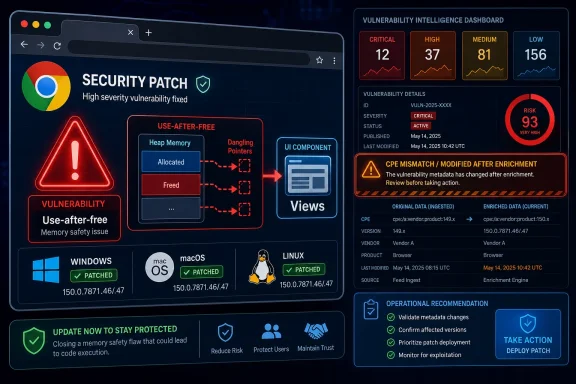 Chrome’s UI Layer Just Became the Attack Surface
CVE-2026-13783 is not another abstract memory-safety entry buried in a browser changelog. Google describes it as a use after free in Views, Chrome’s cross-platform UI framework, exploitable by a remote attacker who convinces a user to perform specific interface gestures on a crafted HTML page. Chromium rated the issue Critical, and the National Vulnerability Database now assigns it a CVSS 3.1 score of 8.8 High, while CISA’s ADP enrichment scores it at 9.6 Critical.That gap between “High” and “Critical” is not just bureaucratic noise. NVD’s score keeps the vulnerability in an unchanged scope model, while CISA’s vector treats the impact as crossing a security boundary. In plain English, the disagreement is about whether exploitation remains contained within the originally vulnerable component or reaches beyond it in a way that broadens the blast radius.
The trigger condition also matters. NVD initially listed the flaw as requiring no user interaction, then revised the vector to require user interaction. That revision aligns with Google’s wording: the attacker must persuade the user to engage in specific UI gestures. This is still dangerous, but it is not the same as a drive-by exploit that needs only a page load.
The practical takeaway for defenders is that CVE-2026-13783 sits in an uncomfortable middle ground. It is not reported as exploited in the wild in the provided NVD and CISA data. It is also not a low-priority browser bug that can wait for the next leisurely maintenance window.
The Patch Arrived Inside a Much Larger Chrome 150 Security Drop
Google’s Chrome Releases blog says Chrome 150 was promoted to the Stable channel on June 30, 2026, with rollout over the following days and weeks. The release moved Linux to 150.0.7871.46 and Windows/macOS to 150.0.7871.46/.47. Google also said the update included 433 security fixes, an unusually large bundle even by modern Chromium standards.CVE-2026-13783 was one of a run of Critical issues in that release. The public advisory lists Critical flaws across Extensions, GPU, ANGLE, Dawn, WebUSB, Browser, Views, Bluetooth, Ozone, Skia, Chromoting, and Fullscreen. In other words, Chrome 150 was not a surgical single-CVE emergency patch; it was a broad security train carrying dozens of high-consequence repairs.
That context changes how IT should read the update. If an organization is asking whether to expedite Chrome 150 because of CVE-2026-13783 alone, it is already asking the question too narrowly. The release contains enough Critical-class memory and validation bugs that the operational decision should be about the whole browser runtime, not just one CVE page.
It also explains why some bug links remain restricted. Google routinely limits access to vulnerability details until most users have received the fix, especially when related code may exist in shared libraries or downstream Chromium-based projects. That restriction is frustrating for researchers and defenders who want root-cause detail, but it is a standard part of Chrome’s patch choreography.
The NVD Record Shows Why “One CVE, One Truth” Is a Fantasy
The NVD entry for CVE-2026-13783 carries a “Modified After Enrichment” banner, which is a polite way of saying that the vulnerability record changed after NVD had already completed some of its value-added analysis. That is exactly what happened here. The record was received from Chrome on June 30, then enriched and revised repeatedly on July 1 and July 2.The most important revision was the user-interaction field. NVD’s initial analysis on July 1 added a CVSS 3.1 vector with UI:N, implying no user interaction. Later the same day, NIST reanalyzed the record and changed the vector to UI:R. That is not a cosmetic correction; it changes how the bug appears in prioritization systems and risk dashboards.
There was also churn around weakness data. Chrome’s source record identified CWE-416, the canonical “Use After Free” weakness. CISA-ADP added CWE-416, then removed it, while the NVD page still presents the Chrome-sourced CWE-416 in the weakness section. A human can reconcile that sequence. A brittle ingestion pipeline may not.
The CPE section is where things get especially awkward. NVD’s change history shows an initial configuration for Google Chrome versions up to, but excluding, 150.0.7871.46, combined with operating-system CPEs for Windows, Linux, and macOS. But the CVE description says Chrome prior to 150.0.7871.47, and Google’s own release notes list 150.0.7871.46/.47 for Windows and Mac. The user-facing NVD page also shows “CPEs loading” rather than a clean, visible affected-products table.
That discrepancy is exactly the kind of thing that makes vulnerability managers uneasy. If a scanner keys off “excluding 150.0.7871.46,” it may decide that 150.0.7871.46 is safe everywhere. If a policy team keys off the CVE description, it may require 150.0.7871.47. If an admin looks only at Google’s platform-specific release line, they may conclude the correct patched version depends on OS and channel.
Yes, the CPE Looks Incomplete — But the Bigger Problem Is Version Semantics
So, are we missing a CPE here? Probably yes, or at least the visible NVD CPE presentation is not yet giving administrators the clarity they need. The more precise answer is that the affected-product metadata appears underdeveloped or stale relative to the vendor description and subsequent NVD/CISA enrichment.The Chrome source record says affected versions are less than 150.0.7871.47. NVD’s initial CPE configuration, according to its own change history, used versions up to but excluding 150.0.7871.46. That is a meaningful mismatch. It may be harmless if platform build numbering makes 150.0.7871.46 the fixed Linux build and 150.0.7871.47 the fixed Windows/macOS build, but the CPE text shown in the change history does not express that nuance cleanly.
This is one of the chronic weaknesses of CPE for fast-moving browsers. Chrome’s public release numbers are platform-specific, staggered, and sometimes split across adjacent build numbers. CPE, by contrast, wants a clean product-version boundary. The result is a model that can be technically parsable while still being operationally ambiguous.
For WindowsForum readers, the Windows angle is straightforward. On Windows, Google’s advisory lists Chrome 150.0.7871.46/.47, and the CVE description uses “prior to 150.0.7871.47.” For managed Windows fleets, the defensible target is therefore 150.0.7871.47 or later unless Google or NVD publishes a clearer platform-specific correction. Treating 150.0.7871.46 as universally sufficient would be an unnecessary gamble.
This is not a call to panic. It is a call to stop treating CPE output as sacred text when vendor advisories and CVE descriptions provide more precise context. CPE is useful for automation, but automation should not override the plainly stated fixed-version threshold when the metadata is visibly in flux.
“User Interaction Required” Is Not a Comfort Blanket
The revised NVD vector requires user interaction, and CISA’s SSVC data lists exploitation as “none” and automatable as “no.” That combination will tempt some organizations to push CVE-2026-13783 below remotely exploitable server bugs, and in many prioritization models that is reasonable. But browser user interaction is not the same as a help-desk user clicking through a strange installer prompt.The web is built out of gestures. Clicking a dialog, dragging an element, accepting a prompt, changing focus, invoking fullscreen, using a file picker, interacting with browser chrome-like UI, or responding to a crafted page flow can all be part of normal browsing behavior. If a flaw lives in a UI framework, “specific UI gestures” may still be easier to elicit than defenders would like.
The attacker also does not need credentials. The NVD and CISA CVSS vectors both list privileges required as none and network attack vector as network. That means the attacker’s hardest job is social engineering the interaction, not first compromising an account or gaining local access.
For home users, this collapses into familiar advice: restart Chrome after it updates, and do not assume the browser is protected just because the update downloaded in the background. For enterprises, it means checking actual version telemetry, not merely relying on update policies that say devices should have updated.
Memory Safety Still Owns the Browser Security Agenda
CVE-2026-13783 is a CWE-416 use-after-free, a class of bug that has haunted browsers for decades. The short version is that software continues to reference memory after it has been freed, creating an opening for corruption and, in the wrong circumstances, code execution or sandbox-relevant exploitation. In a browser, where attacker-controlled content and complex C++ subsystems collide, use-after-free bugs remain among the most consequential vulnerability patterns.Chrome has invested heavily in hardening, sandboxing, site isolation, fuzzing, MiraclePtr-style mitigations, and broader memory-safety work. Yet the Chrome 150 advisory shows the old enemy is far from gone. The Critical list alone includes multiple use-after-free bugs across different components, including Views.
That is why the component name matters. Views is not the JavaScript engine, the GPU shader compiler, or the network stack. It is part of the browser’s UI machinery. A flaw there reminds us that the browser is not just a renderer of web content; it is a sprawling application platform where the boundary between webpage behavior and native UI behavior must be constantly defended.
For defenders, the specific exploit mechanics are less important than the architectural lesson. Browser risk does not live only in the tab. It lives in the glue between tabs, dialogs, permissions, extensions, surfaces, and native OS integration.
Windows Shops Should Watch Edge Without Assuming It Is Already Fixed
Because Microsoft Edge is Chromium-based, Windows administrators should not treat a Chrome CVE as a Chrome-only issue without checking Edge’s corresponding Chromium intake. The CVE discussed here is sourced to Chrome and Google’s advisory, but the underlying code lives in Chromium, and Chromium vulnerabilities frequently flow into Edge, Brave, Vivaldi, Opera, and Electron-based application stacks.That does not mean every downstream product is vulnerable in exactly the same way. Build flags, platform code, component exposure, and release timing can differ. It does mean that “we do not deploy Google Chrome” is not a complete answer in a Windows environment where Edge is present by default and Chromium-based embedded browsers are common.
The right enterprise move is version verification across browser families. Chrome’s fixed desktop build is the first obvious checkpoint. Edge should be checked through Microsoft’s release notes and update channels. Electron applications require more nuance, because they may bundle older Chromium versions and ship on their own cadence.
This is where vulnerability management becomes asset management. If the organization cannot say which Chromium runtimes are present, it cannot reliably say whether CVE-2026-13783 is remediated. Chrome is merely the most visible packaging of the code.
The Patch SLA Should Follow the Browser, Not the CVSS Debate
CVSS is useful, but it is not a deployment plan. NVD says 8.8 High. CISA-ADP says 9.6 Critical. Chromium says Critical. The exploit status says none observed. The attack requires user interaction. All of those statements can be true at the same time.For most organizations, the operational answer is to treat this as an expedited browser update, not necessarily a midnight all-hands emergency. Chrome is internet-facing client software with a long history of rapid exploit development after patches land. Once a security fix is public, attackers can diff code, infer the bug class, and work toward a weaponized path, even if the original issue was privately found and not exploited in the wild.
The rollout language also deserves attention. Google says updates roll out over days or weeks. That is acceptable for consumer-scale distribution but not a substitute for enterprise confirmation. Managed environments should use Chrome Browser Cloud Management, enterprise update controls, MDM telemetry, endpoint inventory, or EDR software inventory to verify fixed builds.
The goal is not to shame automatic updates. Chrome’s auto-update model is one of the reasons browser security is better than it used to be. The goal is to remember that “automatic” is a mechanism, not evidence.
The CPE Mess Is a Warning for Scanner-Driven Security Programs
A scanner that says “not vulnerable” because it consumed an early CPE boundary may be wrong. A scanner that says “vulnerable” because it sees 150.0.7871.46 without understanding platform-specific release channels may also be wrong. CVE-2026-13783 is a useful reminder that machine-readable vulnerability data is only as good as the assumptions packed into it.The NVD banner is doing the right thing by warning that enrichment may require amendment after subsequent CVE changes. But many organizations do not display that nuance in their dashboards. They display severity, affected version, asset count, and SLA clock. By the time the nuance reaches a ticket queue, it has often been flattened into a red, yellow, or green box.
That flattening is dangerous with browsers because patch versions are not always linear across platforms. Windows and macOS may receive one terminal build number, Linux another, Android another still, and Extended Stable yet another. A single CPE range often struggles to represent that reality.
The fix is not to abandon automation. It is to layer vendor advisories, CISA enrichment, NVD records, and actual endpoint versions into the same review. When those sources disagree, defenders should document the conservative interpretation and move on rather than waiting for perfect metadata.
The Sensible Reading for CVE-2026-13783 Is Conservative and Boring
Here is the operational posture that best fits the available evidence: CVE-2026-13783 is a serious Chrome vulnerability fixed in the Chrome 150 Stable desktop release, with no public indication in the supplied data that it is currently exploited in the wild. It requires user interaction, but the interaction occurs in a browser context where crafted pages and social engineering are realistic. The CPE metadata appears to lag or simplify the vendor’s fixed-version story, so administrators should favor Google’s advisory and the CVE description over a single early CPE threshold.That may sound boring, but boring is what good patch management looks like. The most useful security response is not a dramatic hunt for compromise indicators that do not yet exist. It is verifying that browsers actually moved to fixed builds and that downstream Chromium products are not forgotten.
For home users, the job is to open Chrome’s About page, let the update finish, and relaunch. For Windows administrators, the job is to confirm build numbers across Chrome, Edge, and any managed Chromium derivatives. For vulnerability managers, the job is to watch NVD for CPE corrections and avoid closing tickets solely because one enrichment pass briefly suggested a lower fixed-version boundary.
The Chrome 150 Lesson Is Written in the Metadata
CVE-2026-13783 is a browser memory-safety flaw, but the lesson reaches into vulnerability operations. The record changed. The score changed. The user-interaction requirement changed. The CPE story is not as clear as the fixed-version sentence. That is exactly the environment modern defenders live in.- Chrome users on Windows should aim for 150.0.7871.47 or later for this CVE unless Google publishes more precise platform-specific guidance.
- Linux administrators should reconcile Google’s 150.0.7871.46 stable build with the CVE’s “prior to 150.0.7871.47” wording before treating scanner output as final.
- Vulnerability teams should not rely on the initial NVD CPE range alone because the record was modified after enrichment.
- The bug requires user interaction, but that should not be confused with low risk in a browser UI context.
- Edge and other Chromium-based products deserve separate version checks rather than assumptions based on Chrome’s release alone.
- The absence of known exploitation lowers emergency pressure, but it does not justify delaying a Critical Chromium security train.
References
- Primary source: NVD / Chromium
Published: 2026-07-03T07:00:46-07:00
NVD - CVE-2026-13783
 nvd.nist.gov
- Security advisory: MSRC
Published: 2026-07-03T07:00:46-07:00
Original feed URL
Security Update Guide - Microsoft Security Response Center
 msrc.microsoft.com
- Related coverage: cvefeed.io
CVE-2026-13783 - Google Chrome Use-after-free
Use after free in Views in Google Chrome prior to 150.0.7871.47 allowed a remote attacker who convinced a user to engage in specific UI gestures to potentially exploit heap corruption via a crafted HTML page. (Chromium security severity: Critical)cvefeed.io - Related coverage: radar.offseq.com
CVE-2026-13783: Use after free in Google Chrome - Live Threat Intelligence - Threat Radar | OffSeq.com
Detailed information about CVE-2026-13783: Use after free in Google Chrome affecting Google Chrome. Get real-time updates, technical details, and mitigation strradar.offseq.com - Related coverage: vuldb.com
CVE-2026-13783 Google Chrome Views use after free (ID 516962)
A vulnerability was found in Google Chrome. This vulnerability is known as CVE-2026-13783. It is recommended to upgrade the affected component.vuldb.com
