

Google fixed CVE-2026-14100 in Chrome 150.0.7871.47 after disclosing on June 30, 2026 that insufficient data validation in Chromium’s NetworkCache could let a remote attacker leak cross-origin data through a crafted HTML page. The bug is not a headline-grabbing memory-corruption zero-day, and Google rates it Low. But the uncomfortable lesson is that even “low” browser flaws can touch the web’s deepest promise: one site should not be able to read another site’s data. As documented by Google’s Chrome Releases blog and the National Vulnerability Database, the right response is not panic; it is fast, boring, verifiable browser patching.
CVE-2026-14100 lives in the part of the browser most users never think about: the cache. The NetworkCache exists to make the web feel fast by reusing responses where it is safe to do so. That word, safe, is doing the work here.
The NVD description says the flaw affected Google Chrome before 150.0.7871.47 and allowed a remote attacker to leak cross-origin data using a crafted HTML page. In normal terms, that means the attacker does not need local access, malware installation, or administrator privileges. They need a victim to interact with hostile web content in a vulnerable browser.
Google’s own Chrome Releases post lists CVE-2026-14100 as a Low-severity Chromium issue reported by Google on May 15, 2026, then fixed in the broader June 30 Stable Channel update. That same release promoted Chrome 150 to stable for Windows, macOS, and Linux, with 150.0.7871.46 for Linux and 150.0.7871.46/.47 for Windows and Mac.
The discrepancy between Google’s “Low” label and CISA-ADP’s CVSS 3.1 score of 6.5 Medium is not necessarily a contradiction. It is a reminder that severity systems are measuring different things. Browser vendors often account for exploitability, mitigations, and real-world attack chain usefulness; CVSS emphasizes formal impact and attack conditions.
A NetworkCache bug is especially interesting because caching is supposed to be invisible. Users see pages, tabs, sign-in prompts, and downloads. Underneath, the browser is constantly deciding whether a response belongs to one origin, whether it can be reused, whether headers permit reuse, and whether some subtle variation in request context makes the cached copy unsafe.
That is why “insufficient data validation” is more than a bland CWE label. In this case, the assigned weakness is CWE-20, Improper Input Validation, according to the CISA-ADP enrichment visible in NVD. The phrase is generic, but the location is not: if data validation fails in a cache that mediates origin separation, the mistake can become an information disclosure bug.
There is no public evidence in the NVD entry that CVE-2026-14100 was exploited in the wild. The CISA-ADP SSVC entry lists exploitation as “none,” automatable as “no,” and technical impact as “partial.” That is useful context for defenders deciding whether this is a drop-everything emergency. It is not useful as an excuse to defer the update indefinitely.
That volume matters. A single CVE can tell a clean story, but a browser update is usually a bundle of repaired assumptions. Some flaws fix memory safety problems, some patch policy enforcement gaps, some correct security UI behavior, and some close information leak paths that are only useful when chained with something else.
For Windows users, the practical version boundary is the important part: Chrome prior to 150.0.7871.47 is listed as vulnerable for this CVE. The Chrome Releases blog’s platform wording is slightly awkward because the June 30 release carried 150.0.7871.46/.47 for Windows and Mac, while NVD’s CVE text specifically names 150.0.7871.47 as the fixed threshold for CVE-2026-14100. For ordinary Chrome users, the answer is simple: let Chrome update beyond that line and restart it.
Administrators should be a little more precise. If you manage Chrome through enterprise policy, endpoint management, or golden images, do not assume “Chrome 150” is specific enough. Track the full version string, confirm the deployed build, and check that browsers have actually restarted after the update has been staged.
The user-visible NVD record says NIST had not yet provided CVSS 4.0 or CVSS 3.x scoring at the time reflected in the entry, while CISA-ADP supplied a CVSS 3.1 vector of AV:N/AC:L/PR:N/UI:R/S:U/C:H/I:N/A:N. Translated, that vector says the attack is network-accessible, low complexity, requires no privileges, does require user interaction, has unchanged scope, and affects confidentiality heavily without integrity or availability impact.
That scoring explains why some scanners may flag the bug as Medium even though Google’s Chromium severity is Low. Security teams that blindly sort by a single severity label will get inconsistent prioritization. Better teams will look at exploitability, asset exposure, browser update velocity, and the kind of data that could plausibly be exposed in their environment.
The CPE configuration in NVD lists Google Chrome versions up to but excluding 150.0.7871.46, combined with operating systems including Windows, Linux, and macOS. Yet the CVE description says “prior to 150.0.7871.47.” That mismatch is exactly the sort of detail that trips automation. The safer operational interpretation is to require 150.0.7871.47 or later where that build is available, rather than treating 150.0.7871.46 as categorically safe for this specific issue.
For CVE-2026-14100, the likely practical concern is not whether Chrome exists in the CPE dictionary. It is whether all Chromium-derived exposure is represented in a way that downstream tools can act on. Google Chrome has a CPE; Microsoft Edge, Brave, Vivaldi, Opera, Electron-based applications, embedded Chromium runtimes, and vendor-pinned Chromium forks may have separate update paths and separate advisories.
That does not mean every Chromium-based product is automatically vulnerable to this CVE as published. A product must share the affected code path, ship the vulnerable version range, and expose the relevant behavior. But from a defender’s perspective, a Chrome NetworkCache bug is a prompt to look beyond the Chrome icon on the desktop.
This is particularly true on Windows. Many enterprises inventory “browsers” but not every application that embeds browser technology. Some line-of-business apps package web runtimes; some security appliances expose browser-based consoles; some developer tools ship old Chromium components. CPE matching is necessary, but it is not a substitute for software inventory that understands Chromium as a supply chain.
A crafted HTML page does not need to look like a malware executable. It can be an ad landing page, a compromised site, a link in a chat message, a fake document portal, or a page opened inside a workflow the user believes is legitimate. For a browser flaw, “requires user interaction” often means “requires browsing.”
That is why browser patch management deserves a different rhythm from ordinary application patching. A vulnerable PDF editor might only touch files a user opens. A vulnerable browser touches untrusted code by design, all day, across personal accounts, enterprise SaaS, intranet sites, identity providers, and administrative consoles.
The right mitigation is therefore not user education alone. Telling users not to visit malicious pages is like telling mail servers not to receive suspicious messages. It may be part of the program, but it cannot be the program.
But information disclosure bugs in browsers can be useful in chains. A cross-origin leak might expose tokens, internal state, CSRF-relevant data, personalized content, or signals that help an attacker refine a second-stage attack. The public description does not say what data can be leaked or under what exact conditions, and Google commonly restricts bug details until enough users have updated.
That restriction is sensible. The Chrome Releases blog explicitly notes that access to bug details and links may remain restricted until most users are updated, and that restrictions may stay in place for third-party library issues affecting other projects. For defenders, the absence of exploit details should not be interpreted as absence of risk.
The better mental model is that CVE-2026-14100 weakens an isolation boundary. The damage from such a weakness depends on what the victim is doing, what sensitive origins are reachable, and whether an attacker can combine the leak with other web primitives. In a browser, “partial” technical impact can still be meaningful.
That makes restart enforcement a security control. Enterprises using Chrome Browser Cloud Management, Group Policy, Intune, or other endpoint management should check policies that notify users, set relaunch windows, and enforce updates after a grace period. The goal is not to be cruel to users; it is to make the patch state real.
For unmanaged users, the check is simpler: open Chrome’s About page and let it finish updating, then relaunch. On Windows, Chrome normally updates itself in the background, but the version number is the only proof that the process completed. If the browser still reports a build below 150.0.7871.47, the machine is not where it needs to be for this CVE.
This is also a useful moment to check Microsoft Edge and other Chromium browsers separately. They do not necessarily update on Google’s exact cadence, and their version numbers differ. The presence of a Chrome CVE should trigger a Chromium-browser review, not a Chrome-only ritual.
But the browser is a special case because update friction is relatively low and exposure is constant. If a Chrome update fixes 433 security issues, the marginal cost of fixing CVE-2026-14100 is the same as fixing the critical issues in the same package: deploy the browser update and relaunch. In that sense, severity triage is less useful for Chrome than for systems where every patch requires an outage window.
The real operational divide is not Low versus Medium. It is updated versus not updated. A fleet that reaches current Chrome builds within a few days has absorbed CVE-2026-14100 along with the rest of the release. A fleet that drifts for weeks is accumulating risk across many small browser assumptions.
That is where home users and small offices often fall behind. They may not have a vulnerability scanner, but they do have webmail, cloud storage, banking, admin portals, password managers, and browser profiles full of ambient authority. The browser is now the workstation’s front door.
For WindowsForum readers, that makes this an inventory story. If you are running Chrome on a personal Windows PC, check the version and restart. If you manage endpoints, query the version at scale and verify relaunch compliance. If you support users informally, tell them to update Chrome rather than trying to explain NetworkCache internals.
The ambiguity around 150.0.7871.46 versus 150.0.7871.47 is a good example of why patch guidance should name the desired state, not just the vulnerable state. “Update Chrome” is acceptable for a consumer. “Ensure Chrome is at 150.0.7871.47 or later on Windows and macOS, and confirm the vendor-fixed build for Linux” is better for IT.
In vulnerability management, precision is not pedantry. It is how you avoid closing the wrong ticket.
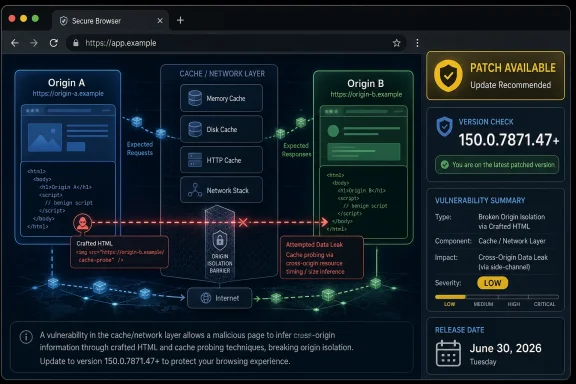 A Low-Severity Bug Hits a High-Value Boundary
CVE-2026-14100 lives in the part of the browser most users never think about: the cache. The NetworkCache exists to make the web feel fast by reusing responses where it is safe to do so. That word, safe, is doing the work here.The NVD description says the flaw affected Google Chrome before 150.0.7871.47 and allowed a remote attacker to leak cross-origin data using a crafted HTML page. In normal terms, that means the attacker does not need local access, malware installation, or administrator privileges. They need a victim to interact with hostile web content in a vulnerable browser.
Google’s own Chrome Releases post lists CVE-2026-14100 as a Low-severity Chromium issue reported by Google on May 15, 2026, then fixed in the broader June 30 Stable Channel update. That same release promoted Chrome 150 to stable for Windows, macOS, and Linux, with 150.0.7871.46 for Linux and 150.0.7871.46/.47 for Windows and Mac.
The discrepancy between Google’s “Low” label and CISA-ADP’s CVSS 3.1 score of 6.5 Medium is not necessarily a contradiction. It is a reminder that severity systems are measuring different things. Browser vendors often account for exploitability, mitigations, and real-world attack chain usefulness; CVSS emphasizes formal impact and attack conditions.
Cross-Origin Leaks Are Browser Security’s Quiet Nightmare
The same-origin policy is one of the web’s oldest and most important security boundaries. It is what stops a random page from reading your webmail, your banking session, or an internal admin console merely because those resources are open in the same browser profile. Browser security is, in large part, a decades-long campaign to preserve that boundary while still letting the modern web do increasingly complicated things.A NetworkCache bug is especially interesting because caching is supposed to be invisible. Users see pages, tabs, sign-in prompts, and downloads. Underneath, the browser is constantly deciding whether a response belongs to one origin, whether it can be reused, whether headers permit reuse, and whether some subtle variation in request context makes the cached copy unsafe.
That is why “insufficient data validation” is more than a bland CWE label. In this case, the assigned weakness is CWE-20, Improper Input Validation, according to the CISA-ADP enrichment visible in NVD. The phrase is generic, but the location is not: if data validation fails in a cache that mediates origin separation, the mistake can become an information disclosure bug.
There is no public evidence in the NVD entry that CVE-2026-14100 was exploited in the wild. The CISA-ADP SSVC entry lists exploitation as “none,” automatable as “no,” and technical impact as “partial.” That is useful context for defenders deciding whether this is a drop-everything emergency. It is not useful as an excuse to defer the update indefinitely.
Chrome 150 Was the Real Security Event
CVE-2026-14100 is one line in a very large Chrome 150 security release. Google’s Stable Channel post says the update includes 433 security fixes, and the advisory’s public list stretches across critical, high, medium, and low issues in components ranging from Extensions and GPU to ANGLE, Dawn, Blink, Network, DevTools, WebAppInstalls, and Chrome for iOS.That volume matters. A single CVE can tell a clean story, but a browser update is usually a bundle of repaired assumptions. Some flaws fix memory safety problems, some patch policy enforcement gaps, some correct security UI behavior, and some close information leak paths that are only useful when chained with something else.
For Windows users, the practical version boundary is the important part: Chrome prior to 150.0.7871.47 is listed as vulnerable for this CVE. The Chrome Releases blog’s platform wording is slightly awkward because the June 30 release carried 150.0.7871.46/.47 for Windows and Mac, while NVD’s CVE text specifically names 150.0.7871.47 as the fixed threshold for CVE-2026-14100. For ordinary Chrome users, the answer is simple: let Chrome update beyond that line and restart it.
Administrators should be a little more precise. If you manage Chrome through enterprise policy, endpoint management, or golden images, do not assume “Chrome 150” is specific enough. Track the full version string, confirm the deployed build, and check that browsers have actually restarted after the update has been staged.
NVD’s Enrichment Tells Its Own Story
The NVD entry is also a snapshot of the modern vulnerability data pipeline. The CVE was received from Chrome on June 30, 2026, modified by CISA-ADP on July 1, and initially analyzed by NIST later that same day. That is a reasonably fast public record, but it is still a layered record: vendor disclosure first, enrichment second, automated consumption somewhere downstream.The user-visible NVD record says NIST had not yet provided CVSS 4.0 or CVSS 3.x scoring at the time reflected in the entry, while CISA-ADP supplied a CVSS 3.1 vector of AV:N/AC:L/PR:N/UI:R/S:U/C:H/I:N/A:N. Translated, that vector says the attack is network-accessible, low complexity, requires no privileges, does require user interaction, has unchanged scope, and affects confidentiality heavily without integrity or availability impact.
That scoring explains why some scanners may flag the bug as Medium even though Google’s Chromium severity is Low. Security teams that blindly sort by a single severity label will get inconsistent prioritization. Better teams will look at exploitability, asset exposure, browser update velocity, and the kind of data that could plausibly be exposed in their environment.
The CPE configuration in NVD lists Google Chrome versions up to but excluding 150.0.7871.46, combined with operating systems including Windows, Linux, and macOS. Yet the CVE description says “prior to 150.0.7871.47.” That mismatch is exactly the sort of detail that trips automation. The safer operational interpretation is to require 150.0.7871.47 or later where that build is available, rather than treating 150.0.7871.46 as categorically safe for this specific issue.
The CPE Question Is Not Academic
“Are we missing a CPE here?” is a small line on NVD pages, but in enterprise vulnerability management it is a loaded question. CPE data is what turns a public CVE into a scanner finding, a dashboard count, a ticket, and eventually a compliance artifact. If the CPE range is wrong, incomplete, or ambiguous, teams either chase false positives or miss vulnerable machines.For CVE-2026-14100, the likely practical concern is not whether Chrome exists in the CPE dictionary. It is whether all Chromium-derived exposure is represented in a way that downstream tools can act on. Google Chrome has a CPE; Microsoft Edge, Brave, Vivaldi, Opera, Electron-based applications, embedded Chromium runtimes, and vendor-pinned Chromium forks may have separate update paths and separate advisories.
That does not mean every Chromium-based product is automatically vulnerable to this CVE as published. A product must share the affected code path, ship the vulnerable version range, and expose the relevant behavior. But from a defender’s perspective, a Chrome NetworkCache bug is a prompt to look beyond the Chrome icon on the desktop.
This is particularly true on Windows. Many enterprises inventory “browsers” but not every application that embeds browser technology. Some line-of-business apps package web runtimes; some security appliances expose browser-based consoles; some developer tools ship old Chromium components. CPE matching is necessary, but it is not a substitute for software inventory that understands Chromium as a supply chain.
User Interaction Is Not Much Comfort on the Web
The CVSS vector’s UI:R flag means user interaction is required. In theory, that reduces risk. In practice, the entire web is user interaction.A crafted HTML page does not need to look like a malware executable. It can be an ad landing page, a compromised site, a link in a chat message, a fake document portal, or a page opened inside a workflow the user believes is legitimate. For a browser flaw, “requires user interaction” often means “requires browsing.”
That is why browser patch management deserves a different rhythm from ordinary application patching. A vulnerable PDF editor might only touch files a user opens. A vulnerable browser touches untrusted code by design, all day, across personal accounts, enterprise SaaS, intranet sites, identity providers, and administrative consoles.
The right mitigation is therefore not user education alone. Telling users not to visit malicious pages is like telling mail servers not to receive suspicious messages. It may be part of the program, but it cannot be the program.
The Attack Chain Matters More Than the Label
On its own, CVE-2026-14100 is an information disclosure issue. It is not described as code execution, sandbox escape, persistence, privilege escalation, or a direct account takeover. That should keep the discussion grounded.But information disclosure bugs in browsers can be useful in chains. A cross-origin leak might expose tokens, internal state, CSRF-relevant data, personalized content, or signals that help an attacker refine a second-stage attack. The public description does not say what data can be leaked or under what exact conditions, and Google commonly restricts bug details until enough users have updated.
That restriction is sensible. The Chrome Releases blog explicitly notes that access to bug details and links may remain restricted until most users are updated, and that restrictions may stay in place for third-party library issues affecting other projects. For defenders, the absence of exploit details should not be interpreted as absence of risk.
The better mental model is that CVE-2026-14100 weakens an isolation boundary. The damage from such a weakness depends on what the victim is doing, what sensitive origins are reachable, and whether an attacker can combine the leak with other web primitives. In a browser, “partial” technical impact can still be meaningful.
Windows Administrators Should Treat Browser Restarts as Patch Completion
Chrome’s updater is good, but it cannot make a running old browser process disappear by magic. On Windows fleets, the most common browser patch failure is not that the update never downloads. It is that Chrome sits open for days, waiting for a restart that users defer because they have 47 tabs and a half-written form.That makes restart enforcement a security control. Enterprises using Chrome Browser Cloud Management, Group Policy, Intune, or other endpoint management should check policies that notify users, set relaunch windows, and enforce updates after a grace period. The goal is not to be cruel to users; it is to make the patch state real.
For unmanaged users, the check is simpler: open Chrome’s About page and let it finish updating, then relaunch. On Windows, Chrome normally updates itself in the background, but the version number is the only proof that the process completed. If the browser still reports a build below 150.0.7871.47, the machine is not where it needs to be for this CVE.
This is also a useful moment to check Microsoft Edge and other Chromium browsers separately. They do not necessarily update on Google’s exact cadence, and their version numbers differ. The presence of a Chrome CVE should trigger a Chromium-browser review, not a Chrome-only ritual.
The “Low” Queue Is Where Real Hygiene Lives
Security teams naturally prioritize critical and high vulnerabilities. They have to. No organization can treat every browser CVE as a five-alarm fire, especially in a release with hundreds of fixes.But the browser is a special case because update friction is relatively low and exposure is constant. If a Chrome update fixes 433 security issues, the marginal cost of fixing CVE-2026-14100 is the same as fixing the critical issues in the same package: deploy the browser update and relaunch. In that sense, severity triage is less useful for Chrome than for systems where every patch requires an outage window.
The real operational divide is not Low versus Medium. It is updated versus not updated. A fleet that reaches current Chrome builds within a few days has absorbed CVE-2026-14100 along with the rest of the release. A fleet that drifts for weeks is accumulating risk across many small browser assumptions.
That is where home users and small offices often fall behind. They may not have a vulnerability scanner, but they do have webmail, cloud storage, banking, admin portals, password managers, and browser profiles full of ambient authority. The browser is now the workstation’s front door.
The Version String Is the Control Plane
The most concrete thing about CVE-2026-14100 is the fixed version boundary. Google’s advisory puts Chrome 150 into stable on June 30, 2026. NVD says Chrome prior to 150.0.7871.47 is affected by this NetworkCache flaw. Everything else is risk interpretation.For WindowsForum readers, that makes this an inventory story. If you are running Chrome on a personal Windows PC, check the version and restart. If you manage endpoints, query the version at scale and verify relaunch compliance. If you support users informally, tell them to update Chrome rather than trying to explain NetworkCache internals.
The ambiguity around 150.0.7871.46 versus 150.0.7871.47 is a good example of why patch guidance should name the desired state, not just the vulnerable state. “Update Chrome” is acceptable for a consumer. “Ensure Chrome is at 150.0.7871.47 or later on Windows and macOS, and confirm the vendor-fixed build for Linux” is better for IT.
In vulnerability management, precision is not pedantry. It is how you avoid closing the wrong ticket.
What This Chrome Cache Bug Leaves Administrators Holding
CVE-2026-14100 is small enough to be missed and concrete enough to be useful. It shows how modern browser risk lives in layers: vendor severity, CVSS scoring, NVD enrichment, CPE mapping, platform versioning, user relaunch behavior, and downstream Chromium adoption. The practical reading is straightforward.- Google disclosed and fixed CVE-2026-14100 in the June 30, 2026 Chrome 150 Stable Channel update for desktop.
- The vulnerability is an insufficient data validation flaw in NetworkCache that could allow cross-origin data leakage through crafted HTML.
- Google rates the Chromium issue Low, while CISA-ADP’s CVSS 3.1 enrichment scores it 6.5 Medium because confidentiality impact is high.
- The safest Chrome target for this CVE is 150.0.7871.47 or later where that build is available, especially on Windows and macOS.
- Administrators should verify browser relaunches, not merely update downloads, because old Chrome processes can keep vulnerable code running.
- Chromium-based browsers and embedded runtimes deserve separate inventory attention rather than assumptions based solely on Google Chrome’s patch state.
References
- Primary source: NVD / Chromium
Published: 2026-07-03T07:00:27-07:00
NVD - CVE-2026-14100
 nvd.nist.gov
- Security advisory: MSRC
Published: 2026-07-03T07:00:27-07:00
Original feed URL
Security Update Guide - Microsoft Security Response Center
 msrc.microsoft.com
- Related coverage: cvefeed.io
CVE-2026-14100 - Google Chrome NetworkCache Cross-Origin Data Leak
Insufficient data validation in NetworkCache in Google Chrome prior to 150.0.7871.47 allowed a remote attacker to leak cross-origin data via a crafted HTML page. (Chromium security severity: Low)cvefeed.io - Official source: nist.gov
National Vulnerability Database
NIST maintains the National Vulnerability Database (NVD), a repository of information on software and hardware flaws that can compromise computer security. This is a key piece of the nation’s cybersecurity infrastructure.www.nist.gov - Related coverage: vuldb.com
- Related coverage: radar.offseq.com
CVE-2026-14104: Insufficient validation of untrusted input in Google Chrome - Live Threat Intelligence - Threat Radar | OffSeq.com
Detailed information about CVE-2026-14104: Insufficient validation of untrusted input in Google Chrome affecting Google Chrome. Get real-time updates, technicalradar.offseq.com
- Related coverage: labs.cloudsecurityalliance.org
NVD Enrichment Triage: Enterprise Vulnerability Programs Must Adapt
PDF documentlabs.cloudsecurityalliance.org
