

Background
Chrome’s new vertical-tabs feature matters less because it is novel and more because it closes a conspicuous gap in browser ergonomics. Microsoft Edge has offered vertical tabs for years, and Mozilla Firefox has also supported side-mounted tab workflows in one form or another, so Chrome users were often left watching rivals handle crowded tab bars more gracefully. Google’s move is best understood as part of a broader effort to make Chrome feel less like a bare-bones default and more like a productivity platform.
The timing is revealing. Google has spent the last couple of years leaning into tab management, with updates around tab groups, suggestions, and browser assistance features that make Chrome feel smarter in real workflows. At the same time, Microsoft has spent years positioning Edge as the browser for organization, reading, and multitasking, using vertical tabs and reading tools as part of its value proposition. Chrome adopting those ideas does not erase Edge’s lead, but it does reduce the distance between the two browsers in practical day-to-day use.
That context also explains why the reaction online has been so immediate. Browser preferences are rarely decided by one feature alone, but tab layout is one of the few things people interact with all day long. If your workload routinely includes a dozen or more tabs, the difference between top tabs and side tabs is not cosmetic; it changes how much information you can scan at once and how quickly you can recover from a crowded session. Chrome is trying to meet that reality rather than force users to work around it.
For Microsoft, the situation is both flattering and uncomfortable. Flattering because Chrome is copying a signature Edge capability; uncomfortable because that signature feature is no longer enough on its own to keep users from drifting toward the browser they already know. In other words, this is not just a feature update. It is a reminder that productivity parity is now a baseline expectation, not a premium bonus.
What Chrome Actually Added
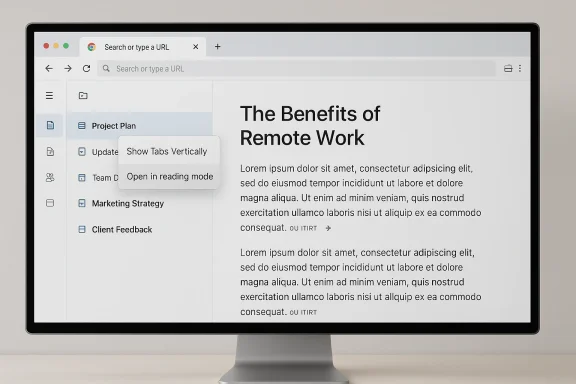
Google’s announcement makes the mechanics sound straightforward. Users in the rollout wave can right-click a Chrome window and choose Show Tabs Vertically, which moves tabs into a left sidebar where they can be selected, dragged, and reordered in a way that resembles the familiar top-tab experience. The feature is aimed at people juggling many open pages, because vertical placement makes longer tab titles easier to read and creates a more structured browsing workspace.
A Familiar Workflow, Finally in Chrome
The real win is not merely that tabs move sideways, but that Chrome is embracing a navigation model users already understand from competing browsers. Vertical tabs are especially useful when the traditional horizontal strip becomes compressed into unreadable slivers. In that scenario, the browser stops helping you recognize what is open and starts forcing you to guess, which is exactly the sort of friction Google is now trying to remove.
Google is also pairing the feature with better handling for tab groups, which matters more than it may sound. Power users often organize by project, research topic, or client, and vertical tabs make that structure easier to scan at a glance. The update therefore feels less like a visual flourish and more like an acknowledgement that modern browsing is really session management in disguise.
- Tabs can be moved to a left sidebar.
- Users can drag tabs up or down.
- Tab titles become easier to read in crowded sessions.
- The layout is better suited to heavy multitasking.
- Tab groups become easier to manage visually.
Why This Matters More Than It Sounds
A browser is one of the few applications people keep open all day, every day, so small usability improvements compound quickly. When tabs are easier to identify, fewer clicks are wasted and fewer mistakes are made, especially in research-heavy workflows. That is why a feature that looks mundane on a marketing page can become one of the most appreciated updates in daily use.
It also matters because Chrome has long benefited from being the browser everyone can explain to colleagues, family members, and IT departments without a learning curve. If it now offers a more advanced layout without making users hunt through settings, Google narrows one more reason people might have preferred Edge for serious multitasking. The competitive value is not the vertical bar itself; it is the reduced excuse for staying with something else.
Reading Mode Gets a Real Upgrade
Chrome’s second headline feature is an improved reading mode, and this may be the more interesting update for people who care about long-form reading rather than tab management. Google says the new version opens as a full-page interface instead of the older narrow sidebar experience, which previously felt cramped and awkward on busy pages. That shift alone makes the feature much more likely to be used regularly rather than ignored after one or two tries.
From Sidebar Convenience to Focused Reading
The old approach was functional but not elegant. A sidebar view can be useful for quick reference, yet it often leaves users adjusting widths and fighting for space with the original page. By moving to a full-page reading experience, Chrome is taking a cue from dedicated reader modes that prioritize comfort, legibility, and focus over preserving the exact structure of the source webpage.
Google says users can reach the feature by right-clicking a page and choosing Open in reading mode, then adjusting font, color, line height, and other visual settings. That level of control is important because reading comfort is personal, especially for people with accessibility needs or those reading dense technical material. A one-size-fits-all presentation is rarely enough, so customization is the difference between a novelty and a daily tool.
- Full-page layout replaces the cramped sidebar view.
- Font and color options improve accessibility.
- Line height controls support longer reading sessions.
- The feature should reduce visual fatigue.
- It is better suited to articles, documentation, and research.
Why Reader Features Still Matter
Reading tools may look old-fashioned in an era dominated by AI and browser assistants, but they remain a core part of how people interact with the web. News articles, how-to pages, support documents, and research papers all benefit from stripped-down presentation. If a browser can make those tasks more comfortable without requiring an extension, it removes friction from a very common kind of work.
This also highlights how Chrome’s product strategy is evolving. Instead of treating power-user features as niche add-ons, Google is now bundling them into the mainstream browser experience. That is a smart move because it helps Chrome look less like a generic web shell and more like a serious productivity environment.
Why Edge No Longer Owns the “Better Tab” Story
For years, one of Edge’s strongest arguments was that it handled browsing chaos better than Chrome. Vertical tabs, sidebar tools, and reading-oriented features gave Microsoft a clear, concrete story to tell about organization and comfort. With Chrome now matching at least part of that story, Edge loses some of the contrast that made it easy to recommend on usability alone.
Parity Is Not the Same as Supremacy
That said, Chrome’s new feature does not automatically make Edge obsolete. Edge still has a mature implementation of vertical tabs and a broader set of Microsoft-first conveniences, particularly for users living inside the Windows and Microsoft 365 ecosystem. But browser switching is often driven by perceived simplicity, and once a user believes Chrome can do the same job, the inertia of staying put becomes stronger.
The uncomfortable truth for Microsoft is that browser differentiation is fragile. A headline feature can take years to build a reputation and only weeks to become a checkbox item in a competitor’s release notes. That is why browsers increasingly compete on ecosystem integration, speed perception, sync behavior, and trust rather than on one obvious UI trick.
The “Switch to Edge” Argument Gets Harder
For average consumers, the question is less “Which browser has vertical tabs?” and more “Which browser feels less annoying to use every day?” Chrome has long benefited from familiarity, broader extension mindshare, and deep ties to Google services. If it now offers the same tab layout Edge users have been praising, the case for staying with Edge becomes more about preference than necessity.
Enterprise users are a different story. Many organizations standardize browsers based on policy, device management, security posture, and Microsoft integration, not on whether the tabs sit across the top or down the side. In those environments, Chrome’s new feature is unlikely to trigger mass migration, but it could still influence individual employees who use a personal browser alongside a managed work browser.
What This Means for Everyday Users
For most people, the practical effect is simple: Chrome now feels more adaptable. If you work on a wide monitor, juggle multiple research threads, or dislike crowded tab strips, vertical tabs can immediately improve usability. The feature is also likely to appeal to users who switch between workspaces, because readable tab titles and side placement make it easier to keep mental track of context.
Consumer Impact
Consumers who already love Chrome probably will not change how they browse dramatically. What they gain is a better option for dealing with tab overload and a more coherent reading experience without installing add-ons. That matters because the best browser features are the ones people discover organically and keep using because they solve a problem before it becomes annoying.
Consumers considering Edge now face a slightly more ambiguous decision. If vertical tabs were the one feature pushing them toward Microsoft, Chrome’s adoption weakens that distinction. If they mostly wanted a polished browser with a good extension ecosystem and familiar Google account integration, Chrome’s new layout option may be enough to tip them back.
- Better tab visibility on large displays.
- Less clutter in research-heavy sessions.
- Easier reading of long tab titles.
- More comfortable article consumption.
- Fewer reasons to choose a browser solely for layout features.
Power Users Will Notice the Difference First
Power users are likely to adopt vertical tabs first because they feel tab sprawl most acutely. Anyone who keeps tabs grouped by project, compares products across many sites, or works with documentation alongside a live app will immediately understand the value. For those users, the change is not merely aesthetic; it can be a small but real productivity gain.
At the same time, power users are also the most likely to notice imperfections. If Chrome’s implementation lacks the polish or flexibility of Edge’s mature approach, the comparison will happen instantly and publicly. That is part of the risk of feature parity: once the competitor joins the race, you are judged not on whether you have the feature, but on whether you have the best version of it.
The Competitive Chessboard: Google, Microsoft, and User Lock-In
This browser update is part of a much larger strategic picture. Chrome dominates desktop browser share, while Edge remains in a distant second place, so Google does not need vertical tabs to survive. But by adding them anyway, Google protects its lead against feature-based criticism and makes it harder for Microsoft to claim exclusive ownership of productivity-focused browsing.
The Market Reality
When one browser controls the majority of users, competitors have to win on motivation rather than default presence. Microsoft has spent years trying to do that by bundling Edge into Windows and emphasizing convenience features that feel native to the operating system. Google’s answer is to keep Chrome modern enough that users do not feel they must leave it to get advanced behavior.
This is especially important because browser habits are sticky. People rarely uninstall a browser because of a single missing feature, but they absolutely may stop recommending a rival if that rival no longer offers something unique. The loss of uniqueness is often more damaging than the loss of raw functionality.
Ecosystem Still Matters More Than One Feature
Chrome’s biggest advantage remains its ecosystem gravity. Extensions, Google account sync, cross-device familiarity, and support from web developers all reinforce its position. Microsoft Edge counters with Windows integration and enterprise familiarity, but the average user still tends to default to Chrome unless another browser gives them a compelling reason not to.
That means vertical tabs are less a turning point than a defensive move. Google is reinforcing the sense that Chrome is no longer behind on productivity niceties. For Microsoft, the challenge now is to keep Edge feeling meaningfully distinct in ways that go beyond a side tab strip and a reading pane.
- Chrome reduces the distance to Edge on UI innovation.
- Edge retains a Windows-native identity.
- Google protects its feature-complete reputation.
- User lock-in becomes more about ecosystem than layout.
- Differentiation shifts toward deeper integration and policy controls.
Why This Rollout Feels Timely
The update also lands at a moment when browser makers are increasingly trying to blend classic usability with modern productivity features. Google has been layering in AI capabilities, smarter tab behavior, and more focused reading tools. Microsoft, meanwhile, has continued to push Edge as a better-organized browser experience for Windows users.
Part of a Larger Chrome Refresh
Chrome’s recent direction suggests a browser trying to feel more intentional rather than merely ubiquitous. Google has framed Chrome as an AI-enhanced, task-oriented tool, with features designed to help users handle complex work across pages and tabs more efficiently. Vertical tabs fit neatly into that story because they solve a very old problem in a very visible way.
The reading mode update also makes sense in that broader context. If Chrome is going to be a place where users research, compare, and synthesize information, then it needs to offer an environment that can shift between busy multitasking and calm reading without making people reach for another app. That is an understated but important evolution.
Why Timing Matters for User Perception
Launch timing affects perception more than many product teams like to admit. If a feature arrives after competitors have normalized it, users see it as catch-up rather than innovation. But catch-up features still matter, because they remove objections and prevent rivals from turning a single advantage into a brand identity.
That is exactly what Chrome is doing here. It is not trying to out-edge Edge on being first; it is trying to make sure no one can say Chrome lacks the basics anymore. In browser politics, that is often enough to keep the market from shifting.
Strengths and Opportunities
Chrome’s vertical tabs and upgraded reading mode create a straightforward but meaningful opportunity: they let Google reduce one of Edge’s oldest talking points while improving the experience for people who live in tabs all day. The features also reinforce Chrome’s image as a browser that can serve both casual users and power users without adding much complexity.
- Better use of screen real estate on widescreen displays.
- Easier tab identification in dense sessions.
- A more usable reading mode for articles and documentation.
- Stronger parity with competing browsers.
- Less reason for users to switch browsers just for layout features.
- Better support for tab-group-heavy workflows.
- A cleaner path for Google to position Chrome as a productivity tool.
It is also worth noting that Chrome can now market itself as more flexible without abandoning its core identity. That flexibility could matter more as users become less loyal to any one browser and more willing to pick the one that best matches their current workflow. That is a meaningful shift in a market that once relied heavily on habit alone.
Risks and Concerns
The biggest risk is that Chrome’s new features are good enough to remove urgency without being distinctive enough to inspire delight. If the implementation feels half-baked, users will compare it unfavorably to Edge’s more established experience and conclude that Google merely copied the idea without refining it. In that case, the update becomes a checkbox rather than a competitive win.
- The feature may feel like catch-up rather than innovation.
- Users could expect Edge-level polish from day one.
- Too many options might overwhelm casual users.
- Reading mode could remain underused if hidden too deeply.
- Feature parity may weaken Chrome’s ability to surprise users.
- Microsoft may respond with new differentiation of its own.
- Enterprise buyers may see little practical change and ignore the update.
There is also a broader strategic concern: if browsers keep converging on the same interface ideas, consumers may stop caring about feature differentiation and focus instead on ecosystem inertia. That helps the largest players, but it can make competition feel flatter and less inventive. In practice, that can be bad for everyone except the dominant browser.
A final concern is discoverability. A feature buried behind a right-click menu may be obvious to enthusiasts but easy to miss for ordinary users, especially if they never see a prompt explaining why it matters. The best browser features are not only useful; they are surfaced at the exact moment users need them.
What to Watch Next
The next few weeks will show whether Chrome’s vertical tabs become a real habit or just a headline. If Google rolls out clearer onboarding, broader availability, or tighter integration with tab groups and workspaces, the feature could become a meaningful part of Chrome’s identity rather than a footnote. The same is true for reading mode: if the full-page experience proves genuinely comfortable, users will adopt it quickly.
The Key Signals
- Whether the rollout reaches stable-channel users broadly and without friction.
- Whether Chrome adds more controls or customization for vertical tabs.
- Whether Google promotes reading mode more visibly in the UI.
- Whether Microsoft responds with new Edge improvements or refinement.
- Whether user sentiment frames the move as useful parity or overdue imitation.
The most interesting long-term question is whether this update changes browser loyalty at the margin. Most people will not switch browsers because of one feature, but some will use this as a reason to stop switching away. That is often how browser wars are really won: not by conquest, but by preventing defections.
If Google keeps tightening Chrome’s productivity story while Microsoft continues to defend Edge’s Windows-native advantages, users will end up with two broadly capable browsers rather than one clearly superior one. That is probably the healthiest outcome for consumers, even if it makes the marketing battle less dramatic. For now, though, Chrome’s new vertical tabs and reading mode are a clear signal that Google is serious about closing the usability gap.
Chrome’s new vertical tabs are not a revolution, but they are an important concession to how people actually browse in 2026. By borrowing one of Edge’s most recognizable strengths and pairing it with a better reading experience, Google is making Chrome harder to dismiss for anyone who cares about productivity, focus, and screen space. That will not end the browser war, but it does make the next round a lot more interesting.