

Google is testing a new Chrome page on Windows, reported on July 6, 2026 by Windows Report, that visually walks users through the final Windows Settings step required to make Chrome the default browser. The change sounds small, but it is really about where browser choice happens: inside Windows, inside Chrome, or in the narrow strip of UI between them. Google is not bypassing Microsoft’s default-app controls. It is trying to make Microsoft’s controls feel less like the end of the road.
As detailed by Windows Report’s Venkat, the experiment appears on the
The current Chrome behavior is familiar to anyone who has installed a browser on Windows 11. You open Chrome’s settings, click “Make default,” and Windows Settings opens to the Default Apps area where the actual change must be completed. Chrome can ask; Windows decides.
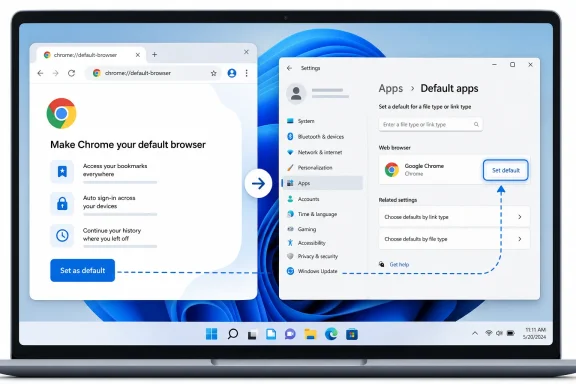
The new test changes the psychology of that handoff. According to Windows Report, clicking “Make default” during testing opened a new Chrome-hosted page that says, “Set Google Chrome as your default browser,” then instructs the user to click the Set Default button in Windows settings. The page also uses the usual ecosystem argument: passwords, bookmarks, and history sync better across devices when Chrome is the default.
That wording matters because it frames default-browser status not as a single operating-system preference, but as the last missing piece in a larger Google account workflow. Chrome is not just asking to open links. It is presenting default status as the connective tissue between the browser, saved credentials, browsing history, mobile devices, and Google’s cloud.
The more interesting part is visual. Windows Report says Chrome is preparing a flow that presents the Windows Default Apps page within the guided experience, showing users the exact button they need to press. Google has also prepared a fallback screen for cases where Windows Settings cannot be displayed, with a link to open Settings directly.
This is not a hack, at least based on what has been reported. It is a usability layer placed on top of Microsoft’s mandated user-choice flow. But in browser wars, usability layers are never neutral.
That framework explains why Chrome cannot simply flip the default-browser switch by itself. Windows treats browser defaults as a user-controlled system decision, not an application-controlled preference. The user must confirm the association for web links and related file types through Windows UI.
The problem for browser makers is that every additional system step creates friction. A user who clicks “Make default” inside Chrome has already expressed intent, but once Windows Settings opens, the experience changes context, visual language, and ownership. Some users finish the task. Others get lost, distracted, or irritated.
Google’s test is an attempt to keep intent alive across that boundary. In product-design language, this is completion assistance. In competition language, it is an effort to reclaim part of a conversion funnel that Windows controls.
Microsoft has its own history here, of course. Edge has long used prompts, banners, first-run experiences, and Windows integration to remind users that Microsoft would very much like its browser to remain central to the operating system. Chrome’s guided setter should be read in that same competitive tradition, not as an isolated usability nicety.
But that is how browser dominance works now. The default browser is not just a launcher for web pages; it is a position in the operating system’s attention economy. Defaults determine which browser opens links from chat apps, email clients, help documents, installers, and enterprise portals. They shape whether a user’s next password save lands in Google Password Manager, Microsoft Wallet, a third-party manager, or nowhere at all.
Chrome’s market share also hides local vulnerability. On a freshly installed Windows PC, Edge is present from the beginning, signed in with a Microsoft account more often than it used to be, and increasingly woven into Windows services. Chrome may be the browser many users intend to use, but Edge has home-field advantage at setup time.
That is why the final click matters. If a user installs Chrome but leaves Edge as default for links, the PC becomes a split-brain browser environment. Chrome may be the browser on the taskbar, but Edge still appears whenever the system opens a link. Google wants to close that gap before habit calcifies around Microsoft’s browser.
The guided setter is therefore less about winning new Chrome users than preventing half-converted ones. Google already got the user to install Chrome and open its settings. The experiment is aimed at the last mile, where Windows friction can turn preference into drift.
The current fight is subtler. It is about who gets to explain the user’s choice at the moment the choice is made. Microsoft owns the Default Apps surface, but Google wants to arrive there with a tour guide, a spotlight, and a reminder of why Chrome thinks the user should finish the job.
That distinction will matter to regulators and competitors. A plain button that opens Windows Settings is easy to defend as user-directed. A guided page that visually embeds or mirrors the Settings step still leaves the user in control, but it also creates a more persuasive path. It reduces confusion, but it may also reduce deliberation.
This is the uncomfortable ambiguity of modern platform design. The same technique that helps a user complete an intended task can also nudge a user through a decision faster than they might otherwise make it. A visual guide can be assistive or promotional depending on when it appears, how often it appears, and how easy it is to dismiss.
Windows Report says it is not yet clear whether Google plans to surface the experience through a notification or prompt, or whether it will appear only after users click “Make default” in Chrome settings. That unresolved point is the dividing line between convenience and pressure. If the page appears only after an explicit user action, it is mainly a better instruction sheet. If Chrome starts proactively pushing users into it, the story becomes more contentious.
Microsoft’s documentation reflects that tension. Developers are encouraged to register apps properly, direct users to Settings, and respect user choice. Microsoft also says apps can include screenshots or step-by-step guides, which makes Google’s visual setter feel less like a rogue maneuver and more like an aggressive interpretation of accepted practice.
Still, there is a difference between a support article showing a screenshot and a browser wrapping the operating-system step inside a guided conversion flow. The former teaches; the latter shepherds. That difference may be small to a user who simply wants links to open in Chrome, but it is enormous in platform politics.
For Windows enthusiasts, this is another reminder that the operating system is no longer just the place where applications run. It is the referee for identity, search, browser defaults, notification permissions, file associations, AI assistants, and cloud storage prompts. Every one of those surfaces is a tiny market in itself.
The browser-default surface is especially sensitive because browsers are gateways. They decide search defaults, extension ecosystems, web-app behavior, password storage, tracking protections, sync services, and increasingly AI features. A default-browser change is not merely cosmetic. It can shift a user from one company’s web stack to another’s.
A visual guide reduces that confusion. If the user has already clicked “Make default,” Chrome has a reasonable argument that it is helping complete an action the user initiated. The fallback page described by Windows Report also suggests Google knows the embedded or guided view may not always work cleanly and wants a direct Settings escape hatch.
But the less generous reading is also not wrong. Chrome is using its own UI to keep users moving toward a business-critical outcome. The copy does not simply say “finish this Windows setting.” It promotes Chrome’s sync benefits and frames default status as the right way to keep personal data connected.
That is classic platform bundling in softer clothing. Instead of tying products together technically, the interface ties them together narratively. Browser default, password sync, bookmarks, history, and cross-device continuity become one story.
The important question is not whether Google is allowed to make that pitch. It is whether the pitch remains proportional to the user’s intent. A single guided page after an explicit click is easy to defend. Repeated prompts, notifications, or first-run pressure would deserve more scrutiny.
But enterprise administrators should still pay attention because consumer-facing browser behavior has a way of leaking into workplace support queues. A guided setter that is harmless on a personal laptop can become noise on a locked-down corporate device. Users may see instructions they cannot complete, settings pages they are not allowed to change, or prompts that conflict with company policy.
The fallback behavior matters here. If Chrome detects that Windows Settings cannot be displayed, Windows Report says it has a placeholder message and a direct link to open Settings. In a managed environment, the next question is whether Chrome will also recognize policy restrictions gracefully, or whether help desks will field tickets from users who think something is broken.
There is also the issue of documentation drift. Admins write internal browser guidance based on stable UI flows. When Chrome inserts a new page between its settings and Windows Settings, even a well-intentioned change can make existing instructions feel outdated.
None of this means enterprises should panic. It means they should test. Browser UI changes increasingly affect onboarding, identity flows, password-manager adoption, and user expectations around defaults. The default browser is a policy object, but it is also an emotional object: users notice when links open somewhere they did not expect.
Microsoft’s advantage is structural. Edge ships with Windows, integrates with Microsoft account services, appears in system experiences, and benefits from whatever defaults remain untouched. Google’s advantage is behavioral. Many users want Chrome because they already use it elsewhere, rely on Google services, or simply see it as the default browser in their own mental model even before Windows agrees.
The guided setter tries to convert behavioral preference into operating-system reality. That is why the embedded visual instruction is so powerful. It collapses the gap between “I want Chrome” and “Windows has accepted Chrome.”
Microsoft has faced criticism for pushing Edge too aggressively in the past, and Google has faced similar criticism for Chrome prompts across its web properties and apps. Neither company is a neutral guardian of user choice. Each wants choice to resolve in its favor, and each uses design to make that result feel natural.
The irony is that the user may benefit from this rivalry in narrow ways. Better instructions are good. Clearer default-app pages are good. Reduced confusion is good. But the reason those improvements arrive is not civic virtue; it is competition for control of the next click.
Google’s test lands in a market where platform owners are expected to justify how they present choice. Microsoft must show that Windows lets users change defaults in a meaningful way. Google must show that its prompts help users rather than badger them. Both companies know the old days of silent default hijacking are gone, but the new frontier is persuasion.
The best version of this feature would be restrained. It would appear only after the user clicks “Make default.” It would clearly identify that Windows Settings is the place where the decision is made. It would avoid repeat nagging after a user declines. It would respect managed-device policies and stop cleanly when an admin has locked defaults.
The worst version would become another recurring browser nag. It would surface through notifications, first-run screens, or account prompts until the user gives in. It would blur the line between instruction and coercion. It would turn a legitimate guide into one more reason users distrust browser onboarding.
Windows Report’s article leaves that rollout behavior unresolved, and that is the detail to watch. The existence of a visual guide is not inherently troubling. Its distribution strategy will reveal Google’s actual appetite for pressure.
As detailed by Windows Report’s Venkat, the experiment appears on the
chrome://default-browser page as part of what Google calls a Visual Guided Setter experience. Instead of merely sending the user into Windows 11’s Default Apps page and hoping they finish the job, Chrome shows the user what to click next. That is a modest feature with a very modern motive: reduce abandonment at the exact moment Windows takes over.
 Google Turns a Settings Handoff Into a Guided Checkout
The current Chrome behavior is familiar to anyone who has installed a browser on Windows 11. You open Chrome’s settings, click “Make default,” and Windows Settings opens to the Default Apps area where the actual change must be completed. Chrome can ask; Windows decides.The new test changes the psychology of that handoff. According to Windows Report, clicking “Make default” during testing opened a new Chrome-hosted page that says, “Set Google Chrome as your default browser,” then instructs the user to click the Set Default button in Windows settings. The page also uses the usual ecosystem argument: passwords, bookmarks, and history sync better across devices when Chrome is the default.
That wording matters because it frames default-browser status not as a single operating-system preference, but as the last missing piece in a larger Google account workflow. Chrome is not just asking to open links. It is presenting default status as the connective tissue between the browser, saved credentials, browsing history, mobile devices, and Google’s cloud.
The more interesting part is visual. Windows Report says Chrome is preparing a flow that presents the Windows Default Apps page within the guided experience, showing users the exact button they need to press. Google has also prepared a fallback screen for cases where Windows Settings cannot be displayed, with a link to open Settings directly.
This is not a hack, at least based on what has been reported. It is a usability layer placed on top of Microsoft’s mandated user-choice flow. But in browser wars, usability layers are never neutral.
Windows 11 Made Defaults More Explicit, and Everyone Adapted
Microsoft’s default-app system has been moving steadily toward explicit user consent. Official Microsoft documentation describes Windows 11’s app defaults platform as a place where users choose which apps open file types and link types, while apps may direct users to Settings with in-app prompts or documentation. Microsoft’s developer guidance also tells app makers to use thems-settings:defaultapps URI to launch the Default Apps page, and to prompt users thoughtfully rather than aggressively.That framework explains why Chrome cannot simply flip the default-browser switch by itself. Windows treats browser defaults as a user-controlled system decision, not an application-controlled preference. The user must confirm the association for web links and related file types through Windows UI.
The problem for browser makers is that every additional system step creates friction. A user who clicks “Make default” inside Chrome has already expressed intent, but once Windows Settings opens, the experience changes context, visual language, and ownership. Some users finish the task. Others get lost, distracted, or irritated.
Google’s test is an attempt to keep intent alive across that boundary. In product-design language, this is completion assistance. In competition language, it is an effort to reclaim part of a conversion funnel that Windows controls.
Microsoft has its own history here, of course. Edge has long used prompts, banners, first-run experiences, and Windows integration to remind users that Microsoft would very much like its browser to remain central to the operating system. Chrome’s guided setter should be read in that same competitive tradition, not as an isolated usability nicety.
The Dominant Browser Still Behaves Like a Challenger
Chrome does not need this feature because it is obscure. StatCounter’s June 2026 figures put Chrome at roughly seven-tenths of global browser usage overall, and even higher on desktop depending on the view. That makes the default-browser prompt a strange kind of power move: the market leader is acting like it is still fighting for every install.But that is how browser dominance works now. The default browser is not just a launcher for web pages; it is a position in the operating system’s attention economy. Defaults determine which browser opens links from chat apps, email clients, help documents, installers, and enterprise portals. They shape whether a user’s next password save lands in Google Password Manager, Microsoft Wallet, a third-party manager, or nowhere at all.
Chrome’s market share also hides local vulnerability. On a freshly installed Windows PC, Edge is present from the beginning, signed in with a Microsoft account more often than it used to be, and increasingly woven into Windows services. Chrome may be the browser many users intend to use, but Edge has home-field advantage at setup time.
That is why the final click matters. If a user installs Chrome but leaves Edge as default for links, the PC becomes a split-brain browser environment. Chrome may be the browser on the taskbar, but Edge still appears whenever the system opens a link. Google wants to close that gap before habit calcifies around Microsoft’s browser.
The guided setter is therefore less about winning new Chrome users than preventing half-converted ones. Google already got the user to install Chrome and open its settings. The experiment is aimed at the last mile, where Windows friction can turn preference into drift.
The Real Battle Is Over Who Explains Choice
There is an old version of the browser-default fight that was mostly about control. Could one browser silently make itself default? Could an installer hijack associations? Could an operating system privilege its own browser? Modern Windows is more constrained than that, at least on paper.The current fight is subtler. It is about who gets to explain the user’s choice at the moment the choice is made. Microsoft owns the Default Apps surface, but Google wants to arrive there with a tour guide, a spotlight, and a reminder of why Chrome thinks the user should finish the job.
That distinction will matter to regulators and competitors. A plain button that opens Windows Settings is easy to defend as user-directed. A guided page that visually embeds or mirrors the Settings step still leaves the user in control, but it also creates a more persuasive path. It reduces confusion, but it may also reduce deliberation.
This is the uncomfortable ambiguity of modern platform design. The same technique that helps a user complete an intended task can also nudge a user through a decision faster than they might otherwise make it. A visual guide can be assistive or promotional depending on when it appears, how often it appears, and how easy it is to dismiss.
Windows Report says it is not yet clear whether Google plans to surface the experience through a notification or prompt, or whether it will appear only after users click “Make default” in Chrome settings. That unresolved point is the dividing line between convenience and pressure. If the page appears only after an explicit user action, it is mainly a better instruction sheet. If Chrome starts proactively pushing users into it, the story becomes more contentious.
Microsoft’s Default Apps Page Is Now a Platform Boundary
Windows Settings has become one of the most important antitrust surfaces on the PC. It is where user choice, platform control, app competition, and regulatory compliance collide in a deceptively ordinary interface. The Default Apps page is not glamorous, but it is where browser makers win or lose a large number of everyday launches.Microsoft’s documentation reflects that tension. Developers are encouraged to register apps properly, direct users to Settings, and respect user choice. Microsoft also says apps can include screenshots or step-by-step guides, which makes Google’s visual setter feel less like a rogue maneuver and more like an aggressive interpretation of accepted practice.
Still, there is a difference between a support article showing a screenshot and a browser wrapping the operating-system step inside a guided conversion flow. The former teaches; the latter shepherds. That difference may be small to a user who simply wants links to open in Chrome, but it is enormous in platform politics.
For Windows enthusiasts, this is another reminder that the operating system is no longer just the place where applications run. It is the referee for identity, search, browser defaults, notification permissions, file associations, AI assistants, and cloud storage prompts. Every one of those surfaces is a tiny market in itself.
The browser-default surface is especially sensitive because browsers are gateways. They decide search defaults, extension ecosystems, web-app behavior, password storage, tracking protections, sync services, and increasingly AI features. A default-browser change is not merely cosmetic. It can shift a user from one company’s web stack to another’s.
A Helpful Guide Can Still Be a Competitive Weapon
There is a generous reading of Google’s experiment, and it is not wrong. Windows 11’s default-app settings can be confusing for ordinary users. Even technically competent users sometimes stumble over the distinction between setting a browser as the default app, assigning specific protocols, and handling file types such as HTML or PDF.A visual guide reduces that confusion. If the user has already clicked “Make default,” Chrome has a reasonable argument that it is helping complete an action the user initiated. The fallback page described by Windows Report also suggests Google knows the embedded or guided view may not always work cleanly and wants a direct Settings escape hatch.
But the less generous reading is also not wrong. Chrome is using its own UI to keep users moving toward a business-critical outcome. The copy does not simply say “finish this Windows setting.” It promotes Chrome’s sync benefits and frames default status as the right way to keep personal data connected.
That is classic platform bundling in softer clothing. Instead of tying products together technically, the interface ties them together narratively. Browser default, password sync, bookmarks, history, and cross-device continuity become one story.
The important question is not whether Google is allowed to make that pitch. It is whether the pitch remains proportional to the user’s intent. A single guided page after an explicit click is easy to defend. Repeated prompts, notifications, or first-run pressure would deserve more scrutiny.
Enterprise IT Will See a Small Feature With Familiar Risks
For managed Windows fleets, the feature is unlikely to be earth-shattering by itself. Organizations that care deeply about browser defaults already use policy, provisioning, default association files, or device-management tooling to control the experience. Microsoft’s Edge deployment documentation, for example, describes using default associations configuration through Group Policy or mobile device management to set Edge for HTML files, HTTP and HTTPS links, and related associations.But enterprise administrators should still pay attention because consumer-facing browser behavior has a way of leaking into workplace support queues. A guided setter that is harmless on a personal laptop can become noise on a locked-down corporate device. Users may see instructions they cannot complete, settings pages they are not allowed to change, or prompts that conflict with company policy.
The fallback behavior matters here. If Chrome detects that Windows Settings cannot be displayed, Windows Report says it has a placeholder message and a direct link to open Settings. In a managed environment, the next question is whether Chrome will also recognize policy restrictions gracefully, or whether help desks will field tickets from users who think something is broken.
There is also the issue of documentation drift. Admins write internal browser guidance based on stable UI flows. When Chrome inserts a new page between its settings and Windows Settings, even a well-intentioned change can make existing instructions feel outdated.
None of this means enterprises should panic. It means they should test. Browser UI changes increasingly affect onboarding, identity flows, password-manager adoption, and user expectations around defaults. The default browser is a policy object, but it is also an emotional object: users notice when links open somewhere they did not expect.
Edge Is the Unspoken Character in Chrome’s New Flow
The Chrome guided setter is really a three-party story: Google, Microsoft, and the user. Edge is not necessarily named in the flow, but it is the browser most likely to lose when a Windows user completes Chrome’s default change. That makes the new page part of a long-running tug-of-war between the company that owns the browser market and the company that owns the desktop platform.Microsoft’s advantage is structural. Edge ships with Windows, integrates with Microsoft account services, appears in system experiences, and benefits from whatever defaults remain untouched. Google’s advantage is behavioral. Many users want Chrome because they already use it elsewhere, rely on Google services, or simply see it as the default browser in their own mental model even before Windows agrees.
The guided setter tries to convert behavioral preference into operating-system reality. That is why the embedded visual instruction is so powerful. It collapses the gap between “I want Chrome” and “Windows has accepted Chrome.”
Microsoft has faced criticism for pushing Edge too aggressively in the past, and Google has faced similar criticism for Chrome prompts across its web properties and apps. Neither company is a neutral guardian of user choice. Each wants choice to resolve in its favor, and each uses design to make that result feel natural.
The irony is that the user may benefit from this rivalry in narrow ways. Better instructions are good. Clearer default-app pages are good. Reduced confusion is good. But the reason those improvements arrive is not civic virtue; it is competition for control of the next click.
The Smallest UI Changes Now Carry Regulatory Weight
Browser choice remains a live regulatory issue because defaults compound over time. A browser that becomes default gains traffic, data, search revenue, extension activity, and developer attention. That is why seemingly minor prompts and settings flows attract scrutiny out of proportion to their pixel count.Google’s test lands in a market where platform owners are expected to justify how they present choice. Microsoft must show that Windows lets users change defaults in a meaningful way. Google must show that its prompts help users rather than badger them. Both companies know the old days of silent default hijacking are gone, but the new frontier is persuasion.
The best version of this feature would be restrained. It would appear only after the user clicks “Make default.” It would clearly identify that Windows Settings is the place where the decision is made. It would avoid repeat nagging after a user declines. It would respect managed-device policies and stop cleanly when an admin has locked defaults.
The worst version would become another recurring browser nag. It would surface through notifications, first-run screens, or account prompts until the user gives in. It would blur the line between instruction and coercion. It would turn a legitimate guide into one more reason users distrust browser onboarding.
Windows Report’s article leaves that rollout behavior unresolved, and that is the detail to watch. The existence of a visual guide is not inherently troubling. Its distribution strategy will reveal Google’s actual appetite for pressure.
The Chrome Default Prompt Is Really a Test of Restraint
The concrete facts are straightforward, but the implications depend on what Google does next. Windows Report has spotted a Chrome experiment that makes the Windows default-browser handoff more visual, more guided, and potentially more effective. That can be good user experience and hard-nosed market defense at the same time.- Chrome is testing a
chrome://default-browserguided experience on Windows that shows users how to complete the default-browser change in Windows Settings. - The feature reportedly includes a visual presentation of the Windows Default Apps step, plus a fallback screen when Settings cannot be displayed inside the flow.
- The experiment does not appear to bypass Windows 11’s user-choice mechanism; it instead tries to keep users oriented until they click the final Windows button.
- The competitive stakes are larger than the UI suggests because default-browser status affects links, search habits, password storage, sync, and ecosystem lock-in.
- The unresolved issue is whether Google will show this only after a user clicks “Make default,” or whether it will become a broader prompt campaign.
- Enterprise admins should test the behavior once it reaches broader Chrome channels, especially on devices where browser defaults are governed by policy.
References
- Primary source: Windows Report
Published: 2026-07-06T10:45:16.150965
Chrome tests a visual guide to help users set it as the default browser on Windows
Google is testing a new chrome://default-browser page to make it easier for Windows users to set Chrome as their default browser. windowsreport.com
- Related coverage: gs.statcounter.com
Desktop & Browser Market Share Worldwide | Statcounter Global Stats
This graph shows the market share of desktop & browsers worldwide based on over 3 billion monthly page views.gs.statcounter.com - Related coverage: technologychecker.io
Chrome Market Share 2026: 68.2% Overall, 69% Mobile, 67% Desktop - TechnologyChecker.io
Chrome holds 68.2% of human web traffic in 2026, the #1 browser by 4x. It wins every platform but the iPhone. Full country, OS, and device breakdown.technologychecker.io - Related coverage: aboutchromebooks.com
Chrome Version History Statistics 2026
ul.stat-list li:last-child { border-bottom: none; }www.aboutchromebooks.com - Related coverage: statcounter.com
- Related coverage: learn.meltwater.com
