

CISA published advisory ICSA-26-162-03 on June 11, 2026, warning that Brickcom Cube, Dome, Bullet, and Box cameras running firmware 3.2.3.5.6 are affected by authentication weaknesses that can expose live feeds and administrative control. The advisory is small, but the implications are not. A camera vulnerability is never just a camera vulnerability when the device is pointed at hospital corridors, factory floors, offices, loading docks, and financial-services facilities. This is the kind of flaw that turns “physical security” into another remote-access surface.
The Brickcom advisory lands in a familiar corner of enterprise risk: embedded devices that were bought as appliances but behave like neglected servers. CISA identifies two broad classes of weakness in the affected cameras: missing authentication for critical functionality and use of default credentials. Neither phrase is exotic, and that is precisely the problem.
These are not memory-corruption bugs requiring a compiler exploit chain, heap grooming, or deep firmware archaeology. They are failures at the front door. If an attacker can reach the device and authentication is missing, weak, or predictable, the sophistication required to cause damage drops sharply.
The affected product families are not obscure in form even if Brickcom is not a household name. Cube, Dome, Bullet, and Box cameras map neatly onto the physical layouts administrators see every day: indoor monitoring, ceiling-mounted coverage, perimeter observation, and fixed-position surveillance. In other words, the vulnerable devices are likely to be mounted in places where organizations deliberately wanted visibility.
That makes the advisory’s impact unusually literal. Unauthorized access to a camera does not merely disclose a configuration file or a user list. It can disclose who enters a building, what equipment sits in a room, when staff change shifts, where medicines are stored, whether a loading bay is active, or which badge readers and doors are within view.
Cameras are especially vulnerable to this pattern. They are often installed in batches, enrolled into a video management system, and then left alone unless a feed goes dark. The people who mount them are not always the people who later administer them, and neither group may be responsible for vulnerability management.
A Windows admin knows what it means to inventory domain-joined laptops. An OT engineer knows the sensitivity of a PLC. But an IP camera can fall between those worlds, treated as neither IT nor OT until it becomes both. It has firmware, network services, credentials, remote viewing features, and often some form of web interface. That is a computer, even if procurement called it a camera.
Brickcom’s own publicly available support material has historically described administrator defaults in simple terms, including the familiar admin/admin pattern. Even when default credentials are documented for legitimate setup, they become dangerous the moment devices are deployed without forced credential rotation, network isolation, and repeatable asset tracking.
That tension matters. It may reflect a templating issue, a narrow distinction about exploit path, or a requirement that the attacker first have network-level access to the camera rather than internet-level reachability. But for defenders, the practical reading is straightforward: do not assume “not remotely exploitable” means “safe on the network.”
Many camera compromises are not launched from the open internet against a pristine perimeter. They begin after a foothold elsewhere: a compromised VPN account, a flat guest network, a forgotten vendor tunnel, a misconfigured firewall rule, or a workstation on the same subnet. Once inside, weakly protected cameras are attractive targets because they offer reconnaissance, persistence opportunities, and sometimes pivot paths.
This is why CISA’s recommended mitigations are as important as the vulnerability descriptions. The agency does not point administrators toward a magic patch in the advisory text supplied here. It points them toward exposure reduction: keep control system devices off the internet, isolate networks, put remote access behind properly maintained VPNs, and perform impact analysis before making defensive changes.
The familiar advice can sound boilerplate until a camera is the affected system. Then it becomes operationally specific. If the device is watching a pharmacy, a server cage, a cash-handling room, a production line, or an executive entrance, exposure is not theoretical. The feed itself is the sensitive data.
A stolen password database creates a recognizable incident response flow. A ransomware detonation creates an emergency. A silently accessed camera feed may create neither, at least not immediately. The organization may never know whether an attacker observed a security procedure, identified an employee routine, watched a patient area, or learned how deliveries are handled.
That ambiguity is what makes visual compromise so uncomfortable. It can support later intrusion without leaving the dramatic traces administrators expect. A camera can be used to time a physical entry, verify whether staff are present, learn where screens display sensitive information, or map operational rhythms.
In commercial facilities, the obvious worry is surveillance of entrances, cash offices, and tenant spaces. In critical manufacturing, the worry expands to process visibility: what is running, when lines are idle, and which machinery or materials are present. In healthcare, the privacy dimension becomes sharper still, because cameras may capture patients, staff workflows, controlled areas, and emergency operations.
Financial services adds another layer. A compromised camera may not reveal account data, but it can reveal physical controls around vaults, teller lines, back offices, secure rooms, and visitor procedures. Attackers do not always need the database when they can study the building.
The camera subnet is often the new printer VLAN: full of devices that are operationally important, poorly inventoried, rarely patched, and reachable by more systems than anyone intended. Video management servers may bridge networks. Facilities vendors may request remote access. Security staff may need mobile viewing. Each convenience adds another path.
That does not mean organizations should panic and rip cameras off the wall. It means administrators should treat cameras as managed endpoints with a different user interface. They need ownership, firmware tracking, credential policy, segmentation, logging expectations, and a retirement plan.
The Windows analogy is useful because it shifts the conversation away from blame. Nobody would accept a domain full of Windows servers running unknown builds with default administrator passwords because “they are just used for viewing.” The same standard should apply to IP surveillance hardware, especially in regulated or safety-sensitive environments.
Internet exposure is not always deliberate. Cameras get published through router rules, cloud relay features, dynamic DNS setups, temporary troubleshooting changes, or inherited firewall configurations nobody wants to touch. In smaller commercial environments, the installer may have optimized for remote viewing with the tools available at the time. Years later, the device remains reachable.
The risk is magnified by search engines and automated scanning. Attackers do not need to know that a particular clinic, plant, or office uses a Brickcom model. They can search for exposed services, fingerprint devices, and test known weak patterns at scale. The defender thinks in buildings; the attacker thinks in address space.
The correct posture is not merely “change the password,” though that is necessary. The correct posture is that the camera management plane should be inaccessible except from tightly controlled networks. Viewing pathways should be mediated through authenticated systems designed for that purpose, not exposed device interfaces.
A VPN can reduce exposure by removing camera interfaces from the public internet, but it does not erase the need for least privilege. If every VPN user can reach every camera, then a compromised credential still becomes a surveillance problem. If vendor access lands on a flat network, the VPN becomes a more respectable-looking bridge to the same old risk.
Administrators should resist the temptation to treat VPN deployment as the end state. It is a control, not a cure. The better model is layered: remote access with strong authentication, constrained network paths, monitored sessions, restricted management interfaces, and separate credentials for device administration.
The same logic applies to video management systems. If cameras are reachable only from the VMS and an administrative jump host, the blast radius is smaller. If cameras are reachable from office desktops, guest Wi-Fi, facilities laptops, and vendor subnets, then the organization has built a surveillance mesh and called it convenience.
Brickcom’s public download listings have shown firmware 3.2.3.5.6 across multiple v5 camera families, including box, bullet, dome, and cube lines. That alignment supports CISA’s affected-version list, but it also raises a hard operational question. If 3.2.3.5.6 is the available firmware for deployed hardware, mitigation may depend more on architecture than on an easy update button.
This is where enterprise security programs often stumble. Patch management assumes a vendor pipeline, a maintenance window, a rollback path, and a compatible image. Camera fleets may have none of those things. Some devices may be out of warranty, installed in difficult locations, dependent on old VMS compatibility, or managed by third-party integrators.
The absence of known public exploitation should not become an excuse for waiting indefinitely. It should shape prioritization. Internet-exposed cameras and cameras in sensitive areas should move first. Devices on isolated networks with strong access controls can be scheduled more deliberately, but they still need a decision.
A useful inventory has to connect technical and physical facts. The model number matters, but so does the camera’s location and field of view. A vulnerable camera watching a public lobby is not the same risk as a vulnerable camera watching a medication room, server rack, payment counter, or manufacturing process.
Administrators should also identify the systems that depend on the cameras. A firmware change may break ONVIF integration, stream profiles, recording behavior, analytics, or mobile viewing. That does not mean the change should be avoided. It means the security team needs facilities, physical security, compliance, and operations in the same conversation before the maintenance window begins.
This is the practical value of CISA’s reminder to perform impact analysis and risk assessment before deploying defensive measures. In the abstract, that phrase sounds bureaucratic. In a hospital, factory, or financial branch, it means do not break surveillance coverage while trying to secure surveillance coverage.
Not every PoC becomes a mass-exploitation campaign. Many are incomplete, environment-specific, or responsibly handled. But embedded-device flaws have a long history of moving from advisory text to botnet logic, credential-stuffing scripts, and targeted reconnaissance tools. Cameras are especially tempting because compromise can produce immediate value without noisy payloads.
The attacker does not need to brick the device or install malware to create harm. Watching is enough. Administrative control is worse, because it may allow configuration changes, account creation, stream manipulation, or disabling visibility at a critical moment. Even a temporary loss of trust in camera integrity can create operational consequences.
For defenders, this means the right question is not whether exploitation is already widespread. The right question is whether the organization would know if exploitation happened tomorrow. If the answer is no, mitigation deserves urgency.
Healthcare illustrates the stakes most clearly. Cameras may support security in emergency departments, pharmacies, behavioral health units, entrances, and restricted corridors. Even when they are not intended to capture clinical detail, they can reveal patient movement, staff availability, and sensitive operational patterns.
Manufacturing environments have a different exposure profile. A camera pointed at a production line can disclose output levels, equipment configuration, downtime, or physical safeguards. For a competitor, criminal group, or nation-state actor, visual intelligence can be useful without touching a single PLC.
Financial institutions have spent decades hardening digital systems while also relying on physical surveillance for fraud deterrence and incident review. If an attacker can observe the physical side of those controls, the distinction between cyber and physical security becomes academic. The bank branch, like the factory floor and the clinic corridor, is now a networked environment.
Good governance shows up in boring places. Someone knows who owns the camera fleet. Someone knows which firmware versions are deployed. Someone can disable unnecessary internet exposure without starting a turf war. Someone can tell whether a vendor account still works after the installer leaves.
Bad governance also shows up quietly. Cameras sit on the same network as office systems. Default passwords survive because changing them might break the recorder. Remote access is granted through a firewall rule created years ago. Firmware remains frozen because nobody wants to risk losing video.
The difference between those two organizations is not whether they read advisories. It is whether advisories map to action. CISA can publish the warning, but only the local operator can turn that warning into segmentation, credential rotation, firmware validation, and replacement planning.
Credential review comes next. Default administrator credentials should be assumed unsafe, even where there is no evidence of compromise. Shared credentials should be eliminated where the device supports named accounts. Passwords should be unique, stored in an approved vault, and rotated after exposure is reduced.
Network controls should then narrow who can talk to the cameras. The VMS, administrative jump hosts, and tightly defined management networks may need access. Ordinary desktops, guest networks, and broad VPN pools generally do not. The camera should be a destination for known systems, not a neighborhood resource.
Logging and monitoring are harder because many embedded devices provide limited telemetry. Still, administrators can monitor surrounding infrastructure: firewall flows, VPN access, VMS logs, DNS queries, authentication attempts where available, and unusual outbound traffic from camera VLANs. The lack of perfect device logs is not a reason to fly blind.
The Brickcom advisory will probably not dominate the week’s technology headlines, but it is exactly the kind of warning that separates mature operators from lucky ones. The next wave of infrastructure security will not be won only by patching marquee products on Patch Tuesday; it will be won by finding the forgotten devices that quietly see everything, reducing who can reach them, and refusing to let convenience masquerade as control.
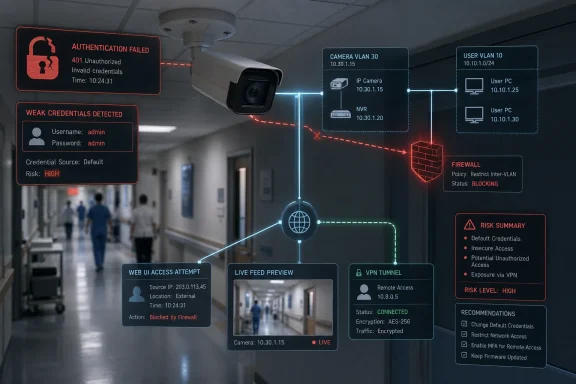 The Camera Is the Computer Everyone Forgot to Patch
The Brickcom advisory lands in a familiar corner of enterprise risk: embedded devices that were bought as appliances but behave like neglected servers. CISA identifies two broad classes of weakness in the affected cameras: missing authentication for critical functionality and use of default credentials. Neither phrase is exotic, and that is precisely the problem.These are not memory-corruption bugs requiring a compiler exploit chain, heap grooming, or deep firmware archaeology. They are failures at the front door. If an attacker can reach the device and authentication is missing, weak, or predictable, the sophistication required to cause damage drops sharply.
The affected product families are not obscure in form even if Brickcom is not a household name. Cube, Dome, Bullet, and Box cameras map neatly onto the physical layouts administrators see every day: indoor monitoring, ceiling-mounted coverage, perimeter observation, and fixed-position surveillance. In other words, the vulnerable devices are likely to be mounted in places where organizations deliberately wanted visibility.
That makes the advisory’s impact unusually literal. Unauthorized access to a camera does not merely disclose a configuration file or a user list. It can disclose who enters a building, what equipment sits in a room, when staff change shifts, where medicines are stored, whether a loading bay is active, or which badge readers and doors are within view.
Default Credentials Are Not a Configuration Mistake; They Are a Supply-Chain Habit
The use of default credentials has been treated for years as a user error: the installer failed to change the password, the integrator rushed the job, the customer never read the manual. That framing is too generous. Default credentials persist because the device ecosystem has long optimized for installation speed over secure ownership transfer.Cameras are especially vulnerable to this pattern. They are often installed in batches, enrolled into a video management system, and then left alone unless a feed goes dark. The people who mount them are not always the people who later administer them, and neither group may be responsible for vulnerability management.
A Windows admin knows what it means to inventory domain-joined laptops. An OT engineer knows the sensitivity of a PLC. But an IP camera can fall between those worlds, treated as neither IT nor OT until it becomes both. It has firmware, network services, credentials, remote viewing features, and often some form of web interface. That is a computer, even if procurement called it a camera.
Brickcom’s own publicly available support material has historically described administrator defaults in simple terms, including the familiar admin/admin pattern. Even when default credentials are documented for legitimate setup, they become dangerous the moment devices are deployed without forced credential rotation, network isolation, and repeatable asset tracking.
CISA’s Wording Exposes the Messiness of Embedded Risk
The advisory summary says successful exploitation could allow a remote unauthenticated attacker to gain access to live video feeds, retrieve sensitive visual information, and obtain administrative control of the device. It also includes the line that no known public exploitation has been reported to CISA and that the vulnerabilities are not exploitable remotely.That tension matters. It may reflect a templating issue, a narrow distinction about exploit path, or a requirement that the attacker first have network-level access to the camera rather than internet-level reachability. But for defenders, the practical reading is straightforward: do not assume “not remotely exploitable” means “safe on the network.”
Many camera compromises are not launched from the open internet against a pristine perimeter. They begin after a foothold elsewhere: a compromised VPN account, a flat guest network, a forgotten vendor tunnel, a misconfigured firewall rule, or a workstation on the same subnet. Once inside, weakly protected cameras are attractive targets because they offer reconnaissance, persistence opportunities, and sometimes pivot paths.
This is why CISA’s recommended mitigations are as important as the vulnerability descriptions. The agency does not point administrators toward a magic patch in the advisory text supplied here. It points them toward exposure reduction: keep control system devices off the internet, isolate networks, put remote access behind properly maintained VPNs, and perform impact analysis before making defensive changes.
The familiar advice can sound boilerplate until a camera is the affected system. Then it becomes operationally specific. If the device is watching a pharmacy, a server cage, a cash-handling room, a production line, or an executive entrance, exposure is not theoretical. The feed itself is the sensitive data.
The CVSS Score Understates the Human Cost of a Live Feed
CISA lists the vulnerabilities at CVSS v3 7.7, which puts them in high-severity territory without pushing them into the maximum alarm tier. That is a reasonable numerical treatment for many access-control failures. But CVSS was never very good at pricing the real-world cost of being watched.A stolen password database creates a recognizable incident response flow. A ransomware detonation creates an emergency. A silently accessed camera feed may create neither, at least not immediately. The organization may never know whether an attacker observed a security procedure, identified an employee routine, watched a patient area, or learned how deliveries are handled.
That ambiguity is what makes visual compromise so uncomfortable. It can support later intrusion without leaving the dramatic traces administrators expect. A camera can be used to time a physical entry, verify whether staff are present, learn where screens display sensitive information, or map operational rhythms.
In commercial facilities, the obvious worry is surveillance of entrances, cash offices, and tenant spaces. In critical manufacturing, the worry expands to process visibility: what is running, when lines are idle, and which machinery or materials are present. In healthcare, the privacy dimension becomes sharper still, because cameras may capture patients, staff workflows, controlled areas, and emergency operations.
Financial services adds another layer. A compromised camera may not reveal account data, but it can reveal physical controls around vaults, teller lines, back offices, secure rooms, and visitor procedures. Attackers do not always need the database when they can study the building.
Windows Shops Should Recognize the Pattern From PrintNightmare and SMB Ghosts
For WindowsForum readers, the lesson is less about Brickcom as a brand and more about the recurring failure mode. Enterprise Windows environments have spent years learning that “internal only” does not mean “low risk.” Print spoolers, file shares, legacy protocols, remote management agents, and line-of-business appliances have all taught the same lesson.The camera subnet is often the new printer VLAN: full of devices that are operationally important, poorly inventoried, rarely patched, and reachable by more systems than anyone intended. Video management servers may bridge networks. Facilities vendors may request remote access. Security staff may need mobile viewing. Each convenience adds another path.
That does not mean organizations should panic and rip cameras off the wall. It means administrators should treat cameras as managed endpoints with a different user interface. They need ownership, firmware tracking, credential policy, segmentation, logging expectations, and a retirement plan.
The Windows analogy is useful because it shifts the conversation away from blame. Nobody would accept a domain full of Windows servers running unknown builds with default administrator passwords because “they are just used for viewing.” The same standard should apply to IP surveillance hardware, especially in regulated or safety-sensitive environments.
The Internet Is the Wrong Place for a Camera Login Page
CISA’s first recommendation is to minimize network exposure and ensure control system devices are not accessible from the internet. That is the line every advisory includes because it remains the line organizations keep crossing. A device with a web interface and default credentials should never be one port-forward away from strangers.Internet exposure is not always deliberate. Cameras get published through router rules, cloud relay features, dynamic DNS setups, temporary troubleshooting changes, or inherited firewall configurations nobody wants to touch. In smaller commercial environments, the installer may have optimized for remote viewing with the tools available at the time. Years later, the device remains reachable.
The risk is magnified by search engines and automated scanning. Attackers do not need to know that a particular clinic, plant, or office uses a Brickcom model. They can search for exposed services, fingerprint devices, and test known weak patterns at scale. The defender thinks in buildings; the attacker thinks in address space.
The correct posture is not merely “change the password,” though that is necessary. The correct posture is that the camera management plane should be inaccessible except from tightly controlled networks. Viewing pathways should be mediated through authenticated systems designed for that purpose, not exposed device interfaces.
The VPN Caveat Is Doing More Work Than It Seems
CISA recommends more secure remote access methods such as VPNs, while noting that VPNs can themselves contain vulnerabilities and are only as secure as connected devices. That caveat is not legal padding. It is the modern perimeter in one sentence.A VPN can reduce exposure by removing camera interfaces from the public internet, but it does not erase the need for least privilege. If every VPN user can reach every camera, then a compromised credential still becomes a surveillance problem. If vendor access lands on a flat network, the VPN becomes a more respectable-looking bridge to the same old risk.
Administrators should resist the temptation to treat VPN deployment as the end state. It is a control, not a cure. The better model is layered: remote access with strong authentication, constrained network paths, monitored sessions, restricted management interfaces, and separate credentials for device administration.
The same logic applies to video management systems. If cameras are reachable only from the VMS and an administrative jump host, the blast radius is smaller. If cameras are reachable from office desktops, guest Wi-Fi, facilities laptops, and vendor subnets, then the organization has built a surveillance mesh and called it convenience.
The Patch Story Is Less Clear Than the Exposure Story
The supplied advisory names affected versions but does not present a clean remediation version in the excerpt. That leaves administrators in a common embedded-device bind: the vulnerability is public, the affected firmware is known, but the immediate patch path may require vendor confirmation, support portals, model-by-model checks, or replacement planning.Brickcom’s public download listings have shown firmware 3.2.3.5.6 across multiple v5 camera families, including box, bullet, dome, and cube lines. That alignment supports CISA’s affected-version list, but it also raises a hard operational question. If 3.2.3.5.6 is the available firmware for deployed hardware, mitigation may depend more on architecture than on an easy update button.
This is where enterprise security programs often stumble. Patch management assumes a vendor pipeline, a maintenance window, a rollback path, and a compatible image. Camera fleets may have none of those things. Some devices may be out of warranty, installed in difficult locations, dependent on old VMS compatibility, or managed by third-party integrators.
The absence of known public exploitation should not become an excuse for waiting indefinitely. It should shape prioritization. Internet-exposed cameras and cameras in sensitive areas should move first. Devices on isolated networks with strong access controls can be scheduled more deliberately, but they still need a decision.
The Real Inventory Is Not the Purchase Order
The first defensive move is finding the devices. That sounds obvious until an organization tries to answer how many IP cameras it has, which firmware they run, which VLAN they occupy, who owns them, and whether their web interfaces are reachable outside the security team’s tooling. Purchase orders are not inventories, and neither are floor plans.A useful inventory has to connect technical and physical facts. The model number matters, but so does the camera’s location and field of view. A vulnerable camera watching a public lobby is not the same risk as a vulnerable camera watching a medication room, server rack, payment counter, or manufacturing process.
Administrators should also identify the systems that depend on the cameras. A firmware change may break ONVIF integration, stream profiles, recording behavior, analytics, or mobile viewing. That does not mean the change should be avoided. It means the security team needs facilities, physical security, compliance, and operations in the same conversation before the maintenance window begins.
This is the practical value of CISA’s reminder to perform impact analysis and risk assessment before deploying defensive measures. In the abstract, that phrase sounds bureaucratic. In a hospital, factory, or financial branch, it means do not break surveillance coverage while trying to secure surveillance coverage.
The PoC Discovery Changes the Clock
CISA credits the discovery of proof-of-concept material to parsa rezaie khiabanloo. That detail matters because PoC availability changes the defender’s timeline even when CISA says it has not seen known public exploitation targeting the vulnerabilities. Once exploit logic exists in the world, the distance between research and opportunistic scanning can shrink.Not every PoC becomes a mass-exploitation campaign. Many are incomplete, environment-specific, or responsibly handled. But embedded-device flaws have a long history of moving from advisory text to botnet logic, credential-stuffing scripts, and targeted reconnaissance tools. Cameras are especially tempting because compromise can produce immediate value without noisy payloads.
The attacker does not need to brick the device or install malware to create harm. Watching is enough. Administrative control is worse, because it may allow configuration changes, account creation, stream manipulation, or disabling visibility at a critical moment. Even a temporary loss of trust in camera integrity can create operational consequences.
For defenders, this means the right question is not whether exploitation is already widespread. The right question is whether the organization would know if exploitation happened tomorrow. If the answer is no, mitigation deserves urgency.
Surveillance Gear Has Become Part of the Attack Surface of Care, Cash, and Production
The sectors named in the advisory are not incidental. Commercial facilities, critical manufacturing, financial services, and healthcare all depend on cameras for safety, compliance, investigations, and daily operations. That dependence makes camera compromise both a cyber incident and a business continuity issue.Healthcare illustrates the stakes most clearly. Cameras may support security in emergency departments, pharmacies, behavioral health units, entrances, and restricted corridors. Even when they are not intended to capture clinical detail, they can reveal patient movement, staff availability, and sensitive operational patterns.
Manufacturing environments have a different exposure profile. A camera pointed at a production line can disclose output levels, equipment configuration, downtime, or physical safeguards. For a competitor, criminal group, or nation-state actor, visual intelligence can be useful without touching a single PLC.
Financial institutions have spent decades hardening digital systems while also relying on physical surveillance for fraud deterrence and incident review. If an attacker can observe the physical side of those controls, the distinction between cyber and physical security becomes academic. The bank branch, like the factory floor and the clinic corridor, is now a networked environment.
The Small Advisory Is a Big Test of Governance
The Brickcom notice is not a sprawling mega-breach disclosure. It does not name a ransomware gang, describe stolen databases, or announce emergency patches for millions of PCs. That makes it an excellent test of whether an organization’s security program can handle the mundane risks that actually accumulate.Good governance shows up in boring places. Someone knows who owns the camera fleet. Someone knows which firmware versions are deployed. Someone can disable unnecessary internet exposure without starting a turf war. Someone can tell whether a vendor account still works after the installer leaves.
Bad governance also shows up quietly. Cameras sit on the same network as office systems. Default passwords survive because changing them might break the recorder. Remote access is granted through a firewall rule created years ago. Firmware remains frozen because nobody wants to risk losing video.
The difference between those two organizations is not whether they read advisories. It is whether advisories map to action. CISA can publish the warning, but only the local operator can turn that warning into segmentation, credential rotation, firmware validation, and replacement planning.
The Practical Response Starts With Reachability
For most administrators, the first response should not be a frantic firmware hunt. It should be a reachability check. If the affected cameras can be reached from the public internet, from broad user networks, or from unmanaged vendor paths, the organization has a priority incident even before a patch decision is made.Credential review comes next. Default administrator credentials should be assumed unsafe, even where there is no evidence of compromise. Shared credentials should be eliminated where the device supports named accounts. Passwords should be unique, stored in an approved vault, and rotated after exposure is reduced.
Network controls should then narrow who can talk to the cameras. The VMS, administrative jump hosts, and tightly defined management networks may need access. Ordinary desktops, guest networks, and broad VPN pools generally do not. The camera should be a destination for known systems, not a neighborhood resource.
Logging and monitoring are harder because many embedded devices provide limited telemetry. Still, administrators can monitor surrounding infrastructure: firewall flows, VPN access, VMS logs, DNS queries, authentication attempts where available, and unusual outbound traffic from camera VLANs. The lack of perfect device logs is not a reason to fly blind.
The Brickcom Lesson Fits in Five Operational Moves
The advisory’s value is not that it reveals a surprising new class of bug. It is that it forces organizations to confront the gap between owning cameras and managing them. The response should be concrete, fast, and proportionate to where the cameras are deployed.- Organizations should identify every Brickcom Cube, Dome, Bullet, and Box camera and verify whether firmware 3.2.3.5.6 is present.
- Administrators should remove direct internet exposure for affected cameras before treating any other mitigation as complete.
- Security teams should replace default or shared administrator credentials with unique credentials stored and governed like other privileged secrets.
- Network teams should restrict camera access to video management systems, approved administrative hosts, and narrowly scoped remote-access paths.
- Operations leaders should prioritize cameras based on what they can see, because a device watching a sensitive area carries more risk than one watching a public hallway.
- Incident responders should assume that proof-of-concept discovery shortens the timeline for opportunistic testing, even if confirmed exploitation has not yet been reported.
The Brickcom advisory will probably not dominate the week’s technology headlines, but it is exactly the kind of warning that separates mature operators from lucky ones. The next wave of infrastructure security will not be won only by patching marquee products on Patch Tuesday; it will be won by finding the forgotten devices that quietly see everything, reducing who can reach them, and refusing to let convenience masquerade as control.
References
- Primary source: CISA
Published: 2026-06-11T12:00:00+00:00

Brickcom Cameras | CISA
www.cisa.gov
- Related coverage: videoexpertsgroup.com
Brickcom Camera: Default IP, Username, Password
In this guide, we’ll provide detailed information on accessing your Brickcom camera and answer common questions to help you get started.www.videoexpertsgroup.com
- Related coverage: brickcom.com
Support - Download
www.brickcom.com
- Related coverage: brickcom.com.tw
What is IP Camera’s default administrator username and password? - FAQ
www.brickcom.com.tw
- Related coverage: manualsdir.com
3 authentication | Brickcom OSD-040 36x Series User Manual | Page 34 / 74
Brickcom OSD-040 36x Series User Manual • 3 authentication • Brickcom Camcorderswww.manualsdir.com - Related coverage: denversecure.com
Default Passwords | Denver Secure LLC
Prevent unauthorized access by changing default passwords. Directory of 50+ IP camera passwords. Stay secure with Denver Secure LLC.www.denversecure.com
- Related coverage: manualzz.com
- Related coverage: cyber.gc.ca
[Control systems] CISA ICS security advisories (AV26–530) - Canadian Centre for Cyber Security
[Control systems] CISA ICS security advisories (AV26–530)www.cyber.gc.ca - Related coverage: marbersecurity.com
CISA Releases Ten Industrial Control Systems Advisories - Marber Security
CISA released ten Industrial Control Systems (ICS) advisories on June 12, 2025. These advisories provide timely information about current security issues, vulnerabilities, and exploits surrounding ICS. ICSA-25-162-01 Siemens Tecnomatix Plant Simulation ICSA-25-162-02 Siemens RUGGEDCOM APE1808... marbersecurity.com
- Related coverage: cisa.com
- Related coverage: kamery-ip.com
- Related coverage: dhs.gov
</rdf:Alt> </dc:title> <dc:description> <rdf:Alt> <rdf:li xml:lang="x-default"/> </rdf:Alt> </dc:description> <dc:creator> <rdf:Seq> <rdf:li/>
</rdf:Alt> </dc:description> <dc:creator> <rdf:Seq> <rdf:li/> </rdf:Seq> </dc:creator> <pdf:Producer>Adobe PDF Library 25.1.211</pdf:Producer> <pdf:Keywords/> <pdfx:SourceModified/>...www.dhs.gov
- Related coverage: rimaelektronik.com
