

Claude can now be used to drive Adobe Lightroom through Adobe’s new creativity connector, and a MakeUseOf writer has responded by building an open-source MCP bridge that lets Claude control darktable, the free RAW editor, from a chat interface on Windows, macOS, and Linux. The interesting part is not that another AI can “edit photos.” The interesting part is that the interface layer, not the editor, is becoming the new battlefield. If natural language becomes the command surface for creative software, Adobe’s subscription lock-in starts to look less like inevitability and more like one possible backend among many.
Adobe’s pitch is straightforward: keep the pro tools, add the conversational layer, and let Claude orchestrate the workflow. In practice, that means a user can describe an outcome in Claude and have Adobe’s connector route the task through tools such as Photoshop, Lightroom, Firefly, Premiere, Illustrator, Express, InDesign, and Stock. It is a classic Adobe move: absorb the interface disruption before it becomes a platform disruption.
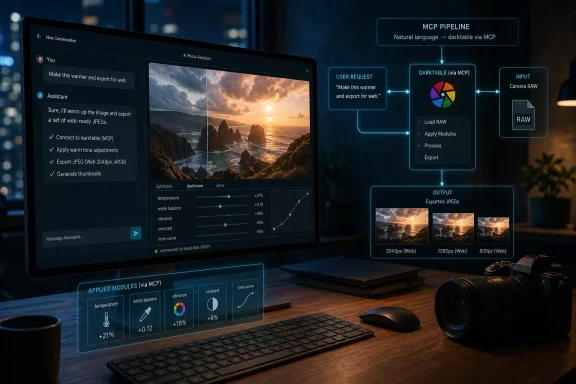
The MakeUseOf experiment turns that logic inside out. Instead of treating Claude as a new doorway into Adobe’s paid stack, Yadullah Abidi built a Model Context Protocol server that exposes darktable’s command-line capabilities to Claude Code. The result is a chat-driven RAW workflow that uses darktable as the engine and Claude as the conversational operator.
That distinction matters. Adobe wants AI to make Creative Cloud feel more approachable. The darktable bridge suggests AI may also make non-Adobe tools feel approachable enough to replace Creative Cloud entirely.
For years, the strongest argument for Lightroom was not that no competitor could process RAW files. It was that Lightroom combined cataloging, editing, presets, masking, export, and muscle memory into a workflow that was painful to abandon. If an AI assistant can translate intent into darktable operations, the switching cost drops sharply.
That is why Adobe’s subscription model has been so durable. Once a photographer’s archive, presets, edit history, and deadline rhythm live in Lightroom, the monthly bill becomes less like a purchase and more like rent on one’s own working process. The software is useful, but the captivity comes from accumulated dependency.
Darktable has long been the obvious escape hatch for a certain kind of photographer. It is free, open source, cross-platform, and deeply capable. It supports RAW development, non-destructive editing, XMP sidecars, GPU acceleration, color management, and a processing pipeline built for people who care about the details.
The problem is that darktable has never tried very hard to be Lightroom. That is philosophically admirable and commercially inconvenient. It gives users enormous control, but it can feel dense, technical, and unwelcoming to someone trained by Adobe’s more polished interface.
Claude changes the texture of that problem. If the user no longer has to know where every control lives, the complexity of darktable becomes less of a barrier. The AI does not remove the complexity; it becomes a translator for it.
That is exactly what makes darktable a good candidate. The application ships with
Abidi’s
This is why the experiment feels more consequential than another “AI photo editor” novelty. The AI is not replacing the RAW engine. It is wrapping a mature RAW engine in a new control surface.
That is also why open source benefits disproportionately. Many open-source tools are powerful but intimidating. They often have command-line interfaces, scriptability, documented file formats, and modular internals. Those traits once appealed mainly to power users; in an MCP world, they become hooks for AI assistants.
That learning curve is real. Lightroom often makes a plausible edit easy. Darktable often makes a precise edit possible. Those are different design goals, and photographers who only want speed can bounce off darktable before discovering its strengths.
A conversational layer changes the first hour with the software. Instead of hunting for the right module, a user can ask for warmer highlights, gentler contrast, crushed blacks, a Kodak-ish color grade, or a web-ready export at a fixed long edge. Claude can turn that into a sequence of darktable operations.
The best version of this workflow is not “AI edits my photos and I stop thinking.” It is “AI gets me to a technically coherent starting point, and I take over when judgment matters.” Because darktable stores non-destructive edits in XMP sidecars, the user can open the result in the normal interface and continue manually.
That handoff is critical. Many AI image tools flatten the workflow into a generated result that is hard to inspect or revise. A Claude-to-darktable workflow can leave the photographer with editable settings, not just a finished bitmap. That keeps the human in the loop without forcing the human to do every repetitive step.
Subscriptions are tolerable when they feel like an ongoing exchange of value. They become resented when they feel like a tax on continuity. If canceling a plan threatens a user’s access, workflow, or accumulated archive habits, the subscription begins to feel less like software and more like leverage.
Adobe is not unique here. The entire professional software industry has moved toward recurring revenue, cloud services, bundled plans, storage tiers, and AI credit systems. The economic logic is obvious. The user resentment is also obvious.
Open-source tools offer a different bargain. They may ask more of the user up front, but they do not meter access in the same way. They can be automated, inspected, scripted, and integrated without waiting for a vendor to bless a use case.
Claude makes that bargain more attractive because it can absorb some of the usability cost. A tool that was once “free but difficult” can become “free, powerful, and conversational enough.” That is a major shift.
Adobe’s response will be to make its own AI integrations smoother, safer, and more deeply embedded. That may work for many customers. But the MakeUseOf experiment shows that AI is not automatically a moat for incumbents. It can also be a crowbar.
When a user asks for “cinematic tones” or “a warm editorial look,” Claude can infer a set of plausible adjustments. It can darken shadows, desaturate midtones, lift highlights, tweak contrast, apply styles, crop, and export. That may be enough for batches, social posts, quick proofs, and learning.
But taste still matters. The difference between a heavy-handed grade and a subtle one is often contextual. Skin tones, memory colors, lens character, dynamic range, print intent, client taste, and genre conventions all affect whether an edit works.
This is where the darktable approach is healthier than fully generative editing. It keeps the work anchored in photographic controls. Claude can move the levers, but the levers remain visible. The user can inspect, reject, revise, and learn.
The real educational value may be underrated. A photographer can ask Claude not only to edit an image, but to explain why it used a given module or adjustment. That turns a difficult application into a tutor. For darktable, whose power has often been trapped behind a steep learning curve, that could matter as much as automation.
Adobe’s AI masking, generative removal, cloud workflows, and Creative Cloud integration are substantial advantages. Lightroom is not merely a RAW processor; it is part of a broader production environment. A wedding photographer, agency retoucher, or content team may value reliability and collaboration more than ideological independence.
The MakeUseOf writer notes one area where darktable still trails Lightroom: AI masking. That gap matters. Modern Lightroom can identify people, skies, subjects, backgrounds, and other regions in ways that save enormous time. Darktable can do masks, but it does not offer the same kind of one-click semantic selection.
Claude can try to approximate masks from descriptions, but that is not the same as native AI segmentation inside the editor. For some workflows, especially portrait and commercial work, that missing layer remains a serious limitation.
Adobe also has the advantage of accountability. If a professional shop standardizes on Creative Cloud, it gets vendor support, predictable updates, documentation, enterprise controls, and a product roadmap. A self-built MCP bridge to darktable is exciting, but it is still a tinkerer’s architecture until it matures.
The PC has always thrived on composability. A Windows workstation can run Lightroom, darktable, WSL, PowerShell, Python scripts, local AI tooling, cloud-connected assistants, GPU-accelerated creative software, and decades of legacy utilities. That messiness is sometimes a support nightmare, but it is also where new workflows are born.
MCP fits naturally into that tradition. It turns applications into tool providers and AI assistants into workflow coordinators. The more software exposes clean local interfaces, the more users can build custom automations that vendors did not anticipate.
That has implications far beyond RAW editing. Sysadmins can imagine the same pattern applied to log analysis, endpoint management, documentation, backup workflows, or local diagnostics. Creative users can imagine it across audio, video, 3D, and publishing. The AI agent becomes less like a chatbot and more like a shell with judgment.
That is exciting, but it also reintroduces old security lessons under new branding. If an AI assistant can invoke local tools, touch files, execute commands, and modify assets, permissions matter. The line between helpful automation and accidental damage can be thin.
A malicious file, poisoned prompt, compromised connector, or overly broad permission set could cause an assistant to perform actions the user did not intend. In a photo workflow, that might mean overwriting files, leaking metadata, or corrupting edits. In an enterprise workflow, the stakes could be much higher.
The answer is not to avoid MCP-style integrations. The answer is to treat them like real software integrations rather than magic. Users need clear scopes, visible commands, confirmations for destructive actions, sandboxing where possible, and a bias toward non-destructive output.
Darktable’s XMP sidecar model helps here because it encourages reversible edits. A well-designed MCP server should preserve originals, write outputs to explicit locations, and make its operations transparent. The user should be able to see what happened and undo it.
The irony is that open source may have an advantage here too. A small MCP bridge can be inspected, forked, and constrained. A proprietary cloud connector may be easier to use, but harder to understand. Trust will come from design, not branding.
What is new is that AI threatens to abstract the interface. If users increasingly describe outcomes instead of navigating panels, the application underneath becomes more interchangeable. The best backend may still win, but the user’s loyalty may move upward to the assistant.
That is why Adobe is smart to meet Claude where users are. If the chat layer is where creative intent begins, Adobe wants its tools available there. The company does not want to be reduced to a rendering engine behind someone else’s interface.
But the same strategy exposes Adobe to comparison. If Claude can edit through Lightroom and also through darktable, users can ask a brutal question: which backend gives me enough quality, control, and convenience for the least pain? For some photographers, Adobe will still win. For others, the answer may change.
The MakeUseOf experiment is not a mass-market product yet. It is a proof of direction. It shows that a single motivated user can wire an AI assistant into a serious open-source creative application and get a workflow that feels close enough to challenge habit.
The Claude-darktable workflow is different. It is not primarily about inventing pixels. It is about operating a traditional RAW editor through language. That makes it less flashy and, in some ways, more important.
Photographers already know how to ask for an edit in human terms. “Make it warmer.” “Recover the sky.” “Give it more contrast without ruining the skin.” “Export these for the web.” The old problem was that software required those requests to be translated into sliders, modules, curves, masks, profiles, and export presets.
AI is good at translation. Not perfect, not infallible, but good enough to reduce friction. That means the most useful AI tools may be the ones that leave the underlying craft intact while removing the mechanical tedium around it.
This also explains why command-line support matters. The boring interface is what makes the magical interface possible. Because darktable can run headlessly, Claude can use it as a tool. The lesson for software makers is blunt: if your application cannot be automated, it may be invisible to the next interface layer.
But early workflows often look like this. They start as awkward bridges built by enthusiasts, then harden into installers, plug-ins, extensions, and eventually product categories. The first version only has to prove that the experience is desirable.
What the MakeUseOf piece demonstrates is desire. A long-time Lightroom user found that natural-language control made darktable feel less like a compromise and more like liberation. That is the kind of anecdote vendors should pay attention to because it identifies a latent demand: people want professional tools without professional lock-in.
Adobe can respond by making Creative Cloud’s AI workflows better. It can bundle more capabilities, improve masking, deepen Firefly integration, and make Claude-driven editing feel seamless. That will keep many users inside the ecosystem.
But it cannot easily erase the comparison. Once a photographer sees that a free RAW editor can be made conversational, the subscription becomes a choice again. That psychological shift may be more damaging than any single lost customer.
The MakeUseOf experiment should be read as a small but telling signal: AI will not simply make expensive software more powerful; it will make powerful software easier to leave. Adobe’s best customers may remain exactly where they are, especially in professional shops that prize polish and support. But for the independent photographer with a Windows PC, a folder full of RAW files, and a growing resentment of subscription rent, Claude plus darktable points toward a future where the editor is local, the workflow is conversational, and the lock-in is optional.
Source: MakeUseOf Claude can edit your photos now — and it makes Darktable feel like Lightroom
 Adobe Put Claude in the Studio, but Open Source Found the Side Door
Adobe’s pitch is straightforward: keep the pro tools, add the conversational layer, and let Claude orchestrate the workflow. In practice, that means a user can describe an outcome in Claude and have Adobe’s connector route the task through tools such as Photoshop, Lightroom, Firefly, Premiere, Illustrator, Express, InDesign, and Stock. It is a classic Adobe move: absorb the interface disruption before it becomes a platform disruption.The MakeUseOf experiment turns that logic inside out. Instead of treating Claude as a new doorway into Adobe’s paid stack, Yadullah Abidi built a Model Context Protocol server that exposes darktable’s command-line capabilities to Claude Code. The result is a chat-driven RAW workflow that uses darktable as the engine and Claude as the conversational operator.
That distinction matters. Adobe wants AI to make Creative Cloud feel more approachable. The darktable bridge suggests AI may also make non-Adobe tools feel approachable enough to replace Creative Cloud entirely.
For years, the strongest argument for Lightroom was not that no competitor could process RAW files. It was that Lightroom combined cataloging, editing, presets, masking, export, and muscle memory into a workflow that was painful to abandon. If an AI assistant can translate intent into darktable operations, the switching cost drops sharply.
Lightroom’s Moat Was Always Workflow, Not Sliders
Photographers do not pay for Lightroom because exposure sliders are mystical. They pay because the whole machine is familiar. Import, cull, rate, correct, sync, export, repeat. A decade of habits can be worth more than any individual feature.That is why Adobe’s subscription model has been so durable. Once a photographer’s archive, presets, edit history, and deadline rhythm live in Lightroom, the monthly bill becomes less like a purchase and more like rent on one’s own working process. The software is useful, but the captivity comes from accumulated dependency.
Darktable has long been the obvious escape hatch for a certain kind of photographer. It is free, open source, cross-platform, and deeply capable. It supports RAW development, non-destructive editing, XMP sidecars, GPU acceleration, color management, and a processing pipeline built for people who care about the details.
The problem is that darktable has never tried very hard to be Lightroom. That is philosophically admirable and commercially inconvenient. It gives users enormous control, but it can feel dense, technical, and unwelcoming to someone trained by Adobe’s more polished interface.
Claude changes the texture of that problem. If the user no longer has to know where every control lives, the complexity of darktable becomes less of a barrier. The AI does not remove the complexity; it becomes a translator for it.
MCP Is the Plumbing That Makes the Trick More Than a Demo
The Model Context Protocol is the quiet star of this story. MCP gives AI systems a standardized way to connect to tools, files, databases, and services. In less glamorous terms, it is a way for a model to stop merely suggesting commands and start invoking them through defined interfaces.That is exactly what makes darktable a good candidate. The application ships with
darktable-cli, a headless command-line tool that can process and export images without opening the graphical interface. It accepts input files, optional XMP sidecars, output paths, styles, format settings, dimensions, color profiles, and other parameters.Abidi’s
darktable-mcp server exposes those capabilities to Claude Code as callable tools. Claude can inspect a folder, assemble the correct command-line invocation, run darktable against RAW files, export JPEGs, and preserve edit instructions through sidecar files. The chat is not merely generating advice; it is operating the workflow.This is why the experiment feels more consequential than another “AI photo editor” novelty. The AI is not replacing the RAW engine. It is wrapping a mature RAW engine in a new control surface.
That is also why open source benefits disproportionately. Many open-source tools are powerful but intimidating. They often have command-line interfaces, scriptability, documented file formats, and modular internals. Those traits once appealed mainly to power users; in an MCP world, they become hooks for AI assistants.
Darktable’s Clunkiness Becomes an Asset When Claude Can Drive
Darktable’s reputation has always been a little paradoxical. It is one of the strongest open-source photography applications available, yet it can feel alien to people arriving from Lightroom. Its module system, scene-referred workflow, tone mapping options, sharpening controls, masks, and color tools reward study rather than casual poking.That learning curve is real. Lightroom often makes a plausible edit easy. Darktable often makes a precise edit possible. Those are different design goals, and photographers who only want speed can bounce off darktable before discovering its strengths.
A conversational layer changes the first hour with the software. Instead of hunting for the right module, a user can ask for warmer highlights, gentler contrast, crushed blacks, a Kodak-ish color grade, or a web-ready export at a fixed long edge. Claude can turn that into a sequence of darktable operations.
The best version of this workflow is not “AI edits my photos and I stop thinking.” It is “AI gets me to a technically coherent starting point, and I take over when judgment matters.” Because darktable stores non-destructive edits in XMP sidecars, the user can open the result in the normal interface and continue manually.
That handoff is critical. Many AI image tools flatten the workflow into a generated result that is hard to inspect or revise. A Claude-to-darktable workflow can leave the photographer with editable settings, not just a finished bitmap. That keeps the human in the loop without forcing the human to do every repetitive step.
The Subscription Escape Story Is Really About Control
It is tempting to frame this as a simple price story: Lightroom costs money, darktable does not. That is true, but it understates the emotional and operational reason photographers look for alternatives. The deeper issue is control.Subscriptions are tolerable when they feel like an ongoing exchange of value. They become resented when they feel like a tax on continuity. If canceling a plan threatens a user’s access, workflow, or accumulated archive habits, the subscription begins to feel less like software and more like leverage.
Adobe is not unique here. The entire professional software industry has moved toward recurring revenue, cloud services, bundled plans, storage tiers, and AI credit systems. The economic logic is obvious. The user resentment is also obvious.
Open-source tools offer a different bargain. They may ask more of the user up front, but they do not meter access in the same way. They can be automated, inspected, scripted, and integrated without waiting for a vendor to bless a use case.
Claude makes that bargain more attractive because it can absorb some of the usability cost. A tool that was once “free but difficult” can become “free, powerful, and conversational enough.” That is a major shift.
Adobe’s response will be to make its own AI integrations smoother, safer, and more deeply embedded. That may work for many customers. But the MakeUseOf experiment shows that AI is not automatically a moat for incumbents. It can also be a crowbar.
Natural Language Is Powerful, but It Is Not a Substitute for Taste
There is an obvious danger in over-reading the experiment. A chat interface can execute edits, but it does not make every edit good. Photography is not a parameter optimization problem with a single correct answer.When a user asks for “cinematic tones” or “a warm editorial look,” Claude can infer a set of plausible adjustments. It can darken shadows, desaturate midtones, lift highlights, tweak contrast, apply styles, crop, and export. That may be enough for batches, social posts, quick proofs, and learning.
But taste still matters. The difference between a heavy-handed grade and a subtle one is often contextual. Skin tones, memory colors, lens character, dynamic range, print intent, client taste, and genre conventions all affect whether an edit works.
This is where the darktable approach is healthier than fully generative editing. It keeps the work anchored in photographic controls. Claude can move the levers, but the levers remain visible. The user can inspect, reject, revise, and learn.
The real educational value may be underrated. A photographer can ask Claude not only to edit an image, but to explain why it used a given module or adjustment. That turns a difficult application into a tutor. For darktable, whose power has often been trapped behind a steep learning curve, that could matter as much as automation.
Adobe Still Owns the Polished End of the Market
None of this means Adobe is suddenly in trouble with working photographers. Lightroom remains highly polished, deeply integrated, and surrounded by a vast ecosystem of tutorials, presets, plug-ins, mobile apps, cloud sync, and professional habits. For many users, the price is annoying but rational.Adobe’s AI masking, generative removal, cloud workflows, and Creative Cloud integration are substantial advantages. Lightroom is not merely a RAW processor; it is part of a broader production environment. A wedding photographer, agency retoucher, or content team may value reliability and collaboration more than ideological independence.
The MakeUseOf writer notes one area where darktable still trails Lightroom: AI masking. That gap matters. Modern Lightroom can identify people, skies, subjects, backgrounds, and other regions in ways that save enormous time. Darktable can do masks, but it does not offer the same kind of one-click semantic selection.
Claude can try to approximate masks from descriptions, but that is not the same as native AI segmentation inside the editor. For some workflows, especially portrait and commercial work, that missing layer remains a serious limitation.
Adobe also has the advantage of accountability. If a professional shop standardizes on Creative Cloud, it gets vendor support, predictable updates, documentation, enterprise controls, and a product roadmap. A self-built MCP bridge to darktable is exciting, but it is still a tinkerer’s architecture until it matures.
The Windows Angle Is Bigger Than Photography
For WindowsForum readers, the important part is not only that this works on Windows. It is that Windows remains the messy, powerful middle ground where GUI apps, command-line tools, local files, AI assistants, and open-source utilities can all be stitched together.The PC has always thrived on composability. A Windows workstation can run Lightroom, darktable, WSL, PowerShell, Python scripts, local AI tooling, cloud-connected assistants, GPU-accelerated creative software, and decades of legacy utilities. That messiness is sometimes a support nightmare, but it is also where new workflows are born.
MCP fits naturally into that tradition. It turns applications into tool providers and AI assistants into workflow coordinators. The more software exposes clean local interfaces, the more users can build custom automations that vendors did not anticipate.
That has implications far beyond RAW editing. Sysadmins can imagine the same pattern applied to log analysis, endpoint management, documentation, backup workflows, or local diagnostics. Creative users can imagine it across audio, video, 3D, and publishing. The AI agent becomes less like a chatbot and more like a shell with judgment.
That is exciting, but it also reintroduces old security lessons under new branding. If an AI assistant can invoke local tools, touch files, execute commands, and modify assets, permissions matter. The line between helpful automation and accidental damage can be thin.
The Security Model Has to Catch Up With the Creative Demo
The darktable MCP setup described by MakeUseOf is a local creative workflow, not a corporate deployment blueprint. Still, the broader MCP ecosystem has already attracted security scrutiny, and for good reason. Tool-calling agents can create new attack surfaces.A malicious file, poisoned prompt, compromised connector, or overly broad permission set could cause an assistant to perform actions the user did not intend. In a photo workflow, that might mean overwriting files, leaking metadata, or corrupting edits. In an enterprise workflow, the stakes could be much higher.
The answer is not to avoid MCP-style integrations. The answer is to treat them like real software integrations rather than magic. Users need clear scopes, visible commands, confirmations for destructive actions, sandboxing where possible, and a bias toward non-destructive output.
Darktable’s XMP sidecar model helps here because it encourages reversible edits. A well-designed MCP server should preserve originals, write outputs to explicit locations, and make its operations transparent. The user should be able to see what happened and undo it.
The irony is that open source may have an advantage here too. A small MCP bridge can be inspected, forked, and constrained. A proprietary cloud connector may be easier to use, but harder to understand. Trust will come from design, not branding.
The Real Threat to Adobe Is Not Free Software — It Is Replaceable Interfaces
Adobe has competed with free and open-source software for decades. GIMP did not kill Photoshop. Inkscape did not kill Illustrator. darktable did not kill Lightroom. Professional software survives because workflows, ecosystems, and expectations are sticky.What is new is that AI threatens to abstract the interface. If users increasingly describe outcomes instead of navigating panels, the application underneath becomes more interchangeable. The best backend may still win, but the user’s loyalty may move upward to the assistant.
That is why Adobe is smart to meet Claude where users are. If the chat layer is where creative intent begins, Adobe wants its tools available there. The company does not want to be reduced to a rendering engine behind someone else’s interface.
But the same strategy exposes Adobe to comparison. If Claude can edit through Lightroom and also through darktable, users can ask a brutal question: which backend gives me enough quality, control, and convenience for the least pain? For some photographers, Adobe will still win. For others, the answer may change.
The MakeUseOf experiment is not a mass-market product yet. It is a proof of direction. It shows that a single motivated user can wire an AI assistant into a serious open-source creative application and get a workflow that feels close enough to challenge habit.
The First Useful AI Photo Editor May Be the One That Does Not Edit Photos Itself
A lot of AI photography discourse has focused on generation: fake backgrounds, synthetic objects, generative fill, image expansion, style transfer, and automated retouching. Those tools are impressive, but they often collide with photography’s uneasy relationship with authenticity.The Claude-darktable workflow is different. It is not primarily about inventing pixels. It is about operating a traditional RAW editor through language. That makes it less flashy and, in some ways, more important.
Photographers already know how to ask for an edit in human terms. “Make it warmer.” “Recover the sky.” “Give it more contrast without ruining the skin.” “Export these for the web.” The old problem was that software required those requests to be translated into sliders, modules, curves, masks, profiles, and export presets.
AI is good at translation. Not perfect, not infallible, but good enough to reduce friction. That means the most useful AI tools may be the ones that leave the underlying craft intact while removing the mechanical tedium around it.
This also explains why command-line support matters. The boring interface is what makes the magical interface possible. Because darktable can run headlessly, Claude can use it as a tool. The lesson for software makers is blunt: if your application cannot be automated, it may be invisible to the next interface layer.
The Darktable Experiment Gives Photographers a New Bargaining Position
The immediate audience fordarktable-mcp is small: photographers comfortable enough with Claude Code, MCP servers, local tooling, and open-source software to wire the pieces together. That is not the average Lightroom user. It is probably not even the average darktable user.But early workflows often look like this. They start as awkward bridges built by enthusiasts, then harden into installers, plug-ins, extensions, and eventually product categories. The first version only has to prove that the experience is desirable.
What the MakeUseOf piece demonstrates is desire. A long-time Lightroom user found that natural-language control made darktable feel less like a compromise and more like liberation. That is the kind of anecdote vendors should pay attention to because it identifies a latent demand: people want professional tools without professional lock-in.
Adobe can respond by making Creative Cloud’s AI workflows better. It can bundle more capabilities, improve masking, deepen Firefly integration, and make Claude-driven editing feel seamless. That will keep many users inside the ecosystem.
But it cannot easily erase the comparison. Once a photographer sees that a free RAW editor can be made conversational, the subscription becomes a choice again. That psychological shift may be more damaging than any single lost customer.
The Claude-Darktable Hack Turns a Subscription Complaint Into a Platform Warning
The most concrete lesson from this experiment is that AI is becoming a control layer for existing software, not just a generator of new media. That makes older debates about open source, command-line access, local files, and interoperability newly relevant.- Adobe’s Claude connector shows that major creative suites now see chat interfaces as a serious place for professional work to begin.
- Darktable’s command-line tooling makes it unusually well suited to AI orchestration, because Claude can invoke real RAW-processing operations rather than merely suggest edits.
- XMP sidecars are essential to the workflow because they preserve non-destructive edits that can later be opened and refined in the normal darktable interface.
- Lightroom still has major advantages in polish, ecosystem depth, AI masking, and professional familiarity.
- Open-source creative tools gain leverage when AI assistants can hide their rough edges without hiding their underlying power.
- The next competitive fight in creative software may be over which applications are easiest for agents to operate safely, transparently, and locally.
The MakeUseOf experiment should be read as a small but telling signal: AI will not simply make expensive software more powerful; it will make powerful software easier to leave. Adobe’s best customers may remain exactly where they are, especially in professional shops that prize polish and support. But for the independent photographer with a Windows PC, a folder full of RAW files, and a growing resentment of subscription rent, Claude plus darktable points toward a future where the editor is local, the workflow is conversational, and the lock-in is optional.
Source: MakeUseOf Claude can edit your photos now — and it makes Darktable feel like Lightroom
