

On June 12, 2026, Microsoft’s Source Asia profiled Phinyaphat Junsoton, known as Khun Nui, a Thai wheelchair user and data entry professional who uses Microsoft Copilot to cut a complex monthly shift-scheduling task from roughly three days to about 30 minutes. The story is framed as an accessibility success, but its sharper lesson is about power: who gets to turn knowledge into work, and who is still forced to wait for systems to accommodate them. For Windows users and IT leaders, this is not a feel-good sidebar to the AI boom. It is a reminder that the most consequential AI deployments may be the unglamorous ones that remove friction from ordinary office work.
The familiar pitch for workplace AI is speed. Draft faster, summarize faster, analyze faster, schedule faster. In Khun Nui’s case, that pitch is true in the most literal sense: a job that previously required days of manual formula-building in Excel reportedly became a half-hour exercise with Copilot’s help.
But the better story is not that Microsoft’s assistant can generate spreadsheet formulas. Anyone who has spent time in Excel knows that formula syntax has always been a gatekeeper masquerading as a productivity feature. The breakthrough is that Khun Nui could describe what she needed in plain language and receive a workable path through the task without turning every obstacle into a request for help from someone else.
That distinction matters. Accessibility is often discussed as a set of accommodations layered on top of mainstream software after the “real” product has already been built. AI changes the frame because the interface itself becomes more negotiable. If a user can ask for a formula, a workflow, a market-research outline, or a planning structure in natural language, then the distance between intent and execution shrinks.
For people with disabilities, that distance has never been merely technical. It is social, economic, and psychological. Every unnecessary dependency costs time, but it can also reinforce the corrosive idea that competence belongs to those who move, type, travel, or communicate in the expected way.
Her path also complicates the myth that AI simply arrives and transforms lives on contact. Before Copilot became useful to her, Khun Nui had already left her hometown to study Accounting and IT at the Pattaya Redemptorist Technological College for People with Disabilities. She had learned database management and basic programming. She later earned a bachelor’s degree from Sukhothai Thammathirat Open University.
In other words, AI did not replace education. It multiplied the value of education that had already been hard-won. That is a crucial point for anyone trying to separate practical AI adoption from marketing fog.
The current AI industry loves the language of democratization, but democracy is not a download button. The people who benefit most from AI tools are often those who have enough domain knowledge to ask good questions, evaluate bad answers, and fold the output into real work. Khun Nui’s story is powerful precisely because it shows AI as an amplifier of skill, not as a magic substitute for it.
Excel is one of the most important applications in the history of Windows computing because it is where informal business logic goes to live. It is the shadow ERP system, the local database, the reporting engine, the planning tool, the accounting scratchpad, and the place where knowledge workers quietly encode the rules their companies actually run on. For small and midsize businesses especially, Excel is not a spreadsheet app; it is infrastructure.
That infrastructure is powerful, but it has never been evenly accessible. Formula knowledge, macro literacy, data-cleaning habits, and the confidence to troubleshoot broken workbooks are distributed unevenly across offices. Some workers become indispensable because they know where the formulas are buried. Others are kept dependent because they do not.
Khun Nui’s scheduling task at Phichit Drinking Co., Ltd. involved more than 200 staff members, two shifts, and six production lines. That is not a toy problem. A broken schedule can ripple into payroll errors, production delays, worker dissatisfaction, and management confusion.
When Copilot helps construct formulas from described scheduling parameters, it changes who gets to operate the machinery of the office. It does not eliminate the need for judgment. It does, however, lower the penalty for not remembering the exact syntax needed to translate judgment into spreadsheet logic.
That debt is everywhere. It sits in copied spreadsheets, local workarounds, tribal knowledge, undocumented macros, email chains, and manual reconciliation steps that survive because nobody has the time or authority to redesign them. AI tools can expose that debt by making absurdly inefficient workflows suddenly visible.
For a user like Khun Nui, this matters at a human scale. Time saved is energy saved. Friction removed from one task creates room for other work, further learning, or planning a more independent future. Microsoft’s story notes that she is also using Copilot for business market research and strategic planning connected to hydroponic farming, a possible second income stream.
That is where the productivity debate becomes too narrow. The most important output of AI may not be the task it completes. It may be the options it creates after the task no longer consumes the day.
Natural-language interaction is not automatically accessible, and it can create new barriers of its own. AI systems can misunderstand context, fabricate answers, mishandle personal data, or require connectivity and licensing that exclude the very users they are supposed to empower. Still, the direction is significant. The interface is becoming less about memorizing commands and more about negotiating outcomes.
That shift is especially relevant to WindowsForum readers because Windows remains the everyday platform for much of the world’s administrative work. The AI PC narrative has often focused on silicon, NPUs, local models, and branded Copilot keys. Those things matter, but they are not the whole story.
The more immediate question is whether AI can reduce the cognitive and procedural load imposed by mature desktop software. If it can, then accessibility is no longer a parallel conversation. It becomes a standard by which mainstream productivity software is judged.
The danger is not that the story is false. The danger is that it becomes too easy. One successful worker using Copilot does not prove that AI access is equitable, that licensing is affordable, that training reaches rural communities, or that employers are prepared to redesign jobs around capability rather than assumptions.
Microsoft’s partnership with the Redemptorist Foundation for People with Disabilities gives the story more institutional weight. The relationship reportedly dates back to the 2000s and now aims to educate an additional 2,000 people with disabilities by the end of 2026. That is meaningful, especially because training and trusted local partners are often the difference between a technology being available in theory and usable in practice.
But scale is the hard part. A training program can introduce tools. It cannot, by itself, guarantee accessible workplaces, inclusive hiring, affordable devices, reliable connectivity, or managers who understand that disability inclusion is not charity. Those are the conditions that determine whether AI becomes a ladder or just another polished demo.
The answer is not to block AI out of fear. That would preserve old dependencies while doing little to improve accuracy, security, or inclusion. The answer is to treat AI assistance as part of the workplace computing environment and govern it with the same seriousness applied to identity, data access, endpoint security, and application lifecycle management.
In a scheduling workflow, for example, the formula is only one piece of the system. The data source matters. The permissions model matters. The review process matters. The audit trail matters. If AI-generated logic affects staffing, pay, compliance, or safety, organizations need a way to verify it.
That does not diminish the accessibility benefit. It protects it. A tool that helps a worker act independently is only empowering if the organization trusts the resulting work enough to use it.
That should influence how organizations design AI training. Workers do not need another generic webinar telling them that prompts should be clear and specific. They need guided practice inside the recurring tasks that already consume their time.
For people with disabilities, that job-specific approach is even more important. Accessibility needs vary widely, and generic training can flatten those differences into a single inspirational narrative. The right question is not whether AI is good for disabled workers as a category. The right question is what specific friction points a specific worker faces, and whether AI can remove them without introducing new risks.
That framing also helps avoid paternalism. Khun Nui is not presented as a passive recipient of technology. She is a skilled worker using a tool to do a demanding job better and to plan for future income. That agency is the point.
People hesitate to ask for help because they do not want to seem incompetent. They hesitate because the expert is busy, the manager is impatient, or the question feels too basic. They hesitate because the same question has been asked before, or because needing help has social consequences.
AI does not eliminate the need for human mentorship, and it should not become a cheap substitute for proper training. But it can provide a low-friction first stop for exploration. For users who have been made to feel like a burden, that matters.
This is where accessibility and confidence intertwine. A faster workflow is measurable. A worker’s willingness to attempt harder tasks is harder to quantify, but it may be more transformative over time.
Khun Nui’s story makes that visible. She moved from being judged by assumed limitations to using AI in daily work, career development, and entrepreneurial planning. That is not merely a technical transition. It is a change in self-perception reinforced by practical success.
The same pattern will play out across workplaces. Some employees will use AI to explore, automate, draft, test, and learn. Others will be told, implicitly or explicitly, that the tool is not for them, or that mistakes are too risky, or that only certain roles get to experiment. The resulting gap may look like a skills gap, but it will also be a permission gap.
Companies that care about inclusion should pay attention to that distinction. Giving workers access to Copilot is not the same as giving them a mandate to rethink their work. The second part requires management.
The company also benefits from connecting AI to disability inclusion rather than only to executive productivity. That broadens the moral frame around Copilot at a time when generative AI is still dogged by concerns over cost, reliability, labor disruption, privacy, and environmental impact. The message is clear: this is not just software for managers who want shorter meetings; it is software that can expand participation.
That message deserves to be taken seriously without being swallowed whole. Technology companies often conflate access to their ecosystem with access to opportunity. Those things can overlap, but they are not identical.
Still, in this case, the product story and the human story are not in conflict. A tool that helps a wheelchair user in Thailand manage complex staffing data more independently is a legitimate example of useful AI. The question is whether the industry can make such examples normal rather than exceptional.
That is why the partnership model matters. Microsoft Thailand, the Redemptorist Foundation for People with Disabilities, and related social-impact programs are not incidental to the story. They are the scaffolding that turns software into usable opportunity.
For IT pros, this is a useful corrective to the idea that deployment equals adoption. Rolling out AI features is the easy part. The harder work is identifying who is excluded from current workflows, what knowledge they need, what data they can safely access, and how success will be measured beyond raw time savings.
The best version of this future is not one where every worker becomes dependent on an opaque assistant. It is one where AI becomes a flexible layer between human intent and rigid systems, especially for users whom those systems have historically failed.
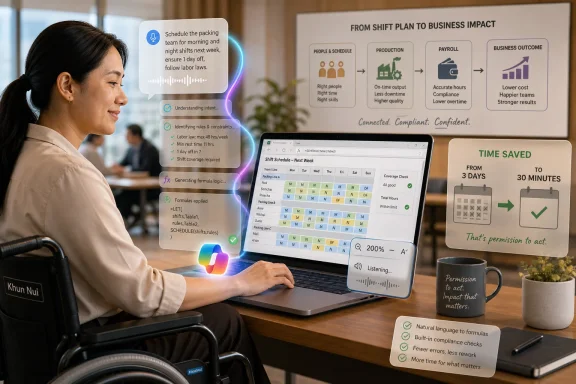 The Real Breakthrough Is Not the Prompt, but the Permission to Act
The familiar pitch for workplace AI is speed. Draft faster, summarize faster, analyze faster, schedule faster. In Khun Nui’s case, that pitch is true in the most literal sense: a job that previously required days of manual formula-building in Excel reportedly became a half-hour exercise with Copilot’s help.But the better story is not that Microsoft’s assistant can generate spreadsheet formulas. Anyone who has spent time in Excel knows that formula syntax has always been a gatekeeper masquerading as a productivity feature. The breakthrough is that Khun Nui could describe what she needed in plain language and receive a workable path through the task without turning every obstacle into a request for help from someone else.
That distinction matters. Accessibility is often discussed as a set of accommodations layered on top of mainstream software after the “real” product has already been built. AI changes the frame because the interface itself becomes more negotiable. If a user can ask for a formula, a workflow, a market-research outline, or a planning structure in natural language, then the distance between intent and execution shrinks.
For people with disabilities, that distance has never been merely technical. It is social, economic, and psychological. Every unnecessary dependency costs time, but it can also reinforce the corrosive idea that competence belongs to those who move, type, travel, or communicate in the expected way.
Microsoft Finds a Human Face for an Argument It Has Been Making for Years
Microsoft has spent years repositioning itself around accessibility, AI, and productivity, and Khun Nui’s story sits neatly at the intersection of all three. She was born with congenital muscle weakness, grew up using a wheelchair in a rural environment, and faced assumptions that education, work, and independence might never fully belong to her. That background makes her use of AI more than a customer testimonial; it is a rebuttal to the quiet fatalism that often surrounds disability in employment.Her path also complicates the myth that AI simply arrives and transforms lives on contact. Before Copilot became useful to her, Khun Nui had already left her hometown to study Accounting and IT at the Pattaya Redemptorist Technological College for People with Disabilities. She had learned database management and basic programming. She later earned a bachelor’s degree from Sukhothai Thammathirat Open University.
In other words, AI did not replace education. It multiplied the value of education that had already been hard-won. That is a crucial point for anyone trying to separate practical AI adoption from marketing fog.
The current AI industry loves the language of democratization, but democracy is not a download button. The people who benefit most from AI tools are often those who have enough domain knowledge to ask good questions, evaluate bad answers, and fold the output into real work. Khun Nui’s story is powerful precisely because it shows AI as an amplifier of skill, not as a magic substitute for it.
Excel Was Always an Accessibility Story
It is tempting to treat the Excel portion of this story as a small operational anecdote. A shift schedule got easier. A formula got generated. A monthly task became less painful. That reading misses why the example resonates with anyone who has lived inside business software.Excel is one of the most important applications in the history of Windows computing because it is where informal business logic goes to live. It is the shadow ERP system, the local database, the reporting engine, the planning tool, the accounting scratchpad, and the place where knowledge workers quietly encode the rules their companies actually run on. For small and midsize businesses especially, Excel is not a spreadsheet app; it is infrastructure.
That infrastructure is powerful, but it has never been evenly accessible. Formula knowledge, macro literacy, data-cleaning habits, and the confidence to troubleshoot broken workbooks are distributed unevenly across offices. Some workers become indispensable because they know where the formulas are buried. Others are kept dependent because they do not.
Khun Nui’s scheduling task at Phichit Drinking Co., Ltd. involved more than 200 staff members, two shifts, and six production lines. That is not a toy problem. A broken schedule can ripple into payroll errors, production delays, worker dissatisfaction, and management confusion.
When Copilot helps construct formulas from described scheduling parameters, it changes who gets to operate the machinery of the office. It does not eliminate the need for judgment. It does, however, lower the penalty for not remembering the exact syntax needed to translate judgment into spreadsheet logic.
The Productivity Number Is Dramatic Because the Old Baseline Was So Bad
The reduction from three days to 30 minutes is the kind of statistic that appears in executive decks because it is simple, memorable, and dramatic. It should also make IT professionals slightly uncomfortable. If a recurring business process can collapse from days to minutes, the organization was probably carrying a large amount of hidden process debt.That debt is everywhere. It sits in copied spreadsheets, local workarounds, tribal knowledge, undocumented macros, email chains, and manual reconciliation steps that survive because nobody has the time or authority to redesign them. AI tools can expose that debt by making absurdly inefficient workflows suddenly visible.
For a user like Khun Nui, this matters at a human scale. Time saved is energy saved. Friction removed from one task creates room for other work, further learning, or planning a more independent future. Microsoft’s story notes that she is also using Copilot for business market research and strategic planning connected to hydroponic farming, a possible second income stream.
That is where the productivity debate becomes too narrow. The most important output of AI may not be the task it completes. It may be the options it creates after the task no longer consumes the day.
The Accessibility Layer Is Becoming the Interface Layer
Windows has a long accessibility history, from screen readers and magnification to voice control, captions, dictation, eye control, and adaptive hardware support. Those tools remain essential. But generative AI points toward a broader shift: accessibility is moving from a specialized feature set into the general interface model of computing.Natural-language interaction is not automatically accessible, and it can create new barriers of its own. AI systems can misunderstand context, fabricate answers, mishandle personal data, or require connectivity and licensing that exclude the very users they are supposed to empower. Still, the direction is significant. The interface is becoming less about memorizing commands and more about negotiating outcomes.
That shift is especially relevant to WindowsForum readers because Windows remains the everyday platform for much of the world’s administrative work. The AI PC narrative has often focused on silicon, NPUs, local models, and branded Copilot keys. Those things matter, but they are not the whole story.
The more immediate question is whether AI can reduce the cognitive and procedural load imposed by mature desktop software. If it can, then accessibility is no longer a parallel conversation. It becomes a standard by which mainstream productivity software is judged.
The Risk Is Turning Inclusion Into a Case Study and Stopping There
Corporate storytelling has a pattern. A person overcomes adversity, a product appears at the decisive moment, and the reader is invited to feel reassured that technology is bending history in the right direction. Khun Nui’s story is more substantial than that, but the format still deserves scrutiny.The danger is not that the story is false. The danger is that it becomes too easy. One successful worker using Copilot does not prove that AI access is equitable, that licensing is affordable, that training reaches rural communities, or that employers are prepared to redesign jobs around capability rather than assumptions.
Microsoft’s partnership with the Redemptorist Foundation for People with Disabilities gives the story more institutional weight. The relationship reportedly dates back to the 2000s and now aims to educate an additional 2,000 people with disabilities by the end of 2026. That is meaningful, especially because training and trusted local partners are often the difference between a technology being available in theory and usable in practice.
But scale is the hard part. A training program can introduce tools. It cannot, by itself, guarantee accessible workplaces, inclusive hiring, affordable devices, reliable connectivity, or managers who understand that disability inclusion is not charity. Those are the conditions that determine whether AI becomes a ladder or just another polished demo.
IT Departments Will Have to Govern the Helpfulness
For administrators, Khun Nui’s example lands in the messy middle between empowerment and governance. On one hand, Copilot-style tools can help users solve real business problems without waiting on overburdened IT teams. On the other hand, those same tools can generate formulas, documents, analyses, and decisions that may be wrong in subtle ways.The answer is not to block AI out of fear. That would preserve old dependencies while doing little to improve accuracy, security, or inclusion. The answer is to treat AI assistance as part of the workplace computing environment and govern it with the same seriousness applied to identity, data access, endpoint security, and application lifecycle management.
In a scheduling workflow, for example, the formula is only one piece of the system. The data source matters. The permissions model matters. The review process matters. The audit trail matters. If AI-generated logic affects staffing, pay, compliance, or safety, organizations need a way to verify it.
That does not diminish the accessibility benefit. It protects it. A tool that helps a worker act independently is only empowering if the organization trusts the resulting work enough to use it.
The Best AI Training Starts With Real Work, Not Abstract Wonder
One of the more practical lessons from Khun Nui’s story is that AI literacy becomes meaningful when it attaches to an actual job. “Use AI to be more productive” is too vague to be useful. “Use Copilot to generate and troubleshoot the formulas needed for a monthly shift schedule across two shifts and six production lines” is concrete enough to change behavior.That should influence how organizations design AI training. Workers do not need another generic webinar telling them that prompts should be clear and specific. They need guided practice inside the recurring tasks that already consume their time.
For people with disabilities, that job-specific approach is even more important. Accessibility needs vary widely, and generic training can flatten those differences into a single inspirational narrative. The right question is not whether AI is good for disabled workers as a category. The right question is what specific friction points a specific worker faces, and whether AI can remove them without introducing new risks.
That framing also helps avoid paternalism. Khun Nui is not presented as a passive recipient of technology. She is a skilled worker using a tool to do a demanding job better and to plan for future income. That agency is the point.
Copilot’s Quietest Win Is Making Expertise Less Lonely
The quote attributed to Khun Nui may be the emotional center of the story: AI makes her feel as if she has access to a giant knowledge vault she can question without fear of annoying anyone. That line captures something workplace software vendors rarely admit. A lot of office labor is shaped by hesitation.People hesitate to ask for help because they do not want to seem incompetent. They hesitate because the expert is busy, the manager is impatient, or the question feels too basic. They hesitate because the same question has been asked before, or because needing help has social consequences.
AI does not eliminate the need for human mentorship, and it should not become a cheap substitute for proper training. But it can provide a low-friction first stop for exploration. For users who have been made to feel like a burden, that matters.
This is where accessibility and confidence intertwine. A faster workflow is measurable. A worker’s willingness to attempt harder tasks is harder to quantify, but it may be more transformative over time.
The AI Divide Will Be Measured in Confidence as Much as Connectivity
Microsoft has increasingly framed AI access as a global skilling challenge, and that framing is correct as far as it goes. But the AI divide will not be defined only by who has a device, an account, or a broadband connection. It will also be defined by who feels entitled to use the tool creatively.Khun Nui’s story makes that visible. She moved from being judged by assumed limitations to using AI in daily work, career development, and entrepreneurial planning. That is not merely a technical transition. It is a change in self-perception reinforced by practical success.
The same pattern will play out across workplaces. Some employees will use AI to explore, automate, draft, test, and learn. Others will be told, implicitly or explicitly, that the tool is not for them, or that mistakes are too risky, or that only certain roles get to experiment. The resulting gap may look like a skills gap, but it will also be a permission gap.
Companies that care about inclusion should pay attention to that distinction. Giving workers access to Copilot is not the same as giving them a mandate to rethink their work. The second part requires management.
The Human Story Microsoft Wants Also Carries a Platform Message
For Microsoft, this article is good corporate citizenship and good platform strategy. Copilot becomes more persuasive when it is seen not as a novelty bolted onto Microsoft 365, but as a practical companion inside the applications where work already happens. Excel, in particular, remains one of Microsoft’s strongest arguments for AI because it contains decades of accumulated user pain.The company also benefits from connecting AI to disability inclusion rather than only to executive productivity. That broadens the moral frame around Copilot at a time when generative AI is still dogged by concerns over cost, reliability, labor disruption, privacy, and environmental impact. The message is clear: this is not just software for managers who want shorter meetings; it is software that can expand participation.
That message deserves to be taken seriously without being swallowed whole. Technology companies often conflate access to their ecosystem with access to opportunity. Those things can overlap, but they are not identical.
Still, in this case, the product story and the human story are not in conflict. A tool that helps a wheelchair user in Thailand manage complex staffing data more independently is a legitimate example of useful AI. The question is whether the industry can make such examples normal rather than exceptional.
The Spreadsheet Miracle Still Needs a Workplace Around It
Khun Nui’s experience points to a future in which AI reduces some of the arbitrary barriers that have shaped knowledge work for decades. But it also points to the limits of tool-centered thinking. Copilot can help generate formulas; it cannot alone ensure accessible transport, fair hiring, inclusive management, or economic security.That is why the partnership model matters. Microsoft Thailand, the Redemptorist Foundation for People with Disabilities, and related social-impact programs are not incidental to the story. They are the scaffolding that turns software into usable opportunity.
For IT pros, this is a useful corrective to the idea that deployment equals adoption. Rolling out AI features is the easy part. The harder work is identifying who is excluded from current workflows, what knowledge they need, what data they can safely access, and how success will be measured beyond raw time savings.
The best version of this future is not one where every worker becomes dependent on an opaque assistant. It is one where AI becomes a flexible layer between human intent and rigid systems, especially for users whom those systems have historically failed.
Khun Nui’s Copilot Moment Shows Where the AI PC Era Has to Prove Itself
The lesson for Windows users is not that Copilot will solve every accessibility problem. The lesson is that accessible AI becomes credible when it changes a real workflow for a real worker under real constraints.- Khun Nui’s reported shift-scheduling improvement, from at least three days to about 30 minutes, is a concrete example of AI reducing office-process friction rather than merely generating text.
- Her success depended on prior education, digital skills, and institutional support, which means AI literacy programs should complement learning rather than replace it.
- Excel remains a critical proving ground for workplace AI because it contains business logic that many organizations rely on but few have properly modernized.
- Accessibility should be treated as part of mainstream interface design, not as a specialized afterthought added once productivity tools are already finished.
- IT departments need governance models that preserve user empowerment while checking AI-generated outputs that affect staffing, pay, compliance, or operations.
- Microsoft’s inclusion story is strongest when it is tied to measurable work outcomes, but its broader promise depends on whether access, training, and workplace trust can scale.
References
- Primary source: Microsoft Source
Published: 2026-06-12T13:42:12.691698
- Official source: microsoft.com
Elevating Communities | Microsoft Elevate
Microsoft Elevate provides people and organizations with AI skills and tools to thrive in an AI-powered economy.www.microsoft.com
- Official source: blogs.microsoft.com
Microsoft Elevate: Putting people first - Microsoft On the Issues
We're announcing Microsoft Elevate and the AI Economy Institute—to ensure that as AI transforms our world, we’re putting people first by equipping them with the skills, knowledge, and tools to thrive with AI.blogs.microsoft.com - Related coverage: techtalkthai.com
ไมโครซอฟท์ – ESCAP – CCDKM – มสธ. – depa ร่วมจัดอบรม “AI for Social Impact” เสริมทักษะเอไอให้ภาคประชาสังคม [PR] – TechTalkThai
ไมโครซอฟท์ ประเทศไทย ร่วมกับ คณะกรรมการเศรษฐกิจและสังคมแห่งเอเชียและแปซิฟิก องค์การสหประชาชาติ (ESCAP), ศูนย์ความร่วมมือเพื่อขับเคลื่อนการพัฒนาดิจิทัล (CCDKM) ประจำมหาวิทยาลัยสุโขทัยธรรมาธิราช (มสธ.) และสำนักงานส่งเสริมเศรษฐกิจดิจิทัล (depa) จัดกิจกรรมอบรม “AI for Social Impact”...www.techtalkthai.com - Official source: unlocked.microsoft.com
Thriving Communities – Microsoft Unlocked
Explore stories about diversity & inclusion.unlocked.microsoft.com - Related coverage: ccdkm.org

