

Microsoft Copilot agents can reportedly return incorrect dates and times in generated outputs, with Veronique’s Blog documenting the issue on May 11, 2026, after seeing agents confuse UK-style day-month dates with US-style month-day dates and sometimes produce unexplained future dates. The report is narrow, but the risk is not: dates are the control surface for meetings, reminders, approvals, contracts, billing, and compliance workflows. If an agent is allowed to narrate, transform, or pass along a date without a deterministic handoff, the bug stops being a chat annoyance and becomes an automation problem.
Dates look simple until software has to move them between people, browsers, tenants, calendars, time zones, regional formats, language models, and automation connectors. That is why this Copilot report lands differently from the usual “AI got a fact wrong” complaint. A model inventing a paragraph is one class of problem; a model silently changing “07/05/2026” into July 5, 2026, is a different class entirely.
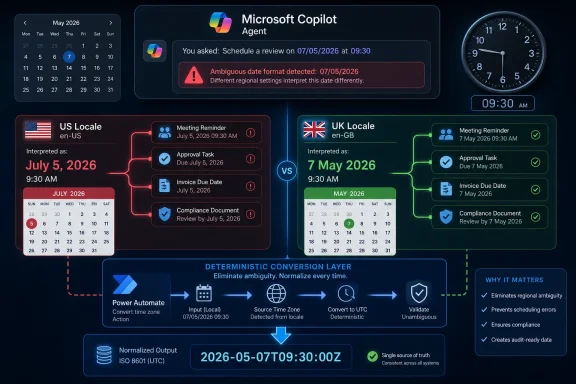
The report describes a familiar localization trap. In the United Kingdom and much of the world, 07/05/2026 means 7 May 2026. In the United States, the same string is commonly read as July 5, 2026. Humans often resolve that ambiguity from context, but software systems need a declared contract, not a vibe.
Copilot agents complicate that contract because they sit at the intersection of deterministic enterprise plumbing and probabilistic language generation. They can read from knowledge sources, respect user context, call tools, and generate answers in natural language. That combination is powerful precisely because it hides complexity from users. It is also dangerous when the hidden complexity includes locale inference.
The reported behavior matters because the failure mode is plausible, not exotic. It does not require a malicious prompt, a broken connector, or an administrator making an obvious mistake. According to the blog summary, the problem appeared suddenly without configuration changes, which is exactly the sort of behavior that causes administrators to distrust platform abstractions.
The problem is that enterprise users rarely experience locale as a single setting. A Microsoft 365 profile can have a display language and regional format. Outlook has calendar time-zone settings. Power Platform has user and environment settings. A browser has preferred languages. Windows has local region and time settings. Copilot Studio has agent language configuration. Somewhere in that stack, one layer can say “British English” while another says “US English,” and the agent may be left to reconcile the contradiction.
Veronique’s checklist is useful because it treats the issue as a stack problem rather than a prompt problem. The settings she recommends inspecting span Microsoft 365 profile language and region, Outlook calendar time zone, tenant and Power Platform user settings, Copilot agent language, browser language, and the local computer’s region and time. That breadth is the point. If the date is wrong at the end, the source of wrongness may not be the line of text you are staring at.
This is where administrators should resist the temptation to treat the agent as a black box that simply “misunderstood.” A Copilot agent is receiving signals from multiple systems and then producing a human-readable response. If those signals are inconsistent, the most impressive model in the world can still be asked to infer something the surrounding system should have specified.
That should not surprise anyone who has operated production automations. Prompt instructions are useful for presentation and behavior shaping, but they are not a substitute for typed data, validated formats, and deterministic conversion. If a workflow depends on whether a date is May 7 or July 5, the system should not rely on the model’s compliance with a natural-language sentence.
There is a reason experienced developers prefer ISO 8601-style representations, explicit time-zone offsets, and well-defined conversion functions. They remove ambiguity before it reaches the display layer. A string like “2026-05-07T09:30:00Z” is less friendly to a human than “07/05/2026 at 9:30,” but it carries a clearer contract through systems.
Copilot agents are attractive because they let non-developers build conversational workflows without writing all of that plumbing by hand. But the more consequential the workflow, the more the old engineering rules come roaring back. Dates, money, identities, permissions, and legal status should not be treated as prose unless they have already been validated somewhere else.
That distinction matters. If a user asks a general question, ungrounded generation can make an agent feel more capable. If a workflow asks for the date of an appointment, contract milestone, or escalation deadline, ungrounded generation is exactly the kind of freedom you may not want. The agent should retrieve, preserve, convert, or display the date. It should not improvise around it.
The catch is that “ungrounded” is not synonymous with “wrong,” and “grounded” is not synonymous with “safe.” Microsoft notes that disabling ungrounded responses does not guarantee that the underlying model never uses general knowledge when combining retrieved information with other context. That is a sensible caveat, but it also means administrators should not mistake one toggle for a full assurance mechanism.
The practical lesson is subtler. For workflows where date accuracy matters, agent freedom should narrow as the business consequence rises. A chatbot that answers employee handbook questions can tolerate a little conversational latitude. An agent that schedules maintenance windows, interprets customer deadlines, or feeds approvals into Power Automate should behave much more like an application.
Power Automate’s date tooling exists because cloud workflows routinely pass timestamps across services that use different formats and time zones. Microsoft’s own guidance notes that datetime values may arrive through triggers and actions in unexpected zones or formats, and that some services use UTC to avoid confusion. The Convert time zone action asks for a base time, source time zone, destination time zone, and optional format string. In other words, it asks for the contract the agent should not be guessing.
This approach changes the architecture of the solution. Instead of asking the agent to both interpret and present time correctly, the flow becomes responsible for converting and formatting the value. The agent can still converse, but the date handling is pushed into a tool designed for that job.
That is the right instinct for serious deployments. Let the agent gather intent and provide a user interface. Let the workflow engine perform conversion, validation, and formatting. Then pass the result back to the agent as a value that is already safe to display.
The same logic applies to Conversation.LocalTimeZone. If a conversation has a usable system variable for local time zone, treat it as an input that must be inspected and, where needed, explicitly set or transformed. Do not assume that the runtime will infer the right zone from a user’s prose, browser, tenant, or calendar context in every channel.
A wrong date in a chat answer is embarrassing. A wrong date in an approval chain can delay procurement. A wrong date in a customer communication can create contractual confusion. A wrong date in a compliance workflow can produce audit evidence that is technically generated by an authorized system but substantively false.
This is why AI governance often sounds abstract until a date flips. Organizations can write broad policies about human review, approved use cases, and responsible AI, but the daily risk lives in mundane transformations. Was the value parsed correctly? Was the locale declared? Was the output validated before it triggered the next step? Was the user shown a format that could not be mistaken?
The report should push IT teams to classify agent outputs by consequence. If the agent is merely summarizing a lunch menu, a locale mismatch is irritating. If it is handling renewals, shifts, invoices, travel bookings, medication reminders, legal deadlines, or incident-response timelines, it belongs in a more controlled category.
But Copilot changes who encounters it. Historically, these bugs were mostly the concern of developers and application owners. Copilot Studio and Power Platform move more workflow creation into the hands of makers, analysts, and departmental administrators. That democratization is valuable, but it also means the platform must make invisible assumptions visible.
A low-code agent builder should not require every maker to become an expert in globalization, UTC, locale negotiation, and date parsing. At the same time, the builder cannot pretend that date handling is merely a display preference. The platform needs stronger warnings, clearer defaults, and better diagnostics when agent locale, browser locale, user profile region, and connector output disagree.
The most useful future feature would not be another prompt box. It would be a trace view that shows exactly which locale and time-zone signals were used when a date was parsed, generated, or passed to a flow. Administrators need observability more than reassurance.
Microsoft also has an opportunity to make date ambiguity harder to ship. If an agent detects a date string like 07/05/2026 in a context where locale signals conflict, it should be able to ask a clarifying question, normalize to an unambiguous format, or force a tool call before producing output. That would be a small friction cost in exchange for a large reduction in silent failure.
Start by mapping the path of a date through the agent. Where does it originate? Is it typed by a user, retrieved from Outlook, read from a document, pulled from Dataverse, returned by a connector, or inferred from conversation history? At what point is it converted? At what point is it displayed? At what point does it trigger an action?
Then remove ambiguity as early as possible. Use explicit formats internally. Prefer ISO-style timestamps where the workflow permits it. Convert time zones in Power Automate or another deterministic layer. Display friendly local dates only after conversion, and include enough context to prevent misreading.
Testing should include the ugly cases, not just the happy path. Use dates where day and month can both be valid, such as 05/07 and 07/05. Test users with en-US and en-GB browser settings. Test across Teams, web chat, and any other channel in use. Test around daylight saving transitions. Test with users whose Microsoft 365 region differs from their physical location.
Most importantly, test after platform changes. The blog’s warning that the behavior appeared without configuration changes is the part that will resonate with administrators. Cloud platforms update continuously, and AI systems add another layer of model, orchestration, and retrieval behavior that can shift outside a tenant admin’s direct control.
The Microsoft 365 profile is a logical first stop because it can shape the user experience across services. Outlook deserves separate attention because calendar time zones have their own operational meaning. Power Platform user and tenant settings matter because the agent may call flows, connectors, or data sources that interpret timestamps differently from the chat surface.
Browser language is easy to overlook because it feels like a client-side preference. In Copilot Studio’s regional formatting model, however, browser locale can affect how date and time are displayed and interpreted in conversation. Local Windows region and time settings add yet another signal, especially for makers testing agents from their own machines.
Agent language settings belong in the same review. If an agent is created or configured with a primary language or regional variant that does not match the expected user population, date behavior can become inconsistent before the first prompt is written. Multilingual agents make this even more complicated because language detection and response language are not always the same as date-format expectation.
The release gate should also define what happens when the agent is unsure. In many business contexts, the correct behavior is not to guess. It is to ask, “Do you mean 7 May 2026 or 5 July 2026?” That may feel inelegant in a demo, but it is exactly the kind of interruption users appreciate when the alternative is a missed deadline.
A user may forgive a bland summary or an awkward sentence. They are less likely to forgive a changed date. Dates are anchors. When an agent gets one wrong, it creates doubt about every other structured value in the response.
That doubt spreads quickly inside organizations. One employee sees a bad date and tells a team. A team lead disables a workflow. An administrator adds review steps that reduce the efficiency gain the agent was supposed to deliver. The technical bug becomes an adoption tax.
Microsoft’s Copilot strategy depends on users accepting agents as safe intermediaries between conversation and action. Date handling is one of the places where that promise is easiest to verify and easiest to break. If the agent cannot reliably preserve time, users will not trust it with work.
Source: Let's Data Science Copilot agent returns incorrect dates in outputs
 The Smallest Data Type Can Break the Biggest Workflow
Dates look simple until software has to move them between people, browsers, tenants, calendars, time zones, regional formats, language models, and automation connectors. That is why this Copilot report lands differently from the usual “AI got a fact wrong” complaint. A model inventing a paragraph is one class of problem; a model silently changing “07/05/2026” into July 5, 2026, is a different class entirely.The report describes a familiar localization trap. In the United Kingdom and much of the world, 07/05/2026 means 7 May 2026. In the United States, the same string is commonly read as July 5, 2026. Humans often resolve that ambiguity from context, but software systems need a declared contract, not a vibe.
Copilot agents complicate that contract because they sit at the intersection of deterministic enterprise plumbing and probabilistic language generation. They can read from knowledge sources, respect user context, call tools, and generate answers in natural language. That combination is powerful precisely because it hides complexity from users. It is also dangerous when the hidden complexity includes locale inference.
The reported behavior matters because the failure mode is plausible, not exotic. It does not require a malicious prompt, a broken connector, or an administrator making an obvious mistake. According to the blog summary, the problem appeared suddenly without configuration changes, which is exactly the sort of behavior that causes administrators to distrust platform abstractions.
Locale Is Not a Preference When the Agent Is Driving the Process
Microsoft’s own documentation for Copilot Studio makes clear that locale matters to date interpretation. The platform’s regional behavior can depend on the user’s browser locale, and Microsoft explicitly gives the example that “2/3” means March 2 in an en-GB context and February 3 in an en-US context. That is not a footnote; it is the whole issue compressed into one example.The problem is that enterprise users rarely experience locale as a single setting. A Microsoft 365 profile can have a display language and regional format. Outlook has calendar time-zone settings. Power Platform has user and environment settings. A browser has preferred languages. Windows has local region and time settings. Copilot Studio has agent language configuration. Somewhere in that stack, one layer can say “British English” while another says “US English,” and the agent may be left to reconcile the contradiction.
Veronique’s checklist is useful because it treats the issue as a stack problem rather than a prompt problem. The settings she recommends inspecting span Microsoft 365 profile language and region, Outlook calendar time zone, tenant and Power Platform user settings, Copilot agent language, browser language, and the local computer’s region and time. That breadth is the point. If the date is wrong at the end, the source of wrongness may not be the line of text you are staring at.
This is where administrators should resist the temptation to treat the agent as a black box that simply “misunderstood.” A Copilot agent is receiving signals from multiple systems and then producing a human-readable response. If those signals are inconsistent, the most impressive model in the world can still be asked to infer something the surrounding system should have specified.
Prompting Is a Weak Guardrail for Calendar Truth
The instinctive response to an AI output problem is to add a stronger instruction. “Always use dd/mm/yyyy.” “Never use US date formats.” “Return dates in UK format only.” The blog reports that, in this case, attempts to force a specific format in prompts did not resolve the issue.That should not surprise anyone who has operated production automations. Prompt instructions are useful for presentation and behavior shaping, but they are not a substitute for typed data, validated formats, and deterministic conversion. If a workflow depends on whether a date is May 7 or July 5, the system should not rely on the model’s compliance with a natural-language sentence.
There is a reason experienced developers prefer ISO 8601-style representations, explicit time-zone offsets, and well-defined conversion functions. They remove ambiguity before it reaches the display layer. A string like “2026-05-07T09:30:00Z” is less friendly to a human than “07/05/2026 at 9:30,” but it carries a clearer contract through systems.
Copilot agents are attractive because they let non-developers build conversational workflows without writing all of that plumbing by hand. But the more consequential the workflow, the more the old engineering rules come roaring back. Dates, money, identities, permissions, and legal status should not be treated as prose unless they have already been validated somewhere else.
Ungrounded Answers Are a Feature Until They Become a Liability
One of the sharper details in the report is that turning off “Allow ungrounded responses” reportedly improved results in one case. In Copilot Studio, that setting controls whether an agent can answer using the model’s general knowledge without relying on configured knowledge sources or tools. Turning it off does not magically make every answer perfect, but it can block responses where the agent would otherwise answer without grounding in a source or tool call.That distinction matters. If a user asks a general question, ungrounded generation can make an agent feel more capable. If a workflow asks for the date of an appointment, contract milestone, or escalation deadline, ungrounded generation is exactly the kind of freedom you may not want. The agent should retrieve, preserve, convert, or display the date. It should not improvise around it.
The catch is that “ungrounded” is not synonymous with “wrong,” and “grounded” is not synonymous with “safe.” Microsoft notes that disabling ungrounded responses does not guarantee that the underlying model never uses general knowledge when combining retrieved information with other context. That is a sensible caveat, but it also means administrators should not mistake one toggle for a full assurance mechanism.
The practical lesson is subtler. For workflows where date accuracy matters, agent freedom should narrow as the business consequence rises. A chatbot that answers employee handbook questions can tolerate a little conversational latitude. An agent that schedules maintenance windows, interprets customer deadlines, or feeds approvals into Power Automate should behave much more like an application.
Power Automate Is the Mitigation Because It Reintroduces Determinism
The workaround described in the report points toward Power Automate’s Convert time zone action and adjustments to the Conversation.LocalTimeZone system variable. That is telling. When the agent’s natural-language layer becomes uncertain, the mitigation is not more eloquent natural language; it is a deterministic conversion step.Power Automate’s date tooling exists because cloud workflows routinely pass timestamps across services that use different formats and time zones. Microsoft’s own guidance notes that datetime values may arrive through triggers and actions in unexpected zones or formats, and that some services use UTC to avoid confusion. The Convert time zone action asks for a base time, source time zone, destination time zone, and optional format string. In other words, it asks for the contract the agent should not be guessing.
This approach changes the architecture of the solution. Instead of asking the agent to both interpret and present time correctly, the flow becomes responsible for converting and formatting the value. The agent can still converse, but the date handling is pushed into a tool designed for that job.
That is the right instinct for serious deployments. Let the agent gather intent and provide a user interface. Let the workflow engine perform conversion, validation, and formatting. Then pass the result back to the agent as a value that is already safe to display.
The same logic applies to Conversation.LocalTimeZone. If a conversation has a usable system variable for local time zone, treat it as an input that must be inspected and, where needed, explicitly set or transformed. Do not assume that the runtime will infer the right zone from a user’s prose, browser, tenant, or calendar context in every channel.
The Bug Is Also a Governance Story
Microsoft has spent the past two years pushing Copilot from assistant to agent. The marketing shift is not cosmetic. An assistant helps a user do work; an agent increasingly does work on the user’s behalf. That makes small errors more consequential.A wrong date in a chat answer is embarrassing. A wrong date in an approval chain can delay procurement. A wrong date in a customer communication can create contractual confusion. A wrong date in a compliance workflow can produce audit evidence that is technically generated by an authorized system but substantively false.
This is why AI governance often sounds abstract until a date flips. Organizations can write broad policies about human review, approved use cases, and responsible AI, but the daily risk lives in mundane transformations. Was the value parsed correctly? Was the locale declared? Was the output validated before it triggered the next step? Was the user shown a format that could not be mistaken?
The report should push IT teams to classify agent outputs by consequence. If the agent is merely summarizing a lunch menu, a locale mismatch is irritating. If it is handling renewals, shifts, invoices, travel bookings, medication reminders, legal deadlines, or incident-response timelines, it belongs in a more controlled category.
Microsoft’s Abstraction Has to Meet the Administrator Halfway
To be fair, date and time handling has haunted software long before language models entered the office. Time zones, daylight saving transitions, ambiguous local formats, and user-specific regional settings are a decades-old mess. Copilot did not invent the problem.But Copilot changes who encounters it. Historically, these bugs were mostly the concern of developers and application owners. Copilot Studio and Power Platform move more workflow creation into the hands of makers, analysts, and departmental administrators. That democratization is valuable, but it also means the platform must make invisible assumptions visible.
A low-code agent builder should not require every maker to become an expert in globalization, UTC, locale negotiation, and date parsing. At the same time, the builder cannot pretend that date handling is merely a display preference. The platform needs stronger warnings, clearer defaults, and better diagnostics when agent locale, browser locale, user profile region, and connector output disagree.
The most useful future feature would not be another prompt box. It would be a trace view that shows exactly which locale and time-zone signals were used when a date was parsed, generated, or passed to a flow. Administrators need observability more than reassurance.
Microsoft also has an opportunity to make date ambiguity harder to ship. If an agent detects a date string like 07/05/2026 in a context where locale signals conflict, it should be able to ask a clarifying question, normalize to an unambiguous format, or force a tool call before producing output. That would be a small friction cost in exchange for a large reduction in silent failure.
The Enterprise Lesson Is to Treat Agent Dates as Untrusted Input
The concrete advice for WindowsForum readers is not to panic about every Copilot deployment. The report appears to be based on a specific observed case, not proof of a platform-wide outage. But it is enough to justify a design review anywhere Copilot agents touch operational dates.Start by mapping the path of a date through the agent. Where does it originate? Is it typed by a user, retrieved from Outlook, read from a document, pulled from Dataverse, returned by a connector, or inferred from conversation history? At what point is it converted? At what point is it displayed? At what point does it trigger an action?
Then remove ambiguity as early as possible. Use explicit formats internally. Prefer ISO-style timestamps where the workflow permits it. Convert time zones in Power Automate or another deterministic layer. Display friendly local dates only after conversion, and include enough context to prevent misreading.
Testing should include the ugly cases, not just the happy path. Use dates where day and month can both be valid, such as 05/07 and 07/05. Test users with en-US and en-GB browser settings. Test across Teams, web chat, and any other channel in use. Test around daylight saving transitions. Test with users whose Microsoft 365 region differs from their physical location.
Most importantly, test after platform changes. The blog’s warning that the behavior appeared without configuration changes is the part that will resonate with administrators. Cloud platforms update continuously, and AI systems add another layer of model, orchestration, and retrieval behavior that can shift outside a tenant admin’s direct control.
The Checklist Should Become a Release Gate
Veronique’s checklist is valuable as troubleshooting guidance, but mature organizations should convert it into a release gate. Before an agent is allowed to handle consequential dates, the environment should be checked for consistent regional assumptions. That does not mean every setting must be identical; it means the differences must be understood and tested.The Microsoft 365 profile is a logical first stop because it can shape the user experience across services. Outlook deserves separate attention because calendar time zones have their own operational meaning. Power Platform user and tenant settings matter because the agent may call flows, connectors, or data sources that interpret timestamps differently from the chat surface.
Browser language is easy to overlook because it feels like a client-side preference. In Copilot Studio’s regional formatting model, however, browser locale can affect how date and time are displayed and interpreted in conversation. Local Windows region and time settings add yet another signal, especially for makers testing agents from their own machines.
Agent language settings belong in the same review. If an agent is created or configured with a primary language or regional variant that does not match the expected user population, date behavior can become inconsistent before the first prompt is written. Multilingual agents make this even more complicated because language detection and response language are not always the same as date-format expectation.
The release gate should also define what happens when the agent is unsure. In many business contexts, the correct behavior is not to guess. It is to ask, “Do you mean 7 May 2026 or 5 July 2026?” That may feel inelegant in a demo, but it is exactly the kind of interruption users appreciate when the alternative is a missed deadline.
The Calendar Is Where AI Trust Becomes Measurable
There is a broader lesson here about how users decide whether to trust AI at work. They do not evaluate the model as a benchmark score. They evaluate whether it preserves the things they already know to be true.A user may forgive a bland summary or an awkward sentence. They are less likely to forgive a changed date. Dates are anchors. When an agent gets one wrong, it creates doubt about every other structured value in the response.
That doubt spreads quickly inside organizations. One employee sees a bad date and tells a team. A team lead disables a workflow. An administrator adds review steps that reduce the efficiency gain the agent was supposed to deliver. The technical bug becomes an adoption tax.
Microsoft’s Copilot strategy depends on users accepting agents as safe intermediaries between conversation and action. Date handling is one of the places where that promise is easiest to verify and easiest to break. If the agent cannot reliably preserve time, users will not trust it with work.
The Calendar Bug Leaves Administrators With a Harder Standard
This incident does not prove that Copilot agents are broadly unsafe, but it does show why agent deployments need stricter engineering discipline than chatbot pilots. The safest reading is that date outputs should be treated as untrusted until they have been normalized, converted, and validated outside the generative layer.- Agents that handle dates should be tested with ambiguous day-month and month-day values before they are connected to real workflows.
- Regional settings should be reviewed across Microsoft 365, Outlook, Power Platform, the agent configuration, the browser, and the local Windows environment.
- Prompt instructions should not be treated as a reliable control for date parsing or time-zone conversion.
- Power Automate’s Convert time zone action or equivalent deterministic logic should handle conversions where downstream processes depend on accuracy.
- Ungrounded responses should be disabled or tightly constrained in workflows where the agent is expected to preserve factual values rather than improvise around them.
- Users should see unambiguous date formats in high-stakes contexts, even if those formats are less conversational.
Source: Let's Data Science Copilot agent returns incorrect dates in outputs
