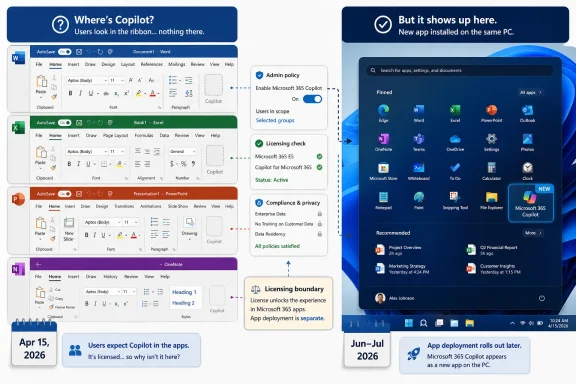
The Copilot AI button disappeared from many Office apps because Microsoft changed Microsoft 365 Copilot Chat availability on April 15, 2026, removing the in-app Word, Excel, PowerPoint, and OneNote entry point for many users without a paid Microsoft 365 Copilot license. That is the simple answer, but it understates the larger story. Microsoft has not abandoned Copilot in Office; it has redrawn the boundary between free AI chat and paid, context-aware productivity automation. For users and administrators, the missing button is less a bug than a licensing signal.
For months, Copilot’s presence inside Office apps felt like Microsoft’s clearest statement of intent: AI would not live off to the side, waiting in a browser tab, but inside the documents, spreadsheets, decks, and notes where work actually happens. Then the button disappeared for many users, and the symbolism flipped. The same interface Microsoft used to normalize AI at work became the place where Microsoft began enforcing the difference between Copilot Chat and Microsoft 365 Copilot.
That distinction matters because the branding has been unusually muddy. To ordinary users, “Copilot” is Copilot: a button, a chat pane, a sparkle icon, a promise that the software can help. To Microsoft, there are now several layers of Copilot identity, with different licensing, data access, application surfaces, and administrative controls.
The April 15 change effectively says that basic access to Copilot Chat is not the same thing as having Copilot embedded in Office. Users may still be able to reach Copilot through the Microsoft 365 Copilot app, the web, Edge, Teams, Outlook, or other surfaces, depending on their tenant and configuration. But the convenient in-document pane in Word, Excel, PowerPoint, and OneNote is increasingly reserved for users with the paid Microsoft 365 Copilot experience.
That is why troubleshooting advice can feel contradictory. Some users are told Copilot has been removed from their apps by design. Others are told to refresh their license, update Office, switch accounts, or enable connected experiences. Both can be true, because the missing button now sits at the intersection of licensing, account identity, update channels, privacy settings, and tenant policy.
The April 2026 change is best understood as Microsoft narrowing the free product’s footprint. Copilot Chat can remain a secure AI assistant for many organizational users, but Microsoft no longer wants that free or unlicensed experience to look too much like the premium Office-integrated product. The pane inside Word or Excel is valuable precisely because it is contextual. It appears where the file is, where the user’s attention is, and where the upgrade feels most natural.
That placement is not just a convenience feature. In productivity software, location is power. A chat assistant in a browser is a tool you choose to visit; a chat assistant inside a spreadsheet is part of the work surface. Removing the button from some licenses makes the paid version feel materially different even before any model, data, or feature comparison begins.
For Microsoft, this is a classic platform move. Seed the behavior broadly, watch users learn where AI helps, then tighten the packaging around the experiences most likely to convert. For customers, especially large organizations, it feels like a rug pull because the interface trained people to expect one thing and then quietly made that thing conditional.
In a small business, removing a button from a handful of users may simply create confusion. In a large tenant, it becomes a licensing conversation. Help desks receive tickets, managers ask why a tool disappeared, and administrators must explain that the organization has access to one kind of Copilot but not another. That friction is annoying, but it is also commercially useful because it turns invisible licensing boundaries into visible user demand.
This is not new behavior from Microsoft. The company has long used feature availability, administrative controls, and integration depth to move customers up the stack. What is different with Copilot is the speed and visibility of the shift. AI features arrived with the rhetoric of transformation, not as obscure enterprise add-ons, so users noticed when the familiar button vanished.
For IT pros, the lesson is blunt: Copilot availability should now be treated like any other managed Microsoft 365 capability. It is not enough to ask whether the tenant “has Copilot.” Administrators need to know which Copilot experience, which license, which app surface, which update channel, and which policy state applies to each user group.
Office apps care which account is active inside the application. A user may have a licensed account somewhere on the PC but still be editing a document under a different primary account in Word or Excel. In that case, Copilot may not appear because the app is not seeing the account that carries the entitlement.
License refresh is another practical fix. In Microsoft 365 apps on Windows, the account page includes an option to update the license, and Microsoft advises users to restart Office apps afterward. On the Mac, license refresh lives in a different place, which makes the same underlying issue feel like a platform-specific mystery.
Update channels can also matter for business users. Microsoft has said that some Copilot features require Current Channel or Monthly Enterprise Channel rather than Semi-Annual Enterprise Channel. That creates the usual enterprise tension: the cautious update channel that helps reduce change risk may also delay access to new cloud-connected features.
Privacy settings are the final trap. Copilot depends on connected experiences and, in some cases, experiences that analyze content. If those settings are disabled by the user or controlled by policy, the button may disappear even when the license is correct. That makes privacy toggles both a user-choice mechanism and a feature gate, which is never a recipe for intuitive troubleshooting.
Outlook’s role is especially telling. Email and calendar workflows are high-frequency, high-value productivity surfaces, and Microsoft has been eager to position AI as a triage layer for communication overload. Keeping Copilot visible there preserves daily contact with the assistant while still making deeper Office integration a premium proposition.
The Microsoft 365 Copilot app also gives Microsoft a central place to consolidate chat, search, agents, notebooks, and creation tools. That serves the company’s broader strategy: Copilot becomes not just a pane inside existing apps, but a hub that can sit above them. The Office apps remain crucial, but Microsoft wants the Copilot brand to feel like an operating layer across work rather than a single feature in Word.
The user experience, however, can feel incoherent. A person may lose Copilot in Word but still see it in Outlook. They may have access in a browser but not in the desktop app. They may see Copilot pinned in one Microsoft 365 surface and absent from another. From Microsoft’s licensing perspective, that may be precise; from the user’s perspective, it looks like software behaving randomly.
That means the help desk script has to change. The first response should not be “reinstall Office.” It should be a licensing and eligibility check. Is the user assigned Microsoft 365 Copilot? Is the tenant affected by the April 15 change? Is the user in an organization where Copilot Chat is still pinned in some surfaces but not available inside the core Office document apps?
Once that is established, conventional troubleshooting makes sense. Verify the signed-in account, refresh the license, check the Office update channel, confirm privacy and connected-experience settings, and review administrative policies. But doing those steps before confirming entitlement wastes time and reinforces the user’s belief that something is broken.
The bigger challenge is policy clarity. If an organization is not buying Microsoft 365 Copilot for everyone, it needs to say who gets it and why. Otherwise, the Copilot button becomes a status symbol inside the tenant: visible for some users, missing for others, and poorly understood by almost everyone.
That is not necessarily irrational. Running generative AI at enterprise scale is expensive, and the most valuable features depend on secure access to organizational data. Microsoft cannot give away the full version of Microsoft 365 Copilot indefinitely while also asking customers to pay premium per-user prices for it. Some boundary between basic and premium was inevitable.
The problem is how that boundary was experienced. A removed button feels different from a feature that was never offered. Users build habits around interface affordances, and when those affordances vanish, they interpret the change as breakage or loss. Microsoft may see licensing hygiene; users see a familiar tool being taken away.
This is the risk of AI-first design when the commercial model is still catching up. If every app surface becomes a billboard for Copilot, every licensing change becomes a UI disruption. Microsoft has trained users to look for AI everywhere, and now it must explain why “everywhere” sometimes means “only if your account qualifies.”
If you do have a paid license, the missing button is more likely to be a configuration or account problem. Sign into the correct Microsoft 365 account inside the app, not just somewhere in Windows or your browser. Refresh the license, restart Office, update the apps, and check whether connected experiences and content-analysis experiences are enabled.
Business users should also ask their administrator about update channels and tenant policy. If the organization uses Semi-Annual Enterprise Channel, some Copilot features may not appear even when licensing is correct. If privacy or connected-experience settings are centrally managed, the user may not be able to fix the issue locally.
For home users, the subscription picture is different but the principle is the same. The account that owns or receives the Copilot entitlement must be the account active in the Office app. Family subscriptions, personal accounts, and Copilot add-ons can create confusion when multiple people or multiple identities share a device.
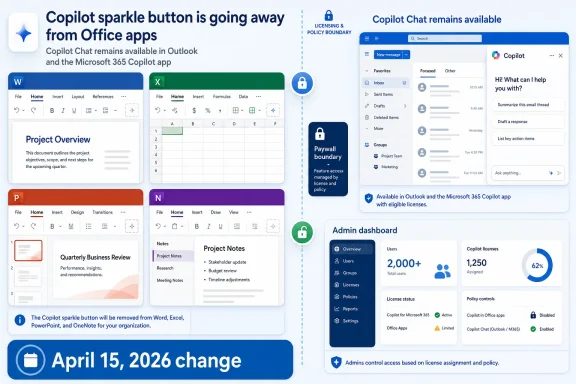 Microsoft Turns a Vanishing Button Into a Paywall
For months, Copilot’s presence inside Office apps felt like Microsoft’s clearest statement of intent: AI would not live off to the side, waiting in a browser tab, but inside the documents, spreadsheets, decks, and notes where work actually happens. Then the button disappeared for many users, and the symbolism flipped. The same interface Microsoft used to normalize AI at work became the place where Microsoft began enforcing the difference between Copilot Chat and Microsoft 365 Copilot.That distinction matters because the branding has been unusually muddy. To ordinary users, “Copilot” is Copilot: a button, a chat pane, a sparkle icon, a promise that the software can help. To Microsoft, there are now several layers of Copilot identity, with different licensing, data access, application surfaces, and administrative controls.
The April 15 change effectively says that basic access to Copilot Chat is not the same thing as having Copilot embedded in Office. Users may still be able to reach Copilot through the Microsoft 365 Copilot app, the web, Edge, Teams, Outlook, or other surfaces, depending on their tenant and configuration. But the convenient in-document pane in Word, Excel, PowerPoint, and OneNote is increasingly reserved for users with the paid Microsoft 365 Copilot experience.
That is why troubleshooting advice can feel contradictory. Some users are told Copilot has been removed from their apps by design. Others are told to refresh their license, update Office, switch accounts, or enable connected experiences. Both can be true, because the missing button now sits at the intersection of licensing, account identity, update channels, privacy settings, and tenant policy.
The Basic Tier Was Never Going to Stay Equal
Microsoft’s original Copilot push benefited from ubiquity. By putting Copilot buttons across Windows, Edge, Microsoft 365, Bing, and Office-adjacent experiences, the company made AI feel unavoidable. That strategy was useful for habit formation, but it also created a commercial problem: if enough people can get a visible Copilot experience for free, the paid upgrade has to justify itself with more than branding.The April 2026 change is best understood as Microsoft narrowing the free product’s footprint. Copilot Chat can remain a secure AI assistant for many organizational users, but Microsoft no longer wants that free or unlicensed experience to look too much like the premium Office-integrated product. The pane inside Word or Excel is valuable precisely because it is contextual. It appears where the file is, where the user’s attention is, and where the upgrade feels most natural.
That placement is not just a convenience feature. In productivity software, location is power. A chat assistant in a browser is a tool you choose to visit; a chat assistant inside a spreadsheet is part of the work surface. Removing the button from some licenses makes the paid version feel materially different even before any model, data, or feature comparison begins.
For Microsoft, this is a classic platform move. Seed the behavior broadly, watch users learn where AI helps, then tighten the packaging around the experiences most likely to convert. For customers, especially large organizations, it feels like a rug pull because the interface trained people to expect one thing and then quietly made that thing conditional.
The 2,000-User Line Shows Where Microsoft Sees the Money
The reported impact on organizations with more than 2,000 users is especially revealing. Microsoft is not merely separating home users from business users or free users from paid subscribers. It is segmenting the enterprise market based on scale, where procurement departments, compliance teams, and IT administrators are more likely to negotiate, budget, and deploy paid AI licenses systematically.In a small business, removing a button from a handful of users may simply create confusion. In a large tenant, it becomes a licensing conversation. Help desks receive tickets, managers ask why a tool disappeared, and administrators must explain that the organization has access to one kind of Copilot but not another. That friction is annoying, but it is also commercially useful because it turns invisible licensing boundaries into visible user demand.
This is not new behavior from Microsoft. The company has long used feature availability, administrative controls, and integration depth to move customers up the stack. What is different with Copilot is the speed and visibility of the shift. AI features arrived with the rhetoric of transformation, not as obscure enterprise add-ons, so users noticed when the familiar button vanished.
For IT pros, the lesson is blunt: Copilot availability should now be treated like any other managed Microsoft 365 capability. It is not enough to ask whether the tenant “has Copilot.” Administrators need to know which Copilot experience, which license, which app surface, which update channel, and which policy state applies to each user group.
The Missing Button May Still Be a Local Problem
Not every missing Copilot button is a licensing decision from Redmond. Microsoft’s own support guidance still points to several mundane causes that can hide Copilot from users who are otherwise entitled to it. The first is account mismatch, which is especially common on machines where people use both personal Microsoft accounts and work or school accounts.Office apps care which account is active inside the application. A user may have a licensed account somewhere on the PC but still be editing a document under a different primary account in Word or Excel. In that case, Copilot may not appear because the app is not seeing the account that carries the entitlement.
License refresh is another practical fix. In Microsoft 365 apps on Windows, the account page includes an option to update the license, and Microsoft advises users to restart Office apps afterward. On the Mac, license refresh lives in a different place, which makes the same underlying issue feel like a platform-specific mystery.
Update channels can also matter for business users. Microsoft has said that some Copilot features require Current Channel or Monthly Enterprise Channel rather than Semi-Annual Enterprise Channel. That creates the usual enterprise tension: the cautious update channel that helps reduce change risk may also delay access to new cloud-connected features.
Privacy settings are the final trap. Copilot depends on connected experiences and, in some cases, experiences that analyze content. If those settings are disabled by the user or controlled by policy, the button may disappear even when the license is correct. That makes privacy toggles both a user-choice mechanism and a feature gate, which is never a recipe for intuitive troubleshooting.
Outlook Is the Exception That Proves the Strategy
The most interesting part of the April change is not only where Copilot disappeared, but where it remained. Outlook and the Microsoft 365 Copilot app continue to be important access points, and Copilot Chat remains reachable through browser-based and standalone experiences for many users. Microsoft is not retreating from AI; it is rearranging the front doors.Outlook’s role is especially telling. Email and calendar workflows are high-frequency, high-value productivity surfaces, and Microsoft has been eager to position AI as a triage layer for communication overload. Keeping Copilot visible there preserves daily contact with the assistant while still making deeper Office integration a premium proposition.
The Microsoft 365 Copilot app also gives Microsoft a central place to consolidate chat, search, agents, notebooks, and creation tools. That serves the company’s broader strategy: Copilot becomes not just a pane inside existing apps, but a hub that can sit above them. The Office apps remain crucial, but Microsoft wants the Copilot brand to feel like an operating layer across work rather than a single feature in Word.
The user experience, however, can feel incoherent. A person may lose Copilot in Word but still see it in Outlook. They may have access in a browser but not in the desktop app. They may see Copilot pinned in one Microsoft 365 surface and absent from another. From Microsoft’s licensing perspective, that may be precise; from the user’s perspective, it looks like software behaving randomly.
Admins Are Now Managing Expectations, Not Just Settings
For administrators, the disappearance of the button creates a communications problem before it creates a technical one. Users generally do not distinguish between Copilot Chat, Microsoft 365 Copilot, Copilot Pro, Copilot in Windows, Copilot in Edge, and the Microsoft 365 Copilot app. They see a button that was there yesterday and is gone today.That means the help desk script has to change. The first response should not be “reinstall Office.” It should be a licensing and eligibility check. Is the user assigned Microsoft 365 Copilot? Is the tenant affected by the April 15 change? Is the user in an organization where Copilot Chat is still pinned in some surfaces but not available inside the core Office document apps?
Once that is established, conventional troubleshooting makes sense. Verify the signed-in account, refresh the license, check the Office update channel, confirm privacy and connected-experience settings, and review administrative policies. But doing those steps before confirming entitlement wastes time and reinforces the user’s belief that something is broken.
The bigger challenge is policy clarity. If an organization is not buying Microsoft 365 Copilot for everyone, it needs to say who gets it and why. Otherwise, the Copilot button becomes a status symbol inside the tenant: visible for some users, missing for others, and poorly understood by almost everyone.
Microsoft’s AI Ambition Is Colliding With Microsoft’s Licensing Culture
The Copilot button controversy is a small episode in a much larger collision. Microsoft wants AI to feel like a natural extension of Windows and Office, but Microsoft’s business model still depends on SKU boundaries, admin controls, bundled value, and upsell paths. The result is a product experience that is marketed as seamless but delivered through a maze of entitlements.That is not necessarily irrational. Running generative AI at enterprise scale is expensive, and the most valuable features depend on secure access to organizational data. Microsoft cannot give away the full version of Microsoft 365 Copilot indefinitely while also asking customers to pay premium per-user prices for it. Some boundary between basic and premium was inevitable.
The problem is how that boundary was experienced. A removed button feels different from a feature that was never offered. Users build habits around interface affordances, and when those affordances vanish, they interpret the change as breakage or loss. Microsoft may see licensing hygiene; users see a familiar tool being taken away.
This is the risk of AI-first design when the commercial model is still catching up. If every app surface becomes a billboard for Copilot, every licensing change becomes a UI disruption. Microsoft has trained users to look for AI everywhere, and now it must explain why “everywhere” sometimes means “only if your account qualifies.”
The Real Fix Is Knowing Which Copilot You Actually Have
For individual users, the practical path starts with a simple distinction. If you do not have a paid Microsoft 365 Copilot license, the missing button in Word, Excel, PowerPoint, or OneNote may be expected behavior after April 15, 2026. In that case, hunting through settings will not restore the same in-app experience.If you do have a paid license, the missing button is more likely to be a configuration or account problem. Sign into the correct Microsoft 365 account inside the app, not just somewhere in Windows or your browser. Refresh the license, restart Office, update the apps, and check whether connected experiences and content-analysis experiences are enabled.
Business users should also ask their administrator about update channels and tenant policy. If the organization uses Semi-Annual Enterprise Channel, some Copilot features may not appear even when licensing is correct. If privacy or connected-experience settings are centrally managed, the user may not be able to fix the issue locally.
For home users, the subscription picture is different but the principle is the same. The account that owns or receives the Copilot entitlement must be the account active in the Office app. Family subscriptions, personal accounts, and Copilot add-ons can create confusion when multiple people or multiple identities share a device.
The Vanishing Sparkle Icon Leaves a Trail Worth Following
The most concrete lesson from this change is that Copilot is no longer a single feature users can assume will behave consistently across Microsoft 365. It is a family of experiences whose availability depends on licensing, app surface, organization size, update cadence, and administrative policy.- The Copilot button disappeared from Word, Excel, PowerPoint, and OneNote for many users because Microsoft changed access for unlicensed or basic Copilot Chat users beginning April 15, 2026.
- Users may still be able to access Copilot Chat through the Microsoft 365 Copilot app, the web, Edge, Outlook, Teams, or other approved surfaces.
- A paid Microsoft 365 Copilot license is increasingly the dividing line for the deeper in-app Office experience.
- If a licensed user cannot see Copilot, the most likely causes are the wrong signed-in account, a stale license state, an outdated Office build, an unsupported update channel, or disabled connected-experience privacy settings.
- Administrators should treat Copilot visibility as a managed deployment issue and communicate clearly which users are entitled to which Copilot experience.
- The missing button is a product strategy signal as much as a support issue, because Microsoft is separating casual AI chat from premium, document-contextual productivity features.
References
- Primary source: Guiding Tech
Published: None
Why Did the Copilot AI Button Disappear From My Office Apps? - Guiding Tech
Can't find the Copilot AI button in your Office apps? Learn why it may have disappeared and how to restore access.www.guidingtech.com
- Related coverage: windowscentral.com
Microsoft 365 is paywalling most of Copilot in its Office apps | Windows Central
Commercial customers will soon need a Microsoft 365 Copilot license to use Copilot Chat in Word, Excel, PowerPoint, and OneNote.www.windowscentral.com - Official source: learn.microsoft.com
Pin Microsoft 365 Copilot Chat in the Microsoft 365 apps | Microsoft Learn
Learn how to pin Microsoft 365 Copilot Chat in Microsoft 365 apps across web, desktop, and mobile. Improve user access with admin configuration settings.learn.microsoft.com - Related coverage: it.osu.edu
Important Update: Changes to Microsoft Copilot Chat | Office of Technology and Digital Innovation
Beginning April 15, Microsoft began rolling out changes to where Copilot Chat (basic) appears across Microsoft apps. The basic version of Copilot, formerlyit.osu.edu - Related coverage: samexpert.com
Copilot Chat Cut From Office for 2000+ Seats | SAMexpert
SAMexpert on Copilot Chat: Microsoft removes free AI from Office apps for 2,000+ seat organisations from 15 April 2026. Only paid licences retain access.samexpert.com - Related coverage: floor16.com
Microsoft Removing Copilot From Word & Excel April 15 — What to Do — Floor 16
Prepare for Copilot Chat April 15 changes before Word, Excel, and PowerPoint lose in-app AI. Mid-market IT's 4-day action plan, licensing math, and user communication template.www.floor16.com
- Related coverage: botbeat.news
Microsoft Paywalls Copilot Chat in Office Apps Starting April 2026, Restricting Free Access | BotBeat
# Microsoft Paywalls Copilot Chat in Office Apps Starting April 2026, Restricting Free Access **Source**: [Hacker News](https://www.windowscentral.com/microsofbotbeat.news - Official source: support.microsoft.com
How to find and enable missing Copilot button in Microsoft 365 apps - Microsoft Support
Things to try if you've purchased Copilot but don't yet see it in your Microsoft 365 apps.support.microsoft.com - Related coverage: its.web.baylor.edu
Microsoft Copilot Changes Coming April 15
its.web.baylor.edu
- Related coverage: scottarmbruster.com
Copilot Leaves Office Apps April 15. Pay or Pivot? | Scott Armbruster
Microsoft strips Copilot from Word, Excel, PowerPoint for unlicensed users April 15. Compare your options and find the right move for your budget. scottarmbruster.com
- Related coverage: servicedesk.drexel.edu
Copilot Chat change in Office Apps
servicedesk.drexel.edu
- Related coverage: office-watch.com
Microsoft Kills Free Copilot Chat in Word, Excel and PowerPoint: What Happens on April 15
Microsoft is switching off free Copilot Chat inside Word, Excel, PowerPoint, and OneNote for millions of Microsoft 365 business users starting April 15, 2026. Uoffice-watch.com
- Related coverage: easy365.io
Claude M365 Connector Now Free — While Microsoft Paywalls Copilot Chat (Basic) in Office Apps
Anthropic opens its M365 connector to all Claude plans — free included. Microsoft removes free Copilot Chat (Basic) from Office apps for large tenants on April 15. Here's what both changes mean for your AI tooling decision www.easy365.io
- Related coverage: techradar.com
Microsoft spent billions on Copilot, but only 3.3% of users are actually paying for the AI tools | TechRadar
Microsoft spent $37.5 billion on AI tools, with limited returns so farwww.techradar.com - Related coverage: pcgamer.com
In a truly galaxy-brained rebrand, Microsoft Office is now the 'Microsoft 365 Copilot app,' but Copilot is also still the name of the AI assistant | PC Gamer
Copilot is the app for launching the other apps, but it's also a chatbot inside the apps. Any questions?www.pcgamer.com - Related coverage: spscc.edu
- Related coverage: bpb-us-e1.wpmucdn.com