

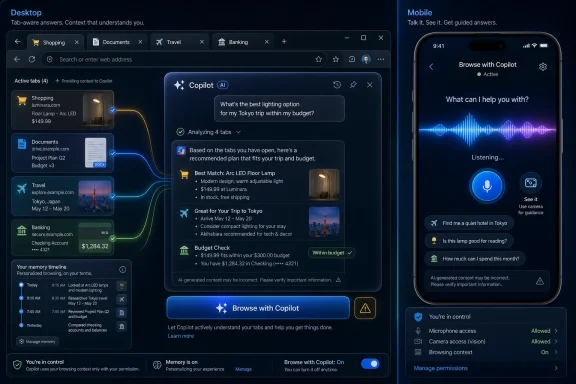
Microsoft announced on May 13, 2026, that Copilot in Microsoft Edge is expanding across desktop and mobile with tab-aware answers, browsing-history personalization, voice and vision features, and a renamed agentic browsing feature called Browse with Copilot. The headline is not simply that Edge can summarize a page. It is that Microsoft is trying to turn the browser from a passive window into an AI-mediated memory of what users read, compare, buy, and return to. That is useful, unnerving, and very Microsoft.
For most of the web’s history, the browser has been a container. It stores history, cookies, passwords, bookmarks, and tabs, but it does not usually present itself as an active participant in the task. Microsoft’s latest Edge push changes that posture. Copilot is being positioned not as a sidebar novelty but as a browsing companion that can reason across open tabs, remember prior activity, and use your history to make suggestions that feel less like search and more like continuity.
That is the pitch Microsoft has been chasing since Copilot became the company’s preferred answer to almost every product question. Windows has Copilot. Microsoft 365 has Copilot. GitHub has Copilot. Edge, though, is uniquely sensitive terrain because the browser is where the rest of computing leaks into view: shopping carts, work portals, health searches, bank tabs, travel plans, passwords, identity forms, and all the half-finished searches users never intended to become a profile.
The company says the experience is permissioned and that Copilot accesses user data only when activated. It also says it collects only what is needed to improve the experience or what users choose to provide through personalization settings. Those caveats matter. But they do not erase the broader shift: Microsoft is asking users to accept that the browser should be a place where an AI system can watch enough of the session to become helpful.
That may be the future of browsing. It is also exactly the kind of future that makes many users reach for the settings menu before the demo has finished.
This is the sort of feature that can feel obvious once it exists. People already use browsers as messy workspaces. A user shopping for a laptop may have five product pages open, a review, a Reddit thread, and a spreadsheet. A student may have journal articles, lecture notes, and a Wikipedia page. An admin may be bouncing between Microsoft Learn, a vendor advisory, a support ticket, and a change-management document. The tab strip is already a poor man’s project manager.
Copilot’s value proposition is that it can turn that chaos into a conversation. Instead of manually comparing specs, copying paragraphs into a chatbot, or maintaining a separate note, the user asks Edge what matters. In principle, that is the browser finally acknowledging how people actually browse.
But the same design also changes the browser’s trust boundary. A tab used to be a thing the user looked at. Now it can become a thing the assistant sees. The distinction is subtle until it is not. If one tab contains a public product page and another contains an authenticated internal dashboard, the user’s mental model of what Copilot can and cannot access becomes central to whether the feature feels like productivity or surveillance.
Microsoft’s support language tries to draw that line by emphasizing explicit activation and user control. That is necessary. It is not sufficient unless the product makes scope visible at the moment of use. Users need to know whether Copilot is reading the current page, selected tabs, all tabs in a window, browsing history, previous Copilot chats, or some combination of those things.
The technical challenge is hard. The user-experience challenge is harder.
This is where the feature moves from summarization into personalization. A chatbot that summarizes the current page is a tool. A chatbot that knows what you looked at yesterday, notices patterns, and offers to resume a task is something closer to an operating layer for attention. Microsoft’s screenshots and examples, including reminders connected to past shopping activity and browser activity repackaged into an audio-style summary, point toward a browser that wants to anticipate rather than merely respond.
There is a real use case here. Many people lose time reconstructing their own context. They forget which review made them reconsider a purchase, which documentation page contained the right command, which hotel looked best, or which article explained a concept cleanly. A browser that can create a coherent path through that mess could be valuable.
The catch is that “remember what I was doing” and “build a behavioral profile from my browsing” are separated mostly by governance, defaults, and trust. Microsoft may see personalization as the route to a better assistant. Users may see it as yet another layer of data collection in a product that already asks them to sign in, sync, back up, accept recommendations, and tolerate nudges toward Microsoft services.
The privacy argument is therefore not a side issue. It is the product. Copilot can only become deeply useful in Edge if users believe the data boundary is understandable and enforceable. If they do not, the best features become reasons to disable it.
That is a classic Microsoft product move: retire the label, normalize the capability. Copilot Mode sounded like something a user deliberately turned on. Copilot in Edge sounds like the browser’s default personality. For a company trying to make AI feel ambient across its products, the branding shift is not cosmetic. It lowers the conceptual distance between using Edge and using Copilot.
Browse with Copilot is the more consequential piece for enterprise and privacy-minded users because it is about actions, not just answers. Microsoft describes it as a feature that can navigate and complete browser actions when explicitly asked. The company says this is available on Edge desktop for Microsoft 365 Premium subscribers in the United States, at least in the current rollout.
Agentic browsing is the logical next step after tab-aware chat. Once the assistant can understand what is on the page, the next question is whether it can click, fill, sort, book, buy, submit, or configure. That is also where the risk profile changes. A hallucinated summary is annoying. A mistaken browser action can be expensive, embarrassing, or dangerous.
Microsoft’s own support warning is revealing. The company advises users getting started with agentic browsing to avoid sensitive or personal information, including financial or banking activity, Social Security identification, and medical records. That is prudent advice. It is also an admission that the product category is not yet something users should blindly trust with the most consequential parts of their online lives.
The warning does not mean Browse with Copilot is unsafe by default. It means Microsoft understands that an AI browser agent lives near high-value data and high-impact actions. The browser has always been a risk surface. Adding an agent gives that surface hands.
On mobile, the promise of Copilot is easy to understand. A smaller screen makes tab comparison harder. Copying details between apps is more annoying. Voice input and visual assistance feel more natural. If Copilot can summarize, compare, and resume browsing tasks without requiring a user to juggle tiny tabs, it may find an audience that never cared about Edge’s desktop feature wars.
The business logic is also clear. Edge is not the dominant browser on mobile. Microsoft does not control the phone platform in the way Apple controls iOS or Google controls Android. Copilot gives Microsoft a reason to argue that Edge is not merely another Chromium browser but the browser where its AI stack works best.
That strategy has a familiar downside. Users who already feel Microsoft inserts Copilot into too many surfaces may see the mobile expansion as another land grab. The company is not just selling a browser; it is selling a continuity layer that becomes more powerful the more places it appears. For some users, that is convenience. For others, it is the exact definition of lock-in.
The mobile rollout also raises practical questions about consent across devices. If a user enables personalization on desktop, what flows to mobile? If Copilot uses browsing history, is that local device history, synced history, or account-level history? If a user uses Edge for work on one device and personal browsing on another, how cleanly are those contexts separated? Microsoft’s answers may exist in settings and policy documentation, but ordinary users will judge the product by whether those boundaries are obvious without reading a support page.
Modern enterprises already struggle with browser sprawl, SaaS data leakage, unmanaged extensions, password managers, session tokens, and users pasting confidential material into public AI tools. An AI assistant embedded directly into the browser compresses several of those issues into one interface. It may reduce risky copy-paste behavior by keeping assistance inside a managed Microsoft environment. It may also create a new class of ambiguity around what content is sent, stored, processed, logged, or used for personalization.
Admins will want policy controls that are not vague. They will want to disable tab access, history-based personalization, agentic browsing, or specific Copilot surfaces independently. They will want auditability where appropriate and silence where privacy law demands it. They will want to know whether a sensitive web app can be excluded from Copilot access and whether block lists are enforceable across managed devices.
Microsoft’s enterprise advantage is that it has the management machinery to make this plausible. Edge can be governed through policy. Microsoft 365 Copilot has enterprise controls. Entra ID, Purview, Intune, and Edge for Business give Microsoft a story that smaller AI browser startups cannot easily match.
But the burden is on Microsoft to make the controls legible. IT pros have learned to be skeptical of “user choice” when features arrive enabled, half-enabled, regionally staged, rebranded, or changed between preview and general availability. The Copilot Mode to Browse with Copilot transition is exactly the kind of branding and packaging shift that can make documentation feel stale the moment it is deployed.
In an enterprise, a feature is not real when it appears in a blog post. It is real when the admin can explain it, configure it, monitor it, and defend it to compliance.
This is where privacy design lives or dies. A permission prompt that says Copilot may use “browser context” is not enough if the user does not understand the scope. A settings toggle buried under personalization is not enough if the feature’s behavior changes depending on account type, device, region, subscription, or experiment. A one-time consent flow is not enough if users forget what they approved.
The browser is full of old privacy lessons. Location prompts became meaningful only when users could choose per-site permissions and see indicators. Camera and microphone access became tolerable because browsers made access visible and revocable. Extensions became safer only after permission scopes and store review processes matured, and even then the ecosystem remains messy.
AI context access needs the same discipline. If Copilot is using open tabs, the interface should say so. If it is using history, the interface should distinguish that from the current page. If it is using past chats, users should be able to see, clear, or disable that memory. If agentic browsing is active, the boundary between suggestion and action should be unmistakable.
Microsoft’s trust problem is partly inherited from the wider AI industry and partly self-inflicted. The company has spent years pushing users toward Microsoft accounts, OneDrive backup, Edge defaults, Bing integration, Windows recommendations, and Copilot entry points. Some of those features are useful. Many of the prompts have felt aggressive. When a company trains users to suspect the nudge, it cannot be surprised when they scrutinize the assistant.
A useless assistant is easy to reject. A useful assistant invites compromise. Users may tolerate more data access if the product saves time, finds better prices, summarizes dense documentation, resumes research, and turns a mess of tabs into a plan. The real privacy contest will not be between users and features they hate. It will be between caution and convenience.
That tension is already visible in the broader AI market. People who would never read a privacy policy routinely paste work emails into chatbots, upload PDFs for summarization, and ask AI tools to analyze screenshots. The behavior is not irrational. The tools are genuinely useful. The danger is that convenience normalizes data exposure before governance catches up.
Microsoft is trying to place itself on the safer side of that transition by embedding AI into products users and enterprises already manage. That could be better than a world where employees scatter sensitive data across random browser extensions and consumer AI sites. But “better than the worst alternative” is not the same as trustworthy by default.
The company’s challenge is to make Copilot feel like an accountable feature, not a fog that settles over Edge. If it succeeds, Edge could become one of the most coherent AI browsers on the market. If it fails, Copilot will become another reason for users to switch browsers, harden policies, or treat every AI prompt as a trap.
This is not just about competing with Chrome. It is about competing with the possibility that the browser becomes less central if AI assistants answer questions directly. If users ask ChatGPT, Claude, Gemini, or Perplexity to research, compare, and summarize, the traditional browser becomes the plumbing. Microsoft would rather make Edge the place where that AI-mediated workflow happens.
That explains why the company keeps returning to the browser despite mixed public enthusiasm for Copilot. Edge is one of the few consumer surfaces where Microsoft can combine account identity, search, web content, productivity context, and AI interaction in a single frame. Bing alone could not do that. Windows alone cannot see enough of the web. Microsoft 365 alone is too work-centered. Edge is the crossroads.
It also explains why the company can appear to retreat in one area while advancing in another. Scaling back or reconsidering Copilot experiences on Xbox does not mean Microsoft is backing away from AI. It means the company is learning where AI feels native and where it feels bolted on. In a game console interface, Copilot may feel like corporate ambition searching for a use case. In a browser full of tabs, it has a more obvious job.
The risk is that Microsoft mistakes obvious utility for user consent. People want help with browser clutter. They may not want a persistent AI identity threaded through their web history. The winning product will be the one that makes the trade feel explicit rather than smuggled.
Source: CNET Microsoft Copilot Can Collect Data From Your Edge Browser Tabs to Get to Know You
 Microsoft Wants Edge to Become the Place Where AI Learns Your Habits
For most of the web’s history, the browser has been a container. It stores history, cookies, passwords, bookmarks, and tabs, but it does not usually present itself as an active participant in the task. Microsoft’s latest Edge push changes that posture. Copilot is being positioned not as a sidebar novelty but as a browsing companion that can reason across open tabs, remember prior activity, and use your history to make suggestions that feel less like search and more like continuity.That is the pitch Microsoft has been chasing since Copilot became the company’s preferred answer to almost every product question. Windows has Copilot. Microsoft 365 has Copilot. GitHub has Copilot. Edge, though, is uniquely sensitive terrain because the browser is where the rest of computing leaks into view: shopping carts, work portals, health searches, bank tabs, travel plans, passwords, identity forms, and all the half-finished searches users never intended to become a profile.
The company says the experience is permissioned and that Copilot accesses user data only when activated. It also says it collects only what is needed to improve the experience or what users choose to provide through personalization settings. Those caveats matter. But they do not erase the broader shift: Microsoft is asking users to accept that the browser should be a place where an AI system can watch enough of the session to become helpful.
That may be the future of browsing. It is also exactly the kind of future that makes many users reach for the settings menu before the demo has finished.
The Browser Is Becoming the AI’s Workbench
The most concrete new capability is Copilot’s ability to use open tabs as context. Microsoft describes this as reasoning across tabs: comparing options, surfacing important details, and answering questions without forcing the user to copy and paste from one page to another. In mundane terms, it means Edge can look at several pages you already have open and turn them into a synthesized answer.This is the sort of feature that can feel obvious once it exists. People already use browsers as messy workspaces. A user shopping for a laptop may have five product pages open, a review, a Reddit thread, and a spreadsheet. A student may have journal articles, lecture notes, and a Wikipedia page. An admin may be bouncing between Microsoft Learn, a vendor advisory, a support ticket, and a change-management document. The tab strip is already a poor man’s project manager.
Copilot’s value proposition is that it can turn that chaos into a conversation. Instead of manually comparing specs, copying paragraphs into a chatbot, or maintaining a separate note, the user asks Edge what matters. In principle, that is the browser finally acknowledging how people actually browse.
But the same design also changes the browser’s trust boundary. A tab used to be a thing the user looked at. Now it can become a thing the assistant sees. The distinction is subtle until it is not. If one tab contains a public product page and another contains an authenticated internal dashboard, the user’s mental model of what Copilot can and cannot access becomes central to whether the feature feels like productivity or surveillance.
Microsoft’s support language tries to draw that line by emphasizing explicit activation and user control. That is necessary. It is not sufficient unless the product makes scope visible at the moment of use. Users need to know whether Copilot is reading the current page, selected tabs, all tabs in a window, browsing history, previous Copilot chats, or some combination of those things.
The technical challenge is hard. The user-experience challenge is harder.
Personalization Is the Feature and the Liability
Microsoft’s more ambitious claim is not just that Copilot can inspect what is open now. It is that Copilot can become more useful over time because it remembers what you have worked on. That is the logic behind using browsing history and past chats to make answers more relevant. It also explains why the company is tying Copilot more tightly to Edge’s new tab page and mobile experience.This is where the feature moves from summarization into personalization. A chatbot that summarizes the current page is a tool. A chatbot that knows what you looked at yesterday, notices patterns, and offers to resume a task is something closer to an operating layer for attention. Microsoft’s screenshots and examples, including reminders connected to past shopping activity and browser activity repackaged into an audio-style summary, point toward a browser that wants to anticipate rather than merely respond.
There is a real use case here. Many people lose time reconstructing their own context. They forget which review made them reconsider a purchase, which documentation page contained the right command, which hotel looked best, or which article explained a concept cleanly. A browser that can create a coherent path through that mess could be valuable.
The catch is that “remember what I was doing” and “build a behavioral profile from my browsing” are separated mostly by governance, defaults, and trust. Microsoft may see personalization as the route to a better assistant. Users may see it as yet another layer of data collection in a product that already asks them to sign in, sync, back up, accept recommendations, and tolerate nudges toward Microsoft services.
The privacy argument is therefore not a side issue. It is the product. Copilot can only become deeply useful in Edge if users believe the data boundary is understandable and enforceable. If they do not, the best features become reasons to disable it.
Microsoft Is Retiring Copilot Mode, Not the Idea Behind It
One interesting detail in the announcement is that Microsoft is retiring the Copilot Mode branding while keeping, splitting, and expanding much of the underlying concept. The experimental “Copilot Mode” label gave Edge’s AI overhaul a distinct identity. Now the company appears to be folding the everyday chat and tab-aware features into Edge itself while moving agentic capabilities under the name Browse with Copilot.That is a classic Microsoft product move: retire the label, normalize the capability. Copilot Mode sounded like something a user deliberately turned on. Copilot in Edge sounds like the browser’s default personality. For a company trying to make AI feel ambient across its products, the branding shift is not cosmetic. It lowers the conceptual distance between using Edge and using Copilot.
Browse with Copilot is the more consequential piece for enterprise and privacy-minded users because it is about actions, not just answers. Microsoft describes it as a feature that can navigate and complete browser actions when explicitly asked. The company says this is available on Edge desktop for Microsoft 365 Premium subscribers in the United States, at least in the current rollout.
Agentic browsing is the logical next step after tab-aware chat. Once the assistant can understand what is on the page, the next question is whether it can click, fill, sort, book, buy, submit, or configure. That is also where the risk profile changes. A hallucinated summary is annoying. A mistaken browser action can be expensive, embarrassing, or dangerous.
Microsoft’s own support warning is revealing. The company advises users getting started with agentic browsing to avoid sensitive or personal information, including financial or banking activity, Social Security identification, and medical records. That is prudent advice. It is also an admission that the product category is not yet something users should blindly trust with the most consequential parts of their online lives.
The warning does not mean Browse with Copilot is unsafe by default. It means Microsoft understands that an AI browser agent lives near high-value data and high-impact actions. The browser has always been a risk surface. Adding an agent gives that surface hands.
Edge Mobile Turns the AI Browser Into a Daily Habit
The desktop browser is where power users will test the limits. The mobile browser is where Microsoft can turn Copilot into a habit. Extending the redesigned Edge new tab page and Copilot features to mobile matters because phones are where browsing is often fragmented, impulsive, and context-poor.On mobile, the promise of Copilot is easy to understand. A smaller screen makes tab comparison harder. Copying details between apps is more annoying. Voice input and visual assistance feel more natural. If Copilot can summarize, compare, and resume browsing tasks without requiring a user to juggle tiny tabs, it may find an audience that never cared about Edge’s desktop feature wars.
The business logic is also clear. Edge is not the dominant browser on mobile. Microsoft does not control the phone platform in the way Apple controls iOS or Google controls Android. Copilot gives Microsoft a reason to argue that Edge is not merely another Chromium browser but the browser where its AI stack works best.
That strategy has a familiar downside. Users who already feel Microsoft inserts Copilot into too many surfaces may see the mobile expansion as another land grab. The company is not just selling a browser; it is selling a continuity layer that becomes more powerful the more places it appears. For some users, that is convenience. For others, it is the exact definition of lock-in.
The mobile rollout also raises practical questions about consent across devices. If a user enables personalization on desktop, what flows to mobile? If Copilot uses browsing history, is that local device history, synced history, or account-level history? If a user uses Edge for work on one device and personal browsing on another, how cleanly are those contexts separated? Microsoft’s answers may exist in settings and policy documentation, but ordinary users will judge the product by whether those boundaries are obvious without reading a support page.
The Enterprise Problem Is Not Whether Copilot Works
For IT departments, the central question is not whether Copilot can summarize tabs. It probably can, and it will get better. The question is whether organizations can govern it with the same clarity they expect from other data-handling systems.Modern enterprises already struggle with browser sprawl, SaaS data leakage, unmanaged extensions, password managers, session tokens, and users pasting confidential material into public AI tools. An AI assistant embedded directly into the browser compresses several of those issues into one interface. It may reduce risky copy-paste behavior by keeping assistance inside a managed Microsoft environment. It may also create a new class of ambiguity around what content is sent, stored, processed, logged, or used for personalization.
Admins will want policy controls that are not vague. They will want to disable tab access, history-based personalization, agentic browsing, or specific Copilot surfaces independently. They will want auditability where appropriate and silence where privacy law demands it. They will want to know whether a sensitive web app can be excluded from Copilot access and whether block lists are enforceable across managed devices.
Microsoft’s enterprise advantage is that it has the management machinery to make this plausible. Edge can be governed through policy. Microsoft 365 Copilot has enterprise controls. Entra ID, Purview, Intune, and Edge for Business give Microsoft a story that smaller AI browser startups cannot easily match.
But the burden is on Microsoft to make the controls legible. IT pros have learned to be skeptical of “user choice” when features arrive enabled, half-enabled, regionally staged, rebranded, or changed between preview and general availability. The Copilot Mode to Browse with Copilot transition is exactly the kind of branding and packaging shift that can make documentation feel stale the moment it is deployed.
In an enterprise, a feature is not real when it appears in a blog post. It is real when the admin can explain it, configure it, monitor it, and defend it to compliance.
The Privacy Debate Is Really About Defaults
Microsoft says Copilot accesses data only upon activation. That line is important, and it will likely be repeated often. The problem is that “activation” can mean different things to different people. Clicking a Copilot icon may feel like asking a question about the current page, not granting an assistant broader awareness of tabs, history, and prior chats.This is where privacy design lives or dies. A permission prompt that says Copilot may use “browser context” is not enough if the user does not understand the scope. A settings toggle buried under personalization is not enough if the feature’s behavior changes depending on account type, device, region, subscription, or experiment. A one-time consent flow is not enough if users forget what they approved.
The browser is full of old privacy lessons. Location prompts became meaningful only when users could choose per-site permissions and see indicators. Camera and microphone access became tolerable because browsers made access visible and revocable. Extensions became safer only after permission scopes and store review processes matured, and even then the ecosystem remains messy.
AI context access needs the same discipline. If Copilot is using open tabs, the interface should say so. If it is using history, the interface should distinguish that from the current page. If it is using past chats, users should be able to see, clear, or disable that memory. If agentic browsing is active, the boundary between suggestion and action should be unmistakable.
Microsoft’s trust problem is partly inherited from the wider AI industry and partly self-inflicted. The company has spent years pushing users toward Microsoft accounts, OneDrive backup, Edge defaults, Bing integration, Windows recommendations, and Copilot entry points. Some of those features are useful. Many of the prompts have felt aggressive. When a company trains users to suspect the nudge, it cannot be surprised when they scrutinize the assistant.
Clippy Was Annoying Because It Was Dumb; Copilot Is Sensitive Because It Might Be Useful
Comparisons to Clippy are inevitable, but they are also too easy. Clippy was intrusive because it interrupted users with shallow guesses. Copilot in Edge is different because it can plausibly help. That is precisely why the stakes are higher.A useless assistant is easy to reject. A useful assistant invites compromise. Users may tolerate more data access if the product saves time, finds better prices, summarizes dense documentation, resumes research, and turns a mess of tabs into a plan. The real privacy contest will not be between users and features they hate. It will be between caution and convenience.
That tension is already visible in the broader AI market. People who would never read a privacy policy routinely paste work emails into chatbots, upload PDFs for summarization, and ask AI tools to analyze screenshots. The behavior is not irrational. The tools are genuinely useful. The danger is that convenience normalizes data exposure before governance catches up.
Microsoft is trying to place itself on the safer side of that transition by embedding AI into products users and enterprises already manage. That could be better than a world where employees scatter sensitive data across random browser extensions and consumer AI sites. But “better than the worst alternative” is not the same as trustworthy by default.
The company’s challenge is to make Copilot feel like an accountable feature, not a fog that settles over Edge. If it succeeds, Edge could become one of the most coherent AI browsers on the market. If it fails, Copilot will become another reason for users to switch browsers, harden policies, or treat every AI prompt as a trap.
Microsoft Is Betting That Browsing Is No Longer Search
The deeper strategic move is that Microsoft sees browsing itself changing. The old model was search, click, read, back, search again. The new model is closer to delegation: describe the intent, let the assistant inspect the available context, and receive a synthesized path forward. Edge’s new tab page, Copilot chat, tab reasoning, history-based personalization, and Browse with Copilot all point in that direction.This is not just about competing with Chrome. It is about competing with the possibility that the browser becomes less central if AI assistants answer questions directly. If users ask ChatGPT, Claude, Gemini, or Perplexity to research, compare, and summarize, the traditional browser becomes the plumbing. Microsoft would rather make Edge the place where that AI-mediated workflow happens.
That explains why the company keeps returning to the browser despite mixed public enthusiasm for Copilot. Edge is one of the few consumer surfaces where Microsoft can combine account identity, search, web content, productivity context, and AI interaction in a single frame. Bing alone could not do that. Windows alone cannot see enough of the web. Microsoft 365 alone is too work-centered. Edge is the crossroads.
It also explains why the company can appear to retreat in one area while advancing in another. Scaling back or reconsidering Copilot experiences on Xbox does not mean Microsoft is backing away from AI. It means the company is learning where AI feels native and where it feels bolted on. In a game console interface, Copilot may feel like corporate ambition searching for a use case. In a browser full of tabs, it has a more obvious job.
The risk is that Microsoft mistakes obvious utility for user consent. People want help with browser clutter. They may not want a persistent AI identity threaded through their web history. The winning product will be the one that makes the trade feel explicit rather than smuggled.
The Edge Bargain Now Comes With Memory
The practical advice for WindowsForum readers is not to panic and not to shrug. Copilot in Edge is neither a secret keylogger nor a harmless toy. It is an expanding AI layer inside one of the most sensitive applications on a PC, and its value depends on access to exactly the kinds of context users should think carefully about sharing.- Users who want the benefits should review Edge’s Copilot and personalization settings before treating tab-aware answers as a normal browser function.
- Users handling banking, medical, identity, legal, or confidential work should avoid experimenting with agentic browsing on those pages unless they fully understand the controls.
- Administrators should look for separate policy controls for Copilot chat, tab context, browsing-history personalization, and Browse with Copilot rather than treating “Copilot” as one switch.
- Organizations should decide whether Edge-based AI reduces unsanctioned AI use or creates a new data-governance problem inside the browser.
- Microsoft’s privacy promises should be judged less by blog language than by visible scope indicators, revocable permissions, clear defaults, and reliable enterprise controls.
Source: CNET Microsoft Copilot Can Collect Data From Your Edge Browser Tabs to Get to Know You
