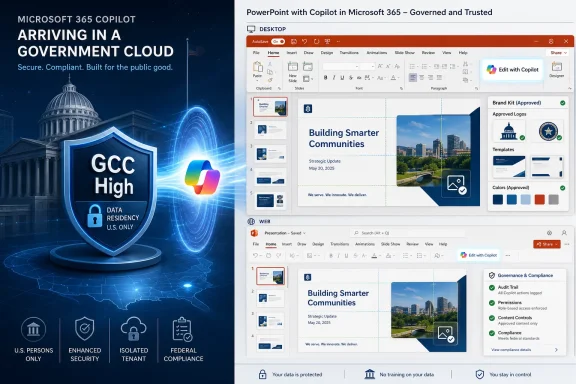
Microsoft has listed Copilot in PowerPoint for Microsoft 365 Government Community Cloud as an in-development feature, with general availability planned for September 2026 on desktop and web for users licensed for Microsoft 365 Copilot. That sounds like a narrow roadmap entry, but it marks a more consequential moment for public-sector productivity software: generative AI is moving from chat sidebars into the slide decks that brief agencies, councils, contractors, and executives. The question for government tenants is no longer whether Copilot can draft a deck, but whether Microsoft can make AI-assisted presentation work fit the slower, stricter rhythms of regulated collaboration.
PowerPoint is not where most people expected the next meaningful government-cloud AI story to land. The app is old, familiar, and sometimes mocked as the bureaucratic language of modern institutions. Yet that is exactly why Copilot in PowerPoint matters: in government, slides are often the work product, not merely the packaging around it.
Microsoft’s roadmap entry for ID 561322 says the feature is in development for GCC, with general availability targeted for September 2026. It covers PowerPoint on desktop and the web, and it applies to Microsoft 365 Copilot-licensed users. The feature promises conversational creation, editing, refinement, layout improvement, design polishing, and access to relevant Microsoft 365 context such as files, meetings, emails, and other organizational content.
That combination is more than “AI makes slides.” It is Microsoft’s larger Copilot bet compressed into a format public agencies already understand. The model is not being positioned as a novelty generator; it is being positioned as a workflow assistant that can turn institutional context into polished, branded, reusable briefings.
For GCC customers, the arrival also says something about Microsoft’s cloud sequencing. Commercial tenants usually see the flashiest Copilot features first, while government clouds trail behind as Microsoft works through compliance, data residency, isolation, and operational controls. A September 2026 target for PowerPoint is therefore both a product update and a signal about how far Microsoft believes its government Copilot architecture has matured.
That is why Copilot in PowerPoint is more important than its consumer-facing reputation might suggest. A tool that can generate a briefing from a policy memo, revise a status update from meeting notes, or reformat a proposal into agency branding is touching a core layer of administrative communication. It is not replacing a back-office macro; it is shaping how decisions are explained.
Microsoft’s pitch leans into that reality. Users can start from a new presentation or build on an existing one, then ask Copilot to add slides, update content, improve layouts, and refine the look of the deck. The promise is not just speed, but continuity: preserving formatting, structure, and branding while iterating.
That last part matters in government. Public-sector documents often carry official templates, accessibility requirements, seal usage rules, mandated disclaimers, and communications-office standards. A deck that looks plausible but violates a brand or accessibility policy creates cleanup work, not productivity.
Copilot’s claimed connection to a brand kit is therefore one of the most practically important pieces of the roadmap entry. The ability to apply approved templates, insert approved images, and check for brand compliance moves the feature away from generic generation and toward governed production. Whether it performs reliably in real tenants will matter more than any stage demo.
Microsoft says Microsoft 365 Copilot operates within the customer’s government cloud tenant for U.S. government cloud environments, and that prompts, responses, and generated content remain within that environment. That is the core premise that makes Copilot adoption even discussable for many public agencies. Without it, the PowerPoint feature would be a nonstarter for many regulated organizations.
Still, government-cloud availability is not a magic compliance wand. Microsoft can provide the platform, but agencies still have to configure permissions, retention, sensitivity labels, sharing policies, and user access. Copilot can only be as well-governed as the content estate it is allowed to reason over.
That is where PowerPoint exposes a familiar weakness. Many organizations have years of poorly labeled documents, overshared SharePoint libraries, stale project files, and meeting recordings with inconsistent permissions. When Copilot uses organizational context to help build a deck, it inherits the quality and governance of that context.
The result is a practical rule for GCC admins: Copilot in PowerPoint should not be treated as a standalone feature rollout. It should be treated as a test of whether the tenant’s information architecture is ready for AI-assisted work.
Microsoft’s brand-kit direction attempts to solve one of the oldest problems in enterprise PowerPoint: everyone has the template, almost nobody uses it perfectly. Users copy old decks, reuse legacy layouts, paste screenshots, distort logos, and improvise when the official slide master does not fit the story they need to tell. Copilot could either worsen that sprawl or help contain it.
If the feature reliably uses approved templates and images, it becomes a quiet enforcement layer. The user asks for a briefing; Copilot produces slides that already know the sanctioned visual language. That is a better outcome than asking every analyst, program manager, or field office employee to become a part-time design compliance officer.
But brand compliance is also where Microsoft’s AI promise will face the most visible scrutiny. A generated paragraph can be edited. A hallucinated chart can be corrected. A deck that looks unofficial, messy, or off-brand is instantly distrusted by the audience before anyone reaches the content.
This is why Copilot in PowerPoint has to be better than “good enough” at visual continuity. PowerPoint users are unusually sensitive to layout errors because the output is meant to be shown, not merely stored. AI that saves 20 minutes of drafting but creates 40 minutes of formatting cleanup will quickly be routed around by experienced staff.
That distinction is central for government IT. Copilot may not break permissions, but it can amplify the consequences of bad ones. An overshared folder that once required a motivated employee to browse through files could become a source for a neatly summarized slide in seconds.
PowerPoint adds another twist: generated output is often exported, emailed, presented, or uploaded elsewhere. A draft deck can become an attachment outside the context in which Copilot generated it. If the deck contains sensitive content pulled from meetings, emails, or files, the downstream handling matters as much as the initial prompt.
That makes sensitivity labels and data loss prevention policies especially important. Agencies adopting Copilot in PowerPoint should think about whether generated decks inherit labels properly, whether users understand when source material is confidential, and whether presentations created with AI need review workflows before external sharing.
The real security boundary is not the Copilot button. It is the full chain from source content to generated deck to presentation, export, archive, and disclosure request. Public-sector organizations already live with that chain; Copilot just accelerates it.
For government workers, that effort can be especially costly. Staff often prepare briefings under deadline, with input from multiple teams, while navigating legal, communications, records, and accessibility expectations. A tool that can build a first draft from existing context has a clear productivity case.
But Copilot’s output still has to be reviewed. That review is not just proofreading; it includes policy accuracy, source interpretation, tone, accessibility, classification, branding, and whether the deck overstates what the underlying material supports. In agencies, a polished but subtly wrong slide can be more dangerous than an obviously rough draft.
This is where Microsoft’s natural-language interface cuts both ways. Asking Copilot to “make this more executive-ready” may produce a cleaner deck, but it may also compress nuance. Asking it to “strengthen the argument” may sharpen a recommendation beyond what staff intended. Asking it to “summarize the meeting” may privilege the loudest or most recent information over the most authoritative.
The practical adoption pattern should therefore be conservative. Copilot can draft, reorganize, and polish, but accountable humans still own the claims. That is not anti-AI caution; it is basic government document hygiene.
Desktop support is important for power users who live in full PowerPoint, work with complex templates, and rely on local performance or advanced formatting. Web support is important for collaborative editing, lightweight access, and government environments where browser-first workflows are increasingly common. Microsoft needs both because the deck lifecycle spans both.
The dual-platform target also reflects how Microsoft now treats Copilot as a cross-application layer rather than a feature bolted onto a single app. A user might gather context in Teams, reference a Word document, pull details from email, and generate a PowerPoint draft. That workflow only makes sense if Copilot is available where the work already moves.
For admins, the platform split also raises deployment questions. Feature readiness may vary by client version, update channel, tenant configuration, and licensing state. A September 2026 general availability target does not mean every user will experience the feature identically on the first day of that month.
Microsoft 365 rollouts are rarely a single dramatic switch. They are phased, policy-mediated, and occasionally confusing. Government tenants should plan communications accordingly: tell users what is coming, what license is required, where it will appear, and what the organization’s rules are for using it.
That has budget and equity implications inside agencies. If only executives, analysts, communications staff, or program managers receive licenses, Copilot-created decks may become concentrated in certain teams. Other users may still receive and edit those decks without having the same AI assistance that created them.
That pattern can create uneven workflows. A licensed user may generate a draft deck from organizational materials, then hand it to an unlicensed colleague for review or completion. The unlicensed user may inherit the risks of AI-generated content without access to the same tools for tracing, revising, or regenerating it.
There is also a training issue. Agencies should avoid assuming that PowerPoint familiarity equals Copilot readiness. The skill is not “knowing PowerPoint”; it is knowing how to prompt responsibly, inspect output, validate claims, preserve records, and avoid leaking sensitive context into a shareable presentation.
Microsoft will sell the feature as productivity. IT leaders should budget for adoption as change management. The license line item is only the beginning.
The “in development” status matters because it tells customers not to build operational commitments around the feature yet. Agencies can begin planning, but they should not schedule training, policy deadlines, or production workflows as though the capability is already locked. Microsoft 365 admins have learned this lesson repeatedly: roadmap entries are early visibility, not deployment completion notices.
Still, the date is close enough to matter. September 2026 gives GCC tenants a planning window measured in months, not years. That is enough time to review templates, clean up asset libraries, examine oversharing, decide which users need licenses, and write internal guidance.
The best-prepared agencies will not wait until the Copilot button appears in PowerPoint. They will treat the roadmap entry as a countdown to readiness. The worst-prepared ones will discover on launch week that AI-generated decks make old governance problems more visible.
PowerPoint generation depends on source quality. If the tenant contains outdated policy documents, duplicate templates, inconsistent branding files, and obsolete briefing decks, Copilot has more opportunities to produce something plausible and wrong. The model may be new, but garbage in, garbage out remains undefeated.
Government organizations should inventory official presentation templates, approved imagery, agency logos, accessibility requirements, and boilerplate language before rollout. They should retire old decks that staff keep copying because “that’s the one we always use.” They should make the correct path easier than the workaround.
The same applies to meetings and email. If Copilot can use meeting context to shape slides, then meeting hygiene becomes part of presentation quality. Clear agendas, accurate titles, disciplined notes, and properly permissioned recordings are no longer just collaboration niceties; they become inputs to generated work.
This is the underappreciated shift in Microsoft 365 Copilot. AI does not merely add a layer on top of Office. It makes the condition of the underlying Microsoft 365 estate more consequential.
PowerPoint is an unusually public test of that trust. A bad Copilot answer in chat might remain private. A bad Copilot-generated slide may be presented in a meeting, forwarded to leadership, attached to a procurement package, or released under a records request. Presentation software creates artifacts that travel.
That portability makes provenance important. Users will need to know which source materials informed a deck, which claims require verification, and which slides were generated or heavily rewritten by AI. Microsoft can help with product affordances, but organizations will need norms.
The cultural challenge may be bigger than the technical one. Some staff will overtrust Copilot because its slides look polished. Others will dismiss it because early outputs will inevitably miss context or make awkward design choices. Successful adoption will live between those extremes.
The strongest case for Copilot in PowerPoint is not that it will replace skilled communicators. It is that it can reduce the blank-slide tax and let skilled staff spend more time on judgment. That case only holds if the tool is treated as an accelerator, not an authority.
 Microsoft Moves the AI Deck Builder Into the Government Workday
PowerPoint is not where most people expected the next meaningful government-cloud AI story to land. The app is old, familiar, and sometimes mocked as the bureaucratic language of modern institutions. Yet that is exactly why Copilot in PowerPoint matters: in government, slides are often the work product, not merely the packaging around it.Microsoft’s roadmap entry for ID 561322 says the feature is in development for GCC, with general availability targeted for September 2026. It covers PowerPoint on desktop and the web, and it applies to Microsoft 365 Copilot-licensed users. The feature promises conversational creation, editing, refinement, layout improvement, design polishing, and access to relevant Microsoft 365 context such as files, meetings, emails, and other organizational content.
That combination is more than “AI makes slides.” It is Microsoft’s larger Copilot bet compressed into a format public agencies already understand. The model is not being positioned as a novelty generator; it is being positioned as a workflow assistant that can turn institutional context into polished, branded, reusable briefings.
For GCC customers, the arrival also says something about Microsoft’s cloud sequencing. Commercial tenants usually see the flashiest Copilot features first, while government clouds trail behind as Microsoft works through compliance, data residency, isolation, and operational controls. A September 2026 target for PowerPoint is therefore both a product update and a signal about how far Microsoft believes its government Copilot architecture has matured.
The Slide Deck Is the Real Interface of Bureaucracy
There is a reason PowerPoint keeps surviving every wave of enterprise software reform. Agencies can buy dashboards, deploy analytics platforms, standardize Teams, and automate records management, but the decisive moment often still arrives as a deck: a budget update, a council presentation, an emergency management briefing, a program review, a procurement justification, or an executive readout.That is why Copilot in PowerPoint is more important than its consumer-facing reputation might suggest. A tool that can generate a briefing from a policy memo, revise a status update from meeting notes, or reformat a proposal into agency branding is touching a core layer of administrative communication. It is not replacing a back-office macro; it is shaping how decisions are explained.
Microsoft’s pitch leans into that reality. Users can start from a new presentation or build on an existing one, then ask Copilot to add slides, update content, improve layouts, and refine the look of the deck. The promise is not just speed, but continuity: preserving formatting, structure, and branding while iterating.
That last part matters in government. Public-sector documents often carry official templates, accessibility requirements, seal usage rules, mandated disclaimers, and communications-office standards. A deck that looks plausible but violates a brand or accessibility policy creates cleanup work, not productivity.
Copilot’s claimed connection to a brand kit is therefore one of the most practically important pieces of the roadmap entry. The ability to apply approved templates, insert approved images, and check for brand compliance moves the feature away from generic generation and toward governed production. Whether it performs reliably in real tenants will matter more than any stage demo.
GCC Is Not Just a Slower Commercial Cloud
The Government Community Cloud is often described as Microsoft 365 with extra compliance obligations, but that undersells the operational difference. GCC customers tend to care about where data lives, who can access it, which integrations are allowed, how audit trails work, and whether a feature has reached parity with the security posture expected by public-sector buyers.Microsoft says Microsoft 365 Copilot operates within the customer’s government cloud tenant for U.S. government cloud environments, and that prompts, responses, and generated content remain within that environment. That is the core premise that makes Copilot adoption even discussable for many public agencies. Without it, the PowerPoint feature would be a nonstarter for many regulated organizations.
Still, government-cloud availability is not a magic compliance wand. Microsoft can provide the platform, but agencies still have to configure permissions, retention, sensitivity labels, sharing policies, and user access. Copilot can only be as well-governed as the content estate it is allowed to reason over.
That is where PowerPoint exposes a familiar weakness. Many organizations have years of poorly labeled documents, overshared SharePoint libraries, stale project files, and meeting recordings with inconsistent permissions. When Copilot uses organizational context to help build a deck, it inherits the quality and governance of that context.
The result is a practical rule for GCC admins: Copilot in PowerPoint should not be treated as a standalone feature rollout. It should be treated as a test of whether the tenant’s information architecture is ready for AI-assisted work.
Brand Compliance Becomes a Governance Feature, Not a Design Perk
The roadmap language around brand kits may sound like a marketing department flourish, but in public-sector environments it lands closer to governance. A city department, public health agency, state contractor, or education authority often has strict standards for official communications. The wrong logo, outdated seal, off-template visual, or unapproved stock image can turn a routine deck into an administrative problem.Microsoft’s brand-kit direction attempts to solve one of the oldest problems in enterprise PowerPoint: everyone has the template, almost nobody uses it perfectly. Users copy old decks, reuse legacy layouts, paste screenshots, distort logos, and improvise when the official slide master does not fit the story they need to tell. Copilot could either worsen that sprawl or help contain it.
If the feature reliably uses approved templates and images, it becomes a quiet enforcement layer. The user asks for a briefing; Copilot produces slides that already know the sanctioned visual language. That is a better outcome than asking every analyst, program manager, or field office employee to become a part-time design compliance officer.
But brand compliance is also where Microsoft’s AI promise will face the most visible scrutiny. A generated paragraph can be edited. A hallucinated chart can be corrected. A deck that looks unofficial, messy, or off-brand is instantly distrusted by the audience before anyone reaches the content.
This is why Copilot in PowerPoint has to be better than “good enough” at visual continuity. PowerPoint users are unusually sensitive to layout errors because the output is meant to be shown, not merely stored. AI that saves 20 minutes of drafting but creates 40 minutes of formatting cleanup will quickly be routed around by experienced staff.
The Security Story Begins Before the Prompt
Microsoft’s Copilot architecture is built around tenant data, identity, and permissions, which is the right starting point. In theory, a user should not be able to use Copilot in PowerPoint to surface files they could not otherwise access. In practice, AI makes existing permission mistakes more discoverable, more summarizable, and more portable.That distinction is central for government IT. Copilot may not break permissions, but it can amplify the consequences of bad ones. An overshared folder that once required a motivated employee to browse through files could become a source for a neatly summarized slide in seconds.
PowerPoint adds another twist: generated output is often exported, emailed, presented, or uploaded elsewhere. A draft deck can become an attachment outside the context in which Copilot generated it. If the deck contains sensitive content pulled from meetings, emails, or files, the downstream handling matters as much as the initial prompt.
That makes sensitivity labels and data loss prevention policies especially important. Agencies adopting Copilot in PowerPoint should think about whether generated decks inherit labels properly, whether users understand when source material is confidential, and whether presentations created with AI need review workflows before external sharing.
The real security boundary is not the Copilot button. It is the full chain from source content to generated deck to presentation, export, archive, and disclosure request. Public-sector organizations already live with that chain; Copilot just accelerates it.
The Productivity Gain Is Real, but So Is the Review Burden
There is an obvious reason Microsoft keeps pushing Copilot deeper into Office apps: document work is full of repetitive transformation. People turn notes into summaries, summaries into slides, slides into talking points, and talking points back into status reports. PowerPoint is one of the worst offenders because it demands both content and design effort.For government workers, that effort can be especially costly. Staff often prepare briefings under deadline, with input from multiple teams, while navigating legal, communications, records, and accessibility expectations. A tool that can build a first draft from existing context has a clear productivity case.
But Copilot’s output still has to be reviewed. That review is not just proofreading; it includes policy accuracy, source interpretation, tone, accessibility, classification, branding, and whether the deck overstates what the underlying material supports. In agencies, a polished but subtly wrong slide can be more dangerous than an obviously rough draft.
This is where Microsoft’s natural-language interface cuts both ways. Asking Copilot to “make this more executive-ready” may produce a cleaner deck, but it may also compress nuance. Asking it to “strengthen the argument” may sharpen a recommendation beyond what staff intended. Asking it to “summarize the meeting” may privilege the loudest or most recent information over the most authoritative.
The practical adoption pattern should therefore be conservative. Copilot can draft, reorganize, and polish, but accountable humans still own the claims. That is not anti-AI caution; it is basic government document hygiene.
Desktop and Web Coverage Signals Microsoft Wants This in the Normal Flow
The roadmap lists both desktop and web platforms, and that matters. PowerPoint users are split across local Office installs, browser-based editing, Teams-linked collaboration, and SharePoint-hosted files. If Copilot only worked well in one surface, adoption would fragment immediately.Desktop support is important for power users who live in full PowerPoint, work with complex templates, and rely on local performance or advanced formatting. Web support is important for collaborative editing, lightweight access, and government environments where browser-first workflows are increasingly common. Microsoft needs both because the deck lifecycle spans both.
The dual-platform target also reflects how Microsoft now treats Copilot as a cross-application layer rather than a feature bolted onto a single app. A user might gather context in Teams, reference a Word document, pull details from email, and generate a PowerPoint draft. That workflow only makes sense if Copilot is available where the work already moves.
For admins, the platform split also raises deployment questions. Feature readiness may vary by client version, update channel, tenant configuration, and licensing state. A September 2026 general availability target does not mean every user will experience the feature identically on the first day of that month.
Microsoft 365 rollouts are rarely a single dramatic switch. They are phased, policy-mediated, and occasionally confusing. Government tenants should plan communications accordingly: tell users what is coming, what license is required, where it will appear, and what the organization’s rules are for using it.
Licensing Keeps Copilot From Becoming a Universal PowerPoint Button
The roadmap entry specifies Microsoft 365 Copilot-licensed users, which is a crucial constraint. This is not simply PowerPoint getting a free AI layer for every GCC user. It is an add-on capability tied to Microsoft’s broader Copilot licensing model.That has budget and equity implications inside agencies. If only executives, analysts, communications staff, or program managers receive licenses, Copilot-created decks may become concentrated in certain teams. Other users may still receive and edit those decks without having the same AI assistance that created them.
That pattern can create uneven workflows. A licensed user may generate a draft deck from organizational materials, then hand it to an unlicensed colleague for review or completion. The unlicensed user may inherit the risks of AI-generated content without access to the same tools for tracing, revising, or regenerating it.
There is also a training issue. Agencies should avoid assuming that PowerPoint familiarity equals Copilot readiness. The skill is not “knowing PowerPoint”; it is knowing how to prompt responsibly, inspect output, validate claims, preserve records, and avoid leaking sensitive context into a shareable presentation.
Microsoft will sell the feature as productivity. IT leaders should budget for adoption as change management. The license line item is only the beginning.
The Roadmap Date Is a Promise With Wiggle Room
Microsoft’s roadmap says general availability is planned for September 2026, with the item created on May 13, 2026 and last updated on June 26, 2026. That specificity is useful, but roadmap dates are not contractual guarantees. They are planning signals, and government-cloud features can move as compliance, engineering, and rollout readiness evolve.The “in development” status matters because it tells customers not to build operational commitments around the feature yet. Agencies can begin planning, but they should not schedule training, policy deadlines, or production workflows as though the capability is already locked. Microsoft 365 admins have learned this lesson repeatedly: roadmap entries are early visibility, not deployment completion notices.
Still, the date is close enough to matter. September 2026 gives GCC tenants a planning window measured in months, not years. That is enough time to review templates, clean up asset libraries, examine oversharing, decide which users need licenses, and write internal guidance.
The best-prepared agencies will not wait until the Copilot button appears in PowerPoint. They will treat the roadmap entry as a countdown to readiness. The worst-prepared ones will discover on launch week that AI-generated decks make old governance problems more visible.
The Smart Agencies Will Fix Their Content Before They Fix Their Prompts
The temptation with Copilot is to start with prompt training. That is understandable because prompting feels new, teachable, and immediately useful. But for Copilot in PowerPoint, the more important preparation may be old-fashioned content cleanup.PowerPoint generation depends on source quality. If the tenant contains outdated policy documents, duplicate templates, inconsistent branding files, and obsolete briefing decks, Copilot has more opportunities to produce something plausible and wrong. The model may be new, but garbage in, garbage out remains undefeated.
Government organizations should inventory official presentation templates, approved imagery, agency logos, accessibility requirements, and boilerplate language before rollout. They should retire old decks that staff keep copying because “that’s the one we always use.” They should make the correct path easier than the workaround.
The same applies to meetings and email. If Copilot can use meeting context to shape slides, then meeting hygiene becomes part of presentation quality. Clear agendas, accurate titles, disciplined notes, and properly permissioned recordings are no longer just collaboration niceties; they become inputs to generated work.
This is the underappreciated shift in Microsoft 365 Copilot. AI does not merely add a layer on top of Office. It makes the condition of the underlying Microsoft 365 estate more consequential.
The Real Contest Is Trust, Not Feature Parity
It is easy to compare GCC Copilot features against commercial Microsoft 365 and ask when government tenants will “catch up.” That is the wrong framing. The public-sector market is not only buying features; it is buying trust that those features behave within legal, operational, and political constraints.PowerPoint is an unusually public test of that trust. A bad Copilot answer in chat might remain private. A bad Copilot-generated slide may be presented in a meeting, forwarded to leadership, attached to a procurement package, or released under a records request. Presentation software creates artifacts that travel.
That portability makes provenance important. Users will need to know which source materials informed a deck, which claims require verification, and which slides were generated or heavily rewritten by AI. Microsoft can help with product affordances, but organizations will need norms.
The cultural challenge may be bigger than the technical one. Some staff will overtrust Copilot because its slides look polished. Others will dismiss it because early outputs will inevitably miss context or make awkward design choices. Successful adoption will live between those extremes.
The strongest case for Copilot in PowerPoint is not that it will replace skilled communicators. It is that it can reduce the blank-slide tax and let skilled staff spend more time on judgment. That case only holds if the tool is treated as an accelerator, not an authority.
September’s PowerPoint Rollout Will Reward the Tenants That Did the Boring Work
The concrete message for GCC customers is simple: Microsoft is bringing Copilot-assisted PowerPoint creation and editing to government tenants, but the value will depend on preparation inside each organization. The feature’s headline is AI slide generation; the operational story is licensing, governance, templates, permissions, review, and user discipline.- Copilot in PowerPoint for GCC is currently listed as in development, with general availability planned for September 2026 across desktop and web.
- The feature is intended for Microsoft 365 Copilot-licensed users, so agencies should plan for targeted licensing rather than universal access by default.
- The brand-kit integration could be one of the most useful parts of the rollout if agencies maintain clean templates, approved images, and current visual standards.
- Existing permission mistakes in SharePoint, OneDrive, Teams, and email can become more consequential when Copilot can summarize and reuse content in presentations.
- Human review remains essential because a polished AI-generated deck can still contain weak assumptions, missing context, outdated claims, or oversimplified policy language.
- The agencies that prepare before launch will get more value than those that wait for the feature to appear and then try to govern it retroactively.
References
- Primary source: Microsoft 365 Roadmap
Published: 2026-06-26T22:01:51.0909953Z
Microsoft 365 Roadmap | Microsoft 365
The Microsoft 365 Roadmap lists updates that are currently planned for applicable subscribers. Check here for more information on the status of new features and updates.www.microsoft.com
- Official source: support.microsoft.com
Edit with Copilot in PowerPoint | Microsoft Support
Edit with Copilot in PowerPointsupport.microsoft.com - Official source: learn.microsoft.com
Understand Microsoft U.S. government cloud environments for Microsoft 365 and Microsoft 365 Copilot | Microsoft Learn
Get an overview of how Microsoft government clouds evolved, why different government cloud environments exist, when to use each environment, and how Microsoft 365 and Microsoft 365 Copilot differ across government cloud subscriptions.learn.microsoft.com - Official source: techcommunity.microsoft.com
Create on-brand presentations using templates with Microsoft 365 Copilot in PowerPoint
Microsoft 365 Copilot in PowerPoint for Windows, for Mac, and for the web can reference your organization’s premade templates to make polished, cohesive slides. techcommunity.microsoft.com
- Related coverage: candede.com
Mastering Microsoft Copilot Brand Kits in PowerPoint |...
A complete guide to Microsoft 365 Copilot Brand Kits: how to create, publish, and use them to generate on-brand PowerPoint decks with the PowerPoint agent.www.candede.com
- Related coverage: windowscentral.com
Microsoft responds to misleading reports about Office rebrand | Windows Central
Microsoft dismissed misleading reports suggesting that it has rebranded Office into Microsoft 365 Copilot.www.windowscentral.com
- Related coverage: techradar.com
Microsoft Office has been rebranded to Microsoft 365 Copilot, or has it? | TechRadar
There's some serious confusion around a potential rebrand from Microsoftwww.techradar.com - Related coverage: tomshardware.com
Microsoft will force install the Copilot AI app for users with desktop versions of 365 apps like Word and Excel — coming October, with no way to opt out for personal users | Tom's Hardware
More bloatware added to Windows, courtesy of Microsoft 365.www.tomshardware.com - Related coverage: pcgamer.com
Microsoft announces it will automatically install the Copilot AI app alongside desktop versions of 365 products like Word, Excel and PowerPoint this October—and it seems like there's no way for personal users to opt out | PC Gamer
Don't want it? Time to switch office suite providers, then.www.pcgamer.com - Related coverage: empowersuite.com
- Official source: cdn-dynmedia-1.microsoft.com
Microsoft Copilot for Microsoft 365
Microsoft Copilot for Microsoft 365cdn-dynmedia-1.microsoft.com