

Microsoft Copilot users in the United States reported widespread access problems on Friday, May 29, 2026, with complaints describing failed AI responses, slow loading, login trouble, and generic “something went wrong” errors across Microsoft’s consumer and work-facing Copilot experiences. The immediate question is whether Copilot was “down,” but the more important answer is that Microsoft has made Copilot too central to daily computing for ambiguity to be acceptable. When an AI assistant becomes a front door to work, search, coding, email, and document production, a murky degradation starts to feel less like an app glitch and more like a productivity outage.
The May 29 complaints followed the now-familiar cloud-era pattern: users saw failures first, third-party outage trackers lit up second, and official clarity lagged behind. Downdetector-style spikes do not prove a service-wide failure by themselves, because they measure user reports rather than backend telemetry. But when thousands of users describe the same symptom in the same time window, the burden shifts to the provider to explain what is happening.
That burden is heavier for Microsoft than it would be for a standalone chatbot company. Copilot is not marketed as a novelty site that users visit when they feel curious. It is pitched as a layer across Windows, Microsoft 365, Edge, Teams, Outlook, Word, Excel, PowerPoint, GitHub, and the admin workflows that increasingly define enterprise computing.
That means a Copilot outage can be many things at once. It can be a consumer web app failing to answer prompts. It can be a Microsoft 365 assistant refusing to summarize a meeting. It can be an enterprise feature that loads but cannot complete work because identity, grounding, retrieval, or model routing is broken somewhere behind the curtain.
This is the uncomfortable part of Microsoft’s AI strategy: Copilot is presented as one brand, but it is not one simple service. It is a family of experiences stitched across cloud infrastructure, app integrations, account systems, content indexes, security boundaries, and large language model endpoints. When something goes wrong, users often cannot tell whether Copilot itself is broken, Microsoft 365 is degraded, Azure is misbehaving, a tenant policy is blocking access, or the model provider path is overloaded.
Traditional productivity applications usually fail in more legible ways. Outlook cannot connect to the server. Word cannot save a document. OneDrive cannot sync a file. These errors are annoying, but they point users and administrators toward a domain: network, storage, authentication, permissions, or application state.
AI assistants blur those domains. A failed Copilot response could mean the prompt was rejected, the model timed out, the user’s license was not recognized, the relevant Microsoft Graph data could not be retrieved, the response violated a content filter, the service was under load, or a regional cloud dependency had degraded. To the user, all of that becomes a spinner, a blank reply, or a shrug from the interface.
That is tolerable when AI is optional. It is harder to accept when an organization has trained workers to ask Copilot for first drafts, spreadsheet explanations, meeting recaps, and inbox triage. The more Microsoft persuades customers that Copilot is a daily work companion, the less room it has for vague failure states.
The irony is that AI software is supposed to reduce complexity for users. During an outage, it often conceals complexity instead. The assistant that can explain a quarterly report cannot explain why it cannot answer a prompt.
That repositioning changes how outages are perceived. A search engine outage is an inconvenience. An email outage is a business incident. A Copilot outage sits somewhere between the two today, but Microsoft clearly wants it to move toward the latter category in importance. If Copilot is the interface to the workday, then Copilot downtime becomes workday downtime.
For enterprises, this matters because adoption decisions are not made only on demos. They are made on reliability, auditability, supportability, and the ability to explain incidents after they occur. A CIO does not merely ask whether Copilot can summarize a Teams meeting. The harder question is whether the organization can depend on it when thousands of employees start using it as muscle memory.
Microsoft has been here before. Exchange Online, Teams, SharePoint, OneDrive, and Azure Active Directory all became indispensable before many customers fully appreciated how much operational risk had shifted into Microsoft’s cloud. Copilot repeats that pattern with a twist: the service does not just host work, it interprets and generates it.
That makes outages psychologically different. When Teams goes down, people know they cannot join a meeting. When Copilot degrades, they may not know whether the answer is unavailable, incomplete, delayed, or subtly wrong. Availability and trust start to merge.
That complexity is not unique to Microsoft. Every large AI platform faces the same architectural problem: large language model services are computationally expensive, latency-sensitive, and deeply dependent on surrounding systems. The model is only one piece of the experience. The rest is the machinery that decides who you are, what data you are allowed to use, which model should handle the request, how to ground the answer, and how to deliver the result back into the app.
That is why AI outages often look messy from the outside. One user can load the page but not generate an answer. Another can use consumer Copilot but not Microsoft 365 Copilot. A third can query chat but cannot use document grounding. Developers may see GitHub Copilot completions continue while chat functions degrade, or the reverse.
This fragmentation makes user reports noisy, but it does not make them meaningless. In fact, noisy reports are precisely what should be expected from a layered AI service. The product surface is unified; the failure modes are not.
Microsoft’s challenge is to make those layers more transparent without drowning users in backend jargon. Enterprise administrators need enough detail to distinguish a tenant issue from a Microsoft incident. Consumers need a plain answer about whether the service is having trouble. Developers need to know whether their IDE, extension, GitHub account, model endpoint, or organization policy is the culprit.
That dynamic appeared again with the Copilot complaints. When users cannot get a straight answer from a service dashboard, they go looking for pattern confirmation. If the map is red, the comment stream is active, and social media is full of identical error messages, people infer that the problem is real.
Providers dislike that inference because user-report platforms do not have privileged backend data. But the alternative is not better unless providers make their own status communication faster and more granular. A green dashboard during a visibly degraded user experience does not reassure people; it teaches them to distrust the dashboard.
Microsoft has multiple status surfaces, and that is part of the problem. Consumer users may check a public service status page. Microsoft 365 administrators may look in the admin center. Azure customers may check Azure Service Health. GitHub users may check GitHub Status. Copilot cuts across all of these worlds, but no single status surface always explains the whole experience.
This is not just a communications issue. It is a product design issue. If Microsoft wants Copilot to be perceived as a unified assistant, it needs incident reporting that matches that unified brand. Otherwise, users experience one Copilot when it works and a maze of status pages when it breaks.
Microsoft has encouraged organizations to embed Copilot into knowledge work. That includes drafting documents, summarizing long threads, analyzing spreadsheets, preparing presentations, extracting action items, and querying internal data. Once those workflows become routine, even intermittent failure creates friction that is hard to quantify but easy to feel.
IT departments also face a support burden when Copilot degrades. Users file tickets. Help desks must determine whether the issue is local, tenant-wide, regional, license-related, or Microsoft-side. Administrators need to check service health, test multiple accounts, compare network conditions, and explain uncertainty to business units that only know the assistant stopped working.
This is where AI reliability becomes an operational discipline. Enterprises do not need Copilot to be perfect, but they do need predictable incident handling. They need clear service health messages, meaningful error codes, tenant-specific impact information, and a way to distinguish degradation from misconfiguration.
The phrase “AI-powered productivity” sounds strategic in a keynote. In a help desk queue, it becomes a dependency with a service-level expectation. Microsoft’s enterprise credibility will depend on how well it closes that gap.
This ambiguity matters because developer workflows are especially sensitive to latency and trust. Code completion tools work best when they disappear into the rhythm of typing. If suggestions lag, fail, or appear inconsistently, developers quickly revert to manual work or alternative tools.
GitHub has its own status reporting, and its incidents do not always map neatly onto Microsoft 365 or consumer Copilot problems. Still, the Copilot umbrella encourages users to think of these tools as members of the same AI family. That is good marketing when features are expanding. It is less helpful when a failure in one area triggers anxiety about another.
Microsoft and GitHub have also pushed AI from autocomplete into more ambitious development workflows. The more Copilot becomes a coding agent rather than a suggestion engine, the more reliability matters. A flaky autocomplete is annoying. A flaky agent that starts tasks, edits files, or participates in pull request flows is a different category of risk.
For WindowsForum’s audience, this is the larger point: Copilot’s reliability is not just a consumer chatbot story. It touches the developer workstation, the enterprise tenant, the admin console, and the Windows desktop. The same brand now spans too many workflows for outages to be treated as isolated web hiccups.
That future is not evenly distributed yet. Many Windows users still treat Copilot as removable furniture, something pinned by default that can be ignored. But Microsoft’s direction is clear enough: AI is becoming part of the Windows value proposition, especially on Copilot+ PCs and newer hardware designed around local neural processing.
The May 29 complaints therefore raise a practical question for the next phase of Windows. Which AI features can fail gracefully when cloud services are degraded, and which become useless without Microsoft’s backend? Local AI processing can help, but many of the most useful Copilot scenarios depend on cloud models, organizational data, or live service integration.
If Microsoft wants users to accept AI as a system feature, it will need to separate local resilience from cloud dependency more clearly. A Windows feature that requires the cloud should behave like a cloud feature, with status transparency and fallback expectations. A local feature should remain useful when the network or service layer is troubled.
This distinction will become more important as AI features move deeper into shell, search, file management, accessibility, and productivity. The desktop has historically been judged by responsiveness. Cloud AI is judged by availability. Copilot-era Windows will have to satisfy both.
That is especially true for AI. One user’s prompt may fail because it requires document grounding. Another prompt may work because it is a simple conversational answer. A consumer account may behave differently from a work account. A mobile app may fail while the web app succeeds. A tenant with certain security settings may see different behavior from another tenant.
Partial failure is harder for users because it creates doubt. If Copilot works for a colleague but not for you, the problem feels local. If it works for one prompt but not another, the problem feels like user error. If it works in Edge but not in Word, the problem feels like an app bug. This ambiguity is exhausting.
It is also harder for Microsoft to communicate. “Some users may experience intermittent failures when generating responses in certain Copilot experiences” is accurate but unsatisfying. Yet that may be the real shape of the incident. The challenge is not to pretend otherwise, but to provide enough specificity that customers can make decisions.
For enterprises, even partial failures need incident playbooks. If Copilot is unavailable, employees should know when to fall back to standard search, templates, saved prompts, internal knowledge bases, or manual review. If AI-generated summaries are delayed, meetings still need notes. If spreadsheet analysis fails, finance teams still need numbers.
Microsoft has already faced scrutiny over Copilot’s data boundaries, licensing complexity, and the difference between what users think the assistant can access and what it actually processes. An outage adds another layer: users may not know whether their prompt was received, whether data was processed before the failure, whether a partial result was discarded, or whether retries create duplicated work.
In ordinary SaaS, users are trained to refresh and try again. With AI, retries are not always neutral. A regenerated answer may differ from the first attempt. A failed action may have partly completed. A prompt containing sensitive context may have been submitted even if no useful output returned. These are manageable issues, but they require better UX than a generic failure banner.
Trust also depends on incident memory. If users repeatedly see Copilot stumble without clear explanations, they will treat it as optional even if Microsoft wants it to be central. If administrators cannot explain incidents to leadership, they will slow deployments. If developers see coding assistance as unreliable, they will keep alternative tools close.
That does not mean Copilot must achieve impossible perfection. It means Microsoft must treat transparency as part of reliability. A service can fail and still retain trust if users understand the scope, cause, mitigation, and recovery. A service that fails opaquely teaches users to build habits around its absence.
That normalization is dangerous for Microsoft. The company is asking customers to pay, deploy, train, and reorganize around Copilot. It cannot afford for users to view the assistant as powerful but temperamental. Enterprise software succeeds when it becomes boringly dependable.
Boring is not an insult here. Boring means clear status pages, intelligible errors, regional detail, admin notifications, public post-incident summaries, and graceful degradation. Boring means the help desk can answer the first wave of tickets without guessing. Boring means users know whether to wait, retry, switch apps, or stop wasting time.
Microsoft has the operational muscle to do this. It runs some of the most important cloud and productivity infrastructure in the world. But Copilot is testing whether that muscle can adapt to AI services whose failures are more ambiguous than a mailbox outage and more personal than a storage incident.
The company’s marketing has been aggressive, and the product surface has expanded quickly. The operational story now has to catch up. Copilot cannot remain a futuristic brand with yesterday’s outage messaging.
That sounds grand for a chatbot, but it is simply where Microsoft’s strategy has taken us. Once AI writes first drafts, summarizes meetings, and helps query business data, it belongs in the same conversation as email, file sync, identity, and collaboration tooling. Not because it is equally mature, but because users are being encouraged to depend on it.
The healthiest organizations will treat Copilot as an accelerator rather than an irreplaceable operator. They will keep templates, documentation, search tools, and manual review processes alive. They will train employees to understand when AI is useful and when it is unavailable, unreliable, or unnecessary.
Microsoft, for its part, should treat incidents like May 29 as feedback on the product’s social contract. Users are not only asking whether Copilot is down. They are asking whether Microsoft is prepared for Copilot to matter as much as Microsoft says it does.
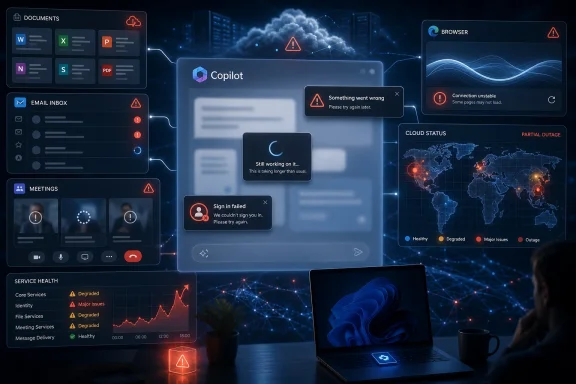 Copilot’s Outage Was Really a Visibility Problem
The May 29 complaints followed the now-familiar cloud-era pattern: users saw failures first, third-party outage trackers lit up second, and official clarity lagged behind. Downdetector-style spikes do not prove a service-wide failure by themselves, because they measure user reports rather than backend telemetry. But when thousands of users describe the same symptom in the same time window, the burden shifts to the provider to explain what is happening.That burden is heavier for Microsoft than it would be for a standalone chatbot company. Copilot is not marketed as a novelty site that users visit when they feel curious. It is pitched as a layer across Windows, Microsoft 365, Edge, Teams, Outlook, Word, Excel, PowerPoint, GitHub, and the admin workflows that increasingly define enterprise computing.
That means a Copilot outage can be many things at once. It can be a consumer web app failing to answer prompts. It can be a Microsoft 365 assistant refusing to summarize a meeting. It can be an enterprise feature that loads but cannot complete work because identity, grounding, retrieval, or model routing is broken somewhere behind the curtain.
This is the uncomfortable part of Microsoft’s AI strategy: Copilot is presented as one brand, but it is not one simple service. It is a family of experiences stitched across cloud infrastructure, app integrations, account systems, content indexes, security boundaries, and large language model endpoints. When something goes wrong, users often cannot tell whether Copilot itself is broken, Microsoft 365 is degraded, Azure is misbehaving, a tenant policy is blocking access, or the model provider path is overloaded.
The Error Message Became the Product Experience
The phrase users kept reporting — “something went wrong” — is not just a bad error message. It is a symbol of the Copilot reliability gap. Microsoft wants Copilot to feel conversational, contextual, and magically integrated, yet when the system fails it often collapses into one of the least informative phrases in software.Traditional productivity applications usually fail in more legible ways. Outlook cannot connect to the server. Word cannot save a document. OneDrive cannot sync a file. These errors are annoying, but they point users and administrators toward a domain: network, storage, authentication, permissions, or application state.
AI assistants blur those domains. A failed Copilot response could mean the prompt was rejected, the model timed out, the user’s license was not recognized, the relevant Microsoft Graph data could not be retrieved, the response violated a content filter, the service was under load, or a regional cloud dependency had degraded. To the user, all of that becomes a spinner, a blank reply, or a shrug from the interface.
That is tolerable when AI is optional. It is harder to accept when an organization has trained workers to ask Copilot for first drafts, spreadsheet explanations, meeting recaps, and inbox triage. The more Microsoft persuades customers that Copilot is a daily work companion, the less room it has for vague failure states.
The irony is that AI software is supposed to reduce complexity for users. During an outage, it often conceals complexity instead. The assistant that can explain a quarterly report cannot explain why it cannot answer a prompt.
Microsoft Has Sold Copilot as Infrastructure
The stakes are higher because Microsoft has spent the last few years repositioning Copilot from feature to infrastructure. It is no longer merely a button in Bing or a sidebar in Edge. It is now the company’s organizing metaphor for productivity, development, administration, security, and eventually Windows itself.That repositioning changes how outages are perceived. A search engine outage is an inconvenience. An email outage is a business incident. A Copilot outage sits somewhere between the two today, but Microsoft clearly wants it to move toward the latter category in importance. If Copilot is the interface to the workday, then Copilot downtime becomes workday downtime.
For enterprises, this matters because adoption decisions are not made only on demos. They are made on reliability, auditability, supportability, and the ability to explain incidents after they occur. A CIO does not merely ask whether Copilot can summarize a Teams meeting. The harder question is whether the organization can depend on it when thousands of employees start using it as muscle memory.
Microsoft has been here before. Exchange Online, Teams, SharePoint, OneDrive, and Azure Active Directory all became indispensable before many customers fully appreciated how much operational risk had shifted into Microsoft’s cloud. Copilot repeats that pattern with a twist: the service does not just host work, it interprets and generates it.
That makes outages psychologically different. When Teams goes down, people know they cannot join a meeting. When Copilot degrades, they may not know whether the answer is unavailable, incomplete, delayed, or subtly wrong. Availability and trust start to merge.
The AI Stack Has More Ways to Fail Than Office Ever Did
Copilot is built on a more complicated dependency chain than the desktop Office world it is gradually augmenting. A Word crash in 2006 was usually local. A Copilot failure in 2026 may involve identity, licensing, app state, Microsoft Graph permissions, retrieval systems, regional Azure capacity, model orchestration, safety filters, and telemetry feedback loops.That complexity is not unique to Microsoft. Every large AI platform faces the same architectural problem: large language model services are computationally expensive, latency-sensitive, and deeply dependent on surrounding systems. The model is only one piece of the experience. The rest is the machinery that decides who you are, what data you are allowed to use, which model should handle the request, how to ground the answer, and how to deliver the result back into the app.
That is why AI outages often look messy from the outside. One user can load the page but not generate an answer. Another can use consumer Copilot but not Microsoft 365 Copilot. A third can query chat but cannot use document grounding. Developers may see GitHub Copilot completions continue while chat functions degrade, or the reverse.
This fragmentation makes user reports noisy, but it does not make them meaningless. In fact, noisy reports are precisely what should be expected from a layered AI service. The product surface is unified; the failure modes are not.
Microsoft’s challenge is to make those layers more transparent without drowning users in backend jargon. Enterprise administrators need enough detail to distinguish a tenant issue from a Microsoft incident. Consumers need a plain answer about whether the service is having trouble. Developers need to know whether their IDE, extension, GitHub account, model endpoint, or organization policy is the culprit.
Downdetector Filled the Silence Microsoft Left Behind
Outage trackers have become the unofficial nervous system of the cloud. They are imperfect, sometimes noisy, and often polluted by unrelated complaints. But users rely on them because official status pages frequently speak too late, too narrowly, or too cautiously.That dynamic appeared again with the Copilot complaints. When users cannot get a straight answer from a service dashboard, they go looking for pattern confirmation. If the map is red, the comment stream is active, and social media is full of identical error messages, people infer that the problem is real.
Providers dislike that inference because user-report platforms do not have privileged backend data. But the alternative is not better unless providers make their own status communication faster and more granular. A green dashboard during a visibly degraded user experience does not reassure people; it teaches them to distrust the dashboard.
Microsoft has multiple status surfaces, and that is part of the problem. Consumer users may check a public service status page. Microsoft 365 administrators may look in the admin center. Azure customers may check Azure Service Health. GitHub users may check GitHub Status. Copilot cuts across all of these worlds, but no single status surface always explains the whole experience.
This is not just a communications issue. It is a product design issue. If Microsoft wants Copilot to be perceived as a unified assistant, it needs incident reporting that matches that unified brand. Otherwise, users experience one Copilot when it works and a maze of status pages when it breaks.
Enterprise Customers Need More Than “Try Again Later”
For a home user, a Copilot outage may mean returning to ordinary web search or writing a paragraph unaided. For an enterprise customer, it can interrupt workflows that have already been redesigned around AI assistance. The difference is not merely scale; it is dependency.Microsoft has encouraged organizations to embed Copilot into knowledge work. That includes drafting documents, summarizing long threads, analyzing spreadsheets, preparing presentations, extracting action items, and querying internal data. Once those workflows become routine, even intermittent failure creates friction that is hard to quantify but easy to feel.
IT departments also face a support burden when Copilot degrades. Users file tickets. Help desks must determine whether the issue is local, tenant-wide, regional, license-related, or Microsoft-side. Administrators need to check service health, test multiple accounts, compare network conditions, and explain uncertainty to business units that only know the assistant stopped working.
This is where AI reliability becomes an operational discipline. Enterprises do not need Copilot to be perfect, but they do need predictable incident handling. They need clear service health messages, meaningful error codes, tenant-specific impact information, and a way to distinguish degradation from misconfiguration.
The phrase “AI-powered productivity” sounds strategic in a keynote. In a help desk queue, it becomes a dependency with a service-level expectation. Microsoft’s enterprise credibility will depend on how well it closes that gap.
Developers Are Watching the Same Cloud From a Different Angle
The Copilot name also creates confusion because GitHub Copilot and Microsoft Copilot are related in brand and ownership but distinct in daily use. Developers who hear that “Copilot is down” may immediately wonder whether code completions, chat, pull request summaries, or agentic coding features are affected. Sometimes the answer will be no. Sometimes a broader dependency could touch multiple services.This ambiguity matters because developer workflows are especially sensitive to latency and trust. Code completion tools work best when they disappear into the rhythm of typing. If suggestions lag, fail, or appear inconsistently, developers quickly revert to manual work or alternative tools.
GitHub has its own status reporting, and its incidents do not always map neatly onto Microsoft 365 or consumer Copilot problems. Still, the Copilot umbrella encourages users to think of these tools as members of the same AI family. That is good marketing when features are expanding. It is less helpful when a failure in one area triggers anxiety about another.
Microsoft and GitHub have also pushed AI from autocomplete into more ambitious development workflows. The more Copilot becomes a coding agent rather than a suggestion engine, the more reliability matters. A flaky autocomplete is annoying. A flaky agent that starts tasks, edits files, or participates in pull request flows is a different category of risk.
For WindowsForum’s audience, this is the larger point: Copilot’s reliability is not just a consumer chatbot story. It touches the developer workstation, the enterprise tenant, the admin console, and the Windows desktop. The same brand now spans too many workflows for outages to be treated as isolated web hiccups.
The Windows Angle Is Still Emerging, But It Matters
Windows users have a particular reason to care about Copilot outages because Microsoft has been steadily making AI part of the operating system’s identity. The Copilot key on new PCs, the Copilot app, Recall-adjacent debates, and AI-assisted settings all point toward a future in which Windows is not merely an operating system but a client for Microsoft’s AI services.That future is not evenly distributed yet. Many Windows users still treat Copilot as removable furniture, something pinned by default that can be ignored. But Microsoft’s direction is clear enough: AI is becoming part of the Windows value proposition, especially on Copilot+ PCs and newer hardware designed around local neural processing.
The May 29 complaints therefore raise a practical question for the next phase of Windows. Which AI features can fail gracefully when cloud services are degraded, and which become useless without Microsoft’s backend? Local AI processing can help, but many of the most useful Copilot scenarios depend on cloud models, organizational data, or live service integration.
If Microsoft wants users to accept AI as a system feature, it will need to separate local resilience from cloud dependency more clearly. A Windows feature that requires the cloud should behave like a cloud feature, with status transparency and fallback expectations. A local feature should remain useful when the network or service layer is troubled.
This distinction will become more important as AI features move deeper into shell, search, file management, accessibility, and productivity. The desktop has historically been judged by responsiveness. Cloud AI is judged by availability. Copilot-era Windows will have to satisfy both.
The Hardest Outage to Handle Is Partial Failure
The phrase “is Copilot down?” sounds binary, but the answer often is not. Modern cloud services rarely fail everywhere, for everyone, in the same way. They degrade by region, feature, account type, request path, and backend dependency.That is especially true for AI. One user’s prompt may fail because it requires document grounding. Another prompt may work because it is a simple conversational answer. A consumer account may behave differently from a work account. A mobile app may fail while the web app succeeds. A tenant with certain security settings may see different behavior from another tenant.
Partial failure is harder for users because it creates doubt. If Copilot works for a colleague but not for you, the problem feels local. If it works for one prompt but not another, the problem feels like user error. If it works in Edge but not in Word, the problem feels like an app bug. This ambiguity is exhausting.
It is also harder for Microsoft to communicate. “Some users may experience intermittent failures when generating responses in certain Copilot experiences” is accurate but unsatisfying. Yet that may be the real shape of the incident. The challenge is not to pretend otherwise, but to provide enough specificity that customers can make decisions.
For enterprises, even partial failures need incident playbooks. If Copilot is unavailable, employees should know when to fall back to standard search, templates, saved prompts, internal knowledge bases, or manual review. If AI-generated summaries are delayed, meetings still need notes. If spreadsheet analysis fails, finance teams still need numbers.
The Trust Problem Is Bigger Than Uptime
Reliability in AI services is not only about whether the service answers. It is about whether users trust the answer, the timing, the data handling, and the vendor’s explanation when things go wrong. Outages test all of those assumptions at once.Microsoft has already faced scrutiny over Copilot’s data boundaries, licensing complexity, and the difference between what users think the assistant can access and what it actually processes. An outage adds another layer: users may not know whether their prompt was received, whether data was processed before the failure, whether a partial result was discarded, or whether retries create duplicated work.
In ordinary SaaS, users are trained to refresh and try again. With AI, retries are not always neutral. A regenerated answer may differ from the first attempt. A failed action may have partly completed. A prompt containing sensitive context may have been submitted even if no useful output returned. These are manageable issues, but they require better UX than a generic failure banner.
Trust also depends on incident memory. If users repeatedly see Copilot stumble without clear explanations, they will treat it as optional even if Microsoft wants it to be central. If administrators cannot explain incidents to leadership, they will slow deployments. If developers see coding assistance as unreliable, they will keep alternative tools close.
That does not mean Copilot must achieve impossible perfection. It means Microsoft must treat transparency as part of reliability. A service can fail and still retain trust if users understand the scope, cause, mitigation, and recovery. A service that fails opaquely teaches users to build habits around its absence.
Microsoft’s AI Ambition Now Requires Boring Operational Excellence
The most revealing thing about the May 29 complaints is how ordinary they are becoming. Cloud outages used to be events. AI degradations are starting to feel like weather: frustrating, hard to localize, and checked through a mix of official forecasts and neighbor reports.That normalization is dangerous for Microsoft. The company is asking customers to pay, deploy, train, and reorganize around Copilot. It cannot afford for users to view the assistant as powerful but temperamental. Enterprise software succeeds when it becomes boringly dependable.
Boring is not an insult here. Boring means clear status pages, intelligible errors, regional detail, admin notifications, public post-incident summaries, and graceful degradation. Boring means the help desk can answer the first wave of tickets without guessing. Boring means users know whether to wait, retry, switch apps, or stop wasting time.
Microsoft has the operational muscle to do this. It runs some of the most important cloud and productivity infrastructure in the world. But Copilot is testing whether that muscle can adapt to AI services whose failures are more ambiguous than a mailbox outage and more personal than a storage incident.
The company’s marketing has been aggressive, and the product surface has expanded quickly. The operational story now has to catch up. Copilot cannot remain a futuristic brand with yesterday’s outage messaging.
The May 29 Lesson Is That AI Needs a Plan B
For users, the practical response is not to panic every time Copilot stumbles. It is to stop treating AI assistance as a single point of failure. If Copilot is part of your workday, then Copilot downtime should be part of your continuity planning.That sounds grand for a chatbot, but it is simply where Microsoft’s strategy has taken us. Once AI writes first drafts, summarizes meetings, and helps query business data, it belongs in the same conversation as email, file sync, identity, and collaboration tooling. Not because it is equally mature, but because users are being encouraged to depend on it.
The healthiest organizations will treat Copilot as an accelerator rather than an irreplaceable operator. They will keep templates, documentation, search tools, and manual review processes alive. They will train employees to understand when AI is useful and when it is unavailable, unreliable, or unnecessary.
Microsoft, for its part, should treat incidents like May 29 as feedback on the product’s social contract. Users are not only asking whether Copilot is down. They are asking whether Microsoft is prepared for Copilot to matter as much as Microsoft says it does.
When the Assistant Becomes the Workflow, the Fallback Becomes the Strategy
The concrete lesson from Friday’s Copilot disruption is not that AI tools are fragile toys. It is that they are becoming real infrastructure faster than the surrounding expectations have matured.- Users reported Copilot failures on May 29, 2026, including slow loading, failed generations, login problems, and generic error messages.
- Downdetector-style spikes are not definitive proof of a platform-wide outage, but they are meaningful evidence when many users report the same symptoms at the same time.
- Microsoft’s Copilot branding now spans consumer, enterprise, developer, and Windows experiences, which makes outage communication more complicated and more important.
- Enterprise administrators need tenant-level clarity, actionable error messages, and status updates that distinguish Copilot degradation from local configuration problems.
- Windows users should expect Microsoft to clarify which AI features depend on cloud services and which can remain useful when Copilot’s backend is degraded.
- Organizations adopting Copilot should build fallback workflows now, before AI assistance becomes too embedded to lose without disruption.
References
- Primary source: capitolskyline.com
Published: Fri, 29 May 2026 16:58:03 GMT
Loading…
capitolskyline.com - Related coverage: windowscentral.com
Microsoft 365 and Outlook are back to normal following outage
Outlook, Teams and Microsoft 365 are no longer experiencing issues www.windowscentral.com
- Related coverage: downforeveryoneorjustme.com

Is Copilot down? Live status and problems past 24 hours
Live problems for Copilot. Error received? Down? Slow? Check what is going on. downforeveryoneorjustme.com
- Related coverage: pingoru.io
Loading…
pingoru.io - Official source: learn.microsoft.com

How to check Microsoft 365 service health - Microsoft 365 Enterprise
View the health status of Microsoft 365 services before you call support to see if there's an active service interruption.learn.microsoft.com - Related coverage: outage.report
Microsoft Copilot down? Outage map, service status, incidents history
See if Microsoft Copilot is down or it's just you. Check current status and outage map. Post yours and see other's reports and complaints outage.report
- Related coverage: isdown.app
Loading…
isdown.app - Related coverage: techradar.com

Microsoft admits an Office bug exposed confidential user emails to Copilot
M365 Copilot Chat was summarizing your emails, whether you granted it access or not. This bug affected Sent and Draft folders.www.techradar.com
- Related coverage: entireweb.com
Loading…
www.entireweb.com - Related coverage: techsifted.com
Loading…
techsifted.com - Related coverage: tomsguide.com
Loading…
www.tomsguide.com - Official source: azure.status.microsoft
Loading…
azure.status.microsoft - Official source: cdn-dynmedia-1.microsoft.com
Loading…
cdn-dynmedia-1.microsoft.com - Related coverage: oregon.gov
Loading…
www.oregon.gov - Related coverage: investigacion.udem.edu.mx
Loading…
investigacion.udem.edu.mx
