

Computerworld columnist Preston Gralla said in June 2026 that he is leaving Microsoft Copilot for Google Gemini after a failed iPhone texting troubleshooting session exposed what he sees as Copilot’s confident but unreliable approach to technical support. The episode is small, almost domestic, but the complaint lands in the middle of a much larger fight over who owns the everyday AI assistant. Microsoft has spent three years trying to make Copilot feel inevitable across Windows, Edge, Microsoft 365, GitHub, and the taskbar. Gralla’s argument is that inevitability is not the same thing as usefulness.
Every generative AI system gets things wrong. That is no longer the scandal. The scandal is that these tools increasingly sit in places where users interpret them not as experiments, but as product features backed by the authority of the platform.
That distinction matters. A chatbot sitting on a website can be treated as a speculative assistant. A chatbot pinned to Windows, embedded in Office, surfaced in Edge, and sold under the Microsoft brand invites a different mental model: this thing is supposed to know how Microsoft-style computing works. When it gives bad advice in that context, the failure feels less like a model limitation and more like a broken support channel.
Gralla’s iPhone texting problem is not a Windows bug, and that is precisely why it is useful. The modern AI assistant is being sold as a general-purpose helper, not merely as a command parser for one vendor’s software. Users ask it about phones, routers, printers, cloud accounts, family tech mishaps, travel plans, spreadsheets, invoices, error messages, and the thousand tiny failures that make up real computing life.
The complaint in the Computerworld piece is not simply that Copilot failed to diagnose why texts sent to an email address arrived while texts sent to a phone number did not. It is that Copilot framed its answer with unearned certainty, narrowed the problem prematurely, and then doubled down with another confident “straight to the switch” style promise. That is the pattern IT people know too well: the tool did not merely lack the answer; it made the troubleshooting process worse.
A wrong answer in a demo can be laughed off. A wrong answer during a real support problem becomes a tax on the user’s attention. It sends them into menus that do not matter, resets settings that were fine, and erodes the confidence needed to try the next step. The damage is not only the bad fact. It is the false path.
This is especially painful in tech support because troubleshooting depends on sequence. A good technician does not merely know possible causes; they rank them by likelihood, reversibility, diagnostic value, and risk. They ask what changed, distinguish iMessage from SMS, isolate device settings from carrier provisioning, and avoid destructive steps until the boring explanations are exhausted.
Large language models are good at sounding like that process. They can produce a plausible ladder of checks and fixes. But plausibility is not the same as disciplined diagnosis, and a consumer assistant that announces there are “only two real explanations” when reality contains more than two has already failed the craft of support.
That is why Gralla’s anecdote stings. Microsoft has marketed Copilot as a productivity layer, a companion, a work accelerator, and a way to reduce friction. Yet the most common technology job in households and small offices is not writing a memo or summarizing a deck. It is figuring out why the thing that worked yesterday is not working today.
That is a powerful strategy, but it has a trust problem. The more places Copilot appears, the more chances users have to decide whether it deserves that placement. If the assistant is helpful, the ubiquity feels like convenience. If it is mediocre, the ubiquity feels like pressure.
This tension has shown up repeatedly in Microsoft’s shifting Copilot footprint. The company has pushed Copilot into Windows 11, changed how the Windows Copilot experience behaves, adjusted Microsoft 365 access, experimented with taskbar entry points, and continued to repackage AI surfaces across consumer and business products. Some of these moves are sensible product iteration. Others have felt like a company still searching for the right contract with users.
That matters for WindowsForum readers because Windows users have lived through decades of Microsoft bundling strategy. Internet Explorer, Teams, OneDrive, Edge, Widgets, Recall, and Copilot are different products from different eras, but they all raise the same underlying question: is Microsoft adding a capability because users asked for it, or because the platform gives Microsoft a privileged place to promote it?
Copilot’s weakness is not merely that Gemini, ChatGPT, Claude, or another assistant might answer some questions better. It is that Copilot’s placement inside the Windows and Microsoft 365 universe creates a higher burden. A default assistant has to earn default trust.
Still, in Gralla’s framing, Gemini has one major advantage: he chose it after Copilot disappointed him. That user journey changes the emotional contract. Gemini becomes the alternative reached for after a bad experience, not the thing that showed up by default and then failed to justify itself.
This is one reason AI assistant competition is likely to be more volatile than the browser wars or office-suite wars. Users can switch between chatbots in seconds. They can ask the same question to Copilot, Gemini, ChatGPT, and Claude, then keep using whichever one seems least wrong or most helpful in that moment. The switching cost is low, even if the ecosystem lock-in around files, email, calendars, and business data remains high.
Microsoft knows this, which is why Copilot is not just a chatbot. It is also a licensing product, a Microsoft 365 feature family, an enterprise governance story, a developer tool brand, and a Windows interface bet. The name “Copilot” now covers so much territory that user disappointment in one corner can bleed into the whole brand.
Gemini’s benefit, for now, is sharper comparative identity. To many users, it is “the Google AI one.” Copilot is “the Microsoft AI thing,” but that thing might mean a Windows app, a sidebar, an Office button, a GitHub coding assistant, an enterprise chat agent, or a consumer chatbot. Brand breadth can become brand fog.
A competent AI tech-support assistant should often begin with uncertainty. It should say what information would distinguish one cause from another. It should rank hypotheses without pretending the list is exhaustive. It should separate safe checks from risky changes. It should explain how to undo anything it asks the user to change.
That kind of behavior is not glamorous. It does not produce the same demo magic as generating a presentation from a prompt or summarizing a meeting. But it is the difference between an assistant and a stochastic help-desk cosplayer.
For Microsoft, this is a particularly urgent design challenge because Windows users already deal with a support ecosystem full of outdated forum posts, SEO spam, registry folklore, driver voodoo, and vendor scripts. If Copilot simply synthesizes that mess into a confident answer, it has not solved support. It has laundered the mess through a friendlier voice.
The future AI support tool needs to know when to stop talking. It should ask for the exact iOS version, carrier, message settings, Apple ID configuration, SIM/eSIM status, and whether the number is registered with iMessage. It should tell the user when the next step belongs with Apple, the carrier, or a device reset. It should not declare victory before the facts support it.
Enterprises are not just buying AI for creative writing. They are buying it for knowledge retrieval, process automation, support deflection, document analysis, coding help, compliance triage, and operational decision support. In those settings, a wrong answer with confident formatting can be worse than no answer at all.
Microsoft’s pitch to enterprises has leaned heavily on security, identity, tenant boundaries, compliance controls, and integration with Microsoft Graph. Those are real advantages. A chatbot that can operate within an organization’s permission model is more deployable than a consumer tool pasted into a browser tab.
But governance does not make an answer correct. It makes the data path more controlled. Enterprise buyers still have to evaluate whether Copilot improves outcomes in specific workflows, and whether its behavior under uncertainty matches the organization’s tolerance for risk.
That is where stories like Gralla’s have influence beyond their immediate facts. They reinforce a suspicion many admins already have: AI assistants are useful, but they are not yet reliable enough to be treated as autonomous troubleshooters. They need guardrails, logging, escalation paths, and a culture that treats their output as provisional.
But the brand now carries a promise Microsoft cannot always keep. A copilot should reduce workload. It should monitor, cross-check, and improve the operator’s decisions. If the human has to supervise every answer, verify every premise, and recover from every confident detour, the metaphor starts to collapse.
This is particularly acute because Microsoft’s ecosystem has trained users to expect integration as competence. If Word checks grammar, Excel calculates formulas, Outlook handles mail rules, and Windows manages devices, then Copilot’s presence beside those tools suggests a similar level of functional dependability. Generative AI does not yet work that way.
The more Microsoft wraps Copilot in familiar productivity surfaces, the less patience users will have for “AI is experimental” disclaimers. A lab feature can be flaky. A paid assistant in business software is judged by business-software standards.
That is the bind Microsoft created for itself. It moved faster than almost anyone to productize generative AI across mainstream computing. Now it has to make the product feel less like a demo and more like infrastructure.
Microsoft clearly wants Windows to be an AI-mediated environment. Search, settings, local files, screenshots, app actions, and cloud work are all candidates for natural-language control. If that vision works, Windows becomes less of a menu maze and more of a conversational workspace. If it does not, Windows becomes an operating system with yet another layer of noisy suggestions.
The technical challenge is formidable. A Windows AI assistant must understand local context, cloud context, user intent, privacy boundaries, enterprise policy, application state, and the difference between advice and action. It must work for consumers and managed fleets. It must be useful on powerful Copilot+ PCs and ordinary machines that will remain in service for years.
The social challenge may be harder. Windows users have a long memory for features that felt pushed rather than earned. They remember upgrade nags, default app resets, ads in system surfaces, Microsoft account pressure, and the periodic sense that the operating system is serving corporate strategy as much as user intent.
Copilot can overcome that history only by being visibly useful. Not theoretically useful, not strategically important, not impressive in a keynote. Useful in the dull moments: fixing Bluetooth, explaining a Windows Update error, finding the setting that moved, translating a cryptic dialog box, and knowing when it does not know.
That is bad news for any assistant that wins demos but loses troubleshooting sessions. Ordinary users do not benchmark models. They remember whether the answer worked. They remember whether the assistant wasted their time. They remember whether the tool sounded certain and then turned out to be wrong.
This is why Gemini, ChatGPT, Claude, and Copilot will increasingly be judged by behavioral style as much as raw capability. Does the assistant ask clarifying questions? Does it admit uncertainty? Does it cite the relevant setting or policy accurately? Does it keep track of what the user already tried? Does it resist the temptation to invent a missing step?
Microsoft’s challenge is sharpened by the fact that Copilot is not merely competing with other chatbots. It is competing with Google Search, Reddit, Apple Support, Microsoft Learn, Stack Overflow, vendor forums, YouTube tutorials, and the friend who has fixed this exact thing before. A good AI assistant can synthesize those worlds. A bad one becomes just another unreliable layer above them.
Gralla’s switch to Gemini should be read less as a final verdict on all Copilot use and more as a warning flare. Users are willing to experiment, but they are not infinitely patient. The assistant that fails at a concrete task may not get a second chance, especially when the rival tab is already open.
That means designing for escalation. When a problem crosses into Apple account behavior, carrier provisioning, or device activation, Copilot should say so plainly. When it is relying on general knowledge rather than authoritative documentation, it should make that clear. When a user has tried the obvious fixes, it should stop recycling them.
It also means Microsoft should resist the urge to make every Copilot surface feel equally authoritative. A creative drafting assistant can be playful. A Windows settings assistant should be precise. A coding assistant can propose alternatives. A security or admin assistant must be careful about scope and consequences.
This is where enterprise discipline could improve the consumer product. IT support workflows already know about triage, escalation, runbooks, known issues, severity, rollback, and audit trails. A consumer Copilot that borrowed those habits would be less magical and far more useful.
The irony is that Microsoft has the raw ingredients to build exactly that. It has documentation, telemetry, support channels, identity systems, endpoint management tools, and decades of Windows compatibility knowledge. The question is whether Copilot can connect those assets in a way that behaves like support rather than autocomplete.
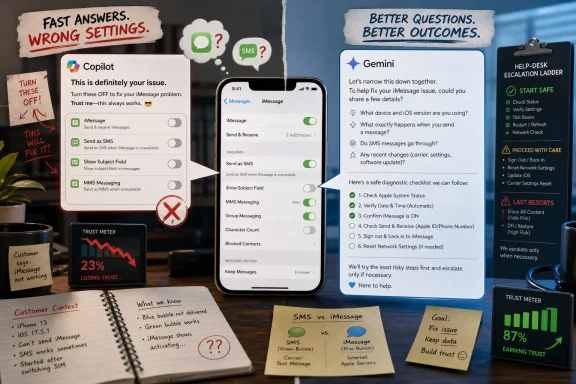 Copilot’s Problem Is Not That It Gets Things Wrong
Every generative AI system gets things wrong. That is no longer the scandal. The scandal is that these tools increasingly sit in places where users interpret them not as experiments, but as product features backed by the authority of the platform.That distinction matters. A chatbot sitting on a website can be treated as a speculative assistant. A chatbot pinned to Windows, embedded in Office, surfaced in Edge, and sold under the Microsoft brand invites a different mental model: this thing is supposed to know how Microsoft-style computing works. When it gives bad advice in that context, the failure feels less like a model limitation and more like a broken support channel.
Gralla’s iPhone texting problem is not a Windows bug, and that is precisely why it is useful. The modern AI assistant is being sold as a general-purpose helper, not merely as a command parser for one vendor’s software. Users ask it about phones, routers, printers, cloud accounts, family tech mishaps, travel plans, spreadsheets, invoices, error messages, and the thousand tiny failures that make up real computing life.
The complaint in the Computerworld piece is not simply that Copilot failed to diagnose why texts sent to an email address arrived while texts sent to a phone number did not. It is that Copilot framed its answer with unearned certainty, narrowed the problem prematurely, and then doubled down with another confident “straight to the switch” style promise. That is the pattern IT people know too well: the tool did not merely lack the answer; it made the troubleshooting process worse.
The Hallucination Everyone Notices Is the One That Wastes Saturday Afternoon
AI vendors often discuss hallucination as an abstract accuracy problem. Consumers experience it as wasted time. The difference is not semantic; it is the whole market.A wrong answer in a demo can be laughed off. A wrong answer during a real support problem becomes a tax on the user’s attention. It sends them into menus that do not matter, resets settings that were fine, and erodes the confidence needed to try the next step. The damage is not only the bad fact. It is the false path.
This is especially painful in tech support because troubleshooting depends on sequence. A good technician does not merely know possible causes; they rank them by likelihood, reversibility, diagnostic value, and risk. They ask what changed, distinguish iMessage from SMS, isolate device settings from carrier provisioning, and avoid destructive steps until the boring explanations are exhausted.
Large language models are good at sounding like that process. They can produce a plausible ladder of checks and fixes. But plausibility is not the same as disciplined diagnosis, and a consumer assistant that announces there are “only two real explanations” when reality contains more than two has already failed the craft of support.
That is why Gralla’s anecdote stings. Microsoft has marketed Copilot as a productivity layer, a companion, a work accelerator, and a way to reduce friction. Yet the most common technology job in households and small offices is not writing a memo or summarizing a deck. It is figuring out why the thing that worked yesterday is not working today.
Microsoft Built Distribution Before Trust
Microsoft’s Copilot strategy has been an object lesson in platform leverage. The company did not need to win every AI comparison on pure model preference because it had Windows, Office, Teams, Edge, Outlook, GitHub, and a vast enterprise licensing machine. It could put Copilot where people already worked.That is a powerful strategy, but it has a trust problem. The more places Copilot appears, the more chances users have to decide whether it deserves that placement. If the assistant is helpful, the ubiquity feels like convenience. If it is mediocre, the ubiquity feels like pressure.
This tension has shown up repeatedly in Microsoft’s shifting Copilot footprint. The company has pushed Copilot into Windows 11, changed how the Windows Copilot experience behaves, adjusted Microsoft 365 access, experimented with taskbar entry points, and continued to repackage AI surfaces across consumer and business products. Some of these moves are sensible product iteration. Others have felt like a company still searching for the right contract with users.
That matters for WindowsForum readers because Windows users have lived through decades of Microsoft bundling strategy. Internet Explorer, Teams, OneDrive, Edge, Widgets, Recall, and Copilot are different products from different eras, but they all raise the same underlying question: is Microsoft adding a capability because users asked for it, or because the platform gives Microsoft a privileged place to promote it?
Copilot’s weakness is not merely that Gemini, ChatGPT, Claude, or another assistant might answer some questions better. It is that Copilot’s placement inside the Windows and Microsoft 365 universe creates a higher burden. A default assistant has to earn default trust.
Gemini Benefits From Being Chosen, Not Imposed
Google’s Gemini is hardly a neutral outsider. It is backed by one of the few companies with the infrastructure, data, distribution, and AI research depth to compete with Microsoft and OpenAI at scale. Google has its own ecosystem agenda, its own bundling instincts, and its own history of launching confusingly named AI products.Still, in Gralla’s framing, Gemini has one major advantage: he chose it after Copilot disappointed him. That user journey changes the emotional contract. Gemini becomes the alternative reached for after a bad experience, not the thing that showed up by default and then failed to justify itself.
This is one reason AI assistant competition is likely to be more volatile than the browser wars or office-suite wars. Users can switch between chatbots in seconds. They can ask the same question to Copilot, Gemini, ChatGPT, and Claude, then keep using whichever one seems least wrong or most helpful in that moment. The switching cost is low, even if the ecosystem lock-in around files, email, calendars, and business data remains high.
Microsoft knows this, which is why Copilot is not just a chatbot. It is also a licensing product, a Microsoft 365 feature family, an enterprise governance story, a developer tool brand, and a Windows interface bet. The name “Copilot” now covers so much territory that user disappointment in one corner can bleed into the whole brand.
Gemini’s benefit, for now, is sharper comparative identity. To many users, it is “the Google AI one.” Copilot is “the Microsoft AI thing,” but that thing might mean a Windows app, a sidebar, an Office button, a GitHub coding assistant, an enterprise chat agent, or a consumer chatbot. Brand breadth can become brand fog.
The Best AI Troubleshooter Will Behave Less Like a Know-It-All
The problem Gralla describes is not solved by making the model more verbose. It is solved by making the assistant more humble, more diagnostic, and more aware of when the user needs verification rather than confidence.A competent AI tech-support assistant should often begin with uncertainty. It should say what information would distinguish one cause from another. It should rank hypotheses without pretending the list is exhaustive. It should separate safe checks from risky changes. It should explain how to undo anything it asks the user to change.
That kind of behavior is not glamorous. It does not produce the same demo magic as generating a presentation from a prompt or summarizing a meeting. But it is the difference between an assistant and a stochastic help-desk cosplayer.
For Microsoft, this is a particularly urgent design challenge because Windows users already deal with a support ecosystem full of outdated forum posts, SEO spam, registry folklore, driver voodoo, and vendor scripts. If Copilot simply synthesizes that mess into a confident answer, it has not solved support. It has laundered the mess through a friendlier voice.
The future AI support tool needs to know when to stop talking. It should ask for the exact iOS version, carrier, message settings, Apple ID configuration, SIM/eSIM status, and whether the number is registered with iMessage. It should tell the user when the next step belongs with Apple, the carrier, or a device reset. It should not declare victory before the facts support it.
Enterprise IT Will Read This as a Governance Story
A consumer anecdote about iPhone texts may seem far removed from enterprise AI deployment, but IT departments will recognize the shape of the risk. The same overconfidence that wastes a home user’s afternoon can mislead a help-desk technician, a junior admin, or a business user trying to interpret an error in a production workflow.Enterprises are not just buying AI for creative writing. They are buying it for knowledge retrieval, process automation, support deflection, document analysis, coding help, compliance triage, and operational decision support. In those settings, a wrong answer with confident formatting can be worse than no answer at all.
Microsoft’s pitch to enterprises has leaned heavily on security, identity, tenant boundaries, compliance controls, and integration with Microsoft Graph. Those are real advantages. A chatbot that can operate within an organization’s permission model is more deployable than a consumer tool pasted into a browser tab.
But governance does not make an answer correct. It makes the data path more controlled. Enterprise buyers still have to evaluate whether Copilot improves outcomes in specific workflows, and whether its behavior under uncertainty matches the organization’s tolerance for risk.
That is where stories like Gralla’s have influence beyond their immediate facts. They reinforce a suspicion many admins already have: AI assistants are useful, but they are not yet reliable enough to be treated as autonomous troubleshooters. They need guardrails, logging, escalation paths, and a culture that treats their output as provisional.
Microsoft’s Brand Promise Is Working Against It
The name “Copilot” was clever when Microsoft introduced it broadly. It implied assistance without autonomy, guidance without replacement, a helper sitting beside the user rather than a machine taking over. In a skeptical market, that was the right tone.But the brand now carries a promise Microsoft cannot always keep. A copilot should reduce workload. It should monitor, cross-check, and improve the operator’s decisions. If the human has to supervise every answer, verify every premise, and recover from every confident detour, the metaphor starts to collapse.
This is particularly acute because Microsoft’s ecosystem has trained users to expect integration as competence. If Word checks grammar, Excel calculates formulas, Outlook handles mail rules, and Windows manages devices, then Copilot’s presence beside those tools suggests a similar level of functional dependability. Generative AI does not yet work that way.
The more Microsoft wraps Copilot in familiar productivity surfaces, the less patience users will have for “AI is experimental” disclaimers. A lab feature can be flaky. A paid assistant in business software is judged by business-software standards.
That is the bind Microsoft created for itself. It moved faster than almost anyone to productize generative AI across mainstream computing. Now it has to make the product feel less like a demo and more like infrastructure.
The Windows Angle Is Bigger Than One Chatbot
For Windows users, the Copilot-versus-Gemini question is not only about which assistant gives the better answer today. It is about what kind of operating system Windows is becoming.Microsoft clearly wants Windows to be an AI-mediated environment. Search, settings, local files, screenshots, app actions, and cloud work are all candidates for natural-language control. If that vision works, Windows becomes less of a menu maze and more of a conversational workspace. If it does not, Windows becomes an operating system with yet another layer of noisy suggestions.
The technical challenge is formidable. A Windows AI assistant must understand local context, cloud context, user intent, privacy boundaries, enterprise policy, application state, and the difference between advice and action. It must work for consumers and managed fleets. It must be useful on powerful Copilot+ PCs and ordinary machines that will remain in service for years.
The social challenge may be harder. Windows users have a long memory for features that felt pushed rather than earned. They remember upgrade nags, default app resets, ads in system surfaces, Microsoft account pressure, and the periodic sense that the operating system is serving corporate strategy as much as user intent.
Copilot can overcome that history only by being visibly useful. Not theoretically useful, not strategically important, not impressive in a keynote. Useful in the dull moments: fixing Bluetooth, explaining a Windows Update error, finding the setting that moved, translating a cryptic dialog box, and knowing when it does not know.
The AI Race Is Becoming a Reliability Race
The first phase of consumer AI competition was about astonishment. The second was about multimodality, context windows, coding ability, and speed. The next phase will be about reliability under ordinary pressure.That is bad news for any assistant that wins demos but loses troubleshooting sessions. Ordinary users do not benchmark models. They remember whether the answer worked. They remember whether the assistant wasted their time. They remember whether the tool sounded certain and then turned out to be wrong.
This is why Gemini, ChatGPT, Claude, and Copilot will increasingly be judged by behavioral style as much as raw capability. Does the assistant ask clarifying questions? Does it admit uncertainty? Does it cite the relevant setting or policy accurately? Does it keep track of what the user already tried? Does it resist the temptation to invent a missing step?
Microsoft’s challenge is sharpened by the fact that Copilot is not merely competing with other chatbots. It is competing with Google Search, Reddit, Apple Support, Microsoft Learn, Stack Overflow, vendor forums, YouTube tutorials, and the friend who has fixed this exact thing before. A good AI assistant can synthesize those worlds. A bad one becomes just another unreliable layer above them.
Gralla’s switch to Gemini should be read less as a final verdict on all Copilot use and more as a warning flare. Users are willing to experiment, but they are not infinitely patient. The assistant that fails at a concrete task may not get a second chance, especially when the rival tab is already open.
The Copilot Brand Needs Fewer Promises and Better Escalation
Microsoft does not need Copilot to be perfect to keep it relevant. It needs Copilot to become more trustworthy in the moments where imperfection is likely.That means designing for escalation. When a problem crosses into Apple account behavior, carrier provisioning, or device activation, Copilot should say so plainly. When it is relying on general knowledge rather than authoritative documentation, it should make that clear. When a user has tried the obvious fixes, it should stop recycling them.
It also means Microsoft should resist the urge to make every Copilot surface feel equally authoritative. A creative drafting assistant can be playful. A Windows settings assistant should be precise. A coding assistant can propose alternatives. A security or admin assistant must be careful about scope and consequences.
This is where enterprise discipline could improve the consumer product. IT support workflows already know about triage, escalation, runbooks, known issues, severity, rollback, and audit trails. A consumer Copilot that borrowed those habits would be less magical and far more useful.
The irony is that Microsoft has the raw ingredients to build exactly that. It has documentation, telemetry, support channels, identity systems, endpoint management tools, and decades of Windows compatibility knowledge. The question is whether Copilot can connect those assets in a way that behaves like support rather than autocomplete.
The Lesson From One Botched iPhone Fix Is Bigger Than Copilot
The useful reading of Gralla’s complaint is not that Gemini is now the universal winner or that Copilot is useless. AI assistants change too quickly for that kind of permanent scoreboard. The useful reading is that the market is starting to punish assistants for bad judgment, not just bad facts.- Copilot’s central weakness in the Computerworld account was overconfidence during troubleshooting, not merely an incorrect answer.
- Microsoft’s deep Windows and Microsoft 365 integration raises expectations that Copilot will behave like a dependable product feature rather than a casual chatbot.
- Gemini gains from being an active user choice, especially when users arrive after a disappointing Copilot session.
- Enterprise IT should treat consumer failures as signals about model behavior under uncertainty, particularly in support and operations workflows.
- The next competitive frontier for AI assistants will be disciplined reliability, escalation, and humility rather than sheer presence across apps.
References
- Primary source: Computerworld
Published: Wed, 10 Jun 2026 11:23:32 GMT
Why I’m leaving Copilot for Gemini – Computerworld
It’s pretty simple: Google’s Gemini outpaces Microsoft’s Copilot on all of the personal tasks I find important. www.computerworld.com
- Related coverage: windowslatest.com
Former Microsoft VP says Microsoft missed the AI wave like the internet and mobile, as Copilot scales back in Windows 11
Former Microsoft PM says the company's AI push failed, citing Copilot's dismal 3.3% adoption rate and calling for a massive factory reset. www.windowslatest.com
- Related coverage: techradar.com
Microsoft AI CEO admits Gemini 'can do things that Copilot can’t do' | TechRadar
But is betting on Copilot’s long‑term role in daily lifewww.techradar.com - Related coverage: digitalapplied.com
GitHub Copilot Drops Gemini: Model Shakeup May 2026
GitHub removes all Gemini models from Copilot Chat, pulls Opus from Pro, and adds usage limits ahead of June 1 usage-based billing. What changes.www.digitalapplied.com - Related coverage: theregister.com
Bye-bye, Gemini CLI; Google nudges devs toward Antigravity
Most users lose access June 18 - unless you’ve got enterprise creds or paid API keyswww.theregister.com - Related coverage: howtogeek.com
Microsoft Copilot Disappears After Recent Windows Update
If you want Copilot back, here's how to get it. www.howtogeek.com
- Related coverage: forbes.com
Microsoft Ends Claude Code Licenses As It Shifts Developers To Copilot
Microsoft ends Claude Code licenses and shifts developers to its in‑house Copilot model, signaling a strategic move toward AI self‑sufficiency and distribution power.www.forbes.com - Related coverage: arstechnica.com
Windows 11 updates are accidentally getting rid of Copilot, at least for now - Ars Technica
Copilot can be reinstalled from the Microsoft Store if it's something you want.arstechnica.com - Related coverage: guidingtech.com
How to Fix Copilot Not Working in Microsoft Office Apps - Guiding Tech
Frustrated by Copilot not working in MS Office? We’ve got a few fixes for you to try, be it Office Home or Microsoft 365.www.guidingtech.com
- Official source: support.microsoft.com
How Copilot Chat works in Microsoft 365 apps | Microsoft Support
How Copilot Chat works in Microsoft 365 appssupport.microsoft.com - Official source: learn.microsoft.com
Pin Microsoft 365 Copilot and its companion apps to the Windows taskbar | Microsoft Learn
Learn how to improve the use of Microsoft 365 Copilot across your organization by pinning the Copilot app to the Windows taskbar.learn.microsoft.com - Related coverage: office-watch.com
Microsoft Kills Free Copilot Chat in Word, Excel and PowerPoint: What Happens on April 15
Microsoft is switching off free Copilot Chat inside Word, Excel, PowerPoint, and OneNote for millions of Microsoft 365 business users starting April 15, 2026. Uoffice-watch.com
- Related coverage: windowscentral.com
Microsoft 365 is paywalling most of Copilot in its Office apps | Windows Central
Commercial customers will soon need a Microsoft 365 Copilot license to use Copilot Chat in Word, Excel, PowerPoint, and OneNote.www.windowscentral.com - Related coverage: its.wsu.edu
Copilot Chat Removed from Word, Excel, PowerPoint, and OneNote | Information Technology Services | Washington State University
Please see the following scheduled Microsoft change: Date: Effective immediately The following work is being completed: Microsoft has removed the no-cost Copilot Chat feature in Word, Excel, PowerPoint, and OneNote for users without a paid Microsoft 365 Copilot license. All affected groups... its.wsu.edu
- Related coverage: tomshardware.com
Admins finally get the power to uninstall Microsoft Copilot on Windows 11 Pro, Enterprise, and EDU versions — devices must meet specific conditions to allow the removal of the AI app | Tom's Hardware
One less bloatware on Windows 11.www.tomshardware.com - Related coverage: its.fsu.edu
- Related coverage: spscc.edu
- Related coverage: m365maps.com
- Official source: microsoft.com
</rdf:Alt> </dc:title> <dc:description> <rdf:Alt> <rdf:li xml:lang="x-default"/> </rdf:Alt> </dc:description> <dc:creator> <rdf:Seq> <rdf:li>Lukas V
</rdf:Alt> </dc:description> <dc:creator> <rdf:Seq> <rdf:li>Lukas Velushwww.microsoft.com
