

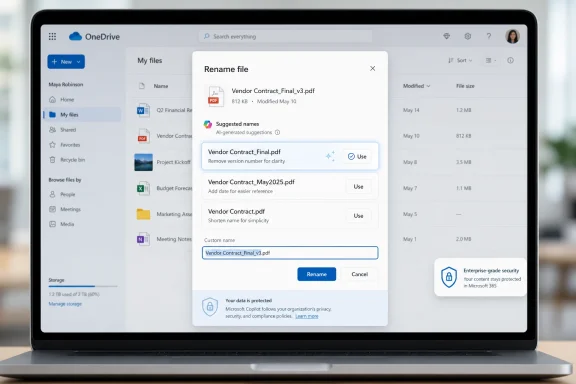
Microsoft is adding Copilot Suggested Rename to OneDrive on the web in June 2026, giving personal and business users three AI-generated filename suggestions inside the rename dialog and after single-file uploads for supported files including Office documents, PDFs, Markdown, and images. That sounds like a tiny quality-of-life feature, and in one sense it is. But it also says something larger about where Microsoft believes AI belongs: not only in chat boxes and agents, but in the dull, repetitive seams of everyday file management. The question is whether this is the kind of ambient intelligence users actually want, or another Copilot surface area that administrators will have to explain, license, govern, and sometimes disable.
The best AI features are often the least theatrical. Nobody needs a keynote demo to understand why a folder full of
Copilot Suggested Rename attacks that problem at the moment of friction. Instead of asking users to open a separate assistant, describe the file, wait for a response, and manually paste a result, Microsoft is putting the suggestion into the rename flow itself. When the user chooses to rename a file in OneDrive on the web, Copilot reads the content and offers three context-aware names.
That placement matters. Microsoft has spent the last few years stuffing Copilot into sidebars, apps, taskbars, and chat windows, often asking users to change habits before seeing value. Here, the company is doing the more useful thing: finding an existing micro-task and shaving off the part people avoid.
The feature also appears in the post-upload toast for a single supported file, which may prove more important than the rename dialog. The best time to name a file properly is immediately after it lands in storage, before it disappears into a sync folder, a shared library, or a project archive. If Microsoft can nudge users at that point, the payoff compounds over time.
That is both logical and risky. Files are where work lives, and filenames are the oldest metadata most users still create themselves. If Copilot can summarize a document, answer questions about a deck, and generate a response grounded in your tenant data, it can probably propose a better name than
But file naming is also close to the boundary between helpful automation and unwanted inference. A rename suggestion is a claim about what a file is. For a vacation itinerary or meeting agenda, that is harmless enough. For HR records, legal drafts, acquisition plans, medical paperwork, or confidential scans, the suggested name can reveal sensitive context even before anyone opens the document.
That does not mean the feature is inherently unsafe. It means Microsoft is moving AI into metadata, and metadata has always been one of the easiest places to leak meaning. A file called
The web version of OneDrive is where Microsoft can most easily control the experience, enforce Microsoft 365 identity, apply service-side protections, and update the feature without waiting for Windows client release cycles. It is also where Copilot’s cloud-based reasoning already fits most naturally. A browser-based rename dialog can call the service, show suggestions, and avoid entangling the feature with the local filesystem and sync engine.
For administrators, web-only availability is also a containment boundary. A feature inside OneDrive on the web is easier to document and support than an AI rename layer wired into every Explorer window. The desktop sync client already has enough edge cases involving path length, invalid characters, conflicting edits, offline availability, and cross-platform behavior. Adding AI-generated names directly into that pipeline would create a much larger blast radius.
Still, the web-only launch also limits the feature’s cultural impact. Many users do not “go to OneDrive” to manage files; they live in File Explorer, Finder, Office save dialogs, Teams, Outlook attachments, and mobile camera uploads. If Suggested Rename remains a web-only convenience, it will help the users who already organize files in the browser. If it spreads to desktop and mobile later, it becomes a genuine file-management layer.
Office files are the obvious win. Their internal structure gives Copilot titles, headings, sheet names, slide text, and document bodies to inspect. PDFs are more variable, especially when they are scanned images rather than text-based documents, but they are also where bad filenames are most common. Anyone who has managed invoices, forms, contracts, receipts, or downloaded statements knows the problem.
Markdown support is a quiet nod to developers, technical writers, and note-taking workflows. It suggests Microsoft is not treating this purely as an Office-worker feature. OneDrive may not be GitHub, but plenty of technical users keep notes, drafts, scripts, documentation fragments, and personal knowledge bases in synced folders.
Image support is the most interesting and the most delicate. If Copilot can name an image from visual content, the feature becomes useful for screenshots, whiteboard photos, receipts, diagrams, and camera uploads. It also raises obvious questions about how descriptive those names should be, whether faces or locations are inferred, and whether the system will avoid names that create privacy problems.
Search was supposed to solve this. In practice, search helps only when users remember a keyword, when indexing works, when permissions are clear, and when the result list is not polluted by years of vaguely similar documents. A good filename remains a primitive but powerful signal. It is visible in sync folders, email links, mobile apps, backup tools, audit exports, and legal holds.
Copilot Suggested Rename is therefore not just about convenience. It is about pushing metadata creation closer to the moment of content creation. If the system can make the good behavior easier than the bad behavior, it may succeed where corporate naming conventions usually fail.
Anyone who has tried to enforce a filename policy knows how quickly it becomes theater. Users forget the pattern, abbreviate inconsistently, avoid renaming attachments, or dump everything into a “Temp” folder that becomes permanent. An AI suggestion will not create a records-management utopia, but it might reduce the long tail of useless names.
Three suggestions is a sensible interface choice because it gives the user agency without turning the task into prompt engineering. But it also means Microsoft has to decide what “good” looks like. Should the name prioritize document title, date, client, project, author, topic, or document type? Should it preserve existing naming conventions? Should it avoid confidential terms? Should it include dates extracted from the file, the upload time, or neither?
The answer will vary by organization. A law firm, a school district, a contractor, a medical office, and a hobbyist all have different ideas of a helpful name. If the first version is too generic, users will ignore it. If it is too specific, administrators may worry about exposure. If it is inconsistent, it becomes just another source of file sprawl.
Microsoft’s best path is probably not full automation. The safest version of this feature is assistive: suggest, preview, let the user choose, and make it easy to decline. The moment it becomes silent auto-renaming, it stops being a productivity aid and becomes an incident generator.
Microsoft’s enterprise Copilot story has consistently emphasized that work data is handled inside the Microsoft 365 service boundary and is not used to train foundation models. That assurance will matter here, but it will not end the discussion. Many organizations are less worried about model training than about oversharing, accidental disclosure, prompt injection, auditability, and user confusion.
The rename dialog is a deceptively powerful place to put AI because it touches content and metadata at once. If a user with access to a file can generate a descriptive name, that may be perfectly aligned with permissions. But the suggested name can then travel farther than the document contents: into sync logs, link previews, search results, recent-file lists, email notifications, screenshots, and external shares.
This is why IT departments will want policy controls, or at least clear documentation. Suggested Rename sounds small until it intersects with regulated data, guest sharing, eDiscovery, and classification policies. A filename created by AI is still a filename the organization owns.
Suggested Rename cuts through some of that noise because it does one job. It does not ask the user to imagine a new workflow. It does not require a grand theory of agents. It takes a common annoyance and offers a plausible shortcut.
That is where Copilot may find its most durable role. Not as an omniscient assistant hovering over every task, but as a set of small, contextual interventions that make the default path less sloppy. Rename the file. Summarize the attachment before sharing. Extract the action items. Create the meeting note. Find the policy buried in a SharePoint library. These features are not glamorous, but they map to real work.
The danger is that Microsoft will overreach. Users can tolerate AI suggestions that are easy to ignore. They are less forgiving when AI changes defaults, inserts itself into sensitive workflows, or demands attention for marginal gains. The more ambient Copilot becomes, the more important restraint becomes.
A cloud-only rename suggestion in OneDrive on the web is one thing. A Windows shell feature that reads local files to propose names is another. Even if limited to synced OneDrive content, the perception would be different. Users who are already skeptical of OneDrive integration in Windows would see it as another sign that Microsoft wants the filesystem to become a Microsoft 365 surface.
There are technical reasons to move carefully. Local files can be offline, partially synced, encrypted, blocked by policy, or stored in formats Copilot cannot process reliably. Explorer also has to handle bulk operations, legacy paths, third-party shell extensions, and power-user workflows that do not map cleanly to a web toast.
Still, the user demand will be there. The people with the worst filename messes are often not carefully browsing OneDrive on the web. They are scanning documents to a desktop folder, dragging downloads into project directories, saving screenshots, and letting Office autosave into whatever location was last used. If Microsoft wants this feature to matter beyond the Microsoft 365 web experience, it eventually has to meet those users where they work.
That may sound minor, but metadata is how systems remember. File names influence search behavior, user assumptions, retention review, and collaboration patterns. If Copilot names thousands of files across a tenant, it begins to shape the organization’s information architecture one small suggestion at a time.
This could be positive. AI may create more consistent, descriptive names than hurried humans do. It may reduce the number of mystery files that linger for years because nobody knows whether they can be deleted. It may help users who struggle with organization or who work across languages, formats, and inherited document dumps.
But it also means organizations should think about naming as policy, not merely preference. If Copilot tends to include client names, project names, personal names, dates, or document categories, that behavior becomes part of the governance picture. The feature’s value will depend on whether Microsoft lets organizations shape those conventions rather than accept a generic global style.
The less charitable reading is that Microsoft is continuing to attach Copilot to every available surface, even the rename box, because the company needs AI to feel ubiquitous across Microsoft 365. Both readings can be true. A feature can be strategically convenient for Microsoft and still useful for users.
What makes this one worth watching is its proximity to everyday behavior. Most people do not live in AI demos. They live in cluttered folders, half-remembered downloads, and shared links with useless names. If Copilot can improve that without creating new risks, it will have done something more valuable than many flashier AI tools.
The burden is on Microsoft to keep the feature honest. Suggested Rename should remain transparent, optional, and predictable. Users should know when Copilot is reading a file, administrators should know how the feature is governed, and organizations should not have to reverse-engineer the privacy and compliance story after rollout.
 Microsoft Finally Points Copilot at a Chore Everyone Understands
The best AI features are often the least theatrical. Nobody needs a keynote demo to understand why a folder full of Document1, Scan_04182026, and FinalFINALv3 is a problem. Bad filenames are not just ugly; they are a tax on search, sharing, retention, legal discovery, and every future human who has to infer what a file contains without opening it.Copilot Suggested Rename attacks that problem at the moment of friction. Instead of asking users to open a separate assistant, describe the file, wait for a response, and manually paste a result, Microsoft is putting the suggestion into the rename flow itself. When the user chooses to rename a file in OneDrive on the web, Copilot reads the content and offers three context-aware names.
That placement matters. Microsoft has spent the last few years stuffing Copilot into sidebars, apps, taskbars, and chat windows, often asking users to change habits before seeing value. Here, the company is doing the more useful thing: finding an existing micro-task and shaving off the part people avoid.
The feature also appears in the post-upload toast for a single supported file, which may prove more important than the rename dialog. The best time to name a file properly is immediately after it lands in storage, before it disappears into a sync folder, a shared library, or a project archive. If Microsoft can nudge users at that point, the payoff compounds over time.
The Small Feature Hints at a Bigger OneDrive Strategy
OneDrive has become much more than a sync client. In Microsoft 365, it is the substrate for attachments, links, Teams collaboration, Office autosave, SharePoint-backed storage, Windows backup prompts, and now a growing number of Copilot experiences. Suggested Rename is not an isolated gimmick; it fits a broader pattern of Microsoft turning file storage into an intelligent work surface.That is both logical and risky. Files are where work lives, and filenames are the oldest metadata most users still create themselves. If Copilot can summarize a document, answer questions about a deck, and generate a response grounded in your tenant data, it can probably propose a better name than
Untitled presentation.But file naming is also close to the boundary between helpful automation and unwanted inference. A rename suggestion is a claim about what a file is. For a vacation itinerary or meeting agenda, that is harmless enough. For HR records, legal drafts, acquisition plans, medical paperwork, or confidential scans, the suggested name can reveal sensitive context even before anyone opens the document.
That does not mean the feature is inherently unsafe. It means Microsoft is moving AI into metadata, and metadata has always been one of the easiest places to leak meaning. A file called
Q3 workforce reduction plan draft may be more revealing in a shared directory than the content of the document itself.Web-Only Is Not a Footnote
Microsoft’s current plan makes Copilot Suggested Rename a OneDrive web feature, not a Windows File Explorer feature. That distinction will frustrate some users, especially Windows enthusiasts who think of file management as something that happens locally. But it is probably deliberate.The web version of OneDrive is where Microsoft can most easily control the experience, enforce Microsoft 365 identity, apply service-side protections, and update the feature without waiting for Windows client release cycles. It is also where Copilot’s cloud-based reasoning already fits most naturally. A browser-based rename dialog can call the service, show suggestions, and avoid entangling the feature with the local filesystem and sync engine.
For administrators, web-only availability is also a containment boundary. A feature inside OneDrive on the web is easier to document and support than an AI rename layer wired into every Explorer window. The desktop sync client already has enough edge cases involving path length, invalid characters, conflicting edits, offline availability, and cross-platform behavior. Adding AI-generated names directly into that pipeline would create a much larger blast radius.
Still, the web-only launch also limits the feature’s cultural impact. Many users do not “go to OneDrive” to manage files; they live in File Explorer, Finder, Office save dialogs, Teams, Outlook attachments, and mobile camera uploads. If Suggested Rename remains a web-only convenience, it will help the users who already organize files in the browser. If it spreads to desktop and mobile later, it becomes a genuine file-management layer.
The Supported Formats Show Where Microsoft Thinks the Value Is
The initial file coverage is broad enough to be meaningful. Word documents, Excel workbooks, PowerPoint decks, PDFs, Markdown files, and images cover a large share of what people actually store in OneDrive. More importantly, they represent the messy mix of structured work product and loosely captured information that makes cloud drives hard to navigate.Office files are the obvious win. Their internal structure gives Copilot titles, headings, sheet names, slide text, and document bodies to inspect. PDFs are more variable, especially when they are scanned images rather than text-based documents, but they are also where bad filenames are most common. Anyone who has managed invoices, forms, contracts, receipts, or downloaded statements knows the problem.
Markdown support is a quiet nod to developers, technical writers, and note-taking workflows. It suggests Microsoft is not treating this purely as an Office-worker feature. OneDrive may not be GitHub, but plenty of technical users keep notes, drafts, scripts, documentation fragments, and personal knowledge bases in synced folders.
Image support is the most interesting and the most delicate. If Copilot can name an image from visual content, the feature becomes useful for screenshots, whiteboard photos, receipts, diagrams, and camera uploads. It also raises obvious questions about how descriptive those names should be, whether faces or locations are inferred, and whether the system will avoid names that create privacy problems.
The Real Competition Is Not Dropbox or Google Drive, but Human Neglect
It is tempting to compare this feature with other cloud storage providers, but the more important competitor is apathy. Most users do not maintain filing systems because the payoff is delayed and the work is boring. The folder is clean only until the next deadline, download, scan, or Teams export.Search was supposed to solve this. In practice, search helps only when users remember a keyword, when indexing works, when permissions are clear, and when the result list is not polluted by years of vaguely similar documents. A good filename remains a primitive but powerful signal. It is visible in sync folders, email links, mobile apps, backup tools, audit exports, and legal holds.
Copilot Suggested Rename is therefore not just about convenience. It is about pushing metadata creation closer to the moment of content creation. If the system can make the good behavior easier than the bad behavior, it may succeed where corporate naming conventions usually fail.
Anyone who has tried to enforce a filename policy knows how quickly it becomes theater. Users forget the pattern, abbreviate inconsistently, avoid renaming attachments, or dump everything into a “Temp” folder that becomes permanent. An AI suggestion will not create a records-management utopia, but it might reduce the long tail of useless names.
The Feature Is Only as Good as Its Judgment
The hard part is not generating a plausible name. The hard part is generating a name that is useful, restrained, accurate, and acceptable to the person or organization storing the file. A filename is not a summary. It has to be short enough to scan, specific enough to distinguish, and safe enough to display in shared contexts.Three suggestions is a sensible interface choice because it gives the user agency without turning the task into prompt engineering. But it also means Microsoft has to decide what “good” looks like. Should the name prioritize document title, date, client, project, author, topic, or document type? Should it preserve existing naming conventions? Should it avoid confidential terms? Should it include dates extracted from the file, the upload time, or neither?
The answer will vary by organization. A law firm, a school district, a contractor, a medical office, and a hobbyist all have different ideas of a helpful name. If the first version is too generic, users will ignore it. If it is too specific, administrators may worry about exposure. If it is inconsistent, it becomes just another source of file sprawl.
Microsoft’s best path is probably not full automation. The safest version of this feature is assistive: suggest, preview, let the user choose, and make it easy to decline. The moment it becomes silent auto-renaming, it stops being a productivity aid and becomes an incident generator.
Administrators Will Ask the Questions the Demo Skips
For home users, the feature is easy to understand: upload a file, get a better name, move on. For business tenants, the practical questions arrive immediately. Who gets it? Is it tied to a Microsoft 365 Copilot license? Can it be disabled? Does it respect sensitivity labels, retention policies, conditional access, data residency commitments, and existing permission boundaries? How is the content processed, logged, and audited?Microsoft’s enterprise Copilot story has consistently emphasized that work data is handled inside the Microsoft 365 service boundary and is not used to train foundation models. That assurance will matter here, but it will not end the discussion. Many organizations are less worried about model training than about oversharing, accidental disclosure, prompt injection, auditability, and user confusion.
The rename dialog is a deceptively powerful place to put AI because it touches content and metadata at once. If a user with access to a file can generate a descriptive name, that may be perfectly aligned with permissions. But the suggested name can then travel farther than the document contents: into sync logs, link previews, search results, recent-file lists, email notifications, screenshots, and external shares.
This is why IT departments will want policy controls, or at least clear documentation. Suggested Rename sounds small until it intersects with regulated data, guest sharing, eDiscovery, and classification policies. A filename created by AI is still a filename the organization owns.
Copilot’s Best Future May Be Boring
There is a growing fatigue around AI branding, and Microsoft has earned some of it. Copilot is now attached to so many products and scenarios that the name often tells users less than it should. Is this a chat assistant, a summarizer, an agent framework, a search layer, a coding tool, a Windows shell feature, or a button that rewrites a paragraph?Suggested Rename cuts through some of that noise because it does one job. It does not ask the user to imagine a new workflow. It does not require a grand theory of agents. It takes a common annoyance and offers a plausible shortcut.
That is where Copilot may find its most durable role. Not as an omniscient assistant hovering over every task, but as a set of small, contextual interventions that make the default path less sloppy. Rename the file. Summarize the attachment before sharing. Extract the action items. Create the meeting note. Find the policy buried in a SharePoint library. These features are not glamorous, but they map to real work.
The danger is that Microsoft will overreach. Users can tolerate AI suggestions that are easy to ignore. They are less forgiving when AI changes defaults, inserts itself into sensitive workflows, or demands attention for marginal gains. The more ambient Copilot becomes, the more important restraint becomes.
Windows Users Will Notice the Gap Between OneDrive and File Explorer
For the WindowsForum audience, the obvious question is when this reaches File Explorer. Microsoft has been steadily making Windows more cloud-aware and Copilot-aware, but local file management remains one of the last places where users expect direct control. Bringing Suggested Rename into Explorer would be useful, but it would also be politically loaded.A cloud-only rename suggestion in OneDrive on the web is one thing. A Windows shell feature that reads local files to propose names is another. Even if limited to synced OneDrive content, the perception would be different. Users who are already skeptical of OneDrive integration in Windows would see it as another sign that Microsoft wants the filesystem to become a Microsoft 365 surface.
There are technical reasons to move carefully. Local files can be offline, partially synced, encrypted, blocked by policy, or stored in formats Copilot cannot process reliably. Explorer also has to handle bulk operations, legacy paths, third-party shell extensions, and power-user workflows that do not map cleanly to a web toast.
Still, the user demand will be there. The people with the worst filename messes are often not carefully browsing OneDrive on the web. They are scanning documents to a desktop folder, dragging downloads into project directories, saving screenshots, and letting Office autosave into whatever location was last used. If Microsoft wants this feature to matter beyond the Microsoft 365 web experience, it eventually has to meet those users where they work.
The Filename Becomes Another AI-Written Artifact
One subtle consequence of Suggested Rename is that it adds filenames to the growing list of AI-written artifacts inside organizations. We already have AI-drafted emails, AI-summarized meetings, AI-generated slides, AI-written code snippets, and AI-composed chat responses. Now we get AI-proposed metadata.That may sound minor, but metadata is how systems remember. File names influence search behavior, user assumptions, retention review, and collaboration patterns. If Copilot names thousands of files across a tenant, it begins to shape the organization’s information architecture one small suggestion at a time.
This could be positive. AI may create more consistent, descriptive names than hurried humans do. It may reduce the number of mystery files that linger for years because nobody knows whether they can be deleted. It may help users who struggle with organization or who work across languages, formats, and inherited document dumps.
But it also means organizations should think about naming as policy, not merely preference. If Copilot tends to include client names, project names, personal names, dates, or document categories, that behavior becomes part of the governance picture. The feature’s value will depend on whether Microsoft lets organizations shape those conventions rather than accept a generic global style.
The Humble Rename Dialog Now Carries the AI Argument
The most charitable reading of Copilot Suggested Rename is that Microsoft has found a genuinely useful place for generative AI. It is constrained, contextual, and user-approved. It produces a small output that can be judged quickly. It saves time without pretending to replace expertise.The less charitable reading is that Microsoft is continuing to attach Copilot to every available surface, even the rename box, because the company needs AI to feel ubiquitous across Microsoft 365. Both readings can be true. A feature can be strategically convenient for Microsoft and still useful for users.
What makes this one worth watching is its proximity to everyday behavior. Most people do not live in AI demos. They live in cluttered folders, half-remembered downloads, and shared links with useless names. If Copilot can improve that without creating new risks, it will have done something more valuable than many flashier AI tools.
The burden is on Microsoft to keep the feature honest. Suggested Rename should remain transparent, optional, and predictable. Users should know when Copilot is reading a file, administrators should know how the feature is governed, and organizations should not have to reverse-engineer the privacy and compliance story after rollout.
The June Rollout Will Test Whether Tiny AI Is Better Than Big AI
The practical read is simple: this is a small feature with unusually broad consequences because it sits at the intersection of user habit, cloud storage, AI processing, and enterprise governance.- Copilot Suggested Rename is scheduled to begin rolling out to OneDrive on the web in June 2026.
- The feature offers three AI-generated filename suggestions inside the OneDrive rename dialog.
- The same capability can appear after a single supported file is uploaded, letting users rename the file immediately.
- Supported formats include Word, PowerPoint, Excel, PDF, Markdown, and image files.
- The launch is web-only for now, so File Explorer, mobile apps, and desktop sync workflows are not the initial target.
- The feature’s success will depend less on AI novelty than on accuracy, privacy clarity, admin controls, and whether users trust the suggested names.
References
- Primary source: Digital Trends
Published: 2026-06-01T09:22:31.824080

OneDrive is getting an AI feature that names your files so you don’t have to
Copilot Suggested Rename is coming to OneDrive on the web in June 2026, using AI to analyze your file's content and suggest three descriptive names inside the rename dialog. www.digitaltrends.com
- Related coverage: windowsreport.com
- Related coverage: pccentral.net

OneDrive Suggested Rename Feature Brings AI-Powered File Naming
Microsoft OneDrive introduces a Copilot-powered Suggested Rename feature that analyzes uploaded files to provide context-aware, descriptive name suggestions. pccentral.net
- Related coverage: techradar.com

Microsoft has unleashed Copilot AI agents on OneDrive
You can now interact with 20 OneDrive files in one go, instead of file-by-file, with OneDrive's new AI Agents.www.techradar.com
- Related coverage: windowscentral.com

No, Office wasn't rebranded to Microsoft 365 Copilot — the company confirms
Microsoft recently clarified that it didn't rebrand Office to Microsoft 365 Copilot. www.windowscentral.com
- Official source: directionsonmicrosoft.com

OneDrive Roadmap
OneDrive (formerly OneDrive for Business) provides hosted file storage and sharing for Microsoft 365 users and for on-premises deployments. The service includes the storage itself and a client-side synchronization engine that accesses the files from multiple platforms. The hosted version... www.directionsonmicrosoft.com
- Official source: learn.microsoft.com

Decide which Copilot is right for you
Microsoft has several Copilot AI virtual assistants, including Microsoft 365 Copilot Chat, Microsoft 365 Copilot, Microsoft Copilot, Microsoft Security Copilot, GitHub Copilot, and Copilot Studio. Decide which Copilot is right for you and your organization. Which Copilot is right for me?learn.microsoft.com - Related coverage: tomsguide.com
