Microsoft is preparing a Copilot-powered Suggested Rename feature for OneDrive on the web, listed in Microsoft 365 Roadmap entry 564909 for a June 2026 rollout, that will analyze uploaded files and offer clearer names for documents, PDFs, images, spreadsheets, presentations, and Markdown files. The pitch is modest: fewer mystery files called “final_final_v3” and more names that say what a file actually contains. The implication is larger: Microsoft is moving Copilot from a chat box into the ordinary maintenance layer of cloud storage. File naming is about to become another place where Windows and Microsoft 365 users negotiate how much judgment they want software to exercise on their behalf.
Suggested Rename is not the kind of feature that produces a cinematic demo. Nobody is going to stand on a stage and ask Copilot to rename a quarterly report while a crowd applauds. Yet the feature is precisely the sort of background convenience that reveals Microsoft’s actual Copilot strategy better than another flashy chatbot panel.
The company is no longer merely asking users to go to Copilot. It is putting Copilot inside moments where users already make small decisions: sharing a file, summarizing an attachment, comparing documents, asking questions about a PDF, and now naming a file after upload. That makes the OneDrive rename feature less about filenames than about ambient automation.
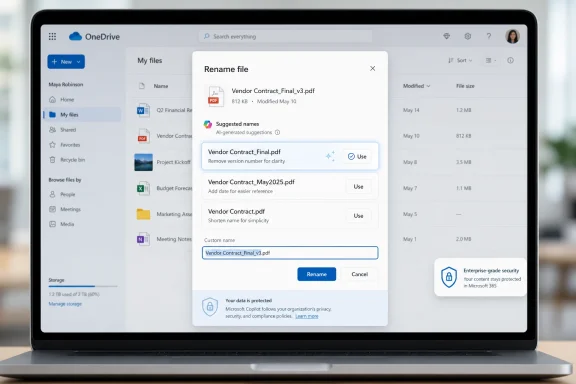
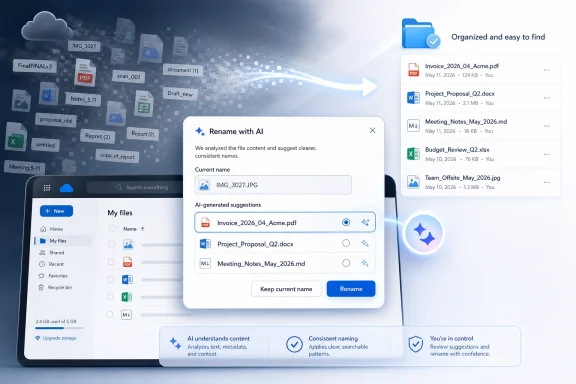
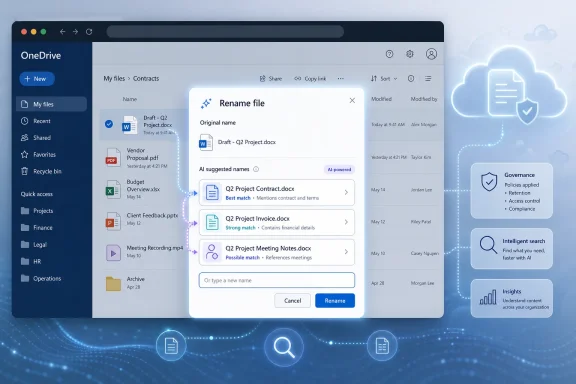
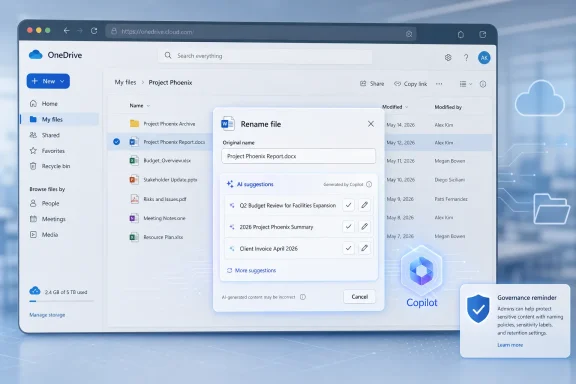
On paper, the workflow sounds simple. A user uploads a supported file to OneDrive on the web, Copilot examines its contents, and OneDrive offers three suggested names in the rename window. The user can accept one or keep the original. Suggestions may also appear when manually renaming an existing file or through toast notifications in the OneDrive web interface.
That last detail is worth slowing down on. A toast notification is not just an option buried in a menu; it is OneDrive nudging the user at the moment Microsoft believes the system has detected an opportunity. The difference between “ask Copilot for help” and “Copilot noticed this could be better” is small in UI terms and enormous in product philosophy.
Search was supposed to solve this. Windows Search, SharePoint search, Microsoft Graph, and OneDrive’s web search can all peer through metadata and, in many cases, file contents. But search has never fully replaced naming because the filename remains the first human-readable contract between a file and its owner. It is what appears in File Explorer, in sync folders, in recent files, in share dialogs, in browser downloads, and in the mental map users build around their work.
Microsoft’s new feature takes aim at that contract. If Copilot can summarize a document, it can plausibly propose a filename. If it can identify that a PDF is a signed vendor agreement or that an image is a whiteboard photo from a budget planning session, then a better name may be the cheapest productivity gain in the entire Copilot stack.
The key word is plausibly. Naming is not just description; it is convention. A law firm, a school district, a hospital, a software team, and a household budget folder may all name the same document differently because names encode workflow, retention habits, security expectations, and institutional memory. Copilot can infer content, but it may not know the local grammar of the folder.
Suggested Rename fits into a broader sequence of OneDrive Copilot additions. Microsoft has already pushed Copilot features that summarize files, answer questions about content, compare documents, and generate summaries when sharing. The rename feature is a natural next step because it turns content understanding into file hygiene.
That matters for Windows users because OneDrive is not confined to the browser in practice. Even when a feature begins on the web, its effects can spill into File Explorer through sync. A file renamed in OneDrive on the web becomes a file renamed on the desktop. A small web feature can therefore alter the local file experience for users who think of their OneDrive folder as just another Windows directory.
The web-only rollout also gives Microsoft a safer runway. Browser-based OneDrive is easier to update, observe, and adjust than the full desktop sync experience. If users reject suggestions, complain about poor names, or run into edge cases with sensitive files, Microsoft can tune the experience before making it more deeply native to Windows.
A forced rename system would be a support nightmare. It would break scripts, confuse sync histories, annoy users, and potentially create legal or compliance problems in environments where file naming conventions are part of record management. A suggestion system, by contrast, can be framed as assistance rather than control.
Still, suggestions shape behavior. Most users do not carefully evaluate three machine-generated options if one looks “good enough.” Over time, Copilot’s style could become the default style for how files are titled, just as autocorrect and subject-line suggestions have quietly influenced how people write.
That is not necessarily bad. Many users would benefit from a machine that turns “scan0007.pdf” into something resembling “Signed Lease Agreement - May 2026.” The risk is that Microsoft optimizes for readable generic names while organizations depend on structured, durable names that carry codes, dates, client identifiers, or retention markers.
Word and PowerPoint files are comparatively friendly territory. They have text, headings, titles, slide structures, and document properties that can help an AI model infer purpose. PDFs are messier, especially when they are scanned, password-protected, poorly OCR’d, or assembled from multiple sources.
Excel is trickier still. A spreadsheet can contain a formal financial model, a raw data export, a personal budget, a pivot-table experiment, or a half-finished operational tracker. The most important meaning may be in sheet names, formulas, columns, hidden tabs, or the context of the surrounding folder rather than in visible text.
Images are the most ambitious category. Microsoft has been steadily expanding Copilot’s ability to understand visual content, and OneDrive image support suggests the rename system may be able to detect enough from screenshots, photos, diagrams, or scanned pages to propose names. That could be genuinely useful for users who collect receipts, whiteboards, product photos, or screenshots. It could also be where the funniest and most wrong suggestions appear.
Markdown support is a quiet nod to developers, writers, and technical teams. Markdown files often live in documentation repositories, note systems, static-site workflows, and project folders. Good Markdown names matter because they are frequently part of a larger information architecture, not just standalone files.
The best version of Suggested Rename saves time in tiny increments. A student uploads lecture notes and gets a usable name. A small business owner scans a receipt and gets a descriptive title. A project manager drops a meeting deck into OneDrive and gets a filename that reflects the client and topic. None of these moments transforms work, but all of them reduce friction.
The value compounds because filenames affect later retrieval. A better name makes search results clearer, reduces duplicate uploads, makes sharing less embarrassing, and helps collaborators understand what they are receiving. In a shared Microsoft 365 environment, a useful filename is a courtesy to everyone else.
But productivity is also the wrapper Microsoft uses to normalize deeper content inspection. Suggested Rename works only because OneDrive and Copilot can analyze file contents after upload. That may be acceptable, expected, or even contractually covered in many Microsoft 365 environments. It will still make some users uneasy, especially when the feature is presented as a convenience rather than a governance event.
The roadmap description as reported gives the basic user experience but does not answer every operational question. That is normal for roadmap entries, which are often directional rather than exhaustive. It also means IT departments should avoid treating the feature as fully understood until Microsoft publishes admin documentation or Message center guidance closer to rollout.
Naming is not cosmetic in regulated environments. A filename can reveal a client name, diagnosis, legal matter, deal code, disciplinary issue, acquisition target, or confidential project. If Copilot proposes a more descriptive name, it may also produce a name that exposes information more plainly than the original.
There is a second-order governance issue: consistency. Many organizations use file naming policies precisely because humans are inconsistent. If Copilot suggestions are inconsistent too, they may make folders look cleaner while quietly undermining naming schemes. Admins should be able to decide whether AI-generated filenames are welcome in managed libraries, personal OneDrive storage, or neither.
For Microsoft 365 commercial users, Copilot operates within a framework of tenant data, permissions, and enterprise commitments. For consumers and smaller organizations, the perceived boundary is less clear. Users may not think of a filename suggestion as an AI inference generated from document contents; they may think of it as another OneDrive feature that appeared one day.
The practical concern is not that Copilot magically gets access to files it could not otherwise touch. It is that more routine UI actions are becoming opportunities for AI processing. Uploading, sharing, renaming, previewing, and searching are all mundane acts. Once Copilot is woven through them, the line between file management and content analysis fades.
Microsoft can reduce anxiety by being explicit. The rename window should make clear that suggestions are generated from file content, that users can ignore them, and that organizational policies apply. Ideally, admins should have switches granular enough to disable Suggested Rename without turning off every useful Copilot capability in OneDrive.
But AI-generated names can also create new noise if they are too generic. “Project Plan,” “Meeting Notes,” “Financial Summary,” and “Client Proposal” are better than “Untitled,” but only barely. The best filenames often include dates, entities, version markers, departments, or project codes. If Copilot omits those details, it may create pleasant-looking clutter.
There is also the risk of overconfident specificity. A model may infer the wrong client, mistake a draft for a final agreement, misread an image, or elevate a minor detail into the filename. Users may not notice until the file is shared, searched, or used in a workflow that depends on accurate naming.
The most successful version of Suggested Rename would learn from local context without becoming invasive. If a folder contains files named by date, project code, and deliverable, Copilot should follow that pattern. If an organization uses a formal naming scheme, Copilot should reinforce it. If Microsoft ships only generic semantic names, the feature will be useful for consumers and frustrating for disciplined teams.
That uncertainty is not a criticism unique to this feature. It is the reality of Microsoft 365 as a continuously updated service. The roadmap gives customers a signal, not a shipping contract.
For WindowsForum readers, the timing is still notable. By June 2026, Copilot is no longer a novelty Microsoft is trying to introduce; it is infrastructure Microsoft is trying to normalize. Suggested Rename arrives in that phase of the product cycle where the company stops asking whether users want AI and starts deciding which everyday tasks are obvious candidates for it.
That is why this small OneDrive feature deserves attention. Not because file renaming is glamorous, but because it shows how Microsoft intends to make Copilot feel inevitable: not as a single destination, but as a layer of suggestions across the operating system-adjacent productivity stack.
Google, Dropbox, Apple, and smaller document platforms have all explored AI-assisted organization in various forms. The direction of travel is obvious. Storage is becoming less like a passive drive and more like an active assistant that classifies, summarizes, warns, and recommends.
Microsoft’s advantage is distribution. OneDrive is already embedded in Windows setup flows, Office save dialogs, Teams recordings, SharePoint libraries, and Microsoft 365 subscriptions. A rename suggestion in that environment can reach users who would never install a separate AI organizer.
Microsoft’s weakness is trust fatigue. Users and admins have endured years of branding churn, sync confusion, storage quota surprises, Teams recording policy changes, and Copilot messaging that often runs ahead of practical clarity. Even a helpful feature can be received skeptically if it appears without enough explanation or control.
The enterprise case is more conditional. A user’s personal OneDrive for Business library is still corporate data when used under a work account. Files may later be shared, discovered, retained, audited, or migrated. A filename is part of that lifecycle.
In small businesses, Suggested Rename may become a quiet productivity win because there is often no formal document management discipline. In larger organizations, it may be treated as another AI feature to evaluate through security, compliance, records management, and change-advisory lenses.
The irony is that the places with the most chaotic files may benefit most, while the places with the most rules may hesitate longest. That has been the Copilot story from the beginning: the technology is most compelling where information work is messy, but most scrutinized where information has the highest stakes.
Toast notifications are especially delicate. OneDrive already competes for attention with Teams, Outlook, Windows notifications, browser prompts, security alerts, and app updates. A file rename suggestion is rarely urgent. Microsoft should treat it as an optional improvement, not a productivity emergency.
There is also a social dimension. If a user uploads a file and immediately sees three AI-generated alternatives, the interface is implicitly judging the original name. That may be fine for “IMG_4821,” less fine for a carefully named document that follows a team convention Copilot does not understand.
The best UI would be humble. It would say, in effect, “Here are some names that might help,” not “We found a better name.” Microsoft’s Copilot products have sometimes struggled with tone, oscillating between assistant and overconfident coworker. File naming is a place where humility will matter.
Most ordinary renames are harmless. But anyone using OneDrive as a backing store for scripts, automation, linked Excel workbooks, local project references, or application data should be cautious about casual renaming. The same advice applies today, but AI suggestions may make renaming feel lower-stakes than it really is.
This is particularly relevant in hybrid work environments where users blur personal organization and team collaboration. A file renamed for clarity in one context may become confusing in another. A Teams-shared document, a SharePoint-synced library, and a local OneDrive folder can all represent the same cloud object to different users.
Microsoft could help by clearly showing path, sharing status, and sync implications in the rename experience. If a file is shared with others, part of a Teams-connected library, or referenced elsewhere, users should know before accepting a suggested name. A smart rename feature should be smart enough to warn when a rename is not just personal housekeeping.
Until Microsoft publishes the full administrative details, the safe assumption is that Suggested Rename should be evaluated like any other AI-assisted content feature. That means testing it with representative files, checking how it behaves with protected content, confirming whether naming suggestions include sensitive terms, and deciding whether user training is required.
Training may sound excessive for a rename feature, but the message is simple: do not accept AI-generated names blindly. Users should treat suggestions as drafts. That is especially important for files involving customers, patients, students, HR matters, legal work, security incidents, or financial data.
If Microsoft wants broad enterprise acceptance, it should provide admin-facing documentation before rollout reaches general availability. The feature is easy to understand at the user level. The governance model is where confidence will be won or lost.
That has symbolic weight. A filename is one of the few pieces of computing language users still routinely write themselves. It is personal, contextual, and often messy. By offering to generate it, Microsoft is saying that even the small acts of digital organization are candidates for AI mediation.
Some users will welcome that. Others will see it as another intrusion. Most will probably do what users usually do: accept the feature when it helps, ignore it when it doesn’t, and complain loudly when it gets something embarrassing wrong.
The question for Microsoft is whether Copilot can be useful without becoming presumptuous. Suggested Rename is a perfect test because the stakes are low enough for experimentation but high enough to expose real tensions around privacy, control, and trust.
 Microsoft Has Found the Most Boring Place to Put AI — and That Is Why It Matters
Suggested Rename is not the kind of feature that produces a cinematic demo. Nobody is going to stand on a stage and ask Copilot to rename a quarterly report while a crowd applauds. Yet the feature is precisely the sort of background convenience that reveals Microsoft’s actual Copilot strategy better than another flashy chatbot panel.The company is no longer merely asking users to go to Copilot. It is putting Copilot inside moments where users already make small decisions: sharing a file, summarizing an attachment, comparing documents, asking questions about a PDF, and now naming a file after upload. That makes the OneDrive rename feature less about filenames than about ambient automation.
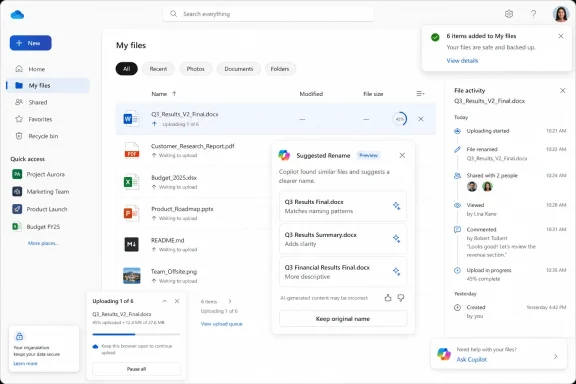
On paper, the workflow sounds simple. A user uploads a supported file to OneDrive on the web, Copilot examines its contents, and OneDrive offers three suggested names in the rename window. The user can accept one or keep the original. Suggestions may also appear when manually renaming an existing file or through toast notifications in the OneDrive web interface.
That last detail is worth slowing down on. A toast notification is not just an option buried in a menu; it is OneDrive nudging the user at the moment Microsoft believes the system has detected an opportunity. The difference between “ask Copilot for help” and “Copilot noticed this could be better” is small in UI terms and enormous in product philosophy.
The Filename Is the Oldest Metadata Problem in Personal Computing
Anyone who has managed a Downloads folder knows the disease. Files arrive with camera names, invoice numbers, Teams recording titles, scanner defaults, cryptic attachment strings, or the immortal “Document1.” The longer a folder lives, the more it becomes a sedimentary record of interrupted attention.Search was supposed to solve this. Windows Search, SharePoint search, Microsoft Graph, and OneDrive’s web search can all peer through metadata and, in many cases, file contents. But search has never fully replaced naming because the filename remains the first human-readable contract between a file and its owner. It is what appears in File Explorer, in sync folders, in recent files, in share dialogs, in browser downloads, and in the mental map users build around their work.
Microsoft’s new feature takes aim at that contract. If Copilot can summarize a document, it can plausibly propose a filename. If it can identify that a PDF is a signed vendor agreement or that an image is a whiteboard photo from a budget planning session, then a better name may be the cheapest productivity gain in the entire Copilot stack.
The key word is plausibly. Naming is not just description; it is convention. A law firm, a school district, a hospital, a software team, and a household budget folder may all name the same document differently because names encode workflow, retention habits, security expectations, and institutional memory. Copilot can infer content, but it may not know the local grammar of the folder.
OneDrive Becomes the Place Where Copilot Watches the Work Arrive
OneDrive has long been more than Microsoft’s Dropbox competitor. In modern Microsoft 365, it is the personal storage layer beneath Office files, Teams meeting recordings, shared links, web attachments, sync folders, and increasingly Windows itself. That position makes it a privileged place to insert AI because so much work passes through it before users even think of it as “storage.”Suggested Rename fits into a broader sequence of OneDrive Copilot additions. Microsoft has already pushed Copilot features that summarize files, answer questions about content, compare documents, and generate summaries when sharing. The rename feature is a natural next step because it turns content understanding into file hygiene.
That matters for Windows users because OneDrive is not confined to the browser in practice. Even when a feature begins on the web, its effects can spill into File Explorer through sync. A file renamed in OneDrive on the web becomes a file renamed on the desktop. A small web feature can therefore alter the local file experience for users who think of their OneDrive folder as just another Windows directory.
The web-only rollout also gives Microsoft a safer runway. Browser-based OneDrive is easier to update, observe, and adjust than the full desktop sync experience. If users reject suggestions, complain about poor names, or run into edge cases with sensitive files, Microsoft can tune the experience before making it more deeply native to Windows.
The Three-Suggestion Design Keeps the Human in the Loop, for Now
The reassuring part of Suggested Rename is that Microsoft is not describing automatic renaming. Users see three proposed names and can keep the original. That makes the feature closer to autocomplete than autopilot, and that distinction will matter to administrators and privacy-conscious users.A forced rename system would be a support nightmare. It would break scripts, confuse sync histories, annoy users, and potentially create legal or compliance problems in environments where file naming conventions are part of record management. A suggestion system, by contrast, can be framed as assistance rather than control.
Still, suggestions shape behavior. Most users do not carefully evaluate three machine-generated options if one looks “good enough.” Over time, Copilot’s style could become the default style for how files are titled, just as autocorrect and subject-line suggestions have quietly influenced how people write.
That is not necessarily bad. Many users would benefit from a machine that turns “scan0007.pdf” into something resembling “Signed Lease Agreement - May 2026.” The risk is that Microsoft optimizes for readable generic names while organizations depend on structured, durable names that carry codes, dates, client identifiers, or retention markers.
The Supported File Types Reveal Microsoft’s Confidence — and Its Limits
At launch, Suggested Rename is expected to support Word documents, PowerPoint presentations, Excel spreadsheets, PDF files, Markdown files, and images. That is a revealing list. It covers the everyday knowledge-worker universe, but it also includes file types with very different levels of semantic clarity.Word and PowerPoint files are comparatively friendly territory. They have text, headings, titles, slide structures, and document properties that can help an AI model infer purpose. PDFs are messier, especially when they are scanned, password-protected, poorly OCR’d, or assembled from multiple sources.
Excel is trickier still. A spreadsheet can contain a formal financial model, a raw data export, a personal budget, a pivot-table experiment, or a half-finished operational tracker. The most important meaning may be in sheet names, formulas, columns, hidden tabs, or the context of the surrounding folder rather than in visible text.
Images are the most ambitious category. Microsoft has been steadily expanding Copilot’s ability to understand visual content, and OneDrive image support suggests the rename system may be able to detect enough from screenshots, photos, diagrams, or scanned pages to propose names. That could be genuinely useful for users who collect receipts, whiteboards, product photos, or screenshots. It could also be where the funniest and most wrong suggestions appear.
Markdown support is a quiet nod to developers, writers, and technical teams. Markdown files often live in documentation repositories, note systems, static-site workflows, and project folders. Good Markdown names matter because they are frequently part of a larger information architecture, not just standalone files.
The Productivity Pitch Is Real, but It Is Not the Whole Story
It is easy to sneer at AI file renaming as another example of Copilot being poured into every available seam of Microsoft 365. That would miss why the feature may actually land with ordinary users. File naming is tedious, repetitive, and often done at the exact moment a user wants to move on.The best version of Suggested Rename saves time in tiny increments. A student uploads lecture notes and gets a usable name. A small business owner scans a receipt and gets a descriptive title. A project manager drops a meeting deck into OneDrive and gets a filename that reflects the client and topic. None of these moments transforms work, but all of them reduce friction.
The value compounds because filenames affect later retrieval. A better name makes search results clearer, reduces duplicate uploads, makes sharing less embarrassing, and helps collaborators understand what they are receiving. In a shared Microsoft 365 environment, a useful filename is a courtesy to everyone else.
But productivity is also the wrapper Microsoft uses to normalize deeper content inspection. Suggested Rename works only because OneDrive and Copilot can analyze file contents after upload. That may be acceptable, expected, or even contractually covered in many Microsoft 365 environments. It will still make some users uneasy, especially when the feature is presented as a convenience rather than a governance event.
Admins Will Ask the Questions Microsoft’s Marketing Does Not
For enterprise IT, the first question is not whether Suggested Rename is clever. It is whether the feature can be controlled. Admins will want to know whether it is enabled by default, whether it requires Microsoft 365 Copilot licensing, whether it respects sensitivity labels, whether prompts and outputs are logged, and whether suggested names are retained anywhere.The roadmap description as reported gives the basic user experience but does not answer every operational question. That is normal for roadmap entries, which are often directional rather than exhaustive. It also means IT departments should avoid treating the feature as fully understood until Microsoft publishes admin documentation or Message center guidance closer to rollout.
Naming is not cosmetic in regulated environments. A filename can reveal a client name, diagnosis, legal matter, deal code, disciplinary issue, acquisition target, or confidential project. If Copilot proposes a more descriptive name, it may also produce a name that exposes information more plainly than the original.
There is a second-order governance issue: consistency. Many organizations use file naming policies precisely because humans are inconsistent. If Copilot suggestions are inconsistent too, they may make folders look cleaner while quietly undermining naming schemes. Admins should be able to decide whether AI-generated filenames are welcome in managed libraries, personal OneDrive storage, or neither.
The Privacy Concern Is Less Sci-Fi Than Workflow
The most predictable reaction will be that Microsoft is “reading your files.” The more precise version is that Suggested Rename requires content analysis inside a cloud service where the file has already been uploaded. That distinction matters, but it will not settle the debate.For Microsoft 365 commercial users, Copilot operates within a framework of tenant data, permissions, and enterprise commitments. For consumers and smaller organizations, the perceived boundary is less clear. Users may not think of a filename suggestion as an AI inference generated from document contents; they may think of it as another OneDrive feature that appeared one day.
The practical concern is not that Copilot magically gets access to files it could not otherwise touch. It is that more routine UI actions are becoming opportunities for AI processing. Uploading, sharing, renaming, previewing, and searching are all mundane acts. Once Copilot is woven through them, the line between file management and content analysis fades.
Microsoft can reduce anxiety by being explicit. The rename window should make clear that suggestions are generated from file content, that users can ignore them, and that organizational policies apply. Ideally, admins should have switches granular enough to disable Suggested Rename without turning off every useful Copilot capability in OneDrive.
The Feature Could Be a Gift to Search — or a New Source of Noise
OneDrive search and Microsoft 365 search already benefit from content indexing, permissions, and Graph signals. Better filenames would seem to improve that system. A folder full of descriptive names is easier to scan, easier to filter, and easier to share.But AI-generated names can also create new noise if they are too generic. “Project Plan,” “Meeting Notes,” “Financial Summary,” and “Client Proposal” are better than “Untitled,” but only barely. The best filenames often include dates, entities, version markers, departments, or project codes. If Copilot omits those details, it may create pleasant-looking clutter.
There is also the risk of overconfident specificity. A model may infer the wrong client, mistake a draft for a final agreement, misread an image, or elevate a minor detail into the filename. Users may not notice until the file is shared, searched, or used in a workflow that depends on accurate naming.
The most successful version of Suggested Rename would learn from local context without becoming invasive. If a folder contains files named by date, project code, and deliverable, Copilot should follow that pattern. If an organization uses a formal naming scheme, Copilot should reinforce it. If Microsoft ships only generic semantic names, the feature will be useful for consumers and frustrating for disciplined teams.
The Roadmap Date Is a Promise Written in Pencil
The feature is listed for June 2026, but Microsoft 365 roadmap dates are not the same as guaranteed availability dates for every tenant. Rollouts can slip, start gradually, arrive behind targeted release settings, or appear first in specific regions or license configurations. Admins who have lived through Microsoft 365 changes know that “rolling out” often means “beginning to appear somewhere.”That uncertainty is not a criticism unique to this feature. It is the reality of Microsoft 365 as a continuously updated service. The roadmap gives customers a signal, not a shipping contract.
For WindowsForum readers, the timing is still notable. By June 2026, Copilot is no longer a novelty Microsoft is trying to introduce; it is infrastructure Microsoft is trying to normalize. Suggested Rename arrives in that phase of the product cycle where the company stops asking whether users want AI and starts deciding which everyday tasks are obvious candidates for it.
That is why this small OneDrive feature deserves attention. Not because file renaming is glamorous, but because it shows how Microsoft intends to make Copilot feel inevitable: not as a single destination, but as a layer of suggestions across the operating system-adjacent productivity stack.
The Real Competition Is Not Dropbox or Google Drive — It Is User Habit
Cloud storage products compete on sync reliability, sharing controls, storage quotas, admin features, and ecosystem integration. Suggested Rename adds a different axis: whether the storage system can help maintain order without users thinking too hard.Google, Dropbox, Apple, and smaller document platforms have all explored AI-assisted organization in various forms. The direction of travel is obvious. Storage is becoming less like a passive drive and more like an active assistant that classifies, summarizes, warns, and recommends.
Microsoft’s advantage is distribution. OneDrive is already embedded in Windows setup flows, Office save dialogs, Teams recordings, SharePoint libraries, and Microsoft 365 subscriptions. A rename suggestion in that environment can reach users who would never install a separate AI organizer.
Microsoft’s weakness is trust fatigue. Users and admins have endured years of branding churn, sync confusion, storage quota surprises, Teams recording policy changes, and Copilot messaging that often runs ahead of practical clarity. Even a helpful feature can be received skeptically if it appears without enough explanation or control.
Personal OneDrive Users May Love It Before Enterprises Allow It
The consumer case is straightforward. Personal OneDrive folders are full of photos, scans, school forms, tax documents, recipes, itineraries, and old attachments. If Copilot can turn those into recognizable names, many users will happily accept the help.The enterprise case is more conditional. A user’s personal OneDrive for Business library is still corporate data when used under a work account. Files may later be shared, discovered, retained, audited, or migrated. A filename is part of that lifecycle.
In small businesses, Suggested Rename may become a quiet productivity win because there is often no formal document management discipline. In larger organizations, it may be treated as another AI feature to evaluate through security, compliance, records management, and change-advisory lenses.
The irony is that the places with the most chaotic files may benefit most, while the places with the most rules may hesitate longest. That has been the Copilot story from the beginning: the technology is most compelling where information work is messy, but most scrutinized where information has the highest stakes.
Microsoft’s Naming Assistant Will Need a Mute Button
The difference between helpful and annoying will come down to restraint. If Suggested Rename appears only when it has a high-confidence recommendation, users may see it as a useful polish layer. If it nags after every upload, it will become another notification to dismiss.Toast notifications are especially delicate. OneDrive already competes for attention with Teams, Outlook, Windows notifications, browser prompts, security alerts, and app updates. A file rename suggestion is rarely urgent. Microsoft should treat it as an optional improvement, not a productivity emergency.
There is also a social dimension. If a user uploads a file and immediately sees three AI-generated alternatives, the interface is implicitly judging the original name. That may be fine for “IMG_4821,” less fine for a carefully named document that follows a team convention Copilot does not understand.
The best UI would be humble. It would say, in effect, “Here are some names that might help,” not “We found a better name.” Microsoft’s Copilot products have sometimes struggled with tone, oscillating between assistant and overconfident coworker. File naming is a place where humility will matter.
Windows Users Should Watch the Sync Boundary
Although the roadmap points to OneDrive on the web, Windows users should think about where web actions end and local consequences begin. If a user accepts a Copilot-generated name in the browser, the renamed file will sync to devices tied to that OneDrive account. That means shortcuts, recent-file references, local habits, and third-party workflows may be affected.Most ordinary renames are harmless. But anyone using OneDrive as a backing store for scripts, automation, linked Excel workbooks, local project references, or application data should be cautious about casual renaming. The same advice applies today, but AI suggestions may make renaming feel lower-stakes than it really is.
This is particularly relevant in hybrid work environments where users blur personal organization and team collaboration. A file renamed for clarity in one context may become confusing in another. A Teams-shared document, a SharePoint-synced library, and a local OneDrive folder can all represent the same cloud object to different users.
Microsoft could help by clearly showing path, sharing status, and sync implications in the rename experience. If a file is shared with others, part of a Teams-connected library, or referenced elsewhere, users should know before accepting a suggested name. A smart rename feature should be smart enough to warn when a rename is not just personal housekeeping.
The Small Print Will Decide Whether This Is Enterprise-Ready
The unresolved questions are not exotic. They are the same questions every Microsoft 365 admin now asks about Copilot features. Is it on by default? Which licenses light it up? Which audit logs capture usage? Does it work in GCC, GCC High, or DoD clouds? Does it respect data residency and sensitivity labels? Can admins disable it globally or by group?Until Microsoft publishes the full administrative details, the safe assumption is that Suggested Rename should be evaluated like any other AI-assisted content feature. That means testing it with representative files, checking how it behaves with protected content, confirming whether naming suggestions include sensitive terms, and deciding whether user training is required.
Training may sound excessive for a rename feature, but the message is simple: do not accept AI-generated names blindly. Users should treat suggestions as drafts. That is especially important for files involving customers, patients, students, HR matters, legal work, security incidents, or financial data.
If Microsoft wants broad enterprise acceptance, it should provide admin-facing documentation before rollout reaches general availability. The feature is easy to understand at the user level. The governance model is where confidence will be won or lost.
The Filename Is Becoming an AI Surface
The deeper shift is that Microsoft is turning metadata into a generative surface. Copilot already writes summaries, drafts email, creates slides, answers questions, and interprets files. Suggested Rename extends that pattern to the label attached to the file itself.That has symbolic weight. A filename is one of the few pieces of computing language users still routinely write themselves. It is personal, contextual, and often messy. By offering to generate it, Microsoft is saying that even the small acts of digital organization are candidates for AI mediation.
Some users will welcome that. Others will see it as another intrusion. Most will probably do what users usually do: accept the feature when it helps, ignore it when it doesn’t, and complain loudly when it gets something embarrassing wrong.
The question for Microsoft is whether Copilot can be useful without becoming presumptuous. Suggested Rename is a perfect test because the stakes are low enough for experimentation but high enough to expose real tensions around privacy, control, and trust.
The OneDrive Rename Button Now Carries a Policy Conversation
The practical reading for WindowsForum’s audience is that Suggested Rename is worth watching not because it is revolutionary, but because it is operational. It will touch ordinary files, ordinary users, and ordinary support tickets. Those are the places where platform strategy becomes lived experience.- Microsoft is targeting OneDrive on the web first, with a June 2026 roadmap rollout for the Copilot-powered Suggested Rename feature.
- The feature is expected to analyze file contents after upload and present three suggested filenames while still allowing users to keep the original name.
- Supported launch formats include Word, PowerPoint, Excel, PDF, Markdown, and image files.
- The most useful versions of the feature will respect folder context, organizational naming conventions, sensitivity labels, and shared-file implications.
- Administrators should wait for Microsoft’s detailed controls and documentation before assuming the feature is appropriate for regulated or tightly governed environments.
- Windows users should remember that a rename accepted in OneDrive on the web can sync back into File Explorer and affect local workflows.
References
- Primary source: Windows Report
Published: 2026-06-01T07:12:09.722494
Microsoft OneDrive Is Getting Copilot-Powered Suggested Rename for Files
Microsoft is adding a new Copilot-powered Suggested Rename feature to OneDrive that recommends smarter file names based on content. windowsreport.com
- Official source: microsoft.com
Microsoft 365 Roadmap | Microsoft 365
The Microsoft 365 Roadmap lists updates that are currently planned for applicable subscribers. Check here for more information on the status of new features and updates.www.microsoft.com
- Related coverage: pccentral.net
OneDrive Suggested Rename Feature Brings AI-Powered File Naming
Microsoft OneDrive introduces a Copilot-powered Suggested Rename feature that analyzes uploaded files to provide context-aware, descriptive name suggestions.pccentral.net - Official source: support.microsoft.com
Why has my filename changed? | Microsoft Support
When saving files to your personal OneDrive, certain characters are automatically renamed by Office apps, including Word, Excel and PowerPoint.support.microsoft.com - Official source: learn.microsoft.com
Release Notes for Microsoft 365 Copilot | Microsoft Learn
Lists the features that reach General Availability in each release of Microsoft 365 Copilot.learn.microsoft.com - Official source: directionsonmicrosoft.com
OneDrive Roadmap - Directions on Microsoft
OneDrive (formerly OneDrive for Business) provides hosted file storage and sharing for Microsoft 365 users and for on-premises deployments. The service includes the storage itself and a client-side synchronization engine that accesses the files from multiple platforms. The hosted version...www.directionsonmicrosoft.com
- Related coverage: levelupm365.com
Microsoft 365 Roadmap Updates June 2026 – Level Up M365
What’s shipping, what’s changing, and what admins should prepare for. Photo credit: Copilot TL;DR (Executive Summary)Why This Month MattersCopilot / AI ExperiencesSharePoint List Support in Agent B…levelupm365.com - Related coverage: nubis365.com
</rdf:Alt> </dc:title> <dc:description> <rdf:Alt> <rdf:li xml:lang="x-default"/> </rdf:Alt> </dc:description> <dc:creator> <rdf:Seq> <rdf:li>Mike Wi
</rdf:Alt> </dc:description> <dc:creator> <rdf:Seq> <rdf:li>Mike Windsornubis365.com
- Related coverage: choc.org
- Related coverage: techriver.com